Why it’s important for an anti-detect browser to update its Chromium kernel
27/5/26


Andrey Vorster
Content Manager, Octo Browser
The Octo Browser team updates the browser kernel within the first few days after a new Chromium release. This allows our users to benefit from the latest changes as quickly as billions of Chrome users do. Staying aligned with the current Chromium version helps maintain anonymity and reduce the risk of account restrictions and bans by blending in with regular Internet traffic.
Stay anonymous, take advantage of multi-accounting, and achieve your goals with the highest-quality anti-detect browser on the market.
Chromium is the best browser kernel for anti-detect browsers
Chromium is Google’s open-source project. It serves as the foundation for the world’s most popular web browser, Google Chrome, as well as many other well-known browsers, including Microsoft Edge, Opera, Brave, Yandex Browser, Vivaldi, Sleipnir, and Avast Secure Browser. As of 2026, Chromium and Chromium-based browsers account for the majority of the browser market and are used by more than 3.6 billion people.
Advantages of Chromium for anti-detect browsers
Mass adoption and natural camouflage
Anti-detect browsers can seamlessly blend in as standard Chrome instances. Most websites and platforms check user-agent strings and basic browser parameters; mimicking Chromium is significantly easier than standing out as a rare or niche browser.Open-source code
Open-source code gives developers the ability to implement deep fingerprint spoofing at the browser kernel level, including Canvas, WebGL, WebRTC, Client Hints, device configuration parameters, and many other browser characteristics.Compatibility and continuous updates
Chromium provides excellent compatibility with modern websites and supports browser extensions as well as automation frameworks such as Selenium, Puppeteer, and Playwright. Frequent kernel updates allow anti-detect browsers to keep pace with evolving web standards.
Octo Browser is built on Octium, a proprietary browser kernel built on Chromium. This allows browser profiles to appear natural and authentic to websites and online platforms.
Determining exactly which Chromium-based browser a visitor is using is often difficult. Most traffic analysis and user identification systems rely primarily on the user-agent string, and many Chromium-based browsers share identical or nearly identical user-agent values.
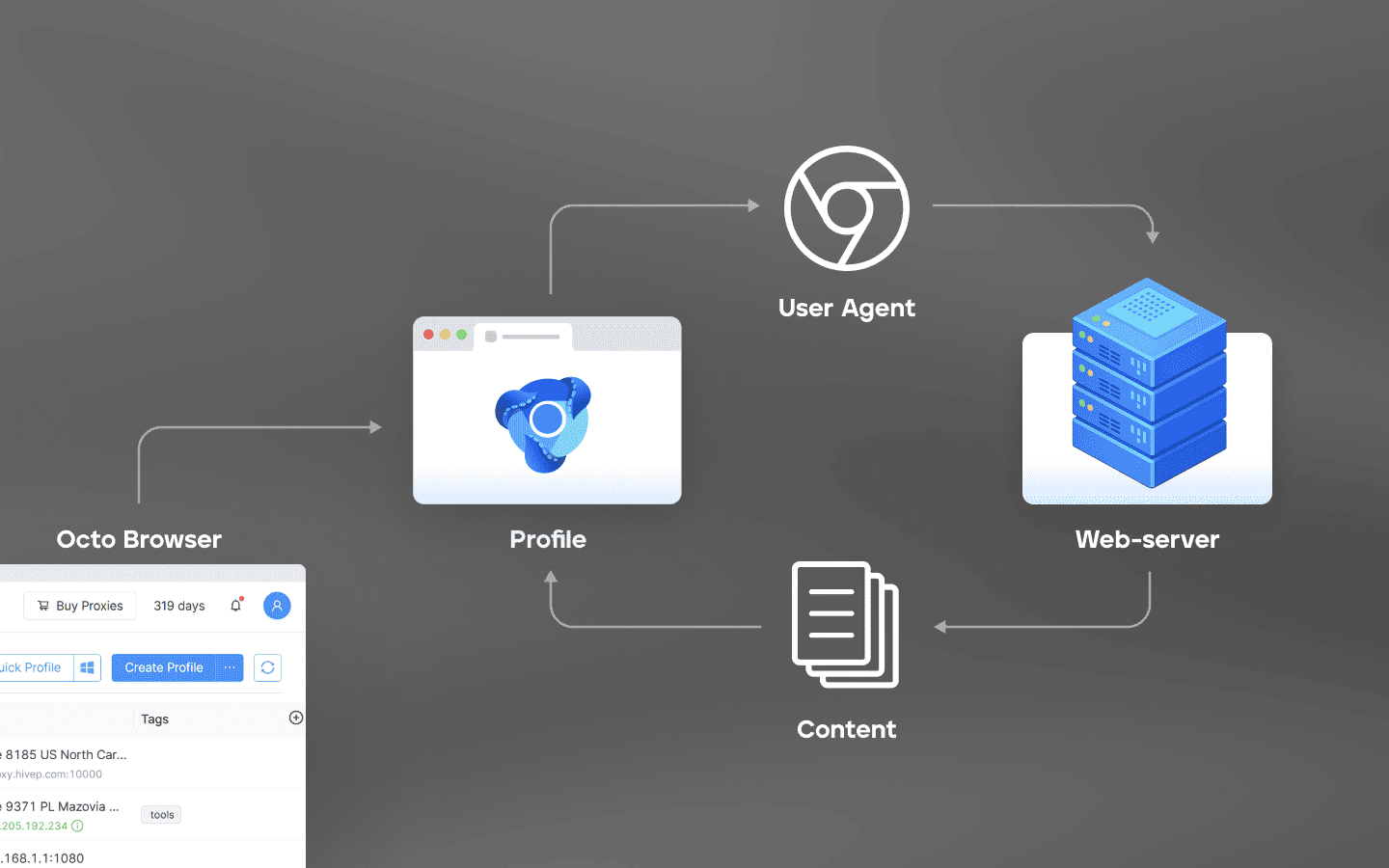
Originally, the user-agent was designed as a technical parameter that informed websites about the browser, operating system, and other environment details needed for proper content rendering. Over time, however, it became a casualty of browser and search-engine competition, as major vendors sometimes altered website behavior, blocked content delivery, or limited compatibility for competing products. As a result, many smaller and niche browsers began spoofing their user-agent strings to ensure compatibility.
Why keeping the browser kernel up to date matters
Websites and anti-fraud systems use browser fingerprinting to identify visitors. They combine information about the system, software, and network connection into a unique combination of parameters known as the digital fingerprint. This makes it possible to track device activity and detect even subtle changes in the browser fingerprint.
Every Chromium release behaves somewhat differently from the previous one. APIs are added or removed, rendering behavior changes, new security features are introduced, and browsers may begin sending additional headers to Google services that were not previously used. Official release notes clearly demonstrate how these details evolve from version to version.
If an anti-detect browser runs on an outdated Chromium kernel, tools such as CreepJS or Pixelscan can quickly identify inconsistencies. This is why a high-quality anti-detect browser must update its kernel at roughly the same pace as ordinary Internet users update their browsers.
At Octo, we consider kernel update speed one of the key factors behind a reliable anti-detect browser. That is why we update the browser kernel within days of each new Chromium release. New kernel versions patch vulnerabilities, support modern web standards, reduce detection risks, and help prevent account restrictions and blocks.
Risks associated with browser updates
Updates are essential, but they also carry certain risks.
Version discrepancies between profiles and devices
When multiple devices access the same anti-detect browser profiles, they may be running different browser versions. If one team member uses the latest kernel while another uses an outdated version, accessing the same account can introduce fingerprint inconsistencies. Alternating between browser versions is unusual behavior for real users and may increase the risk of exposing accounts.
Changes in detection techniques
Google and other major platforms continuously improve user identification methods. A new browser kernel may introduce additional markers that can be used to detect fingerprint modifications. If an anti-detect browser vendor falls behind, these signals may remain unaddressed for too long.
Compatibility issues and profile instability
A new browser kernel may change the behavior of fingerprint-related parameters. If spoofing mechanisms are not updated in time, fingerprints can become unstable or unrealistic. For example, an update may alter WebGL property ordering, Canvas rendering behavior, or memory-reporting mechanisms. Fingerprint modifications that worked correctly on one version may begin producing artifacts on another.
At Octo, we use automatic kernel and user-agent updates, thoroughly test releases before deployment, rely on cloud profile synchronization, and react quickly to Chromium changes. We also verify that users are running the latest version of Octo Browser. This ensures that collaborative profile usage remains indistinguishable even to highly sophisticated identification systems.
Conclusions
Chromium updates are both a necessity and a challenge for anti-detect browser developers. An up-to-date browser kernel helps mimic real Chrome users, reduces the likelihood of restrictions, and maintains compatibility with modern websites. However, without careful implementation, updates can introduce additional triggers for anti-fraud systems.
When choosing an anti-detect browser, pay attention to the speed of kernel updates, stability reviews, and the quality of fingerprint modifications. Octo Browser helps maintain anonymity and manage multiple accounts by presenting websites with realistic device fingerprints.
Automation, deep kernel-level fingerprint modifications, and rigorous testing help reduce detection risks. Combined with high-quality proxies and natural browsing behavior, they can significantly increase account longevity.
The Octo team continues to monitor Chromium updates and improve our product accordingly.
Stay anonymous, take advantage of multi-accounting, and achieve your goals with the highest-quality anti-detect browser on the market.
Chromium is the best browser kernel for anti-detect browsers
Chromium is Google’s open-source project. It serves as the foundation for the world’s most popular web browser, Google Chrome, as well as many other well-known browsers, including Microsoft Edge, Opera, Brave, Yandex Browser, Vivaldi, Sleipnir, and Avast Secure Browser. As of 2026, Chromium and Chromium-based browsers account for the majority of the browser market and are used by more than 3.6 billion people.
Advantages of Chromium for anti-detect browsers
Mass adoption and natural camouflage
Anti-detect browsers can seamlessly blend in as standard Chrome instances. Most websites and platforms check user-agent strings and basic browser parameters; mimicking Chromium is significantly easier than standing out as a rare or niche browser.Open-source code
Open-source code gives developers the ability to implement deep fingerprint spoofing at the browser kernel level, including Canvas, WebGL, WebRTC, Client Hints, device configuration parameters, and many other browser characteristics.Compatibility and continuous updates
Chromium provides excellent compatibility with modern websites and supports browser extensions as well as automation frameworks such as Selenium, Puppeteer, and Playwright. Frequent kernel updates allow anti-detect browsers to keep pace with evolving web standards.
Octo Browser is built on Octium, a proprietary browser kernel built on Chromium. This allows browser profiles to appear natural and authentic to websites and online platforms.
Determining exactly which Chromium-based browser a visitor is using is often difficult. Most traffic analysis and user identification systems rely primarily on the user-agent string, and many Chromium-based browsers share identical or nearly identical user-agent values.
Originally, the user-agent was designed as a technical parameter that informed websites about the browser, operating system, and other environment details needed for proper content rendering. Over time, however, it became a casualty of browser and search-engine competition, as major vendors sometimes altered website behavior, blocked content delivery, or limited compatibility for competing products. As a result, many smaller and niche browsers began spoofing their user-agent strings to ensure compatibility.
Why keeping the browser kernel up to date matters
Websites and anti-fraud systems use browser fingerprinting to identify visitors. They combine information about the system, software, and network connection into a unique combination of parameters known as the digital fingerprint. This makes it possible to track device activity and detect even subtle changes in the browser fingerprint.
Every Chromium release behaves somewhat differently from the previous one. APIs are added or removed, rendering behavior changes, new security features are introduced, and browsers may begin sending additional headers to Google services that were not previously used. Official release notes clearly demonstrate how these details evolve from version to version.
If an anti-detect browser runs on an outdated Chromium kernel, tools such as CreepJS or Pixelscan can quickly identify inconsistencies. This is why a high-quality anti-detect browser must update its kernel at roughly the same pace as ordinary Internet users update their browsers.
At Octo, we consider kernel update speed one of the key factors behind a reliable anti-detect browser. That is why we update the browser kernel within days of each new Chromium release. New kernel versions patch vulnerabilities, support modern web standards, reduce detection risks, and help prevent account restrictions and blocks.
Risks associated with browser updates
Updates are essential, but they also carry certain risks.
Version discrepancies between profiles and devices
When multiple devices access the same anti-detect browser profiles, they may be running different browser versions. If one team member uses the latest kernel while another uses an outdated version, accessing the same account can introduce fingerprint inconsistencies. Alternating between browser versions is unusual behavior for real users and may increase the risk of exposing accounts.
Changes in detection techniques
Google and other major platforms continuously improve user identification methods. A new browser kernel may introduce additional markers that can be used to detect fingerprint modifications. If an anti-detect browser vendor falls behind, these signals may remain unaddressed for too long.
Compatibility issues and profile instability
A new browser kernel may change the behavior of fingerprint-related parameters. If spoofing mechanisms are not updated in time, fingerprints can become unstable or unrealistic. For example, an update may alter WebGL property ordering, Canvas rendering behavior, or memory-reporting mechanisms. Fingerprint modifications that worked correctly on one version may begin producing artifacts on another.
At Octo, we use automatic kernel and user-agent updates, thoroughly test releases before deployment, rely on cloud profile synchronization, and react quickly to Chromium changes. We also verify that users are running the latest version of Octo Browser. This ensures that collaborative profile usage remains indistinguishable even to highly sophisticated identification systems.
Conclusions
Chromium updates are both a necessity and a challenge for anti-detect browser developers. An up-to-date browser kernel helps mimic real Chrome users, reduces the likelihood of restrictions, and maintains compatibility with modern websites. However, without careful implementation, updates can introduce additional triggers for anti-fraud systems.
When choosing an anti-detect browser, pay attention to the speed of kernel updates, stability reviews, and the quality of fingerprint modifications. Octo Browser helps maintain anonymity and manage multiple accounts by presenting websites with realistic device fingerprints.
Automation, deep kernel-level fingerprint modifications, and rigorous testing help reduce detection risks. Combined with high-quality proxies and natural browsing behavior, they can significantly increase account longevity.
The Octo team continues to monitor Chromium updates and improve our product accordingly.
Stay up to date with the latest Octo Browser news
By clicking the button you agree to our Privacy Policy.
Stay up to date with the latest Octo Browser news
By clicking the button you agree to our Privacy Policy.
Stay up to date with the latest Octo Browser news
By clicking the button you agree to our Privacy Policy.

Join Octo Browser now
Or contact Customer Service at any time with any questions you might have.
Join Octo Browser now
Or contact Customer Service at any time with any questions you might have.
Join Octo Browser now
Or contact Customer Service at any time with any questions you might have.