Các hành động hàng loạt hữu ích với API Octo Browser


Alex Phillips
Customer Service Specialist
API (Giao diện Lập trình Ứng dụng) là một giao diện cho phép các ứng dụng khác nhau tương tác với nhau. Trong trường hợp của Octo Browser, API cho phép bạn gửi yêu cầu HTTP đến các máy chủ Octo và tự động quản lý hồ sơ trình duyệt.
Trước đây, chúng tôi đã giải thích chi tiết API là gì, cách chạy các tập lệnh, và giải thích cấu trúc của các yêu cầu. Bây giờ, chúng tôi sẽ đi qua một số ví dụ hữu ích nhất được nhiều người dùng của chúng tôi yêu cầu. Sau khi đọc bài viết này, bạn sẽ học cách lấy và lưu tên hồ sơ, thêm tiện ích mở rộng hàng loạt, trang bắt đầu và dấu trang vào các hồ sơ đã tạo, và xuất dữ liệu hồ sơ vào bảng tính. Bên dưới bạn sẽ tìm thấy hướng dẫn chi tiết và mã sẵn sàng sử dụng.
Nội dung
Quản lí số lượng tài khoản không giới hạn mà không lo bị chặn, hoạt động thường nhật, hay lo tới các chi phí không đáng có.
Bạn có muốn thử Octo Browser với giá giảm không?
Sử dụng mã khuyến mãi OCTOBLOG để được giảm giá 30% cho bất kỳ gói đăng ký nào. Ưu đãi này chỉ dành cho người dùng mới.
Chuẩn bị
Tải xuống và cài đặt VS Code.
Tải xuống và cài đặt Node.js.
Tạo một thư mục ở nơi thuận tiện và đặt tên cho thư mục đó, ví dụ như octo_api.
Mở thư mục này trong VS Code.
Tạo một tệp với phần mở rộng .js. Tốt nhất là đặt tên tệp theo hành động mà mã sẽ thực hiện để tránh nhầm lẫn: ví dụ, get_titles.js.
Mở terminal và chạy lệnh npm install axios để cài đặt một phụ thuộc cho Node.js.
Nếu VS Code hiển thị lỗi, mở Windows PowerShell dưới quyền quản trị viên, nhập lệnh Set-ExecutionPolicy -Scope CurrentUser -ExecutionPolicy RemoteSigned và xác nhận. Sau đó lặp lại bước trước đó.
Khởi động Octo Browser.
Nơi tìm token API của bạn
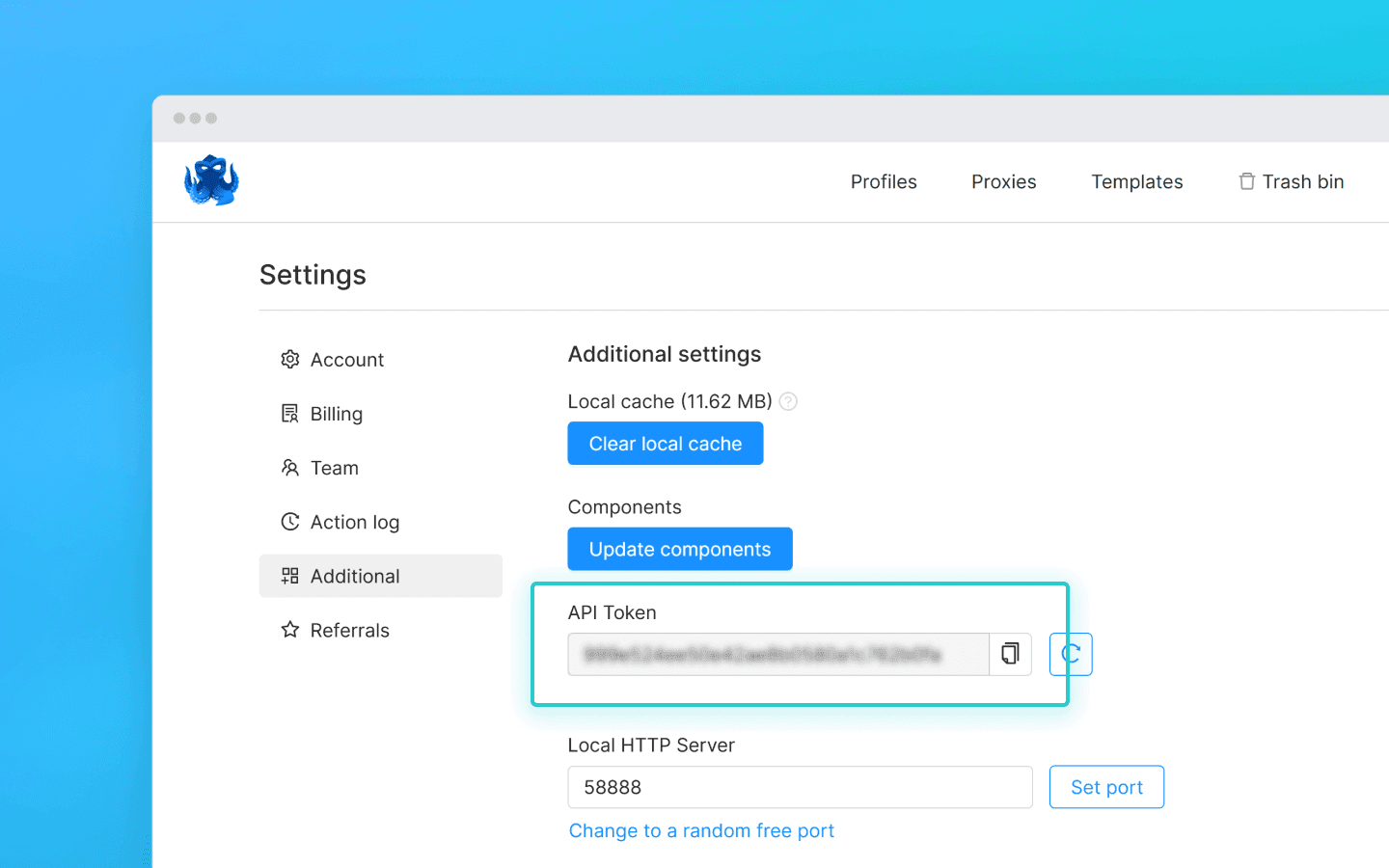
Để tương tác với Octo Browser thông qua API, bạn sẽ cần một token API. Nó có sẵn cho người dùng có Gói đăng kí Base và cao hơn. Token API được hiển thị trong Octo Browser trong cài đặt tài khoản chính dưới tab “Additional” (các thành viên khác trong nhóm không thể thấy token API).
Giới hạn API (giới hạn tốc độ)
Lưu ý rằng API của Octo Browser có giới hạn yêu cầu. Các đoạn mã được cung cấp sử dụng hàm check_limits để kiểm tra các tiêu đề giới hạn tốc độ API và tự động tạm dừng nếu số lượng yêu cầu còn lại thấp. Điều này giúp tránh các lỗi 429 Quá nhiều yêu cầu.
Khi thực hiện yêu cầu đến Public API, mỗi yêu cầu sử dụng 1 RPM và 1 RPH. Khi sử dụng Local API, RPM/RPH không bị sử dụng, ngoại trừ POST Start Profile (1 RPM và 1 RPH) và POST One-time profile (4 RPM và 4 RPH).
Số lượng hồ sơ bạn có thể khởi động, tạo và xóa trong một gói đăng ký cụ thể hoàn toàn phụ thuộc vào các tập lệnh và logic của chúng. Bạn có thể tự tính toán số lượng yêu cầu cần thiết cho quy trình công việc của mình dựa trên những yêu cầu ảnh hưởng đến giới hạn RPH và RPM.
Một số yêu cầu API có thể yêu cầu xử lý phức tạp hơn, nghĩa là việc thực hiện của chúng có thể tốn nhiều hơn một yêu cầu. Điều này là cần thiết để cân bằng tải máy chủ và đảm bảo hiệu suất tối ưu cho tất cả người dùng.
RPM có nghĩa là yêu cầu mỗi phút.
RPH có nghĩa là yêu cầu mỗi giờ.
Giá trị giới hạn yêu cầu phụ thuộc vào gói đăng ký của bạn.
Với việc thiết lập hoàn tất, chúng ta hãy chuyển sang các đoạn mã hữu ích.
Lấy tên hồ sơ và lưu chúng vào tệp .txt
Đoạn mã này hữu ích khi bạn cần nhanh chóng thu thập danh sách tất cả các hồ sơ đã tạo ở một nơi. Nó giúp đơn giản hóa việc theo dõi hồ sơ, xác minh sự tồn tại thực tế của chúng và thực hiện các hành động tiếp theo.
Tạo tệp get_titles.js trong thư mục octo_api và dán mã trực tiếp vào đó.
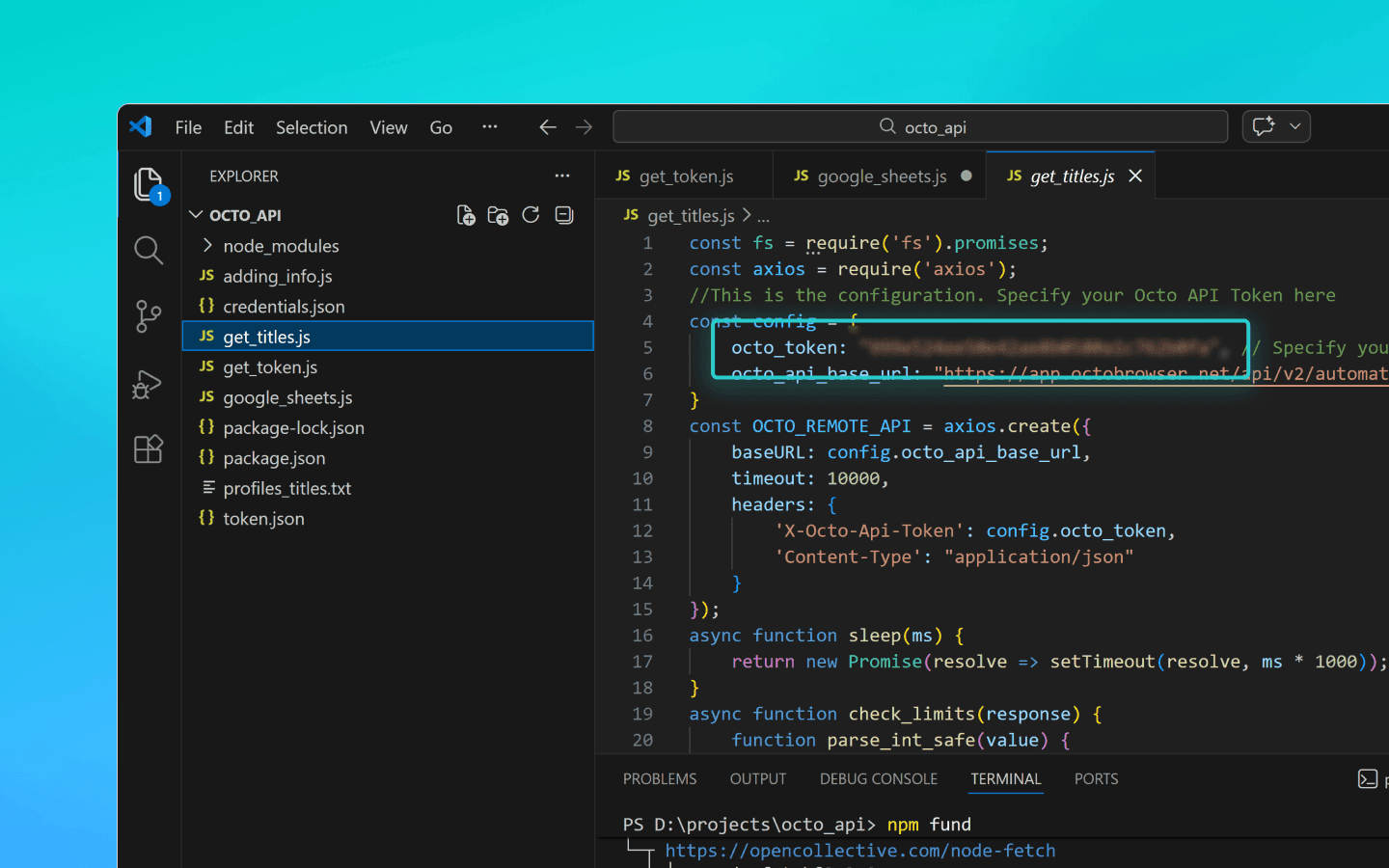
Thay thế OCTO_API_TOKEN trong trường octo_token bằng token API của bạn từ Octo Browser.
Lưu tệp.
Nhập lệnh node get_titles.js trong terminal và chạy đoạn mã.
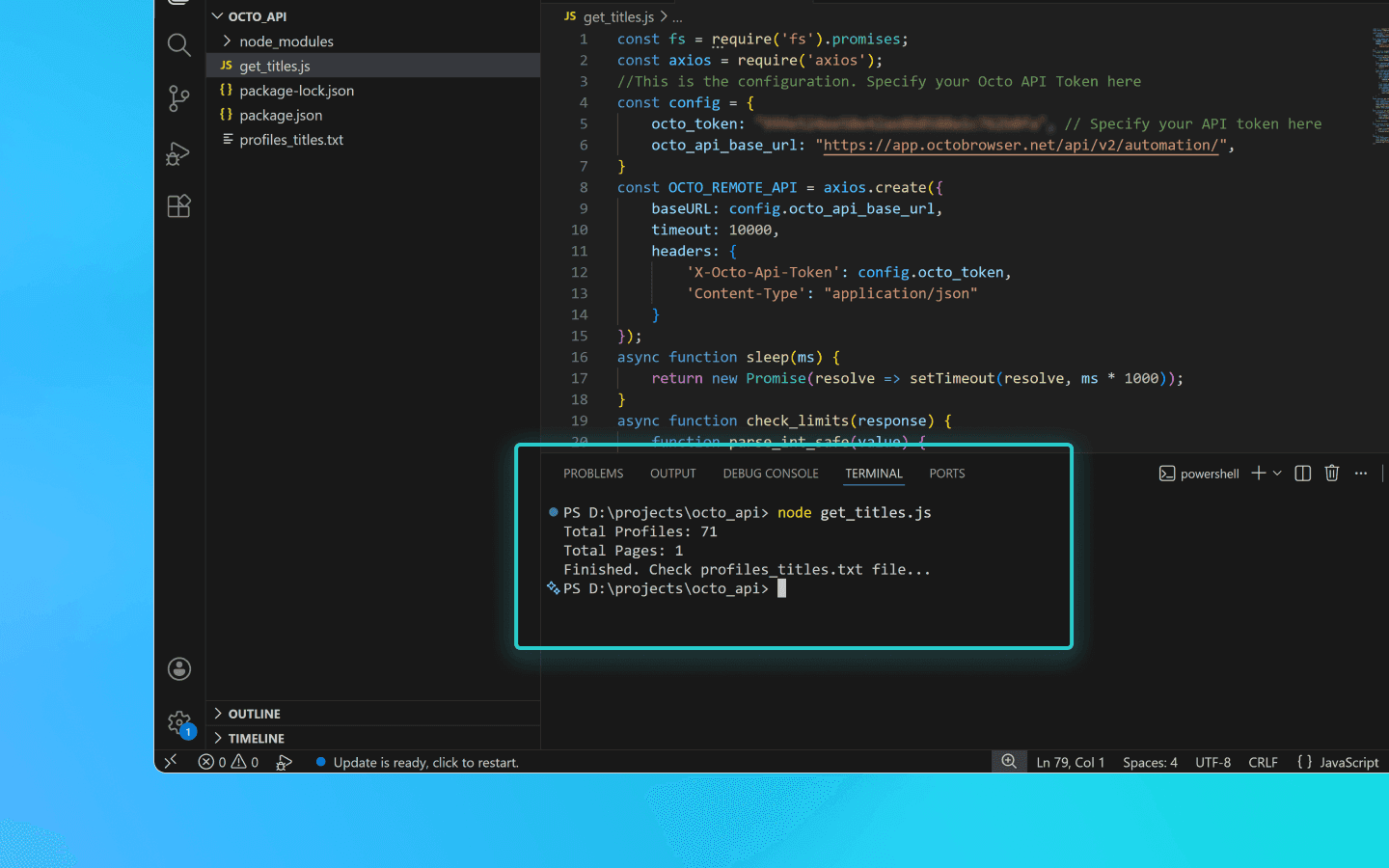
Tên hồ sơ sẽ được lưu theo dòng trong tệp profiles_titles.txt trong cùng thư mục với đoạn mã.
Đoạn mã để lưu tên hồ sơ vào tệp .txt
const fs = require('fs').promises;
const axios = require('axios');
//This is the configuration. Specify your Octo API Token here
const config = {
    octo_token: "OCTO_API_TOKEN", // Specify your API token here
    octo_api_base_url: "https://app.octobrowser.net/api/v2/automation/",
}
const OCTO_REMOTE_API = axios.create({
    baseURL: config.octo_api_base_url,
    timeout: 10000,
    headers: {
        'X-Octo-Api-Token': config.octo_token,
        'Content-Type': "application/json"
    }
});
async function sleep(ms) {
    return new Promise(resolve => setTimeout(resolve, ms * 1000));
}
async function check_limits(response) {
    function parse_int_safe(value) {
        const parsed = parseInt(value, 10);
        return isNaN(parsed) ? 0 : parsed;
    }
    const ratelimit_header = response.headers.ratelimit;
    if (!ratelimit_header) {
        console.warn('No ratelimit header found!');
        return;
    }
    const limit_entries = ratelimit_header.split(',').map(entry => entry.trim());
    for (const entry of limit_entries) {
        const name_match = entry.match(/^([^;]+)/);
        const r_match = entry.match(/;r=(\d+)/);
        const t_match = entry.match(/;t=(\d+)/);
        if (!r_match || !t_match) {
            console.warn(`Invalid ratelimit format: ${entry}`);
            continue;
        }
        const limit_name = name_match ? name_match[1] : 'unknown_limit';
        const remaining_quantity = parse_int_safe(r_match[1]);
        const window_seconds = parse_int_safe(t_match[1]);
        if (remaining_quantity < 5) {
            const wait_time = window_seconds + 1;
            console.log(`Waiting ${wait_time} seconds due to ${limit_name} limit`);
            await sleep(wait_time);
        }
    }
}
async function get_total_pages() {
    const response = await OCTO_REMOTE_API.get('/profiles?page=0&page_len=10');
    const total_profiles = response.data.total_count;
    const total_pages = Math.ceil(response.data.total_count / 100);
    console.log(`Total Profiles: ${total_profiles}\nTotal Pages: ${total_pages}`);
    await check_limits(response);
    return total_pages;
}
async function get_all_profiles_titles(total_pages) {
    let profiles = [];
    for (let i = 0; i < total_pages; i++) {
        let response = await OCTO_REMOTE_API.get(`/profiles?page=${i}&page_len=100&fields=title`);
        await check_limits(response);
        profiles.push(...response.data.data);
    }
    return profiles;
}
async function write_file(profiles) {
    const titles = profiles.map(item => item.title).filter(Boolean);
    try {
        await fs.writeFile('./profiles_titles.txt', titles.join('\n'), 'utf-8');
    } catch (error) {
        console.error(`ERROR: While trying writing the file some error occured:\n${error}`);
    }
}
(async () => {
    const total_pages = await get_total_pages();
    const profiles = await get_all_profiles_titles(total_pages);
    await write_file(profiles);
    console.log('Finished. Check profiles_titles.txt file...');
})()
const fs = require('fs').promises;
const axios = require('axios');
//This is the configuration. Specify your Octo API Token here
const config = {
    octo_token: "OCTO_API_TOKEN", // Specify your API token here
    octo_api_base_url: "https://app.octobrowser.net/api/v2/automation/",
}
const OCTO_REMOTE_API = axios.create({
    baseURL: config.octo_api_base_url,
    timeout: 10000,
    headers: {
        'X-Octo-Api-Token': config.octo_token,
        'Content-Type': "application/json"
    }
});
async function sleep(ms) {
    return new Promise(resolve => setTimeout(resolve, ms * 1000));
}
async function check_limits(response) {
    function parse_int_safe(value) {
        const parsed = parseInt(value, 10);
        return isNaN(parsed) ? 0 : parsed;
    }
    const ratelimit_header = response.headers.ratelimit;
    if (!ratelimit_header) {
        console.warn('No ratelimit header found!');
        return;
    }
    const limit_entries = ratelimit_header.split(',').map(entry => entry.trim());
    for (const entry of limit_entries) {
        const name_match = entry.match(/^([^;]+)/);
        const r_match = entry.match(/;r=(\d+)/);
        const t_match = entry.match(/;t=(\d+)/);
        if (!r_match || !t_match) {
            console.warn(`Invalid ratelimit format: ${entry}`);
            continue;
        }
        const limit_name = name_match ? name_match[1] : 'unknown_limit';
        const remaining_quantity = parse_int_safe(r_match[1]);
        const window_seconds = parse_int_safe(t_match[1]);
        if (remaining_quantity < 5) {
            const wait_time = window_seconds + 1;
            console.log(`Waiting ${wait_time} seconds due to ${limit_name} limit`);
            await sleep(wait_time);
        }
    }
}
async function get_total_pages() {
    const response = await OCTO_REMOTE_API.get('/profiles?page=0&page_len=10');
    const total_profiles = response.data.total_count;
    const total_pages = Math.ceil(response.data.total_count / 100);
    console.log(`Total Profiles: ${total_profiles}\nTotal Pages: ${total_pages}`);
    await check_limits(response);
    return total_pages;
}
async function get_all_profiles_titles(total_pages) {
    let profiles = [];
    for (let i = 0; i < total_pages; i++) {
        let response = await OCTO_REMOTE_API.get(`/profiles?page=${i}&page_len=100&fields=title`);
        await check_limits(response);
        profiles.push(...response.data.data);
    }
    return profiles;
}
async function write_file(profiles) {
    const titles = profiles.map(item => item.title).filter(Boolean);
    try {
        await fs.writeFile('./profiles_titles.txt', titles.join('\n'), 'utf-8');
    } catch (error) {
        console.error(`ERROR: While trying writing the file some error occured:\n${error}`);
    }
}
(async () => {
    const total_pages = await get_total_pages();
    const profiles = await get_all_profiles_titles(total_pages);
    await write_file(profiles);
    console.log('Finished. Check profiles_titles.txt file...');
})()
Thêm tiện ích mở rộng, trang bắt đầu và dấu trang vào hồ sơ
Đoạn mã tự động này cho phép bạn nhanh chóng tiêu chuẩn hóa cấu hình hồ sơ và tránh việc thêm thủ công các tham số giống nhau.
Để thêm tiện ích mở rộng, bạn sẽ cần UUID của chúng:
Mở một hồ sơ với tiện ích mở rộng đã được cài đặt.
Trong thanh địa chỉ của hồ sơ, nhập chrome://extensions/ và nhấn Enter.
Trên tiện ích mở rộng cần thiết, nhấp vào nút “Chi tiết”.
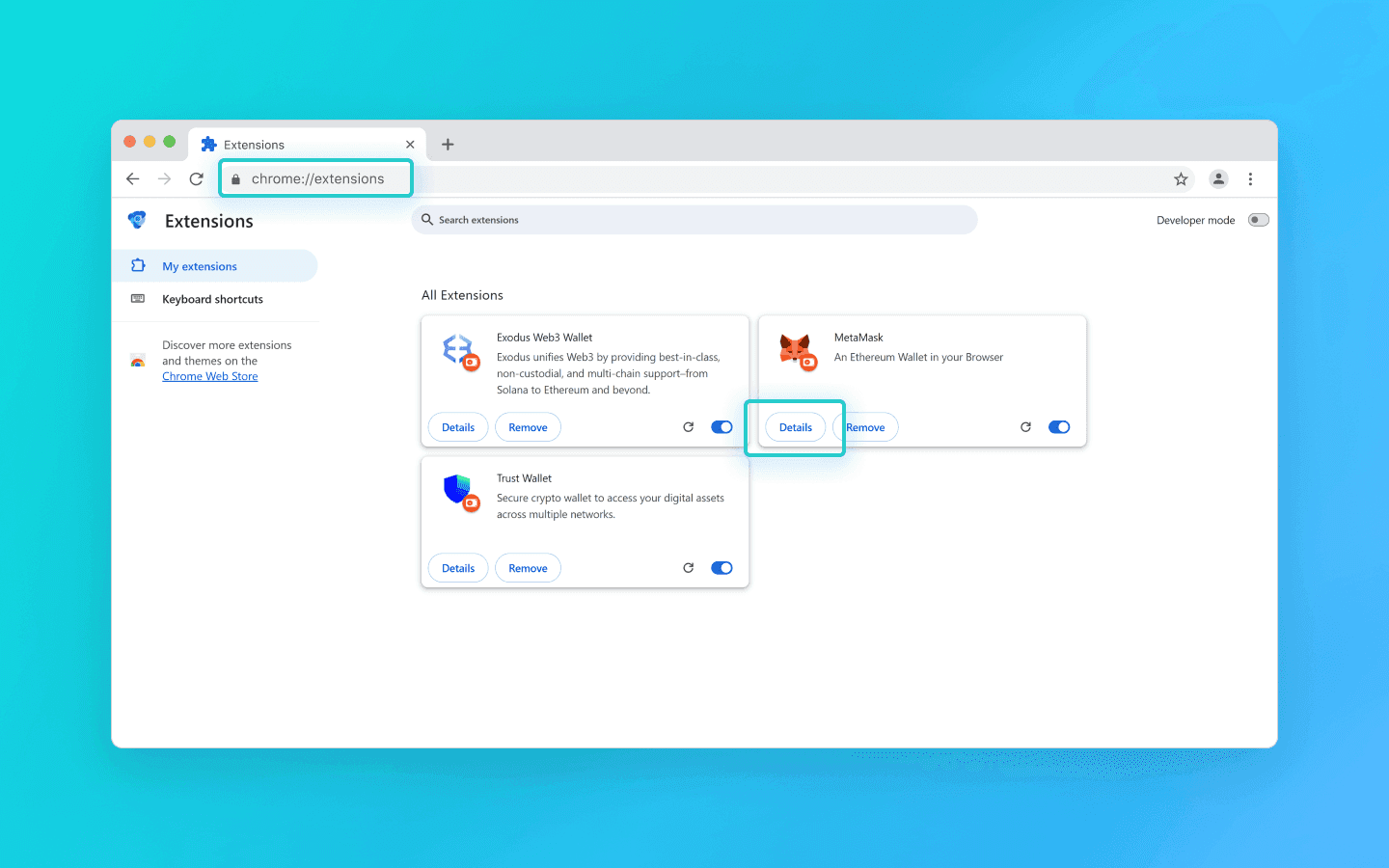
Ở dưới cùng của trang, sao chép UUID của tiện ích mở rộng cùng với phiên bản của nó.
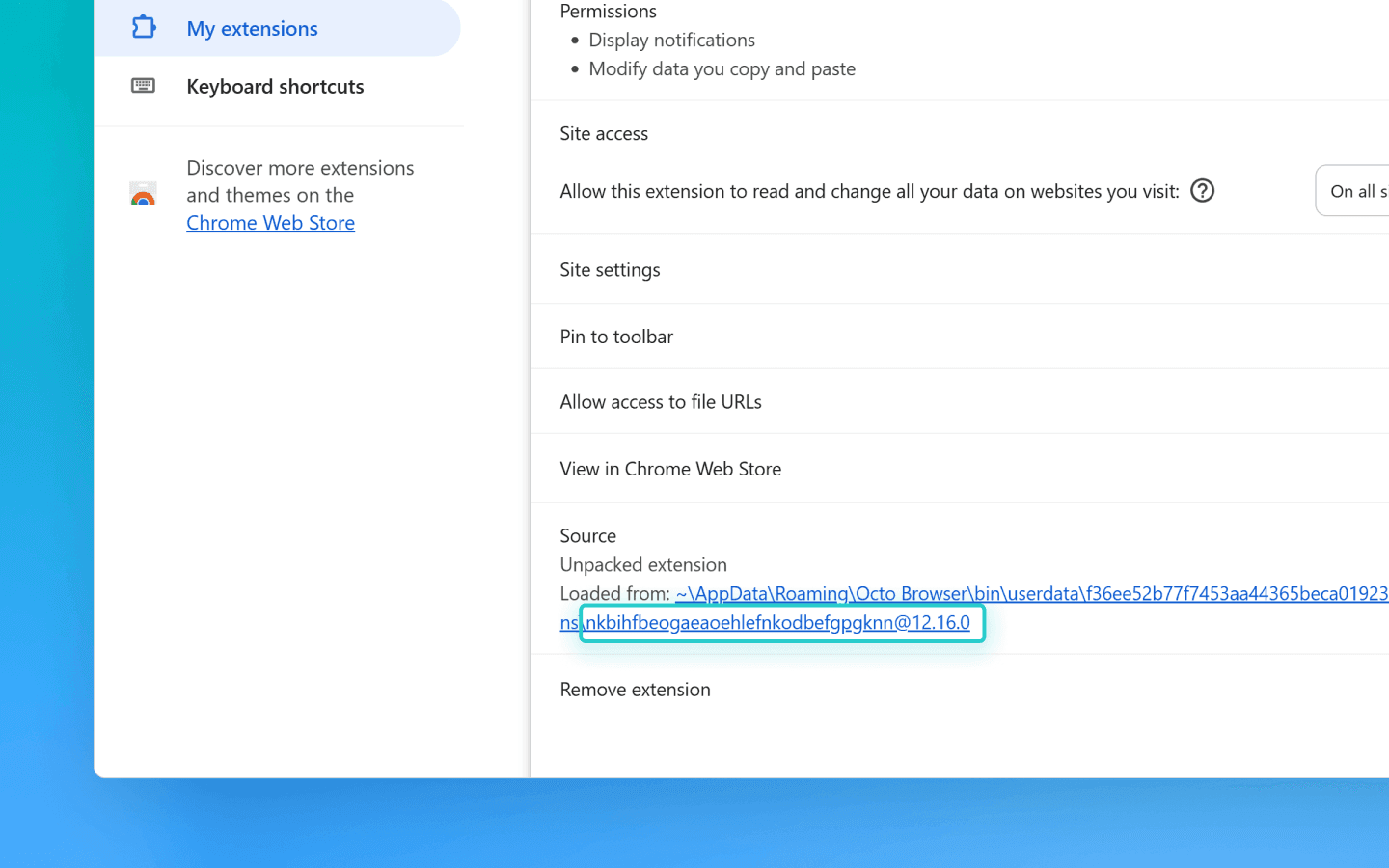
Bạn có thể tìm thấy các phương pháp để lấy UUID thông qua API trong tài liệu.
Tiếp theo, bạn cần chỉnh sửa mã:
Tạo tệp tên là adding_info.js trong thư mục octo_api.
Dán đoạn mã vào đó.
Chèn token API của bạn vào trường octo_token.
Thêm UUID của các tiện ích mở rộng cần thiết vào trường extensions.
Thêm tên (tiêu đề dấu trang) và URL (địa chỉ trang web) vào trường bookmarks.
Thêm các URL của trang web bạn muốn mở tự động khi khởi động hồ sơ vào trường start_pages.
Nếu bạn chỉ cần thêm tiện ích mở rộng, dấu trang hoặc trang bắt đầu, bạn có thể xóa các tham số không cần thiết khỏi đoạn mã:
data: { extensions: ["nkbihfbeogaeaoehlefnkodbefgpgknn@12.17.2"], //remove if you don’t need to add extensions bookmarks: [ { name: "google", url: "https://google.com" }, { name: "facebook", url: "https://facebook.com" } ],//remove if you don’t need bookmarks start_pages: ["https://google.com", "https://facebook.com"] //remove if you don’t need start pages }data: { extensions: ["nkbihfbeogaeaoehlefnkodbefgpgknn@12.17.2"], //remove if you don’t need to add extensions bookmarks: [ { name: "google", url: "https://google.com" }, { name: "facebook", url: "https://facebook.com" } ],//remove if you don’t need bookmarks start_pages: ["https://google.com", "https://facebook.com"] //remove if you don’t need start pages }
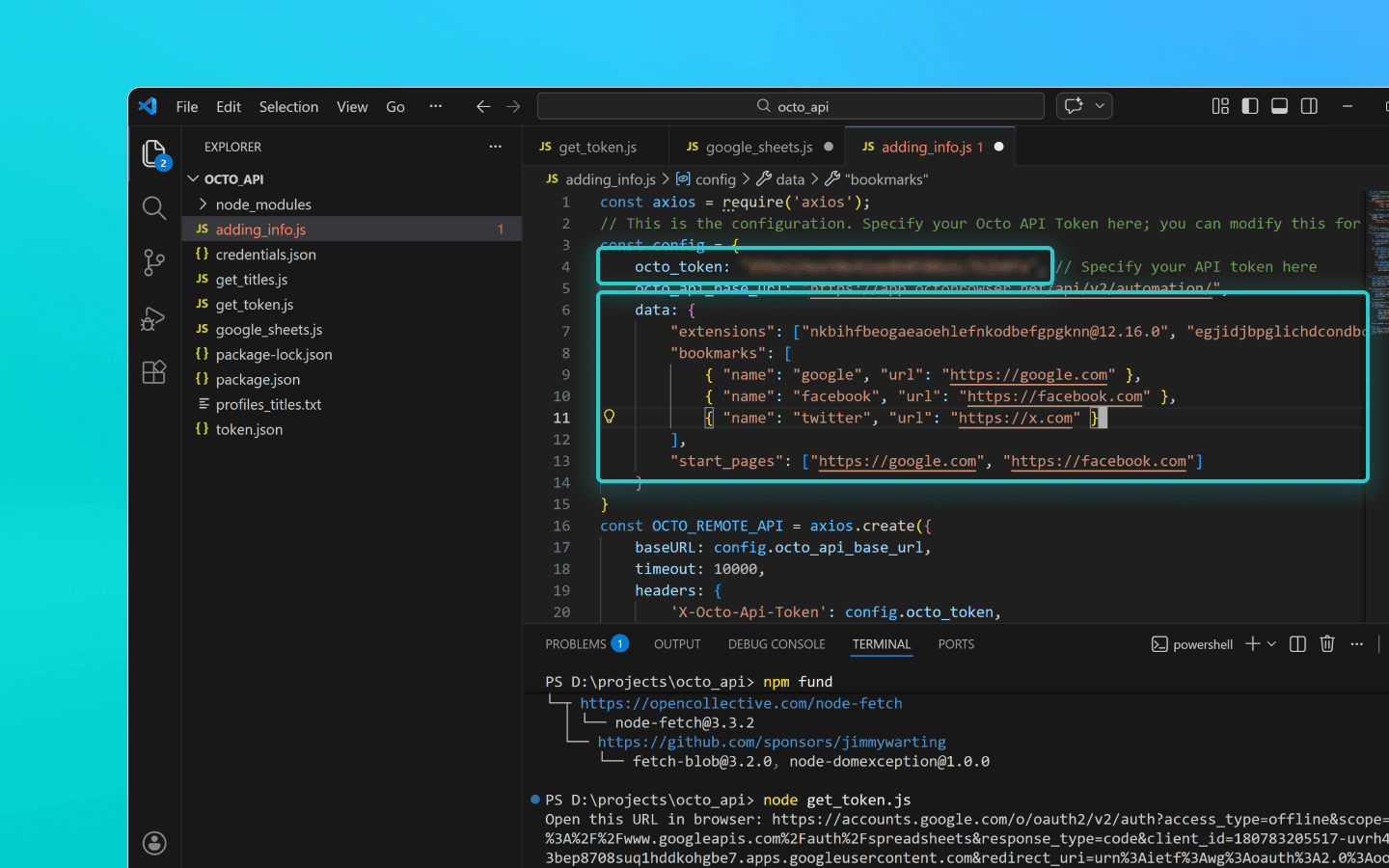
Lưu tệp adding_info.js.
Chạy nó bằng cách sử dụng lệnh node adding_info.js.
Các tiện ích mở rộng, dấu trang và trang bắt đầu cần thiết sẽ được thêm vào tất cả các hồ sơ của bạn. Nếu bạn chỉ cần áp dụng thay đổi cho các hồ sơ cụ thể, hãy tham khảo ví dụ trong tài liệu.
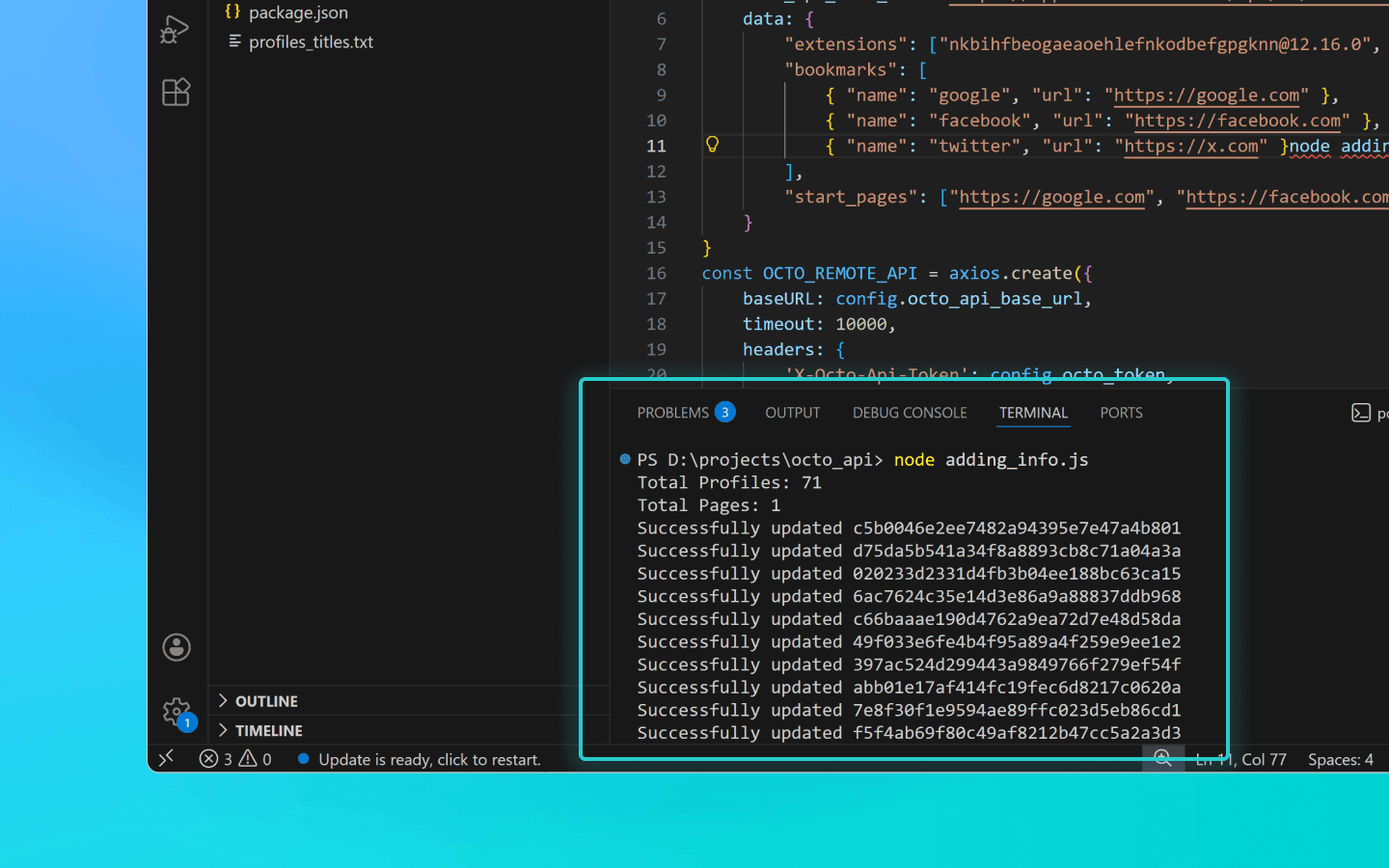
Trước khi chạy đoạn mã, hãy đảm bảo các hồ sơ bạn muốn cập nhật không đang chạy. Các hồ sơ đang chạy sẽ không được cập nhật.
Đoạn mã để thêm tiện ích mở rộng, trang bắt đầu và dấu trang vào hồ sơ
const axios = require('axios'); // This is the configuration. Specify your Octo API Token here; you can modify this for your personal needs const config = { octo_token: "OCTO_API_TOKEN", // Specify your API token here octo_api_base_url: "https://app.octobrowser.net/api/v2/automation/", data: { "extensions": ["aapfglkgnhmiaabhiijkjpfmhllaodgp@4.2.3"], "bookmarks": [ { "name": "google", "url": "https://google.com" }, { "name": "facebook", "url": "https://facebook.com" } ], "start_pages": ["https://google.com", "https://facebook.com"] } } const OCTO_REMOTE_API = axios.create({ baseURL: config.octo_api_base_url, timeout: 10000, headers: { 'X-Octo-Api-Token': config.octo_token, 'Content-Type': "application/json" } }); //functions async function sleep(ms) { return new Promise(resolve => setTimeout(resolve, ms * 1000)); } async function check_limits(response) { function parse_int_safe(value) { const parsed = parseInt(value, 10); return isNaN(parsed) ? 0 : parsed; } const ratelimit_header = response.headers.ratelimit; if (!ratelimit_header) { console.warn('No ratelimit header found!'); return; } const limit_entries = ratelimit_header.split(',').map(entry => entry.trim()); for (const entry of limit_entries) { const name_match = entry.match(/^([^;]+)/); const r_match = entry.match(/;r=(\d+)/); const t_match = entry.match(/;t=(\d+)/); if (!r_match || !t_match) { console.warn(`Invalid ratelimit format: ${entry}`); continue; } const limit_name = name_match ? name_match[1] : 'unknown_limit'; const remaining_quantity = parse_int_safe(r_match[1]); const window_seconds = parse_int_safe(t_match[1]); if (remaining_quantity < 5) { const wait_time = window_seconds + 1; console.log(`Waiting ${wait_time} seconds due to ${limit_name} limit`); await sleep(wait_time); } } } async function get_total_profiles() { const response = await OCTO_REMOTE_API.get('/profiles?page=0&page_len=10'); const total_profiles = response.data.total_count; const total_pages = Math.ceil(response.data.total_count / 100); console.log(`Total Profiles: ${total_profiles}\nTotal Pages: ${total_pages}`); await check_limits(response); return total_pages; } async function get_all_profiles_uuids(total_pages) { let profiles = []; for (let i = 0; i < total_pages; i++) { let response = await OCTO_REMOTE_API.get(`/profiles?page=${i}&page_len=100`); await check_limits(response); profiles.push(...response.data.data); } return profiles; } async function patch_all_profiles(profiles) { let updated = []; let not_updated = []; for (let profile of profiles) { try { const response = await OCTO_REMOTE_API.patch(`/profiles/${profile.uuid}`, config.data); await check_limits(response); updated.push(profile); console.log(`Successfully updated ${profile.uuid}`); } catch (error) { not_updated.push(profile); console.error(`ERROR: Can't patch profile ${profile.uuid}`); } } return [updated, not_updated]; } (async () => { const total = await get_total_profiles(); const profiles = await get_all_profiles_uuids(total); const [updated, not_updated] = await patch_all_profiles(profiles); console.log(`Finished process:\nUpdated: ${updated.length}\nNot updated: ${not_updated.length}`); })();
const axios = require('axios'); // This is the configuration. Specify your Octo API Token here; you can modify this for your personal needs const config = { octo_token: "OCTO_API_TOKEN", // Specify your API token here octo_api_base_url: "https://app.octobrowser.net/api/v2/automation/", data: { "extensions": ["aapfglkgnhmiaabhiijkjpfmhllaodgp@4.2.3"], "bookmarks": [ { "name": "google", "url": "https://google.com" }, { "name": "facebook", "url": "https://facebook.com" } ], "start_pages": ["https://google.com", "https://facebook.com"] } } const OCTO_REMOTE_API = axios.create({ baseURL: config.octo_api_base_url, timeout: 10000, headers: { 'X-Octo-Api-Token': config.octo_token, 'Content-Type': "application/json" } }); //functions async function sleep(ms) { return new Promise(resolve => setTimeout(resolve, ms * 1000)); } async function check_limits(response) { function parse_int_safe(value) { const parsed = parseInt(value, 10); return isNaN(parsed) ? 0 : parsed; } const ratelimit_header = response.headers.ratelimit; if (!ratelimit_header) { console.warn('No ratelimit header found!'); return; } const limit_entries = ratelimit_header.split(',').map(entry => entry.trim()); for (const entry of limit_entries) { const name_match = entry.match(/^([^;]+)/); const r_match = entry.match(/;r=(\d+)/); const t_match = entry.match(/;t=(\d+)/); if (!r_match || !t_match) { console.warn(`Invalid ratelimit format: ${entry}`); continue; } const limit_name = name_match ? name_match[1] : 'unknown_limit'; const remaining_quantity = parse_int_safe(r_match[1]); const window_seconds = parse_int_safe(t_match[1]); if (remaining_quantity < 5) { const wait_time = window_seconds + 1; console.log(`Waiting ${wait_time} seconds due to ${limit_name} limit`); await sleep(wait_time); } } } async function get_total_profiles() { const response = await OCTO_REMOTE_API.get('/profiles?page=0&page_len=10'); const total_profiles = response.data.total_count; const total_pages = Math.ceil(response.data.total_count / 100); console.log(`Total Profiles: ${total_profiles}\nTotal Pages: ${total_pages}`); await check_limits(response); return total_pages; } async function get_all_profiles_uuids(total_pages) { let profiles = []; for (let i = 0; i < total_pages; i++) { let response = await OCTO_REMOTE_API.get(`/profiles?page=${i}&page_len=100`); await check_limits(response); profiles.push(...response.data.data); } return profiles; } async function patch_all_profiles(profiles) { let updated = []; let not_updated = []; for (let profile of profiles) { try { const response = await OCTO_REMOTE_API.patch(`/profiles/${profile.uuid}`, config.data); await check_limits(response); updated.push(profile); console.log(`Successfully updated ${profile.uuid}`); } catch (error) { not_updated.push(profile); console.error(`ERROR: Can't patch profile ${profile.uuid}`); } } return [updated, not_updated]; } (async () => { const total = await get_total_profiles(); const profiles = await get_all_profiles_uuids(total); const [updated, not_updated] = await patch_all_profiles(profiles); console.log(`Finished process:\nUpdated: ${updated.length}\nNot updated: ${not_updated.length}`); })();
Xuất dữ liệu hồ sơ ra Google Sheets
Bạn có thể xuất dữ liệu hồ sơ của mình ra một bảng tính. Điều này giúp dễ dàng cấu trúc thông tin, cũng như sắp xếp và phân tích nó. Bạn có thể xuất các thông số hồ sơ sau:
UUID,
tag,
tên,
mô tả.
Tạo tệp có tên google_sheets.js trong thư mục octo_api.
Thêm mã đoạn mã vào tệp.
Điền vào trường octo_token. Token API có thể được tìm thấy trong Octo Browser.
Điền vào trường table_id. Đây là ID của tài liệu Google Sheets của bạn.
Điền vào trường table_sheet_name. Đây là tên của sheet trong tài liệu Google Sheets nơi bạn muốn xuất dữ liệu ra.
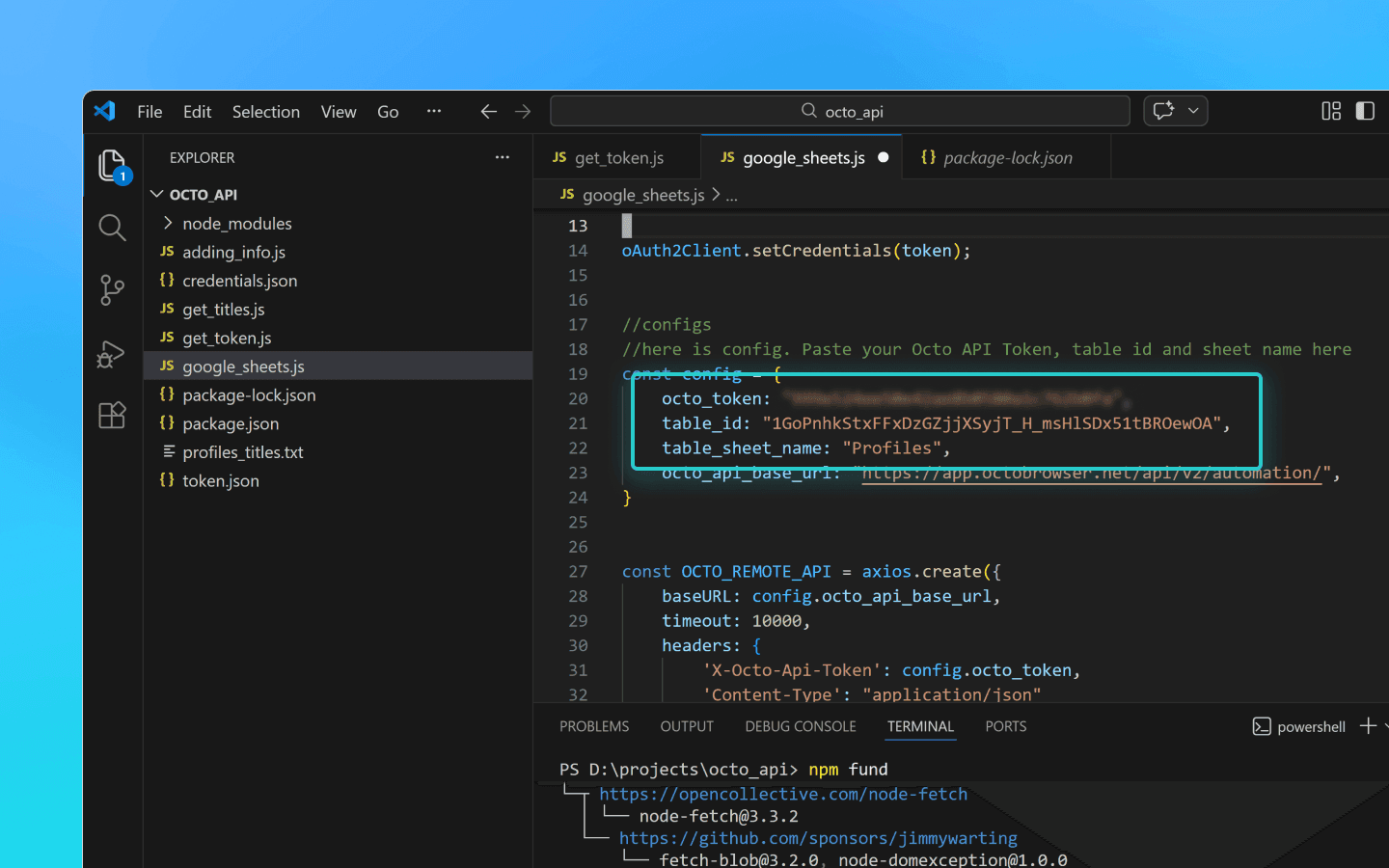
Lưu các thay đổi.
Thêm các tệp credentials.json và token.json vào thư mục octo_api.
Chạy đoạn mã trong terminal VS Code bằng lệnh node google_sheets.js.
Khi đoạn mã hoàn tất, dữ liệu sẽ được tải lên bảng tính đã chỉ định.
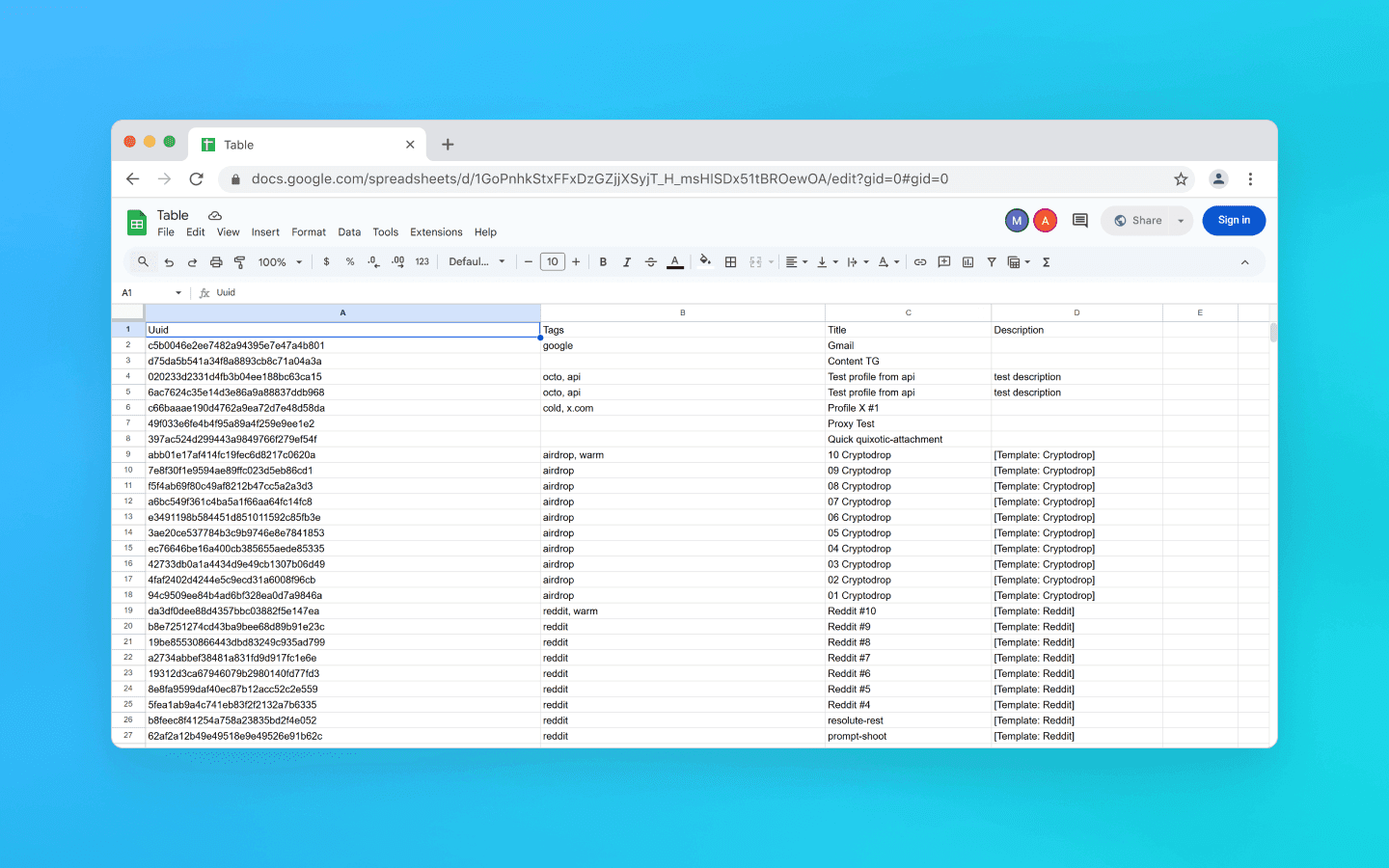
Đoạn mã để xuất dữ liệu hồ sơ ra Google Sheets
const axios = require('axios'); const { google } = require('googleapis'); const token = require('./token.json'); const credentials = require('./credentials.json'); const oAuth2Client = new google.auth.OAuth2( credentials.installed.client_id, credentials.installed.client_secret, credentials.installed.redirect_uris[0] ); oAuth2Client.setCredentials(token); //configuration //Paste your Octo API token, spreadsheet ID and sheet name here const config = { octo_token: "OCTO_API_TOKEN", table_id: "1pqnVysHymZSI5Lzx6odasdasAqE022fqUEf6q5LnOqAhylLSM", table_sheet_name: "Profiles", octo_api_base_url: "https://app.octobrowser.net/api/v2/automation/", } const OCTO_REMOTE_API = axios.create({ baseURL: config.octo_api_base_url, timeout: 10000, headers: { 'X-Octo-Api-Token': config.octo_token, 'Content-Type': "application/json" } }); //functions async function check_limits(response) { function parse_int_safe(value) { const parsed = parseInt(value, 10); return isNaN(parsed) ? 0 : parsed; } const ratelimit_header = response.headers.ratelimit; if (!ratelimit_header) { console.warn('No ratelimit header found!'); return; } const limit_entries = ratelimit_header.split(',').map(entry => entry.trim()); for (const entry of limit_entries) { const name_match = entry.match(/^([^;]+)/); const r_match = entry.match(/;r=(\d+)/); const t_match = entry.match(/;t=(\d+)/); if (!r_match || !t_match) { console.warn(`Invalid ratelimit format: ${entry}`); continue; } const limit_name = name_match ? name_match[1] : 'unknown_limit'; const remaining_quantity = parse_int_safe(r_match[1]); const window_seconds = parse_int_safe(t_match[1]); if (remaining_quantity < 5) { const wait_time = window_seconds + 1; console.log(`Waiting ${wait_time} seconds due to ${limit_name} limit`); await sleep(wait_time); } } } async function sleep(ms) { return new Promise(resolve => setTimeout(resolve, ms * 1000)); } async function get_total_pages() { const response = await OCTO_REMOTE_API.get('/profiles?page=0&page_len=10'); const total_profiles = response.data.total_count; const total_pages = Math.ceil(response.data.total_count / 100); console.log(`Total Profiles: ${total_profiles}\nTotal Pages: ${total_pages}`); await check_limits(response); return total_pages; } async function get_all_profiles_data(total_pages) { let profiles = []; for (let i = 0; i < total_pages; i++) { let response = await OCTO_REMOTE_API.get(`/profiles?page=${i}&page_len=100&fields=title,description,tags`); await check_limits(response); profiles.push(...response.data.data); } return profiles; } async function fill_sheet_with_data(oAuth2Client, spreadsheet_id, list_name, data) { const sheets = google.sheets({ version: 'v4', auth: oAuth2Client }); try { const sheetInfo = await sheets.spreadsheets.get({ spreadsheetId: spreadsheet_id, }); const sheetExists = sheetInfo.data.sheets.some( sheet => sheet.properties.title === list_name ); if (!sheetExists) { await sheets.spreadsheets.batchUpdate({ spreadsheetId: spreadsheet_id, resource: { requests: [{ addSheet: { properties: { title: list_name } } }] } }); console.log(`Создан новый лист "${list_name}".`); } const headers = ['Uuid', 'Tags', 'Title', 'Description']; const values = data.map(item => [ item.uuid, Array.isArray(item.tags) ? item.tags.join(', ') : item.tags, item.title, item.description || '' ]); await sheets.spreadsheets.values.update({ spreadsheetId: spreadsheet_id, range: `${list_name}!A1:D1`, valueInputOption: 'RAW', resource: { values: [headers] } }); await sheets.spreadsheets.values.update({ spreadsheetId: spreadsheet_id, range: `${list_name}!A2:D${values.length + 1}`, valueInputOption: 'RAW', resource: { values: values } }); console.log(`Данные успешно записаны в лист "${list_name}".`); } catch (err) { console.error('Ошибка при обновлении таблицы:', err); throw err; } } (async () => { const total_pages = await get_total_pages(); const profiles_data = await get_all_profiles_data(total_pages); await fill_sheet_with_data(oAuth2Client, config.table_id, config.table_sheet_name, profiles_data); })()
const axios = require('axios'); const { google } = require('googleapis'); const token = require('./token.json'); const credentials = require('./credentials.json'); const oAuth2Client = new google.auth.OAuth2( credentials.installed.client_id, credentials.installed.client_secret, credentials.installed.redirect_uris[0] ); oAuth2Client.setCredentials(token); //configuration //Paste your Octo API token, spreadsheet ID and sheet name here const config = { octo_token: "OCTO_API_TOKEN", table_id: "1pqnVysHymZSI5Lzx6odasdasAqE022fqUEf6q5LnOqAhylLSM", table_sheet_name: "Profiles", octo_api_base_url: "https://app.octobrowser.net/api/v2/automation/", } const OCTO_REMOTE_API = axios.create({ baseURL: config.octo_api_base_url, timeout: 10000, headers: { 'X-Octo-Api-Token': config.octo_token, 'Content-Type': "application/json" } }); //functions async function check_limits(response) { function parse_int_safe(value) { const parsed = parseInt(value, 10); return isNaN(parsed) ? 0 : parsed; } const ratelimit_header = response.headers.ratelimit; if (!ratelimit_header) { console.warn('No ratelimit header found!'); return; } const limit_entries = ratelimit_header.split(',').map(entry => entry.trim()); for (const entry of limit_entries) { const name_match = entry.match(/^([^;]+)/); const r_match = entry.match(/;r=(\d+)/); const t_match = entry.match(/;t=(\d+)/); if (!r_match || !t_match) { console.warn(`Invalid ratelimit format: ${entry}`); continue; } const limit_name = name_match ? name_match[1] : 'unknown_limit'; const remaining_quantity = parse_int_safe(r_match[1]); const window_seconds = parse_int_safe(t_match[1]); if (remaining_quantity < 5) { const wait_time = window_seconds + 1; console.log(`Waiting ${wait_time} seconds due to ${limit_name} limit`); await sleep(wait_time); } } } async function sleep(ms) { return new Promise(resolve => setTimeout(resolve, ms * 1000)); } async function get_total_pages() { const response = await OCTO_REMOTE_API.get('/profiles?page=0&page_len=10'); const total_profiles = response.data.total_count; const total_pages = Math.ceil(response.data.total_count / 100); console.log(`Total Profiles: ${total_profiles}\nTotal Pages: ${total_pages}`); await check_limits(response); return total_pages; } async function get_all_profiles_data(total_pages) { let profiles = []; for (let i = 0; i < total_pages; i++) { let response = await OCTO_REMOTE_API.get(`/profiles?page=${i}&page_len=100&fields=title,description,tags`); await check_limits(response); profiles.push(...response.data.data); } return profiles; } async function fill_sheet_with_data(oAuth2Client, spreadsheet_id, list_name, data) { const sheets = google.sheets({ version: 'v4', auth: oAuth2Client }); try { const sheetInfo = await sheets.spreadsheets.get({ spreadsheetId: spreadsheet_id, }); const sheetExists = sheetInfo.data.sheets.some( sheet => sheet.properties.title === list_name ); if (!sheetExists) { await sheets.spreadsheets.batchUpdate({ spreadsheetId: spreadsheet_id, resource: { requests: [{ addSheet: { properties: { title: list_name } } }] } }); console.log(`Создан новый лист "${list_name}".`); } const headers = ['Uuid', 'Tags', 'Title', 'Description']; const values = data.map(item => [ item.uuid, Array.isArray(item.tags) ? item.tags.join(', ') : item.tags, item.title, item.description || '' ]); await sheets.spreadsheets.values.update({ spreadsheetId: spreadsheet_id, range: `${list_name}!A1:D1`, valueInputOption: 'RAW', resource: { values: [headers] } }); await sheets.spreadsheets.values.update({ spreadsheetId: spreadsheet_id, range: `${list_name}!A2:D${values.length + 1}`, valueInputOption: 'RAW', resource: { values: values } }); console.log(`Данные успешно записаны в лист "${list_name}".`); } catch (err) { console.error('Ошибка при обновлении таблицы:', err); throw err; } } (async () => { const total_pages = await get_total_pages(); const profiles_data = await get_all_profiles_data(total_pages); await fill_sheet_with_data(oAuth2Client, config.table_id, config.table_sheet_name, profiles_data); })()
Cách lấy table_id
Mở hoặc tạo một bảng tính trong Google Sheets.
Sao chép ID bảng. Đây là phần của URL nằm giữa
/d/và/edit.
Ví dụ, nếu liên kết của bạn trông như https://docs.google.com/spreadsheets/d/1GoPnhkStxFFxDzGZjjXSyjT_H_msHlSDx51tBROewOA/edit, thì table_id là 1GoPnhkStxFFxDzGZjjXSyjT_H_msHlSDx51tBROewOA.
Cách lấy tệp credentials.json
Đăng nhập vào tài khoản Gmail cá nhân (không phải của tổ chức).
Chọn bất kỳ quốc gia châu Âu nào từ danh sách và nhấp Chấp nhận và tiếp tục.
Nhấp Chọn một dự án, sau đó Dự án mới.
Nhập bất kỳ tên dự án nào và nhấp Tạo.
Đi đến https://console.cloud.google.com/auth và nhấp Bắt đầu.
Nhập bất kỳ Tên ứng dụng, email của bạn và nhấp Tiếp theo.
Chọn Bên ngoài, nhập lại email của bạn, nhấp Tiếp theo, kiểm tra hộp đồng ý, sau đó nhấp Tiếp tục và Kết thúc.
Trong phần Người dùng thử, nhấp Thêm người dùng.
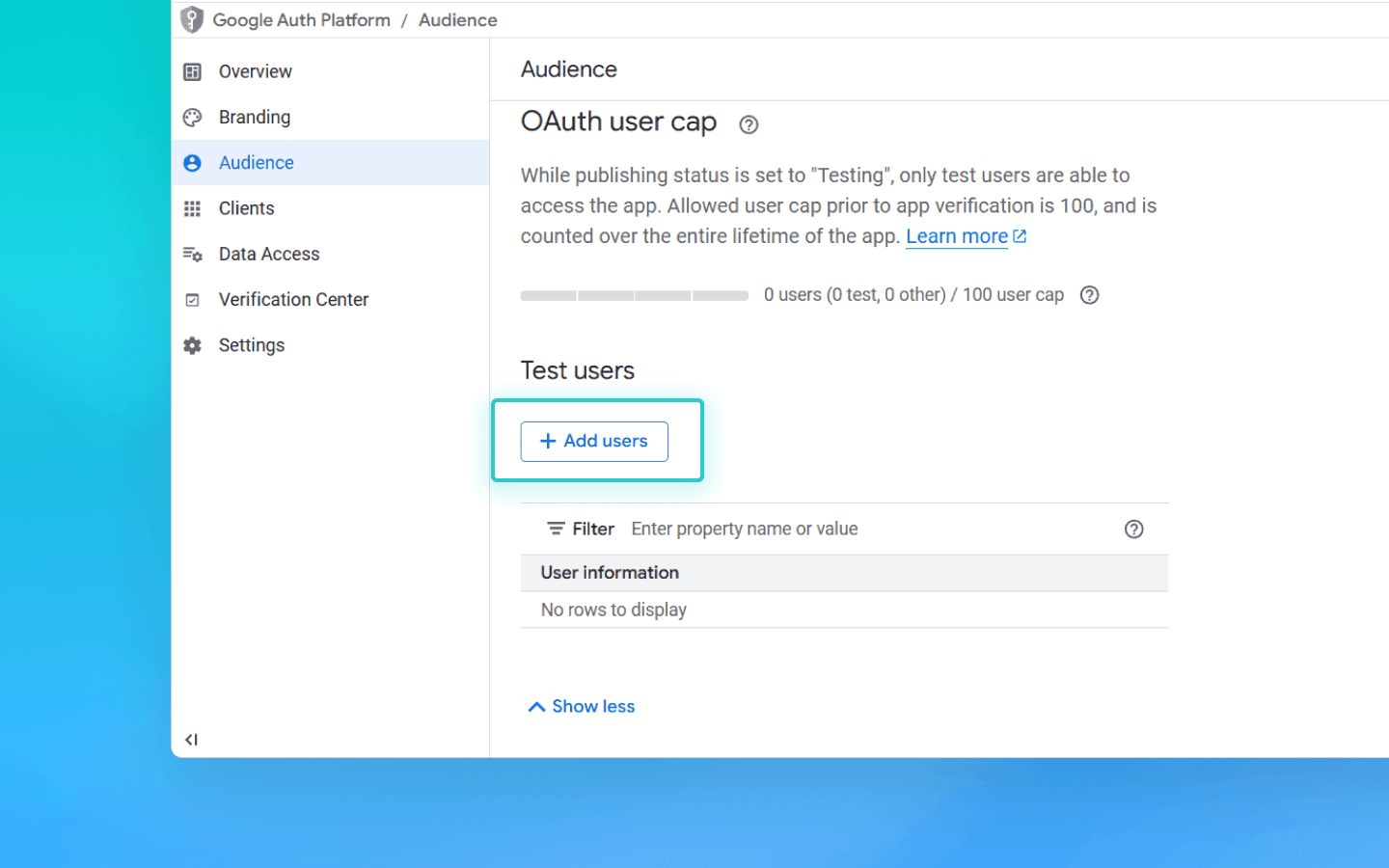
. Thêm email của bạn và nhấp Lưu.
. Trên trang https://console.cloud.google.com/auth/overview, nhấp Tạo OAuth Client.
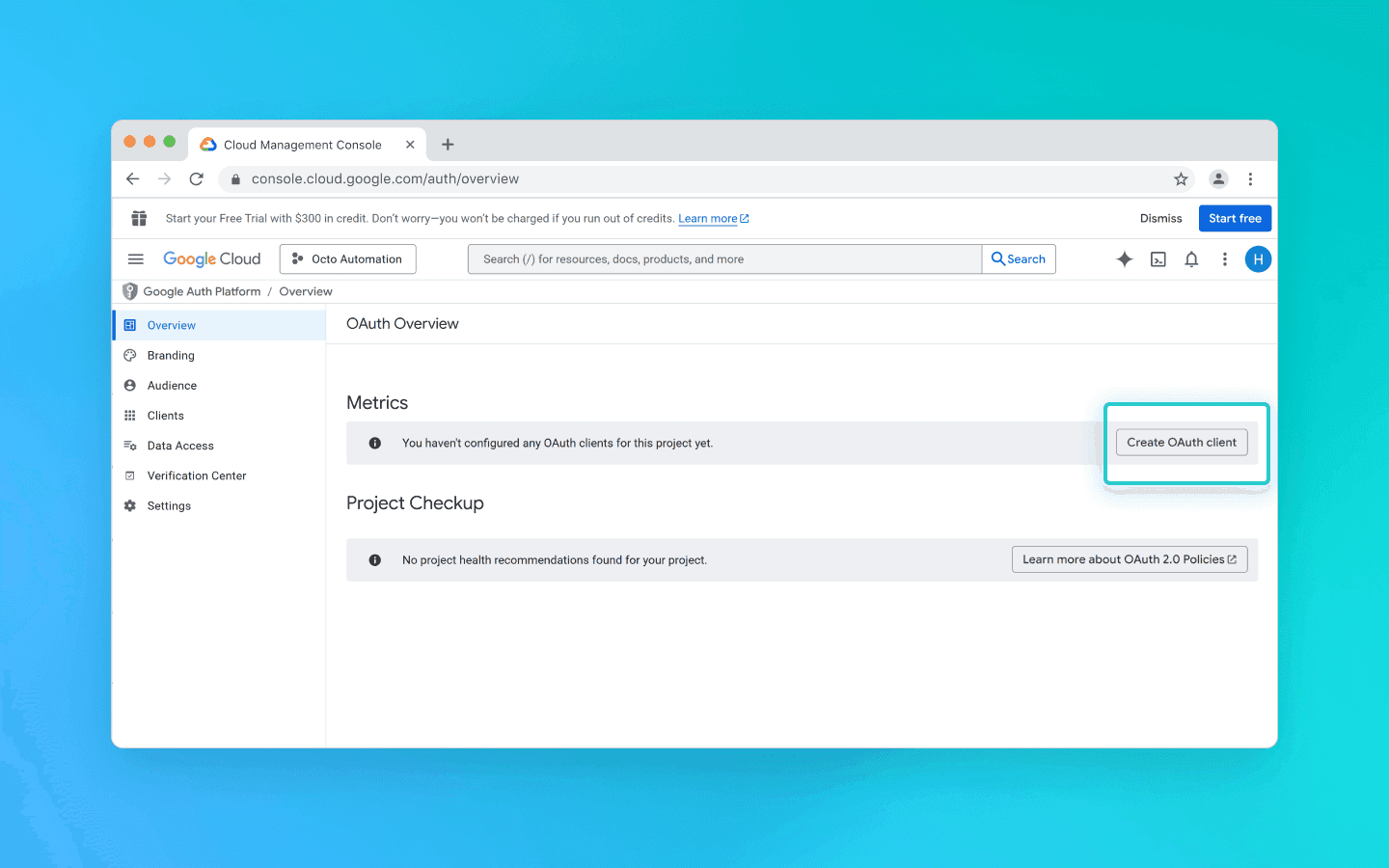
. Chọn Ứng dụng máy tính để bàn từ danh sách, nhập bất kỳ tên nào và nhấp Tạo.
. Một cửa sổ pop-up sẽ xuất hiện. Tải xuống tệp JSON từ đó.
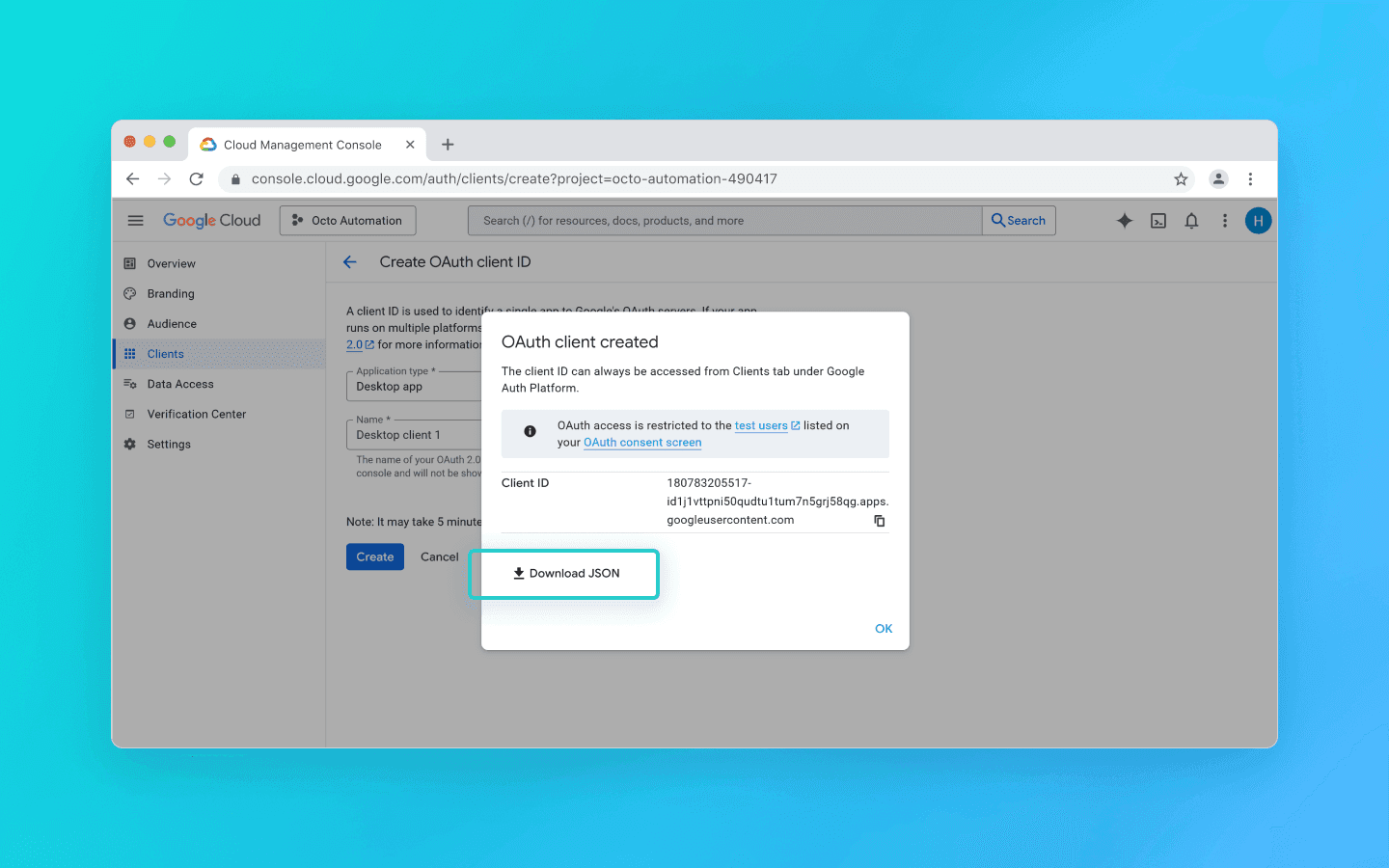
. Tìm kiếm API Google Sheets.
. Chọn nó và nhấp Kích hoạt.
. Mở tệp JSON đã tải xuống trước đó.
. Thay đổi giá trị của
redirect_uristừhttp://localhostthành"redirect_uris": ["urn:ietf:wg:oauth:2.0:oob","http://localhost"].
Hãy thực hiện thay đổi cẩn thận để bạn không vô tình loại bỏ dấu ngoặc.
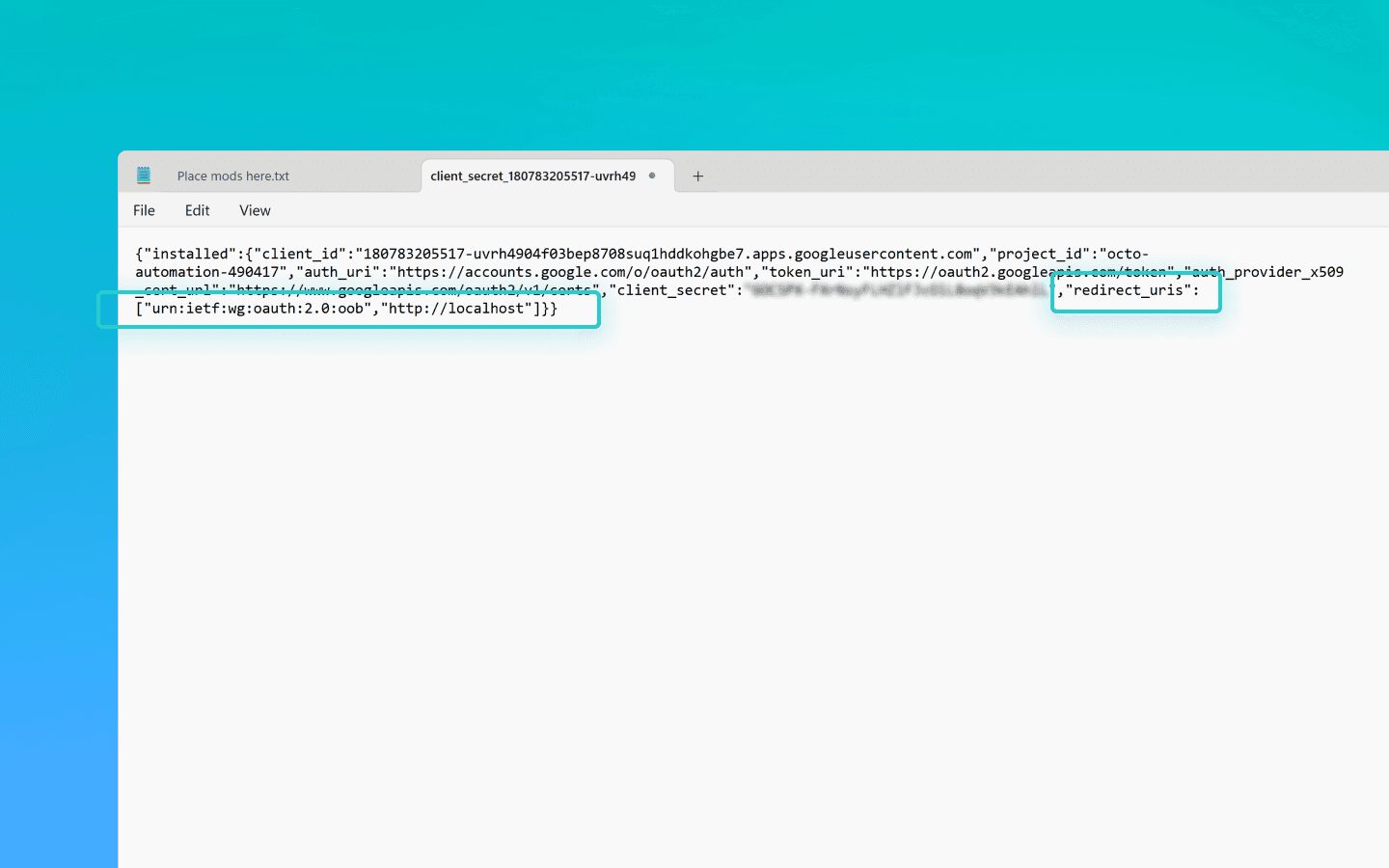
. Lưu tệp.
. Đổi tên nó thành credentials.json.
. Thêm nó vào thư mục octo_api.
Cách lấy tệp token.json
Tạo một tệp có tên get_token.js trong thư mục octo_api và mở nó trong VS Code.
Chạy lệnh npm install googleapis trong terminal VS Code.
Dán đoạn mã tạo token vào get_token.js và lưu tệp.
Chạy đoạn mã bằng node get_token.js.
Bạn sẽ thấy một liên kết nói rằng Mở URL này trong trình duyệt:
https://accounts.google.com/o/oauth2/…Mở liên kết.
Đăng nhập vào tài khoản Google của bạn.
Nhấp qua màn hình chấp thuận.
Trên trang cuối cùng, Google sẽ hiển thị mã xác thực.
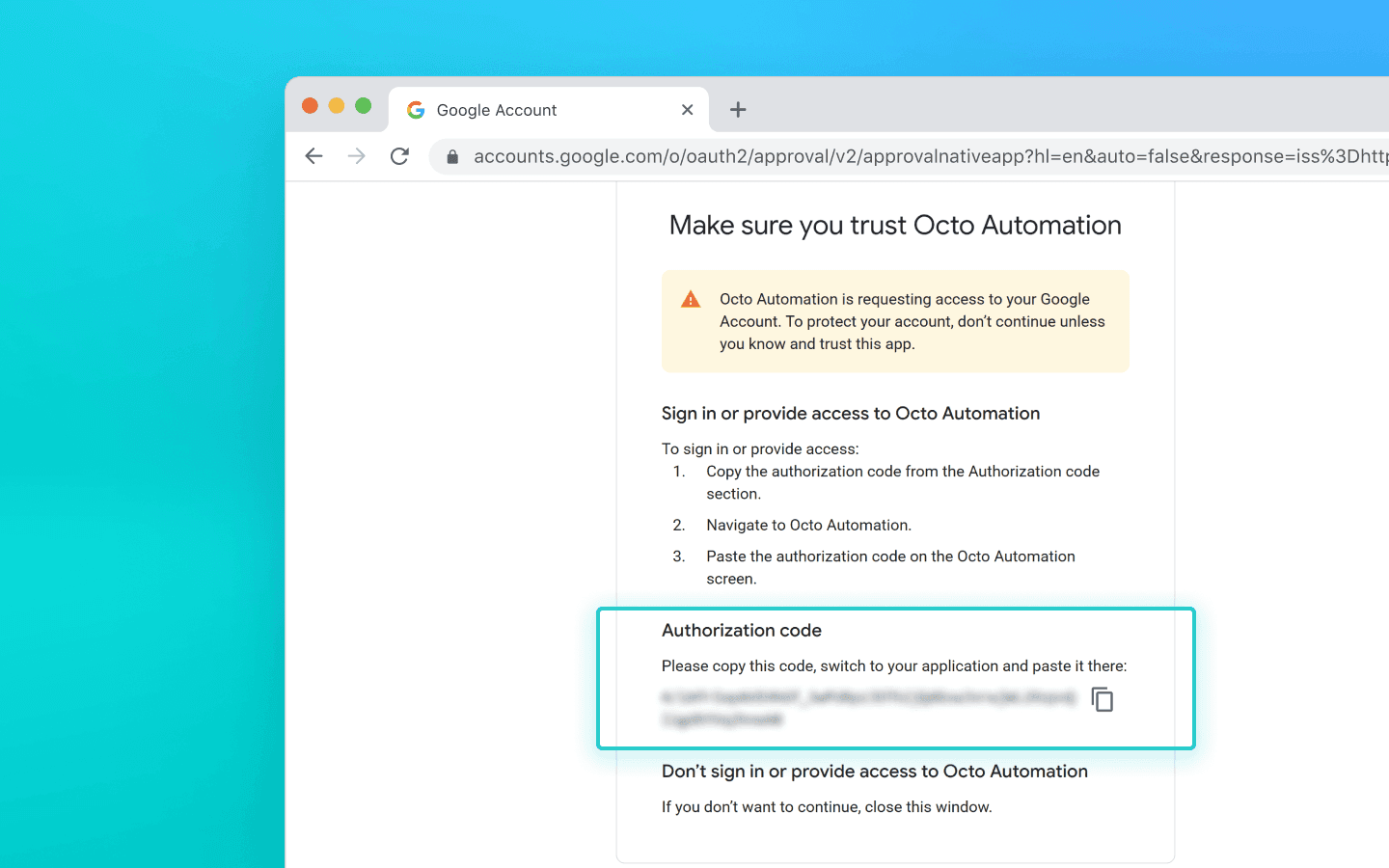
. Dán mã vào terminal và nhấn Enter.
. Đoạn mã sau đó sẽ tạo một tệp token.json trong thư mục nơi bạn đã chạy nó.
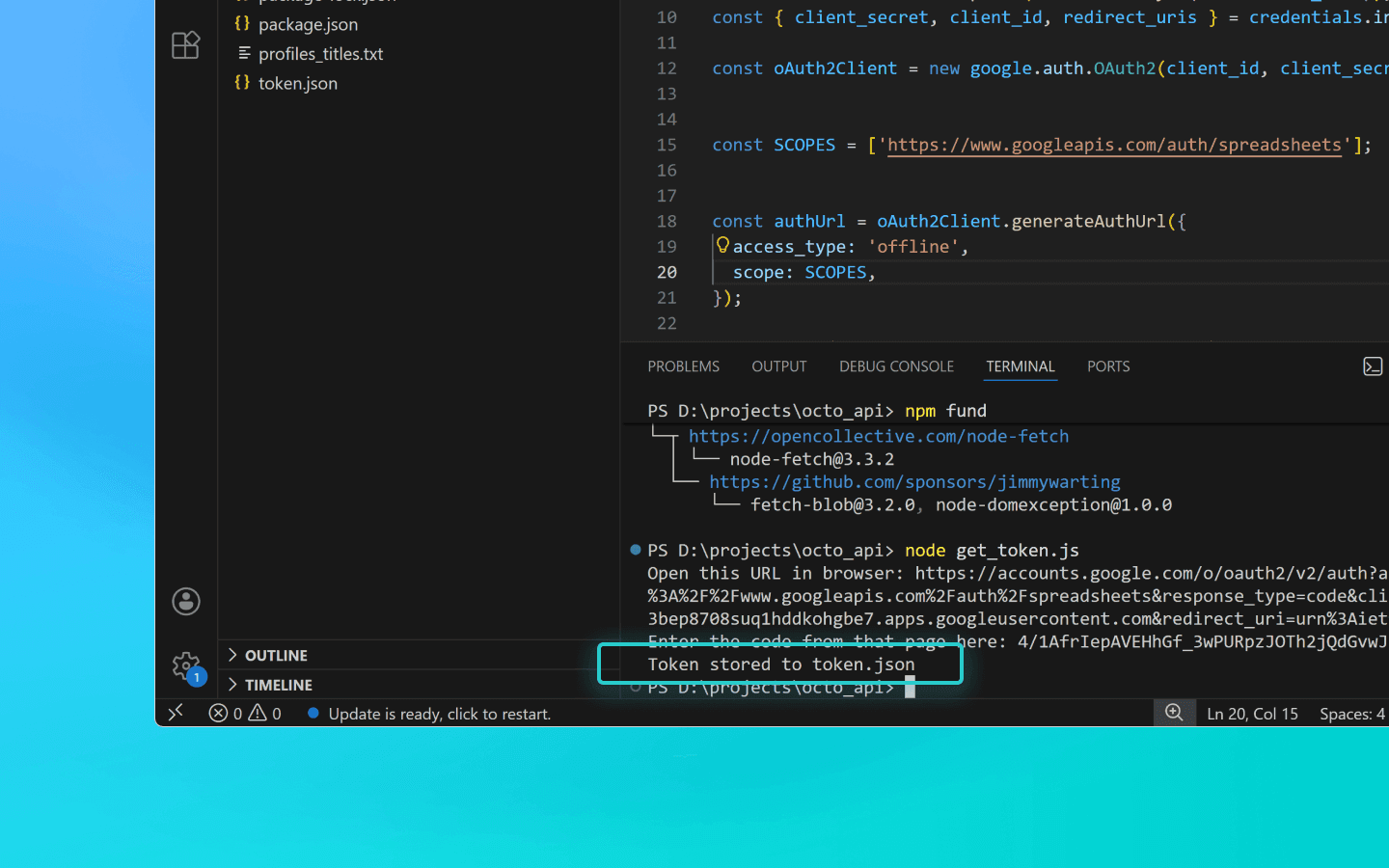
Đoạn mã tạo token
const fs = require('fs'); const readline = require('readline'); const { google } = require('googleapis'); const CREDENTIALS_PATH = 'credentials.json'; const TOKEN_PATH = 'token.json'; const credentials = JSON.parse(fs.readFileSync(CREDENTIALS_PATH)); const { client_secret, client_id, redirect_uris } = credentials.installed; const oAuth2Client = new google.auth.OAuth2(client_id, client_secret, redirect_uris[0]); const SCOPES = ['https://www.googleapis.com/auth/spreadsheets']; const authUrl = oAuth2Client.generateAuthUrl({ access_type: 'offline', scope: SCOPES, }); console.log('Open this URL in browser:', authUrl); const rl = readline.createInterface({ input: process.stdin, output: process.stdout, }); rl.question('Enter the code from that page here: ', (code) => { rl.close(); oAuth2Client.getToken(code, (err, token) => { if (err) return console.error('Error retrieving access token', err); fs.writeFileSync(TOKEN_PATH, JSON.stringify(token)); console.log('Token stored to', TOKEN_PATH); }); });
const fs = require('fs'); const readline = require('readline'); const { google } = require('googleapis'); const CREDENTIALS_PATH = 'credentials.json'; const TOKEN_PATH = 'token.json'; const credentials = JSON.parse(fs.readFileSync(CREDENTIALS_PATH)); const { client_secret, client_id, redirect_uris } = credentials.installed; const oAuth2Client = new google.auth.OAuth2(client_id, client_secret, redirect_uris[0]); const SCOPES = ['https://www.googleapis.com/auth/spreadsheets']; const authUrl = oAuth2Client.generateAuthUrl({ access_type: 'offline', scope: SCOPES, }); console.log('Open this URL in browser:', authUrl); const rl = readline.createInterface({ input: process.stdin, output: process.stdout, }); rl.question('Enter the code from that page here: ', (code) => { rl.close(); oAuth2Client.getToken(code, (err, token) => { if (err) return console.error('Error retrieving access token', err); fs.writeFileSync(TOKEN_PATH, JSON.stringify(token)); console.log('Token stored to', TOKEN_PATH); }); });
Kết luận
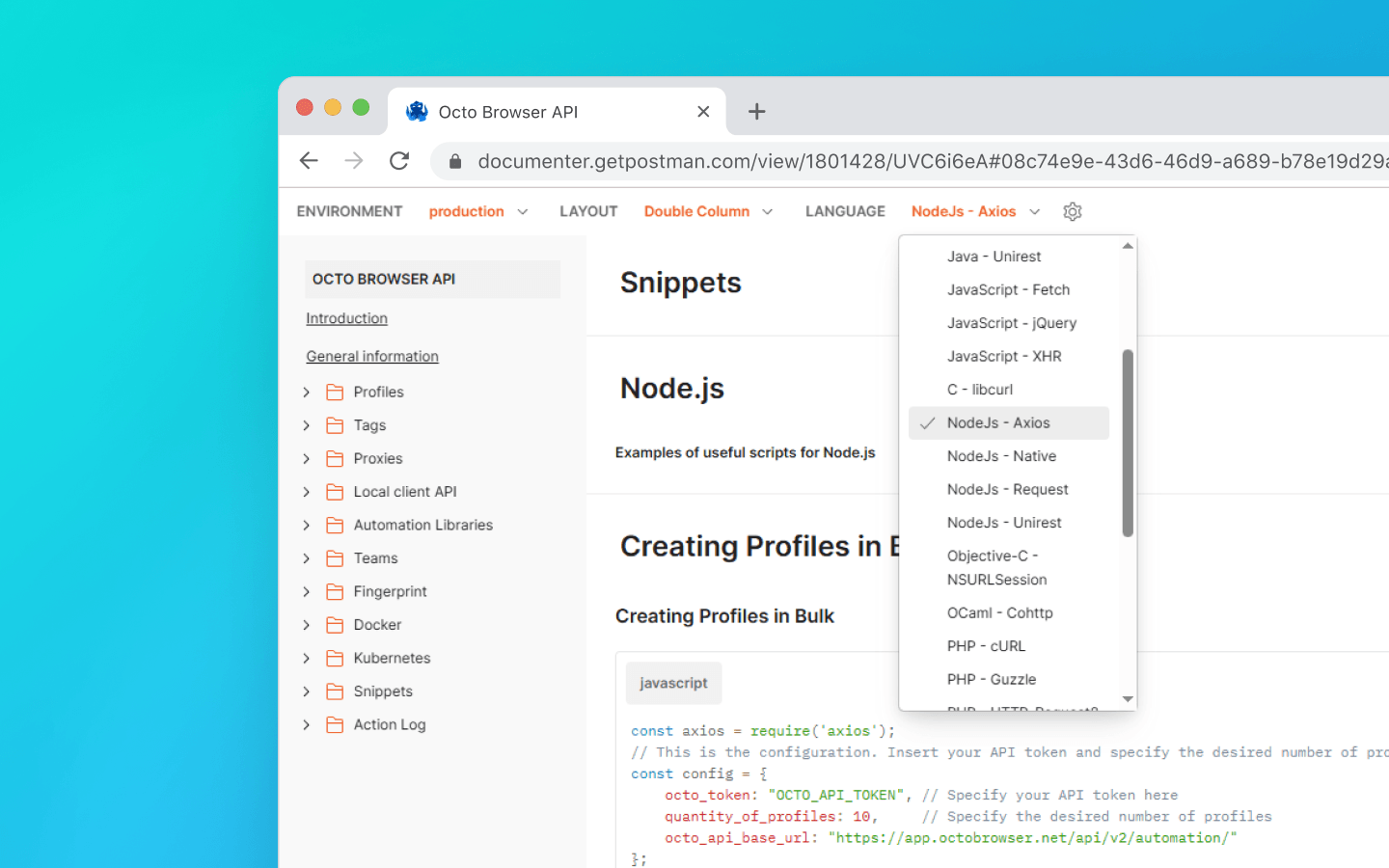
Chúng tôi đã sử dụng ngôn ngữ lập trình Node.js trong các ví dụ trong bài viết này. Bạn có thể tìm thấy các đoạn mã hữu ích bằng các ngôn ngữ khác trong tài liệu của chúng tôi.
Trong bài viết này, chúng tôi đã đề cập đến:
cách chuẩn bị môi trường của bạn;
cách lấy token API Octo Browser của bạn;
cách lấy UUID tiện ích mở rộng;
cách lấy tên hồ sơ bằng API và lưu chúng vào tệp văn bản;
cách thêm số lượng lớn các tiện ích mở rộng, dấu trang và trang bắt đầu vào các hồ sơ hiện có;
cách xuất dữ liệu hồ sơ ra Google Sheets.
Nếu bạn vẫn còn câu hỏi hoặc không tìm thấy ví dụ bạn cần trong tài liệu, hãy liên hệ với Dịch vụ Khách hàng của chúng tôi qua Telegram hoặc sử dụng trò chuyện trang web của chúng tôi hoặc widget trong trình duyệt.
Quản lí số lượng tài khoản không giới hạn mà không lo bị chặn, hoạt động thường nhật, hay lo tới các chi phí không đáng có.
Bạn có muốn thử Octo Browser với giá giảm không?
Sử dụng mã khuyến mãi OCTOBLOG để được giảm giá 30% cho bất kỳ gói đăng ký nào. Ưu đãi này chỉ dành cho người dùng mới.
Chuẩn bị
Tải xuống và cài đặt VS Code.
Tải xuống và cài đặt Node.js.
Tạo một thư mục ở nơi thuận tiện và đặt tên cho thư mục đó, ví dụ như octo_api.
Mở thư mục này trong VS Code.
Tạo một tệp với phần mở rộng .js. Tốt nhất là đặt tên tệp theo hành động mà mã sẽ thực hiện để tránh nhầm lẫn: ví dụ, get_titles.js.
Mở terminal và chạy lệnh npm install axios để cài đặt một phụ thuộc cho Node.js.
Nếu VS Code hiển thị lỗi, mở Windows PowerShell dưới quyền quản trị viên, nhập lệnh Set-ExecutionPolicy -Scope CurrentUser -ExecutionPolicy RemoteSigned và xác nhận. Sau đó lặp lại bước trước đó.
Khởi động Octo Browser.
Nơi tìm token API của bạn
Để tương tác với Octo Browser thông qua API, bạn sẽ cần một token API. Nó có sẵn cho người dùng có Gói đăng kí Base và cao hơn. Token API được hiển thị trong Octo Browser trong cài đặt tài khoản chính dưới tab “Additional” (các thành viên khác trong nhóm không thể thấy token API).
Giới hạn API (giới hạn tốc độ)
Lưu ý rằng API của Octo Browser có giới hạn yêu cầu. Các đoạn mã được cung cấp sử dụng hàm check_limits để kiểm tra các tiêu đề giới hạn tốc độ API và tự động tạm dừng nếu số lượng yêu cầu còn lại thấp. Điều này giúp tránh các lỗi 429 Quá nhiều yêu cầu.
Khi thực hiện yêu cầu đến Public API, mỗi yêu cầu sử dụng 1 RPM và 1 RPH. Khi sử dụng Local API, RPM/RPH không bị sử dụng, ngoại trừ POST Start Profile (1 RPM và 1 RPH) và POST One-time profile (4 RPM và 4 RPH).
Số lượng hồ sơ bạn có thể khởi động, tạo và xóa trong một gói đăng ký cụ thể hoàn toàn phụ thuộc vào các tập lệnh và logic của chúng. Bạn có thể tự tính toán số lượng yêu cầu cần thiết cho quy trình công việc của mình dựa trên những yêu cầu ảnh hưởng đến giới hạn RPH và RPM.
Một số yêu cầu API có thể yêu cầu xử lý phức tạp hơn, nghĩa là việc thực hiện của chúng có thể tốn nhiều hơn một yêu cầu. Điều này là cần thiết để cân bằng tải máy chủ và đảm bảo hiệu suất tối ưu cho tất cả người dùng.
RPM có nghĩa là yêu cầu mỗi phút.
RPH có nghĩa là yêu cầu mỗi giờ.
Giá trị giới hạn yêu cầu phụ thuộc vào gói đăng ký của bạn.
Với việc thiết lập hoàn tất, chúng ta hãy chuyển sang các đoạn mã hữu ích.
Lấy tên hồ sơ và lưu chúng vào tệp .txt
Đoạn mã này hữu ích khi bạn cần nhanh chóng thu thập danh sách tất cả các hồ sơ đã tạo ở một nơi. Nó giúp đơn giản hóa việc theo dõi hồ sơ, xác minh sự tồn tại thực tế của chúng và thực hiện các hành động tiếp theo.
Tạo tệp get_titles.js trong thư mục octo_api và dán mã trực tiếp vào đó.
Thay thế OCTO_API_TOKEN trong trường octo_token bằng token API của bạn từ Octo Browser.
Lưu tệp.
Nhập lệnh node get_titles.js trong terminal và chạy đoạn mã.
Tên hồ sơ sẽ được lưu theo dòng trong tệp profiles_titles.txt trong cùng thư mục với đoạn mã.
Đoạn mã để lưu tên hồ sơ vào tệp .txt
const fs = require('fs').promises; const axios = require('axios'); //This is the configuration. Specify your Octo API Token here const config = { octo_token: "OCTO_API_TOKEN", // Specify your API token here octo_api_base_url: "https://app.octobrowser.net/api/v2/automation/", } const OCTO_REMOTE_API = axios.create({ baseURL: config.octo_api_base_url, timeout: 10000, headers: { 'X-Octo-Api-Token': config.octo_token, 'Content-Type': "application/json" } }); async function sleep(ms) { return new Promise(resolve => setTimeout(resolve, ms * 1000)); } async function check_limits(response) { function parse_int_safe(value) { const parsed = parseInt(value, 10); return isNaN(parsed) ? 0 : parsed; } const ratelimit_header = response.headers.ratelimit; if (!ratelimit_header) { console.warn('No ratelimit header found!'); return; } const limit_entries = ratelimit_header.split(',').map(entry => entry.trim()); for (const entry of limit_entries) { const name_match = entry.match(/^([^;]+)/); const r_match = entry.match(/;r=(\d+)/); const t_match = entry.match(/;t=(\d+)/); if (!r_match || !t_match) { console.warn(`Invalid ratelimit format: ${entry}`); continue; } const limit_name = name_match ? name_match[1] : 'unknown_limit'; const remaining_quantity = parse_int_safe(r_match[1]); const window_seconds = parse_int_safe(t_match[1]); if (remaining_quantity < 5) { const wait_time = window_seconds + 1; console.log(`Waiting ${wait_time} seconds due to ${limit_name} limit`); await sleep(wait_time); } } } async function get_total_pages() { const response = await OCTO_REMOTE_API.get('/profiles?page=0&page_len=10'); const total_profiles = response.data.total_count; const total_pages = Math.ceil(response.data.total_count / 100); console.log(`Total Profiles: ${total_profiles}\nTotal Pages: ${total_pages}`); await check_limits(response); return total_pages; } async function get_all_profiles_titles(total_pages) { let profiles = []; for (let i = 0; i < total_pages; i++) { let response = await OCTO_REMOTE_API.get(`/profiles?page=${i}&page_len=100&fields=title`); await check_limits(response); profiles.push(...response.data.data); } return profiles; } async function write_file(profiles) { const titles = profiles.map(item => item.title).filter(Boolean); try { await fs.writeFile('./profiles_titles.txt', titles.join('\n'), 'utf-8'); } catch (error) { console.error(`ERROR: While trying writing the file some error occured:\n${error}`); } } (async () => { const total_pages = await get_total_pages(); const profiles = await get_all_profiles_titles(total_pages); await write_file(profiles); console.log('Finished. Check profiles_titles.txt file...'); })()
Thêm tiện ích mở rộng, trang bắt đầu và dấu trang vào hồ sơ
Đoạn mã tự động này cho phép bạn nhanh chóng tiêu chuẩn hóa cấu hình hồ sơ và tránh việc thêm thủ công các tham số giống nhau.
Để thêm tiện ích mở rộng, bạn sẽ cần UUID của chúng:
Mở một hồ sơ với tiện ích mở rộng đã được cài đặt.
Trong thanh địa chỉ của hồ sơ, nhập chrome://extensions/ và nhấn Enter.
Trên tiện ích mở rộng cần thiết, nhấp vào nút “Chi tiết”.
Ở dưới cùng của trang, sao chép UUID của tiện ích mở rộng cùng với phiên bản của nó.
Bạn có thể tìm thấy các phương pháp để lấy UUID thông qua API trong tài liệu.
Tiếp theo, bạn cần chỉnh sửa mã:
Tạo tệp tên là adding_info.js trong thư mục octo_api.
Dán đoạn mã vào đó.
Chèn token API của bạn vào trường octo_token.
Thêm UUID của các tiện ích mở rộng cần thiết vào trường extensions.
Thêm tên (tiêu đề dấu trang) và URL (địa chỉ trang web) vào trường bookmarks.
Thêm các URL của trang web bạn muốn mở tự động khi khởi động hồ sơ vào trường start_pages.
Nếu bạn chỉ cần thêm tiện ích mở rộng, dấu trang hoặc trang bắt đầu, bạn có thể xóa các tham số không cần thiết khỏi đoạn mã:
data: {

        extensions: ["nkbihfbeogaeaoehlefnkodbefgpgknn@12.17.2"], //remove if you don’t need to add extensions

        bookmarks: [

            { name: "google", url: "https://google.com" },

            { name: "facebook", url: "https://facebook.com" }

        ],//remove if you don’t need bookmarks

        start_pages: ["https://google.com", "https://facebook.com"] //remove if you don’t need start pages

    }
Lưu tệp adding_info.js.
Chạy nó bằng cách sử dụng lệnh node adding_info.js.
Các tiện ích mở rộng, dấu trang và trang bắt đầu cần thiết sẽ được thêm vào tất cả các hồ sơ của bạn. Nếu bạn chỉ cần áp dụng thay đổi cho các hồ sơ cụ thể, hãy tham khảo ví dụ trong tài liệu.
Trước khi chạy đoạn mã, hãy đảm bảo các hồ sơ bạn muốn cập nhật không đang chạy. Các hồ sơ đang chạy sẽ không được cập nhật.
Đoạn mã để thêm tiện ích mở rộng, trang bắt đầu và dấu trang vào hồ sơ
const axios = require('axios');
// This is the configuration. Specify your Octo API Token here; you can modify this for your personal needs
const config = {
    octo_token: "OCTO_API_TOKEN", // Specify your API token here
    octo_api_base_url: "https://app.octobrowser.net/api/v2/automation/",
    data: {
        "extensions": ["aapfglkgnhmiaabhiijkjpfmhllaodgp@4.2.3"],
        "bookmarks": [
            { "name": "google", "url": "https://google.com" },
            { "name": "facebook", "url": "https://facebook.com" }
        ],
        "start_pages": ["https://google.com", "https://facebook.com"]
    }
}
const OCTO_REMOTE_API = axios.create({
    baseURL: config.octo_api_base_url,
    timeout: 10000,
    headers: {
        'X-Octo-Api-Token': config.octo_token,
        'Content-Type': "application/json"
    }
});
//functions
async function sleep(ms) {
    return new Promise(resolve => setTimeout(resolve, ms * 1000));
}
async function check_limits(response) {
    function parse_int_safe(value) {
        const parsed = parseInt(value, 10);
        return isNaN(parsed) ? 0 : parsed;
    }
    const ratelimit_header = response.headers.ratelimit;
    if (!ratelimit_header) {
        console.warn('No ratelimit header found!');
        return;
    }
    const limit_entries = ratelimit_header.split(',').map(entry => entry.trim());
    for (const entry of limit_entries) {
        const name_match = entry.match(/^([^;]+)/);
        const r_match = entry.match(/;r=(\d+)/);
        const t_match = entry.match(/;t=(\d+)/);
        if (!r_match || !t_match) {
            console.warn(`Invalid ratelimit format: ${entry}`);
            continue;
        }
        const limit_name = name_match ? name_match[1] : 'unknown_limit';
        const remaining_quantity = parse_int_safe(r_match[1]);
        const window_seconds = parse_int_safe(t_match[1]);
        if (remaining_quantity < 5) {
            const wait_time = window_seconds + 1;
            console.log(`Waiting ${wait_time} seconds due to ${limit_name} limit`);
            await sleep(wait_time);
        }
    }
}
async function get_total_profiles() {
    const response = await OCTO_REMOTE_API.get('/profiles?page=0&page_len=10');
    const total_profiles = response.data.total_count;
    const total_pages = Math.ceil(response.data.total_count / 100);
    console.log(`Total Profiles: ${total_profiles}\nTotal Pages: ${total_pages}`);
    await check_limits(response);
    return total_pages;
}
async function get_all_profiles_uuids(total_pages) {
    let profiles = [];
    for (let i = 0; i < total_pages; i++) {
        let response = await OCTO_REMOTE_API.get(`/profiles?page=${i}&page_len=100`);
        await check_limits(response);
        profiles.push(...response.data.data);
    }
    return profiles;
}
async function patch_all_profiles(profiles) {
    let updated = [];
    let not_updated = [];
    for (let profile of profiles) {
        try {
            const response = await OCTO_REMOTE_API.patch(`/profiles/${profile.uuid}`, config.data);
            await check_limits(response);
            updated.push(profile);
            console.log(`Successfully updated ${profile.uuid}`);
        } catch (error) {
            not_updated.push(profile);
            console.error(`ERROR: Can't patch profile ${profile.uuid}`);
        }
    }
    return [updated, not_updated];
}
(async () => {
    const total = await get_total_profiles();
    const profiles = await get_all_profiles_uuids(total);
    const [updated, not_updated] = await patch_all_profiles(profiles);
    console.log(`Finished process:\nUpdated: ${updated.length}\nNot updated: ${not_updated.length}`);
})();
Xuất dữ liệu hồ sơ ra Google Sheets
Bạn có thể xuất dữ liệu hồ sơ của mình ra một bảng tính. Điều này giúp dễ dàng cấu trúc thông tin, cũng như sắp xếp và phân tích nó. Bạn có thể xuất các thông số hồ sơ sau:
UUID,
tag,
tên,
mô tả.
Tạo tệp có tên google_sheets.js trong thư mục octo_api.
Thêm mã đoạn mã vào tệp.
Điền vào trường octo_token. Token API có thể được tìm thấy trong Octo Browser.
Điền vào trường table_id. Đây là ID của tài liệu Google Sheets của bạn.
Điền vào trường table_sheet_name. Đây là tên của sheet trong tài liệu Google Sheets nơi bạn muốn xuất dữ liệu ra.
Lưu các thay đổi.
Thêm các tệp credentials.json và token.json vào thư mục octo_api.
Chạy đoạn mã trong terminal VS Code bằng lệnh node google_sheets.js.
Khi đoạn mã hoàn tất, dữ liệu sẽ được tải lên bảng tính đã chỉ định.
Đoạn mã để xuất dữ liệu hồ sơ ra Google Sheets
const axios = require('axios');
const { google } = require('googleapis');
const token = require('./token.json');
const credentials = require('./credentials.json');


const oAuth2Client = new google.auth.OAuth2(
    credentials.installed.client_id,
    credentials.installed.client_secret,
    credentials.installed.redirect_uris[0]
);


oAuth2Client.setCredentials(token);


//configuration
//Paste your Octo API token, spreadsheet ID and sheet name here
const config = {
    octo_token: "OCTO_API_TOKEN",
    table_id: "1pqnVysHymZSI5Lzx6odasdasAqE022fqUEf6q5LnOqAhylLSM",
    table_sheet_name: "Profiles",
    octo_api_base_url: "https://app.octobrowser.net/api/v2/automation/",
}


const OCTO_REMOTE_API = axios.create({
    baseURL: config.octo_api_base_url,
    timeout: 10000,
    headers: {
        'X-Octo-Api-Token': config.octo_token,
        'Content-Type': "application/json"
    }
});


//functions
async function check_limits(response) {
    function parse_int_safe(value) {
        const parsed = parseInt(value, 10);
        return isNaN(parsed) ? 0 : parsed;
    }
    const ratelimit_header = response.headers.ratelimit;
    if (!ratelimit_header) {
        console.warn('No ratelimit header found!');
        return;
    }
    const limit_entries = ratelimit_header.split(',').map(entry => entry.trim());
    for (const entry of limit_entries) {
        const name_match = entry.match(/^([^;]+)/);
        const r_match = entry.match(/;r=(\d+)/);
        const t_match = entry.match(/;t=(\d+)/);
        if (!r_match || !t_match) {
            console.warn(`Invalid ratelimit format: ${entry}`);
            continue;
        }
        const limit_name = name_match ? name_match[1] : 'unknown_limit';
        const remaining_quantity = parse_int_safe(r_match[1]);
        const window_seconds = parse_int_safe(t_match[1]);
        if (remaining_quantity < 5) {
            const wait_time = window_seconds + 1;
            console.log(`Waiting ${wait_time} seconds due to ${limit_name} limit`);
            await sleep(wait_time);
        }
    }
}


async function sleep(ms) {
    return new Promise(resolve => setTimeout(resolve, ms * 1000));
}


async function get_total_pages() {
    const response = await OCTO_REMOTE_API.get('/profiles?page=0&page_len=10');
    const total_profiles = response.data.total_count;
    const total_pages = Math.ceil(response.data.total_count / 100);
    console.log(`Total Profiles: ${total_profiles}\nTotal Pages: ${total_pages}`);
    await check_limits(response);
    return total_pages;
}


async function get_all_profiles_data(total_pages) {
    let profiles = [];
    for (let i = 0; i < total_pages; i++) {
        let response = await OCTO_REMOTE_API.get(`/profiles?page=${i}&page_len=100&fields=title,description,tags`);
        await check_limits(response);
        profiles.push(...response.data.data);
    }
    return profiles;
}


async function fill_sheet_with_data(oAuth2Client, spreadsheet_id, list_name, data) {
    const sheets = google.sheets({ version: 'v4', auth: oAuth2Client });


    try {
        const sheetInfo = await sheets.spreadsheets.get({
            spreadsheetId: spreadsheet_id,
        });


        const sheetExists = sheetInfo.data.sheets.some(
            sheet => sheet.properties.title === list_name
        );


        if (!sheetExists) {
            await sheets.spreadsheets.batchUpdate({
                spreadsheetId: spreadsheet_id,
                resource: {
                    requests: [{
                        addSheet: {
                            properties: {
                                title: list_name
                            }
                        }
                    }]
                }
            });
            console.log(`Создан новый лист "${list_name}".`);
        }


        const headers = ['Uuid', 'Tags', 'Title', 'Description'];
        const values = data.map(item => [
            item.uuid,
            Array.isArray(item.tags) ? item.tags.join(', ') : item.tags,
            item.title,
            item.description || ''
        ]);


        await sheets.spreadsheets.values.update({
            spreadsheetId: spreadsheet_id,
            range: `${list_name}!A1:D1`,
            valueInputOption: 'RAW',
            resource: {
                values: [headers]
            }
        });


        await sheets.spreadsheets.values.update({
            spreadsheetId: spreadsheet_id,
            range: `${list_name}!A2:D${values.length + 1}`,
            valueInputOption: 'RAW',
            resource: {
                values: values
            }
        });


        console.log(`Данные успешно записаны в лист "${list_name}".`);


    } catch (err) {
        console.error('Ошибка при обновлении таблицы:', err);
        throw err;
    }
}


(async () => {
    const total_pages = await get_total_pages();
    const profiles_data = await get_all_profiles_data(total_pages);
    await fill_sheet_with_data(oAuth2Client, config.table_id, config.table_sheet_name, profiles_data);
})()
Cách lấy table_id
Mở hoặc tạo một bảng tính trong Google Sheets.
Sao chép ID bảng. Đây là phần của URL nằm giữa
/d/và/edit.
Ví dụ, nếu liên kết của bạn trông như https://docs.google.com/spreadsheets/d/1GoPnhkStxFFxDzGZjjXSyjT_H_msHlSDx51tBROewOA/edit, thì table_id là 1GoPnhkStxFFxDzGZjjXSyjT_H_msHlSDx51tBROewOA.
Cách lấy tệp credentials.json
Đăng nhập vào tài khoản Gmail cá nhân (không phải của tổ chức).
Chọn bất kỳ quốc gia châu Âu nào từ danh sách và nhấp Chấp nhận và tiếp tục.
Nhấp Chọn một dự án, sau đó Dự án mới.
Nhập bất kỳ tên dự án nào và nhấp Tạo.
Đi đến https://console.cloud.google.com/auth và nhấp Bắt đầu.
Nhập bất kỳ Tên ứng dụng, email của bạn và nhấp Tiếp theo.
Chọn Bên ngoài, nhập lại email của bạn, nhấp Tiếp theo, kiểm tra hộp đồng ý, sau đó nhấp Tiếp tục và Kết thúc.
Trong phần Người dùng thử, nhấp Thêm người dùng.
. Thêm email của bạn và nhấp Lưu.
. Trên trang https://console.cloud.google.com/auth/overview, nhấp Tạo OAuth Client.
. Chọn Ứng dụng máy tính để bàn từ danh sách, nhập bất kỳ tên nào và nhấp Tạo.
. Một cửa sổ pop-up sẽ xuất hiện. Tải xuống tệp JSON từ đó.
. Tìm kiếm API Google Sheets.
. Chọn nó và nhấp Kích hoạt.
. Mở tệp JSON đã tải xuống trước đó.
. Thay đổi giá trị của
redirect_uristừhttp://localhostthành"redirect_uris": ["urn:ietf:wg:oauth:2.0:oob","http://localhost"].
Hãy thực hiện thay đổi cẩn thận để bạn không vô tình loại bỏ dấu ngoặc.
. Lưu tệp.
. Đổi tên nó thành credentials.json.
. Thêm nó vào thư mục octo_api.
Cách lấy tệp token.json
Tạo một tệp có tên get_token.js trong thư mục octo_api và mở nó trong VS Code.
Chạy lệnh npm install googleapis trong terminal VS Code.
Dán đoạn mã tạo token vào get_token.js và lưu tệp.
Chạy đoạn mã bằng node get_token.js.
Bạn sẽ thấy một liên kết nói rằng Mở URL này trong trình duyệt:
https://accounts.google.com/o/oauth2/…Mở liên kết.
Đăng nhập vào tài khoản Google của bạn.
Nhấp qua màn hình chấp thuận.
Trên trang cuối cùng, Google sẽ hiển thị mã xác thực.
. Dán mã vào terminal và nhấn Enter.
. Đoạn mã sau đó sẽ tạo một tệp token.json trong thư mục nơi bạn đã chạy nó.
Đoạn mã tạo token
const fs = require('fs');
const readline = require('readline');
const { google } = require('googleapis');

const CREDENTIALS_PATH = 'credentials.json';
const TOKEN_PATH = 'token.json';


const credentials = JSON.parse(fs.readFileSync(CREDENTIALS_PATH));
const { client_secret, client_id, redirect_uris } = credentials.installed;

const oAuth2Client = new google.auth.OAuth2(client_id, client_secret, redirect_uris[0]);


const SCOPES = ['https://www.googleapis.com/auth/spreadsheets'];


const authUrl = oAuth2Client.generateAuthUrl({
  access_type: 'offline',
  scope: SCOPES,
});

console.log('Open this URL in browser:', authUrl);

const rl = readline.createInterface({
  input: process.stdin,
  output: process.stdout,
});

rl.question('Enter the code from that page here: ', (code) => {
  rl.close();
  oAuth2Client.getToken(code, (err, token) => {
    if (err) return console.error('Error retrieving access token', err);
    fs.writeFileSync(TOKEN_PATH, JSON.stringify(token));
    console.log('Token stored to', TOKEN_PATH);
  });
});
Kết luận
Chúng tôi đã sử dụng ngôn ngữ lập trình Node.js trong các ví dụ trong bài viết này. Bạn có thể tìm thấy các đoạn mã hữu ích bằng các ngôn ngữ khác trong tài liệu của chúng tôi.
Trong bài viết này, chúng tôi đã đề cập đến:
cách chuẩn bị môi trường của bạn;
cách lấy token API Octo Browser của bạn;
cách lấy UUID tiện ích mở rộng;
cách lấy tên hồ sơ bằng API và lưu chúng vào tệp văn bản;
cách thêm số lượng lớn các tiện ích mở rộng, dấu trang và trang bắt đầu vào các hồ sơ hiện có;
cách xuất dữ liệu hồ sơ ra Google Sheets.
Nếu bạn vẫn còn câu hỏi hoặc không tìm thấy ví dụ bạn cần trong tài liệu, hãy liên hệ với Dịch vụ Khách hàng của chúng tôi qua Telegram hoặc sử dụng trò chuyện trang web của chúng tôi hoặc widget trong trình duyệt.
Cập nhật với các tin tức Octo Browser mới nhất
Khi nhấp vào nút này, bạn sẽ đồng ý với Chính sách Quyền riêng tư của chúng tôi.
Cập nhật với các tin tức Octo Browser mới nhất
Khi nhấp vào nút này, bạn sẽ đồng ý với Chính sách Quyền riêng tư của chúng tôi.
Cập nhật với các tin tức Octo Browser mới nhất
Khi nhấp vào nút này, bạn sẽ đồng ý với Chính sách Quyền riêng tư của chúng tôi.

Tham gia Octo Browser ngay
Hoặc liên hệ với Dịch vụ khách hàng bất kì lúc nào nếu bạn có bất cứ thắc mắc nào.
Tham gia Octo Browser ngay
Hoặc liên hệ với Dịch vụ khách hàng bất kì lúc nào nếu bạn có bất cứ thắc mắc nào.
Tham gia Octo Browser ngay
Hoặc liên hệ với Dịch vụ khách hàng bất kì lúc nào nếu bạn có bất cứ thắc mắc nào.