使用 Octo Browser API 的有用批量操作


Alex Phillips
Customer Service Specialist
API(应用程序编程接口)是一种允许各应用程序互相交互的接口。对于Octo Browser而言,API使您可以向Octo服务器发送HTTP请求并自动化浏览器配置文件管理。
之前,我们详细解释了什么是API,介绍了运行脚本的方法,并解释了请求的结构。现在,我们将介绍一些最受用户欢迎的实用示例。阅读本文后,您将学习如何检索和保存配置文件名称、批量添加扩展、起始页和书签到已创建的配置文件,并将配置文件数据导出到电子表格中。下面您将找到详细说明和可直接使用的代码。
内容
管理任意数量的账户,无需担心被封禁、重复操作和不必要的开支。
您想以折扣价格尝试 Octo 浏览器吗?
使用促销代码 OCTOBLOG 获得任何订阅 30% 的折扣。此优惠仅适用于新用户。
准备
下载并安装 VS Code。
下载并安装 Node.js。
在一个方便的位置创建一个文件夹,并为其命名,例如,octo_api。
在 VS Code 中打开此文件夹。
创建一个 .js 扩展名的文件。最好以代码将要执行的操作来命名它以避免混淆:例如,get_titles.js。
打开终端并运行命令 npm install axios 来为 Node.js 安装一个依赖项。
如果 VS Code 显示错误,请以管理员身份打开 Windows PowerShell,输入命令 Set-ExecutionPolicy -Scope CurrentUser -ExecutionPolicy RemoteSigned 并确认。然后重复上一步。
启动 Octo Browser。
在哪里找到您的 API 令牌
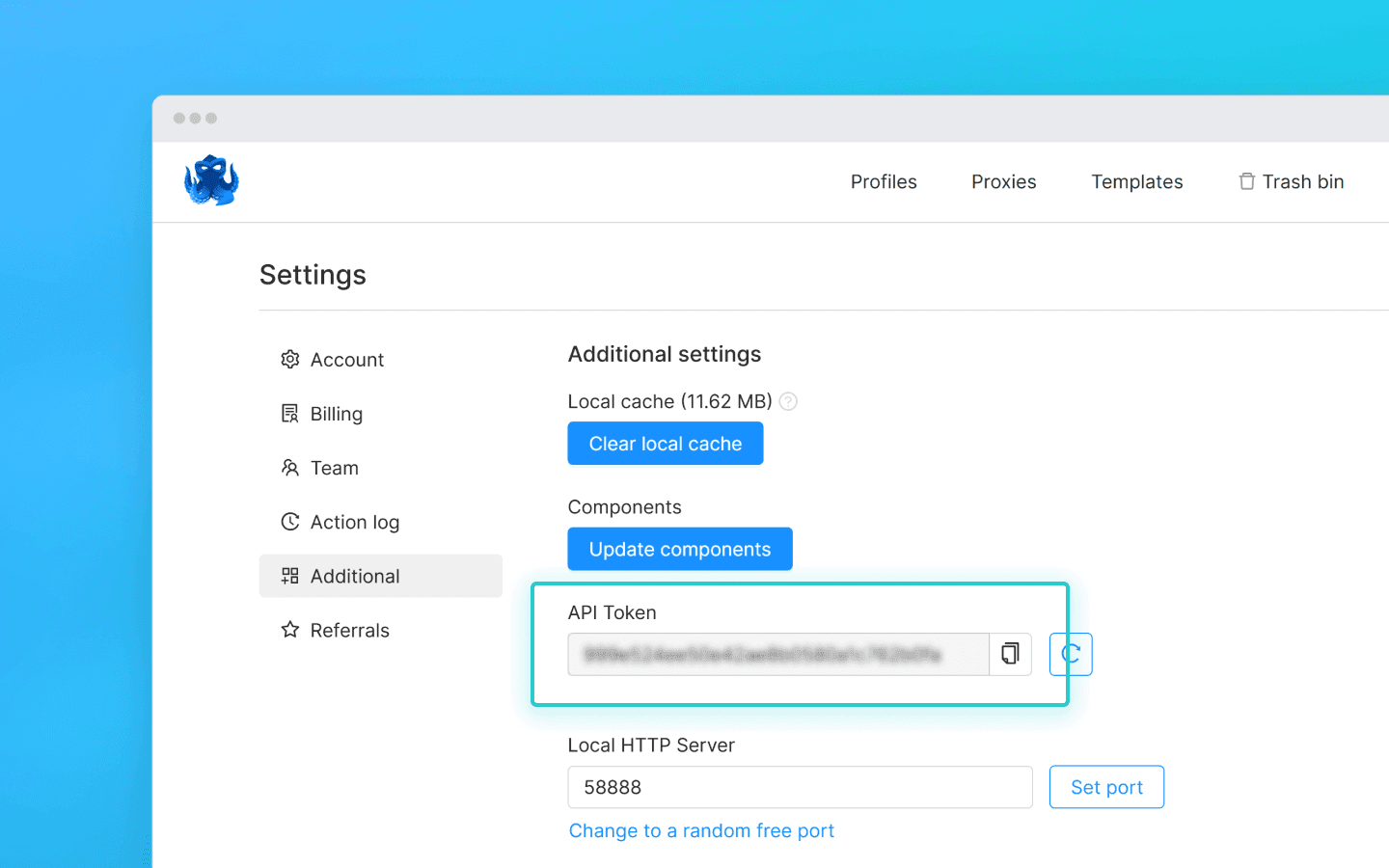
要通过 API 与 Octo Browser 交互,您需要一个 API 令牌。Base 订阅及以上的用户可以使用。API 令牌显示在 Octo Browser 的主账户设置下的“附加”选项卡中(其他团队成员不能看到 API 令牌)。
API 限制(速率限制)
请记住,Octo Browser API 有请求限制。提供的代码片段使用check_limits函数,检查 API 速率限制头并在剩余请求数量较少时自动暂停。这有助于避免429 请求过多错误。
当向公共 API 发出请求时,每个请求消耗 1 RPM 和 1 RPH。使用本地 API 时,除 POST 启动配置文件(1 RPM 和 1 RPH)和 POST 一次性配置文件(4 RPM 和 4 RPH)外,并不消耗 RPM/RPH。
您可以启动、创建和删除的配置文件的确切数量完全取决于您的脚本及其逻辑。您可以根据哪些请求影响 RPH 和 RPM 限制,独立计算所需的请求数量。
一些 API 请求可能需要更复杂的处理,这意味着它们的执行可能比单个请求花费更高。这对于平衡服务器负载和确保所有用户的最佳性能是必要的。
RPM 意味着每分钟请求数。
RPH 意味着每小时请求数。
请求限制值取决于您的订阅。
设置完成后,让我们继续使用有用的代码片段。
检索配置文件名称并将其保存到 .txt 文件
当您需要快速收集所有已创建配置文件的列表在一个地方时,此片段很有用。它有助于简化配置文件跟踪,验证其实际存在性,并对其采取进一步的操作。
在 octo_api 文件夹中创建一个文件 get_titles.js,并将代码片段粘贴到其中。
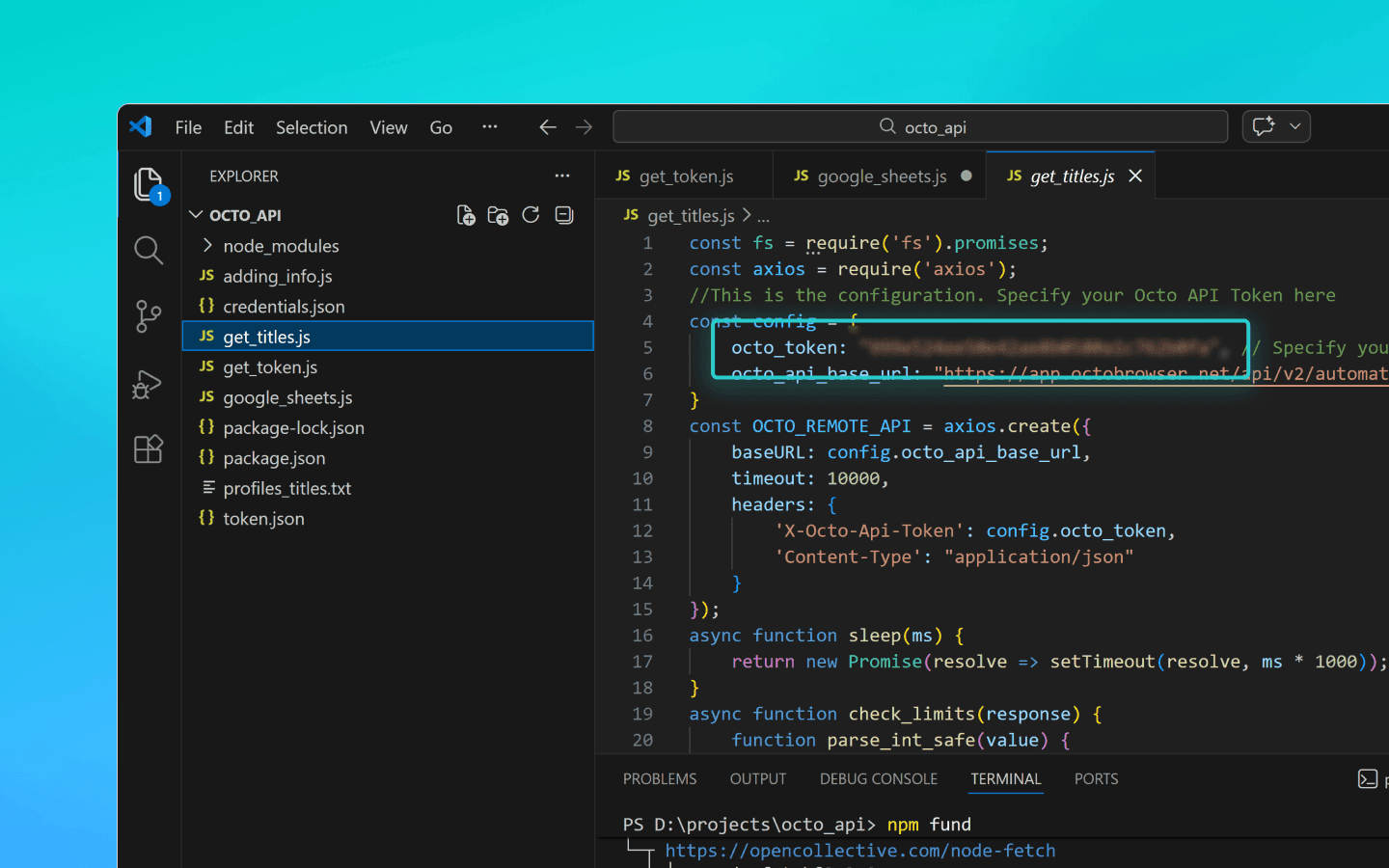
将 OCTO_API_TOKEN 替换为来自 Octo Browser 的 API 令牌。
保存文件。
在终端中输入命令 node get_titles.js 并运行脚本。
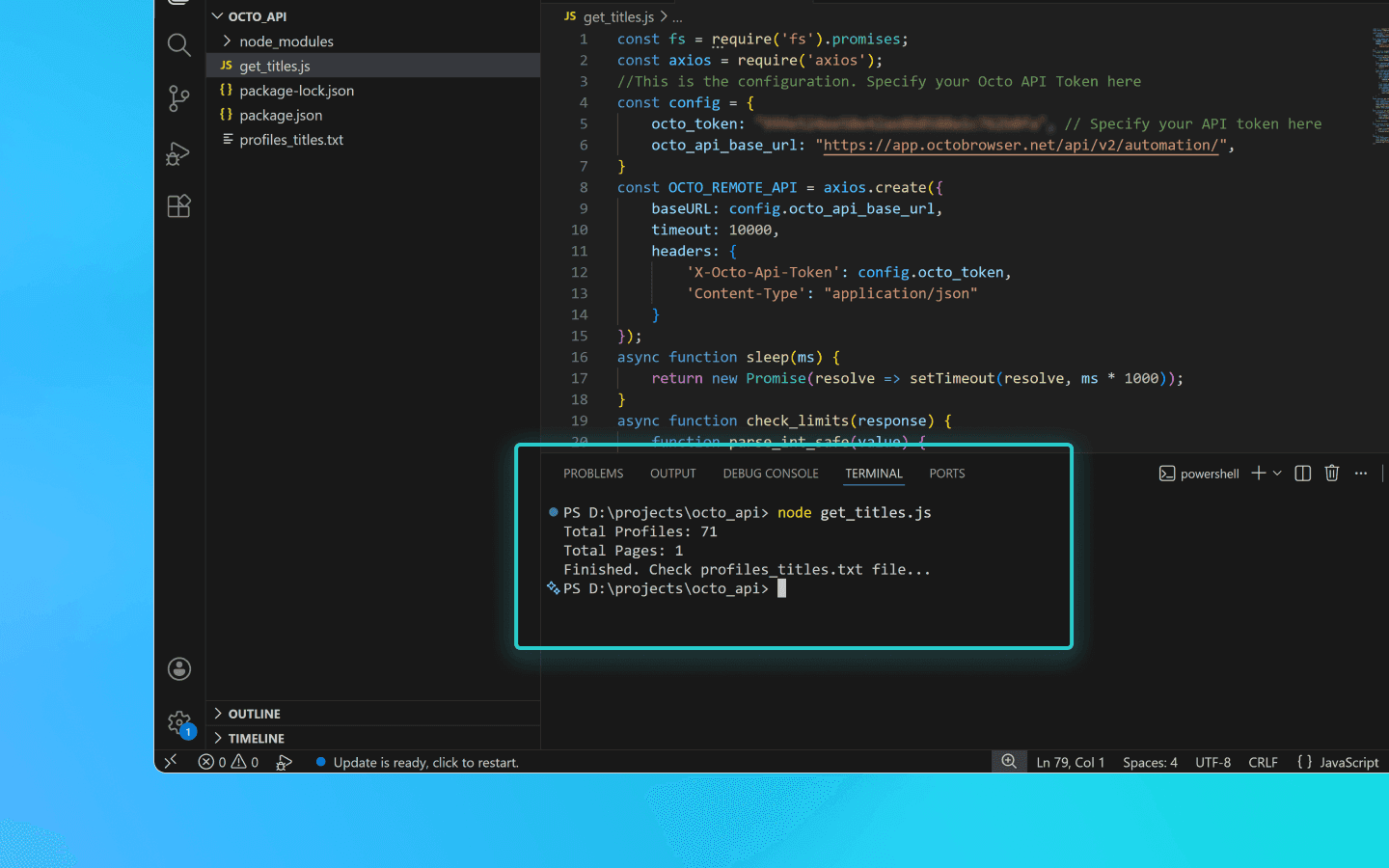
配置文件名称按行保存在与脚本相同文件夹内的 profiles_titles.txt 文件中。
保存配置文件名称到 .txt 文件的代码片段
const fs = require('fs').promises;
const axios = require('axios');
//This is the configuration. Specify your Octo API Token here
const config = {
    octo_token: "OCTO_API_TOKEN", // Specify your API token here
    octo_api_base_url: "https://app.octobrowser.net/api/v2/automation/",
}
const OCTO_REMOTE_API = axios.create({
    baseURL: config.octo_api_base_url,
    timeout: 10000,
    headers: {
        'X-Octo-Api-Token': config.octo_token,
        'Content-Type': "application/json"
    }
});
async function sleep(ms) {
    return new Promise(resolve => setTimeout(resolve, ms * 1000));
}
async function check_limits(response) {
    function parse_int_safe(value) {
        const parsed = parseInt(value, 10);
        return isNaN(parsed) ? 0 : parsed;
    }
    const ratelimit_header = response.headers.ratelimit;
    if (!ratelimit_header) {
        console.warn('No ratelimit header found!');
        return;
    }
    const limit_entries = ratelimit_header.split(',').map(entry => entry.trim());
    for (const entry of limit_entries) {
        const name_match = entry.match(/^([^;]+)/);
        const r_match = entry.match(/;r=(\d+)/);
        const t_match = entry.match(/;t=(\d+)/);
        if (!r_match || !t_match) {
            console.warn(`Invalid ratelimit format: ${entry}`);
            continue;
        }
        const limit_name = name_match ? name_match[1] : 'unknown_limit';
        const remaining_quantity = parse_int_safe(r_match[1]);
        const window_seconds = parse_int_safe(t_match[1]);
        if (remaining_quantity < 5) {
            const wait_time = window_seconds + 1;
            console.log(`Waiting ${wait_time} seconds due to ${limit_name} limit`);
            await sleep(wait_time);
        }
    }
}
async function get_total_pages() {
    const response = await OCTO_REMOTE_API.get('/profiles?page=0&page_len=10');
    const total_profiles = response.data.total_count;
    const total_pages = Math.ceil(response.data.total_count / 100);
    console.log(`Total Profiles: ${total_profiles}\nTotal Pages: ${total_pages}`);
    await check_limits(response);
    return total_pages;
}
async function get_all_profiles_titles(total_pages) {
    let profiles = [];
    for (let i = 0; i < total_pages; i++) {
        let response = await OCTO_REMOTE_API.get(`/profiles?page=${i}&page_len=100&fields=title`);
        await check_limits(response);
        profiles.push(...response.data.data);
    }
    return profiles;
}
async function write_file(profiles) {
    const titles = profiles.map(item => item.title).filter(Boolean);
    try {
        await fs.writeFile('./profiles_titles.txt', titles.join('\n'), 'utf-8');
    } catch (error) {
        console.error(`ERROR: While trying writing the file some error occured:\n${error}`);
    }
}
(async () => {
    const total_pages = await get_total_pages();
    const profiles = await get_all_profiles_titles(total_pages);
    await write_file(profiles);
    console.log('Finished. Check profiles_titles.txt file...');
})()
const fs = require('fs').promises;
const axios = require('axios');
//This is the configuration. Specify your Octo API Token here
const config = {
    octo_token: "OCTO_API_TOKEN", // Specify your API token here
    octo_api_base_url: "https://app.octobrowser.net/api/v2/automation/",
}
const OCTO_REMOTE_API = axios.create({
    baseURL: config.octo_api_base_url,
    timeout: 10000,
    headers: {
        'X-Octo-Api-Token': config.octo_token,
        'Content-Type': "application/json"
    }
});
async function sleep(ms) {
    return new Promise(resolve => setTimeout(resolve, ms * 1000));
}
async function check_limits(response) {
    function parse_int_safe(value) {
        const parsed = parseInt(value, 10);
        return isNaN(parsed) ? 0 : parsed;
    }
    const ratelimit_header = response.headers.ratelimit;
    if (!ratelimit_header) {
        console.warn('No ratelimit header found!');
        return;
    }
    const limit_entries = ratelimit_header.split(',').map(entry => entry.trim());
    for (const entry of limit_entries) {
        const name_match = entry.match(/^([^;]+)/);
        const r_match = entry.match(/;r=(\d+)/);
        const t_match = entry.match(/;t=(\d+)/);
        if (!r_match || !t_match) {
            console.warn(`Invalid ratelimit format: ${entry}`);
            continue;
        }
        const limit_name = name_match ? name_match[1] : 'unknown_limit';
        const remaining_quantity = parse_int_safe(r_match[1]);
        const window_seconds = parse_int_safe(t_match[1]);
        if (remaining_quantity < 5) {
            const wait_time = window_seconds + 1;
            console.log(`Waiting ${wait_time} seconds due to ${limit_name} limit`);
            await sleep(wait_time);
        }
    }
}
async function get_total_pages() {
    const response = await OCTO_REMOTE_API.get('/profiles?page=0&page_len=10');
    const total_profiles = response.data.total_count;
    const total_pages = Math.ceil(response.data.total_count / 100);
    console.log(`Total Profiles: ${total_profiles}\nTotal Pages: ${total_pages}`);
    await check_limits(response);
    return total_pages;
}
async function get_all_profiles_titles(total_pages) {
    let profiles = [];
    for (let i = 0; i < total_pages; i++) {
        let response = await OCTO_REMOTE_API.get(`/profiles?page=${i}&page_len=100&fields=title`);
        await check_limits(response);
        profiles.push(...response.data.data);
    }
    return profiles;
}
async function write_file(profiles) {
    const titles = profiles.map(item => item.title).filter(Boolean);
    try {
        await fs.writeFile('./profiles_titles.txt', titles.join('\n'), 'utf-8');
    } catch (error) {
        console.error(`ERROR: While trying writing the file some error occured:\n${error}`);
    }
}
(async () => {
    const total_pages = await get_total_pages();
    const profiles = await get_all_profiles_titles(total_pages);
    await write_file(profiles);
    console.log('Finished. Check profiles_titles.txt file...');
})()
将扩展、起始页和书签添加到配置文件
此自动化脚本可让您快速标准化配置文件配置,避免手动添加相同的参数。
要添加扩展,您将需要它们的 UUID:
打开已安装扩展的配置文件。
在配置文件地址栏中输入 chrome://extensions/ 并按回车键。
在所需扩展上,点击“详细信息”按钮。
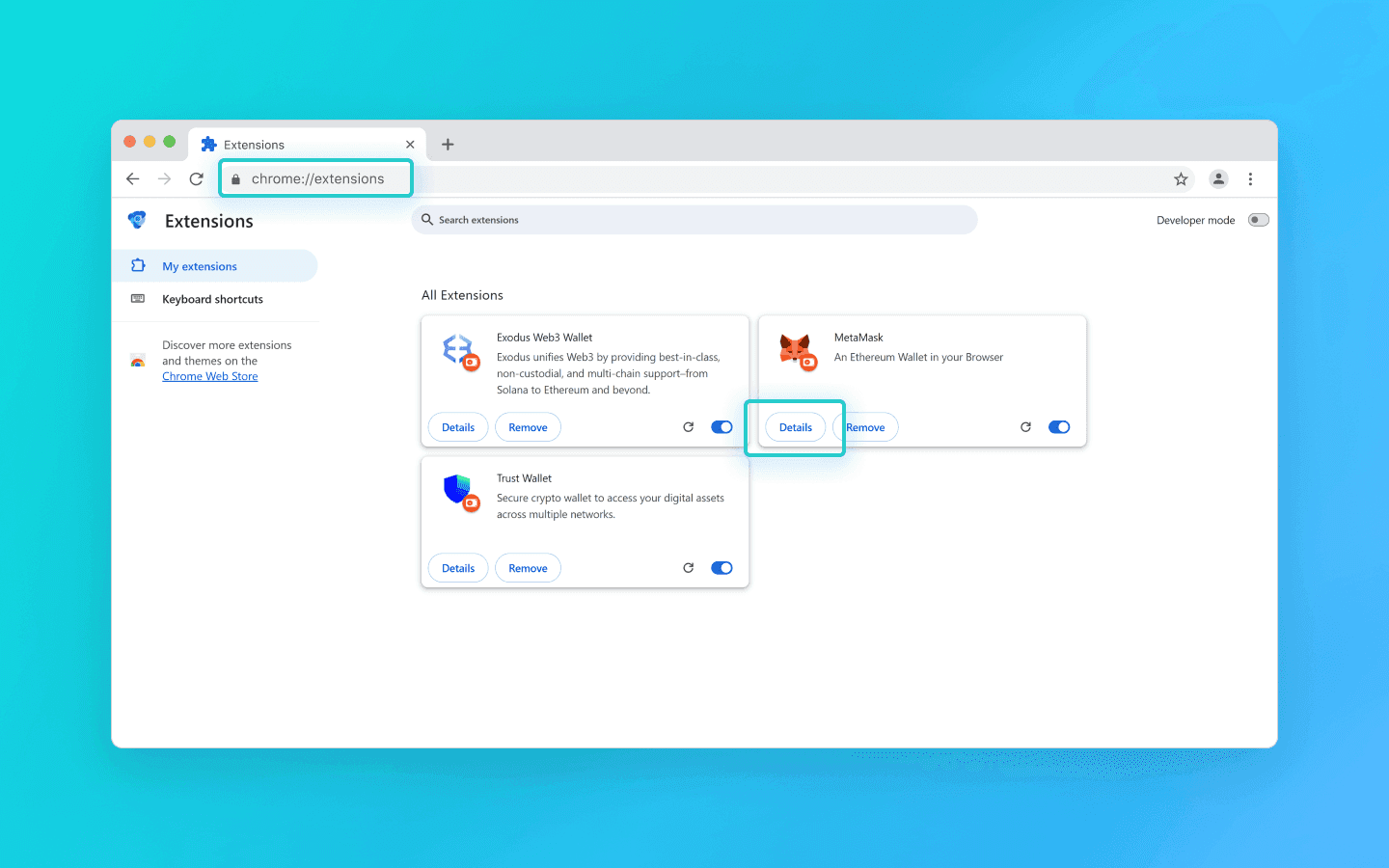
在页面底部复制扩展的 UUID 及其版本。
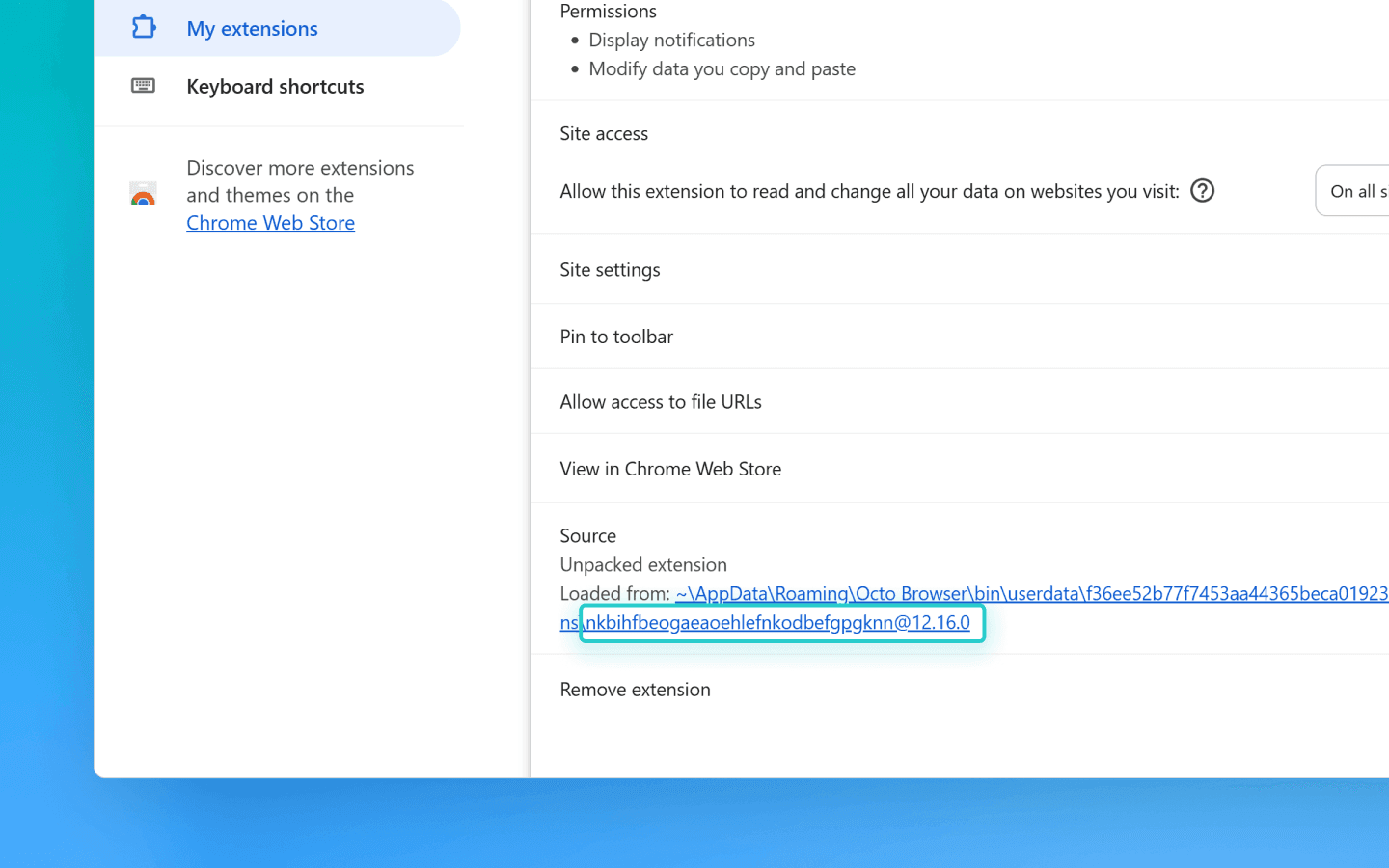
您可以在文档中找到通过 API 检索 UUID 的方法。
接下来,您需要编辑代码:
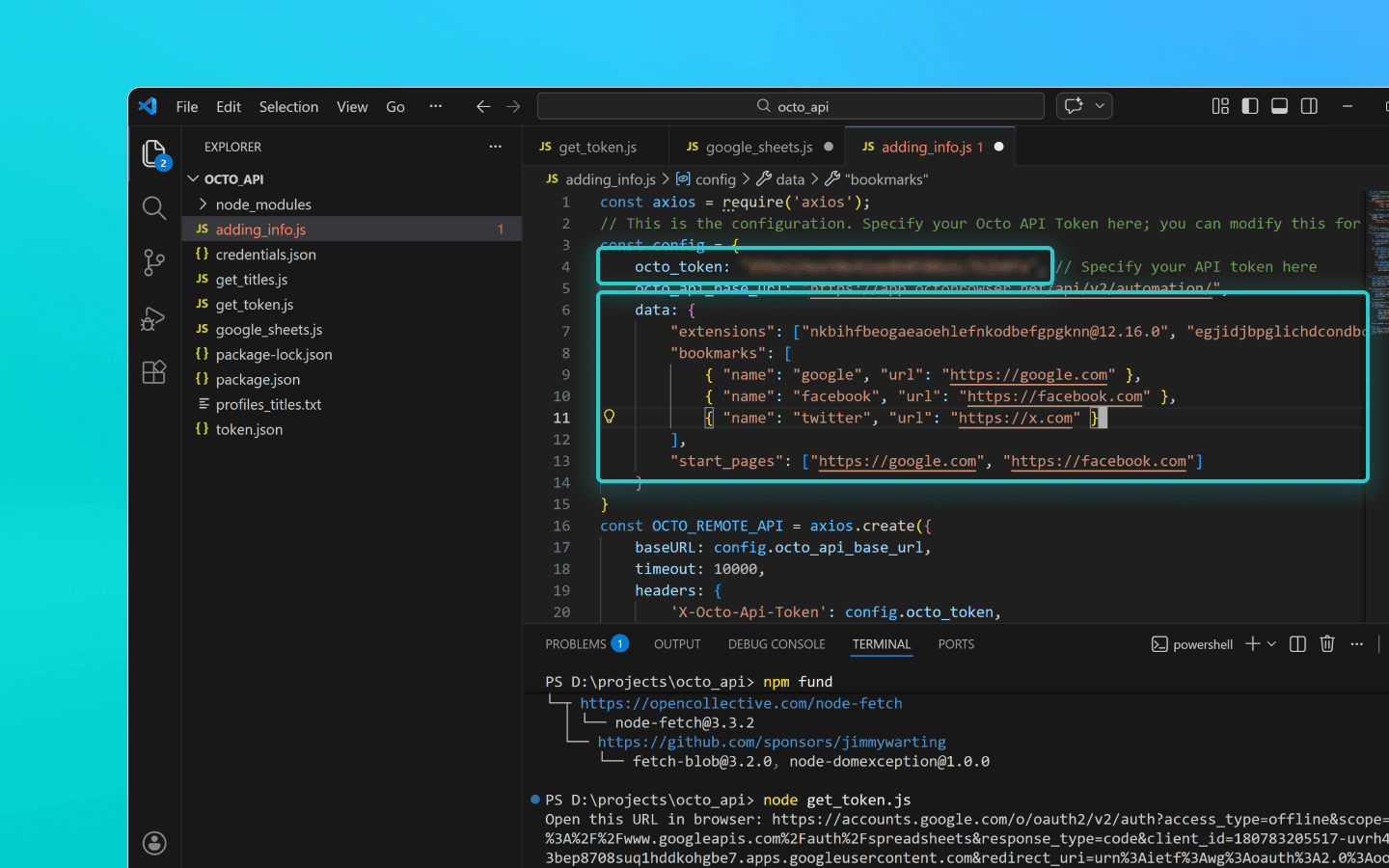
在 octo_api 文件夹中创建一个名为 adding_info.js 的文件。
将代码片段粘贴到其中。
将您的 API 令牌插入 octo_token 字段。
将所需扩展的 UUID 添加到extensions字段。
将名称(书签标题)和 URL(网站地址)添加到bookmarks字段。
将您希望在配置文件启动时自动打开的网站 URL 添加到start_pages字段。
如果您只需添加扩展、书签或起始页,您可以从代码片段中删除不必要的参数:
data: { extensions: ["nkbihfbeogaeaoehlefnkodbefgpgknn@12.17.2"], //remove if you don’t need to add extensions bookmarks: [ { name: "google", url: "https://google.com" }, { name: "facebook", url: "https://facebook.com" } ],//remove if you don’t need bookmarks start_pages: ["https://google.com", "https://facebook.com"] //remove if you don’t need start pages }data: { extensions: ["nkbihfbeogaeaoehlefnkodbefgpgknn@12.17.2"], //remove if you don’t need to add extensions bookmarks: [ { name: "google", url: "https://google.com" }, { name: "facebook", url: "https://facebook.com" } ],//remove if you don’t need bookmarks start_pages: ["https://google.com", "https://facebook.com"] //remove if you don’t need start pages }
保存 adding_info.js 文件。
使用命令 node adding_info.js 运行它。
所需的扩展、书签和起始页将添加到您的所有配置文件中。如果仅需对特定配置文件应用更改,请参阅文档中的示例。
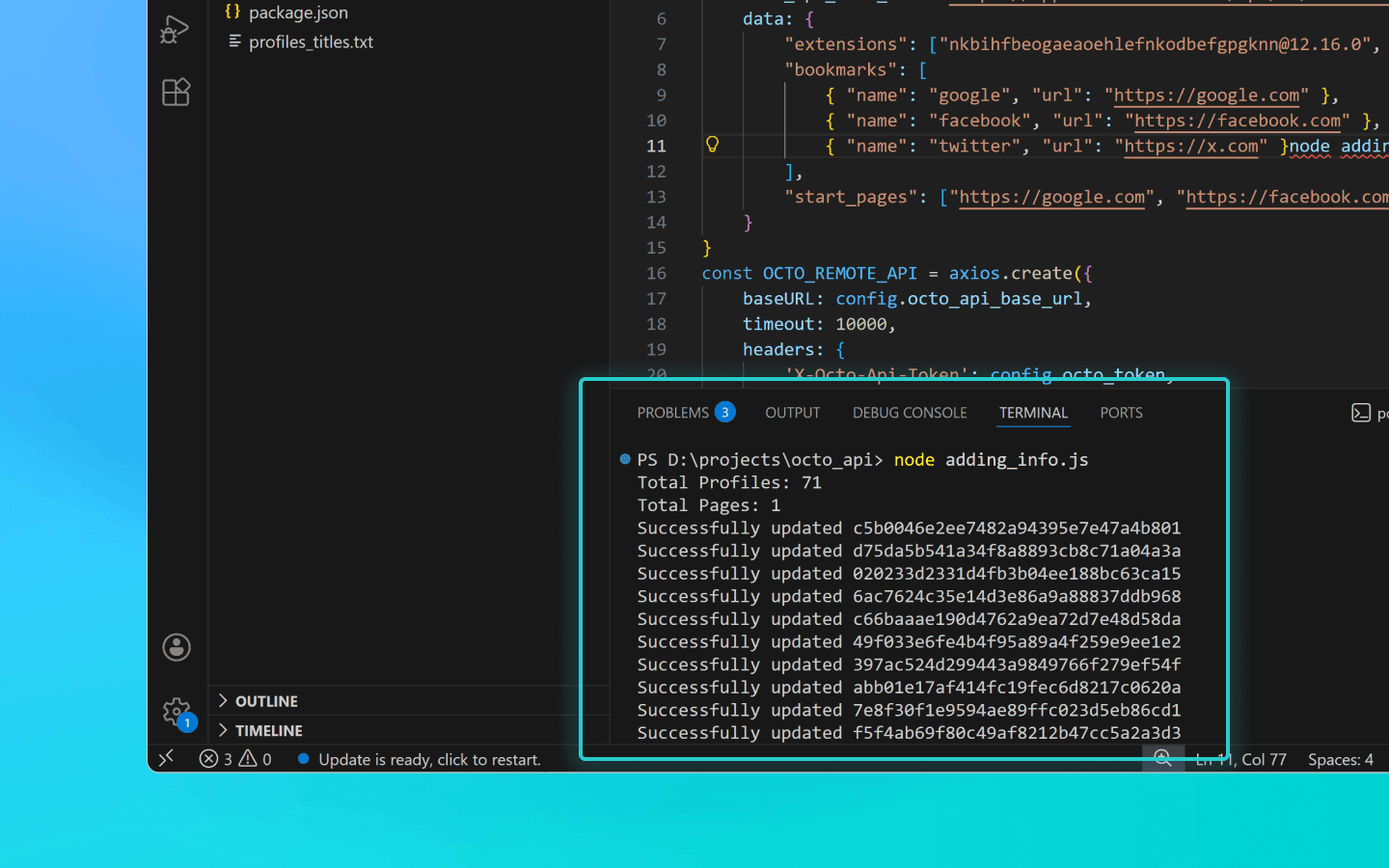
在运行脚本之前,请确保您要更新的配置文件未在运行中。运行中的配置文件将不更新。
添加扩展、起始页和书签到配置文件的代码片段
const axios = require('axios'); // This is the configuration. Specify your Octo API Token here; you can modify this for your personal needs const config = { octo_token: "OCTO_API_TOKEN", // Specify your API token here octo_api_base_url: "https://app.octobrowser.net/api/v2/automation/", data: { "extensions": ["aapfglkgnhmiaabhiijkjpfmhllaodgp@4.2.3"], "bookmarks": [ { "name": "google", "url": "https://google.com" }, { "name": "facebook", "url": "https://facebook.com" } ], "start_pages": ["https://google.com", "https://facebook.com"] } } const OCTO_REMOTE_API = axios.create({ baseURL: config.octo_api_base_url, timeout: 10000, headers: { 'X-Octo-Api-Token': config.octo_token, 'Content-Type': "application/json" } }); //functions async function sleep(ms) { return new Promise(resolve => setTimeout(resolve, ms * 1000)); } async function check_limits(response) { function parse_int_safe(value) { const parsed = parseInt(value, 10); return isNaN(parsed) ? 0 : parsed; } const ratelimit_header = response.headers.ratelimit; if (!ratelimit_header) { console.warn('No ratelimit header found!'); return; } const limit_entries = ratelimit_header.split(',').map(entry => entry.trim()); for (const entry of limit_entries) { const name_match = entry.match(/^([^;]+)/); const r_match = entry.match(/;r=(\d+)/); const t_match = entry.match(/;t=(\d+)/); if (!r_match || !t_match) { console.warn(`Invalid ratelimit format: ${entry}`); continue; } const limit_name = name_match ? name_match[1] : 'unknown_limit'; const remaining_quantity = parse_int_safe(r_match[1]); const window_seconds = parse_int_safe(t_match[1]); if (remaining_quantity < 5) { const wait_time = window_seconds + 1; console.log(`Waiting ${wait_time} seconds due to ${limit_name} limit`); await sleep(wait_time); } } } async function get_total_profiles() { const response = await OCTO_REMOTE_API.get('/profiles?page=0&page_len=10'); const total_profiles = response.data.total_count; const total_pages = Math.ceil(response.data.total_count / 100); console.log(`Total Profiles: ${total_profiles}\nTotal Pages: ${total_pages}`); await check_limits(response); return total_pages; } async function get_all_profiles_uuids(total_pages) { let profiles = []; for (let i = 0; i < total_pages; i++) { let response = await OCTO_REMOTE_API.get(`/profiles?page=${i}&page_len=100`); await check_limits(response); profiles.push(...response.data.data); } return profiles; } async function patch_all_profiles(profiles) { let updated = []; let not_updated = []; for (let profile of profiles) { try { const response = await OCTO_REMOTE_API.patch(`/profiles/${profile.uuid}`, config.data); await check_limits(response); updated.push(profile); console.log(`Successfully updated ${profile.uuid}`); } catch (error) { not_updated.push(profile); console.error(`ERROR: Can't patch profile ${profile.uuid}`); } } return [updated, not_updated]; } (async () => { const total = await get_total_profiles(); const profiles = await get_all_profiles_uuids(total); const [updated, not_updated] = await patch_all_profiles(profiles); console.log(`Finished process:\nUpdated: ${updated.length}\nNot updated: ${not_updated.length}`); })();
const axios = require('axios'); // This is the configuration. Specify your Octo API Token here; you can modify this for your personal needs const config = { octo_token: "OCTO_API_TOKEN", // Specify your API token here octo_api_base_url: "https://app.octobrowser.net/api/v2/automation/", data: { "extensions": ["aapfglkgnhmiaabhiijkjpfmhllaodgp@4.2.3"], "bookmarks": [ { "name": "google", "url": "https://google.com" }, { "name": "facebook", "url": "https://facebook.com" } ], "start_pages": ["https://google.com", "https://facebook.com"] } } const OCTO_REMOTE_API = axios.create({ baseURL: config.octo_api_base_url, timeout: 10000, headers: { 'X-Octo-Api-Token': config.octo_token, 'Content-Type': "application/json" } }); //functions async function sleep(ms) { return new Promise(resolve => setTimeout(resolve, ms * 1000)); } async function check_limits(response) { function parse_int_safe(value) { const parsed = parseInt(value, 10); return isNaN(parsed) ? 0 : parsed; } const ratelimit_header = response.headers.ratelimit; if (!ratelimit_header) { console.warn('No ratelimit header found!'); return; } const limit_entries = ratelimit_header.split(',').map(entry => entry.trim()); for (const entry of limit_entries) { const name_match = entry.match(/^([^;]+)/); const r_match = entry.match(/;r=(\d+)/); const t_match = entry.match(/;t=(\d+)/); if (!r_match || !t_match) { console.warn(`Invalid ratelimit format: ${entry}`); continue; } const limit_name = name_match ? name_match[1] : 'unknown_limit'; const remaining_quantity = parse_int_safe(r_match[1]); const window_seconds = parse_int_safe(t_match[1]); if (remaining_quantity < 5) { const wait_time = window_seconds + 1; console.log(`Waiting ${wait_time} seconds due to ${limit_name} limit`); await sleep(wait_time); } } } async function get_total_profiles() { const response = await OCTO_REMOTE_API.get('/profiles?page=0&page_len=10'); const total_profiles = response.data.total_count; const total_pages = Math.ceil(response.data.total_count / 100); console.log(`Total Profiles: ${total_profiles}\nTotal Pages: ${total_pages}`); await check_limits(response); return total_pages; } async function get_all_profiles_uuids(total_pages) { let profiles = []; for (let i = 0; i < total_pages; i++) { let response = await OCTO_REMOTE_API.get(`/profiles?page=${i}&page_len=100`); await check_limits(response); profiles.push(...response.data.data); } return profiles; } async function patch_all_profiles(profiles) { let updated = []; let not_updated = []; for (let profile of profiles) { try { const response = await OCTO_REMOTE_API.patch(`/profiles/${profile.uuid}`, config.data); await check_limits(response); updated.push(profile); console.log(`Successfully updated ${profile.uuid}`); } catch (error) { not_updated.push(profile); console.error(`ERROR: Can't patch profile ${profile.uuid}`); } } return [updated, not_updated]; } (async () => { const total = await get_total_profiles(); const profiles = await get_all_profiles_uuids(total); const [updated, not_updated] = await patch_all_profiles(profiles); console.log(`Finished process:\nUpdated: ${updated.length}\nNot updated: ${not_updated.length}`); })();
导出配置文件数据到 Google Sheets
您可以将您的配置文件数据导出到电子表中。这使得结构化信息、排序和分析更加容易。您可以导出以下配置文件参数:
UUID,
标签,
名称,
描述。
在 octo_api 文件夹中创建一个名为 google_sheets.js 的文件。
将代码片段添加到文件中。
填写octo_token字段。API 令牌可以在 Octo Browser 中找到。
填写table_id字段。这是您的 Google Sheets 文档的 ID。
填写table_sheet_name字段。这是您希望导出数据的 Google Sheets 文档中的表格名称。
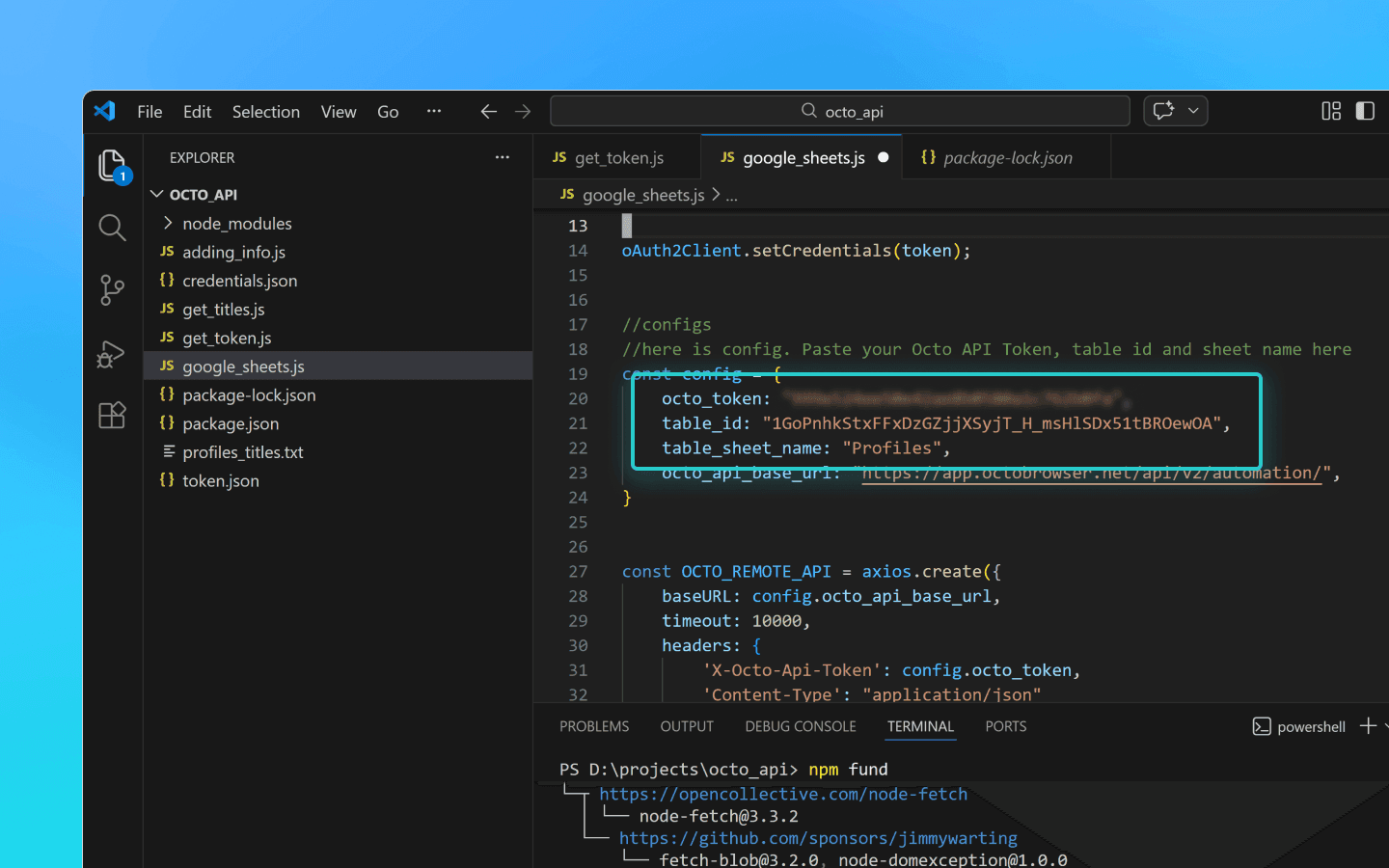
保存更改。
将 credentials.json 和 token.json 文件添加到 octo_api 文件夹。
使用命令 node google_sheets.js 在 VS Code 终端中运行脚本。
脚本完成后,数据将上传到指定的电子表格。
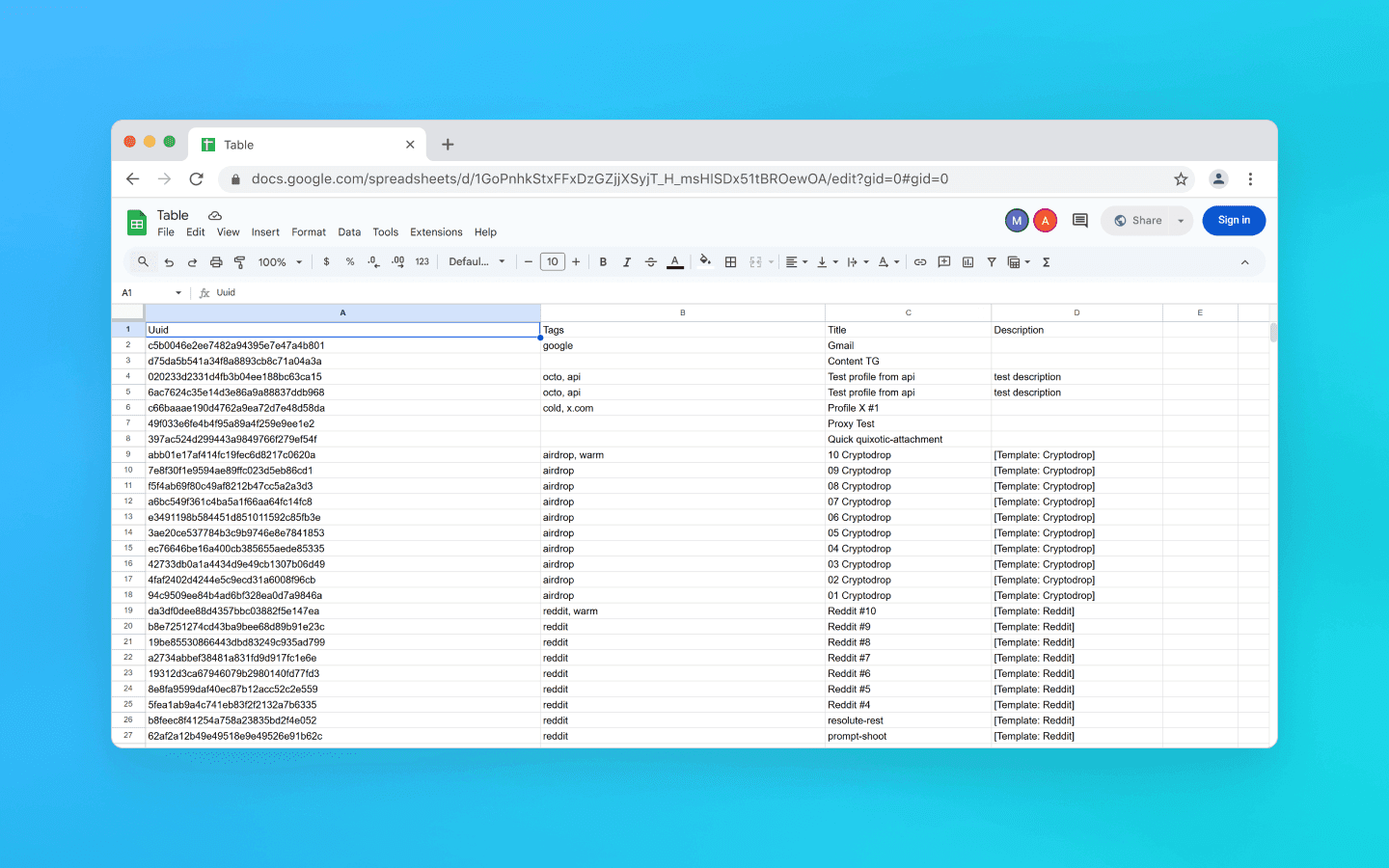
导出配置文件数据到 Google Sheets 的代码片段
const axios = require('axios'); const { google } = require('googleapis'); const token = require('./token.json'); const credentials = require('./credentials.json'); const oAuth2Client = new google.auth.OAuth2( credentials.installed.client_id, credentials.installed.client_secret, credentials.installed.redirect_uris[0] ); oAuth2Client.setCredentials(token); //configuration //Paste your Octo API token, spreadsheet ID and sheet name here const config = { octo_token: "OCTO_API_TOKEN", table_id: "1pqnVysHymZSI5Lzx6odasdasAqE022fqUEf6q5LnOqAhylLSM", table_sheet_name: "Profiles", octo_api_base_url: "https://app.octobrowser.net/api/v2/automation/", } const OCTO_REMOTE_API = axios.create({ baseURL: config.octo_api_base_url, timeout: 10000, headers: { 'X-Octo-Api-Token': config.octo_token, 'Content-Type': "application/json" } }); //functions async function check_limits(response) { function parse_int_safe(value) { const parsed = parseInt(value, 10); return isNaN(parsed) ? 0 : parsed; } const ratelimit_header = response.headers.ratelimit; if (!ratelimit_header) { console.warn('No ratelimit header found!'); return; } const limit_entries = ratelimit_header.split(',').map(entry => entry.trim()); for (const entry of limit_entries) { const name_match = entry.match(/^([^;]+)/); const r_match = entry.match(/;r=(\d+)/); const t_match = entry.match(/;t=(\d+)/); if (!r_match || !t_match) { console.warn(`Invalid ratelimit format: ${entry}`); continue; } const limit_name = name_match ? name_match[1] : 'unknown_limit'; const remaining_quantity = parse_int_safe(r_match[1]); const window_seconds = parse_int_safe(t_match[1]); if (remaining_quantity < 5) { const wait_time = window_seconds + 1; console.log(`Waiting ${wait_time} seconds due to ${limit_name} limit`); await sleep(wait_time); } } } async function sleep(ms) { return new Promise(resolve => setTimeout(resolve, ms * 1000)); } async function get_total_pages() { const response = await OCTO_REMOTE_API.get('/profiles?page=0&page_len=10'); const total_profiles = response.data.total_count; const total_pages = Math.ceil(response.data.total_count / 100); console.log(`Total Profiles: ${total_profiles}\nTotal Pages: ${total_pages}`); await check_limits(response); return total_pages; } async function get_all_profiles_data(total_pages) { let profiles = []; for (let i = 0; i < total_pages; i++) { let response = await OCTO_REMOTE_API.get(`/profiles?page=${i}&page_len=100&fields=title,description,tags`); await check_limits(response); profiles.push(...response.data.data); } return profiles; } async function fill_sheet_with_data(oAuth2Client, spreadsheet_id, list_name, data) { const sheets = google.sheets({ version: 'v4', auth: oAuth2Client }); try { const sheetInfo = await sheets.spreadsheets.get({ spreadsheetId: spreadsheet_id, }); const sheetExists = sheetInfo.data.sheets.some( sheet => sheet.properties.title === list_name ); if (!sheetExists) { await sheets.spreadsheets.batchUpdate({ spreadsheetId: spreadsheet_id, resource: { requests: [{ addSheet: { properties: { title: list_name } } }] } }); console.log(`Создан новый лист "${list_name}".`); } const headers = ['Uuid', 'Tags', 'Title', 'Description']; const values = data.map(item => [ item.uuid, Array.isArray(item.tags) ? item.tags.join(', ') : item.tags, item.title, item.description || '' ]); await sheets.spreadsheets.values.update({ spreadsheetId: spreadsheet_id, range: `${list_name}!A1:D1`, valueInputOption: 'RAW', resource: { values: [headers] } }); await sheets.spreadsheets.values.update({ spreadsheetId: spreadsheet_id, range: `${list_name}!A2:D${values.length + 1}`, valueInputOption: 'RAW', resource: { values: values } }); console.log(`Данные успешно записаны в лист "${list_name}".`); } catch (err) { console.error('Ошибка при обновлении таблицы:', err); throw err; } } (async () => { const total_pages = await get_total_pages(); const profiles_data = await get_all_profiles_data(total_pages); await fill_sheet_with_data(oAuth2Client, config.table_id, config.table_sheet_name, profiles_data); })()
const axios = require('axios'); const { google } = require('googleapis'); const token = require('./token.json'); const credentials = require('./credentials.json'); const oAuth2Client = new google.auth.OAuth2( credentials.installed.client_id, credentials.installed.client_secret, credentials.installed.redirect_uris[0] ); oAuth2Client.setCredentials(token); //configuration //Paste your Octo API token, spreadsheet ID and sheet name here const config = { octo_token: "OCTO_API_TOKEN", table_id: "1pqnVysHymZSI5Lzx6odasdasAqE022fqUEf6q5LnOqAhylLSM", table_sheet_name: "Profiles", octo_api_base_url: "https://app.octobrowser.net/api/v2/automation/", } const OCTO_REMOTE_API = axios.create({ baseURL: config.octo_api_base_url, timeout: 10000, headers: { 'X-Octo-Api-Token': config.octo_token, 'Content-Type': "application/json" } }); //functions async function check_limits(response) { function parse_int_safe(value) { const parsed = parseInt(value, 10); return isNaN(parsed) ? 0 : parsed; } const ratelimit_header = response.headers.ratelimit; if (!ratelimit_header) { console.warn('No ratelimit header found!'); return; } const limit_entries = ratelimit_header.split(',').map(entry => entry.trim()); for (const entry of limit_entries) { const name_match = entry.match(/^([^;]+)/); const r_match = entry.match(/;r=(\d+)/); const t_match = entry.match(/;t=(\d+)/); if (!r_match || !t_match) { console.warn(`Invalid ratelimit format: ${entry}`); continue; } const limit_name = name_match ? name_match[1] : 'unknown_limit'; const remaining_quantity = parse_int_safe(r_match[1]); const window_seconds = parse_int_safe(t_match[1]); if (remaining_quantity < 5) { const wait_time = window_seconds + 1; console.log(`Waiting ${wait_time} seconds due to ${limit_name} limit`); await sleep(wait_time); } } } async function sleep(ms) { return new Promise(resolve => setTimeout(resolve, ms * 1000)); } async function get_total_pages() { const response = await OCTO_REMOTE_API.get('/profiles?page=0&page_len=10'); const total_profiles = response.data.total_count; const total_pages = Math.ceil(response.data.total_count / 100); console.log(`Total Profiles: ${total_profiles}\nTotal Pages: ${total_pages}`); await check_limits(response); return total_pages; } async function get_all_profiles_data(total_pages) { let profiles = []; for (let i = 0; i < total_pages; i++) { let response = await OCTO_REMOTE_API.get(`/profiles?page=${i}&page_len=100&fields=title,description,tags`); await check_limits(response); profiles.push(...response.data.data); } return profiles; } async function fill_sheet_with_data(oAuth2Client, spreadsheet_id, list_name, data) { const sheets = google.sheets({ version: 'v4', auth: oAuth2Client }); try { const sheetInfo = await sheets.spreadsheets.get({ spreadsheetId: spreadsheet_id, }); const sheetExists = sheetInfo.data.sheets.some( sheet => sheet.properties.title === list_name ); if (!sheetExists) { await sheets.spreadsheets.batchUpdate({ spreadsheetId: spreadsheet_id, resource: { requests: [{ addSheet: { properties: { title: list_name } } }] } }); console.log(`Создан новый лист "${list_name}".`); } const headers = ['Uuid', 'Tags', 'Title', 'Description']; const values = data.map(item => [ item.uuid, Array.isArray(item.tags) ? item.tags.join(', ') : item.tags, item.title, item.description || '' ]); await sheets.spreadsheets.values.update({ spreadsheetId: spreadsheet_id, range: `${list_name}!A1:D1`, valueInputOption: 'RAW', resource: { values: [headers] } }); await sheets.spreadsheets.values.update({ spreadsheetId: spreadsheet_id, range: `${list_name}!A2:D${values.length + 1}`, valueInputOption: 'RAW', resource: { values: values } }); console.log(`Данные успешно записаны в лист "${list_name}".`); } catch (err) { console.error('Ошибка при обновлении таблицы:', err); throw err; } } (async () => { const total_pages = await get_total_pages(); const profiles_data = await get_all_profiles_data(total_pages); await fill_sheet_with_data(oAuth2Client, config.table_id, config.table_sheet_name, profiles_data); })()
如何获取table_id
在 Google Sheets 中打开或创建一个电子表格。
复制表格 ID。这是 URL 中
/d/和/edit之间的部分。
例如,如果您的链接看起来像 https://docs.google.com/spreadsheets/d/1GoPnhkStxFFxDzGZjjXSyjT_H_msHlSDx51tBROewOA/edit,那么 table_id 是 1GoPnhkStxFFxDzGZjjXSyjT_H_msHlSDx51tBROewOA。
如何获取 credentials.json 文件
登录到个人(非组织)Gmail 账户。
从列表中选择任一欧洲国家并点击同意并继续。
点击选择项目,然后新建项目。
输入任意项目名称并点击创建。
输入任意应用名称、您的邮箱并点击下一步。
选择外部,重新输入您的邮箱,点击下一步,勾选同意框,然后点击继续和完成。
在测试用户部分,点击添加用户。
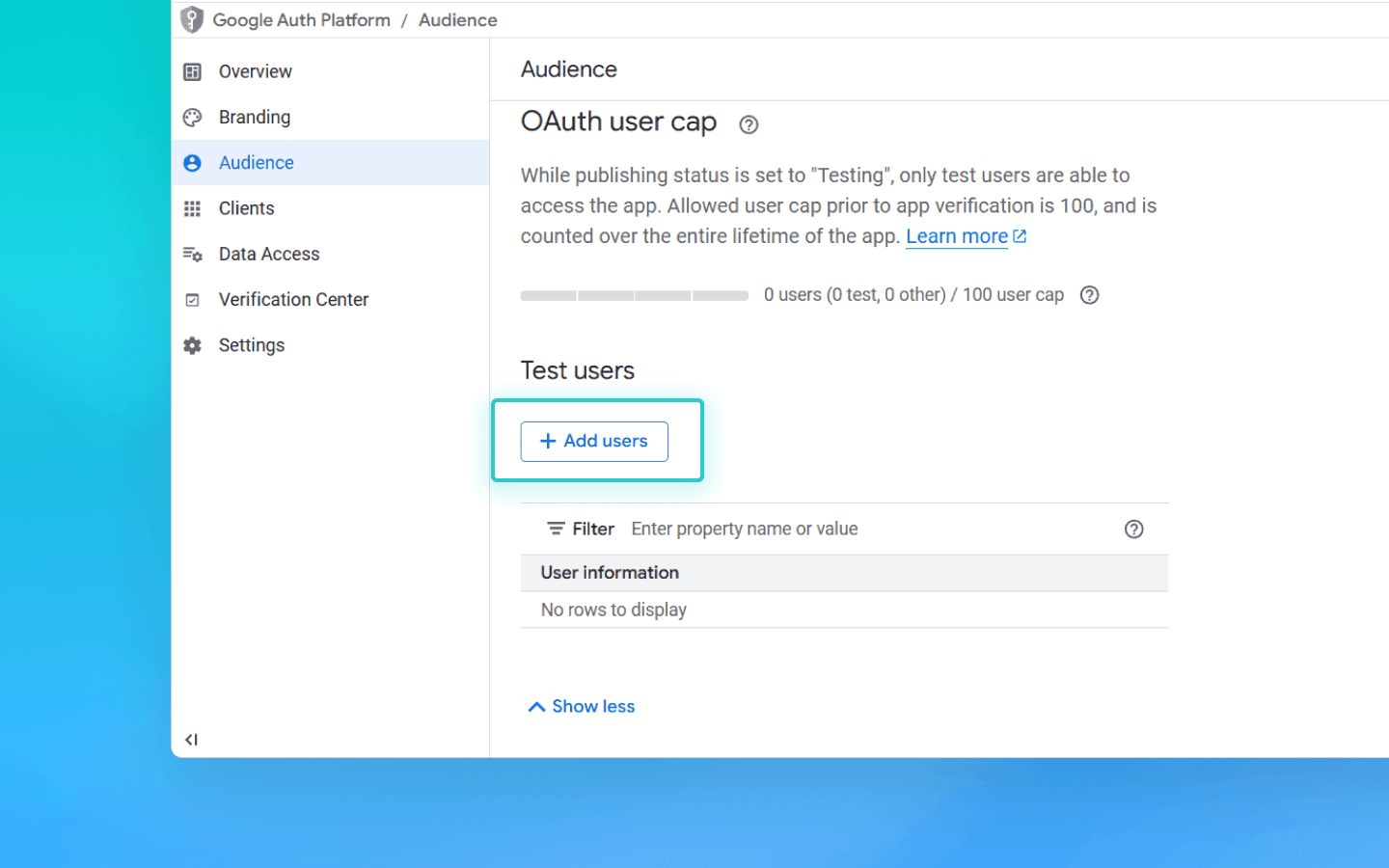
添加您的邮箱并点击保存。
在页面 https://console.cloud.google.com/auth/overview,点击创建 OAuth 客户端。
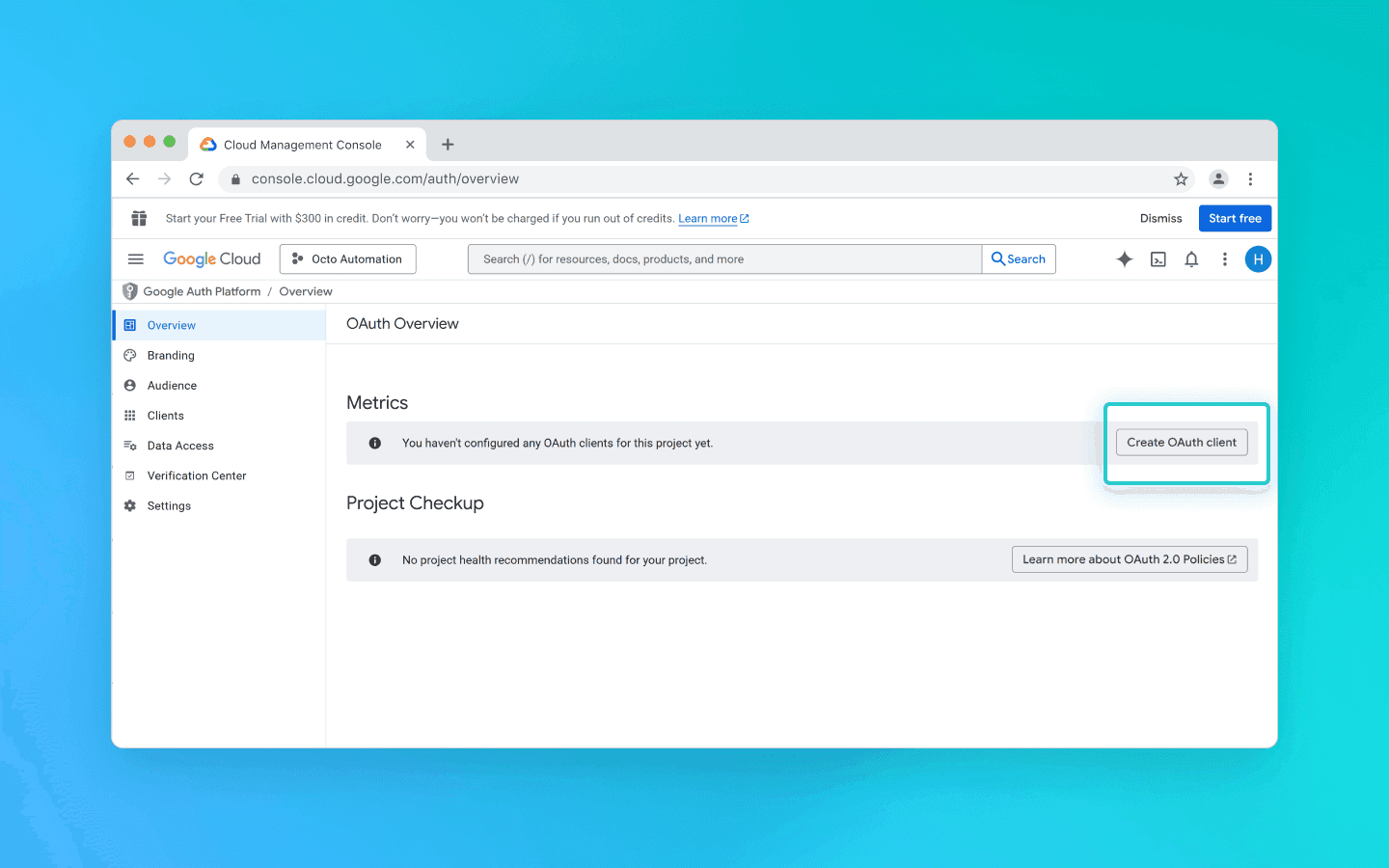
从列表中选择桌面应用,输入任意名称并点击创建。
将出现一个弹出窗口。从中下载 JSON 文件。
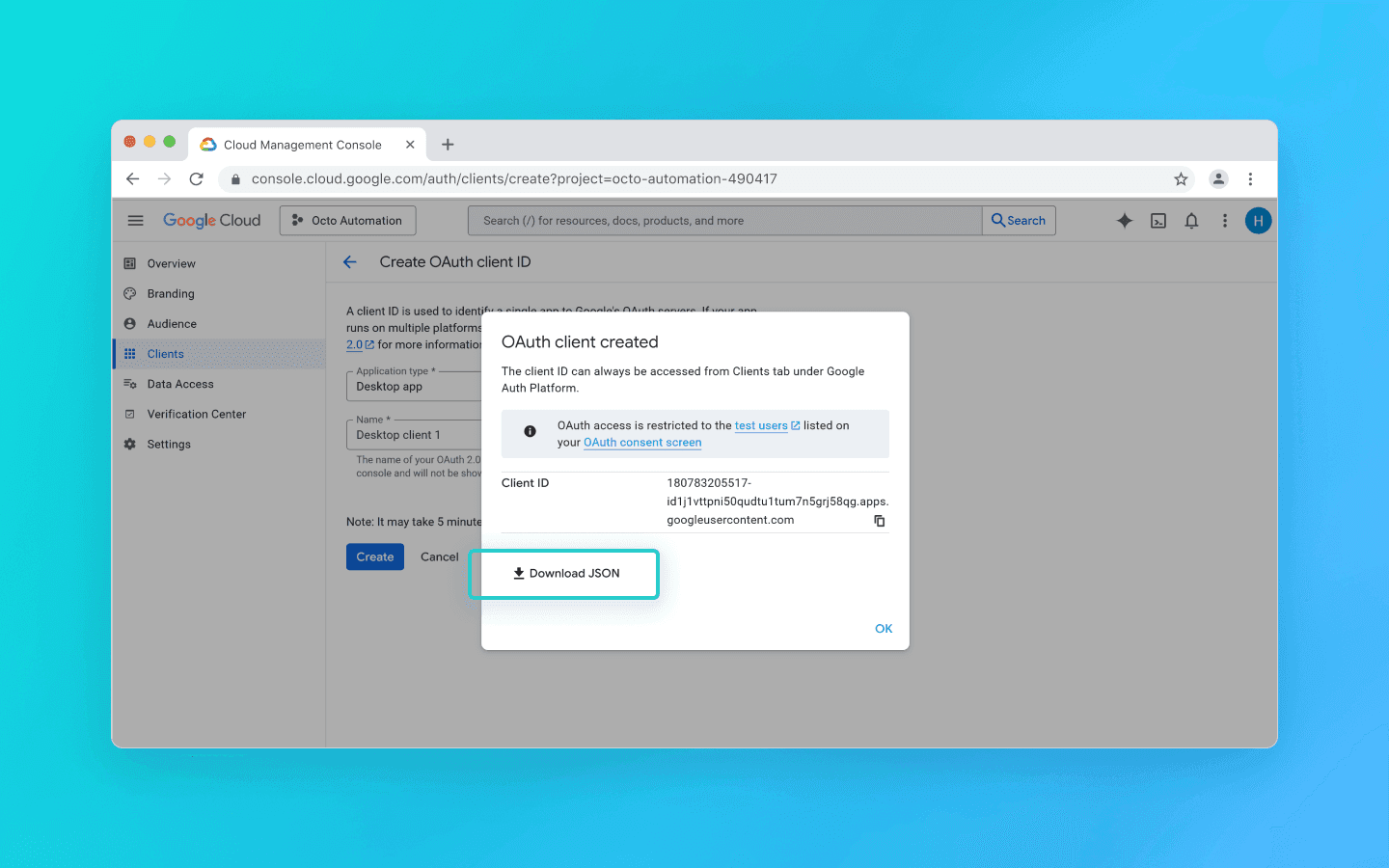
搜索 Google Sheets API。
选择并点击启用。
打开之前下载的 JSON 文件。
将
redirect_uris的值从http://localhost修改为"redirect_uris": ["urn:ietf:wg:oauth:2.0:oob","http://localhost"]。
仔细进行更改以避免意外删除括号。
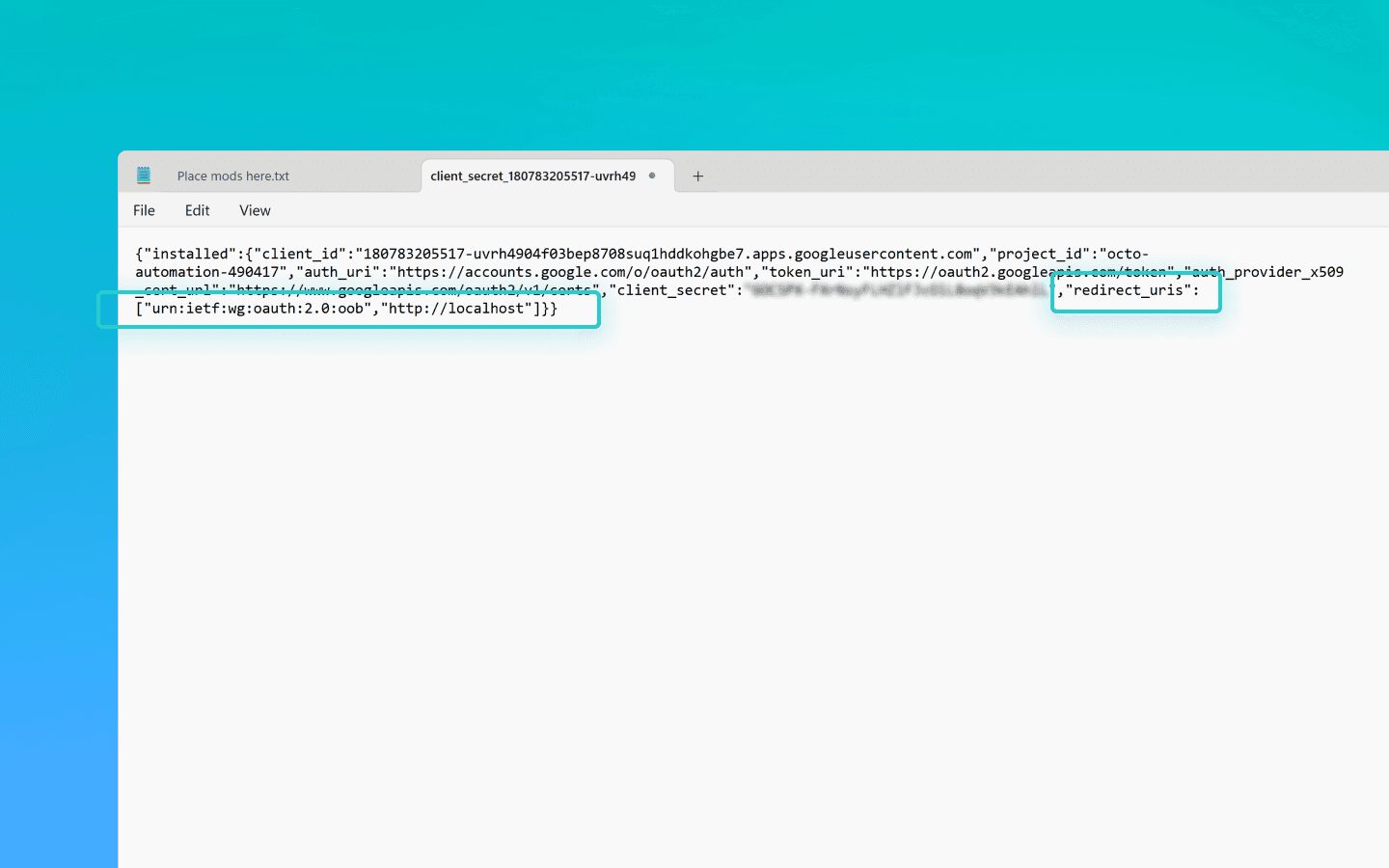
保存文件。
将其重命名为 credentials.json。
将其添加到 octo_api 文件夹。
如何获取 token.json 文件
在 octo_api 文件夹中创建一个名为 get_token.js 的文件并在 VS Code 中打开它。
在 VS Code 终端中运行命令 Npm install googleapis。
将令牌生成脚本粘贴到 get_token.js 并保存文件。
使用 node get_token.js 运行脚本。
您将看到一个链接,上面写着在浏览器中打开此 URL:
https://accounts.google.com/o/oauth2/…打开链接。
登录到您的 Google 账户。
点击通过同意屏幕。
在最后一页,Google 将显示授权码。
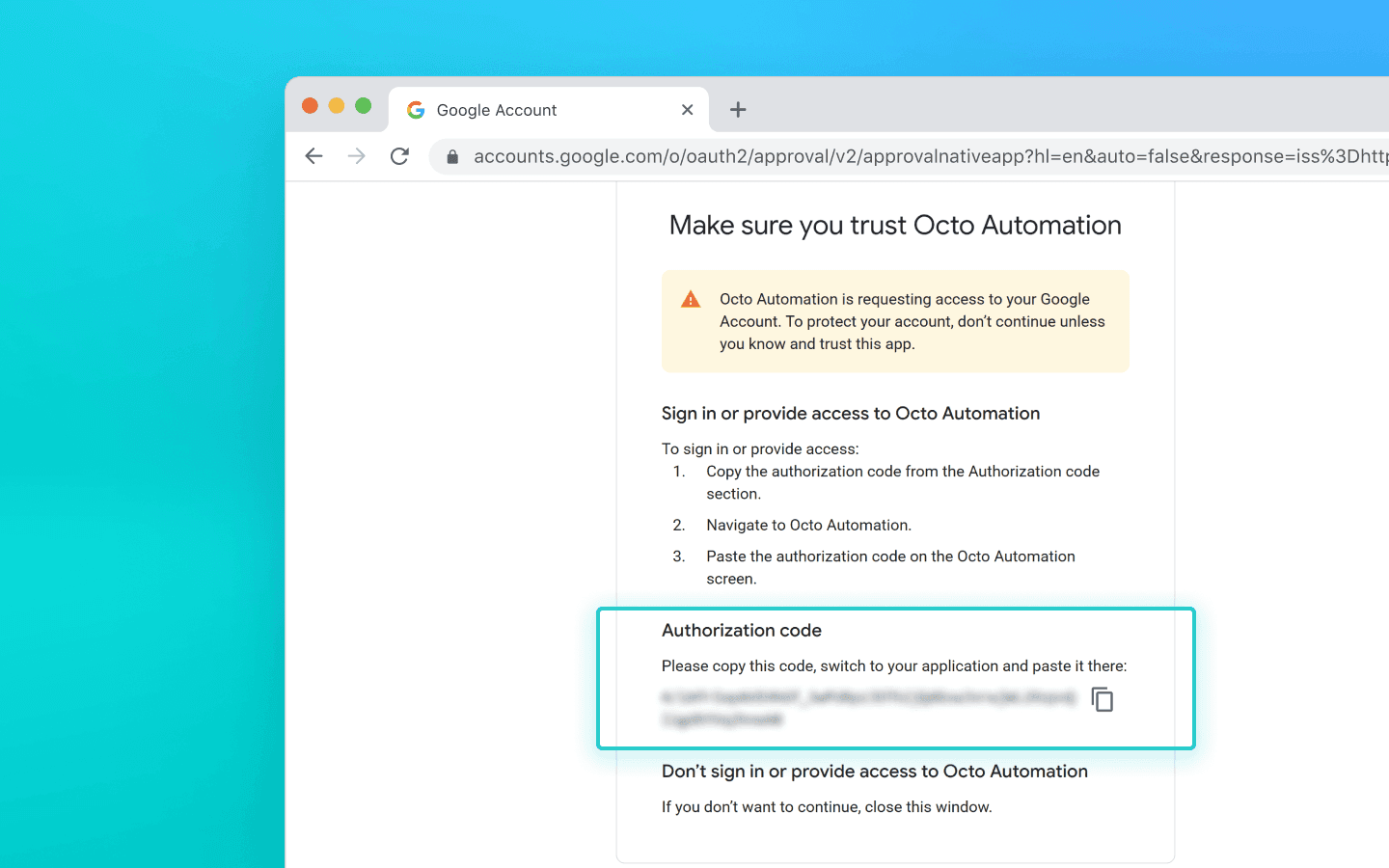
将代码粘贴到终端并按回车键。
然后脚本将在您运行它的文件夹中创建一个 token.json 文件。
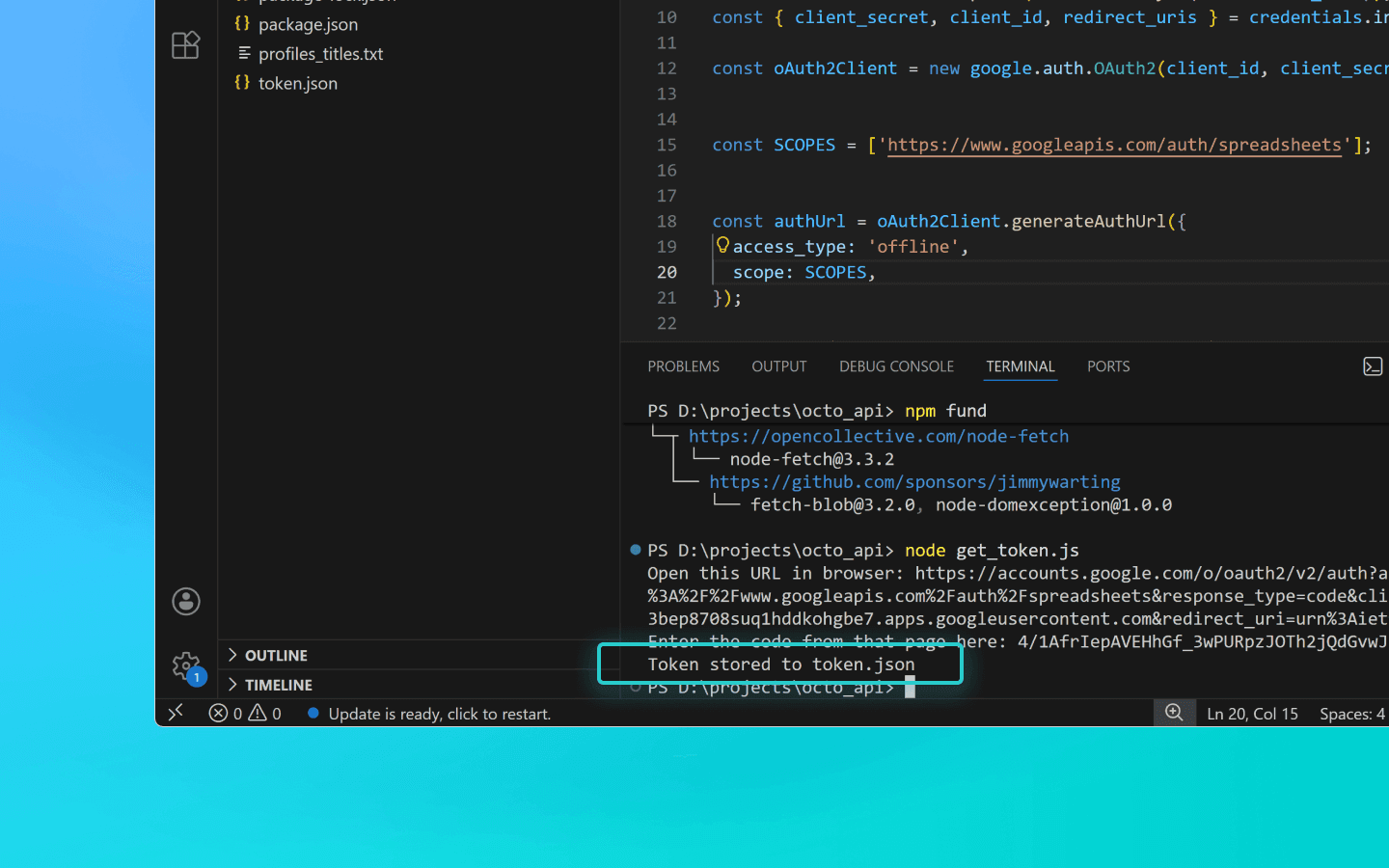
令牌生成脚本
const fs = require('fs'); const readline = require('readline'); const { google } = require('googleapis'); const CREDENTIALS_PATH = 'credentials.json'; const TOKEN_PATH = 'token.json'; const credentials = JSON.parse(fs.readFileSync(CREDENTIALS_PATH)); const { client_secret, client_id, redirect_uris } = credentials.installed; const oAuth2Client = new google.auth.OAuth2(client_id, client_secret, redirect_uris[0]); const SCOPES = ['https://www.googleapis.com/auth/spreadsheets']; const authUrl = oAuth2Client.generateAuthUrl({ access_type: 'offline', scope: SCOPES, }); console.log('Open this URL in browser:', authUrl); const rl = readline.createInterface({ input: process.stdin, output: process.stdout, }); rl.question('Enter the code from that page here: ', (code) => { rl.close(); oAuth2Client.getToken(code, (err, token) => { if (err) return console.error('Error retrieving access token', err); fs.writeFileSync(TOKEN_PATH, JSON.stringify(token)); console.log('Token stored to', TOKEN_PATH); }); });
const fs = require('fs'); const readline = require('readline'); const { google } = require('googleapis'); const CREDENTIALS_PATH = 'credentials.json'; const TOKEN_PATH = 'token.json'; const credentials = JSON.parse(fs.readFileSync(CREDENTIALS_PATH)); const { client_secret, client_id, redirect_uris } = credentials.installed; const oAuth2Client = new google.auth.OAuth2(client_id, client_secret, redirect_uris[0]); const SCOPES = ['https://www.googleapis.com/auth/spreadsheets']; const authUrl = oAuth2Client.generateAuthUrl({ access_type: 'offline', scope: SCOPES, }); console.log('Open this URL in browser:', authUrl); const rl = readline.createInterface({ input: process.stdin, output: process.stdout, }); rl.question('Enter the code from that page here: ', (code) => { rl.close(); oAuth2Client.getToken(code, (err, token) => { if (err) return console.error('Error retrieving access token', err); fs.writeFileSync(TOKEN_PATH, JSON.stringify(token)); console.log('Token stored to', TOKEN_PATH); }); });
结论
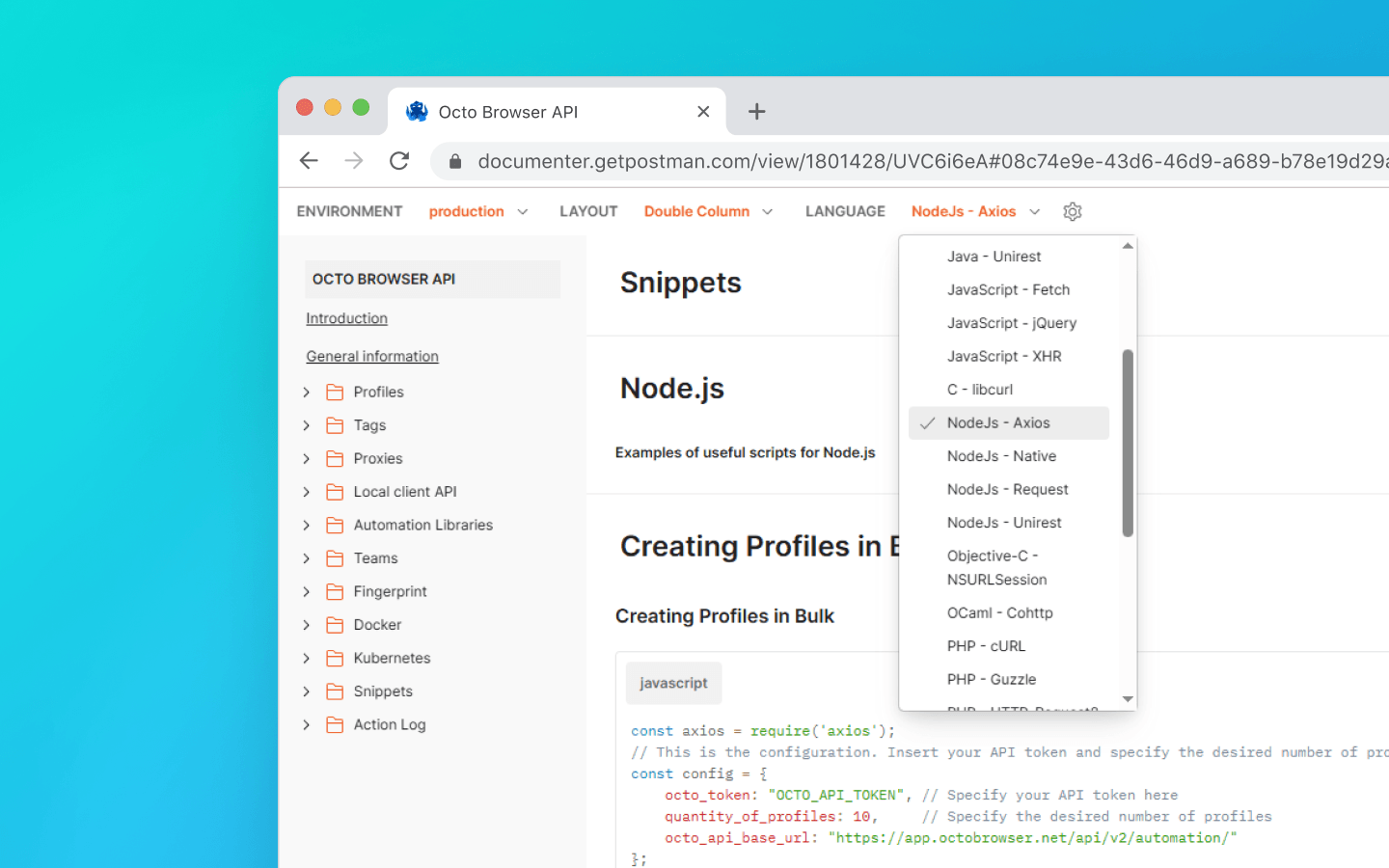
我们在本文的示例中使用了 Node.js 编程语言。您可以在我们的文档中找到其他语言的有用代码片段。
在本文中,我们涵盖了:
如何准备环境;
如何获取您的 Octo Browser API 令牌;
如何检索扩展的 UUID;
如何使用 API 获取配置文件名称并将其保存到文本文件中;
如何批量添加扩展、书签和起始页到现有配置文件;
如何将配置文件数据导出到 Google Sheets。
如果您还有问题或在文档中找不到所需的示例,请随时通过Telegram或使用我们的网站聊天室或浏览器内小部件联系我们的客户服务。
管理任意数量的账户,无需担心被封禁、重复操作和不必要的开支。
您想以折扣价格尝试 Octo 浏览器吗?
使用促销代码 OCTOBLOG 获得任何订阅 30% 的折扣。此优惠仅适用于新用户。
准备
下载并安装 VS Code。
下载并安装 Node.js。
在一个方便的位置创建一个文件夹,并为其命名,例如,octo_api。
在 VS Code 中打开此文件夹。
创建一个 .js 扩展名的文件。最好以代码将要执行的操作来命名它以避免混淆:例如,get_titles.js。
打开终端并运行命令 npm install axios 来为 Node.js 安装一个依赖项。
如果 VS Code 显示错误,请以管理员身份打开 Windows PowerShell,输入命令 Set-ExecutionPolicy -Scope CurrentUser -ExecutionPolicy RemoteSigned 并确认。然后重复上一步。
启动 Octo Browser。
在哪里找到您的 API 令牌
要通过 API 与 Octo Browser 交互,您需要一个 API 令牌。Base 订阅及以上的用户可以使用。API 令牌显示在 Octo Browser 的主账户设置下的“附加”选项卡中(其他团队成员不能看到 API 令牌)。
API 限制(速率限制)
请记住,Octo Browser API 有请求限制。提供的代码片段使用check_limits函数,检查 API 速率限制头并在剩余请求数量较少时自动暂停。这有助于避免429 请求过多错误。
当向公共 API 发出请求时,每个请求消耗 1 RPM 和 1 RPH。使用本地 API 时,除 POST 启动配置文件(1 RPM 和 1 RPH)和 POST 一次性配置文件(4 RPM 和 4 RPH)外,并不消耗 RPM/RPH。
您可以启动、创建和删除的配置文件的确切数量完全取决于您的脚本及其逻辑。您可以根据哪些请求影响 RPH 和 RPM 限制,独立计算所需的请求数量。
一些 API 请求可能需要更复杂的处理,这意味着它们的执行可能比单个请求花费更高。这对于平衡服务器负载和确保所有用户的最佳性能是必要的。
RPM 意味着每分钟请求数。
RPH 意味着每小时请求数。
请求限制值取决于您的订阅。
设置完成后,让我们继续使用有用的代码片段。
检索配置文件名称并将其保存到 .txt 文件
当您需要快速收集所有已创建配置文件的列表在一个地方时,此片段很有用。它有助于简化配置文件跟踪,验证其实际存在性,并对其采取进一步的操作。
在 octo_api 文件夹中创建一个文件 get_titles.js,并将代码片段粘贴到其中。
将 OCTO_API_TOKEN 替换为来自 Octo Browser 的 API 令牌。
保存文件。
在终端中输入命令 node get_titles.js 并运行脚本。
配置文件名称按行保存在与脚本相同文件夹内的 profiles_titles.txt 文件中。
保存配置文件名称到 .txt 文件的代码片段
const fs = require('fs').promises; const axios = require('axios'); //This is the configuration. Specify your Octo API Token here const config = { octo_token: "OCTO_API_TOKEN", // Specify your API token here octo_api_base_url: "https://app.octobrowser.net/api/v2/automation/", } const OCTO_REMOTE_API = axios.create({ baseURL: config.octo_api_base_url, timeout: 10000, headers: { 'X-Octo-Api-Token': config.octo_token, 'Content-Type': "application/json" } }); async function sleep(ms) { return new Promise(resolve => setTimeout(resolve, ms * 1000)); } async function check_limits(response) { function parse_int_safe(value) { const parsed = parseInt(value, 10); return isNaN(parsed) ? 0 : parsed; } const ratelimit_header = response.headers.ratelimit; if (!ratelimit_header) { console.warn('No ratelimit header found!'); return; } const limit_entries = ratelimit_header.split(',').map(entry => entry.trim()); for (const entry of limit_entries) { const name_match = entry.match(/^([^;]+)/); const r_match = entry.match(/;r=(\d+)/); const t_match = entry.match(/;t=(\d+)/); if (!r_match || !t_match) { console.warn(`Invalid ratelimit format: ${entry}`); continue; } const limit_name = name_match ? name_match[1] : 'unknown_limit'; const remaining_quantity = parse_int_safe(r_match[1]); const window_seconds = parse_int_safe(t_match[1]); if (remaining_quantity < 5) { const wait_time = window_seconds + 1; console.log(`Waiting ${wait_time} seconds due to ${limit_name} limit`); await sleep(wait_time); } } } async function get_total_pages() { const response = await OCTO_REMOTE_API.get('/profiles?page=0&page_len=10'); const total_profiles = response.data.total_count; const total_pages = Math.ceil(response.data.total_count / 100); console.log(`Total Profiles: ${total_profiles}\nTotal Pages: ${total_pages}`); await check_limits(response); return total_pages; } async function get_all_profiles_titles(total_pages) { let profiles = []; for (let i = 0; i < total_pages; i++) { let response = await OCTO_REMOTE_API.get(`/profiles?page=${i}&page_len=100&fields=title`); await check_limits(response); profiles.push(...response.data.data); } return profiles; } async function write_file(profiles) { const titles = profiles.map(item => item.title).filter(Boolean); try { await fs.writeFile('./profiles_titles.txt', titles.join('\n'), 'utf-8'); } catch (error) { console.error(`ERROR: While trying writing the file some error occured:\n${error}`); } } (async () => { const total_pages = await get_total_pages(); const profiles = await get_all_profiles_titles(total_pages); await write_file(profiles); console.log('Finished. Check profiles_titles.txt file...'); })()
将扩展、起始页和书签添加到配置文件
此自动化脚本可让您快速标准化配置文件配置,避免手动添加相同的参数。
要添加扩展,您将需要它们的 UUID:
打开已安装扩展的配置文件。
在配置文件地址栏中输入 chrome://extensions/ 并按回车键。
在所需扩展上,点击“详细信息”按钮。
在页面底部复制扩展的 UUID 及其版本。
您可以在文档中找到通过 API 检索 UUID 的方法。
接下来,您需要编辑代码:
在 octo_api 文件夹中创建一个名为 adding_info.js 的文件。
将代码片段粘贴到其中。
将您的 API 令牌插入 octo_token 字段。
将所需扩展的 UUID 添加到extensions字段。
将名称(书签标题)和 URL(网站地址)添加到bookmarks字段。
将您希望在配置文件启动时自动打开的网站 URL 添加到start_pages字段。
如果您只需添加扩展、书签或起始页,您可以从代码片段中删除不必要的参数:
data: {

        extensions: ["nkbihfbeogaeaoehlefnkodbefgpgknn@12.17.2"], //remove if you don’t need to add extensions

        bookmarks: [

            { name: "google", url: "https://google.com" },

            { name: "facebook", url: "https://facebook.com" }

        ],//remove if you don’t need bookmarks

        start_pages: ["https://google.com", "https://facebook.com"] //remove if you don’t need start pages

    }
保存 adding_info.js 文件。
使用命令 node adding_info.js 运行它。
所需的扩展、书签和起始页将添加到您的所有配置文件中。如果仅需对特定配置文件应用更改,请参阅文档中的示例。
在运行脚本之前,请确保您要更新的配置文件未在运行中。运行中的配置文件将不更新。
添加扩展、起始页和书签到配置文件的代码片段
const axios = require('axios');
// This is the configuration. Specify your Octo API Token here; you can modify this for your personal needs
const config = {
    octo_token: "OCTO_API_TOKEN", // Specify your API token here
    octo_api_base_url: "https://app.octobrowser.net/api/v2/automation/",
    data: {
        "extensions": ["aapfglkgnhmiaabhiijkjpfmhllaodgp@4.2.3"],
        "bookmarks": [
            { "name": "google", "url": "https://google.com" },
            { "name": "facebook", "url": "https://facebook.com" }
        ],
        "start_pages": ["https://google.com", "https://facebook.com"]
    }
}
const OCTO_REMOTE_API = axios.create({
    baseURL: config.octo_api_base_url,
    timeout: 10000,
    headers: {
        'X-Octo-Api-Token': config.octo_token,
        'Content-Type': "application/json"
    }
});
//functions
async function sleep(ms) {
    return new Promise(resolve => setTimeout(resolve, ms * 1000));
}
async function check_limits(response) {
    function parse_int_safe(value) {
        const parsed = parseInt(value, 10);
        return isNaN(parsed) ? 0 : parsed;
    }
    const ratelimit_header = response.headers.ratelimit;
    if (!ratelimit_header) {
        console.warn('No ratelimit header found!');
        return;
    }
    const limit_entries = ratelimit_header.split(',').map(entry => entry.trim());
    for (const entry of limit_entries) {
        const name_match = entry.match(/^([^;]+)/);
        const r_match = entry.match(/;r=(\d+)/);
        const t_match = entry.match(/;t=(\d+)/);
        if (!r_match || !t_match) {
            console.warn(`Invalid ratelimit format: ${entry}`);
            continue;
        }
        const limit_name = name_match ? name_match[1] : 'unknown_limit';
        const remaining_quantity = parse_int_safe(r_match[1]);
        const window_seconds = parse_int_safe(t_match[1]);
        if (remaining_quantity < 5) {
            const wait_time = window_seconds + 1;
            console.log(`Waiting ${wait_time} seconds due to ${limit_name} limit`);
            await sleep(wait_time);
        }
    }
}
async function get_total_profiles() {
    const response = await OCTO_REMOTE_API.get('/profiles?page=0&page_len=10');
    const total_profiles = response.data.total_count;
    const total_pages = Math.ceil(response.data.total_count / 100);
    console.log(`Total Profiles: ${total_profiles}\nTotal Pages: ${total_pages}`);
    await check_limits(response);
    return total_pages;
}
async function get_all_profiles_uuids(total_pages) {
    let profiles = [];
    for (let i = 0; i < total_pages; i++) {
        let response = await OCTO_REMOTE_API.get(`/profiles?page=${i}&page_len=100`);
        await check_limits(response);
        profiles.push(...response.data.data);
    }
    return profiles;
}
async function patch_all_profiles(profiles) {
    let updated = [];
    let not_updated = [];
    for (let profile of profiles) {
        try {
            const response = await OCTO_REMOTE_API.patch(`/profiles/${profile.uuid}`, config.data);
            await check_limits(response);
            updated.push(profile);
            console.log(`Successfully updated ${profile.uuid}`);
        } catch (error) {
            not_updated.push(profile);
            console.error(`ERROR: Can't patch profile ${profile.uuid}`);
        }
    }
    return [updated, not_updated];
}
(async () => {
    const total = await get_total_profiles();
    const profiles = await get_all_profiles_uuids(total);
    const [updated, not_updated] = await patch_all_profiles(profiles);
    console.log(`Finished process:\nUpdated: ${updated.length}\nNot updated: ${not_updated.length}`);
})();
导出配置文件数据到 Google Sheets
您可以将您的配置文件数据导出到电子表中。这使得结构化信息、排序和分析更加容易。您可以导出以下配置文件参数:
UUID,
标签,
名称,
描述。
在 octo_api 文件夹中创建一个名为 google_sheets.js 的文件。
将代码片段添加到文件中。
填写octo_token字段。API 令牌可以在 Octo Browser 中找到。
填写table_id字段。这是您的 Google Sheets 文档的 ID。
填写table_sheet_name字段。这是您希望导出数据的 Google Sheets 文档中的表格名称。
保存更改。
将 credentials.json 和 token.json 文件添加到 octo_api 文件夹。
使用命令 node google_sheets.js 在 VS Code 终端中运行脚本。
脚本完成后,数据将上传到指定的电子表格。
导出配置文件数据到 Google Sheets 的代码片段
const axios = require('axios');
const { google } = require('googleapis');
const token = require('./token.json');
const credentials = require('./credentials.json');


const oAuth2Client = new google.auth.OAuth2(
    credentials.installed.client_id,
    credentials.installed.client_secret,
    credentials.installed.redirect_uris[0]
);


oAuth2Client.setCredentials(token);


//configuration
//Paste your Octo API token, spreadsheet ID and sheet name here
const config = {
    octo_token: "OCTO_API_TOKEN",
    table_id: "1pqnVysHymZSI5Lzx6odasdasAqE022fqUEf6q5LnOqAhylLSM",
    table_sheet_name: "Profiles",
    octo_api_base_url: "https://app.octobrowser.net/api/v2/automation/",
}


const OCTO_REMOTE_API = axios.create({
    baseURL: config.octo_api_base_url,
    timeout: 10000,
    headers: {
        'X-Octo-Api-Token': config.octo_token,
        'Content-Type': "application/json"
    }
});


//functions
async function check_limits(response) {
    function parse_int_safe(value) {
        const parsed = parseInt(value, 10);
        return isNaN(parsed) ? 0 : parsed;
    }
    const ratelimit_header = response.headers.ratelimit;
    if (!ratelimit_header) {
        console.warn('No ratelimit header found!');
        return;
    }
    const limit_entries = ratelimit_header.split(',').map(entry => entry.trim());
    for (const entry of limit_entries) {
        const name_match = entry.match(/^([^;]+)/);
        const r_match = entry.match(/;r=(\d+)/);
        const t_match = entry.match(/;t=(\d+)/);
        if (!r_match || !t_match) {
            console.warn(`Invalid ratelimit format: ${entry}`);
            continue;
        }
        const limit_name = name_match ? name_match[1] : 'unknown_limit';
        const remaining_quantity = parse_int_safe(r_match[1]);
        const window_seconds = parse_int_safe(t_match[1]);
        if (remaining_quantity < 5) {
            const wait_time = window_seconds + 1;
            console.log(`Waiting ${wait_time} seconds due to ${limit_name} limit`);
            await sleep(wait_time);
        }
    }
}


async function sleep(ms) {
    return new Promise(resolve => setTimeout(resolve, ms * 1000));
}


async function get_total_pages() {
    const response = await OCTO_REMOTE_API.get('/profiles?page=0&page_len=10');
    const total_profiles = response.data.total_count;
    const total_pages = Math.ceil(response.data.total_count / 100);
    console.log(`Total Profiles: ${total_profiles}\nTotal Pages: ${total_pages}`);
    await check_limits(response);
    return total_pages;
}


async function get_all_profiles_data(total_pages) {
    let profiles = [];
    for (let i = 0; i < total_pages; i++) {
        let response = await OCTO_REMOTE_API.get(`/profiles?page=${i}&page_len=100&fields=title,description,tags`);
        await check_limits(response);
        profiles.push(...response.data.data);
    }
    return profiles;
}


async function fill_sheet_with_data(oAuth2Client, spreadsheet_id, list_name, data) {
    const sheets = google.sheets({ version: 'v4', auth: oAuth2Client });


    try {
        const sheetInfo = await sheets.spreadsheets.get({
            spreadsheetId: spreadsheet_id,
        });


        const sheetExists = sheetInfo.data.sheets.some(
            sheet => sheet.properties.title === list_name
        );


        if (!sheetExists) {
            await sheets.spreadsheets.batchUpdate({
                spreadsheetId: spreadsheet_id,
                resource: {
                    requests: [{
                        addSheet: {
                            properties: {
                                title: list_name
                            }
                        }
                    }]
                }
            });
            console.log(`Создан новый лист "${list_name}".`);
        }


        const headers = ['Uuid', 'Tags', 'Title', 'Description'];
        const values = data.map(item => [
            item.uuid,
            Array.isArray(item.tags) ? item.tags.join(', ') : item.tags,
            item.title,
            item.description || ''
        ]);


        await sheets.spreadsheets.values.update({
            spreadsheetId: spreadsheet_id,
            range: `${list_name}!A1:D1`,
            valueInputOption: 'RAW',
            resource: {
                values: [headers]
            }
        });


        await sheets.spreadsheets.values.update({
            spreadsheetId: spreadsheet_id,
            range: `${list_name}!A2:D${values.length + 1}`,
            valueInputOption: 'RAW',
            resource: {
                values: values
            }
        });


        console.log(`Данные успешно записаны в лист "${list_name}".`);


    } catch (err) {
        console.error('Ошибка при обновлении таблицы:', err);
        throw err;
    }
}


(async () => {
    const total_pages = await get_total_pages();
    const profiles_data = await get_all_profiles_data(total_pages);
    await fill_sheet_with_data(oAuth2Client, config.table_id, config.table_sheet_name, profiles_data);
})()
如何获取table_id
在 Google Sheets 中打开或创建一个电子表格。
复制表格 ID。这是 URL 中
/d/和/edit之间的部分。
例如,如果您的链接看起来像 https://docs.google.com/spreadsheets/d/1GoPnhkStxFFxDzGZjjXSyjT_H_msHlSDx51tBROewOA/edit,那么 table_id 是 1GoPnhkStxFFxDzGZjjXSyjT_H_msHlSDx51tBROewOA。
如何获取 credentials.json 文件
登录到个人(非组织)Gmail 账户。
从列表中选择任一欧洲国家并点击同意并继续。
点击选择项目,然后新建项目。
输入任意项目名称并点击创建。
输入任意应用名称、您的邮箱并点击下一步。
选择外部,重新输入您的邮箱,点击下一步,勾选同意框,然后点击继续和完成。
在测试用户部分,点击添加用户。
添加您的邮箱并点击保存。
在页面 https://console.cloud.google.com/auth/overview,点击创建 OAuth 客户端。
从列表中选择桌面应用,输入任意名称并点击创建。
将出现一个弹出窗口。从中下载 JSON 文件。
搜索 Google Sheets API。
选择并点击启用。
打开之前下载的 JSON 文件。
将
redirect_uris的值从http://localhost修改为"redirect_uris": ["urn:ietf:wg:oauth:2.0:oob","http://localhost"]。
仔细进行更改以避免意外删除括号。
保存文件。
将其重命名为 credentials.json。
将其添加到 octo_api 文件夹。
如何获取 token.json 文件
在 octo_api 文件夹中创建一个名为 get_token.js 的文件并在 VS Code 中打开它。
在 VS Code 终端中运行命令 Npm install googleapis。
将令牌生成脚本粘贴到 get_token.js 并保存文件。
使用 node get_token.js 运行脚本。
您将看到一个链接,上面写着在浏览器中打开此 URL:
https://accounts.google.com/o/oauth2/…打开链接。
登录到您的 Google 账户。
点击通过同意屏幕。
在最后一页,Google 将显示授权码。
将代码粘贴到终端并按回车键。
然后脚本将在您运行它的文件夹中创建一个 token.json 文件。
令牌生成脚本
const fs = require('fs');
const readline = require('readline');
const { google } = require('googleapis');

const CREDENTIALS_PATH = 'credentials.json';
const TOKEN_PATH = 'token.json';


const credentials = JSON.parse(fs.readFileSync(CREDENTIALS_PATH));
const { client_secret, client_id, redirect_uris } = credentials.installed;

const oAuth2Client = new google.auth.OAuth2(client_id, client_secret, redirect_uris[0]);


const SCOPES = ['https://www.googleapis.com/auth/spreadsheets'];


const authUrl = oAuth2Client.generateAuthUrl({
  access_type: 'offline',
  scope: SCOPES,
});

console.log('Open this URL in browser:', authUrl);

const rl = readline.createInterface({
  input: process.stdin,
  output: process.stdout,
});

rl.question('Enter the code from that page here: ', (code) => {
  rl.close();
  oAuth2Client.getToken(code, (err, token) => {
    if (err) return console.error('Error retrieving access token', err);
    fs.writeFileSync(TOKEN_PATH, JSON.stringify(token));
    console.log('Token stored to', TOKEN_PATH);
  });
});
结论
我们在本文的示例中使用了 Node.js 编程语言。您可以在我们的文档中找到其他语言的有用代码片段。
在本文中,我们涵盖了:
如何准备环境;
如何获取您的 Octo Browser API 令牌;
如何检索扩展的 UUID;
如何使用 API 获取配置文件名称并将其保存到文本文件中;
如何批量添加扩展、书签和起始页到现有配置文件;
如何将配置文件数据导出到 Google Sheets。
如果您还有问题或在文档中找不到所需的示例,请随时通过Telegram或使用我们的网站聊天室或浏览器内小部件联系我们的客户服务。
随时获取最新的Octo Browser新闻
通过点击按钮,您同意我们的 隐私政策。
随时获取最新的Octo Browser新闻
通过点击按钮,您同意我们的 隐私政策。
随时获取最新的Octo Browser新闻
通过点击按钮,您同意我们的 隐私政策。
