Web scraping de los resultados de búsqueda de Google: tutorial (2026)

Artur Hvalei
Technical Support Specialist, Octo Browser
El raspado de las SERP de Google le permite comprender qué sitios web y contenidos ven realmente los usuarios, qué palabras clave atraen tráfico y qué formatos de fragmentos funcionan mejor. En este artículo, cubriremos los métodos de recopilación de datos, los compararemos por precisión y complejidad, y destacaremos las mejores soluciones para tareas que van desde el monitoreo básico hasta la analítica a gran escala. Como beneficio adicional, encontrará un script de raspado listo para usar.
Contenidos
Manténgase anónimo, aproveche las ventajas del multi-accounting y alcance sus objetivos con el navegador antidetección de mayor calidad del mercado.
¿Te gustaría probar Octo Browser con descuento?
Usa el código promocional OCTOSCRAPER para obtener un 30% de descuento en cualquier suscripción. Esta oferta solo es válida para nuevos usuarios.
Por qué extraer resultados de búsqueda de Google
Google es una base de datos global de la demanda de los consumidores y la actividad de la competencia. El análisis de la página de resultados del motor de búsqueda (SERP) proporciona información fundamental: clasificaciones reales de sitios web para palabras clave, títulos y metadescripciones de competidores, la presencia y formato de fragmentos enriquecidos, así como datos de los bloques "Otras preguntas de los usuarios" y sugerencias de búsqueda. Estos datos permiten a las empresas y profesionales del marketing:
Seguir el posicionamiento y la visibilidad: Analizar el rendimiento de SEO y supervisar el progreso a lo largo del tiempo.
Investigar a la competencia: Comprender sus estrategias de palabras clave y contenido e identificar brechas de mercado.
Descubrir nichos y tendencias: Encontrar nuevas palabras clave y consultas para crear contenido relevante.
Analizar publicidad: Estudiar los anuncios, títulos, textos y estrategias de los competidores.
Por lo tanto, estos conocimientos son valiosos principalmente para especialistas en SEO, profesionales del marketing, analistas, propietarios de negocios y desarrolladores de herramientas de marketing online.
Herramientas y métodos de recopilación de datos
1. APIs de SERP de terceros (servicios de pago)
Estas son APIs especializadas que manejan toda la complejidad técnica de la recopilación de datos. Envías una solicitud y recibes un JSON estructurado con los resultados de búsqueda, anuncios y otros elementos. Los proveedores gestionan la rotación de proxies, resuelven CAPTCHAs y renderizan JavaScript, entregando datos listos para usar.
Pros: integración sencilla, escalabilidad, el proveedor gestiona los problemas de bloqueo, datos limpios y estructurados.
Contras: coste a gran escala (por ejemplo, Bright Data empieza en 1 $ por cada 1.000 solicitudes), dependencia de un proveedor, latencia de procesamiento.
2. API oficial de Google (Custom Search JSON API)
Esta es una forma legítima de acceder a los datos de búsqueda integrando la Búsqueda de Google en tu sitio web. Sin embargo, es fundamentalmente diferente, ya que no emula las búsquedas de usuarios reales ni devuelve una SERP "en vivo" con anuncios y elementos dinámicos. Los resultados suelen estar menos actualizados y estructurados de manera diferente.
Pros: legal, estable, fácil de usar, incluye un plan gratuito (100 solicitudes al día).
Contras: no devuelve datos reales de la SERP. La API proporciona resultados estructurados de un conjunto limitado de sitios predefinidos, no la página de búsqueda real que ven los usuarios. Tiene cuotas y limitaciones, lo que la hace inadecuada para el seguimiento completo de clasificaciones o análisis competitivos.
3. Solicitudes HTTP directas (scraping)
Este método simula una solicitud de navegador estándar. Tu script (Python, Node.js, etc.) envía una solicitud GET a un URL de Búsqueda de Google y recibe el código HTML, que luego debe ser analizado sintácticamente. Para evitar la detección, debes usar proxies y emular y rotar las cabeceras del navegador.
Pros: control total sobre el proceso, bajo coste (solo se requiere un servidor y proxies), alta flexibilidad.
Contras: alta complejidad y fragilidad. Google bloquea agresivamente las solicitudes que no provienen de navegadores, requiriendo una resolución constante de CAPTCHAs y rotación de huellas digitales. Incluso las soluciones avanzadas con emulación de TLS y cabeceras pueden fallar. Cualquier cambio en el diseño de Google puede romper tu analizador.
4. Automatización del navegador (Puppeteer, Playwright, Selenium)
Este enfoque simula el comportamiento de un usuario real: abrir un navegador, ingresar consultas, hacer clic y desplazarse. Imita perfectamente la interacción humana pero requiere más recursos informáticos. Las bibliotecas como Puppeteer controlan una instancia de Chrome, lo que permite la recopilación de datos de páginas dinámicas.
Pros: puede eludir protecciones complejas, ejecuta JavaScript, máxima precisión de los datos (extraes exactamente lo que ven los usuarios), flexible y potente.
Contras: alto consumo de recursos (CPU, memoria), más lento que las solicitudes HTTP directas, configuración y mantenimiento complejos para proyectos a gran escala.
Por qué los proxies y los navegadores antidetección son esenciales
Google protege activamente sus datos y bloquea agresivamente las solicitudes automatizadas. Los dos obstáculos principales son los CAPTCHAs y los bloqueos basados en IP cuando se superan los límites de solicitudes.
Los proxies actúan como intermediarios, ocultando tu dirección IP real. La estrategia principal es la rotación de proxies, es decir, cambiar las IPs regularmente para simular el tráfico de diferentes usuarios y evitar activar los sistemas anti-bot.
Los navegadores antidetección resuelven un problema más avanzado: enmascarar la huella digital. Te permiten suplantar parámetros del entorno como el User-Agent, la resolución de pantalla, los dispositivos multimedia, la configuración de la GPU y más. Esto crea una huella digital realista para cada nuevo perfil, lo cual es fundamental para eludir los sistemas que analizan las huellas digitales de los dispositivos. Combinar navegadores antidetección con proxies de alta calidad te permite crear miles de "usuarios" únicos y recopilar datos a escala.
Capacidades de Octo Browser para la extracción de SERP de Google
Octo Browser incluye una API que permite la automatización completa del proceso de recopilación de datos. Octo también proporciona una detallada documentación de la API con ejemplos de solicitudes.
La documentación incluye fragmentos para integrar Puppeteer, Playwright y Selenium, que controlan el navegador a través del protocolo CDP.
Recomendaciones útiles
Estudia detenidamente la documentación oficial de la API.
Revisa las preguntas frecuentes relacionadas con el uso de la API.
Lee el artículo detallado sobre cómo trabajar con la API de Octo.
Las solicitudes de API en Octo Browser están limitadas por nivel de suscripción, pero se pueden aumentar. Utiliza funciones que verifiquen los límites de la API en las cabeceras de respuesta. Ignorar los errores HTTP 429 puede prolongar la duración de los bloqueos. Si utilizas varios dispositivos para la automatización bajo una sola cuenta, implementa un seguimiento centralizado de solicitudes (por ejemplo, utilizando Redis).
No utilices versiones sin parchear de las bibliotecas de automatización, ya que contienen vulnerabilidades detectables. Para Puppeteer/Playwright, utiliza los parches de rebrowser. Para Selenium, utiliza undetected-chromedriver.
Utiliza funciones y bibliotecas que mejor imiten el comportamiento humano: clics de ratón, pasar el cursor, movimiento del cursor, escritura, desplazamiento, flujo de navegación y acciones aleatorias.
Utiliza la caché local para los perfiles para reducir el tráfico de proxy. Esto se puede implementar pasando
"local_cache": trueal crear un perfil, o utilizando un directorio de caché compartido a través de--disk-cache-dir, por ejemplo,flags:["--disk-cache-dir=C:/Cache"]Limita la carga de imágenes en la configuración del perfil para ahorrar tráfico de proxy. Esto se puede hacer configurando
"images_load_limit": 10240al crear perfiles, restringiendo las imágenes de más de 10.240 bytes.
Comparación de métodos de extracción de datos
Método | Coste | Complejidad | Riesgos de bloqueo | Calidad de los datos |
|---|---|---|---|---|
APIs de SERP de pago | Alto (a partir de 1 $ por 1.000 solicitudes) | Bajo | Mínimo | Alta |
API oficial | Bajo / Gratuito | Bajo | Ninguno | Baja (no son datos reales de la SERP) |
Solicitudes HTTP | Medio (requiere proxies) | Alto | Muy alto | Alta |
Automatización con un navegador antidetección | Medio (requiere una suscripción y proxies) | Medio | Mínimo | Máxima |
Script listo para usar para extraer la SERP de Google
Aquí tienes un ejemplo de un script extractor de datos que funciona con la API de Octo Browser. Puedes usar este script o partes de él como punto de partida para construir un proyecto completo y adaptarlo a tus necesidades.
Descarga e instala VS Code.
Descarga e instala Node.js.
Crea una carpeta en una ubicación conveniente y ponle nombre, por ejemplo,
octo_scraper.Abre esta carpeta en VS Code.
Crea un archivo
.js. Es mejor nombrarlo de acuerdo con su función, por ejemplo,google_scraping.js.Pega el código del script en el archivo.
En el código, en la variable
config, añade tus proxies al arrayproxies.En el mismo lugar, añade tus consultas de búsqueda al array
google_search_queries. En este ejemplo de script, el número de consultas debe ser mayor o igual al número de proxies. Puedes modificar fácilmente la lógica del extractor de datos para adaptarla a tus necesidades.
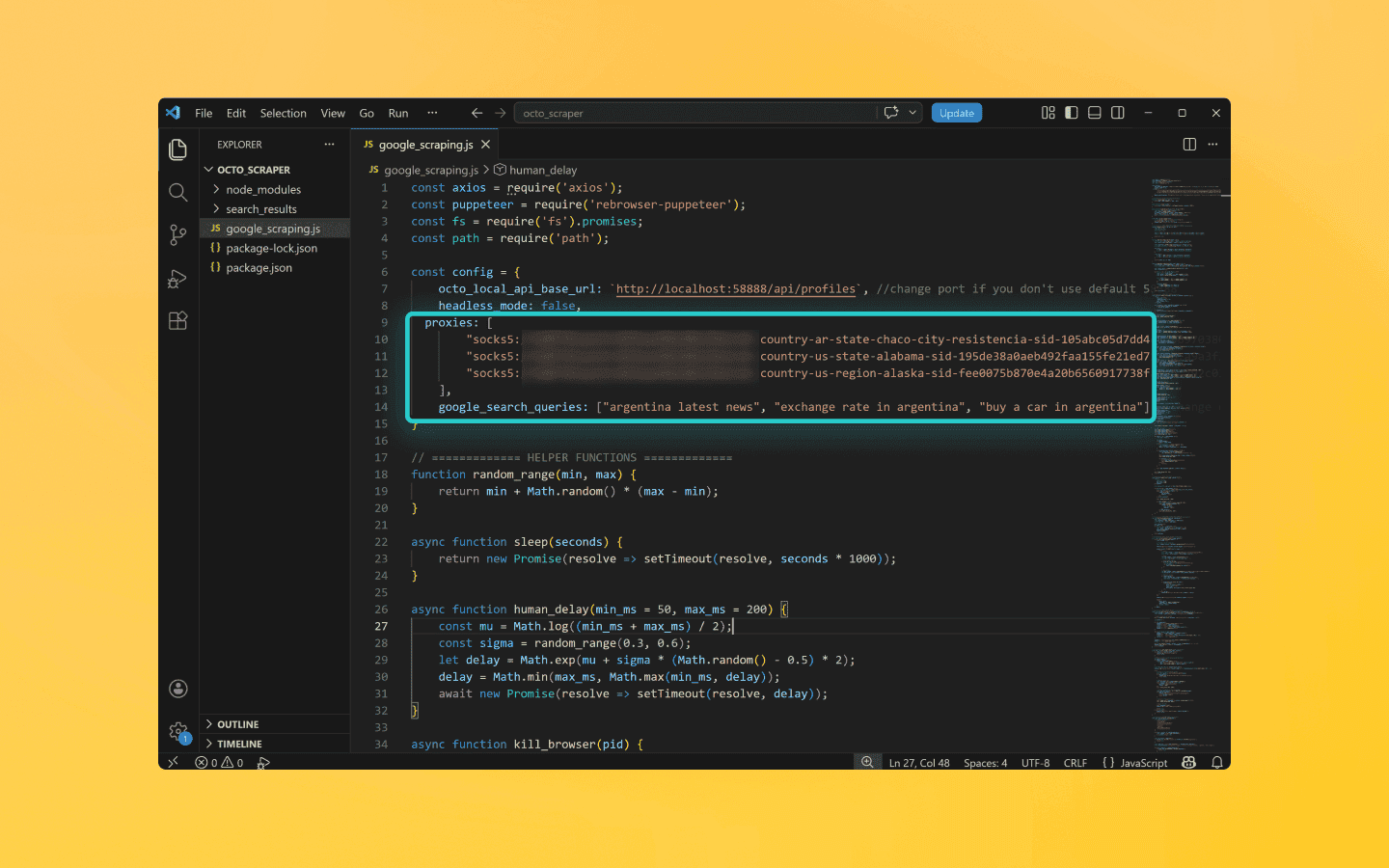
Ten cuidado: cada elemento del array debe estar entre comillas. Los elementos se separan por comas.
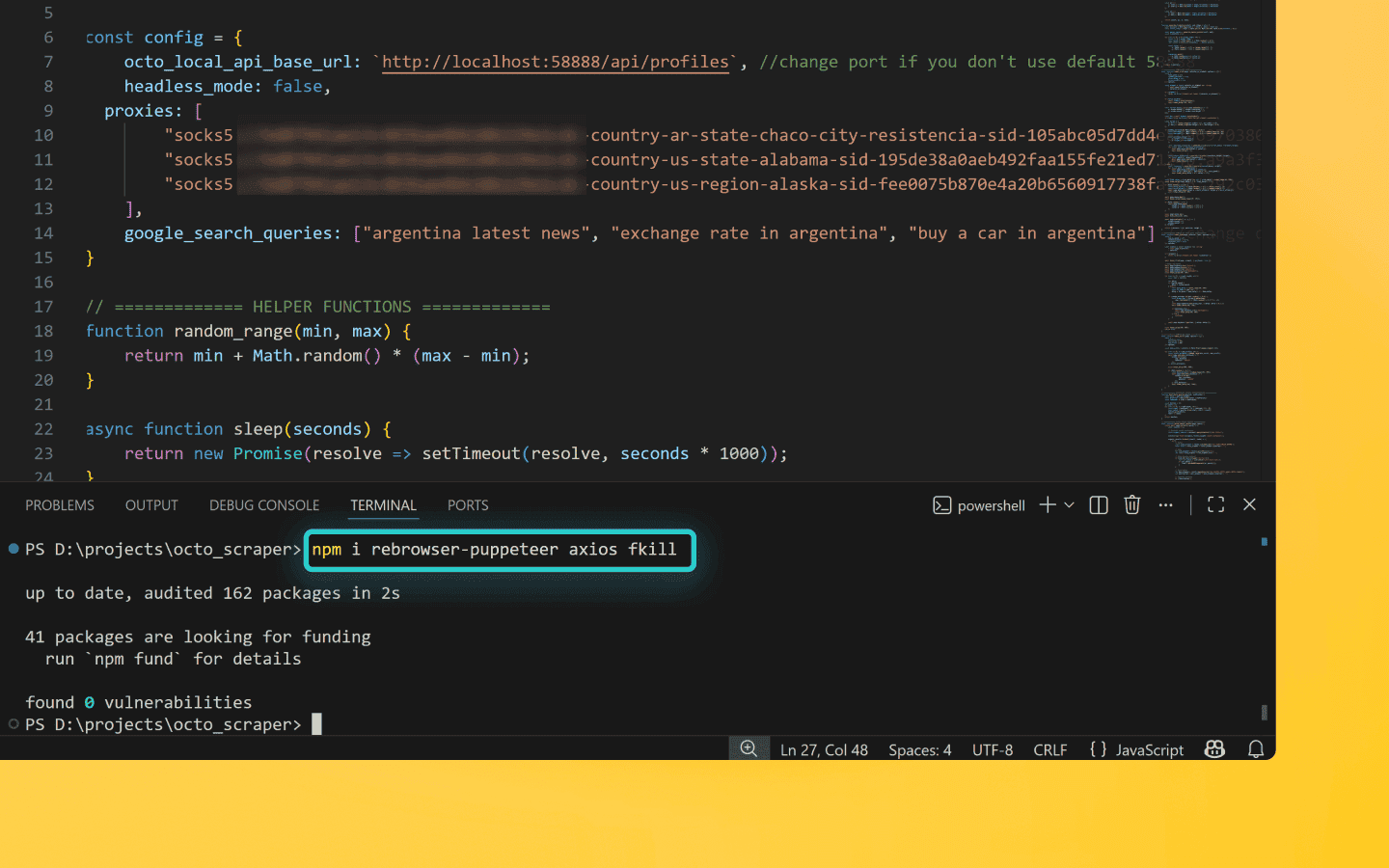
Abre el terminal y ejecuta el comando
npm i rebrowser-puppeteer axios fkillpara instalar las dependencias de Node.js.
Si VS Code muestra un error, abre Windows PowerShell como administrador, introduce el comando
Set-ExecutionPolicy -Scope CurrentUser -ExecutionPolicy RemoteSignedy confirma. Luego repite el paso anterior.Inicia Octo Browser.
Ejecuta el programa en Visual Studio (Ctrl/Cmd + F5) y espera a que el script termine.
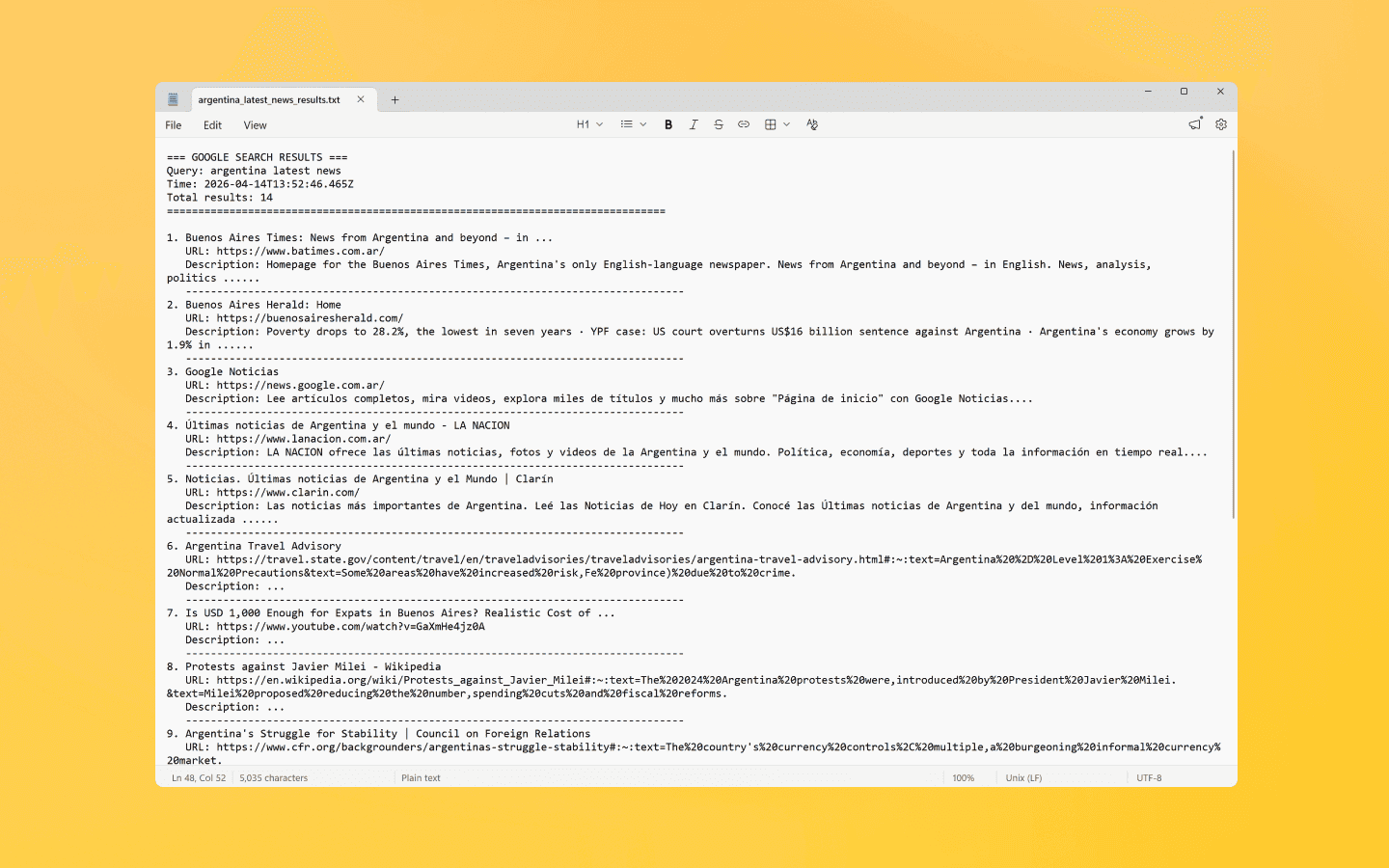
El extractor creará perfiles de un solo uso para cada proxy añadido y ejecutará las consultas especificadas de forma secuencial. El script simulará el comportamiento de un usuario real para eludir los sistemas antifraude de Google.
Puedes supervisar el proceso en la consola de depuración. Si aparece un CAPTCHA, el script cerrará el perfil e iniciará uno nuevo.
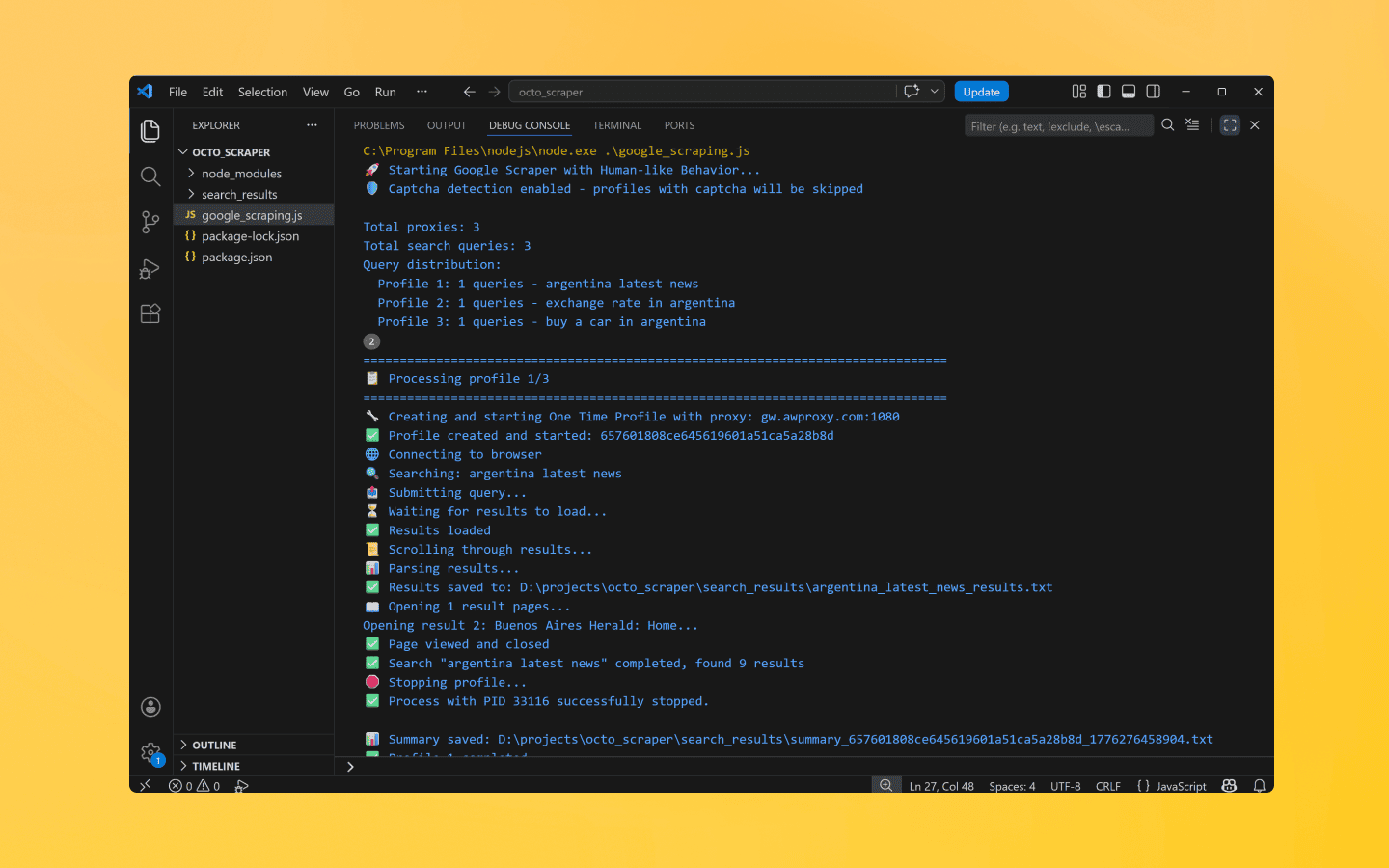
Los resultados de la búsqueda se guardarán en la carpeta
search_resultsen el directorio del proyecto.
Código del script
const axios = require('axios'); const puppeteer = require('rebrowser-puppeteer'); const fs = require('fs').promises; const path = require('path'); const config = { octo_local_api_base_url: `http://localhost:58888/api/profiles`, //change port if you don't use default 58888 headless_mode: false, proxies: [ "socks5://login:password@127.0.0.1:50000", //paste your proxies "socks5://login:password@127.0.0.1:50000" ], google_search_queries: ["nodejs", "sidwudraq", "arch linux"] //change queries } // ============= HELPER FUNCTIONS ============= function random_range(min, max) { return min + Math.random() * (max - min); } async function sleep(seconds) { return new Promise(resolve => setTimeout(resolve, seconds * 1000)); } async function human_delay(min_ms = 50, max_ms = 200) { const mu = Math.log((min_ms + max_ms) / 2); const sigma = random_range(0.3, 0.6); let delay = Math.exp(mu + sigma * (Math.random() - 0.5) * 2); delay = Math.min(max_ms, Math.max(min_ms, delay)); await new Promise(resolve => setTimeout(resolve, delay)); } async function kill_browser(pid) { const { default: fkill } = await import('fkill'); await fkill(pid, { force: true }); console.log(`✅ Process with PID ${pid} successfully stopped.`); } // ============= BEZIER CURVES FOR HUMAN-LIKE MOVEMENT ============= function bezier_curve(t, p0, p1, p2, p3) { const mt = 1 - t; const mt2 = mt * mt; const t2 = t * t; const x = mt2 * mt * p0.x + 3 * mt2 * t * p1.x + 3 * mt * t2 * p2.x + t2 * t * p3.x; const y = mt2 * mt * p0.y + 3 * mt2 * t * p1.y + 3 * mt * t2 * p2.y + t2 * t * p3.y; return { x, y }; } function generate_bezier_points(start, end) { const distance = Math.hypot(end.x - start.x, end.y - start.y); const angle = Math.atan2(end.y - start.y, end.x - start.x); const deviation = random_range(distance * 0.2, distance * 0.5); const angle_variation = random_range(-Math.PI / 3, Math.PI / 3); const p1 = { x: start.x + Math.cos(angle + angle_variation) * deviation, y: start.y + Math.sin(angle + angle_variation) * deviation }; const p2 = { x: end.x - Math.cos(angle - angle_variation) * deviation, y: end.y - Math.sin(angle - angle_variation) * deviation }; return [start, p1, p2, end]; } function generate_trajectory(start, end, steps = null) { const distance = Math.hypot(end.x - start.x, end.y - start.y); const actual_steps = steps || Math.max(20, Math.min(100, Math.floor(distance / 3))); const bezier_points = generate_bezier_points(start, end); const trajectory = []; for (let i = 0; i <= actual_steps; i++) { const t = i / actual_steps; const eased_t = Math.pow(t, 1 + Math.random() * 0.3); const point = bezier_curve(eased_t, ...bezier_points); const jitter = { x: (Math.random() - 0.5) * random_range(0.5, 2), y: (Math.random() - 0.5) * random_range(0.5, 2) }; trajectory.push({ x: Math.round(point.x + jitter.x), y: Math.round(point.y + jitter.y) }); } return trajectory; } // ============= HUMAN-LIKE CLICK ============= async function human_click(page, selector_or_element, options = {}) { const { move_speed = 1.0, random_overshoot = true, click_delay = null, force_visible = true } = options; const element = typeof selector_or_element === 'string' ? await page.$(selector_or_element) : selector_or_element; if (!element) { throw new Error(`Element not found: ${selector_or_element}`); } if (force_visible) { await element.scrollIntoView(); await human_delay(100, 300); } const current_mouse = await page.evaluate(() => ({ x: window.mouseX || window.innerWidth / 2, y: window.mouseY || window.innerHeight / 2 })); const box = await element.boundingBox(); if (!box) throw new Error('Could not get element coordinates'); const target = { x: box.x + random_range(box.width * 0.2, box.width * 0.8), y: box.y + random_range(box.height * 0.2, box.height * 0.8) }; if (random_overshoot && Math.random() < 0.3) { const overshoot_x = (Math.random() - 0.5) * random_range(10, 30); const overshoot_y = (Math.random() - 0.5) * random_range(10, 30); const overshoot_target = { x: target.x + overshoot_x, y: target.y + overshoot_y }; const overshoot_trajectory = generate_trajectory(current_mouse, overshoot_target); for (const point of overshoot_trajectory) { await page.mouse.move(point.x, point.y); await human_delay(1, 3); } const return_trajectory = generate_trajectory(overshoot_target, target); for (const point of return_trajectory) { await page.mouse.move(point.x, point.y); await human_delay(1, 3); } } else { const trajectory = generate_trajectory(current_mouse, target); for (const point of trajectory) { await page.mouse.move(point.x, point.y); const delay = Math.max(1, Math.min(5, 10 / move_speed)); await human_delay(delay * 0.5, delay * 1.5); } } const final_delay = click_delay !== null ? click_delay : random_range(80, 250); await human_delay(final_delay * 0.8, final_delay * 1.2); if (Math.random() < 0.15) { const micro_offset_x = (Math.random() - 0.5) * random_range(1, 4); const micro_offset_y = (Math.random() - 0.5) * random_range(1, 4); await page.mouse.move(target.x + micro_offset_x, target.y + micro_offset_y); await human_delay(10, 30); } await page.mouse.down(); await human_delay(random_range(50, 150)); if (Math.random() < 0.2) { await page.mouse.move( target.x + (Math.random() - 0.5) * 2, target.y + (Math.random() - 0.5) * 2 ); } await page.mouse.up(); await human_delay(50, 150); await page.evaluate(({ x, y }) => { window.mouseX = x; window.mouseY = y; }, target); return { success: true, position: target }; } // ============= HUMAN-LIKE TEXT INPUT ============= async function human_type(page, selector, text, options = {}) { const { typing_speed = null, random_mistakes = false, backspace_fix = false } = options; const element = typeof selector === 'string' ? await page.$(selector) : selector; if (!element) { throw new Error(`Element not found: ${selector}`); } await human_click(page, element, { pre_hover: true }); // Clear the field await page.keyboard.down('Control'); await page.keyboard.press('a'); await page.keyboard.up('Control'); await page.keyboard.press('Backspace'); await human_delay(100, 200); for (let i = 0; i < text.length; i++) { const char = text[i]; let delay; if (typing_speed) { delay = typing_speed; } else { const base_delay = random_range(50, 200); const is_space = char === ' '; delay = is_space ? base_delay * 2 : base_delay; } if (random_mistakes && Math.random() < 0.02) { const wrong_char = String.fromCharCode( char.charCodeAt(0) + (Math.random() > 0.5 ? 1 : -1) ); await page.keyboard.type(wrong_char, { delay: delay * 0.5 }); await human_delay(100, 200); if (backspace_fix) { await page.keyboard.press('Backspace'); await human_delay(50, 100); } else { continue; } } await page.keyboard.type(char, { delay: delay }); } await human_delay(100, 300); return true; } // ============= HUMAN-LIKE SCROLL ============= async function human_scroll(page, options = {}) { const { scrolls = null, min_scroll = 300, max_scroll = 800 } = options; const num_scrolls = scrolls || Math.floor(random_range(3, 8)); for (let i = 0; i < num_scrolls; i++) { const scroll_distance = random_range(min_scroll, max_scroll); await page.evaluate((distance) => { window.scrollBy({ top: distance, behavior: 'smooth' }); }, scroll_distance); await human_delay(800, 2000); if (Math.random() < 0.2) { const back_distance = random_range(100, 300); await page.evaluate((distance) => { window.scrollBy({ top: -distance, behavior: 'smooth' }); }, back_distance); await human_delay(500, 1000); } } } // ============= DISTRIBUTE QUERIES AMONG PROFILES ============= function distribute_queries(queries, numProxies) { const total = queries.length; const baseCount = Math.floor(total / numProxies); const remainder = total % numProxies; const batches = []; let start = 0; for (let i = 0; i < numProxies; i++) { const count = baseCount + (i < remainder ? 1 : 0); const batch = queries.slice(start, start + count); batches.push(batch); start += count; } return batches; } // ============= PARSE GOOGLE RESULTS ============= async function parse_search_results(page, query) { return await page.evaluate((query) => { const results = []; // Find all result containers const organic_results = document.querySelectorAll('div.tF2Cxc'); console.log(`Found ${organic_results.length} result containers`); organic_results.forEach((result, index) => { try { // Title const title_element = result.querySelector('h3.LC20lb.MBeuO.DKV0Md'); const title = title_element ? title_element.innerText : ''; // Link let link_element = result.querySelector('a'); let link = link_element ? link_element.href : ''; // Clean Google redirect if (link && link.includes('/url?q=')) { const url_match = link.match(/\/url\?q=([^&]+)/); if (url_match) { link = decodeURIComponent(url_match[1]); } } // Description let desc_element = result.querySelector('div.VwiC3b.yXK7lf.p4wth.r025kc.Hdw6tb'); let description = desc_element ? desc_element.innerText : ''; // Fallback selector if (!description) { const fallback_desc = result.querySelector('div.VwiC3b'); description = fallback_desc ? fallback_desc.innerText : ''; } if (title && title.trim() && link) { results.push({ position: results.length + 1, title: title.trim(), link: link, description: description.trim().substring(0, 500) }); } } catch (error) { console.error(`Error parsing result ${index}:`, error); } }); console.log(`Successfully parsed ${results.length} results`); return { query: query, timestamp: new Date().toISOString(), total_results: results.length, results: results }; }, query); } // ============= SAVE RESULTS TO FILE ============= async function save_results_to_file(query, data, is_appending = false) { const filename = `${query.replace(/[^a-z0-9]/gi, '_').toLowerCase()}_results.txt`; const filepath = path.join(__dirname, 'search_results', filename); // Create directory if needed await fs.mkdir(path.join(__dirname, 'search_results'), { recursive: true }); let content = ''; if (!is_appending) { content += `=== GOOGLE SEARCH RESULTS ===\n`; content += `Query: ${data.query}\n`; content += `Time: ${data.timestamp}\n`; content += `Total results: ${data.total_results}\n`; content += `${'='.repeat(80)}\n\n`; } for (const result of data.results) { content += `${result.position}. ${result.title}\n`; content += ` URL: ${result.link}\n`; content += ` Description: ${result.description.substring(0, 200)}...\n`; content += ` ${'-'.repeat(80)}\n`; } content += `\n📄 Page saved: ${new Date().toISOString()}\n`; content += `${'='.repeat(80)}\n\n`; await fs.writeFile(filepath, content, { flag: is_appending ? 'a' : 'w' }); console.log(`✅ Results saved to: ${filepath}`); return filepath; } // ============= OPEN RANDOM RESULT PAGE ============= async function open_random_result(page, results) { if (!results || results.length === 0) { console.log('No results to open'); return false; } // Choose a random result (usually not the first) let result_index = 0; if (results.length > 1) { result_index = Math.random() < 0.7 ? Math.floor(random_range(1, Math.min(5, results.length))) : Math.floor(random_range(0, results.length)); } const selected_result = results[result_index]; console.log(`Opening result ${result_index + 1}: ${selected_result.title.substring(0, 50)}...`); try { // Check for captcha before opening const has_captcha = await check_for_captcha(page); if (has_captcha) { console.log('🚫 Captcha detected, not opening result'); return false; } // Open in a new tab const new_page = await page.browser().newPage(); await new_page.goto(selected_result.link, { waitUntil: 'domcontentloaded', timeout: 20000 }); await human_delay(2000, 4000); // Check for captcha on the opened page const page_has_captcha = await check_for_captcha(new_page); if (page_has_captcha) { console.log('🚫 Captcha detected on opened page'); await new_page.close(); return false; } // Scroll on the opened page await human_scroll(new_page, { scrolls: random_range(2, 5) }); await human_delay(1500, 3000); // Close the tab await new_page.close(); console.log(`✅ Page viewed and closed`); return true; } catch (error) { console.log(`❌ Error opening page: ${error.message}`); return false; } } // ============= CAPTCHA CHECK ============= async function check_for_captcha(page) { const captcha_selectors = [ '#captcha-form', '.g-recaptcha', 'iframe[src*="recaptcha"]', 'form[action*="captcha"]', '#captcha', '.captcha', 'div[jsname="Jai8Rc"]', 'form[action*="sorry"]' ]; for (const selector of captcha_selectors) { const element = await page.$(selector); if (element) return true; } const current_url = page.url(); if (current_url.includes('sorry') || current_url.includes('captcha')) { return true; } const page_text = await page.evaluate(() => document.body.innerText); const captcha_keywords = ['captcha', 'robot', 'verify', 'unusual traffic', 'confirm', 'not a robot']; for (const keyword of captcha_keywords) { if (page_text.toLowerCase().includes(keyword)) { return true; } } return false; } // ============= MAIN SEARCH FUNCTION ============= async function google_search_human(page, query, results_data, retry_count = 0) { const max_retries = 2; console.log(`🔍 Searching: ${query}${retry_count > 0 ? ` (attempt ${retry_count + 1})` : ''}`); try { // Go to Google homepage await page.goto('https://www.google.com', { waitUntil: 'domcontentloaded', timeout: 30000 }); await human_delay(1000, 2000); // Check for captcha let has_captcha = await check_for_captcha(page); if (has_captcha) { console.log('🚫 Captcha detected!'); return { error: 'captcha', query: query }; } // Accept cookies if present try { const cookie_button = await page.$('#L2AGLb'); if (cookie_button) { await human_click(page, cookie_button); console.log('✅ Cookies accepted'); await human_delay(500, 1000); } } catch (error) { console.log('No cookie button'); } // Enter search query const search_input = await page.$('textarea[name="q"], input[name="q"]'); if (!search_input) { throw new Error('Search input not found'); } await human_type(page, search_input, query, { random_mistakes: true, backspace_fix: true }); await human_delay(500, 1000); // Check for captcha before submitting has_captcha = await check_for_captcha(page); if (has_captcha) { console.log('🚫 Captcha detected before submission!'); return { error: 'captcha', query: query }; } // Press Enter console.log('📤 Submitting query...'); await Promise.all([ page.waitForNavigation({ waitUntil: 'domcontentloaded', timeout: 15000 }).catch(e => { console.log(`⚠️ Navigation warning: ${e.message}`); return null; }), page.keyboard.press('Enter'), human_delay(500, 1000) ]); // Check for captcha after search has_captcha = await check_for_captcha(page); if (has_captcha) { console.log('🚫 Captcha detected after search!'); return { error: 'captcha', query: query }; } console.log('⏳ Waiting for results to load...'); // Wait for results to appear try { await page.waitForSelector('div.tF2Cxc', { timeout: 15000, visible: true }); console.log('✅ Results loaded'); } catch (error) { console.log('⚠️ Results not found, continuing...'); } await human_delay(1500, 2500); // Scroll through results console.log('📜 Scrolling through results...'); await human_scroll(page, { scrolls: random_range(4, 8) }); // Parse results console.log('📊 Parsing results...'); const parsed_results = await parse_search_results(page, query); if (parsed_results.results.length === 0 && retry_count < max_retries) { console.log('⚠️ No results found, retrying...'); await human_delay(2000, 3000); return await google_search_human(page, query, results_data, retry_count + 1); } // Save results const is_appending = results_data.has_results; await save_results_to_file(query, parsed_results, is_appending); results_data.has_results = true; results_data.all_results.push(...parsed_results.results); // Open 1-2 random result pages if (parsed_results.results.length > 0) { const pages_to_open = Math.floor(random_range(1, Math.min(3, parsed_results.results.length))); console.log(`📖 Opening ${pages_to_open} result pages...`); for (let i = 0; i < pages_to_open; i++) { await open_random_result(page, parsed_results.results); await human_delay(1000, 2000); // Return to results page const current_url = page.url(); if (!current_url.includes('google.com/search')) { try { await page.goBack({ waitUntil: 'domcontentloaded', timeout: 10000 }); await human_delay(1000, 1500); } catch (error) { console.log('⚠️ Could not go back'); await page.reload({ waitUntil: 'domcontentloaded' }); } } } } console.log(`✅ Search "${query}" completed, found ${parsed_results.results.length} results`); return { success: true, query: query, results: parsed_results.results }; } catch (error) { console.error(`❌ Error during search "${query}": ${error.message}`); const has_captcha = await check_for_captcha(page).catch(() => false); if (has_captcha) { console.log('🚫 Error caused by captcha'); return { error: 'captcha', query: query }; } if (retry_count < max_retries) { console.log(`🔄 Retrying in 5 seconds...`); await sleep(5); return await google_search_human(page, query, results_data, retry_count + 1); } return { error: 'timeout', query: query }; } } // ============= OCTO FUNCTIONS ============= async function check_limits(response) { function parse_int_safe(value) { const parsed = parseInt(value, 10); return isNaN(parsed) ? 0 : parsed; } const ratelimit_header = response.headers.ratelimit; if (!ratelimit_header) { console.warn('No ratelimit header found!'); return; } const limit_entries = ratelimit_header.split(',').map(entry => entry.trim()); for (const entry of limit_entries) { const name_match = entry.match(/^([^;]+)/); const r_match = entry.match(/;r=(\d+)/); const t_match = entry.match(/;t=(\d+)/); if (!r_match || !t_match) { console.warn(`Invalid ratelimit format: ${entry}`); continue; } const limit_name = name_match ? name_match[1] : 'unknown_limit'; const remaining_quantity = parse_int_safe(r_match[1]); const window_seconds = parse_int_safe(t_match[1]); if (remaining_quantity < 5) { const wait_time = window_seconds + 1; console.log(`Waiting ${wait_time} seconds due to ${limit_name} limit`); await sleep(wait_time); } } } function parse_proxy(proxy) { const regex = /^(\w+):\/\/(?:([^:]+):([^@]+)@)?([^:]+):(\d+)$/; const match = proxy.match(regex); if (!match) return null; const [, type, login, password, host, port] = match; return { type, host, port, login: login || null, password: password || null }; } async function octo_one_time_profile(config, proxy) { const one_time_profile_config = { method: "post", url: `${config.octo_local_api_base_url}/one_time/start`, headers: { 'Content-Type': 'application/json' }, data: { "profile_data": { "fingerprint": { "os": Math.random() < 0.5 ? "win" : "mac" }, "proxy": proxy, "images_load_limit": 10240, }, "headless": config.headless_mode, "debug_port": true, "timeout": 60 } } const response = await axios(one_time_profile_config); await check_limits(response); return response; } // ============= MAIN PROCESS ============= (async () => { console.log('🚀 Starting Google Scraper with Human-like Behavior...'); console.log('🛡️ Captcha detection enabled - profiles with captcha will be skipped\n'); const proxy_count = config.proxies.length; const all_queries = config.google_search_queries; const query_batches = distribute_queries(all_queries, proxy_count); console.log(`Total proxies: ${proxy_count}`); console.log(`Total search queries: ${all_queries.length}`); console.log('Query distribution:'); query_batches.forEach((batch, idx) => { console.log(` Profile ${idx + 1}: ${batch.length} queries - ${batch.join(', ')}`); }); console.log(''); let successful_profiles = 0; let skipped_profiles = 0; let failed_profiles = 0; for (let i = 0; i < proxy_count; i++) { console.log(`\n${'='.repeat(80)}`); console.log(`📋 Processing profile ${i + 1}/${proxy_count}`); console.log(`${'='.repeat(80)}`); const queries_for_this_profile = query_batches[i]; if (queries_for_this_profile.length === 0) { console.log(`⚠️ No queries assigned to profile ${i + 1}, skipping.`); continue; } let parsed_proxy = parse_proxy(config.proxies[i]); if (!parsed_proxy) { console.error(`❌ Failed to parse proxy: ${config.proxies[i]}`); failed_profiles++; continue; } console.log(`🔧 Creating and starting One Time Profile with proxy: ${parsed_proxy.host}:${parsed_proxy.port}`); let ws_endpoint; try { ws_endpoint = await octo_one_time_profile(config, parsed_proxy); } catch (error) { console.error(`❌ Failed to create or start profile: ${error.message}`); failed_profiles++; continue; } if (!ws_endpoint || !ws_endpoint.data.ws_endpoint || !ws_endpoint.data.uuid) { console.error('❌ Failed to create or start profile'); failed_profiles++; continue; } console.log(`✅ Profile created and started: ${ws_endpoint.data.uuid}`); console.log(`🌐 Connecting to browser`); let browser; try { browser = await puppeteer.connect({ browserWSEndpoint: ws_endpoint.data.ws_endpoint, defaultViewport: null }); } catch (error) { console.error(`❌ Failed to connect to browser: ${error.message}`); await kill_browser(ws_endpoint.data.browser_pid); continue; } const page = await browser.newPage(); const results_data = { has_results: false, all_results: [] }; let captcha_detected = false; // Execute only the queries assigned to this profile for (let j = 0; j < queries_for_this_profile.length; j++) { const query = queries_for_this_profile[j]; try { const search_result = await google_search_human(page, query, results_data); if (search_result.error === 'captcha') { console.log(`\n🚨 CAPTCHA DETECTED! Skipping profile ${ws_endpoint.data.uuid}`); captcha_detected = true; break; } if (j < queries_for_this_profile.length - 1 && !captcha_detected) { const delay_between = random_range(5, 10); console.log(`\n⏰ Waiting ${delay_between.toFixed(1)} seconds before next search...`); await sleep(delay_between); } } catch (error) { console.error(`❌ Error during search "${query}": ${error.message}`); } } console.log(`🛑 Stopping profile...`); await kill_browser(ws_endpoint.data.browser_pid); if (captcha_detected) { console.log(`⏭️ Profile ${ws_endpoint.data.uuid} skipped due to captcha`); skipped_profiles++; } else if (results_data.all_results.length > 0) { const summary_filename = `summary_${ws_endpoint.data.uuid}_${Date.now()}.txt`; const summary_path = path.join(__dirname, 'search_results', summary_filename); let summary_content = `=== SEARCH SUMMARY ===\n`; summary_content += `Profile: ${ws_endpoint.data.uuid}\n`; summary_content += `Proxy: ${parsed_proxy.host}:${parsed_proxy.port}\n`; summary_content += `Queries executed: ${queries_for_this_profile.length}\n`; summary_content += `Queries: ${queries_for_this_profile.join(', ')}\n`; summary_content += `Total results collected: ${results_data.all_results.length}\n`; summary_content += `Time: ${new Date().toISOString()}\n`; summary_content += `${'='.repeat(80)}\n\n`; await fs.writeFile(summary_path, summary_content); console.log(`\n📊 Summary saved: ${summary_path}`); successful_profiles++; } else { console.log(`⚠️ Profile ${ws_endpoint.data.uuid} finished without results`); failed_profiles++; } console.log(`✅ Profile ${i + 1} completed`); if (i < proxy_count - 1) { const delay_between = random_range(10, 20); console.log(`\n⏰ Waiting ${delay_between.toFixed(1)} seconds before next profile...`); await sleep(delay_between); } } console.log(`\n${'='.repeat(80)}`); console.log(`📊 FINAL STATISTICS:`); console.log(`${'='.repeat(80)}`); console.log(`✅ Successful profiles: ${successful_profiles}`); console.log(`⏭️ Skipped due to captcha: ${skipped_profiles}`); console.log(`❌ Failed profiles: ${failed_profiles}`); console.log(`📁 All results saved in "search_results" folder`); console.log(`\n🎉 Google Scraper finished!`); })();
const axios = require('axios'); const puppeteer = require('rebrowser-puppeteer'); const fs = require('fs').promises; const path = require('path'); const config = { octo_local_api_base_url: `http://localhost:58888/api/profiles`, //change port if you don't use default 58888 headless_mode: false, proxies: [ "socks5://login:password@127.0.0.1:50000", //paste your proxies "socks5://login:password@127.0.0.1:50000" ], google_search_queries: ["nodejs", "sidwudraq", "arch linux"] //change queries } // ============= HELPER FUNCTIONS ============= function random_range(min, max) { return min + Math.random() * (max - min); } async function sleep(seconds) { return new Promise(resolve => setTimeout(resolve, seconds * 1000)); } async function human_delay(min_ms = 50, max_ms = 200) { const mu = Math.log((min_ms + max_ms) / 2); const sigma = random_range(0.3, 0.6); let delay = Math.exp(mu + sigma * (Math.random() - 0.5) * 2); delay = Math.min(max_ms, Math.max(min_ms, delay)); await new Promise(resolve => setTimeout(resolve, delay)); } async function kill_browser(pid) { const { default: fkill } = await import('fkill'); await fkill(pid, { force: true }); console.log(`✅ Process with PID ${pid} successfully stopped.`); } // ============= BEZIER CURVES FOR HUMAN-LIKE MOVEMENT ============= function bezier_curve(t, p0, p1, p2, p3) { const mt = 1 - t; const mt2 = mt * mt; const t2 = t * t; const x = mt2 * mt * p0.x + 3 * mt2 * t * p1.x + 3 * mt * t2 * p2.x + t2 * t * p3.x; const y = mt2 * mt * p0.y + 3 * mt2 * t * p1.y + 3 * mt * t2 * p2.y + t2 * t * p3.y; return { x, y }; } function generate_bezier_points(start, end) { const distance = Math.hypot(end.x - start.x, end.y - start.y); const angle = Math.atan2(end.y - start.y, end.x - start.x); const deviation = random_range(distance * 0.2, distance * 0.5); const angle_variation = random_range(-Math.PI / 3, Math.PI / 3); const p1 = { x: start.x + Math.cos(angle + angle_variation) * deviation, y: start.y + Math.sin(angle + angle_variation) * deviation }; const p2 = { x: end.x - Math.cos(angle - angle_variation) * deviation, y: end.y - Math.sin(angle - angle_variation) * deviation }; return [start, p1, p2, end]; } function generate_trajectory(start, end, steps = null) { const distance = Math.hypot(end.x - start.x, end.y - start.y); const actual_steps = steps || Math.max(20, Math.min(100, Math.floor(distance / 3))); const bezier_points = generate_bezier_points(start, end); const trajectory = []; for (let i = 0; i <= actual_steps; i++) { const t = i / actual_steps; const eased_t = Math.pow(t, 1 + Math.random() * 0.3); const point = bezier_curve(eased_t, ...bezier_points); const jitter = { x: (Math.random() - 0.5) * random_range(0.5, 2), y: (Math.random() - 0.5) * random_range(0.5, 2) }; trajectory.push({ x: Math.round(point.x + jitter.x), y: Math.round(point.y + jitter.y) }); } return trajectory; } // ============= HUMAN-LIKE CLICK ============= async function human_click(page, selector_or_element, options = {}) { const { move_speed = 1.0, random_overshoot = true, click_delay = null, force_visible = true } = options; const element = typeof selector_or_element === 'string' ? await page.$(selector_or_element) : selector_or_element; if (!element) { throw new Error(`Element not found: ${selector_or_element}`); } if (force_visible) { await element.scrollIntoView(); await human_delay(100, 300); } const current_mouse = await page.evaluate(() => ({ x: window.mouseX || window.innerWidth / 2, y: window.mouseY || window.innerHeight / 2 })); const box = await element.boundingBox(); if (!box) throw new Error('Could not get element coordinates'); const target = { x: box.x + random_range(box.width * 0.2, box.width * 0.8), y: box.y + random_range(box.height * 0.2, box.height * 0.8) }; if (random_overshoot && Math.random() < 0.3) { const overshoot_x = (Math.random() - 0.5) * random_range(10, 30); const overshoot_y = (Math.random() - 0.5) * random_range(10, 30); const overshoot_target = { x: target.x + overshoot_x, y: target.y + overshoot_y }; const overshoot_trajectory = generate_trajectory(current_mouse, overshoot_target); for (const point of overshoot_trajectory) { await page.mouse.move(point.x, point.y); await human_delay(1, 3); } const return_trajectory = generate_trajectory(overshoot_target, target); for (const point of return_trajectory) { await page.mouse.move(point.x, point.y); await human_delay(1, 3); } } else { const trajectory = generate_trajectory(current_mouse, target); for (const point of trajectory) { await page.mouse.move(point.x, point.y); const delay = Math.max(1, Math.min(5, 10 / move_speed)); await human_delay(delay * 0.5, delay * 1.5); } } const final_delay = click_delay !== null ? click_delay : random_range(80, 250); await human_delay(final_delay * 0.8, final_delay * 1.2); if (Math.random() < 0.15) { const micro_offset_x = (Math.random() - 0.5) * random_range(1, 4); const micro_offset_y = (Math.random() - 0.5) * random_range(1, 4); await page.mouse.move(target.x + micro_offset_x, target.y + micro_offset_y); await human_delay(10, 30); } await page.mouse.down(); await human_delay(random_range(50, 150)); if (Math.random() < 0.2) { await page.mouse.move( target.x + (Math.random() - 0.5) * 2, target.y + (Math.random() - 0.5) * 2 ); } await page.mouse.up(); await human_delay(50, 150); await page.evaluate(({ x, y }) => { window.mouseX = x; window.mouseY = y; }, target); return { success: true, position: target }; } // ============= HUMAN-LIKE TEXT INPUT ============= async function human_type(page, selector, text, options = {}) { const { typing_speed = null, random_mistakes = false, backspace_fix = false } = options; const element = typeof selector === 'string' ? await page.$(selector) : selector; if (!element) { throw new Error(`Element not found: ${selector}`); } await human_click(page, element, { pre_hover: true }); // Clear the field await page.keyboard.down('Control'); await page.keyboard.press('a'); await page.keyboard.up('Control'); await page.keyboard.press('Backspace'); await human_delay(100, 200); for (let i = 0; i < text.length; i++) { const char = text[i]; let delay; if (typing_speed) { delay = typing_speed; } else { const base_delay = random_range(50, 200); const is_space = char === ' '; delay = is_space ? base_delay * 2 : base_delay; } if (random_mistakes && Math.random() < 0.02) { const wrong_char = String.fromCharCode( char.charCodeAt(0) + (Math.random() > 0.5 ? 1 : -1) ); await page.keyboard.type(wrong_char, { delay: delay * 0.5 }); await human_delay(100, 200); if (backspace_fix) { await page.keyboard.press('Backspace'); await human_delay(50, 100); } else { continue; } } await page.keyboard.type(char, { delay: delay }); } await human_delay(100, 300); return true; } // ============= HUMAN-LIKE SCROLL ============= async function human_scroll(page, options = {}) { const { scrolls = null, min_scroll = 300, max_scroll = 800 } = options; const num_scrolls = scrolls || Math.floor(random_range(3, 8)); for (let i = 0; i < num_scrolls; i++) { const scroll_distance = random_range(min_scroll, max_scroll); await page.evaluate((distance) => { window.scrollBy({ top: distance, behavior: 'smooth' }); }, scroll_distance); await human_delay(800, 2000); if (Math.random() < 0.2) { const back_distance = random_range(100, 300); await page.evaluate((distance) => { window.scrollBy({ top: -distance, behavior: 'smooth' }); }, back_distance); await human_delay(500, 1000); } } } // ============= DISTRIBUTE QUERIES AMONG PROFILES ============= function distribute_queries(queries, numProxies) { const total = queries.length; const baseCount = Math.floor(total / numProxies); const remainder = total % numProxies; const batches = []; let start = 0; for (let i = 0; i < numProxies; i++) { const count = baseCount + (i < remainder ? 1 : 0); const batch = queries.slice(start, start + count); batches.push(batch); start += count; } return batches; } // ============= PARSE GOOGLE RESULTS ============= async function parse_search_results(page, query) { return await page.evaluate((query) => { const results = []; // Find all result containers const organic_results = document.querySelectorAll('div.tF2Cxc'); console.log(`Found ${organic_results.length} result containers`); organic_results.forEach((result, index) => { try { // Title const title_element = result.querySelector('h3.LC20lb.MBeuO.DKV0Md'); const title = title_element ? title_element.innerText : ''; // Link let link_element = result.querySelector('a'); let link = link_element ? link_element.href : ''; // Clean Google redirect if (link && link.includes('/url?q=')) { const url_match = link.match(/\/url\?q=([^&]+)/); if (url_match) { link = decodeURIComponent(url_match[1]); } } // Description let desc_element = result.querySelector('div.VwiC3b.yXK7lf.p4wth.r025kc.Hdw6tb'); let description = desc_element ? desc_element.innerText : ''; // Fallback selector if (!description) { const fallback_desc = result.querySelector('div.VwiC3b'); description = fallback_desc ? fallback_desc.innerText : ''; } if (title && title.trim() && link) { results.push({ position: results.length + 1, title: title.trim(), link: link, description: description.trim().substring(0, 500) }); } } catch (error) { console.error(`Error parsing result ${index}:`, error); } }); console.log(`Successfully parsed ${results.length} results`); return { query: query, timestamp: new Date().toISOString(), total_results: results.length, results: results }; }, query); } // ============= SAVE RESULTS TO FILE ============= async function save_results_to_file(query, data, is_appending = false) { const filename = `${query.replace(/[^a-z0-9]/gi, '_').toLowerCase()}_results.txt`; const filepath = path.join(__dirname, 'search_results', filename); // Create directory if needed await fs.mkdir(path.join(__dirname, 'search_results'), { recursive: true }); let content = ''; if (!is_appending) { content += `=== GOOGLE SEARCH RESULTS ===\n`; content += `Query: ${data.query}\n`; content += `Time: ${data.timestamp}\n`; content += `Total results: ${data.total_results}\n`; content += `${'='.repeat(80)}\n\n`; } for (const result of data.results) { content += `${result.position}. ${result.title}\n`; content += ` URL: ${result.link}\n`; content += ` Description: ${result.description.substring(0, 200)}...\n`; content += ` ${'-'.repeat(80)}\n`; } content += `\n📄 Page saved: ${new Date().toISOString()}\n`; content += `${'='.repeat(80)}\n\n`; await fs.writeFile(filepath, content, { flag: is_appending ? 'a' : 'w' }); console.log(`✅ Results saved to: ${filepath}`); return filepath; } // ============= OPEN RANDOM RESULT PAGE ============= async function open_random_result(page, results) { if (!results || results.length === 0) { console.log('No results to open'); return false; } // Choose a random result (usually not the first) let result_index = 0; if (results.length > 1) { result_index = Math.random() < 0.7 ? Math.floor(random_range(1, Math.min(5, results.length))) : Math.floor(random_range(0, results.length)); } const selected_result = results[result_index]; console.log(`Opening result ${result_index + 1}: ${selected_result.title.substring(0, 50)}...`); try { // Check for captcha before opening const has_captcha = await check_for_captcha(page); if (has_captcha) { console.log('🚫 Captcha detected, not opening result'); return false; } // Open in a new tab const new_page = await page.browser().newPage(); await new_page.goto(selected_result.link, { waitUntil: 'domcontentloaded', timeout: 20000 }); await human_delay(2000, 4000); // Check for captcha on the opened page const page_has_captcha = await check_for_captcha(new_page); if (page_has_captcha) { console.log('🚫 Captcha detected on opened page'); await new_page.close(); return false; } // Scroll on the opened page await human_scroll(new_page, { scrolls: random_range(2, 5) }); await human_delay(1500, 3000); // Close the tab await new_page.close(); console.log(`✅ Page viewed and closed`); return true; } catch (error) { console.log(`❌ Error opening page: ${error.message}`); return false; } } // ============= CAPTCHA CHECK ============= async function check_for_captcha(page) { const captcha_selectors = [ '#captcha-form', '.g-recaptcha', 'iframe[src*="recaptcha"]', 'form[action*="captcha"]', '#captcha', '.captcha', 'div[jsname="Jai8Rc"]', 'form[action*="sorry"]' ]; for (const selector of captcha_selectors) { const element = await page.$(selector); if (element) return true; } const current_url = page.url(); if (current_url.includes('sorry') || current_url.includes('captcha')) { return true; } const page_text = await page.evaluate(() => document.body.innerText); const captcha_keywords = ['captcha', 'robot', 'verify', 'unusual traffic', 'confirm', 'not a robot']; for (const keyword of captcha_keywords) { if (page_text.toLowerCase().includes(keyword)) { return true; } } return false; } // ============= MAIN SEARCH FUNCTION ============= async function google_search_human(page, query, results_data, retry_count = 0) { const max_retries = 2; console.log(`🔍 Searching: ${query}${retry_count > 0 ? ` (attempt ${retry_count + 1})` : ''}`); try { // Go to Google homepage await page.goto('https://www.google.com', { waitUntil: 'domcontentloaded', timeout: 30000 }); await human_delay(1000, 2000); // Check for captcha let has_captcha = await check_for_captcha(page); if (has_captcha) { console.log('🚫 Captcha detected!'); return { error: 'captcha', query: query }; } // Accept cookies if present try { const cookie_button = await page.$('#L2AGLb'); if (cookie_button) { await human_click(page, cookie_button); console.log('✅ Cookies accepted'); await human_delay(500, 1000); } } catch (error) { console.log('No cookie button'); } // Enter search query const search_input = await page.$('textarea[name="q"], input[name="q"]'); if (!search_input) { throw new Error('Search input not found'); } await human_type(page, search_input, query, { random_mistakes: true, backspace_fix: true }); await human_delay(500, 1000); // Check for captcha before submitting has_captcha = await check_for_captcha(page); if (has_captcha) { console.log('🚫 Captcha detected before submission!'); return { error: 'captcha', query: query }; } // Press Enter console.log('📤 Submitting query...'); await Promise.all([ page.waitForNavigation({ waitUntil: 'domcontentloaded', timeout: 15000 }).catch(e => { console.log(`⚠️ Navigation warning: ${e.message}`); return null; }), page.keyboard.press('Enter'), human_delay(500, 1000) ]); // Check for captcha after search has_captcha = await check_for_captcha(page); if (has_captcha) { console.log('🚫 Captcha detected after search!'); return { error: 'captcha', query: query }; } console.log('⏳ Waiting for results to load...'); // Wait for results to appear try { await page.waitForSelector('div.tF2Cxc', { timeout: 15000, visible: true }); console.log('✅ Results loaded'); } catch (error) { console.log('⚠️ Results not found, continuing...'); } await human_delay(1500, 2500); // Scroll through results console.log('📜 Scrolling through results...'); await human_scroll(page, { scrolls: random_range(4, 8) }); // Parse results console.log('📊 Parsing results...'); const parsed_results = await parse_search_results(page, query); if (parsed_results.results.length === 0 && retry_count < max_retries) { console.log('⚠️ No results found, retrying...'); await human_delay(2000, 3000); return await google_search_human(page, query, results_data, retry_count + 1); } // Save results const is_appending = results_data.has_results; await save_results_to_file(query, parsed_results, is_appending); results_data.has_results = true; results_data.all_results.push(...parsed_results.results); // Open 1-2 random result pages if (parsed_results.results.length > 0) { const pages_to_open = Math.floor(random_range(1, Math.min(3, parsed_results.results.length))); console.log(`📖 Opening ${pages_to_open} result pages...`); for (let i = 0; i < pages_to_open; i++) { await open_random_result(page, parsed_results.results); await human_delay(1000, 2000); // Return to results page const current_url = page.url(); if (!current_url.includes('google.com/search')) { try { await page.goBack({ waitUntil: 'domcontentloaded', timeout: 10000 }); await human_delay(1000, 1500); } catch (error) { console.log('⚠️ Could not go back'); await page.reload({ waitUntil: 'domcontentloaded' }); } } } } console.log(`✅ Search "${query}" completed, found ${parsed_results.results.length} results`); return { success: true, query: query, results: parsed_results.results }; } catch (error) { console.error(`❌ Error during search "${query}": ${error.message}`); const has_captcha = await check_for_captcha(page).catch(() => false); if (has_captcha) { console.log('🚫 Error caused by captcha'); return { error: 'captcha', query: query }; } if (retry_count < max_retries) { console.log(`🔄 Retrying in 5 seconds...`); await sleep(5); return await google_search_human(page, query, results_data, retry_count + 1); } return { error: 'timeout', query: query }; } } // ============= OCTO FUNCTIONS ============= async function check_limits(response) { function parse_int_safe(value) { const parsed = parseInt(value, 10); return isNaN(parsed) ? 0 : parsed; } const ratelimit_header = response.headers.ratelimit; if (!ratelimit_header) { console.warn('No ratelimit header found!'); return; } const limit_entries = ratelimit_header.split(',').map(entry => entry.trim()); for (const entry of limit_entries) { const name_match = entry.match(/^([^;]+)/); const r_match = entry.match(/;r=(\d+)/); const t_match = entry.match(/;t=(\d+)/); if (!r_match || !t_match) { console.warn(`Invalid ratelimit format: ${entry}`); continue; } const limit_name = name_match ? name_match[1] : 'unknown_limit'; const remaining_quantity = parse_int_safe(r_match[1]); const window_seconds = parse_int_safe(t_match[1]); if (remaining_quantity < 5) { const wait_time = window_seconds + 1; console.log(`Waiting ${wait_time} seconds due to ${limit_name} limit`); await sleep(wait_time); } } } function parse_proxy(proxy) { const regex = /^(\w+):\/\/(?:([^:]+):([^@]+)@)?([^:]+):(\d+)$/; const match = proxy.match(regex); if (!match) return null; const [, type, login, password, host, port] = match; return { type, host, port, login: login || null, password: password || null }; } async function octo_one_time_profile(config, proxy) { const one_time_profile_config = { method: "post", url: `${config.octo_local_api_base_url}/one_time/start`, headers: { 'Content-Type': 'application/json' }, data: { "profile_data": { "fingerprint": { "os": Math.random() < 0.5 ? "win" : "mac" }, "proxy": proxy, "images_load_limit": 10240, }, "headless": config.headless_mode, "debug_port": true, "timeout": 60 } } const response = await axios(one_time_profile_config); await check_limits(response); return response; } // ============= MAIN PROCESS ============= (async () => { console.log('🚀 Starting Google Scraper with Human-like Behavior...'); console.log('🛡️ Captcha detection enabled - profiles with captcha will be skipped\n'); const proxy_count = config.proxies.length; const all_queries = config.google_search_queries; const query_batches = distribute_queries(all_queries, proxy_count); console.log(`Total proxies: ${proxy_count}`); console.log(`Total search queries: ${all_queries.length}`); console.log('Query distribution:'); query_batches.forEach((batch, idx) => { console.log(` Profile ${idx + 1}: ${batch.length} queries - ${batch.join(', ')}`); }); console.log(''); let successful_profiles = 0; let skipped_profiles = 0; let failed_profiles = 0; for (let i = 0; i < proxy_count; i++) { console.log(`\n${'='.repeat(80)}`); console.log(`📋 Processing profile ${i + 1}/${proxy_count}`); console.log(`${'='.repeat(80)}`); const queries_for_this_profile = query_batches[i]; if (queries_for_this_profile.length === 0) { console.log(`⚠️ No queries assigned to profile ${i + 1}, skipping.`); continue; } let parsed_proxy = parse_proxy(config.proxies[i]); if (!parsed_proxy) { console.error(`❌ Failed to parse proxy: ${config.proxies[i]}`); failed_profiles++; continue; } console.log(`🔧 Creating and starting One Time Profile with proxy: ${parsed_proxy.host}:${parsed_proxy.port}`); let ws_endpoint; try { ws_endpoint = await octo_one_time_profile(config, parsed_proxy); } catch (error) { console.error(`❌ Failed to create or start profile: ${error.message}`); failed_profiles++; continue; } if (!ws_endpoint || !ws_endpoint.data.ws_endpoint || !ws_endpoint.data.uuid) { console.error('❌ Failed to create or start profile'); failed_profiles++; continue; } console.log(`✅ Profile created and started: ${ws_endpoint.data.uuid}`); console.log(`🌐 Connecting to browser`); let browser; try { browser = await puppeteer.connect({ browserWSEndpoint: ws_endpoint.data.ws_endpoint, defaultViewport: null }); } catch (error) { console.error(`❌ Failed to connect to browser: ${error.message}`); await kill_browser(ws_endpoint.data.browser_pid); continue; } const page = await browser.newPage(); const results_data = { has_results: false, all_results: [] }; let captcha_detected = false; // Execute only the queries assigned to this profile for (let j = 0; j < queries_for_this_profile.length; j++) { const query = queries_for_this_profile[j]; try { const search_result = await google_search_human(page, query, results_data); if (search_result.error === 'captcha') { console.log(`\n🚨 CAPTCHA DETECTED! Skipping profile ${ws_endpoint.data.uuid}`); captcha_detected = true; break; } if (j < queries_for_this_profile.length - 1 && !captcha_detected) { const delay_between = random_range(5, 10); console.log(`\n⏰ Waiting ${delay_between.toFixed(1)} seconds before next search...`); await sleep(delay_between); } } catch (error) { console.error(`❌ Error during search "${query}": ${error.message}`); } } console.log(`🛑 Stopping profile...`); await kill_browser(ws_endpoint.data.browser_pid); if (captcha_detected) { console.log(`⏭️ Profile ${ws_endpoint.data.uuid} skipped due to captcha`); skipped_profiles++; } else if (results_data.all_results.length > 0) { const summary_filename = `summary_${ws_endpoint.data.uuid}_${Date.now()}.txt`; const summary_path = path.join(__dirname, 'search_results', summary_filename); let summary_content = `=== SEARCH SUMMARY ===\n`; summary_content += `Profile: ${ws_endpoint.data.uuid}\n`; summary_content += `Proxy: ${parsed_proxy.host}:${parsed_proxy.port}\n`; summary_content += `Queries executed: ${queries_for_this_profile.length}\n`; summary_content += `Queries: ${queries_for_this_profile.join(', ')}\n`; summary_content += `Total results collected: ${results_data.all_results.length}\n`; summary_content += `Time: ${new Date().toISOString()}\n`; summary_content += `${'='.repeat(80)}\n\n`; await fs.writeFile(summary_path, summary_content); console.log(`\n📊 Summary saved: ${summary_path}`); successful_profiles++; } else { console.log(`⚠️ Profile ${ws_endpoint.data.uuid} finished without results`); failed_profiles++; } console.log(`✅ Profile ${i + 1} completed`); if (i < proxy_count - 1) { const delay_between = random_range(10, 20); console.log(`\n⏰ Waiting ${delay_between.toFixed(1)} seconds before next profile...`); await sleep(delay_between); } } console.log(`\n${'='.repeat(80)}`); console.log(`📊 FINAL STATISTICS:`); console.log(`${'='.repeat(80)}`); console.log(`✅ Successful profiles: ${successful_profiles}`); console.log(`⏭️ Skipped due to captcha: ${skipped_profiles}`); console.log(`❌ Failed profiles: ${failed_profiles}`); console.log(`📁 All results saved in "search_results" folder`); console.log(`\n🎉 Google Scraper finished!`); })();
Manténgase anónimo, aproveche las ventajas del multi-accounting y alcance sus objetivos con el navegador antidetección de mayor calidad del mercado.
¿Te gustaría probar Octo Browser con descuento?
Usa el código promocional OCTOSCRAPER para obtener un 30% de descuento en cualquier suscripción. Esta oferta solo es válida para nuevos usuarios.
Por qué extraer resultados de búsqueda de Google
Google es una base de datos global de la demanda de los consumidores y la actividad de la competencia. El análisis de la página de resultados del motor de búsqueda (SERP) proporciona información fundamental: clasificaciones reales de sitios web para palabras clave, títulos y metadescripciones de competidores, la presencia y formato de fragmentos enriquecidos, así como datos de los bloques "Otras preguntas de los usuarios" y sugerencias de búsqueda. Estos datos permiten a las empresas y profesionales del marketing:
Seguir el posicionamiento y la visibilidad: Analizar el rendimiento de SEO y supervisar el progreso a lo largo del tiempo.
Investigar a la competencia: Comprender sus estrategias de palabras clave y contenido e identificar brechas de mercado.
Descubrir nichos y tendencias: Encontrar nuevas palabras clave y consultas para crear contenido relevante.
Analizar publicidad: Estudiar los anuncios, títulos, textos y estrategias de los competidores.
Por lo tanto, estos conocimientos son valiosos principalmente para especialistas en SEO, profesionales del marketing, analistas, propietarios de negocios y desarrolladores de herramientas de marketing online.
Herramientas y métodos de recopilación de datos
1. APIs de SERP de terceros (servicios de pago)
Estas son APIs especializadas que manejan toda la complejidad técnica de la recopilación de datos. Envías una solicitud y recibes un JSON estructurado con los resultados de búsqueda, anuncios y otros elementos. Los proveedores gestionan la rotación de proxies, resuelven CAPTCHAs y renderizan JavaScript, entregando datos listos para usar.
Pros: integración sencilla, escalabilidad, el proveedor gestiona los problemas de bloqueo, datos limpios y estructurados.
Contras: coste a gran escala (por ejemplo, Bright Data empieza en 1 $ por cada 1.000 solicitudes), dependencia de un proveedor, latencia de procesamiento.
2. API oficial de Google (Custom Search JSON API)
Esta es una forma legítima de acceder a los datos de búsqueda integrando la Búsqueda de Google en tu sitio web. Sin embargo, es fundamentalmente diferente, ya que no emula las búsquedas de usuarios reales ni devuelve una SERP "en vivo" con anuncios y elementos dinámicos. Los resultados suelen estar menos actualizados y estructurados de manera diferente.
Pros: legal, estable, fácil de usar, incluye un plan gratuito (100 solicitudes al día).
Contras: no devuelve datos reales de la SERP. La API proporciona resultados estructurados de un conjunto limitado de sitios predefinidos, no la página de búsqueda real que ven los usuarios. Tiene cuotas y limitaciones, lo que la hace inadecuada para el seguimiento completo de clasificaciones o análisis competitivos.
3. Solicitudes HTTP directas (scraping)
Este método simula una solicitud de navegador estándar. Tu script (Python, Node.js, etc.) envía una solicitud GET a un URL de Búsqueda de Google y recibe el código HTML, que luego debe ser analizado sintácticamente. Para evitar la detección, debes usar proxies y emular y rotar las cabeceras del navegador.
Pros: control total sobre el proceso, bajo coste (solo se requiere un servidor y proxies), alta flexibilidad.
Contras: alta complejidad y fragilidad. Google bloquea agresivamente las solicitudes que no provienen de navegadores, requiriendo una resolución constante de CAPTCHAs y rotación de huellas digitales. Incluso las soluciones avanzadas con emulación de TLS y cabeceras pueden fallar. Cualquier cambio en el diseño de Google puede romper tu analizador.
4. Automatización del navegador (Puppeteer, Playwright, Selenium)
Este enfoque simula el comportamiento de un usuario real: abrir un navegador, ingresar consultas, hacer clic y desplazarse. Imita perfectamente la interacción humana pero requiere más recursos informáticos. Las bibliotecas como Puppeteer controlan una instancia de Chrome, lo que permite la recopilación de datos de páginas dinámicas.
Pros: puede eludir protecciones complejas, ejecuta JavaScript, máxima precisión de los datos (extraes exactamente lo que ven los usuarios), flexible y potente.
Contras: alto consumo de recursos (CPU, memoria), más lento que las solicitudes HTTP directas, configuración y mantenimiento complejos para proyectos a gran escala.
Por qué los proxies y los navegadores antidetección son esenciales
Google protege activamente sus datos y bloquea agresivamente las solicitudes automatizadas. Los dos obstáculos principales son los CAPTCHAs y los bloqueos basados en IP cuando se superan los límites de solicitudes.
Los proxies actúan como intermediarios, ocultando tu dirección IP real. La estrategia principal es la rotación de proxies, es decir, cambiar las IPs regularmente para simular el tráfico de diferentes usuarios y evitar activar los sistemas anti-bot.
Los navegadores antidetección resuelven un problema más avanzado: enmascarar la huella digital. Te permiten suplantar parámetros del entorno como el User-Agent, la resolución de pantalla, los dispositivos multimedia, la configuración de la GPU y más. Esto crea una huella digital realista para cada nuevo perfil, lo cual es fundamental para eludir los sistemas que analizan las huellas digitales de los dispositivos. Combinar navegadores antidetección con proxies de alta calidad te permite crear miles de "usuarios" únicos y recopilar datos a escala.
Capacidades de Octo Browser para la extracción de SERP de Google
Octo Browser incluye una API que permite la automatización completa del proceso de recopilación de datos. Octo también proporciona una detallada documentación de la API con ejemplos de solicitudes.
La documentación incluye fragmentos para integrar Puppeteer, Playwright y Selenium, que controlan el navegador a través del protocolo CDP.
Recomendaciones útiles
Estudia detenidamente la documentación oficial de la API.
Revisa las preguntas frecuentes relacionadas con el uso de la API.
Lee el artículo detallado sobre cómo trabajar con la API de Octo.
Las solicitudes de API en Octo Browser están limitadas por nivel de suscripción, pero se pueden aumentar. Utiliza funciones que verifiquen los límites de la API en las cabeceras de respuesta. Ignorar los errores HTTP 429 puede prolongar la duración de los bloqueos. Si utilizas varios dispositivos para la automatización bajo una sola cuenta, implementa un seguimiento centralizado de solicitudes (por ejemplo, utilizando Redis).
No utilices versiones sin parchear de las bibliotecas de automatización, ya que contienen vulnerabilidades detectables. Para Puppeteer/Playwright, utiliza los parches de rebrowser. Para Selenium, utiliza undetected-chromedriver.
Utiliza funciones y bibliotecas que mejor imiten el comportamiento humano: clics de ratón, pasar el cursor, movimiento del cursor, escritura, desplazamiento, flujo de navegación y acciones aleatorias.
Utiliza la caché local para los perfiles para reducir el tráfico de proxy. Esto se puede implementar pasando
"local_cache": trueal crear un perfil, o utilizando un directorio de caché compartido a través de--disk-cache-dir, por ejemplo,flags:["--disk-cache-dir=C:/Cache"]Limita la carga de imágenes en la configuración del perfil para ahorrar tráfico de proxy. Esto se puede hacer configurando
"images_load_limit": 10240al crear perfiles, restringiendo las imágenes de más de 10.240 bytes.
Comparación de métodos de extracción de datos
Método | Coste | Complejidad | Riesgos de bloqueo | Calidad de los datos |
|---|---|---|---|---|
APIs de SERP de pago | Alto (a partir de 1 $ por 1.000 solicitudes) | Bajo | Mínimo | Alta |
API oficial | Bajo / Gratuito | Bajo | Ninguno | Baja (no son datos reales de la SERP) |
Solicitudes HTTP | Medio (requiere proxies) | Alto | Muy alto | Alta |
Automatización con un navegador antidetección | Medio (requiere una suscripción y proxies) | Medio | Mínimo | Máxima |
Script listo para usar para extraer la SERP de Google
Aquí tienes un ejemplo de un script extractor de datos que funciona con la API de Octo Browser. Puedes usar este script o partes de él como punto de partida para construir un proyecto completo y adaptarlo a tus necesidades.
Descarga e instala VS Code.
Descarga e instala Node.js.
Crea una carpeta en una ubicación conveniente y ponle nombre, por ejemplo,
octo_scraper.Abre esta carpeta en VS Code.
Crea un archivo
.js. Es mejor nombrarlo de acuerdo con su función, por ejemplo,google_scraping.js.Pega el código del script en el archivo.
En el código, en la variable
config, añade tus proxies al arrayproxies.En el mismo lugar, añade tus consultas de búsqueda al array
google_search_queries. En este ejemplo de script, el número de consultas debe ser mayor o igual al número de proxies. Puedes modificar fácilmente la lógica del extractor de datos para adaptarla a tus necesidades.
Ten cuidado: cada elemento del array debe estar entre comillas. Los elementos se separan por comas.
Abre el terminal y ejecuta el comando
npm i rebrowser-puppeteer axios fkillpara instalar las dependencias de Node.js.
Si VS Code muestra un error, abre Windows PowerShell como administrador, introduce el comando
Set-ExecutionPolicy -Scope CurrentUser -ExecutionPolicy RemoteSignedy confirma. Luego repite el paso anterior.Inicia Octo Browser.
Ejecuta el programa en Visual Studio (Ctrl/Cmd + F5) y espera a que el script termine.
El extractor creará perfiles de un solo uso para cada proxy añadido y ejecutará las consultas especificadas de forma secuencial. El script simulará el comportamiento de un usuario real para eludir los sistemas antifraude de Google.
Puedes supervisar el proceso en la consola de depuración. Si aparece un CAPTCHA, el script cerrará el perfil e iniciará uno nuevo.
Los resultados de la búsqueda se guardarán en la carpeta
search_resultsen el directorio del proyecto.
Código del script
const axios = require('axios'); const puppeteer = require('rebrowser-puppeteer'); const fs = require('fs').promises; const path = require('path'); const config = { octo_local_api_base_url: `http://localhost:58888/api/profiles`, //change port if you don't use default 58888 headless_mode: false, proxies: [ "socks5://login:password@127.0.0.1:50000", //paste your proxies "socks5://login:password@127.0.0.1:50000" ], google_search_queries: ["nodejs", "sidwudraq", "arch linux"] //change queries } // ============= HELPER FUNCTIONS ============= function random_range(min, max) { return min + Math.random() * (max - min); } async function sleep(seconds) { return new Promise(resolve => setTimeout(resolve, seconds * 1000)); } async function human_delay(min_ms = 50, max_ms = 200) { const mu = Math.log((min_ms + max_ms) / 2); const sigma = random_range(0.3, 0.6); let delay = Math.exp(mu + sigma * (Math.random() - 0.5) * 2); delay = Math.min(max_ms, Math.max(min_ms, delay)); await new Promise(resolve => setTimeout(resolve, delay)); } async function kill_browser(pid) { const { default: fkill } = await import('fkill'); await fkill(pid, { force: true }); console.log(`✅ Process with PID ${pid} successfully stopped.`); } // ============= BEZIER CURVES FOR HUMAN-LIKE MOVEMENT ============= function bezier_curve(t, p0, p1, p2, p3) { const mt = 1 - t; const mt2 = mt * mt; const t2 = t * t; const x = mt2 * mt * p0.x + 3 * mt2 * t * p1.x + 3 * mt * t2 * p2.x + t2 * t * p3.x; const y = mt2 * mt * p0.y + 3 * mt2 * t * p1.y + 3 * mt * t2 * p2.y + t2 * t * p3.y; return { x, y }; } function generate_bezier_points(start, end) { const distance = Math.hypot(end.x - start.x, end.y - start.y); const angle = Math.atan2(end.y - start.y, end.x - start.x); const deviation = random_range(distance * 0.2, distance * 0.5); const angle_variation = random_range(-Math.PI / 3, Math.PI / 3); const p1 = { x: start.x + Math.cos(angle + angle_variation) * deviation, y: start.y + Math.sin(angle + angle_variation) * deviation }; const p2 = { x: end.x - Math.cos(angle - angle_variation) * deviation, y: end.y - Math.sin(angle - angle_variation) * deviation }; return [start, p1, p2, end]; } function generate_trajectory(start, end, steps = null) { const distance = Math.hypot(end.x - start.x, end.y - start.y); const actual_steps = steps || Math.max(20, Math.min(100, Math.floor(distance / 3))); const bezier_points = generate_bezier_points(start, end); const trajectory = []; for (let i = 0; i <= actual_steps; i++) { const t = i / actual_steps; const eased_t = Math.pow(t, 1 + Math.random() * 0.3); const point = bezier_curve(eased_t, ...bezier_points); const jitter = { x: (Math.random() - 0.5) * random_range(0.5, 2), y: (Math.random() - 0.5) * random_range(0.5, 2) }; trajectory.push({ x: Math.round(point.x + jitter.x), y: Math.round(point.y + jitter.y) }); } return trajectory; } // ============= HUMAN-LIKE CLICK ============= async function human_click(page, selector_or_element, options = {}) { const { move_speed = 1.0, random_overshoot = true, click_delay = null, force_visible = true } = options; const element = typeof selector_or_element === 'string' ? await page.$(selector_or_element) : selector_or_element; if (!element) { throw new Error(`Element not found: ${selector_or_element}`); } if (force_visible) { await element.scrollIntoView(); await human_delay(100, 300); } const current_mouse = await page.evaluate(() => ({ x: window.mouseX || window.innerWidth / 2, y: window.mouseY || window.innerHeight / 2 })); const box = await element.boundingBox(); if (!box) throw new Error('Could not get element coordinates'); const target = { x: box.x + random_range(box.width * 0.2, box.width * 0.8), y: box.y + random_range(box.height * 0.2, box.height * 0.8) }; if (random_overshoot && Math.random() < 0.3) { const overshoot_x = (Math.random() - 0.5) * random_range(10, 30); const overshoot_y = (Math.random() - 0.5) * random_range(10, 30); const overshoot_target = { x: target.x + overshoot_x, y: target.y + overshoot_y }; const overshoot_trajectory = generate_trajectory(current_mouse, overshoot_target); for (const point of overshoot_trajectory) { await page.mouse.move(point.x, point.y); await human_delay(1, 3); } const return_trajectory = generate_trajectory(overshoot_target, target); for (const point of return_trajectory) { await page.mouse.move(point.x, point.y); await human_delay(1, 3); } } else { const trajectory = generate_trajectory(current_mouse, target); for (const point of trajectory) { await page.mouse.move(point.x, point.y); const delay = Math.max(1, Math.min(5, 10 / move_speed)); await human_delay(delay * 0.5, delay * 1.5); } } const final_delay = click_delay !== null ? click_delay : random_range(80, 250); await human_delay(final_delay * 0.8, final_delay * 1.2); if (Math.random() < 0.15) { const micro_offset_x = (Math.random() - 0.5) * random_range(1, 4); const micro_offset_y = (Math.random() - 0.5) * random_range(1, 4); await page.mouse.move(target.x + micro_offset_x, target.y + micro_offset_y); await human_delay(10, 30); } await page.mouse.down(); await human_delay(random_range(50, 150)); if (Math.random() < 0.2) { await page.mouse.move( target.x + (Math.random() - 0.5) * 2, target.y + (Math.random() - 0.5) * 2 ); } await page.mouse.up(); await human_delay(50, 150); await page.evaluate(({ x, y }) => { window.mouseX = x; window.mouseY = y; }, target); return { success: true, position: target }; } // ============= HUMAN-LIKE TEXT INPUT ============= async function human_type(page, selector, text, options = {}) { const { typing_speed = null, random_mistakes = false, backspace_fix = false } = options; const element = typeof selector === 'string' ? await page.$(selector) : selector; if (!element) { throw new Error(`Element not found: ${selector}`); } await human_click(page, element, { pre_hover: true }); // Clear the field await page.keyboard.down('Control'); await page.keyboard.press('a'); await page.keyboard.up('Control'); await page.keyboard.press('Backspace'); await human_delay(100, 200); for (let i = 0; i < text.length; i++) { const char = text[i]; let delay; if (typing_speed) { delay = typing_speed; } else { const base_delay = random_range(50, 200); const is_space = char === ' '; delay = is_space ? base_delay * 2 : base_delay; } if (random_mistakes && Math.random() < 0.02) { const wrong_char = String.fromCharCode( char.charCodeAt(0) + (Math.random() > 0.5 ? 1 : -1) ); await page.keyboard.type(wrong_char, { delay: delay * 0.5 }); await human_delay(100, 200); if (backspace_fix) { await page.keyboard.press('Backspace'); await human_delay(50, 100); } else { continue; } } await page.keyboard.type(char, { delay: delay }); } await human_delay(100, 300); return true; } // ============= HUMAN-LIKE SCROLL ============= async function human_scroll(page, options = {}) { const { scrolls = null, min_scroll = 300, max_scroll = 800 } = options; const num_scrolls = scrolls || Math.floor(random_range(3, 8)); for (let i = 0; i < num_scrolls; i++) { const scroll_distance = random_range(min_scroll, max_scroll); await page.evaluate((distance) => { window.scrollBy({ top: distance, behavior: 'smooth' }); }, scroll_distance); await human_delay(800, 2000); if (Math.random() < 0.2) { const back_distance = random_range(100, 300); await page.evaluate((distance) => { window.scrollBy({ top: -distance, behavior: 'smooth' }); }, back_distance); await human_delay(500, 1000); } } } // ============= DISTRIBUTE QUERIES AMONG PROFILES ============= function distribute_queries(queries, numProxies) { const total = queries.length; const baseCount = Math.floor(total / numProxies); const remainder = total % numProxies; const batches = []; let start = 0; for (let i = 0; i < numProxies; i++) { const count = baseCount + (i < remainder ? 1 : 0); const batch = queries.slice(start, start + count); batches.push(batch); start += count; } return batches; } // ============= PARSE GOOGLE RESULTS ============= async function parse_search_results(page, query) { return await page.evaluate((query) => { const results = []; // Find all result containers const organic_results = document.querySelectorAll('div.tF2Cxc'); console.log(`Found ${organic_results.length} result containers`); organic_results.forEach((result, index) => { try { // Title const title_element = result.querySelector('h3.LC20lb.MBeuO.DKV0Md'); const title = title_element ? title_element.innerText : ''; // Link let link_element = result.querySelector('a'); let link = link_element ? link_element.href : ''; // Clean Google redirect if (link && link.includes('/url?q=')) { const url_match = link.match(/\/url\?q=([^&]+)/); if (url_match) { link = decodeURIComponent(url_match[1]); } } // Description let desc_element = result.querySelector('div.VwiC3b.yXK7lf.p4wth.r025kc.Hdw6tb'); let description = desc_element ? desc_element.innerText : ''; // Fallback selector if (!description) { const fallback_desc = result.querySelector('div.VwiC3b'); description = fallback_desc ? fallback_desc.innerText : ''; } if (title && title.trim() && link) { results.push({ position: results.length + 1, title: title.trim(), link: link, description: description.trim().substring(0, 500) }); } } catch (error) { console.error(`Error parsing result ${index}:`, error); } }); console.log(`Successfully parsed ${results.length} results`); return { query: query, timestamp: new Date().toISOString(), total_results: results.length, results: results }; }, query); } // ============= SAVE RESULTS TO FILE ============= async function save_results_to_file(query, data, is_appending = false) { const filename = `${query.replace(/[^a-z0-9]/gi, '_').toLowerCase()}_results.txt`; const filepath = path.join(__dirname, 'search_results', filename); // Create directory if needed await fs.mkdir(path.join(__dirname, 'search_results'), { recursive: true }); let content = ''; if (!is_appending) { content += `=== GOOGLE SEARCH RESULTS ===\n`; content += `Query: ${data.query}\n`; content += `Time: ${data.timestamp}\n`; content += `Total results: ${data.total_results}\n`; content += `${'='.repeat(80)}\n\n`; } for (const result of data.results) { content += `${result.position}. ${result.title}\n`; content += ` URL: ${result.link}\n`; content += ` Description: ${result.description.substring(0, 200)}...\n`; content += ` ${'-'.repeat(80)}\n`; } content += `\n📄 Page saved: ${new Date().toISOString()}\n`; content += `${'='.repeat(80)}\n\n`; await fs.writeFile(filepath, content, { flag: is_appending ? 'a' : 'w' }); console.log(`✅ Results saved to: ${filepath}`); return filepath; } // ============= OPEN RANDOM RESULT PAGE ============= async function open_random_result(page, results) { if (!results || results.length === 0) { console.log('No results to open'); return false; } // Choose a random result (usually not the first) let result_index = 0; if (results.length > 1) { result_index = Math.random() < 0.7 ? Math.floor(random_range(1, Math.min(5, results.length))) : Math.floor(random_range(0, results.length)); } const selected_result = results[result_index]; console.log(`Opening result ${result_index + 1}: ${selected_result.title.substring(0, 50)}...`); try { // Check for captcha before opening const has_captcha = await check_for_captcha(page); if (has_captcha) { console.log('🚫 Captcha detected, not opening result'); return false; } // Open in a new tab const new_page = await page.browser().newPage(); await new_page.goto(selected_result.link, { waitUntil: 'domcontentloaded', timeout: 20000 }); await human_delay(2000, 4000); // Check for captcha on the opened page const page_has_captcha = await check_for_captcha(new_page); if (page_has_captcha) { console.log('🚫 Captcha detected on opened page'); await new_page.close(); return false; } // Scroll on the opened page await human_scroll(new_page, { scrolls: random_range(2, 5) }); await human_delay(1500, 3000); // Close the tab await new_page.close(); console.log(`✅ Page viewed and closed`); return true; } catch (error) { console.log(`❌ Error opening page: ${error.message}`); return false; } } // ============= CAPTCHA CHECK ============= async function check_for_captcha(page) { const captcha_selectors = [ '#captcha-form', '.g-recaptcha', 'iframe[src*="recaptcha"]', 'form[action*="captcha"]', '#captcha', '.captcha', 'div[jsname="Jai8Rc"]', 'form[action*="sorry"]' ]; for (const selector of captcha_selectors) { const element = await page.$(selector); if (element) return true; } const current_url = page.url(); if (current_url.includes('sorry') || current_url.includes('captcha')) { return true; } const page_text = await page.evaluate(() => document.body.innerText); const captcha_keywords = ['captcha', 'robot', 'verify', 'unusual traffic', 'confirm', 'not a robot']; for (const keyword of captcha_keywords) { if (page_text.toLowerCase().includes(keyword)) { return true; } } return false; } // ============= MAIN SEARCH FUNCTION ============= async function google_search_human(page, query, results_data, retry_count = 0) { const max_retries = 2; console.log(`🔍 Searching: ${query}${retry_count > 0 ? ` (attempt ${retry_count + 1})` : ''}`); try { // Go to Google homepage await page.goto('https://www.google.com', { waitUntil: 'domcontentloaded', timeout: 30000 }); await human_delay(1000, 2000); // Check for captcha let has_captcha = await check_for_captcha(page); if (has_captcha) { console.log('🚫 Captcha detected!'); return { error: 'captcha', query: query }; } // Accept cookies if present try { const cookie_button = await page.$('#L2AGLb'); if (cookie_button) { await human_click(page, cookie_button); console.log('✅ Cookies accepted'); await human_delay(500, 1000); } } catch (error) { console.log('No cookie button'); } // Enter search query const search_input = await page.$('textarea[name="q"], input[name="q"]'); if (!search_input) { throw new Error('Search input not found'); } await human_type(page, search_input, query, { random_mistakes: true, backspace_fix: true }); await human_delay(500, 1000); // Check for captcha before submitting has_captcha = await check_for_captcha(page); if (has_captcha) { console.log('🚫 Captcha detected before submission!'); return { error: 'captcha', query: query }; } // Press Enter console.log('📤 Submitting query...'); await Promise.all([ page.waitForNavigation({ waitUntil: 'domcontentloaded', timeout: 15000 }).catch(e => { console.log(`⚠️ Navigation warning: ${e.message}`); return null; }), page.keyboard.press('Enter'), human_delay(500, 1000) ]); // Check for captcha after search has_captcha = await check_for_captcha(page); if (has_captcha) { console.log('🚫 Captcha detected after search!'); return { error: 'captcha', query: query }; } console.log('⏳ Waiting for results to load...'); // Wait for results to appear try { await page.waitForSelector('div.tF2Cxc', { timeout: 15000, visible: true }); console.log('✅ Results loaded'); } catch (error) { console.log('⚠️ Results not found, continuing...'); } await human_delay(1500, 2500); // Scroll through results console.log('📜 Scrolling through results...'); await human_scroll(page, { scrolls: random_range(4, 8) }); // Parse results console.log('📊 Parsing results...'); const parsed_results = await parse_search_results(page, query); if (parsed_results.results.length === 0 && retry_count < max_retries) { console.log('⚠️ No results found, retrying...'); await human_delay(2000, 3000); return await google_search_human(page, query, results_data, retry_count + 1); } // Save results const is_appending = results_data.has_results; await save_results_to_file(query, parsed_results, is_appending); results_data.has_results = true; results_data.all_results.push(...parsed_results.results); // Open 1-2 random result pages if (parsed_results.results.length > 0) { const pages_to_open = Math.floor(random_range(1, Math.min(3, parsed_results.results.length))); console.log(`📖 Opening ${pages_to_open} result pages...`); for (let i = 0; i < pages_to_open; i++) { await open_random_result(page, parsed_results.results); await human_delay(1000, 2000); // Return to results page const current_url = page.url(); if (!current_url.includes('google.com/search')) { try { await page.goBack({ waitUntil: 'domcontentloaded', timeout: 10000 }); await human_delay(1000, 1500); } catch (error) { console.log('⚠️ Could not go back'); await page.reload({ waitUntil: 'domcontentloaded' }); } } } } console.log(`✅ Search "${query}" completed, found ${parsed_results.results.length} results`); return { success: true, query: query, results: parsed_results.results }; } catch (error) { console.error(`❌ Error during search "${query}": ${error.message}`); const has_captcha = await check_for_captcha(page).catch(() => false); if (has_captcha) { console.log('🚫 Error caused by captcha'); return { error: 'captcha', query: query }; } if (retry_count < max_retries) { console.log(`🔄 Retrying in 5 seconds...`); await sleep(5); return await google_search_human(page, query, results_data, retry_count + 1); } return { error: 'timeout', query: query }; } } // ============= OCTO FUNCTIONS ============= async function check_limits(response) { function parse_int_safe(value) { const parsed = parseInt(value, 10); return isNaN(parsed) ? 0 : parsed; } const ratelimit_header = response.headers.ratelimit; if (!ratelimit_header) { console.warn('No ratelimit header found!'); return; } const limit_entries = ratelimit_header.split(',').map(entry => entry.trim()); for (const entry of limit_entries) { const name_match = entry.match(/^([^;]+)/); const r_match = entry.match(/;r=(\d+)/); const t_match = entry.match(/;t=(\d+)/); if (!r_match || !t_match) { console.warn(`Invalid ratelimit format: ${entry}`); continue; } const limit_name = name_match ? name_match[1] : 'unknown_limit'; const remaining_quantity = parse_int_safe(r_match[1]); const window_seconds = parse_int_safe(t_match[1]); if (remaining_quantity < 5) { const wait_time = window_seconds + 1; console.log(`Waiting ${wait_time} seconds due to ${limit_name} limit`); await sleep(wait_time); } } } function parse_proxy(proxy) { const regex = /^(\w+):\/\/(?:([^:]+):([^@]+)@)?([^:]+):(\d+)$/; const match = proxy.match(regex); if (!match) return null; const [, type, login, password, host, port] = match; return { type, host, port, login: login || null, password: password || null }; } async function octo_one_time_profile(config, proxy) { const one_time_profile_config = { method: "post", url: `${config.octo_local_api_base_url}/one_time/start`, headers: { 'Content-Type': 'application/json' }, data: { "profile_data": { "fingerprint": { "os": Math.random() < 0.5 ? "win" : "mac" }, "proxy": proxy, "images_load_limit": 10240, }, "headless": config.headless_mode, "debug_port": true, "timeout": 60 } } const response = await axios(one_time_profile_config); await check_limits(response); return response; } // ============= MAIN PROCESS ============= (async () => { console.log('🚀 Starting Google Scraper with Human-like Behavior...'); console.log('🛡️ Captcha detection enabled - profiles with captcha will be skipped\n'); const proxy_count = config.proxies.length; const all_queries = config.google_search_queries; const query_batches = distribute_queries(all_queries, proxy_count); console.log(`Total proxies: ${proxy_count}`); console.log(`Total search queries: ${all_queries.length}`); console.log('Query distribution:'); query_batches.forEach((batch, idx) => { console.log(` Profile ${idx + 1}: ${batch.length} queries - ${batch.join(', ')}`); }); console.log(''); let successful_profiles = 0; let skipped_profiles = 0; let failed_profiles = 0; for (let i = 0; i < proxy_count; i++) { console.log(`\n${'='.repeat(80)}`); console.log(`📋 Processing profile ${i + 1}/${proxy_count}`); console.log(`${'='.repeat(80)}`); const queries_for_this_profile = query_batches[i]; if (queries_for_this_profile.length === 0) { console.log(`⚠️ No queries assigned to profile ${i + 1}, skipping.`); continue; } let parsed_proxy = parse_proxy(config.proxies[i]); if (!parsed_proxy) { console.error(`❌ Failed to parse proxy: ${config.proxies[i]}`); failed_profiles++; continue; } console.log(`🔧 Creating and starting One Time Profile with proxy: ${parsed_proxy.host}:${parsed_proxy.port}`); let ws_endpoint; try { ws_endpoint = await octo_one_time_profile(config, parsed_proxy); } catch (error) { console.error(`❌ Failed to create or start profile: ${error.message}`); failed_profiles++; continue; } if (!ws_endpoint || !ws_endpoint.data.ws_endpoint || !ws_endpoint.data.uuid) { console.error('❌ Failed to create or start profile'); failed_profiles++; continue; } console.log(`✅ Profile created and started: ${ws_endpoint.data.uuid}`); console.log(`🌐 Connecting to browser`); let browser; try { browser = await puppeteer.connect({ browserWSEndpoint: ws_endpoint.data.ws_endpoint, defaultViewport: null }); } catch (error) { console.error(`❌ Failed to connect to browser: ${error.message}`); await kill_browser(ws_endpoint.data.browser_pid); continue; } const page = await browser.newPage(); const results_data = { has_results: false, all_results: [] }; let captcha_detected = false; // Execute only the queries assigned to this profile for (let j = 0; j < queries_for_this_profile.length; j++) { const query = queries_for_this_profile[j]; try { const search_result = await google_search_human(page, query, results_data); if (search_result.error === 'captcha') { console.log(`\n🚨 CAPTCHA DETECTED! Skipping profile ${ws_endpoint.data.uuid}`); captcha_detected = true; break; } if (j < queries_for_this_profile.length - 1 && !captcha_detected) { const delay_between = random_range(5, 10); console.log(`\n⏰ Waiting ${delay_between.toFixed(1)} seconds before next search...`); await sleep(delay_between); } } catch (error) { console.error(`❌ Error during search "${query}": ${error.message}`); } } console.log(`🛑 Stopping profile...`); await kill_browser(ws_endpoint.data.browser_pid); if (captcha_detected) { console.log(`⏭️ Profile ${ws_endpoint.data.uuid} skipped due to captcha`); skipped_profiles++; } else if (results_data.all_results.length > 0) { const summary_filename = `summary_${ws_endpoint.data.uuid}_${Date.now()}.txt`; const summary_path = path.join(__dirname, 'search_results', summary_filename); let summary_content = `=== SEARCH SUMMARY ===\n`; summary_content += `Profile: ${ws_endpoint.data.uuid}\n`; summary_content += `Proxy: ${parsed_proxy.host}:${parsed_proxy.port}\n`; summary_content += `Queries executed: ${queries_for_this_profile.length}\n`; summary_content += `Queries: ${queries_for_this_profile.join(', ')}\n`; summary_content += `Total results collected: ${results_data.all_results.length}\n`; summary_content += `Time: ${new Date().toISOString()}\n`; summary_content += `${'='.repeat(80)}\n\n`; await fs.writeFile(summary_path, summary_content); console.log(`\n📊 Summary saved: ${summary_path}`); successful_profiles++; } else { console.log(`⚠️ Profile ${ws_endpoint.data.uuid} finished without results`); failed_profiles++; } console.log(`✅ Profile ${i + 1} completed`); if (i < proxy_count - 1) { const delay_between = random_range(10, 20); console.log(`\n⏰ Waiting ${delay_between.toFixed(1)} seconds before next profile...`); await sleep(delay_between); } } console.log(`\n${'='.repeat(80)}`); console.log(`📊 FINAL STATISTICS:`); console.log(`${'='.repeat(80)}`); console.log(`✅ Successful profiles: ${successful_profiles}`); console.log(`⏭️ Skipped due to captcha: ${skipped_profiles}`); console.log(`❌ Failed profiles: ${failed_profiles}`); console.log(`📁 All results saved in "search_results" folder`); console.log(`\n🎉 Google Scraper finished!`); })();
Mantente al día de las últimas noticias sobre Octo Browser
Al hacer clic en el botón, aceptas nuestra Política de privacidad.
Mantente al día de las últimas noticias sobre Octo Browser
Al hacer clic en el botón, aceptas nuestra Política de privacidad.
Mantente al día de las últimas noticias sobre Octo Browser
Al hacer clic en el botón, aceptas nuestra Política de privacidad.

Únete a Octo Browser ahora
O contacta al servicio al cliente en cualquier momento si tienes alguna pregunta.
Únete a Octo Browser ahora
O contacta al servicio al cliente en cualquier momento si tienes alguna pregunta.
Únete a Octo Browser ahora
O contacta al servicio al cliente en cualquier momento si tienes alguna pregunta.