How next-generation captchas work and why it matters for automation

Markus_automation
Expert in data parsing and automation
Modern captchas have long gone beyond simple puzzles designed to stop bots. They are complex systems of behavioral and environmental verification that analyze not only the entered token, but also the user’s digital fingerprint, the characteristics of their environment, and behavioral patterns. The visible interface is only the final layer of a multi-stage verification process.
For developers of scrapers, automation scripts, and anti-detect infrastructure, it is critically important to understand the internal mechanics of these solutions. In practice, working with captchas comes down to two key aspects:
Scoring — who calculates the risk coefficient (score) and what model is being used.
Signals — what data is collected on the client side and how it is transmitted to the validation server.
Different systems implement these mechanisms in different ways. In this article, we will examine three of the most common and technically advanced solutions: reCAPTCHA v3, Cloudflare Turnstile, and hCaptcha and discuss their architecture, signal sources, and approaches to risk assessment.
Contents
Stay anonymous, take advantage of multi-accounting, and achieve your goals with the highest-quality anti-detect browser on the market.
Would you like to try Octo Browser at discount?
Use the promo code OCTOSCRAPER to get 30% off any subscription. This offer is valid only for new users.
How captchas work
Let’s first look at how each captcha solution works:
reCAPTCHA v3 (Google)
A classic example of an invisible scoring model. The browser collects data about user behavior and exchanges it with Google for a token.
This token is sent to the website server, which then sends a secret request to Google. The purpose is to verify the token and receive a JSON response with a risk score ranging from 0.0 (bot) to 1.0 (human) and an action label.
If a user receives a low score (< 0.5), the website owner configures a scenario for how to handle such a visitor — block them entirely or display a visible reCAPTCHA v2 for additional verification (the ubiquitous traffic lights).
Example integration: On a page with a captcha, the script is connected as follows:
<script src="https://www.google.com/recaptcha/api.js?render=Your_site_key">
<script src="https://www.google.com/recaptcha/api.js?render=Your_site_key">
When the target action occurs (for example, when clicking the “Login” button), the following method is called
grecaptcha.execute('YOUR_SITE_KEY', {action: 'login'}).then(function(token) {
     // This token is sent to the website backend along with the form data
 });
grecaptcha.execute('YOUR_SITE_KEY', {action: 'login'}).then(function(token) {
     // This token is sent to the website backend along with the form data
 });
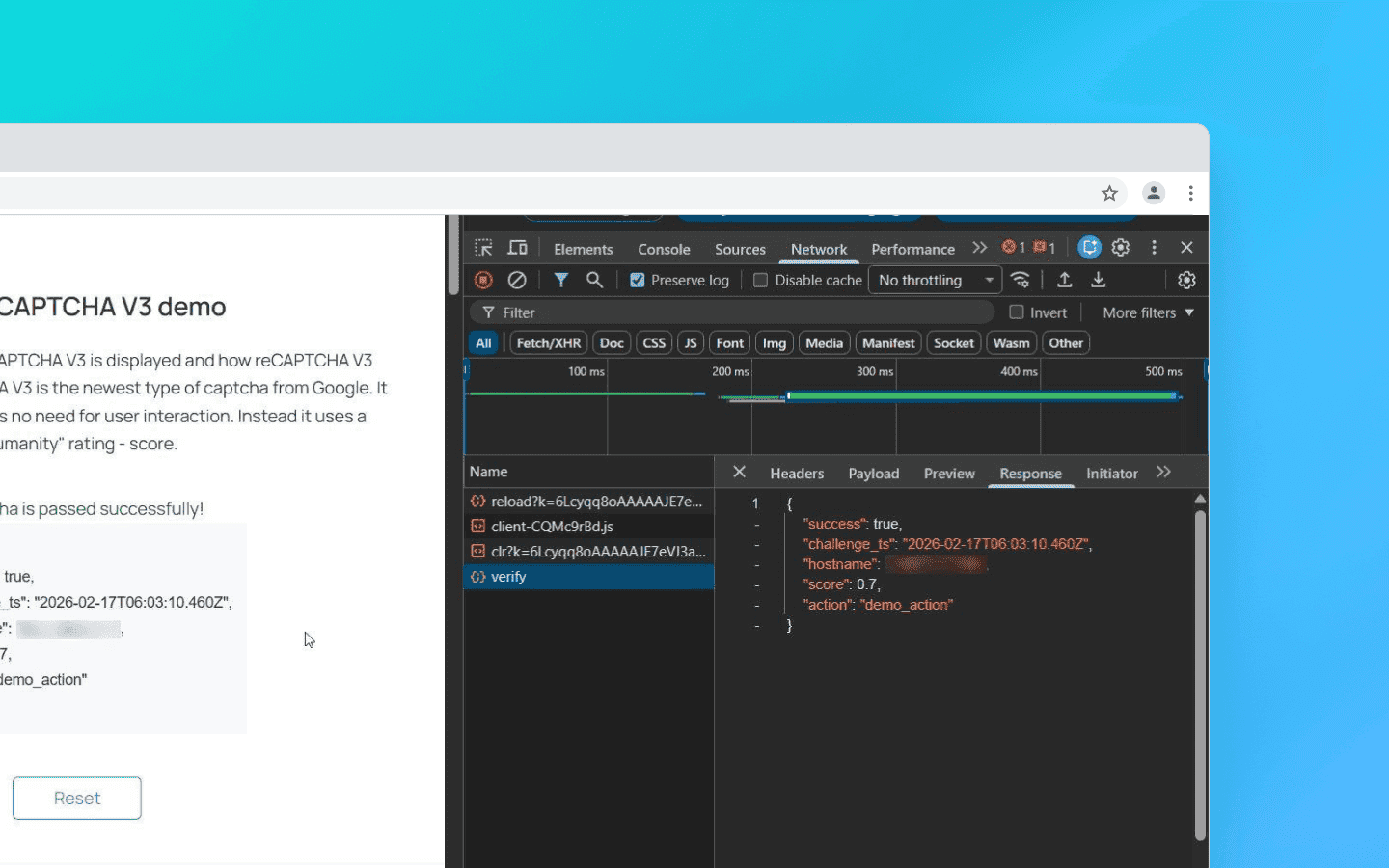
The token is valid for only 2 minutes and can be used for verification only once.
An important nuance for scrapers: the score depends not only on behavior but also on the website’s enterprise attributes. When Google increases the weight of TLS ClientHello fingerprints, the score drops below 0.1 even with a valid token if your request does not imitate Chrome 122+ (JA3 hash). Here’s an example of backend verification:
import requests

# client_ip must be obtained from request.remote_addr or headers
response = requests.post('https://www.google.com/recaptcha/api/siteverify', data={
    'secret': 'YOUR_SECRET_KEY',
    'response': token,
    'remoteip': client_ip
}).json()

score = response.get('score', 0)
if score < 0.5:
    # Fallback to v2 or blocking
    pass
import requests

# client_ip must be obtained from request.remote_addr or headers
response = requests.post('https://www.google.com/recaptcha/api/siteverify', data={
    'secret': 'YOUR_SECRET_KEY',
    'response': token,
    'remoteip': client_ip
}).json()

score = response.get('score', 0)
if score < 0.5:
    # Fallback to v2 or blocking
    pass
Cloudflare Turnstile
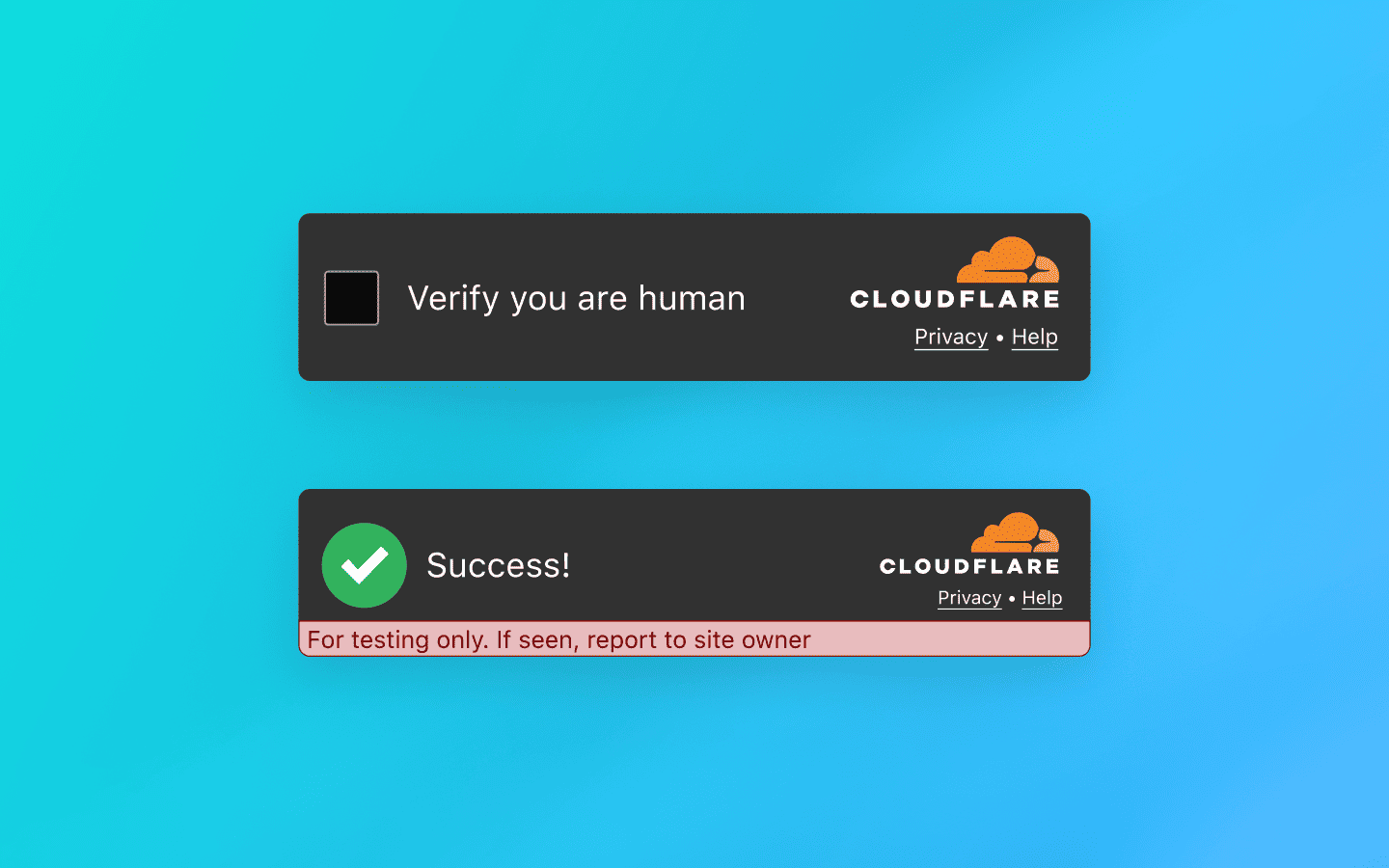
An intelligent verification platform without visual puzzles that dynamically selects a set of background browser tests. In most cases, it performs verification invisibly for the user — without clicks, image selection, or other explicit actions.
Main types of checks include:
Proof‑of‑work. The browser is given a computational task (usually related to hashing) that creates a short-term load on the CPU. The goal is to increase the cost of mass automated requests.
Environment integrity check. The system compares declared client parameters (for example,
User-Agent) with the actual capabilities of the engine. Any mismatch between declared and real environment characteristics increases the risk score.API availability. Support for modern web standards is analyzed (Canvas, WebAudio, WebRTC, etc.). Bots running on outdated or stripped-down engines often fail this stage due to incomplete implementation of such interfaces.
Implementation validation. The system checks not only the presence of APIs but also the behavioral authenticity of how they work; for example, whether Canvas rendering matches the reference profile of real Chrome or contains artifacts typical of virtualized or substituted drivers.
Additionally, Turnstile checks the Battery API and Permissions Policy, as bots running Node.js in headless mode often incorrectly process navigator.getBattery(). To bypass this, patch it through puppeteer-extra:
await page.evaluateOnNewDocument(() => {
  const originalQuery = window.navigator.permissions.query;
  window.navigator.permissions.query = (parameters) => originalQuery(parameters).then(() => ({ state: 'granted' }));
});
await page.evaluateOnNewDocument(() => {
  const originalQuery = window.navigator.permissions.query;
  window.navigator.permissions.query = (parameters) => originalQuery(parameters).then(() => ({ state: 'granted' }));
});
After these checks, ML models are applied to evaluate the results and a short-lived one-time token is issued.
The script connection works similarly to reCAPTCHA. Example integration:
<script src="https://challenges.cloudflare.com/turnstile/v0/api.js" async defer></script>
<script src="https://challenges.cloudflare.com/turnstile/v0/api.js" async defer></script>
Widget element:
<div class="cf-turnstile" data-sitekey="yourSiteKey"></div>
<div class="cf-turnstile" data-sitekey="yourSiteKey"></div>
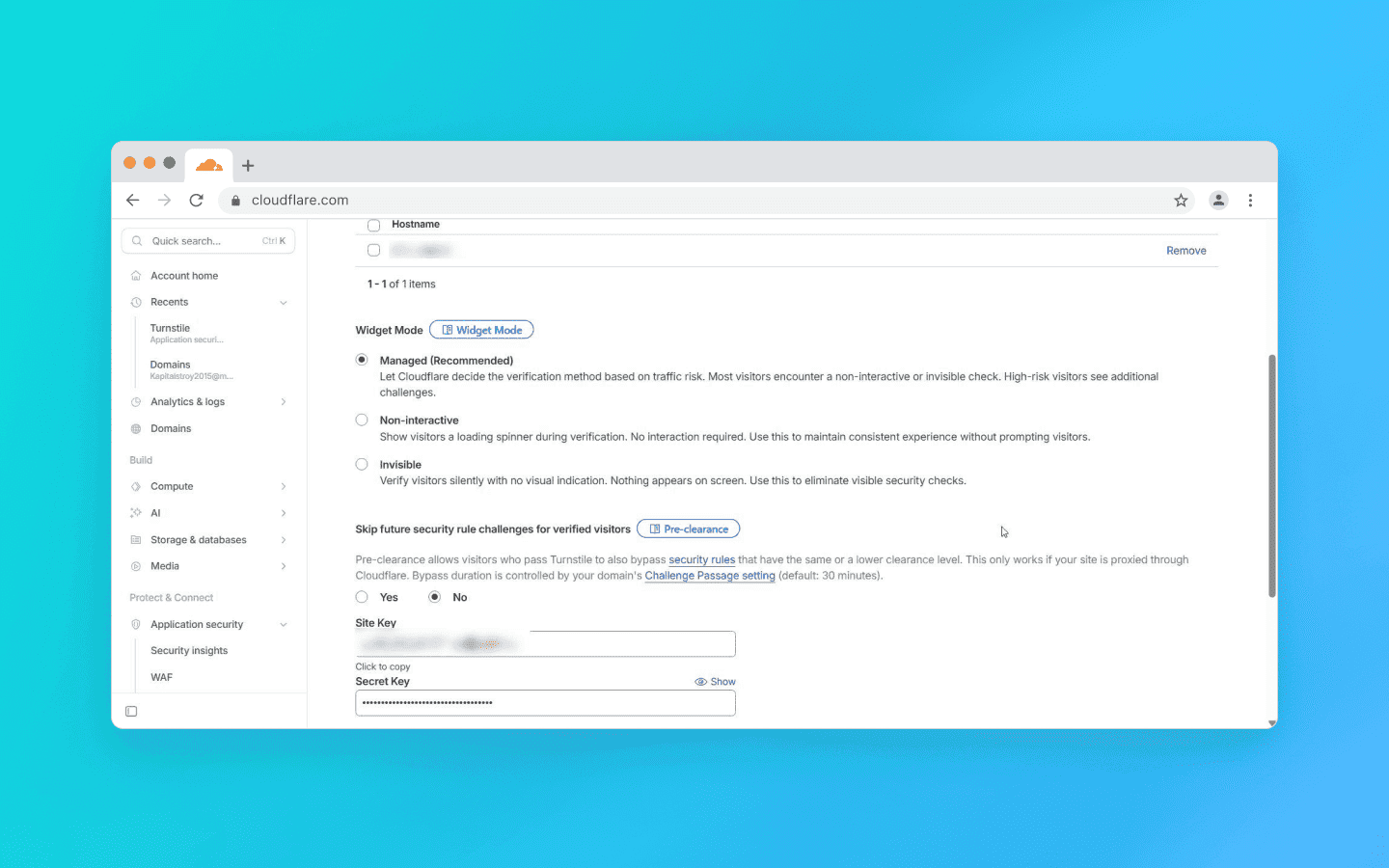
Turnstile works in two modes:
Managed — a widget is displayed on the page. In most cases, it passes verification automatically and immediately turns “green” without user involvement.
Invisible — verification is performed entirely in the background and is not displayed in the interface.
If the system detects increased risk or anomalies in the signals, it can escalate the verification and request an additional action — for example, verification by checking a box.
After passing the verification, the widget places a token into the hidden form field cf-turnstile-response. The website server receives this token and sends a POST request to Cloudflare: https://challenges.cloudflare.com/turnstile/v0/siteverify (parameters: secret and response=token).
The token, as with reCAPTCHA, is single-use, but it lives longer — for 5 minutes. If you receive success: false, the error-codes field will contain the reason (for example, invalid-input-response means the token has expired or was forged).
hCaptcha
A hybrid verification model and a private alternative to Google’s solutions. In the basic configuration, it uses the familiar “I am human” checkbox. If suspicious signals are detected, the system escalates the verification and offers more complex visual tasks — usually more demanding than Google’s.
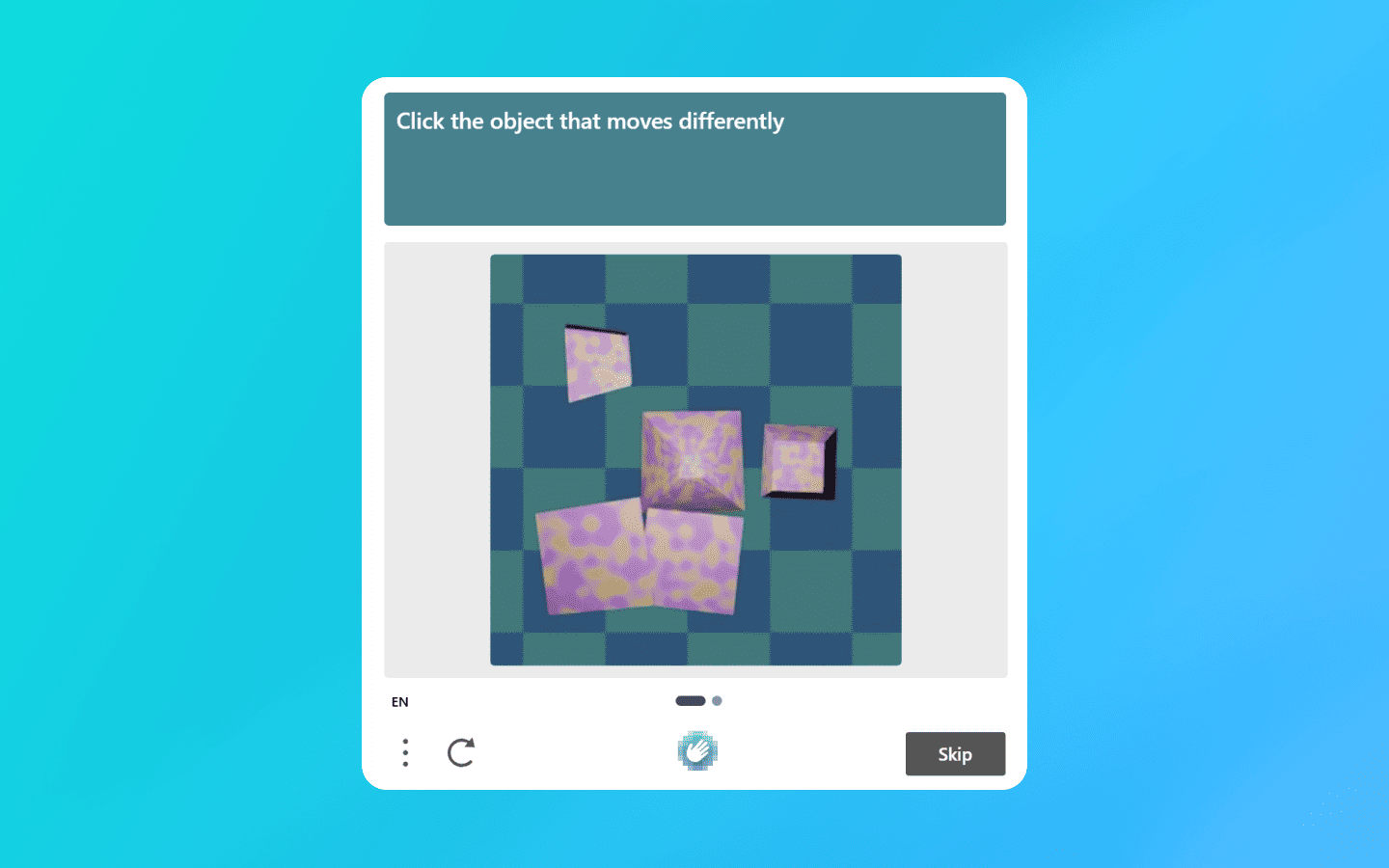
In addition to the standard scenario, hCaptcha is available in Invisible and Passive modes, where verification occurs with minimal or zero user involvement. For Enterprise-grade clients, there is a mechanism similar to Google’s scoring model, which allows risk assessment without displaying interactive tasks.
Example integration: Connects normally. The script syntax is compatible with competitor solutions:
<script src="https://js.hcaptcha.com/1/api.js" async defer></script>
 <div class="h-captcha" data-sitekey="YOUR_SITE_KEY"><
<script src="https://js.hcaptcha.com/1/api.js" async defer></script>
 <div class="h-captcha" data-sitekey="YOUR_SITE_KEY"><
After passing the captcha, a hidden field h-captcha-response appears in the form. The website server verifies it with a POST request: https://api.hcaptcha.com/siteverify. Parameters: secret, response, and preferably remoteip.
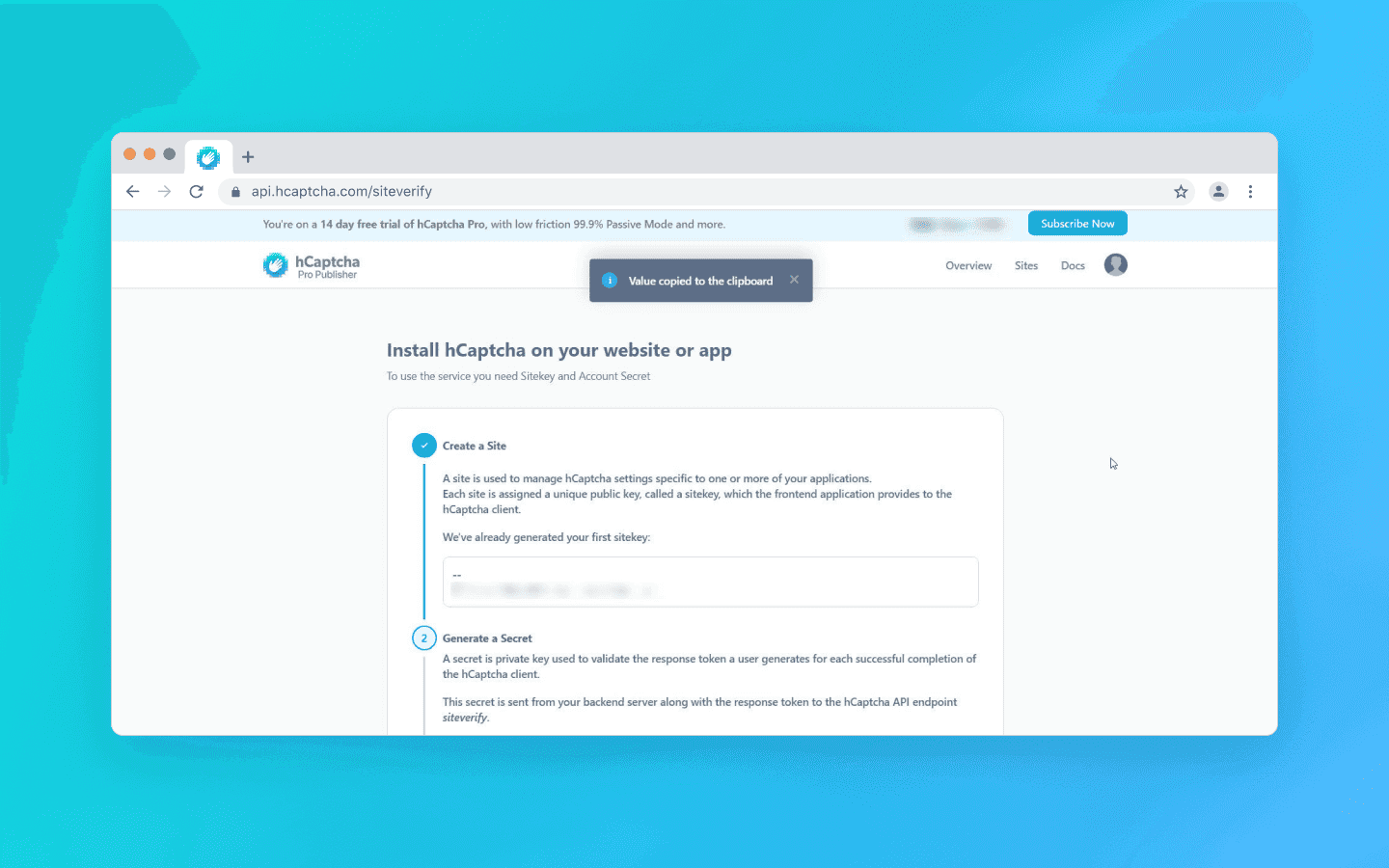
Server response: In the free version everything is straightforward:
{
   "success": true,  // or false
   "challenge_ts": "..."
 }
{
   "success": true,  // or false
   "challenge_ts": "..."
 }
In the Enterprise version, the JSON contains additional fields with a risk score and rejection reasons.
Comparison table by criteria
Criterion | reCAPTCHA v3 (Google) | Cloudflare Turnstile | hCaptcha |
Detection logic (where you can lose score) | Behavioral history. The system takes into account the user’s digital footprint within the Google ecosystem. Lack of search history, Google cookies, authorized sessions, or having an IP address in reputation lists directly lowers the final risk score. | Environment and fingerprint. Strictly checks browser consistency (TLS fingerprint, Canvas, WebGL). Mismatch between Headless parameters and real Chrome results in failure. | IP and behavior. Reacts aggressively to datacenter IPs and unnatural mouse movements. Often issues complex visual tasks. |
Bypass difficulty | High. Getting a token is easy, but getting a high score is difficult. You will need properly prepared profiles and residential proxies. | High. Can be bypassed with a high-quality anti-detect browser or proper JS environment patching. | Medium/High. The main protection measure is visual. Can be bypassed using dedicated visual recognition services (although many have become inadequate). |
Resource load | Low. The script itself is lightweight but requires resources to maintain profiles (cookies, history). | High. Uses proof-of-work and loads the CPU with mathematical tasks. | High (time/money). Requires either payment for solving or time spent clicking. |
Dependence on JS/Cookies | Critical. Does not work without JS. For score >0.3 cookies (SID/HSID) are almost mandatory. | High. Does not work without JS. Cookies are less important than fingerprint integrity and a clean IP. | Medium. Requires JS. Cookies are secondary; a clean IP is important. Often used as a click-through placeholder. |
Captcha bypass strategies
In tasks involving large-scale scraping, multi-accounting, and intensive interaction with web interfaces, three approaches can be used to solve captchas. The choice of method depends on traffic volume, required stability, and the level of protection of the target resource.
Delegating: using an intermediary service
The most popular method for scalable systems. You do not solve the task yourself; instead, you send it to an intermediary that solves the captcha for you and returns the token.
But simply obtaining a token from the service is not enough. The website will not know that the captcha has been solved until you apply the token. This is usually done via JavaScript injection:
You need to find the hidden field (usually
g-recaptcha-response) and insert the token there.The crucial part: you must call the callback function that triggers server-side verification. Without this step, the “Submit” button may remain inactive.
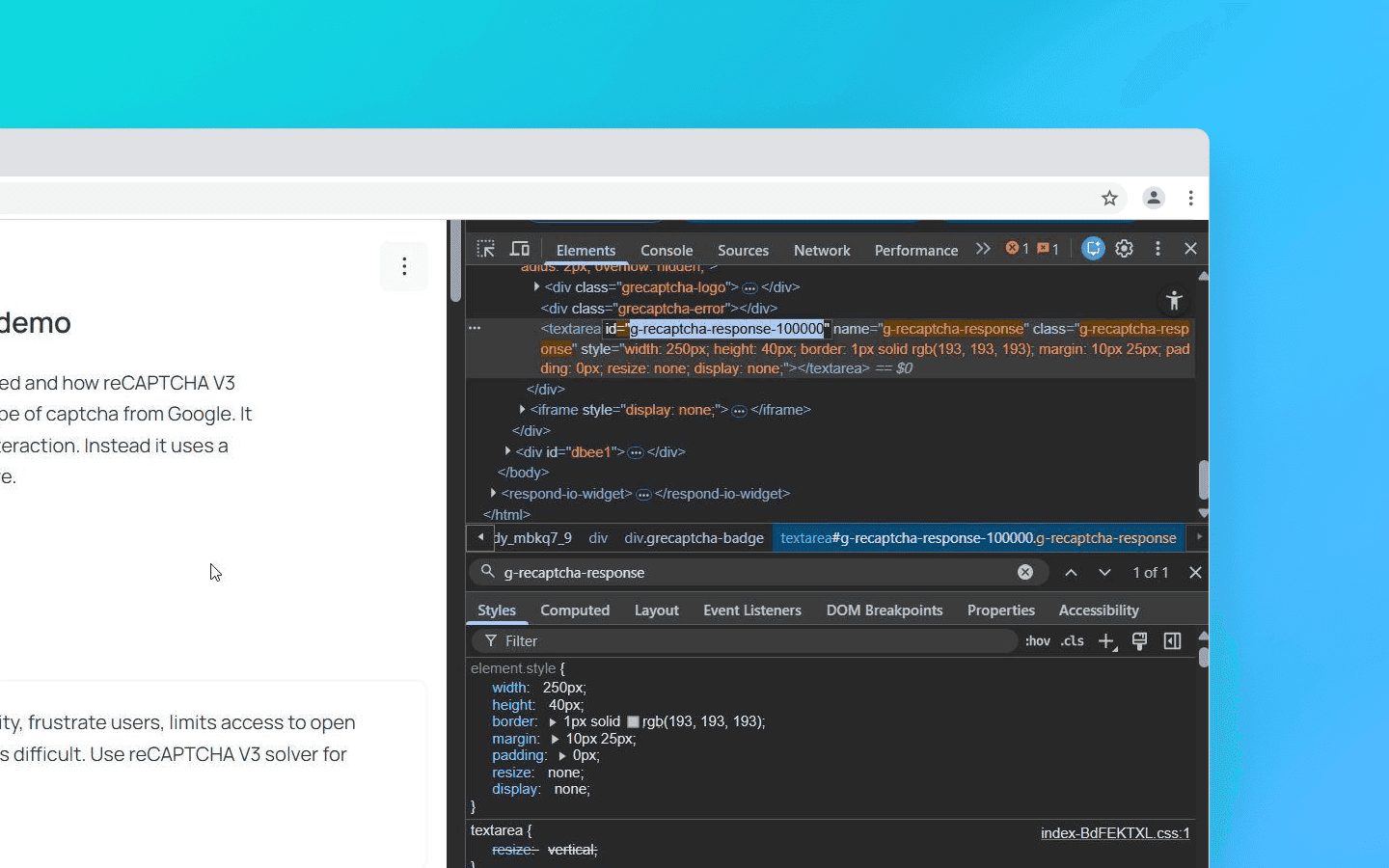
# Insert token into hidden field
driver.execute_script("document.getElementsByName('g-recaptcha-response')[0].value = arguments[0];", token)
# Call the callback function (a trigger for the website)
driver.execute_script(f"submitCallback('{token}');")
# Insert token into hidden field
driver.execute_script("document.getElementsByName('g-recaptcha-response')[0].value = arguments[0];", token)
# Call the callback function (a trigger for the website)
driver.execute_script(f"submitCallback('{token}');")
Possible pitfalls:
User-Agent matching: It is critically important that the User-Agent used during recognition by the service matches the one you use when submitting the token. If the service solved the captcha with Chrome 139 but you submit the token with Chrome 140 headers, the token will be rejected (this is especially critical for Turnstile).
Proxy matching: For reCAPTCHA v3 and hCaptcha Enterprise, it is highly desirable to send your proxy to the recognition service so that the captcha is solved from the same IP address that you will use to access the site. Otherwise Google will detect the mismatch.
Dynamic parameters: Often the SiteKey alone is not enough. For example, if you work with Google SERP or other complex protection systems, they may require passing the
data-sparameter, which is dynamically generated every time the page loads. If you send the SiteKey to the solving service without this parameter, the token will be valid but the website will not accept it.
Browser emulation (Puppeteer/Selenium + Stealth)
Used when the site checks the JS environment too strictly (Turnstile, hCaptcha Enterprise). Standard Puppeteer or Selenium will be detected immediately due to the property navigator.webdriver = true.
Therefore additional tools must be used: Puppeteer-extra-plugin-stealth, Undetected Chromedriver, or Octo Browser via API.
The essence of the method is that the browser uses a modified Chromium kernel (it spoofs the kernel). Critical fingerprints (Canvas, WebGL, WebRTC, Audio) are spoofed at the level of native C++ code rather than through JS injections.
This is the key point, as protection measures like Turnstile look for traces of interference in the JS environment, but in Octo there are none. The browser uses unique hardware noise and parameters, passes integrity checks, and you receive the token automatically.
This method is quite demanding in terms of RAM and CPU resources, so it is not suitable for thousands of threads. However, for 50–100 threads this solution is optimal.
If you require 100+ threads, you can combine it with Docker using the flags --no-sandbox --disable-gpu. With Playwright you can expect about a 70% success rate when bypassing Turnstile using a stealth plugin and residential proxies. As an alternative, you can use the Octo Browser API (headless mode without a graphical interface).
HTTP-level requests (TLS fingerprinting)
This is an advanced approach for high-volume scraping using Go, Python Requests, and C#, where the browser itself is not used. Instead, its network fingerprint is reproduced.
Standard HTTP libraries such as Python Requests form a TLS handshake with characteristic differences from standard browser handshakes: e.g., a different order of parameters and a connection signature. Cloudflare detects such discrepancies and may block the request before the captcha script even loads.
There are libraries capable of imitating the TLS fingerprint of a real browser. This makes it possible to pass Cloudflare Turnstile checks without launching a browser.
Why your bot receives a low score or a ban
If you sent the captcha to an intermediary service, inserted the token it returned, but the site still does not let you in, the issue is most likely not the captcha itself but one of the following problems:
Dirty proxies. Datacenter IPs are flagged by Google and Cloudflare as high risk by default. The only solution in this case is to use mobile or residential proxies.
Lack of profile preparation (relevant for reCAPTCHA v3). You are trying to access the site using a clean profile with no history. For reCAPTCHA v3 this clearly indicates a bot. Use properly prepared profiles with saved SID/HSID cookies from an authorized Google session.
Header inconsistency. The order of headers in the request does not match that of a real browser. For example, Chrome always sends headers in a specific order (
Host -> Connection -> sec-ch-ua...). If your library sends them differently, this is a red flag for anti-fraud systems.
Conclusion
In 2026, automation requires a complex architecture and control over all levels of interaction.
reCAPTCHA v3 is bypassed not so much by solving tasks as by reputation management: quality profile farming, a stable history of interactions, and a consistent environment.
Cloudflare Turnstile places strict requirements on environment integrity. Any discrepancies in JS, API, or TLS fingerprints lead to reduced trust and escalation of verification.
hCaptcha relies more heavily on visual tasks, which makes it relatively more susceptible to automated recognition through modern computer vision models.
Working with captchas today requires understanding the principles of modern anti-bot systems and the ability to manage the digital fingerprint at every interaction stage.
Stay anonymous, take advantage of multi-accounting, and achieve your goals with the highest-quality anti-detect browser on the market.
Would you like to try Octo Browser at discount?
Use the promo code OCTOSCRAPER to get 30% off any subscription. This offer is valid only for new users.
How captchas work
Let’s first look at how each captcha solution works:
reCAPTCHA v3 (Google)
A classic example of an invisible scoring model. The browser collects data about user behavior and exchanges it with Google for a token.
This token is sent to the website server, which then sends a secret request to Google. The purpose is to verify the token and receive a JSON response with a risk score ranging from 0.0 (bot) to 1.0 (human) and an action label.
If a user receives a low score (< 0.5), the website owner configures a scenario for how to handle such a visitor — block them entirely or display a visible reCAPTCHA v2 for additional verification (the ubiquitous traffic lights).
Example integration: On a page with a captcha, the script is connected as follows:
<script src="https://www.google.com/recaptcha/api.js?render=Your_site_key">
When the target action occurs (for example, when clicking the “Login” button), the following method is called
grecaptcha.execute('YOUR_SITE_KEY', {action: 'login'}).then(function(token) {
     // This token is sent to the website backend along with the form data
 });
The token is valid for only 2 minutes and can be used for verification only once.
An important nuance for scrapers: the score depends not only on behavior but also on the website’s enterprise attributes. When Google increases the weight of TLS ClientHello fingerprints, the score drops below 0.1 even with a valid token if your request does not imitate Chrome 122+ (JA3 hash). Here’s an example of backend verification:
import requests

# client_ip must be obtained from request.remote_addr or headers
response = requests.post('https://www.google.com/recaptcha/api/siteverify', data={
    'secret': 'YOUR_SECRET_KEY',
    'response': token,
    'remoteip': client_ip
}).json()

score = response.get('score', 0)
if score < 0.5:
    # Fallback to v2 or blocking
    pass
Cloudflare Turnstile
An intelligent verification platform without visual puzzles that dynamically selects a set of background browser tests. In most cases, it performs verification invisibly for the user — without clicks, image selection, or other explicit actions.
Main types of checks include:
Proof‑of‑work. The browser is given a computational task (usually related to hashing) that creates a short-term load on the CPU. The goal is to increase the cost of mass automated requests.
Environment integrity check. The system compares declared client parameters (for example,
User-Agent) with the actual capabilities of the engine. Any mismatch between declared and real environment characteristics increases the risk score.API availability. Support for modern web standards is analyzed (Canvas, WebAudio, WebRTC, etc.). Bots running on outdated or stripped-down engines often fail this stage due to incomplete implementation of such interfaces.
Implementation validation. The system checks not only the presence of APIs but also the behavioral authenticity of how they work; for example, whether Canvas rendering matches the reference profile of real Chrome or contains artifacts typical of virtualized or substituted drivers.
Additionally, Turnstile checks the Battery API and Permissions Policy, as bots running Node.js in headless mode often incorrectly process navigator.getBattery(). To bypass this, patch it through puppeteer-extra:
await page.evaluateOnNewDocument(() => {
  const originalQuery = window.navigator.permissions.query;
  window.navigator.permissions.query = (parameters) => originalQuery(parameters).then(() => ({ state: 'granted' }));
});
After these checks, ML models are applied to evaluate the results and a short-lived one-time token is issued.
The script connection works similarly to reCAPTCHA. Example integration:
<script src="https://challenges.cloudflare.com/turnstile/v0/api.js" async defer></script>
Widget element:
<div class="cf-turnstile" data-sitekey="yourSiteKey"></div>
Turnstile works in two modes:
Managed — a widget is displayed on the page. In most cases, it passes verification automatically and immediately turns “green” without user involvement.
Invisible — verification is performed entirely in the background and is not displayed in the interface.
If the system detects increased risk or anomalies in the signals, it can escalate the verification and request an additional action — for example, verification by checking a box.
After passing the verification, the widget places a token into the hidden form field cf-turnstile-response. The website server receives this token and sends a POST request to Cloudflare: https://challenges.cloudflare.com/turnstile/v0/siteverify (parameters: secret and response=token).
The token, as with reCAPTCHA, is single-use, but it lives longer — for 5 minutes. If you receive success: false, the error-codes field will contain the reason (for example, invalid-input-response means the token has expired or was forged).
hCaptcha
A hybrid verification model and a private alternative to Google’s solutions. In the basic configuration, it uses the familiar “I am human” checkbox. If suspicious signals are detected, the system escalates the verification and offers more complex visual tasks — usually more demanding than Google’s.
In addition to the standard scenario, hCaptcha is available in Invisible and Passive modes, where verification occurs with minimal or zero user involvement. For Enterprise-grade clients, there is a mechanism similar to Google’s scoring model, which allows risk assessment without displaying interactive tasks.
Example integration: Connects normally. The script syntax is compatible with competitor solutions:
<script src="https://js.hcaptcha.com/1/api.js" async defer></script>
 <div class="h-captcha" data-sitekey="YOUR_SITE_KEY"><
After passing the captcha, a hidden field h-captcha-response appears in the form. The website server verifies it with a POST request: https://api.hcaptcha.com/siteverify. Parameters: secret, response, and preferably remoteip.
Server response: In the free version everything is straightforward:
{
   "success": true,  // or false
   "challenge_ts": "..."
 }
In the Enterprise version, the JSON contains additional fields with a risk score and rejection reasons.
Comparison table by criteria
Criterion | reCAPTCHA v3 (Google) | Cloudflare Turnstile | hCaptcha |
Detection logic (where you can lose score) | Behavioral history. The system takes into account the user’s digital footprint within the Google ecosystem. Lack of search history, Google cookies, authorized sessions, or having an IP address in reputation lists directly lowers the final risk score. | Environment and fingerprint. Strictly checks browser consistency (TLS fingerprint, Canvas, WebGL). Mismatch between Headless parameters and real Chrome results in failure. | IP and behavior. Reacts aggressively to datacenter IPs and unnatural mouse movements. Often issues complex visual tasks. |
Bypass difficulty | High. Getting a token is easy, but getting a high score is difficult. You will need properly prepared profiles and residential proxies. | High. Can be bypassed with a high-quality anti-detect browser or proper JS environment patching. | Medium/High. The main protection measure is visual. Can be bypassed using dedicated visual recognition services (although many have become inadequate). |
Resource load | Low. The script itself is lightweight but requires resources to maintain profiles (cookies, history). | High. Uses proof-of-work and loads the CPU with mathematical tasks. | High (time/money). Requires either payment for solving or time spent clicking. |
Dependence on JS/Cookies | Critical. Does not work without JS. For score >0.3 cookies (SID/HSID) are almost mandatory. | High. Does not work without JS. Cookies are less important than fingerprint integrity and a clean IP. | Medium. Requires JS. Cookies are secondary; a clean IP is important. Often used as a click-through placeholder. |
Captcha bypass strategies
In tasks involving large-scale scraping, multi-accounting, and intensive interaction with web interfaces, three approaches can be used to solve captchas. The choice of method depends on traffic volume, required stability, and the level of protection of the target resource.
Delegating: using an intermediary service
The most popular method for scalable systems. You do not solve the task yourself; instead, you send it to an intermediary that solves the captcha for you and returns the token.
But simply obtaining a token from the service is not enough. The website will not know that the captcha has been solved until you apply the token. This is usually done via JavaScript injection:
You need to find the hidden field (usually
g-recaptcha-response) and insert the token there.The crucial part: you must call the callback function that triggers server-side verification. Without this step, the “Submit” button may remain inactive.
# Insert token into hidden field
driver.execute_script("document.getElementsByName('g-recaptcha-response')[0].value = arguments[0];", token)
# Call the callback function (a trigger for the website)
driver.execute_script(f"submitCallback('{token}');")
Possible pitfalls:
User-Agent matching: It is critically important that the User-Agent used during recognition by the service matches the one you use when submitting the token. If the service solved the captcha with Chrome 139 but you submit the token with Chrome 140 headers, the token will be rejected (this is especially critical for Turnstile).
Proxy matching: For reCAPTCHA v3 and hCaptcha Enterprise, it is highly desirable to send your proxy to the recognition service so that the captcha is solved from the same IP address that you will use to access the site. Otherwise Google will detect the mismatch.
Dynamic parameters: Often the SiteKey alone is not enough. For example, if you work with Google SERP or other complex protection systems, they may require passing the
data-sparameter, which is dynamically generated every time the page loads. If you send the SiteKey to the solving service without this parameter, the token will be valid but the website will not accept it.
Browser emulation (Puppeteer/Selenium + Stealth)
Used when the site checks the JS environment too strictly (Turnstile, hCaptcha Enterprise). Standard Puppeteer or Selenium will be detected immediately due to the property navigator.webdriver = true.
Therefore additional tools must be used: Puppeteer-extra-plugin-stealth, Undetected Chromedriver, or Octo Browser via API.
The essence of the method is that the browser uses a modified Chromium kernel (it spoofs the kernel). Critical fingerprints (Canvas, WebGL, WebRTC, Audio) are spoofed at the level of native C++ code rather than through JS injections.
This is the key point, as protection measures like Turnstile look for traces of interference in the JS environment, but in Octo there are none. The browser uses unique hardware noise and parameters, passes integrity checks, and you receive the token automatically.
This method is quite demanding in terms of RAM and CPU resources, so it is not suitable for thousands of threads. However, for 50–100 threads this solution is optimal.
If you require 100+ threads, you can combine it with Docker using the flags --no-sandbox --disable-gpu. With Playwright you can expect about a 70% success rate when bypassing Turnstile using a stealth plugin and residential proxies. As an alternative, you can use the Octo Browser API (headless mode without a graphical interface).
HTTP-level requests (TLS fingerprinting)
This is an advanced approach for high-volume scraping using Go, Python Requests, and C#, where the browser itself is not used. Instead, its network fingerprint is reproduced.
Standard HTTP libraries such as Python Requests form a TLS handshake with characteristic differences from standard browser handshakes: e.g., a different order of parameters and a connection signature. Cloudflare detects such discrepancies and may block the request before the captcha script even loads.
There are libraries capable of imitating the TLS fingerprint of a real browser. This makes it possible to pass Cloudflare Turnstile checks without launching a browser.
Why your bot receives a low score or a ban
If you sent the captcha to an intermediary service, inserted the token it returned, but the site still does not let you in, the issue is most likely not the captcha itself but one of the following problems:
Dirty proxies. Datacenter IPs are flagged by Google and Cloudflare as high risk by default. The only solution in this case is to use mobile or residential proxies.
Lack of profile preparation (relevant for reCAPTCHA v3). You are trying to access the site using a clean profile with no history. For reCAPTCHA v3 this clearly indicates a bot. Use properly prepared profiles with saved SID/HSID cookies from an authorized Google session.
Header inconsistency. The order of headers in the request does not match that of a real browser. For example, Chrome always sends headers in a specific order (
Host -> Connection -> sec-ch-ua...). If your library sends them differently, this is a red flag for anti-fraud systems.
Conclusion
In 2026, automation requires a complex architecture and control over all levels of interaction.
reCAPTCHA v3 is bypassed not so much by solving tasks as by reputation management: quality profile farming, a stable history of interactions, and a consistent environment.
Cloudflare Turnstile places strict requirements on environment integrity. Any discrepancies in JS, API, or TLS fingerprints lead to reduced trust and escalation of verification.
hCaptcha relies more heavily on visual tasks, which makes it relatively more susceptible to automated recognition through modern computer vision models.
Working with captchas today requires understanding the principles of modern anti-bot systems and the ability to manage the digital fingerprint at every interaction stage.
Stay up to date with the latest Octo Browser news
By clicking the button you agree to our Privacy Policy.
Stay up to date with the latest Octo Browser news
By clicking the button you agree to our Privacy Policy.
Stay up to date with the latest Octo Browser news
By clicking the button you agree to our Privacy Policy.

Join Octo Browser now
Or contact Customer Service at any time with any questions you might have.
Join Octo Browser now
Or contact Customer Service at any time with any questions you might have.
Join Octo Browser now
Or contact Customer Service at any time with any questions you might have.