How to best use Claude AI: complete guide for 2026


Andrey Vorster
Content Manager, Octo Browser
Claude is a family of advanced large language models (LLMs) developed by Anthropic. Claude's main strengths are advanced reasoning, the ability to work with long contexts, and high accuracy in following instructions. By 2026, Claude has evolved into a complete ecosystem, ranging from a web chat interface to autonomous agents like Claude Code and Cowork. It now includes Artifacts for interactive outputs, Projects for organizing work, and a powerful API. In this guide, we'll explain how to use Claude for content creation, coding, data analysis, and business tasks.
Contents
Stay anonymous, take advantage of multi-accounting, and achieve your goals with the highest-quality anti-detect browser on the market.
Would you like to try Octo Browser at discount?
Use the promo code OCTOBLOG to get 30% off any subscription. This offer is valid only for new users.
Getting started with Anthropic Claude AI assistant
Claude is an AI assistant that can hold conversations, accurately follow instructions, write and edit text, explain complex topics in simple language, analyze data, and assist with coding. Its primary advantages are advanced reasoning capabilities and the ability to work with long contexts. Claude supports multiple languages and can work with code.
To get started:
Go to claude.ai.
Sign up with your email address or a Google account. The minimum age requirement is 18.
Check whether the service is available in your region on the Anthropic website.
Try the free account: start with simple prompts and test the model on real-world tasks.
How to access Claude web interface and apps
Claude is available in several formats:
Web interface. The primary way to use Claude is through claude.ai. It provides access to the full feature set, including chat, file uploads, Artifacts, and Projects.
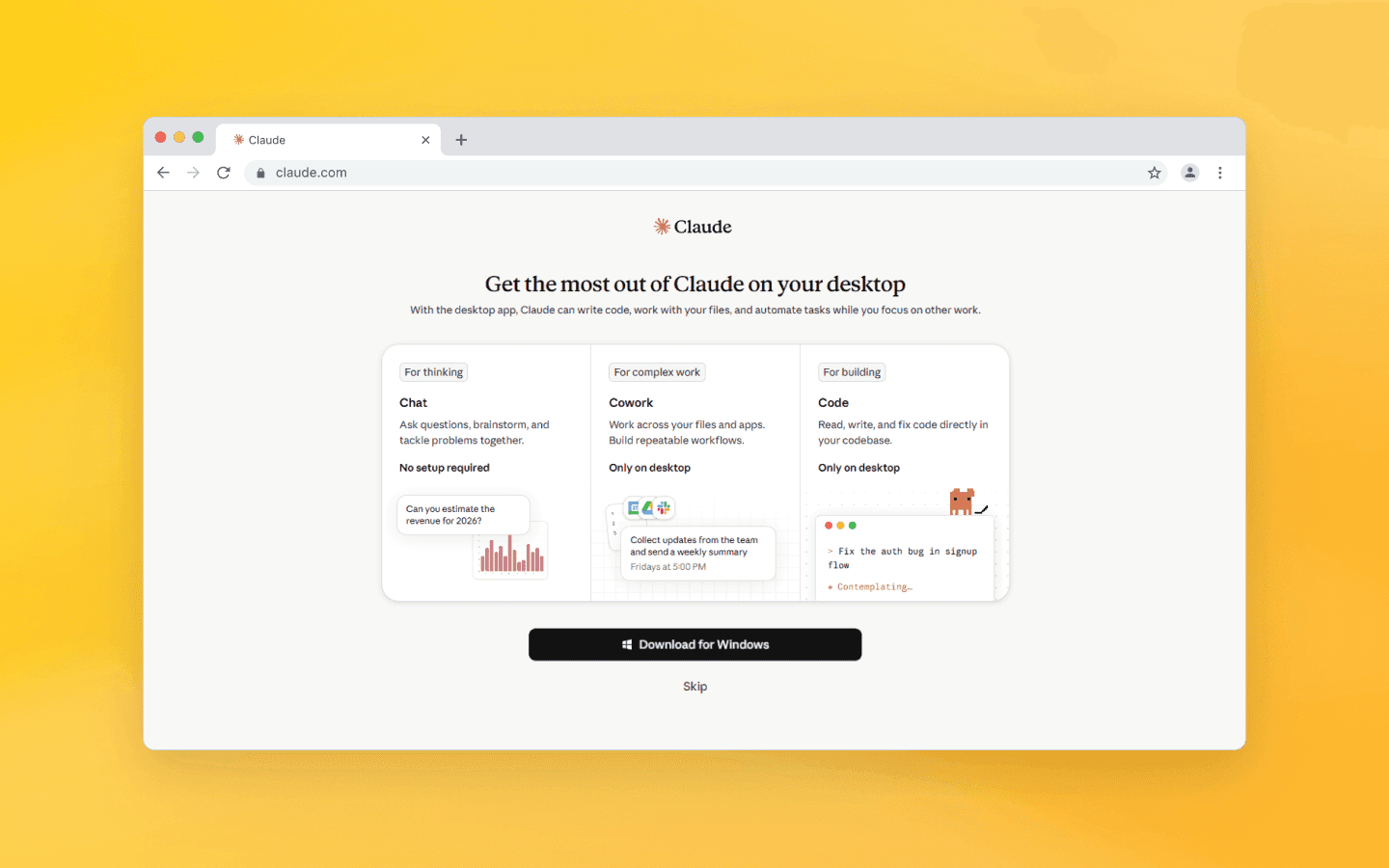
Desktop application. Download Claude Desktop for macOS or Windows. The desktop version integrates more effectively with local files and is particularly useful when working with Cowork.
Mobile apps. Available for iOS and Android, allowing you to chat with Claude anytime.
Claude subscription plans and usage limits
In 2026, Claude offers several subscription tiers.
Free
The free plan provides access to the Sonnet model. Limits are approximately 15–50 short messages per 5-hour window. The exact number depends on the complexity of your prompts and current server load.
The free plan includes:
Basic Artifacts.
A limited number of Projects.
Text and image analysis.
Web search.
Connectors for Slack, Google Workspace, and other services.
The free plan does not include:
Opus (the most powerful model).
Claude Code.
Cowork.
Pro (~$20/month or $17/month when billed annually)
The Pro plan provides approximately five times more usage, or around 45 messages per 5-hour window. The context window is 200,000 tokens.
It includes:
Claude Code.
Unlimited Projects.
Expanded access to Artifacts.
Connectors.
Extended Thinking mode.
Max 5x ($100/month) and Max 20x ($200/month)
Max plans are designed for intensive use. They provide 5 or 20 times more usage than the Pro plan.
Max 5x is suitable for developers who use Claude Code for several hours per day. Max 20x is intended for demanding workloads, such as multiple simultaneous sessions or continuous use throughout the day.
Team and Enterprise
Business users can choose from Team and Enterprise plans.
Team Standard ($20 per team member/month): Claude Code and standard usage limits.
Team Premium ($100 per team member/month): Cowork and increased limits.
Enterprise: Custom pricing and terms.
Plan | Price | Usage limits | Context | Additional features |
Free | Free | ~15-40 messages per 5 hours | Limited | Basic Artifacts and Projects |
Pro | ~$20/month | ~50-100 messages per 5 hours | 200,000 tokens | Claude Code, unlimited Projects, connectors |
Max | $100–200/month | Hundreds of messages per 5 hours | Up to 500,000–1 million tokens | Priority access for complex tasks |
Team/Enterprise | Custom | Higher limits | Up to 1 million tokens | Teamwork, administrative controls |
How usage limits work
Usage limits reset every 5 hours. Chat conversations and Claude Code share the same usage quota.
Pro and Max plans also include weekly usage limits in addition to the 5-hour windows.
You can check your current usage with the /usage or /status commands in Claude Code.
Context window
Claude AI's standard context window is 200,000 tokens, or roughly 500 pages of text. In beta, Sonnet 4.6 and Opus 4.6 support up to 1 million tokens. Enterprise plans may offer even larger context windows.
Which model to choose: Claude Opus, Claude Sonnet, or Claude Haiku?
Each model is designed for a specific purpose, balancing computational power and processing speed. The right choice depends on the complexity and scale of your task.
Claude Opus is the flagship model. It is designed for complex analytical work, reviewing and generating large codebases, solving sophisticated logical problems, and performing multi-step reasoning. It takes longer to process requests but delivers the deepest and most structured responses.
Claude Sonnet is the balanced option. It is ideal for writing, processing moderately complex documents, and maintaining context throughout extended conversations. It offers an excellent balance between quality and speed.
Claude Haiku is the lightweight, high-speed model. It is intended for simple requests that require immediate responses, such as quick factual answers, information lookup, and basic text processing. It provides minimal latency with low computational cost.
To choose the right model, match the size of your input, the complexity of the task, and the required depth of analysis to the capabilities of each model. This ensures the best balance between speed, quality, and cost.
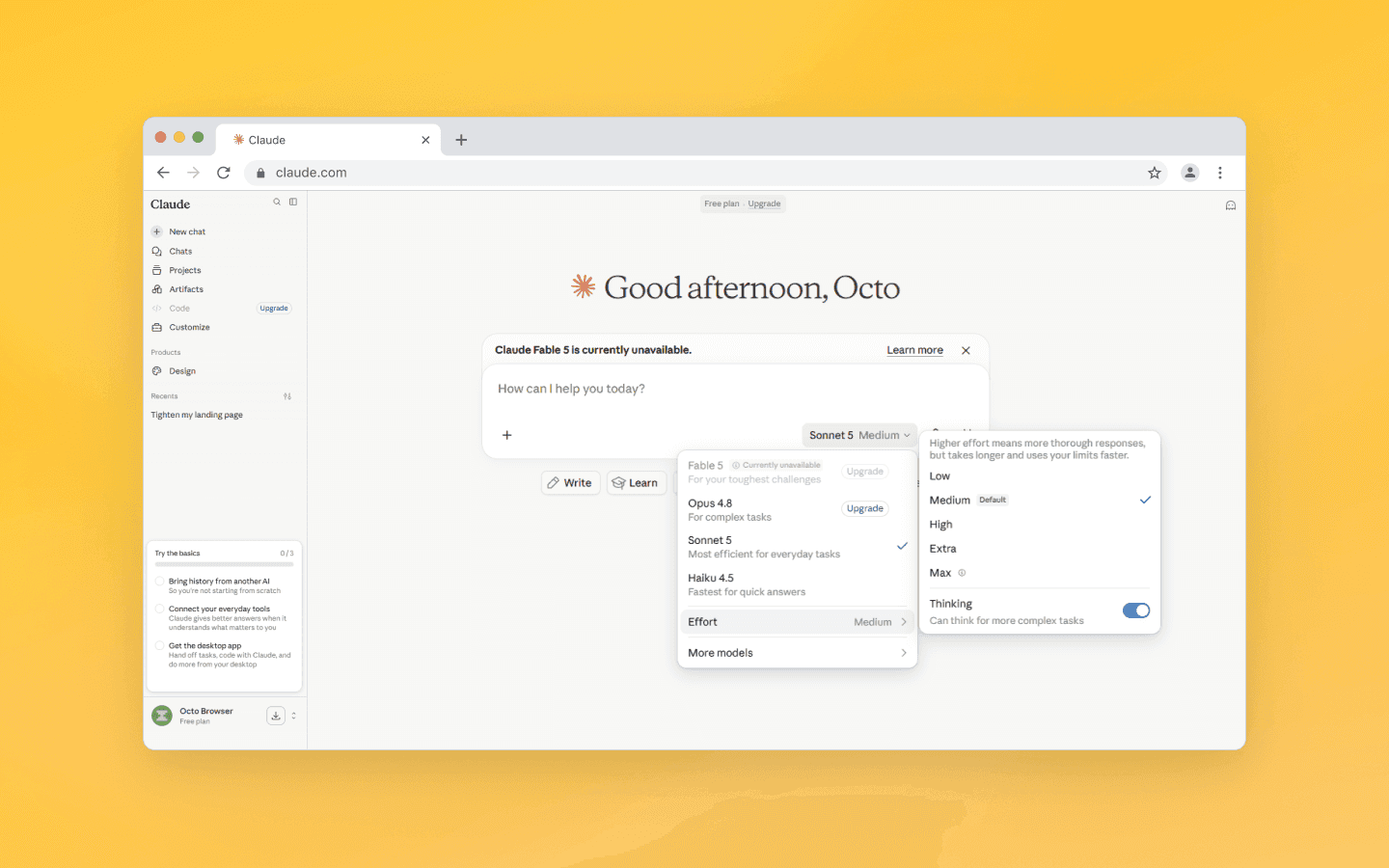
You can choose between Sonnet, Opus, and Haiku in the Claude interface, and also configure Claude’s effort level.
Claude AI capabilities, limitations, and context window
Claude AI supports multi-turn conversations within a single session. You can provide several follow-up instructions in sequence. For example, you might upload a draft, ask Claude to shorten it, change its tone, adapt it for a landing page, and then generate short ad creatives.
Claude maintains the context of your task when your instructions are clearly defined. It preserves context throughout the conversation, producing more consistent results during iterative refinement than with isolated prompts.
Capabilities
Multilingual support. Claude supports multiple languages.
Artifacts. Interactive outputs displayed in a separate panel. Claude can generate them automatically or on request. They can be edited, exported, and shared via a link (recipients do not need an Anthropic account). Persistent storage of up to 20 MB and Live Artifacts with real-time data updates are supported.
Projects. Persistent workspaces where you can store files, define custom instructions, and preserve chat history. Each project has its own isolated context, making Projects ideal for long-term work.
Cowork. An autonomous desktop agent that performs multi-step tasks without requiring a terminal. It supports planning and working with local folders. Available with Team Premium and higher plans.
Vision. Image analysis that recognizes objects, text in photos, diagrams, charts, and more. Multiple files can be uploaded simultaneously.
Connectors. Integrations with external services. As of 2026, supported services include Gmail, Google Calendar, Slack, S&P Global, LSEG, Moody's, FactSet, and others, allowing Claude to work with data from your existing tools.
MCP (Model Context Protocol). Support for connecting external tools and data sources. Developers can extend Claude's capabilities through custom MCP servers.
Limitations
Message limits, particularly on the Free and Pro plans during intensive use.
No real-time functionality outside of Live Artifacts.
Responses may occasionally contain inaccuracies, which can be reduced by using precise prompts.
The context window is large, but not unlimited.
Best practices for prompt engineering and optimization strategies
Well-structured prompts are the key to getting high-quality responses from Claude.
Be clear and specific
State your task directly. Specify the desired format and tone.
Example:
Poor: "Create an analytics dashboard."
Better: "Create an analytics dashboard. Include as many relevant features and interactive elements as possible. Go beyond the basic functionality."
Tips:
Use direct verbs such as "Write," "Analyze," and "Generate."
Skip lengthy introductions and get straight to the point.
Clearly specify what the response should include.
Assign a role
Give Claude a role, for example:
"You are a senior software engineer" or "You are a marketing expert."
Provide examples
Start with one to three examples to demonstrate the desired style or format. Add more if the responses still aren't meeting your expectations.
Example:
Here is an example of the style I want:
Article: [link]
Summary: The EU has passed a law about AI. Key requirements include transparency and human oversight. It comes into force in 2026.
Now summarize this article: [link]
Use an XML structure
Separate instructions, context, and examples with XML tags such as <instructions>, <context>, and <examples>.
Chain of Thought
Ask Claude to reason step by step.
Option 1: "Think step by step before answering."
Option 2 (using tags): "Think through the problem inside <thinking> tags before answering. Then provide the final answer inside <response> tags."
Important: Claude 4.x includes Extended Thinking, which provides structured reasoning automatically. In many cases, it is preferable to manually prompting Chain of Thought. However, manual CoT remains useful when Extended Thinking is unavailable, such as on the free plan.
Allow uncertainty
Encourage Claude to admit when it lacks sufficient information. This reduces hallucinations.
Example:
"Analyze this financial data. If there isn't enough information to draw conclusions, say so instead of making assumptions."
Iterate
Refine the responses. Edit your prompts. An iterative approach consistently improves output quality.
Additional settings
In the interface, you can adjust the model's effort level. Higher effort uses more tokens but generally produces better results. Lower effort is faster and more economical.
For Claude Code, create a CLAUDE.md file containing your default project instructions.
Keep your Projects focused and use shorter working sessions. This helps prevent context overload.
Top use cases for Claude: content creation, coding, and data analysis
Claude excels across several categories of tasks.
Content creation
Generating articles, SEO content, and marketing materials.
Editing and rewriting texts.
Brainstorming ideas and creating content plans.
Using Artifacts to build interactive documents and prototypes.
For marketers and affiliates, Claude is a valuable tool for speeding up the creation of creatives, posts, and landing pages. For secure multi-accounting and automation, you'll also need an anti-detect browser.
Coding
Claude Code is an autonomous coding agent. It can read and edit files, run commands, and work with Git.
Generate functions, classes, and components.
Refactor code, find and fix bugs.
Create tests and write documentation.
Claude Sonnet 4.6 delivers excellent coding performance. Developers prefer it over Sonnet 4.5 in roughly 70% of cases. Many note that it analyzes context more thoroughly before modifying code, is less prone to overengineering, unnecessary command simplification, and superficial responses.
Claude Code automates tasks related to multi-accounting, including data processing, API interactions, and web scraping. However, scripts run on a single device leave the same digital fingerprint, which can lead to account linking and bans. Octo Browser solves this problem by spoofing more than 50 fingerprint parameters, including screen resolution, fonts, WebGL, the time zone, and many others. Each Octo profile appears as a separate device, allowing Claude Code scripts to run in isolated environments without exposing the underlying fingerprint spoofing.
Data analysis
Analyze CSV, Excel, and PDF files.
Create visualizations with Artifacts.
Build dashboards and reports.
Summarize large datasets.
Perform financial analysis and document processing.
Other use cases
Research.
Workflow automation.
Working with legal documents.
Long-term planning.
Exploring advanced Claude features: Artifacts, Projects, and Claude Code
Artifacts
Artifacts offer a dedicated workspace for standalone outputs. They can generate HTML applications, diagrams, documents, and code. Artifacts can be edited, previewed, and shared. They support persistent storage, automatic real-time data updates through Live Artifacts, and MCP integration.
Projects
Projects are persistent workspaces designed for long-term tasks. You can store files, custom instructions, and chat history within each project. Project contexts remain isolated from one another, making it easy to resume work at any time without re-uploading files or redefining instructions.
Claude Code
Claude Code is an agent that runs in the terminal or desktop application. It reads and edits files, executes commands, runs tests, and works with Git.
Claude Code follows an iterative workflow. After each change, the agent verifies the result, makes additional adjustments if necessary, and repeats the process until the objective is achieved. This differs from a traditional chat interface, where users must provide instructions step by step.
Cowork
Cowork is a desktop agent designed to perform multi-step tasks in the background. It does not require Node.js or terminal usage. It integrates directly with the local file system, allowing it to read and edit files on the user's computer. Cowork also supports scheduling, enabling users to specify when tasks should run automatically.
Cowork supports connectors for external services. As of 2026, available integrations include Gmail, Google Calendar, Slack, S&P Global, LSEG, Moody's, FactSet, and others. Cowork can retrieve data from these sources and incorporate it into its workflows.
Using Artifacts for interactive outputs
To create an Artifact, simply describe the task in the chat. Claude will generate the output in a side panel. Artifacts can be edited, exported, and published. Live Artifacts update automatically, making them ideal for rapid prototyping and reporting.
Examples of Artifacts:
Dashboards and visualizations.
Simulators and interactive prototypes.
Tools with built-in AI functionality.
Reports and documents.
Organizing work with Projects and Cowork
Projects isolate context. Each project stores its own files, instructions, and chat history.
Cowork adds autonomy. You can delegate tasks such as preparing reports, scheduling workflows, or granting access to local folders. This is especially useful for teams and repetitive processes.
API access and workflow integrations
Claude can be integrated into virtually any application through its API.
Getting started:
Go to platform.claude.com (Claude Console).
Create an API key.
Use an SDK for Python, TypeScript, or another supported language.
API pricing
As of 2026, Claude API pricing is as follows:
Sonnet 4.6: $3 per 1 million input tokens, $15 per 1 million output tokens.
Opus 4.6: $5 per 1 million input tokens, $25 per 1 million output tokens.
Haiku 4.5: $1 per 1 million input tokens, $5 per 1 million output tokens.
Important: For Sonnet 4.6 and Opus 4.6, context windows of up to 1 million tokens are included in the standard price. There are no additional fees.
Prompt caching reduces the cost of input tokens. Cache reads cost $0.30 per 1 million tokens for Sonnet instead of $3, while cache writes cost $3.75 per 1 million tokens. Caching pays for itself after the first reuse.
Integrations
Zapier. Connect Claude to thousands of services.
MCP integrations. Gmail, Slack, Google Calendar, S&P Global, LSEG, Moody's, FactSet, and more.
Custom agents. Embed Claude into your own products.
Embeddings. For search engines and RAG applications.
When to choose the API instead of a subscription
The API is best suited for automation, production environments, and CI/CD workflows. If your monthly API spending exceeds $20, a Pro or Max subscription may be more cost-effective.
Many users adopt a hybrid approach: a subscription for interactive work and an API key for CI pipelines and batch processing, such as handling large datasets or executing repetitive operations in batches instead of one request at a time.
Conclusion
In 2026, Claude AI is far more than a chatbot. It has evolved into a comprehensive platform capable of handling everything from everyday writing tasks to advanced automation, software development, and data analysis.
Octo Browser users can deploy Octo’s isolated browser profiles to manage multiple Claude accounts simultaneously. This helps work around Claude usage limits while maintaining separate contexts for different projects. Start with a free Claude account and scale as your needs grow.
Claude delivers its best results when given clear prompts, defined roles, examples, and well-structured input. Experiment with different techniques, test alternative approaches, and refine your prompts iteratively—the model rewards precise and detailed instructions.
FAQ
What is Claude AI and how does it work?
Claude is a large language model (LLM) developed by Anthropic using a transformer architecture. It operates on text prompts, processing contexts of up to hundreds of thousands of tokens to generate coherent and relevant responses.
How do I get started with Claude AI?
Sign up at claude.ai and start chatting. You can also download the desktop or mobile app for a more convenient experience.
How can I write better prompts for Claude?
To get high-quality responses, make your request as specific as possible, assign Claude an expert role, and provide an example of the desired output when appropriate. For complex prompts, use XML tags to structure your input and ask the model to explain its reasoning using Chain of Thought. More advanced techniques and ready-to-use templates are available in the Best Practices section of the official documentation.
What are Claude Artifacts and how do they work?
Artifacts are a dedicated feature for creating, viewing, and editing complex content. They are generated automatically or on request in a side panel. Artifacts can be edited, shared (the recipient does not need an Anthropic account), and stored for future use.
Is Claude suitable for business and teamwork?
Yes. Team and Enterprise subscriptions support Projects, shared Artifacts and connectors, administrative controls, and secure teamwork. Cowork further streamlines collaborative workflows.
Stay anonymous, take advantage of multi-accounting, and achieve your goals with the highest-quality anti-detect browser on the market.
Would you like to try Octo Browser at discount?
Use the promo code OCTOBLOG to get 30% off any subscription. This offer is valid only for new users.
Getting started with Anthropic Claude AI assistant
Claude is an AI assistant that can hold conversations, accurately follow instructions, write and edit text, explain complex topics in simple language, analyze data, and assist with coding. Its primary advantages are advanced reasoning capabilities and the ability to work with long contexts. Claude supports multiple languages and can work with code.
To get started:
Go to claude.ai.
Sign up with your email address or a Google account. The minimum age requirement is 18.
Check whether the service is available in your region on the Anthropic website.
Try the free account: start with simple prompts and test the model on real-world tasks.
How to access Claude web interface and apps
Claude is available in several formats:
Web interface. The primary way to use Claude is through claude.ai. It provides access to the full feature set, including chat, file uploads, Artifacts, and Projects.
Desktop application. Download Claude Desktop for macOS or Windows. The desktop version integrates more effectively with local files and is particularly useful when working with Cowork.
Mobile apps. Available for iOS and Android, allowing you to chat with Claude anytime.
Claude subscription plans and usage limits
In 2026, Claude offers several subscription tiers.
Free
The free plan provides access to the Sonnet model. Limits are approximately 15–50 short messages per 5-hour window. The exact number depends on the complexity of your prompts and current server load.
The free plan includes:
Basic Artifacts.
A limited number of Projects.
Text and image analysis.
Web search.
Connectors for Slack, Google Workspace, and other services.
The free plan does not include:
Opus (the most powerful model).
Claude Code.
Cowork.
Pro (~$20/month or $17/month when billed annually)
The Pro plan provides approximately five times more usage, or around 45 messages per 5-hour window. The context window is 200,000 tokens.
It includes:
Claude Code.
Unlimited Projects.
Expanded access to Artifacts.
Connectors.
Extended Thinking mode.
Max 5x ($100/month) and Max 20x ($200/month)
Max plans are designed for intensive use. They provide 5 or 20 times more usage than the Pro plan.
Max 5x is suitable for developers who use Claude Code for several hours per day. Max 20x is intended for demanding workloads, such as multiple simultaneous sessions or continuous use throughout the day.
Team and Enterprise
Business users can choose from Team and Enterprise plans.
Team Standard ($20 per team member/month): Claude Code and standard usage limits.
Team Premium ($100 per team member/month): Cowork and increased limits.
Enterprise: Custom pricing and terms.
Plan | Price | Usage limits | Context | Additional features |
Free | Free | ~15-40 messages per 5 hours | Limited | Basic Artifacts and Projects |
Pro | ~$20/month | ~50-100 messages per 5 hours | 200,000 tokens | Claude Code, unlimited Projects, connectors |
Max | $100–200/month | Hundreds of messages per 5 hours | Up to 500,000–1 million tokens | Priority access for complex tasks |
Team/Enterprise | Custom | Higher limits | Up to 1 million tokens | Teamwork, administrative controls |
How usage limits work
Usage limits reset every 5 hours. Chat conversations and Claude Code share the same usage quota.
Pro and Max plans also include weekly usage limits in addition to the 5-hour windows.
You can check your current usage with the /usage or /status commands in Claude Code.
Context window
Claude AI's standard context window is 200,000 tokens, or roughly 500 pages of text. In beta, Sonnet 4.6 and Opus 4.6 support up to 1 million tokens. Enterprise plans may offer even larger context windows.
Which model to choose: Claude Opus, Claude Sonnet, or Claude Haiku?
Each model is designed for a specific purpose, balancing computational power and processing speed. The right choice depends on the complexity and scale of your task.
Claude Opus is the flagship model. It is designed for complex analytical work, reviewing and generating large codebases, solving sophisticated logical problems, and performing multi-step reasoning. It takes longer to process requests but delivers the deepest and most structured responses.
Claude Sonnet is the balanced option. It is ideal for writing, processing moderately complex documents, and maintaining context throughout extended conversations. It offers an excellent balance between quality and speed.
Claude Haiku is the lightweight, high-speed model. It is intended for simple requests that require immediate responses, such as quick factual answers, information lookup, and basic text processing. It provides minimal latency with low computational cost.
To choose the right model, match the size of your input, the complexity of the task, and the required depth of analysis to the capabilities of each model. This ensures the best balance between speed, quality, and cost.
You can choose between Sonnet, Opus, and Haiku in the Claude interface, and also configure Claude’s effort level.
Claude AI capabilities, limitations, and context window
Claude AI supports multi-turn conversations within a single session. You can provide several follow-up instructions in sequence. For example, you might upload a draft, ask Claude to shorten it, change its tone, adapt it for a landing page, and then generate short ad creatives.
Claude maintains the context of your task when your instructions are clearly defined. It preserves context throughout the conversation, producing more consistent results during iterative refinement than with isolated prompts.
Capabilities
Multilingual support. Claude supports multiple languages.
Artifacts. Interactive outputs displayed in a separate panel. Claude can generate them automatically or on request. They can be edited, exported, and shared via a link (recipients do not need an Anthropic account). Persistent storage of up to 20 MB and Live Artifacts with real-time data updates are supported.
Projects. Persistent workspaces where you can store files, define custom instructions, and preserve chat history. Each project has its own isolated context, making Projects ideal for long-term work.
Cowork. An autonomous desktop agent that performs multi-step tasks without requiring a terminal. It supports planning and working with local folders. Available with Team Premium and higher plans.
Vision. Image analysis that recognizes objects, text in photos, diagrams, charts, and more. Multiple files can be uploaded simultaneously.
Connectors. Integrations with external services. As of 2026, supported services include Gmail, Google Calendar, Slack, S&P Global, LSEG, Moody's, FactSet, and others, allowing Claude to work with data from your existing tools.
MCP (Model Context Protocol). Support for connecting external tools and data sources. Developers can extend Claude's capabilities through custom MCP servers.
Limitations
Message limits, particularly on the Free and Pro plans during intensive use.
No real-time functionality outside of Live Artifacts.
Responses may occasionally contain inaccuracies, which can be reduced by using precise prompts.
The context window is large, but not unlimited.
Best practices for prompt engineering and optimization strategies
Well-structured prompts are the key to getting high-quality responses from Claude.
Be clear and specific
State your task directly. Specify the desired format and tone.
Example:
Poor: "Create an analytics dashboard."
Better: "Create an analytics dashboard. Include as many relevant features and interactive elements as possible. Go beyond the basic functionality."
Tips:
Use direct verbs such as "Write," "Analyze," and "Generate."
Skip lengthy introductions and get straight to the point.
Clearly specify what the response should include.
Assign a role
Give Claude a role, for example:
"You are a senior software engineer" or "You are a marketing expert."
Provide examples
Start with one to three examples to demonstrate the desired style or format. Add more if the responses still aren't meeting your expectations.
Example:
Here is an example of the style I want:
Article: [link]
Summary: The EU has passed a law about AI. Key requirements include transparency and human oversight. It comes into force in 2026.
Now summarize this article: [link]
Use an XML structure
Separate instructions, context, and examples with XML tags such as <instructions>, <context>, and <examples>.
Chain of Thought
Ask Claude to reason step by step.
Option 1: "Think step by step before answering."
Option 2 (using tags): "Think through the problem inside <thinking> tags before answering. Then provide the final answer inside <response> tags."
Important: Claude 4.x includes Extended Thinking, which provides structured reasoning automatically. In many cases, it is preferable to manually prompting Chain of Thought. However, manual CoT remains useful when Extended Thinking is unavailable, such as on the free plan.
Allow uncertainty
Encourage Claude to admit when it lacks sufficient information. This reduces hallucinations.
Example:
"Analyze this financial data. If there isn't enough information to draw conclusions, say so instead of making assumptions."
Iterate
Refine the responses. Edit your prompts. An iterative approach consistently improves output quality.
Additional settings
In the interface, you can adjust the model's effort level. Higher effort uses more tokens but generally produces better results. Lower effort is faster and more economical.
For Claude Code, create a CLAUDE.md file containing your default project instructions.
Keep your Projects focused and use shorter working sessions. This helps prevent context overload.
Top use cases for Claude: content creation, coding, and data analysis
Claude excels across several categories of tasks.
Content creation
Generating articles, SEO content, and marketing materials.
Editing and rewriting texts.
Brainstorming ideas and creating content plans.
Using Artifacts to build interactive documents and prototypes.
For marketers and affiliates, Claude is a valuable tool for speeding up the creation of creatives, posts, and landing pages. For secure multi-accounting and automation, you'll also need an anti-detect browser.
Coding
Claude Code is an autonomous coding agent. It can read and edit files, run commands, and work with Git.
Generate functions, classes, and components.
Refactor code, find and fix bugs.
Create tests and write documentation.
Claude Sonnet 4.6 delivers excellent coding performance. Developers prefer it over Sonnet 4.5 in roughly 70% of cases. Many note that it analyzes context more thoroughly before modifying code, is less prone to overengineering, unnecessary command simplification, and superficial responses.
Claude Code automates tasks related to multi-accounting, including data processing, API interactions, and web scraping. However, scripts run on a single device leave the same digital fingerprint, which can lead to account linking and bans. Octo Browser solves this problem by spoofing more than 50 fingerprint parameters, including screen resolution, fonts, WebGL, the time zone, and many others. Each Octo profile appears as a separate device, allowing Claude Code scripts to run in isolated environments without exposing the underlying fingerprint spoofing.
Data analysis
Analyze CSV, Excel, and PDF files.
Create visualizations with Artifacts.
Build dashboards and reports.
Summarize large datasets.
Perform financial analysis and document processing.
Other use cases
Research.
Workflow automation.
Working with legal documents.
Long-term planning.
Exploring advanced Claude features: Artifacts, Projects, and Claude Code
Artifacts
Artifacts offer a dedicated workspace for standalone outputs. They can generate HTML applications, diagrams, documents, and code. Artifacts can be edited, previewed, and shared. They support persistent storage, automatic real-time data updates through Live Artifacts, and MCP integration.
Projects
Projects are persistent workspaces designed for long-term tasks. You can store files, custom instructions, and chat history within each project. Project contexts remain isolated from one another, making it easy to resume work at any time without re-uploading files or redefining instructions.
Claude Code
Claude Code is an agent that runs in the terminal or desktop application. It reads and edits files, executes commands, runs tests, and works with Git.
Claude Code follows an iterative workflow. After each change, the agent verifies the result, makes additional adjustments if necessary, and repeats the process until the objective is achieved. This differs from a traditional chat interface, where users must provide instructions step by step.
Cowork
Cowork is a desktop agent designed to perform multi-step tasks in the background. It does not require Node.js or terminal usage. It integrates directly with the local file system, allowing it to read and edit files on the user's computer. Cowork also supports scheduling, enabling users to specify when tasks should run automatically.
Cowork supports connectors for external services. As of 2026, available integrations include Gmail, Google Calendar, Slack, S&P Global, LSEG, Moody's, FactSet, and others. Cowork can retrieve data from these sources and incorporate it into its workflows.
Using Artifacts for interactive outputs
To create an Artifact, simply describe the task in the chat. Claude will generate the output in a side panel. Artifacts can be edited, exported, and published. Live Artifacts update automatically, making them ideal for rapid prototyping and reporting.
Examples of Artifacts:
Dashboards and visualizations.
Simulators and interactive prototypes.
Tools with built-in AI functionality.
Reports and documents.
Organizing work with Projects and Cowork
Projects isolate context. Each project stores its own files, instructions, and chat history.
Cowork adds autonomy. You can delegate tasks such as preparing reports, scheduling workflows, or granting access to local folders. This is especially useful for teams and repetitive processes.
API access and workflow integrations
Claude can be integrated into virtually any application through its API.
Getting started:
Go to platform.claude.com (Claude Console).
Create an API key.
Use an SDK for Python, TypeScript, or another supported language.
API pricing
As of 2026, Claude API pricing is as follows:
Sonnet 4.6: $3 per 1 million input tokens, $15 per 1 million output tokens.
Opus 4.6: $5 per 1 million input tokens, $25 per 1 million output tokens.
Haiku 4.5: $1 per 1 million input tokens, $5 per 1 million output tokens.
Important: For Sonnet 4.6 and Opus 4.6, context windows of up to 1 million tokens are included in the standard price. There are no additional fees.
Prompt caching reduces the cost of input tokens. Cache reads cost $0.30 per 1 million tokens for Sonnet instead of $3, while cache writes cost $3.75 per 1 million tokens. Caching pays for itself after the first reuse.
Integrations
Zapier. Connect Claude to thousands of services.
MCP integrations. Gmail, Slack, Google Calendar, S&P Global, LSEG, Moody's, FactSet, and more.
Custom agents. Embed Claude into your own products.
Embeddings. For search engines and RAG applications.
When to choose the API instead of a subscription
The API is best suited for automation, production environments, and CI/CD workflows. If your monthly API spending exceeds $20, a Pro or Max subscription may be more cost-effective.
Many users adopt a hybrid approach: a subscription for interactive work and an API key for CI pipelines and batch processing, such as handling large datasets or executing repetitive operations in batches instead of one request at a time.
Conclusion
In 2026, Claude AI is far more than a chatbot. It has evolved into a comprehensive platform capable of handling everything from everyday writing tasks to advanced automation, software development, and data analysis.
Octo Browser users can deploy Octo’s isolated browser profiles to manage multiple Claude accounts simultaneously. This helps work around Claude usage limits while maintaining separate contexts for different projects. Start with a free Claude account and scale as your needs grow.
Claude delivers its best results when given clear prompts, defined roles, examples, and well-structured input. Experiment with different techniques, test alternative approaches, and refine your prompts iteratively—the model rewards precise and detailed instructions.
FAQ
What is Claude AI and how does it work?
Claude is a large language model (LLM) developed by Anthropic using a transformer architecture. It operates on text prompts, processing contexts of up to hundreds of thousands of tokens to generate coherent and relevant responses.
How do I get started with Claude AI?
Sign up at claude.ai and start chatting. You can also download the desktop or mobile app for a more convenient experience.
How can I write better prompts for Claude?
To get high-quality responses, make your request as specific as possible, assign Claude an expert role, and provide an example of the desired output when appropriate. For complex prompts, use XML tags to structure your input and ask the model to explain its reasoning using Chain of Thought. More advanced techniques and ready-to-use templates are available in the Best Practices section of the official documentation.
What are Claude Artifacts and how do they work?
Artifacts are a dedicated feature for creating, viewing, and editing complex content. They are generated automatically or on request in a side panel. Artifacts can be edited, shared (the recipient does not need an Anthropic account), and stored for future use.
Is Claude suitable for business and teamwork?
Yes. Team and Enterprise subscriptions support Projects, shared Artifacts and connectors, administrative controls, and secure teamwork. Cowork further streamlines collaborative workflows.
Stay up to date with the latest Octo Browser news
By clicking the button you agree to our Privacy Policy.
Stay up to date with the latest Octo Browser news
By clicking the button you agree to our Privacy Policy.
Stay up to date with the latest Octo Browser news
By clicking the button you agree to our Privacy Policy.

Join Octo Browser now
Or contact Customer Service at any time with any questions you might have.
Join Octo Browser now
Or contact Customer Service at any time with any questions you might have.
Join Octo Browser now
Or contact Customer Service at any time with any questions you might have.