UDP proxy support in Octo Browser

When a browser connects to a website through a proxy, it’s not just the IP address that matters. What also matters is how the browser transmits data, including when using proxies. UDP is one of the protocols that define this. We’ve added UDP proxy support to Octo Browser, and in this article we’ll explain what it means and why you may need it.
TCP vs UDP: what’s the difference?
When a browser loads a page, data is transmitted using one of three protocols.
TCP is a reliable protocol. It tracks whether data packets are delivered and retransmits any that are lost. In a nutshell, TCP sends a packet, waits for delivery confirmation, and only then sends the next one. This guarantees accuracy, but the connection is slower. Core web protocols like HTTP/1 and HTTP/2 run on top of TCP.
UDP is fast and does not give guarantees of full accuracy. It sends packets without waiting for delivery confirmation. If something is lost, it simply moves on. It’s typically used for calls and games, in which losing a few packets, frames, or bits of audio is not critical, but speed is.
Google developed QUIC, a new protocol based on UDP. The idea is simple: combine UDP speed with data delivery control. On top of QUIC runs HTTP/3, the latest version of the main protocol responsible for website loading.
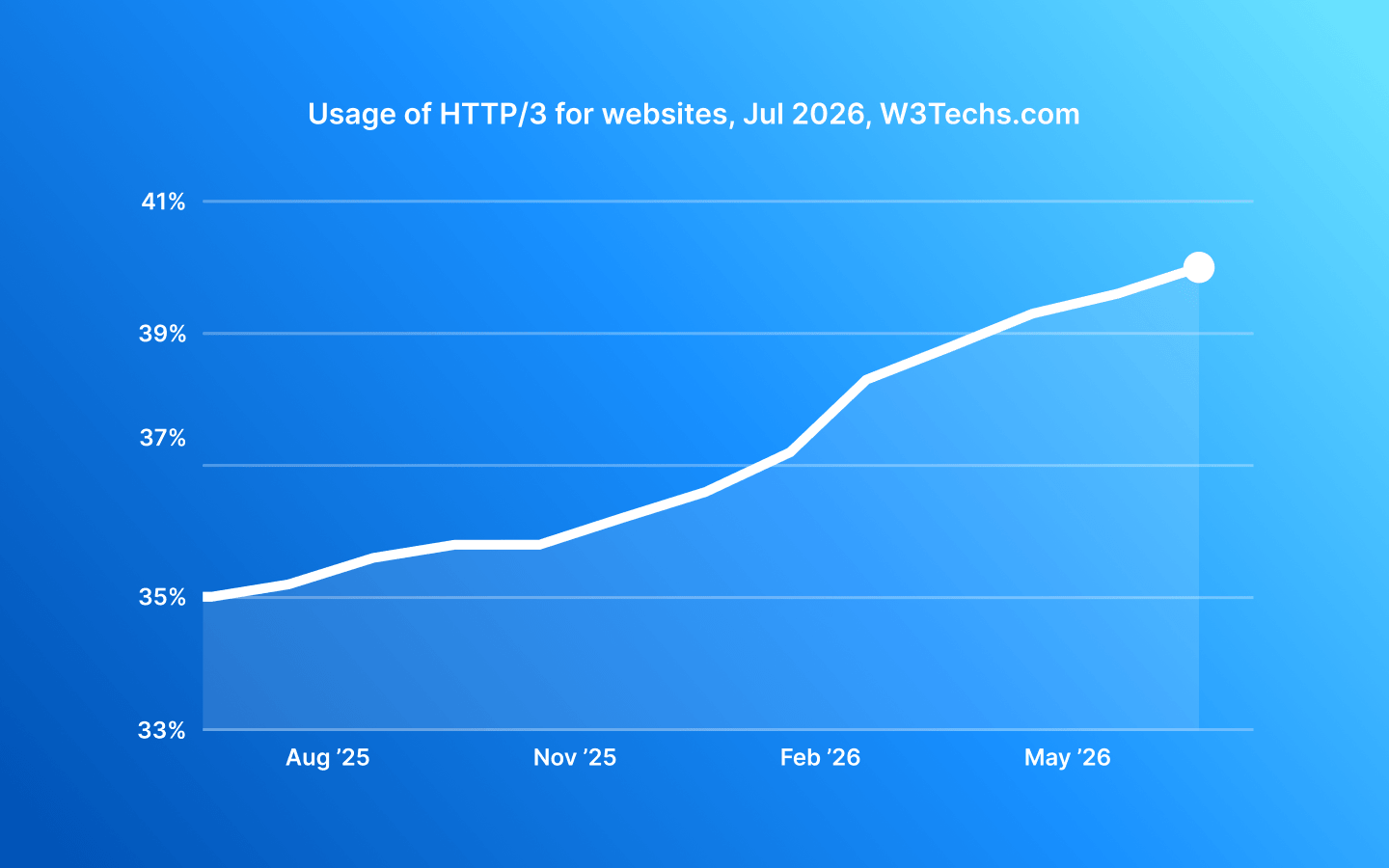
According to W3Techs data as of July 2026, HTTP/3 is supported by nearly 40% of all websites and platforms worldwide. These include Google, Facebook, YouTube, Instagram, Cloudflare, LinkedIn, and Amazon. This doesn’t mean they’ve abandoned TCP. Web servers support both protocols simultaneously and choose between them depending on browser and network capabilities.
Why this matters for multi-accounting
Anti-fraud systems look not only at the IP address and fingerprint. Some of them also analyze which protocol the browser uses. This depends on what the website supports. If it supports HTTP/3, a real Chrome browser will most likely choose it. If your anti-detect profile falls back to HTTP/2 in the same situation, it may appear as a mismatch from an anti-fraud perspective. Not all anti-fraud systems check this yet, but as more websites adopt HTTP/3, profiles that don’t work with UDP will become more noticeable.
If you don’t use proxies for your profiles, for example, if you work via a direct connection or VPN, then UDP will work in any browser. The challenges arise when working with proxies: Chrome and anti-detect browsers based on it have historically not supported UDP proxies. As a result, advanced anti-fraud systems can more easily spot such anti-detect browsers and the use of proxies.
It’s also worth mentioning WebRTC. This is a technology for transmitting audio and video between browsers in real time. When you join a call in Google Meet or watch a stream in your browser, WebRTC is responsible for that.
In most cases, to establish a WebRTC connection, the browser first needs to determine its own public IP address. To do this, it sends a request to a special STUN server. This request is sent over UDP. If the proxy cannot process it, the browser either cannot determine the IP address at all or tries to do so via TCP as a fallback. Anti-fraud systems can detect this. For a real home user, UDP works freely. When a browser behaves differently, it signals to anti-fraud systems that the connection is going through a proxy.
How this works in Octo Browser
UDP proxy support is available in Octo Browser 3.0.6 and later. Native support in anti-detect browsers is still rare, and Octo is one of the first solutions where it works without external proxy tools or additional configuration.
When you launch a profile with a proxy connected or manually check the connection, Octo Browser automatically detects whether the proxy supports UDP. If it does, a UDP icon will appear next to the IP address.
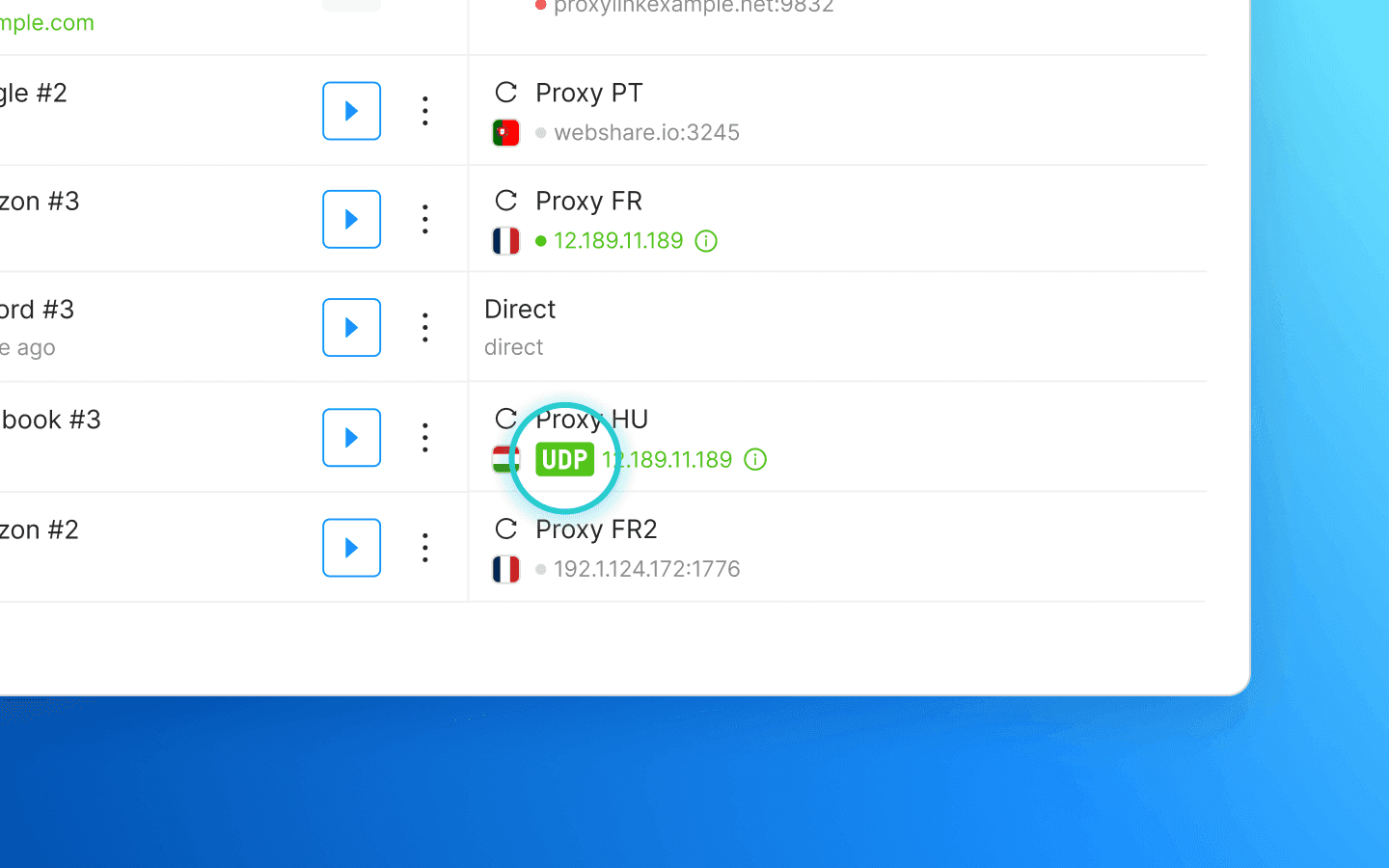
All profile traffic, including QUIC and WebRTC, will pass through the proxy.
Keep in mind that UDP works only with SOCKS5 proxies. Among proxy providers, UDP support is still relatively uncommon; even major proxy services either don’t offer it or include it only in specific subscription tiers. That’s why choosing a proxy provider now requires even more care than usual.
Nodyx, a provider available in our Proxy Shop, is an example of high-quality UDP support. It offers residential and mobile proxies with a large IP address pool and a wide range of locations.
At present, using UDP proxies is not a mandatory requirement for safe profile operation. Most anti-fraud systems still do not place much emphasis on this. We added UDP proxy support to close as many loopholes as possible for the most advanced anti-fraud systems and to stay ahead of the global shift to HTTP/3 and QUIC. If you already work with services that are sensitive to UDP connections, Octo Browser will handle this for you, while most other anti-detect browsers are still lacking.
TCP vs UDP: what’s the difference?
When a browser loads a page, data is transmitted using one of three protocols.
TCP is a reliable protocol. It tracks whether data packets are delivered and retransmits any that are lost. In a nutshell, TCP sends a packet, waits for delivery confirmation, and only then sends the next one. This guarantees accuracy, but the connection is slower. Core web protocols like HTTP/1 and HTTP/2 run on top of TCP.
UDP is fast and does not give guarantees of full accuracy. It sends packets without waiting for delivery confirmation. If something is lost, it simply moves on. It’s typically used for calls and games, in which losing a few packets, frames, or bits of audio is not critical, but speed is.
Google developed QUIC, a new protocol based on UDP. The idea is simple: combine UDP speed with data delivery control. On top of QUIC runs HTTP/3, the latest version of the main protocol responsible for website loading.
According to W3Techs data as of July 2026, HTTP/3 is supported by nearly 40% of all websites and platforms worldwide. These include Google, Facebook, YouTube, Instagram, Cloudflare, LinkedIn, and Amazon. This doesn’t mean they’ve abandoned TCP. Web servers support both protocols simultaneously and choose between them depending on browser and network capabilities.
Why this matters for multi-accounting
Anti-fraud systems look not only at the IP address and fingerprint. Some of them also analyze which protocol the browser uses. This depends on what the website supports. If it supports HTTP/3, a real Chrome browser will most likely choose it. If your anti-detect profile falls back to HTTP/2 in the same situation, it may appear as a mismatch from an anti-fraud perspective. Not all anti-fraud systems check this yet, but as more websites adopt HTTP/3, profiles that don’t work with UDP will become more noticeable.
If you don’t use proxies for your profiles, for example, if you work via a direct connection or VPN, then UDP will work in any browser. The challenges arise when working with proxies: Chrome and anti-detect browsers based on it have historically not supported UDP proxies. As a result, advanced anti-fraud systems can more easily spot such anti-detect browsers and the use of proxies.
It’s also worth mentioning WebRTC. This is a technology for transmitting audio and video between browsers in real time. When you join a call in Google Meet or watch a stream in your browser, WebRTC is responsible for that.
In most cases, to establish a WebRTC connection, the browser first needs to determine its own public IP address. To do this, it sends a request to a special STUN server. This request is sent over UDP. If the proxy cannot process it, the browser either cannot determine the IP address at all or tries to do so via TCP as a fallback. Anti-fraud systems can detect this. For a real home user, UDP works freely. When a browser behaves differently, it signals to anti-fraud systems that the connection is going through a proxy.
How this works in Octo Browser
UDP proxy support is available in Octo Browser 3.0.6 and later. Native support in anti-detect browsers is still rare, and Octo is one of the first solutions where it works without external proxy tools or additional configuration.
When you launch a profile with a proxy connected or manually check the connection, Octo Browser automatically detects whether the proxy supports UDP. If it does, a UDP icon will appear next to the IP address.
All profile traffic, including QUIC and WebRTC, will pass through the proxy.
Keep in mind that UDP works only with SOCKS5 proxies. Among proxy providers, UDP support is still relatively uncommon; even major proxy services either don’t offer it or include it only in specific subscription tiers. That’s why choosing a proxy provider now requires even more care than usual.
Nodyx, a provider available in our Proxy Shop, is an example of high-quality UDP support. It offers residential and mobile proxies with a large IP address pool and a wide range of locations.
At present, using UDP proxies is not a mandatory requirement for safe profile operation. Most anti-fraud systems still do not place much emphasis on this. We added UDP proxy support to close as many loopholes as possible for the most advanced anti-fraud systems and to stay ahead of the global shift to HTTP/3 and QUIC. If you already work with services that are sensitive to UDP connections, Octo Browser will handle this for you, while most other anti-detect browsers are still lacking.
Stay up to date with the latest Octo Browser news
By clicking the button you agree to our Privacy Policy.
Stay up to date with the latest Octo Browser news
By clicking the button you agree to our Privacy Policy.
Stay up to date with the latest Octo Browser news
By clicking the button you agree to our Privacy Policy.

Join Octo Browser now
Or contact Customer Service at any time with any questions you might have.
Join Octo Browser now
Or contact Customer Service at any time with any questions you might have.
Join Octo Browser now
Or contact Customer Service at any time with any questions you might have.