Comparing Claude and ChatGPT in 2026: which one is better?

Nikolai Izoitko
Content Manager, Octo Browser
In 2026, two tools continue to dominate the AI assistant market: Claude by Anthropic and ChatGPT by OpenAI. Both have come a long way: they now feature new models, larger context windows, and support for multimodal data. Yet despite their similarities, there are fundamental differences that make each tool better suited for specific tasks.
This guide will help you make an informed decision about which model to choose. We examine the strengths and weaknesses of both solutions and provide specific recommendations as to who is better off choosing Claude, and who should opt for ChatGPT. The comparison is based on up-to-date 2026 data and includes testing of Claude Sonnet 4.6 / Opus 4.6 and GPT-4o / o3.
Contents
Stay anonymous, take advantage of multi-accounting, and achieve your goals with the highest-quality anti-detect browser on the market.
Would you like to try Octo Browser at discount?
Use the promo code OCTOBLOG to get 30% off any subscription. This offer is valid only for new users.
Claude AI vs ChatGPT: overview and key characteristics
What is ChatGPT?
ChatGPT is an AI assistant developed by OpenAI and introduced in late 2022. In just a few years, the platform evolved from a chatbot into a multifunctional ecosystem. It combines multimodal models, web search, voice mode, image generation, and tools for working with files and data. In 2026, OpenAI's flagship models are GPT-4o—a versatile model for everyday tasks—and o3, designed for complex reasoning and multi-step problem solving.
Key features: built-in image generation, Advanced Voice mode, file and code support, long-term memory, web search, GPT Store, and a broad range of integrations.
What is Claude?
Claude is an AI assistant developed by Anthropic. It is focused on handling large amounts of information, document analysis, coding, and API-based workflows. In 2026, the model family includes Claude Haiku 4.5 for fast and simple tasks, Claude Sonnet 4.6 as the primary general-purpose model, and Claude Opus 4.6 for more advanced scenarios.
Key features: a large context window (up to 200,000 tokens by default and up to 1 million in certain configurations), strong performance on long documents, the Claude Code agent for software development, and an emphasis on reliability and enterprise-grade data security.
If you use Claude or ChatGPT for multiple projects simultaneously, you will quickly run into the issue of context mixing. Different clients, tasks, tests, and experiments begin to overlap when everything runs through the same profile.
The best solution is to separate work environments. This is where anti-detect browsers such as Octo Browser come in. Octo lets you create fully isolated profiles, each with its own cookies, sessions, and digital fingerprint. In practice, this gives you a separate workspace for every project or client.
This approach not only helps preserve correct context but also distributes workload more evenly across accounts, preventing you from hitting usage limits when actively working with AI tools.
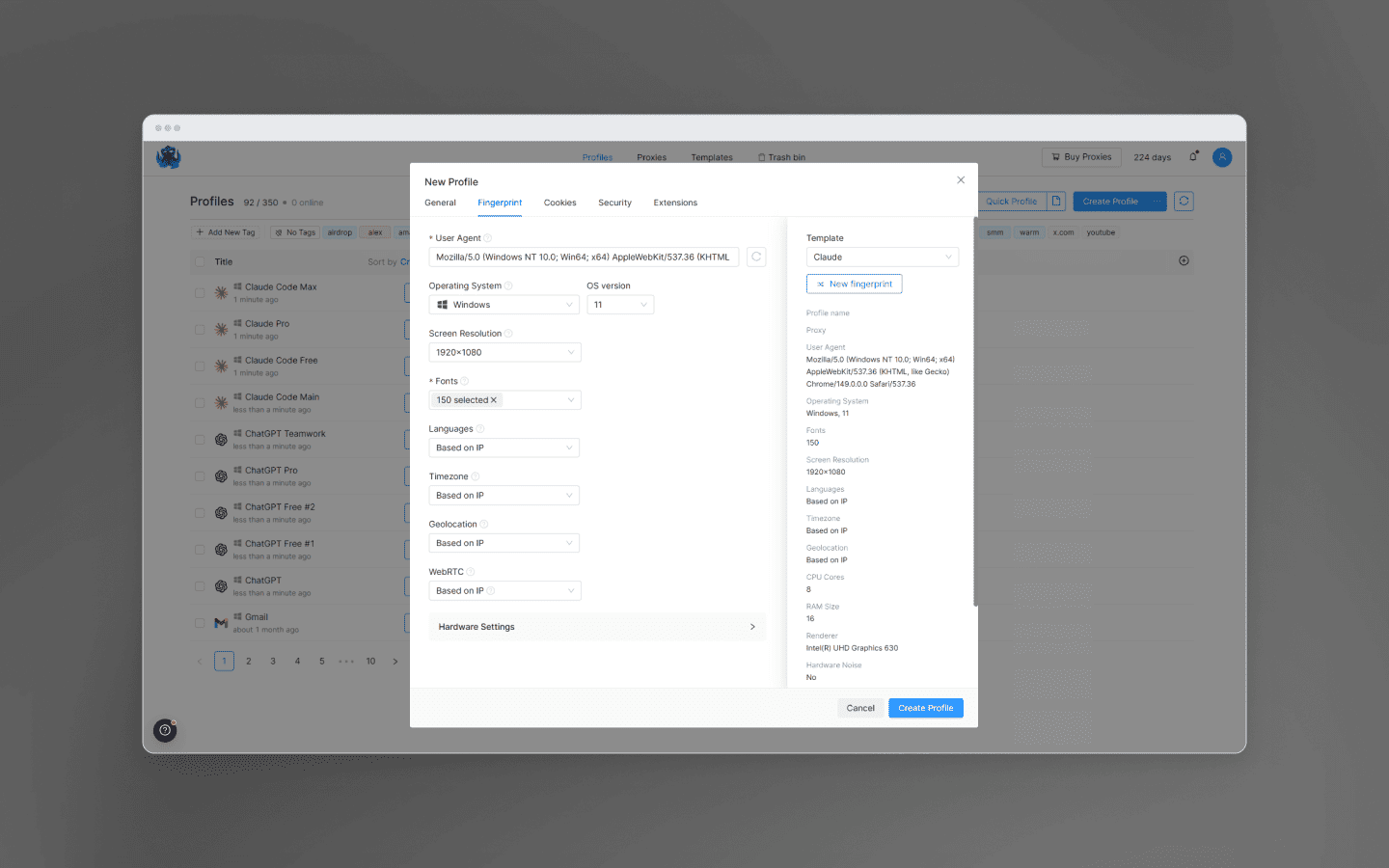
You can configure the browser's digital fingerprint precisely when creating a profile in Octo Browser.
Feature comparison and decision matrix
Despite having a similar set of core capabilities, ChatGPT and Claude excel in different areas. In practice, the choice depends less on model quality and more on the specific tasks you need to accomplish.
Choose Claude if you:
work with long documents and large volumes of text;
conduct research, analytics, or handle legal documentation;
develop software and work with large codebases;
value extensive context windows and consistent responses.
Choose ChatGPT if you:
create images and visual content;
actively use voice interactions;
work with spreadsheets, data, and visualizations;
need a versatile tool for a wide range of tasks.
Image generation
One of the most noticeable differences between the platforms is that ChatGPT supports full image generation from text prompts directly within the chat interface, while Claude is primarily focused on analyzing and processing already existing images.
ChatGPT lets you describe a desired picture in natural language and receive a finished image without using third-party services. The model can create illustrations, advertising creatives, concept art, infographics, comics, product images, and other visual materials. You can also edit images by changing individual elements, backgrounds, style, or composition.
Another advantage of ChatGPT is its relatively strong performance with text inside images. Although mistakes can still occur, modern OpenAI models are significantly better at generating banners, posters, diagrams, and other materials where accurate text rendering is important.
Claude does not offer built-in raster image generation. However, it can analyze uploaded images, screenshots, diagrams, photographs, and documents, extract information from them, describe their contents, and answer questions about visual data. In addition, Claude can help create prompts for specialized image generators such as Midjourney or Stable Diffusion and can generate simple vector graphics and SVG illustrations programmatically.
Conclusion: ChatGPT provides a fully integrated system for image generation and editing, while Claude focuses primarily on visual content analysis.
Text generation and copywriting
Claude supports a significantly larger context window than most competitors, up to approximately 200,000 tokens (roughly 500–600 pages of text). This allows you to process large documents in their entirety without splitting them into smaller sections.
ChatGPT's GPT-4o model supports up to approximately 128,000 tokens (around 300–400 pages), which is sufficient for most practical tasks. However, extra care may be required when working with especially large documents.
In practice, this difference becomes particularly noticeable when analyzing lengthy legal documents, academic papers, and reports. Claude is generally more consistent at correctly extracting information from large texts and is less likely to lose important details buried in the middle of a document—something that is critical when working with large, continuous datasets.
Conclusion: When tasks require processing large documents without segmentation, Claude has a clear advantage.
Coding assistance and technical reasoning
Claude Code is an agentic development environment that operates through the terminal and integrates directly with a project's file system. The model can analyze repository structures, edit files, execute shell commands, and iteratively modify codebases. There is no need to manually copy and paste code into a chat.
Claude is particularly effective at refactoring, architectural analysis, and maintaining complex multi-file systems where preserving dependencies and code integrity is essential.
ChatGPT in Advanced Data Analysis mode executes code in a sandboxed environment: it can run Python scripts, process data, and create visualizations directly within the chat. It is especially well suited for data science, analytics, and rapid hypothesis testing. Additionally, through GitHub Copilot, ChatGPT integrates with VS Code and the Microsoft ecosystem, including Azure DevOps.
Conclusion: For complex engineering projects with multi-file architectures, Claude is generally the better choice. For data analysis, experimental coding, and workflows within the Microsoft ecosystem, ChatGPT is more convenient.
Performance, limitations, and user experience
Claude Sonnet 4.6 typically generates responses faster than its main competitors while maintaining comparable quality. In some scenarios, OpenAI's o3 may respond more slowly because it is designed for deeper multi-step reasoning, where longer response times are part of the model's architecture.
Claude is also more likely to explicitly acknowledge uncertainty and present conclusions cautiously. This reduces the risk of errors but can make responses less definitive. ChatGPT generally responds more confidently and directly, which speeds up workflows but can lead to inaccuracies in complex or ambiguous situations.
Claude enforces more rigid content restrictions, making it less flexible in certain professional or unconventional use cases. ChatGPT offers greater freedom in phrasing and usage scenarios.
Claude's interface is more minimalistic and particularly convenient for reviewing code and documents through its Artifacts workspace. ChatGPT is more feature-rich, offering memory, additional tools, and voice mode.
Conclusion: ChatGPT's strength lies in its rich ecosystem of features, while Claude excels in speed, predictability, and accurate text generation.
Pricing and subscription costs
Claude and ChatGPT follow similar pricing models: both offer free access, individual paid plans, team subscriptions, and enterprise solutions.
Basic individual subscriptions cost roughly the same, around $20 per month. The difference lies in the included capabilities: ChatGPT emphasizes expanded ecosystem features such as additional tools, multimodality, and voice interactions, whereas Claude focuses on stable text processing and higher limits within a single model.
At higher subscription tiers, ChatGPT offers a broader range of plans with increased pricing and additional capabilities for heavy usage. Claude's structure is simpler, featuring an advanced tier with increased limits designed for large-scale text processing and data-heavy workflows.
Team plans are similarly priced for both services, typically around $25–30 per user per month. ChatGPT is often chosen for its integrations and versatility, while Claude is preferred for its context handling and long document processing.
Conclusion: At the base level, the pricing of both models is comparable. Premium ChatGPT subscriptions focus on expanded functionality and tool ecosystem, while Claude emphasizes a simpler pricing model and stable performance on text-centric tasks.
Comparison table
Parameter | Claude | ChatGPT |
|---|---|---|
Primary focus | Texts, documents, code | General-purpose multimodal AI assistant |
Context window | Up to ~200,000 tokens (more in certain modes) | Up to ~128,000 tokens |
Strengths | Long document analysis, consistency, code architecture | Versatility, tools, creativity, multimodality |
Image generation | No native generation (analysis and description only) | Built-in generation and editing |
Coding tools | Claude Code (agentic project workflows) | Advanced Data Analysis + integrations (Copilot, VS Code) |
Response style | More cautious, acknowledges uncertainty | More confident and specific |
Speed | Usually faster for text tasks | Model-dependent (o3 slower, GPT-4o faster) |
Content restrictions | Stricter | More flexible |
Interface | Minimalistic, text- and document-focused | More feature-rich with many tools |
Free access | Yes, with limits | Yes, with limits |
Individual subscription | ~$20/month | ~$20/month |
Team plans | ~$25/user | ~$30/user |
Frequently asked questions
What are the main differences between Claude and ChatGPT?
Claude supports a larger context window (up to ~200,000 tokens), while ChatGPT offers a smaller one (~128,000 tokens) but includes image generation and more built-in tools. Claude tends to respond more cautiously, whereas ChatGPT is generally more confident.
Which AI assistant is better for writing and content creation?
Claude is better suited for long-form, structured, and analytical writing. ChatGPT performs better in marketing tasks such as advertisements, slogans, creative work, and short-form content.
Which model is better for coding?
Claude is more convenient for working with large projects and codebases, especially through Claude Code. ChatGPT is stronger for data analysis, prototyping, and rapid Python workflows. For simple algorithmic tasks, the difference is relatively small.
Does Claude have a larger context window than ChatGPT?
Yes. Claude supports up to 200,000 tokens (roughly 600 pages), while GPT-4o supports up to 128,000 tokens (around 380 pages). For most tasks, the difference is minor, but Claude has a clear advantage when working with large documents.
Which AI assistant analyzes long documents better?
Claude. It handles large texts more consistently and is less likely to lose information in the middle of a document.
Is Claude faster than ChatGPT?
Claude Sonnet 4.6 is generally faster for text-based tasks. OpenAI's o3 is slower because it spends more time reasoning.
Which AI assistant is better for business and professional use?
Claude is often preferred when document processing, data analysis, and precise wording are critical, such as in legal and financial contexts. ChatGPT is better suited for everyday business tasks, including content creation, image generation, presentations, and using various integrated tools.
Can I use Claude and ChatGPT for free?
Yes. Both models offer free versions with usage limits. For regular use, most users choose paid plans starting at around $20 per month.
Stay anonymous, take advantage of multi-accounting, and achieve your goals with the highest-quality anti-detect browser on the market.
Would you like to try Octo Browser at discount?
Use the promo code OCTOBLOG to get 30% off any subscription. This offer is valid only for new users.
Claude AI vs ChatGPT: overview and key characteristics
What is ChatGPT?
ChatGPT is an AI assistant developed by OpenAI and introduced in late 2022. In just a few years, the platform evolved from a chatbot into a multifunctional ecosystem. It combines multimodal models, web search, voice mode, image generation, and tools for working with files and data. In 2026, OpenAI's flagship models are GPT-4o—a versatile model for everyday tasks—and o3, designed for complex reasoning and multi-step problem solving.
Key features: built-in image generation, Advanced Voice mode, file and code support, long-term memory, web search, GPT Store, and a broad range of integrations.
What is Claude?
Claude is an AI assistant developed by Anthropic. It is focused on handling large amounts of information, document analysis, coding, and API-based workflows. In 2026, the model family includes Claude Haiku 4.5 for fast and simple tasks, Claude Sonnet 4.6 as the primary general-purpose model, and Claude Opus 4.6 for more advanced scenarios.
Key features: a large context window (up to 200,000 tokens by default and up to 1 million in certain configurations), strong performance on long documents, the Claude Code agent for software development, and an emphasis on reliability and enterprise-grade data security.
If you use Claude or ChatGPT for multiple projects simultaneously, you will quickly run into the issue of context mixing. Different clients, tasks, tests, and experiments begin to overlap when everything runs through the same profile.
The best solution is to separate work environments. This is where anti-detect browsers such as Octo Browser come in. Octo lets you create fully isolated profiles, each with its own cookies, sessions, and digital fingerprint. In practice, this gives you a separate workspace for every project or client.
This approach not only helps preserve correct context but also distributes workload more evenly across accounts, preventing you from hitting usage limits when actively working with AI tools.
You can configure the browser's digital fingerprint precisely when creating a profile in Octo Browser.
Feature comparison and decision matrix
Despite having a similar set of core capabilities, ChatGPT and Claude excel in different areas. In practice, the choice depends less on model quality and more on the specific tasks you need to accomplish.
Choose Claude if you:
work with long documents and large volumes of text;
conduct research, analytics, or handle legal documentation;
develop software and work with large codebases;
value extensive context windows and consistent responses.
Choose ChatGPT if you:
create images and visual content;
actively use voice interactions;
work with spreadsheets, data, and visualizations;
need a versatile tool for a wide range of tasks.
Image generation
One of the most noticeable differences between the platforms is that ChatGPT supports full image generation from text prompts directly within the chat interface, while Claude is primarily focused on analyzing and processing already existing images.
ChatGPT lets you describe a desired picture in natural language and receive a finished image without using third-party services. The model can create illustrations, advertising creatives, concept art, infographics, comics, product images, and other visual materials. You can also edit images by changing individual elements, backgrounds, style, or composition.
Another advantage of ChatGPT is its relatively strong performance with text inside images. Although mistakes can still occur, modern OpenAI models are significantly better at generating banners, posters, diagrams, and other materials where accurate text rendering is important.
Claude does not offer built-in raster image generation. However, it can analyze uploaded images, screenshots, diagrams, photographs, and documents, extract information from them, describe their contents, and answer questions about visual data. In addition, Claude can help create prompts for specialized image generators such as Midjourney or Stable Diffusion and can generate simple vector graphics and SVG illustrations programmatically.
Conclusion: ChatGPT provides a fully integrated system for image generation and editing, while Claude focuses primarily on visual content analysis.
Text generation and copywriting
Claude supports a significantly larger context window than most competitors, up to approximately 200,000 tokens (roughly 500–600 pages of text). This allows you to process large documents in their entirety without splitting them into smaller sections.
ChatGPT's GPT-4o model supports up to approximately 128,000 tokens (around 300–400 pages), which is sufficient for most practical tasks. However, extra care may be required when working with especially large documents.
In practice, this difference becomes particularly noticeable when analyzing lengthy legal documents, academic papers, and reports. Claude is generally more consistent at correctly extracting information from large texts and is less likely to lose important details buried in the middle of a document—something that is critical when working with large, continuous datasets.
Conclusion: When tasks require processing large documents without segmentation, Claude has a clear advantage.
Coding assistance and technical reasoning
Claude Code is an agentic development environment that operates through the terminal and integrates directly with a project's file system. The model can analyze repository structures, edit files, execute shell commands, and iteratively modify codebases. There is no need to manually copy and paste code into a chat.
Claude is particularly effective at refactoring, architectural analysis, and maintaining complex multi-file systems where preserving dependencies and code integrity is essential.
ChatGPT in Advanced Data Analysis mode executes code in a sandboxed environment: it can run Python scripts, process data, and create visualizations directly within the chat. It is especially well suited for data science, analytics, and rapid hypothesis testing. Additionally, through GitHub Copilot, ChatGPT integrates with VS Code and the Microsoft ecosystem, including Azure DevOps.
Conclusion: For complex engineering projects with multi-file architectures, Claude is generally the better choice. For data analysis, experimental coding, and workflows within the Microsoft ecosystem, ChatGPT is more convenient.
Performance, limitations, and user experience
Claude Sonnet 4.6 typically generates responses faster than its main competitors while maintaining comparable quality. In some scenarios, OpenAI's o3 may respond more slowly because it is designed for deeper multi-step reasoning, where longer response times are part of the model's architecture.
Claude is also more likely to explicitly acknowledge uncertainty and present conclusions cautiously. This reduces the risk of errors but can make responses less definitive. ChatGPT generally responds more confidently and directly, which speeds up workflows but can lead to inaccuracies in complex or ambiguous situations.
Claude enforces more rigid content restrictions, making it less flexible in certain professional or unconventional use cases. ChatGPT offers greater freedom in phrasing and usage scenarios.
Claude's interface is more minimalistic and particularly convenient for reviewing code and documents through its Artifacts workspace. ChatGPT is more feature-rich, offering memory, additional tools, and voice mode.
Conclusion: ChatGPT's strength lies in its rich ecosystem of features, while Claude excels in speed, predictability, and accurate text generation.
Pricing and subscription costs
Claude and ChatGPT follow similar pricing models: both offer free access, individual paid plans, team subscriptions, and enterprise solutions.
Basic individual subscriptions cost roughly the same, around $20 per month. The difference lies in the included capabilities: ChatGPT emphasizes expanded ecosystem features such as additional tools, multimodality, and voice interactions, whereas Claude focuses on stable text processing and higher limits within a single model.
At higher subscription tiers, ChatGPT offers a broader range of plans with increased pricing and additional capabilities for heavy usage. Claude's structure is simpler, featuring an advanced tier with increased limits designed for large-scale text processing and data-heavy workflows.
Team plans are similarly priced for both services, typically around $25–30 per user per month. ChatGPT is often chosen for its integrations and versatility, while Claude is preferred for its context handling and long document processing.
Conclusion: At the base level, the pricing of both models is comparable. Premium ChatGPT subscriptions focus on expanded functionality and tool ecosystem, while Claude emphasizes a simpler pricing model and stable performance on text-centric tasks.
Comparison table
Parameter | Claude | ChatGPT |
|---|---|---|
Primary focus | Texts, documents, code | General-purpose multimodal AI assistant |
Context window | Up to ~200,000 tokens (more in certain modes) | Up to ~128,000 tokens |
Strengths | Long document analysis, consistency, code architecture | Versatility, tools, creativity, multimodality |
Image generation | No native generation (analysis and description only) | Built-in generation and editing |
Coding tools | Claude Code (agentic project workflows) | Advanced Data Analysis + integrations (Copilot, VS Code) |
Response style | More cautious, acknowledges uncertainty | More confident and specific |
Speed | Usually faster for text tasks | Model-dependent (o3 slower, GPT-4o faster) |
Content restrictions | Stricter | More flexible |
Interface | Minimalistic, text- and document-focused | More feature-rich with many tools |
Free access | Yes, with limits | Yes, with limits |
Individual subscription | ~$20/month | ~$20/month |
Team plans | ~$25/user | ~$30/user |
Frequently asked questions
What are the main differences between Claude and ChatGPT?
Claude supports a larger context window (up to ~200,000 tokens), while ChatGPT offers a smaller one (~128,000 tokens) but includes image generation and more built-in tools. Claude tends to respond more cautiously, whereas ChatGPT is generally more confident.
Which AI assistant is better for writing and content creation?
Claude is better suited for long-form, structured, and analytical writing. ChatGPT performs better in marketing tasks such as advertisements, slogans, creative work, and short-form content.
Which model is better for coding?
Claude is more convenient for working with large projects and codebases, especially through Claude Code. ChatGPT is stronger for data analysis, prototyping, and rapid Python workflows. For simple algorithmic tasks, the difference is relatively small.
Does Claude have a larger context window than ChatGPT?
Yes. Claude supports up to 200,000 tokens (roughly 600 pages), while GPT-4o supports up to 128,000 tokens (around 380 pages). For most tasks, the difference is minor, but Claude has a clear advantage when working with large documents.
Which AI assistant analyzes long documents better?
Claude. It handles large texts more consistently and is less likely to lose information in the middle of a document.
Is Claude faster than ChatGPT?
Claude Sonnet 4.6 is generally faster for text-based tasks. OpenAI's o3 is slower because it spends more time reasoning.
Which AI assistant is better for business and professional use?
Claude is often preferred when document processing, data analysis, and precise wording are critical, such as in legal and financial contexts. ChatGPT is better suited for everyday business tasks, including content creation, image generation, presentations, and using various integrated tools.
Can I use Claude and ChatGPT for free?
Yes. Both models offer free versions with usage limits. For regular use, most users choose paid plans starting at around $20 per month.
Stay up to date with the latest Octo Browser news
By clicking the button you agree to our Privacy Policy.
Stay up to date with the latest Octo Browser news
By clicking the button you agree to our Privacy Policy.
Stay up to date with the latest Octo Browser news
By clicking the button you agree to our Privacy Policy.

Join Octo Browser now
Or contact Customer Service at any time with any questions you might have.
Join Octo Browser now
Or contact Customer Service at any time with any questions you might have.
Join Octo Browser now
Or contact Customer Service at any time with any questions you might have.