Octo Browser 3.1: mobile proxies, UDP proxies from a new provider, and VPN for profiles

Octo 3.1 brings major updates to the Proxy Shop. Hive Proxy now offers mobile proxies. Meet Nodyx, a new provider offering residential and mobile proxies with genuine UDP support, which isn't easy to find on the market. Profiles can now connect via VPN as well as proxies. For VPNs, you can also spoof the OS at the network level. The profile list now shows the IP used for the profile's last launch next to the proxy/VPN.
Proxy Shop: mobile proxies and a new provider
Residential proxies don't cover every use case. Some services are noticeably more tolerant of mobile IPs, and mobile proxies previously had to be purchased separately for these scenarios. With Octo 3.1, they're available from two providers directly in the Proxy Shop, with convenient purchases in just a few clicks—no registration with third-party services or manual transfer of credentials.
Hive Proxy, one of the popular Proxy Shop providers, has added mobile proxies to its pool. When creating a proxy, simply choose the required type: residential or mobile.
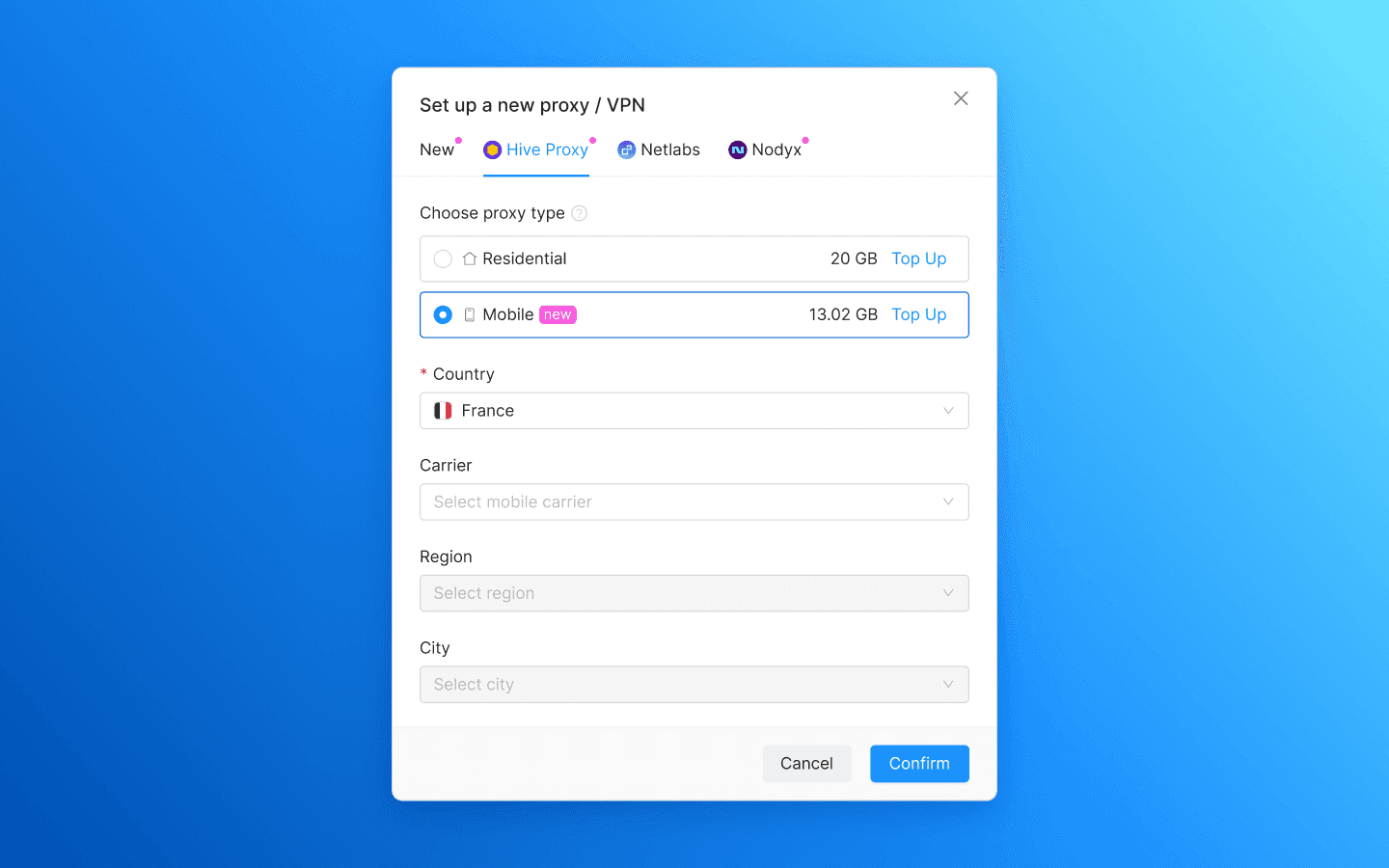
Nodyx is a new provider in the Proxy Shop. It offers residential and mobile proxies with a large IP pool and a wide choice of locations. It also supports UDP, helping address potential loopholes that some anti-fraud systems sensitive to connections using this protocol can use.
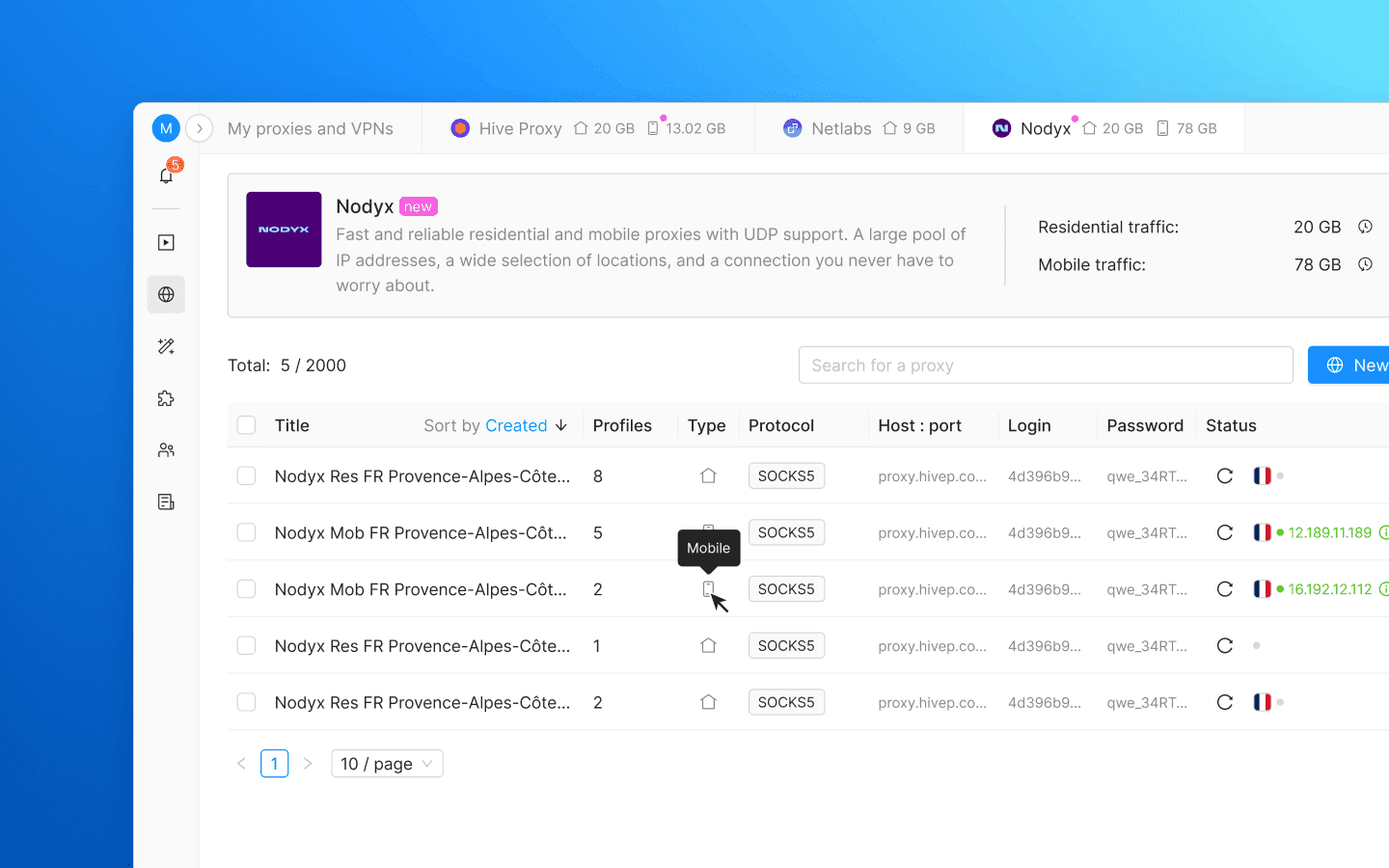
Mobile traffic from both providers is completely separate from residential traffic: separate balances and separate usage histories. Residential traffic cannot be used for mobile proxies, and vice versa. The remaining balance for both types is shown on the provider pages and in the tabs at the top. When creating a proxy, the available traffic is also displayed next to each type.
VPN for profiles
A regular VPN routes all traffic: browsers, messengers, email, etc. All applications connect to the Internet through the same address, making this solution unsuitable for working with multiple profiles.
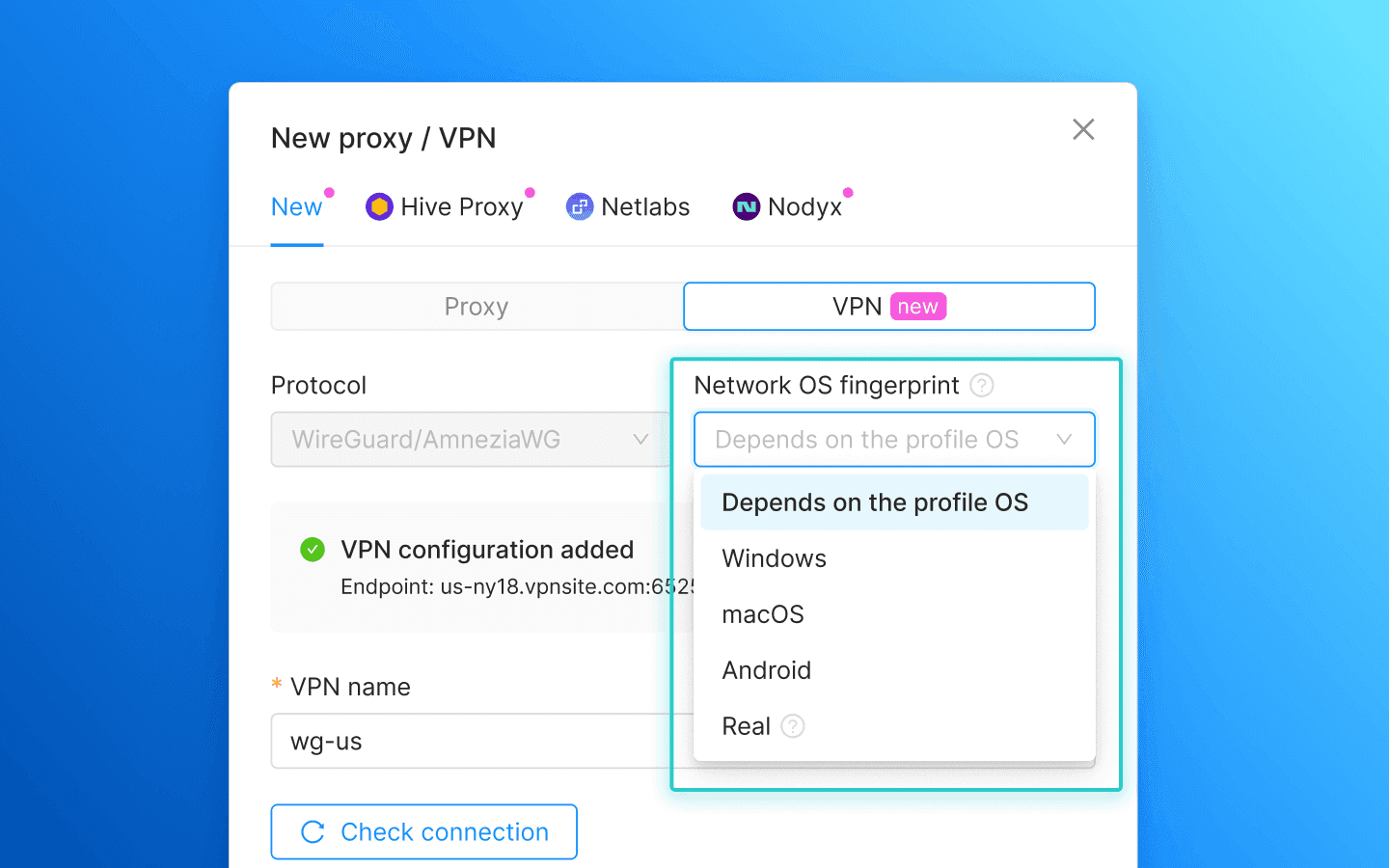
However, you can now assign a VPN to any profile in Octo, just like a proxy. To do this, switch to the VPN tab when adding a new connection and upload a configuration file in .conf format or paste the configuration as text. Currently, WireGuard and AmneziaWG are supported, with more protocols to be added in the future. You can save a VPN to the favourites list, now called “Proxies and VPN,” and reuse it across other profiles just like a regular proxy.
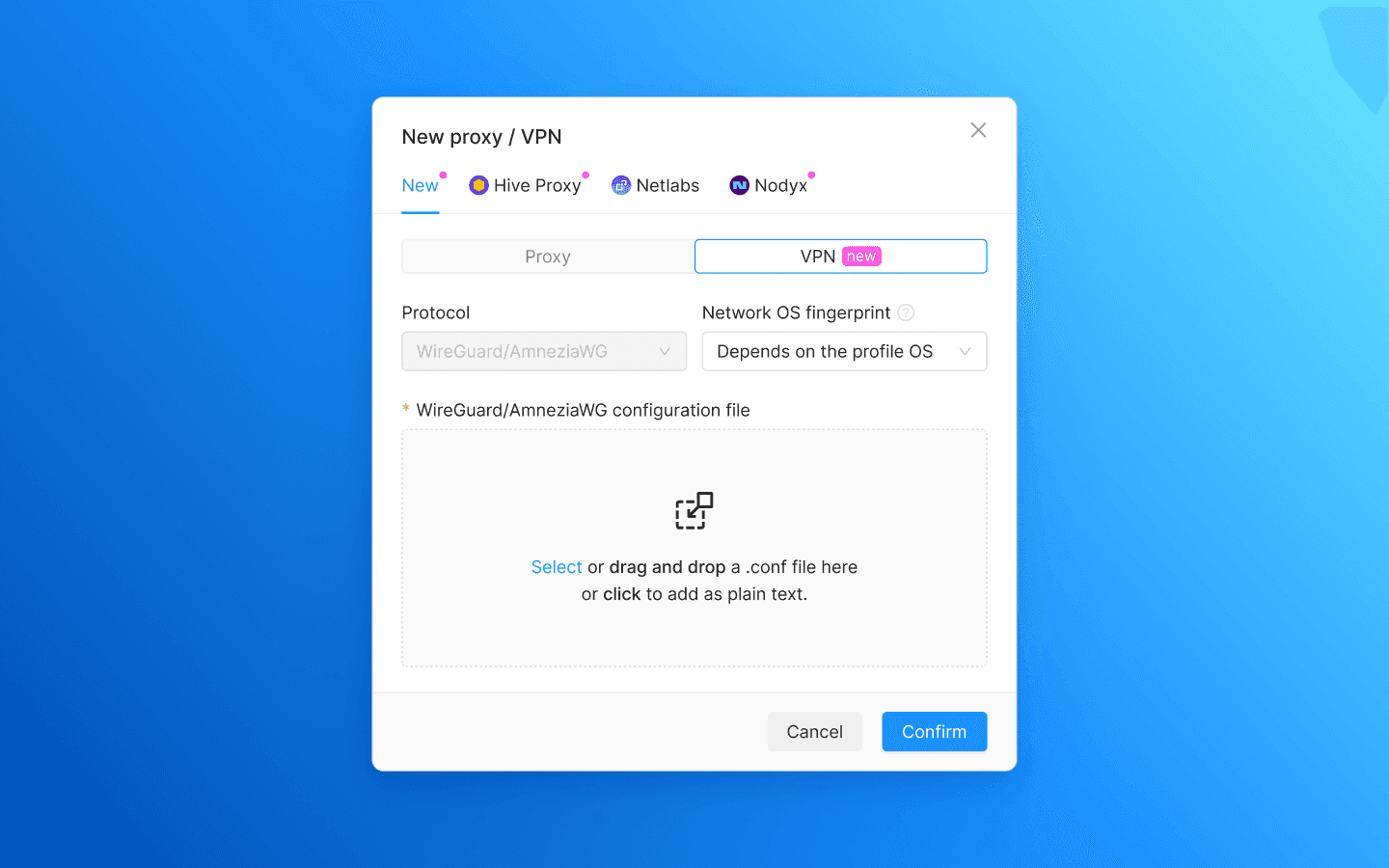
You can assign different VPNs to different profiles and run them simultaneously. Proxies continue to work as before, with both connection types available in the same list.
You can assign the same VPN configuration to multiple profiles and run them through it simultaneously. However, this only works within a single device: the configuration describes one connection with one set of keys, and the server considers only one address active at a time. When running it simultaneously on different devices, data packets may be lost.
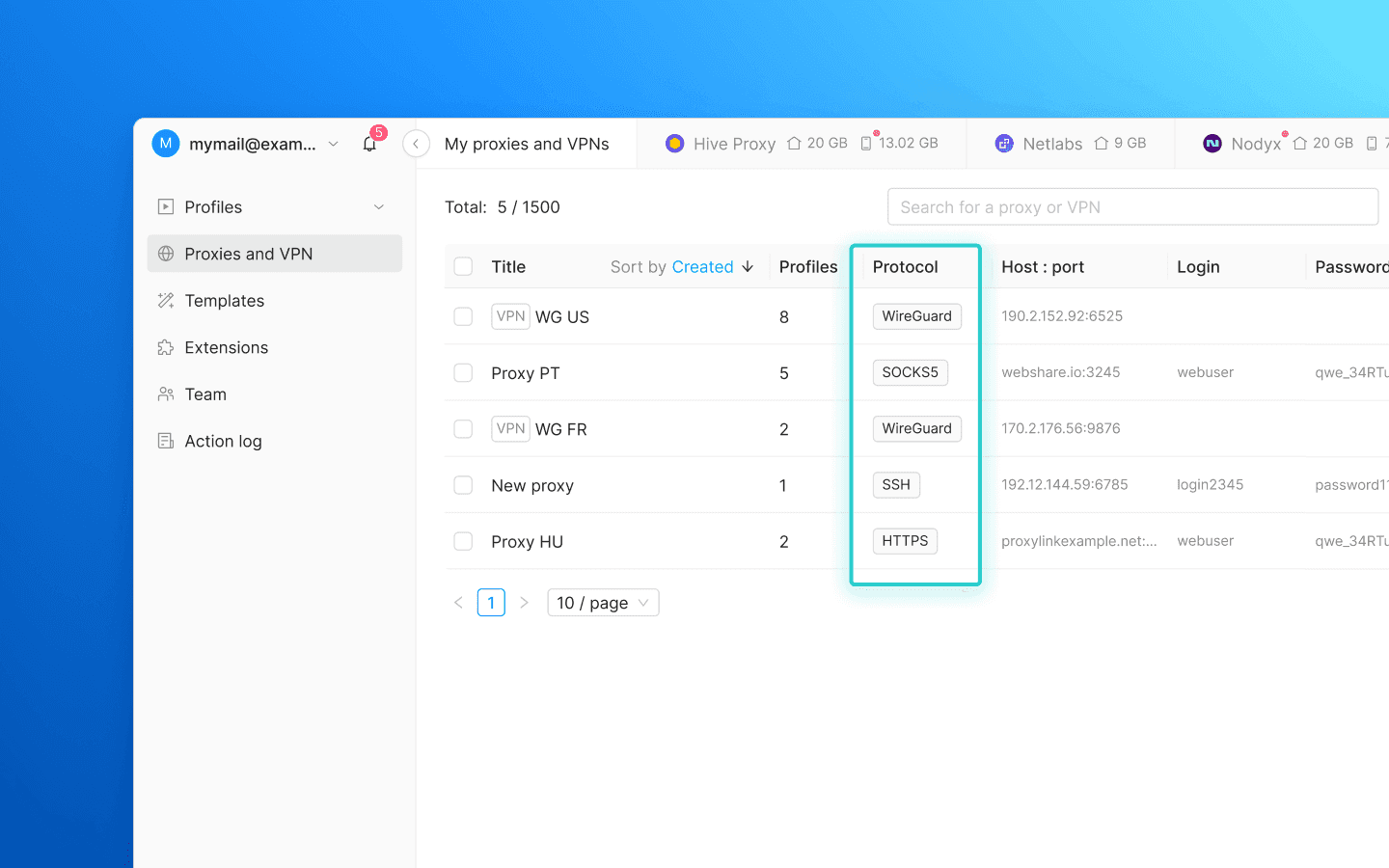
In the profile and template tables, as well as in the connection list, VPNs are marked with a VPN tag before the name to distinguish them from proxies. In the Proxies and VPN tab, the protocol is now shown in a separate column.
Profiles using a VPN support OS spoofing at the network level: Windows, macOS, Android, or the device's actual operating system. A website determines the presumed operating system in two ways: from browser data and from the parameters of the network packets generated by the host OS. If a profile identifies itself as Windows while the network layer reveals a Linux machine, this discrepancy is detectable.
This type of spoofing is not yet possible with proxies: the proxy server establishes the connection to the website, so the website sees the proxy's network fingerprint rather than the one configured in the profile. Few anti-fraud systems detect discrepancies between browser and network fingerprints, but where they do, the consequences can be significant. Among anti-detect browsers, Octo Browser is currently the only one that supports OS spoofing at the network level.
We explain how VPNs work, how they differ from proxies, and how to check that a tunnel is working correctly here:

Profile's last launch IP address
The Proxy/VPN details now show the IP the profile was last launched with, along with the date and location.
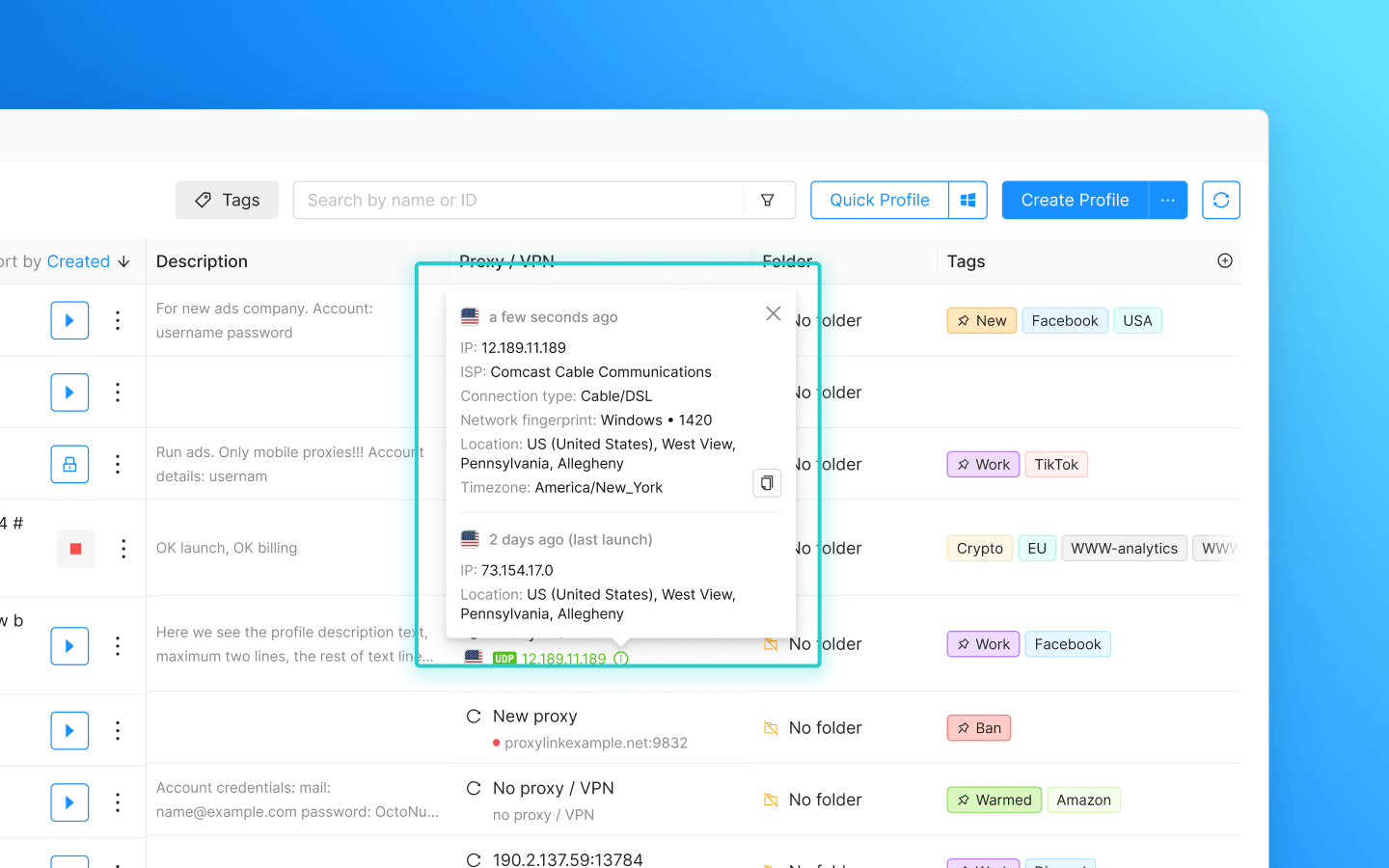
Fewer surprises when launching a profile: you can now check directly in the profile list whether the connection has switched to a different location without manually opening each profile's history.
Other improvements and fixes
Connection details now include a network fingerprint line showing the OS at the network level, if it could be detected, and the MTU.
Sorting has been added to the Proxies/VPNs tables.
Cookie files encrypted in Base64 are now decoded when uploaded.
The service status page is now available at status.octobrowser.net.
Proxy Shop: mobile proxies and a new provider
Residential proxies don't cover every use case. Some services are noticeably more tolerant of mobile IPs, and mobile proxies previously had to be purchased separately for these scenarios. With Octo 3.1, they're available from two providers directly in the Proxy Shop, with convenient purchases in just a few clicks—no registration with third-party services or manual transfer of credentials.
Hive Proxy, one of the popular Proxy Shop providers, has added mobile proxies to its pool. When creating a proxy, simply choose the required type: residential or mobile.
Nodyx is a new provider in the Proxy Shop. It offers residential and mobile proxies with a large IP pool and a wide choice of locations. It also supports UDP, helping address potential loopholes that some anti-fraud systems sensitive to connections using this protocol can use.
Mobile traffic from both providers is completely separate from residential traffic: separate balances and separate usage histories. Residential traffic cannot be used for mobile proxies, and vice versa. The remaining balance for both types is shown on the provider pages and in the tabs at the top. When creating a proxy, the available traffic is also displayed next to each type.
VPN for profiles
A regular VPN routes all traffic: browsers, messengers, email, etc. All applications connect to the Internet through the same address, making this solution unsuitable for working with multiple profiles.
However, you can now assign a VPN to any profile in Octo, just like a proxy. To do this, switch to the VPN tab when adding a new connection and upload a configuration file in .conf format or paste the configuration as text. Currently, WireGuard and AmneziaWG are supported, with more protocols to be added in the future. You can save a VPN to the favourites list, now called “Proxies and VPN,” and reuse it across other profiles just like a regular proxy.
You can assign different VPNs to different profiles and run them simultaneously. Proxies continue to work as before, with both connection types available in the same list.
You can assign the same VPN configuration to multiple profiles and run them through it simultaneously. However, this only works within a single device: the configuration describes one connection with one set of keys, and the server considers only one address active at a time. When running it simultaneously on different devices, data packets may be lost.
In the profile and template tables, as well as in the connection list, VPNs are marked with a VPN tag before the name to distinguish them from proxies. In the Proxies and VPN tab, the protocol is now shown in a separate column.
Profiles using a VPN support OS spoofing at the network level: Windows, macOS, Android, or the device's actual operating system. A website determines the presumed operating system in two ways: from browser data and from the parameters of the network packets generated by the host OS. If a profile identifies itself as Windows while the network layer reveals a Linux machine, this discrepancy is detectable.
This type of spoofing is not yet possible with proxies: the proxy server establishes the connection to the website, so the website sees the proxy's network fingerprint rather than the one configured in the profile. Few anti-fraud systems detect discrepancies between browser and network fingerprints, but where they do, the consequences can be significant. Among anti-detect browsers, Octo Browser is currently the only one that supports OS spoofing at the network level.
We explain how VPNs work, how they differ from proxies, and how to check that a tunnel is working correctly here:
Profile's last launch IP address
The Proxy/VPN details now show the IP the profile was last launched with, along with the date and location.
Fewer surprises when launching a profile: you can now check directly in the profile list whether the connection has switched to a different location without manually opening each profile's history.
Other improvements and fixes
Connection details now include a network fingerprint line showing the OS at the network level, if it could be detected, and the MTU.
Sorting has been added to the Proxies/VPNs tables.
Cookie files encrypted in Base64 are now decoded when uploaded.
The service status page is now available at status.octobrowser.net.
Stay up to date with the latest Octo Browser news
By clicking the button you agree to our Privacy Policy.
Stay up to date with the latest Octo Browser news
By clicking the button you agree to our Privacy Policy.
Stay up to date with the latest Octo Browser news
By clicking the button you agree to our Privacy Policy.

Join Octo Browser now
Or contact Customer Service at any time with any questions you might have.
Join Octo Browser now
Or contact Customer Service at any time with any questions you might have.
Join Octo Browser now
Or contact Customer Service at any time with any questions you might have.