How to Properly Organize Proxy Pool Checks: Proxy Monitoring and Automatic Filtering

Markus_automation
Expert in data parsing and automation
If you work with multi-accounting, you obviously use proxies. But are you doing it correctly? Proxies have an unpleasant trait: they tend to fail at the worst possible moment. When it’s just 2–5 accounts, it’s not critical — everything can be fixed manually. But what if you run several hundred profiles?
Remember: a large proxy pool is a big responsibility. It is extremely important to regularly check their availability and quality. If you don’t, failed IP addresses will keep circulating in your scraper or other applications, increasing task execution time and inflating your budget.
In this article, we’ll look at methods for monitoring your proxy pool and automatically filtering out non-working proxies.
Contents
Maintain your online anonymity with Octo Browser. Your real digital fingerprint cannot be tracked.
Would you like to try Octo Browser at discount?
Use the promo code OCTOSCRAPER to get 30% off any subscription. This offer is valid only for new users.
Why proxies fail and why you need to monitor them regularly
Even high-quality proxies may eventually stop meeting your requirements. There can be several reasons for this:
Blocks by target websites.
With aggressive scraping, some IP addresses may end up on blacklists or receive temporary bans. As a result, the proxy is technically alive, but all requests routed through it are rejected (they receive CAPTCHAs, 403 status codes, etc.).Proxy server downtime or failure.
No one is immune to network issues, even the most expensive providers. Server outages or expired payments can knock a working profile out of the overall workflow.Expiration of the proxy lifetime.
If you use proxies with a fixed lifespan (day, week, or month), once it expires, the IP address stops working.Unstable connection.
Proxies may suffer from high latency or fluctuating speeds due to channel congestion or geographically remote locations.Anonymity detection.
Some proxies may start leaking your real IP address or be transparent from the start. Others may turn out to be datacenter proxies, which automatically means blocked access to some resources, as IPs from datacenter pools are often ineffective at bypassing restrictions.
As a result, without a monitoring system, you risk accumulating non-working or inefficient proxies in your pool, which ultimately reduces scraping success rates and leads to increased latency, blocks, and frequent CAPTCHAs.
Metrics worth tracking in a proxy pool
To monitor proxies properly, it’s not enough to simply check whether an IP address is alive. You need to collect several metrics for each proxy:
Availability (uptime).
The percentage of successful checks. In other words, how often the proxy responds to your test requests. Ideally, you want proxies with uptime close to 100%. If a proxy frequently fails to respond, it’s of little use.Response time.
Measuring the response time through the proxy to a target endpoint, for example, an HTTP request to a fast page. High latency (hundreds of milliseconds or even seconds) indicates a slow proxy. Very slow proxies can become a bottleneck, so it makes sense to flag or discard them, or use them only for non-time-critical tasks.Success rate.
A metric similar to uptime, but measured during real workloads: the share of requests that pass through a proxy without errors (excluding target-side errors). If a proxy’s success rate is noticeably lower than the pool average, it likely has issues — either frequent blocks or instability.Error frequency and types.
It’s useful to log what kind of failures occur: connection timeouts, DNS errors through the proxy, HTTP errors (403, 500, etc.). Frequent timeouts indicate poor availability, while systematic 403 errors strongly suggest that the IP is blocked by the target resource.IP reputation databases.
If maximum stealth is required, it’s worth tracking whether your proxies are identified as proxies or VPN services by various databases (such as ipwho.is or ip-api.com).
Depending on your specific task, choose the metrics you need to monitor and evaluate your proxies based on them.
For example, when parsing search results, it’s critical that the proxy is not banned by the search engine and has acceptable speed. For large-scale data scraping, maximum uptime and the absence of clear proxy flags may be more important, even at the expense of speed.
Tools for checking your proxies: scripts and ready-made solutions
To organize proxy monitoring, you can choose one of the two possible options or combine them:
• use ready-made tools (platforms, services);
• write your own checking script tailored to your tasks.
Using specialized platforms
If you have a large project or prefer ready-made solutions, there is software available for managing proxy pools. For example, the open-source platform Rota — Proxy Rotation Platform offers a polished dashboard for real-time monitoring of thousands of proxies. It automatically checks proxies, removes unusable ones from the pool, and visualizes metrics.
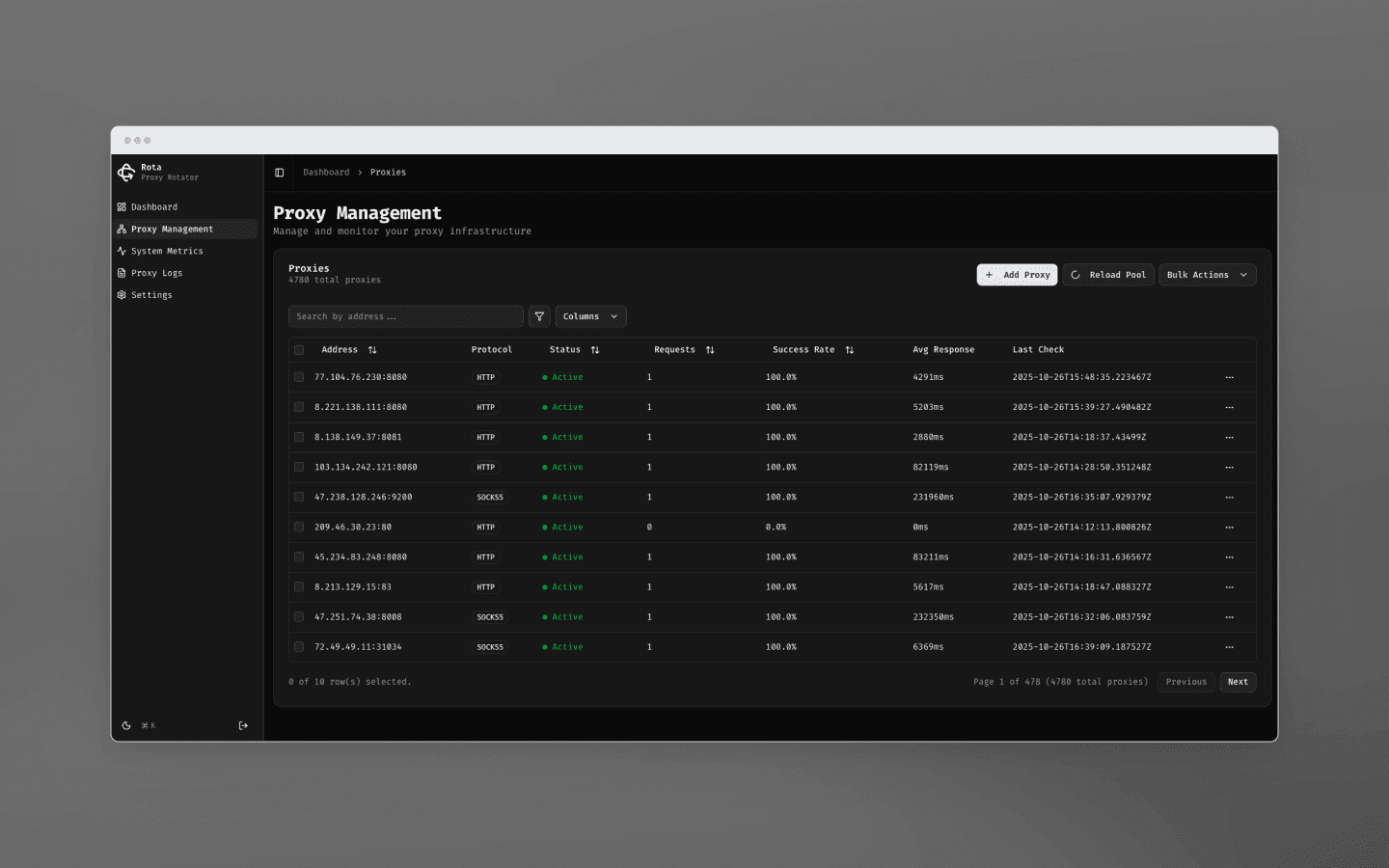
Some proxy providers also offer similar tracking systems in their dashboards. Typically, these are standard checkers that verify the availability of specific IP addresses from the pool and automatically exclude non-working proxies.
Your own proxy checking script
This is a more flexible option that allows you to fully control the checking process. To demonstrate such a solution, let’s look at the open-source script ip_mass_check.
This is a non-commercial product created solely for personal use. The checker implements a multithreaded mechanism for mass IP address checking and determines the IP reputation based on several sources.
Here’s what the script can do:
Check IP lists (including CIDR ranges) for geolocation data, hosting affiliation, VPN, proxy status, etc. It uses services such as ipwho.is, ip-api.com, and AbuseIPDB. Based on this data, the script calculates a suspicion score if data from different services significantly diverges or if the ASN belongs to cloud datacenters.
Process large numbers of IPs in parallel. The script is designed for mass checks and supports configuration of thread count and throttling via the command line.
Build reports. Results are displayed in the console and saved to a CSV file. For each IP address, the report includes all collected fields (country, region, city, provider, ASN), flags returned by the services, and a final verdict with listed reasons.
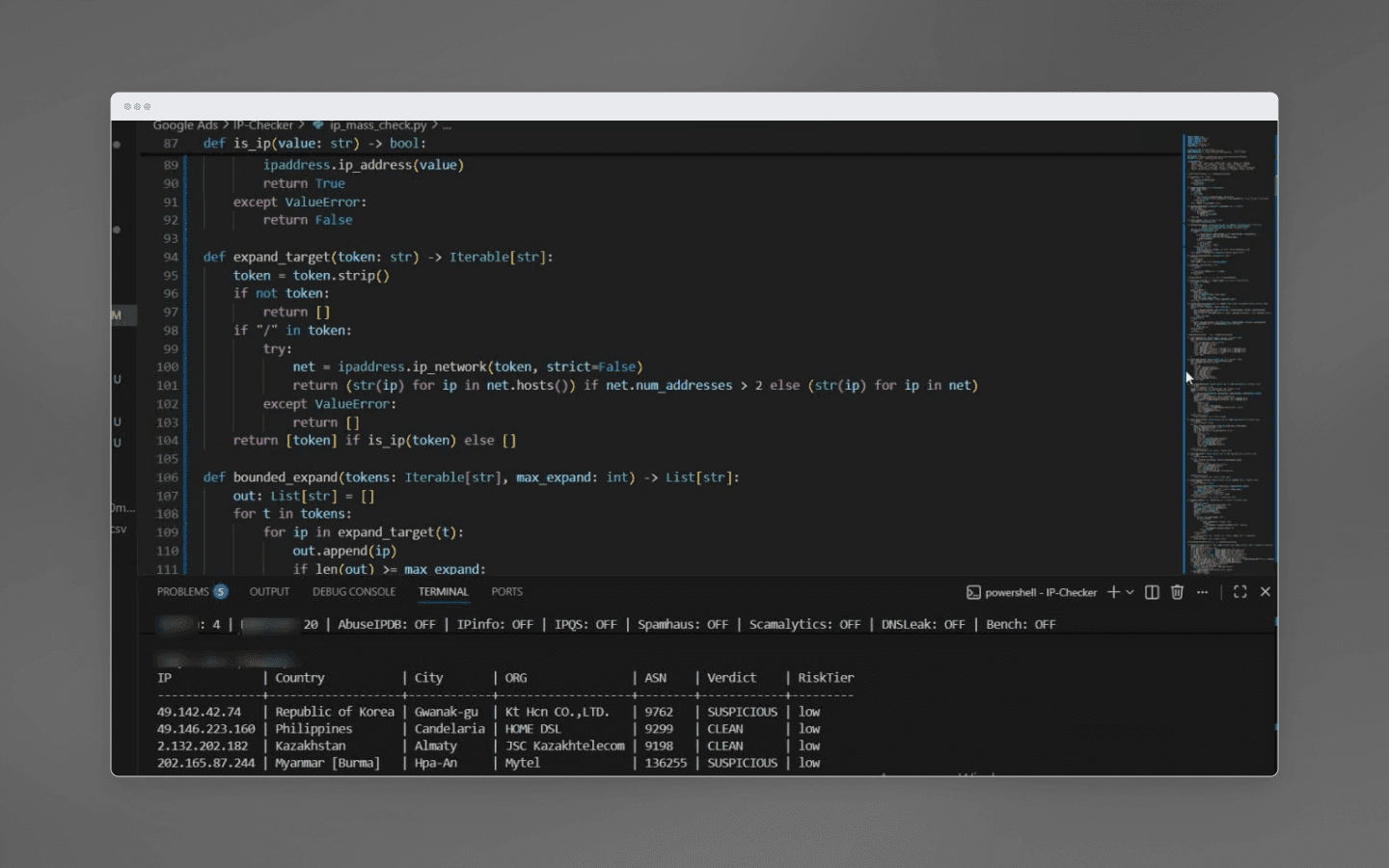
Unlike default checkers provided by some proxy providers, this script doesn’t just ping the proxy, it actually evaluates the IP’s reputation.
To understand how a manual solution works, this script is ideal. You can plug in whatever criteria you consider critical for filtering IP addresses and be confident in the completeness of the data, since you control the checker yourself.
Automation of proxy monitoring and filtering: how to build a pipeline
Naturally, running a script manually every time is not the best option. Ideally, proxy checks should not require your involvement at all. To achieve this, you need to turn the process into a continuous, automated workflow. Here’s how you can build it yourself:
Proxy list storage.
There must be a single authoritative source for your current proxy list. This can be a file, a database, or even a Redis key — the key point is that both the main scraper and the checking script should access the same list.The checking script marks proxy status in the storage (valid / invalid), and the scraper pulls only marked proxies. Alternatively, you can keep two files, for example,proxies_active.txtandproxies_disabled.txt, or even hold the data structure in memory if everything runs inside one application (the last option is not recommended for large-scale runs).Periodic proxy checks.
Run the monitoring process at a suitable time interval. This interval should depend on how intensively proxies are used and on their reliability. In practice, running checks every 5–10 minutes is usually enough for a fast reaction. You can set this up as a background thread or via an external scheduler. On each iteration, the script takes the current list of active proxies and runs them through the following tests:
On the first run, perform an extended reputation check (using your own script or third-party services) to get information about the IP type, geography, proxy/VPN flags, etc. Since this is resource-intensive, you can repeat it once per hour or only when a proxy is first added to the pool.
Each time you switch to a new IP, or on a time-based schedule, make a fast HTTP request through the proxy to a control URL (any lightweight resource — the goal is to check IP availability). Verify that a response is received with a 200 OK status within a reasonable time. This is the basic availability and speed check.
Measure response time and record the response code or error.
Metric collection.
Store the check results. We recommend keeping history: for example, counters of successful and failed attempts per proxy, average response time, and the timestamp of the last successful use. This data is useful both for decision-making and for overall analytics.Filtering decisions.
This is the key stage: automatically deciding which proxies are considered non-working. Based on collected metrics, define the filtering rules:
If a proxy does not respond for N consecutive checks (for example, three timeouts in a row), exclude it from the pool.
If the success rate of requests through a proxy over a recent period drops below a defined threshold (e.g., below 80%, or your acceptable value), remove it. This protects against intermittent issues when the proxy works inconsistently.
If the average response time over recent checks exceeds an acceptable limit (for example, more than 2 seconds), you can quarantine or remove the proxy so it doesn’t slow down the system.
If an extended reputation check shows undesirable characteristics (for example, the IP is flagged as a public VPN or belongs to the wrong country), discard it immediately.
If a proxy has expired by lifetime (for example, the provider issued it for one day and you know the expiration time), remove it on schedule.
All criteria are defined by you. We recommend avoiding overly aggressive filtering and not blocking a proxy based on a single failure, as that may be a one-off network issue. It’s better to combine rules: for example, issue a warning when the success rate drops below 90%, and remove the IP when it falls below 50% or after three consecutive timeouts.
Automatic removal and replacement.
After identifying non-working proxies, you need to remove them from the active list. It’s also important to ensure that the main scraper no longer uses an excluded proxy (this matters if the IP address is already queued for requests): you may need to abort tasks on that address or at least stop assigning new tasks to it. Beyond removal, a best practice is to automate replacement so that the proxy pool stays at a constant size. You can integrate with your proxy provider’s API to fetch fresh proxies to replace discarded ones. For example, if you purchased a pool of 100 proxies and 5 were filtered out, the script can immediately request 5 new IPs via the API and add them to the pool. The simplest solution is to maintain a reserve list of replacement proxies.Logging and notifications.
A fully automated system is perfect, but it’s always still useful to know what’s going on. Set up basic logging: which proxies were removed, when, and for what reason. This helps with troubleshooting and gives insight into the quality of your proxy sources. For a more advanced setup, configure notifications via Telegram or email if, for example, your filtering algorithm removed too many proxies within the last hour (which may indicate the provider disabled your network), or if the total pool size drops below a critical threshold. Some situations require intervention, and you don’t want to miss them.
With this pipeline in place, the system monitors the health of the proxy pool and replenishes it in time. Your involvement is minimal, as you only need to occasionally glance at reports or respond to alerts.
Final recommendations:
Multithreading and load distribution.
When checking large proxy lists, don’t process them strictly sequentially, as it can take too long. Use parallel threads or split the list and check it from multiple nodes. This is especially important if you rely on external APIs (geo-IP services or AbuseIPDB): avoid overloading them. Also, cache IP reputation check results if you frequently re-check the same addresses: for example, there’s no point in running a full reputation check every hour if the IP address hasn’t changed.Intermediate states.
Introduce the concept of quarantine for proxies. A proxy that temporarily fails doesn’t necessarily need to be removed permanently — you can exclude it from use for a while and re-check it later. It’s entirely possible that it recovers after an hour.Proxy rotation.
Even if proxies are good, don’t use the same one for too long on sensitive sites. Have a rotation strategy based on request count or session lifetime. This reduces the chance of blocks and distributes load evenly across the proxy pool.Use tags and groups.
If you have proxies of different types (HTTP/HTTPS, SOCKS, mobile, residential, datacenter), keep them grouped. For example, tag each proxy with attributes such as type, source (provider), and geolocation. During monitoring, you might notice that, e.g., European residential proxies have higher latency — that’s normal. However, if metrics suddenly diverge within the same group, that’s a signal to investigate.Error handling in the scraper.
Until all issues are handled at the monitoring level, make sure your main scraper can gracefully react to proxy failures. At the very minimum, retry the request with another proxy if the current one isn’t working properly. This is where tight integration between monitoring and the scraper helps: mark a proxy as potentially non-working when a failure occurs.
Conclusions
Proxy monitoring and automatic filtering are essential components of modern scraping and data infrastructure. Without them, the efficiency of your proxy pool will inevitably degrade: non-working proxies will accumulate, speeds will drop, and request success rates will decline.
Regularly checking proxies for availability, speed, and stealth keeps your proxy pool healthy, which directly increases the success of your scraping projects. Automating this process eliminates manual routine and reduces human error, as the system itself ensures that only the best available proxies are used.
Maintain your online anonymity with Octo Browser. Your real digital fingerprint cannot be tracked.
Would you like to try Octo Browser at discount?
Use the promo code OCTOSCRAPER to get 30% off any subscription. This offer is valid only for new users.
Why proxies fail and why you need to monitor them regularly
Even high-quality proxies may eventually stop meeting your requirements. There can be several reasons for this:
Blocks by target websites.
With aggressive scraping, some IP addresses may end up on blacklists or receive temporary bans. As a result, the proxy is technically alive, but all requests routed through it are rejected (they receive CAPTCHAs, 403 status codes, etc.).Proxy server downtime or failure.
No one is immune to network issues, even the most expensive providers. Server outages or expired payments can knock a working profile out of the overall workflow.Expiration of the proxy lifetime.
If you use proxies with a fixed lifespan (day, week, or month), once it expires, the IP address stops working.Unstable connection.
Proxies may suffer from high latency or fluctuating speeds due to channel congestion or geographically remote locations.Anonymity detection.
Some proxies may start leaking your real IP address or be transparent from the start. Others may turn out to be datacenter proxies, which automatically means blocked access to some resources, as IPs from datacenter pools are often ineffective at bypassing restrictions.
As a result, without a monitoring system, you risk accumulating non-working or inefficient proxies in your pool, which ultimately reduces scraping success rates and leads to increased latency, blocks, and frequent CAPTCHAs.
Metrics worth tracking in a proxy pool
To monitor proxies properly, it’s not enough to simply check whether an IP address is alive. You need to collect several metrics for each proxy:
Availability (uptime).
The percentage of successful checks. In other words, how often the proxy responds to your test requests. Ideally, you want proxies with uptime close to 100%. If a proxy frequently fails to respond, it’s of little use.Response time.
Measuring the response time through the proxy to a target endpoint, for example, an HTTP request to a fast page. High latency (hundreds of milliseconds or even seconds) indicates a slow proxy. Very slow proxies can become a bottleneck, so it makes sense to flag or discard them, or use them only for non-time-critical tasks.Success rate.
A metric similar to uptime, but measured during real workloads: the share of requests that pass through a proxy without errors (excluding target-side errors). If a proxy’s success rate is noticeably lower than the pool average, it likely has issues — either frequent blocks or instability.Error frequency and types.
It’s useful to log what kind of failures occur: connection timeouts, DNS errors through the proxy, HTTP errors (403, 500, etc.). Frequent timeouts indicate poor availability, while systematic 403 errors strongly suggest that the IP is blocked by the target resource.IP reputation databases.
If maximum stealth is required, it’s worth tracking whether your proxies are identified as proxies or VPN services by various databases (such as ipwho.is or ip-api.com).
Depending on your specific task, choose the metrics you need to monitor and evaluate your proxies based on them.
For example, when parsing search results, it’s critical that the proxy is not banned by the search engine and has acceptable speed. For large-scale data scraping, maximum uptime and the absence of clear proxy flags may be more important, even at the expense of speed.
Tools for checking your proxies: scripts and ready-made solutions
To organize proxy monitoring, you can choose one of the two possible options or combine them:
• use ready-made tools (platforms, services);
• write your own checking script tailored to your tasks.
Using specialized platforms
If you have a large project or prefer ready-made solutions, there is software available for managing proxy pools. For example, the open-source platform Rota — Proxy Rotation Platform offers a polished dashboard for real-time monitoring of thousands of proxies. It automatically checks proxies, removes unusable ones from the pool, and visualizes metrics.
Some proxy providers also offer similar tracking systems in their dashboards. Typically, these are standard checkers that verify the availability of specific IP addresses from the pool and automatically exclude non-working proxies.
Your own proxy checking script
This is a more flexible option that allows you to fully control the checking process. To demonstrate such a solution, let’s look at the open-source script ip_mass_check.
This is a non-commercial product created solely for personal use. The checker implements a multithreaded mechanism for mass IP address checking and determines the IP reputation based on several sources.
Here’s what the script can do:
Check IP lists (including CIDR ranges) for geolocation data, hosting affiliation, VPN, proxy status, etc. It uses services such as ipwho.is, ip-api.com, and AbuseIPDB. Based on this data, the script calculates a suspicion score if data from different services significantly diverges or if the ASN belongs to cloud datacenters.
Process large numbers of IPs in parallel. The script is designed for mass checks and supports configuration of thread count and throttling via the command line.
Build reports. Results are displayed in the console and saved to a CSV file. For each IP address, the report includes all collected fields (country, region, city, provider, ASN), flags returned by the services, and a final verdict with listed reasons.
Unlike default checkers provided by some proxy providers, this script doesn’t just ping the proxy, it actually evaluates the IP’s reputation.
To understand how a manual solution works, this script is ideal. You can plug in whatever criteria you consider critical for filtering IP addresses and be confident in the completeness of the data, since you control the checker yourself.
Automation of proxy monitoring and filtering: how to build a pipeline
Naturally, running a script manually every time is not the best option. Ideally, proxy checks should not require your involvement at all. To achieve this, you need to turn the process into a continuous, automated workflow. Here’s how you can build it yourself:
Proxy list storage.
There must be a single authoritative source for your current proxy list. This can be a file, a database, or even a Redis key — the key point is that both the main scraper and the checking script should access the same list.The checking script marks proxy status in the storage (valid / invalid), and the scraper pulls only marked proxies. Alternatively, you can keep two files, for example,proxies_active.txtandproxies_disabled.txt, or even hold the data structure in memory if everything runs inside one application (the last option is not recommended for large-scale runs).Periodic proxy checks.
Run the monitoring process at a suitable time interval. This interval should depend on how intensively proxies are used and on their reliability. In practice, running checks every 5–10 minutes is usually enough for a fast reaction. You can set this up as a background thread or via an external scheduler. On each iteration, the script takes the current list of active proxies and runs them through the following tests:
On the first run, perform an extended reputation check (using your own script or third-party services) to get information about the IP type, geography, proxy/VPN flags, etc. Since this is resource-intensive, you can repeat it once per hour or only when a proxy is first added to the pool.
Each time you switch to a new IP, or on a time-based schedule, make a fast HTTP request through the proxy to a control URL (any lightweight resource — the goal is to check IP availability). Verify that a response is received with a 200 OK status within a reasonable time. This is the basic availability and speed check.
Measure response time and record the response code or error.
Metric collection.
Store the check results. We recommend keeping history: for example, counters of successful and failed attempts per proxy, average response time, and the timestamp of the last successful use. This data is useful both for decision-making and for overall analytics.Filtering decisions.
This is the key stage: automatically deciding which proxies are considered non-working. Based on collected metrics, define the filtering rules:
If a proxy does not respond for N consecutive checks (for example, three timeouts in a row), exclude it from the pool.
If the success rate of requests through a proxy over a recent period drops below a defined threshold (e.g., below 80%, or your acceptable value), remove it. This protects against intermittent issues when the proxy works inconsistently.
If the average response time over recent checks exceeds an acceptable limit (for example, more than 2 seconds), you can quarantine or remove the proxy so it doesn’t slow down the system.
If an extended reputation check shows undesirable characteristics (for example, the IP is flagged as a public VPN or belongs to the wrong country), discard it immediately.
If a proxy has expired by lifetime (for example, the provider issued it for one day and you know the expiration time), remove it on schedule.
All criteria are defined by you. We recommend avoiding overly aggressive filtering and not blocking a proxy based on a single failure, as that may be a one-off network issue. It’s better to combine rules: for example, issue a warning when the success rate drops below 90%, and remove the IP when it falls below 50% or after three consecutive timeouts.
Automatic removal and replacement.
After identifying non-working proxies, you need to remove them from the active list. It’s also important to ensure that the main scraper no longer uses an excluded proxy (this matters if the IP address is already queued for requests): you may need to abort tasks on that address or at least stop assigning new tasks to it. Beyond removal, a best practice is to automate replacement so that the proxy pool stays at a constant size. You can integrate with your proxy provider’s API to fetch fresh proxies to replace discarded ones. For example, if you purchased a pool of 100 proxies and 5 were filtered out, the script can immediately request 5 new IPs via the API and add them to the pool. The simplest solution is to maintain a reserve list of replacement proxies.Logging and notifications.
A fully automated system is perfect, but it’s always still useful to know what’s going on. Set up basic logging: which proxies were removed, when, and for what reason. This helps with troubleshooting and gives insight into the quality of your proxy sources. For a more advanced setup, configure notifications via Telegram or email if, for example, your filtering algorithm removed too many proxies within the last hour (which may indicate the provider disabled your network), or if the total pool size drops below a critical threshold. Some situations require intervention, and you don’t want to miss them.
With this pipeline in place, the system monitors the health of the proxy pool and replenishes it in time. Your involvement is minimal, as you only need to occasionally glance at reports or respond to alerts.
Final recommendations:
Multithreading and load distribution.
When checking large proxy lists, don’t process them strictly sequentially, as it can take too long. Use parallel threads or split the list and check it from multiple nodes. This is especially important if you rely on external APIs (geo-IP services or AbuseIPDB): avoid overloading them. Also, cache IP reputation check results if you frequently re-check the same addresses: for example, there’s no point in running a full reputation check every hour if the IP address hasn’t changed.Intermediate states.
Introduce the concept of quarantine for proxies. A proxy that temporarily fails doesn’t necessarily need to be removed permanently — you can exclude it from use for a while and re-check it later. It’s entirely possible that it recovers after an hour.Proxy rotation.
Even if proxies are good, don’t use the same one for too long on sensitive sites. Have a rotation strategy based on request count or session lifetime. This reduces the chance of blocks and distributes load evenly across the proxy pool.Use tags and groups.
If you have proxies of different types (HTTP/HTTPS, SOCKS, mobile, residential, datacenter), keep them grouped. For example, tag each proxy with attributes such as type, source (provider), and geolocation. During monitoring, you might notice that, e.g., European residential proxies have higher latency — that’s normal. However, if metrics suddenly diverge within the same group, that’s a signal to investigate.Error handling in the scraper.
Until all issues are handled at the monitoring level, make sure your main scraper can gracefully react to proxy failures. At the very minimum, retry the request with another proxy if the current one isn’t working properly. This is where tight integration between monitoring and the scraper helps: mark a proxy as potentially non-working when a failure occurs.
Conclusions
Proxy monitoring and automatic filtering are essential components of modern scraping and data infrastructure. Without them, the efficiency of your proxy pool will inevitably degrade: non-working proxies will accumulate, speeds will drop, and request success rates will decline.
Regularly checking proxies for availability, speed, and stealth keeps your proxy pool healthy, which directly increases the success of your scraping projects. Automating this process eliminates manual routine and reduces human error, as the system itself ensures that only the best available proxies are used.
Stay up to date with the latest Octo Browser news
By clicking the button you agree to our Privacy Policy.
Stay up to date with the latest Octo Browser news
By clicking the button you agree to our Privacy Policy.
Stay up to date with the latest Octo Browser news
By clicking the button you agree to our Privacy Policy.

Join Octo Browser now
Or contact Customer Service at any time with any questions you might have.
Join Octo Browser now
Or contact Customer Service at any time with any questions you might have.
Join Octo Browser now
Or contact Customer Service at any time with any questions you might have.