How to spot bot-detection traps and avoid them

Markus_automation
Expert in data parsing and automation
Automated scraping has become an integral part of many projects: price monitoring, data collection, and social media analysis. However, website owners try to protect their data and reduce server loads, so they do not encourage scraping. While they cannot simply forbid scraping their website or service, they can place special traps that help determine whether a visitor is a human or a script. In this article, we examine the most common techniques websites use to detect bots, as well as methods to identify and bypass these traps.
Contents
Stay anonymous, take advantage of multi-accounting, and achieve your goals with the highest-quality anti-detect browser on the market.
Would you like to try Octo Browser at discount?
Use the promo code OCTOSCRAPER to get 30% off any subscription. This offer is valid only for new users.
Invisible honeypot traps: hidden links and fields
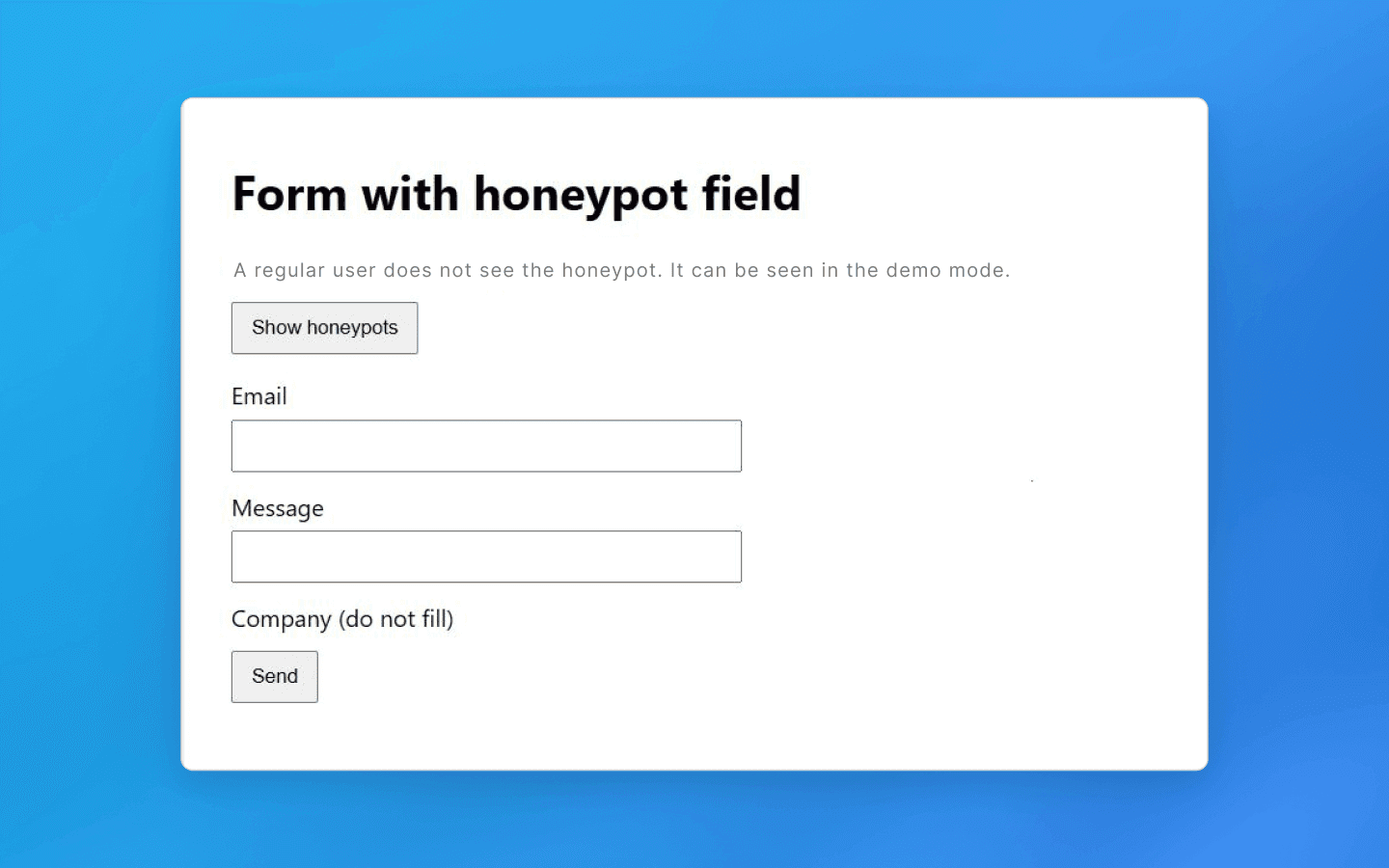
One of the most common tricks used to catch bots is so-called honeypot fields — specially prepared and hidden page elements. A real person will never see or click them, but a simple bot might.
A basic example is an invisible link (created using CSS styles like display: none or positioned outside the screen) that leads to a special trap URL. A normal user will not click such a link because they do not even know it exists, but a scraper that systematically crawls through every link will follow it and expose itself. As soon as the script loads that page, the server can add its IP address to a blacklist and block further access.
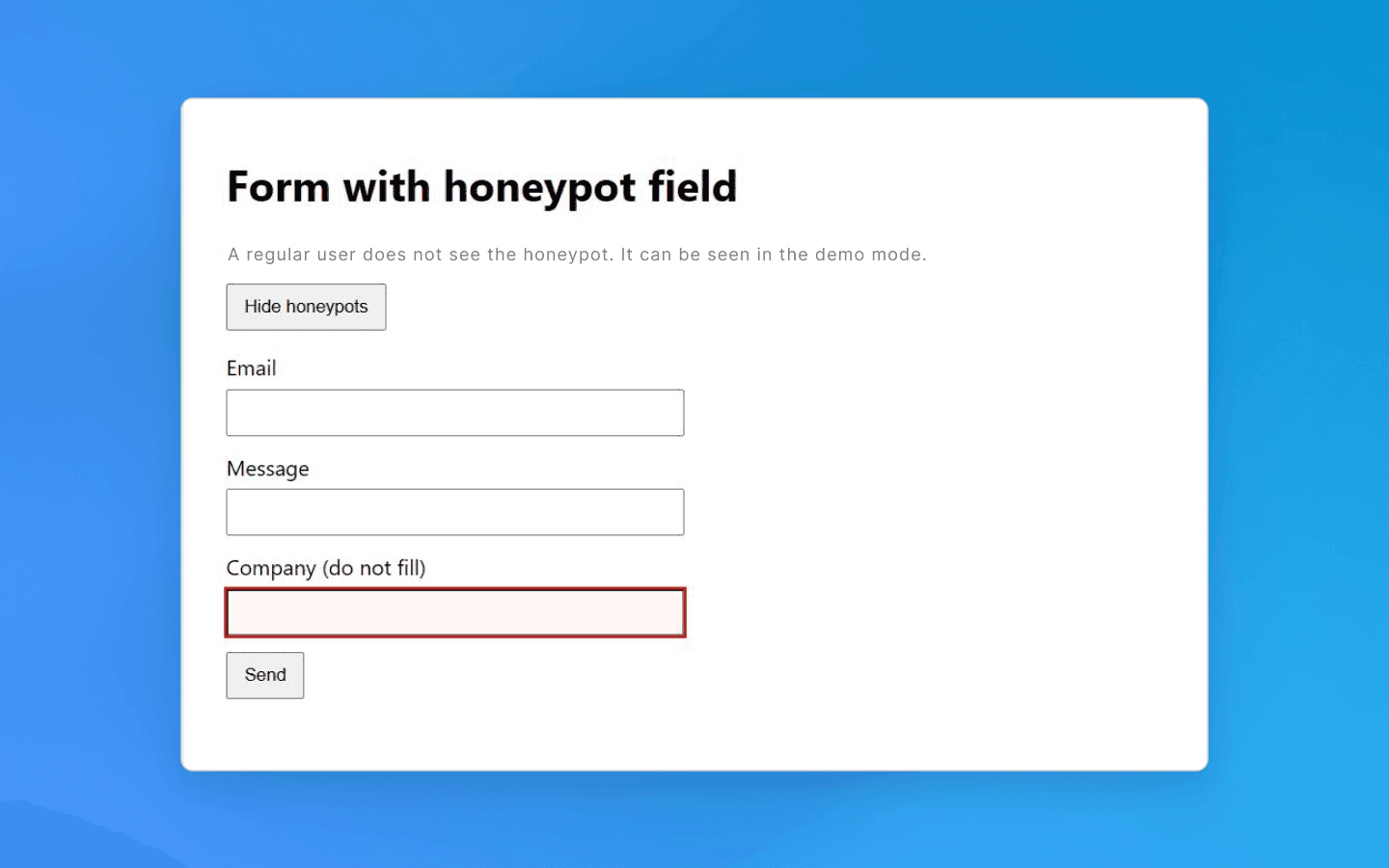
A similar idea applies to web forms. A hidden field is added to a form (for example, a registration or contact form). A human will not see it, but a bot may find and fill it. Such honeypot fields signal bot activity. If a submitted form contains text in a hidden field, that is a red flag. The request is rejected or the session is flagged as bot traffic. In either case, further work becomes impossible.
How to avoid: first, when crawling pages, analyze element properties before clicking or navigating them. Check link styles: if a link or button is marked as invisible (display:none, opacity: 0, size 1×1 pixel, etc.), ignore it. Similarly, before submitting a form, make sure you have not filled in any hidden fields (they can be identified by unusual names or attributes such as aria-hidden, tabindex="-1", hiding styles, etc.). Beginners may think such details are insignificant, but this is one of the easiest ways to get detected. One unnecessary click on a trap link is enough to expose your bot.
Naturally, website and service owners know about countermeasures, and modern bots can already detect honeypot elements by suspicious CSS characteristics, so this method is often combined with other protection techniques. Still, filtering invisible links and fields is a mandatory requirement for any professional parser.
CAPTCHAs and JavaScript challenges
A more obvious way to prevent automated access is CAPTCHA, those annoying pop-ups with image selection, “I am not a robot” checkboxes, and similar variations. This is a direct and effective way to distinguish humans from scripts or bots. Unlike hidden honeypots, CAPTCHAs explicitly require completing a task that a bot is expected not to solve. In practice, simple CAPTCHAs can be bypassed relatively easily because many free open-source solutions exist, while more complex ones require third-party solving services.
If a bot encounters a CAPTCHA, there are few options: either solve it automatically via a third-party service or change the thread and switch to another profile. Paid CAPTCHA solving slows scraping and increases costs. Another strategy is to avoid triggering CAPTCHA altogether — for example, by reducing request intensity to avoid activating protection measures or by using search engine caches (such as Google Cache) to obtain data.
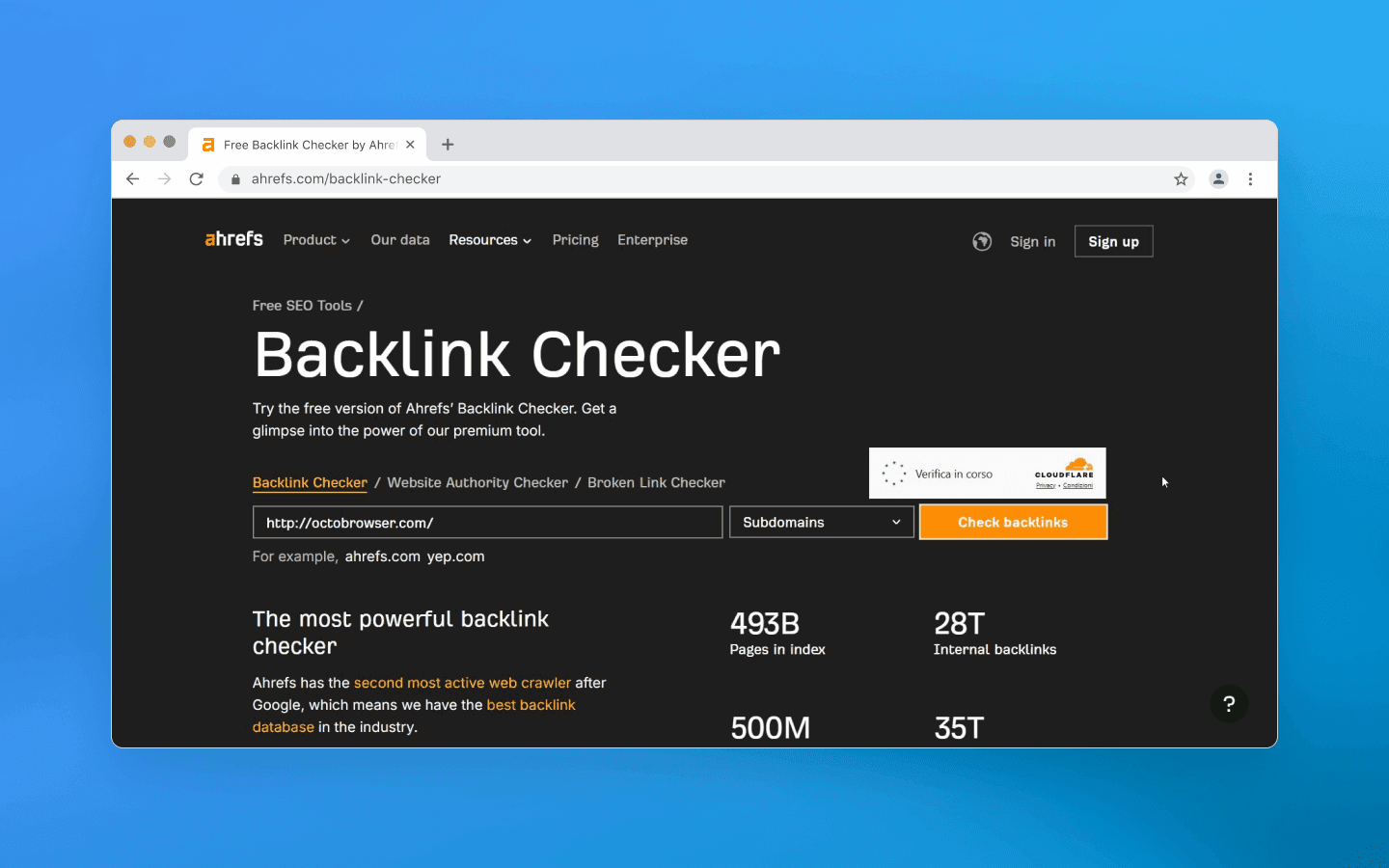
A separate category is the JavaScript challenge. Many websites (especially those behind CDN protection such as Cloudflare) may return a verification page instead of content when traffic looks suspicious. This page runs client-side JS code that calculates a token, checks the browser environment, sets cookies, and only then redirects the visitor to the real content. The goal is to confirm the request comes from a real browser with JS support rather than a simple HTTP client. A bot that cannot execute JavaScript will fail this test and not gain access.
How to avoid: if you know a target website shows CAPTCHAs, decide in advance how you will bypass them, both technically and financially. If preventing CAPTCHA is impossible (some websites show it by default), you will need to integrate a third-party solving solution. For JS challenges, the most obvious workaround is using a headless browser that executes the required scenario. Popular automation tools (Puppeteer, Playwright, etc.) allow running a browser in the background, but do not forget about spoofing, as automation traces must always be hidden.
Ignoring JS verification is not an option: if it exists, you must pass it or you will not get the data. Make sure your scraper loads related scripts, executes them, and stores cookies or tokens for subsequent requests.
Behavioral analysis: speed, sequence, interactions
Even if a bot bypasses direct obstacles such as CAPTCHAs and other visible anti-bot methods, non-human behavior patterns can still be fatal. A typical user spends several seconds on a product page, scrolls, clicks images, and then navigates further. A script, however, may load pages instantly and in a perfectly repeatable order. Modern websites track such anomalies. Extremely high navigation speeds, suspiciously regular intervals between requests, and similar patterns clearly indicate automation.
Another marker is unusual navigation order — for example, crawling URLs alphabetically or strictly following a sitemap, which real visitors rarely do. A simple indicator is the absence of human-like interactions. If logs show a session viewing 100 pages without a single scroll or mouse movement, the session is likely bot traffic.
Time-based traps also exist. Forms may enforce a minimum completion time. Most humans take at least 5–10 seconds to enter credentials, while a bot can submit them in milliseconds. If a form is submitted almost instantly, there is a high probability of automation, and the website may reject the request. A similar approach applies to navigation: moving too quickly to the next step — especially a complex one such as payment — raises suspicion in anti-bot systems.
How to avoid: the main principle is to mimic real user behavior. Introduce randomness and natural patterns into your scraper workflow.
First, do not aim for maximum scraping speed. If speed is not critical, working slightly slower but more carefully is safer. Insert pauses between requests — not fixed ones, but randomized within a range. Add delays on each page to simulate reading time.
Second, avoid strict navigation sequences. If possible, introduce randomness in scraping order (for example, change section order or randomly choose links on a page instead of iterating sequentially).
Third, add signs of natural interaction in headless scenarios. Advanced pipelines may include scrolling, cursor movement, opening interface elements, and small micro-pauses between steps. These actions do not affect data collection directly but make the workflow more human-like, especially on long pages and multi-step flows (login → selection → checkout), where perfectly consistent timing looks unnatural.
Also consider the website’s perspective: many systems combine behavioral analysis with telemetry and web analytics. Trackers on a page may record interaction events and session timing. If logs show an empty session without typical signals, that alone looks suspicious. Therefore, it is important to evaluate not only your scraper’s actions but also what session data is actually generated and how it is interpreted on the monitoring side.
Request rate and volume limits
Another obvious criterion used to distinguish a machine from a human is request frequency. Even the fastest user cannot send dozens of requests per second, but a script can. That is why server-side limits are implemented: for example, no more than N requests from a single IP address per minute. If the limit is exceeded, a temporary or permanent block is triggered. At the web server or CDN level, this is implemented by tracking the number of requests and filtering out bursts that exceed the threshold. The exact numbers depend on the website’s policy: somewhere 5 requests per second may be acceptable, while elsewhere even 1 request per second will be considered excessive. This is easy to implement: with Nginx, you can configure a limit of 1 request per second per IP and reject anything above that.
In addition to frequency, concurrency is also monitored. A regular user is unlikely to open 20 pages of a website simultaneously in different tabs, while a scraper can easily generate many parallel threads. This is also tracked: too many simultaneous sessions from one address are sufficient grounds to suspect a botnet or scraper.
How to avoid: first, limit the level of concurrency in your script. Yes, it is very tempting to parallelize crawling a catalog into 50 threads and collect data in a minute, but in 99% of cases this will immediately attract unwanted attention. It is better to work with a few threads (or even one) if you see that the website is sensitive to load.
Secondly, take care of your IP address rotation. Most websites log the IP of every visitor and block the entire address when suspicious activity is detected. That is why using proxies is a standard practice for serious scraping. It makes sense to use IP rotation: after a certain number of requests or when switching sections, change the exitpoint address. Ideally, always use residential or mobile proxies. It is important to configure the scraper so that one IP does not make too many consecutive requests. For example, send no more than 5–10 requests from one address, then switch. If your proxy pool is limited, at least try to alternate them and maintain pauses.
Additionally, always monitor response headers and status codes for your requests. If you start receiving HTTP 429 Too Many Requests or see something like “Too many requests, try again later” in the page content, this is a clear signal that the request limit has been triggered. Such a situation requires either reducing the scraping speed, increasing the number of proxies, or using other techniques. As an option, if the limit is set per IP address and the website is accessible via HTTP and allows changing User-Agent and Referrer without additional checks, rotating them may help.
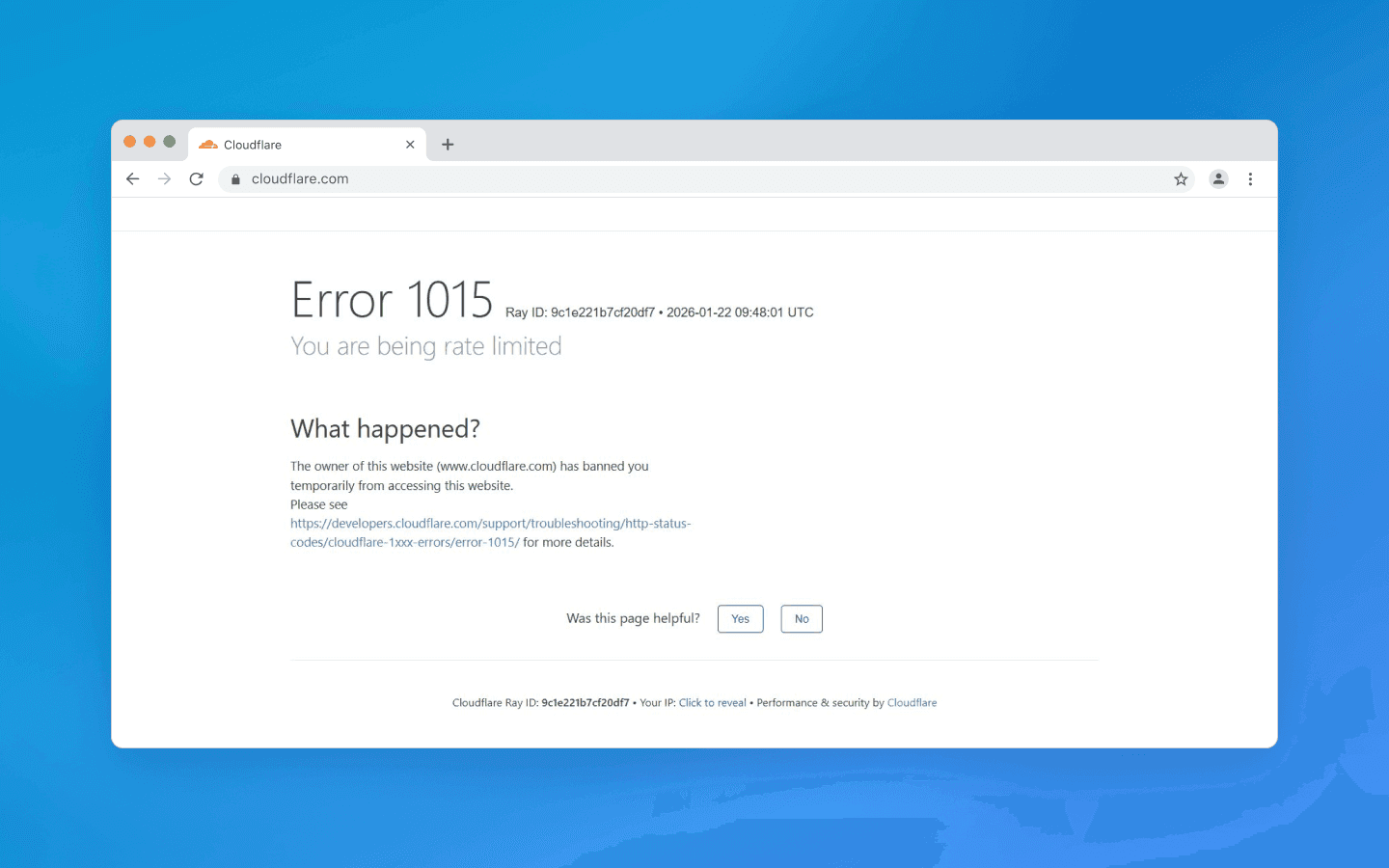
In general, the main rule is not to stand out: the more seamlessly you blend into the background traffic of regular users, the longer your scraper will operate without blocks.
Headers and browser fingerprints
Websites can detect a scraper at the connection stage by analyzing technical request parameters. Each HTTP request carries a set of headers (User-Agent, Accept, Accept-Language, Cookie, etc.), which together form a browser profile. For regular browsers, these profiles are fairly predictable: for example, when visiting a website with Chrome, you send a characteristic set of headers starting with User-Agent: Mozilla/5.0 … Chrome/version …, plus a list of supported languages (Accept-Language), fetch flags (Sec-Fetch-* headers), and so on. A bot, however, may send an unusual or incomplete set of headers. Many websites immediately block requests with suspicious User-Agent strings such as Scrapy, curl, Wget, Python, and similar, at the firewall level. And even if you are not blocked for sending uch strings, the fact itself will be considered as part of the overall risk score.
When replacing the User-Agent with a common browser string, you can still fail on details. For example, Headless Chrome used to reveal itself because the User-Agent string contained the word HeadlessChrome. Another example: the bot does not send the Accept-Language header (real browsers always send language preferences).
Another indicator: the order of headers or their values do not match the declared browser. Anti-bot systems maintain large databases of browser fingerprints — templates with different headers and values from different versions of Chrome, Safari, and Firefox. If you pretend to be Chrome 120+ and send the corresponding User-Agent, but do not include typical modern Chromium UA Client Hints headers (Sec-CH-UA, Sec-CH-UA-Mobile, Sec-CH-UA-Platform), or they are in the wrong format, or a navigation request triggered by a user click does not include Sec-Fetch-User: ?1 while other Sec-Fetch-* headers are present, such small inconsistencies may reveal automation (this is just an illustrative example).
Moreover, beyond HTTP headers, the browser can reveal itself through the navigator object and the JS environment. Headless modes usually include a navigator.webdriver property, which is normally true for automated browsers. Websites then can run a small client-side script: if (navigator.webdriver) { /* Bot detected */ } — and this simple approach is good enough to catch beginners. Others check for specific objects left by Selenium or Playwright. For example, Playwright inserts certain service variables into window (__playwright__binding__ and others), and scripts on the page can look for such signs of external control.
More advanced checks include Canvas API or WebGL tests, where a hidden image is rendered and a canvas fingerprint is collected that may match a typical emulator signature.
In short, there are many checks available to websites, and environment spoofing can be detected even through minor discrepancies in the JS implementation.
How to avoid: disguise yourself as a real device/browser as much as possible. Always set a realistic User-Agent corresponding to a popular browser and keep it updated. But one header is not enough: adjust the others as well. Add Accept-Language (taking the IP region into account), Accept with content types typical for a common browser, Connection, Upgrade-Insecure-Requests, Sec-Fetch-* headers, and so on. The easiest way is to check which headers your browser sends when visiting the target website (via developer tools or a proxy) and emulate them. Pay attention to consistency: if you claim to be Chrome on Windows, you should have a Windows-oriented User-Agent and, where necessary, a Sec-CH-UA-Platform: "Windows" header.
If you work with a headless browser, use libraries or settings that automatically enable automation masking (for example, Puppeteer has the puppeteer-extra-plugin-stealth package, which disables navigator.webdriver and other revealing markers, or patched versions of playwright/puppeteer from rebrowser that hide many standard weaknesses of such libraries). If you are creating a low-level scraper, manually modify navigator via DevTools Protocol to set properties matching a real browser.
Of course, there is no need to emulate absolutely everything down to random Canvas noise. The best practice is to start with the basics — headers and simple JS. Do not send obviously suspicious strings, regularly update header templates to match current browsers, enable emulation of minor interactions, and, if possible, test your bot against anti-detection tools. Tools like BrowserScan or FingerprintJS can show which signals your script exposes.
Other tricks: from “infinite labyrinths” to third-party services
In addition to the above, there are more exotic traps worth knowing about. Some resources deliberately create “infinite” link structures — a kind of labyrinth for a scraper.
A classic example is dynamically generated endless calendar pages or parameterized URLs that lead into loops. A bot without proper stopping conditions may get stuck trying to traverse an endless stream of links. As a result, it wastes your resources and also reveals itself to anti-bot systems through unusual behavior. For real users such links are usually unreachable, but a bot can fall into such a trap.
How to avoid: first, always analyze collected data for plausibility. If your scraper suddenly followed a chain of links somewhere where it was not supposed to go and downloaded tons of texts that look like random phrases, you may have entered a labyrinth. It is useful to implement loop detection logic: track visited URLs, limit crawl depth, verify that new links belong to the same domain or section that you need.
Secondly, always consider the context: if you scrape, for example, a review website and the bot suddenly starts downloading pages with clearly unrelated or incoherent AI-generated text, this is a reason to be cautious and stop that session.
Also keep in mind that third-party services help websites detect bots too. Products such as Cloudflare Bot Management, Datadome, PerimeterX, and others specialize in detecting automated traffic. They use a combination of methods ranging from behavioral analysis and fingerprinting to databases of known bots and even machine learning to identify unusual visitors.
If your bot encounters a powerful anti-bot system, the task becomes more complex, as detection may happen based on a combination of small signals. In such cases everything discussed above applies, and you also need to take into account constant rule improvements on the scraped side. Sometimes it becomes cheaper to change scraping tactics or limit the request volume to a level that does not trigger protection systems. When using proxies, you can try to mimic different real users and change not only the IP address but also geolocation, user agents, and request timing (imitating visits at different hours of the day rather than continuous non-stop activity).
Conclusion
As you can see, there is no single magic button that will permanently eliminate the risk of blocking. You need a combination of technical methods and a careful execution for successful scraping:
Detect and ignore honeypot elements: before clicking a link or filling a field, make sure the element is not hidden from human view. Do not follow suspicious URLs and do not fill invisible form fields.
Mimic a real user: use real headers and values typical of normal browsers (User-Agent, Accept-Language, etc.). Whenever possible, run scraping through the browser kernel of anti-detect browsers to pass JS checks and ensure a realistic environment (navigator, cookies, localStorage, etc.).
Limit speed and concurrency: configure delays and pauses between requests, use randomized intervals. Do not exceed request limits, scale gradually, and monitor website reactions (HTTP 429 codes, CAPTCHAs, and so on).
Rotate IP addresses and session identifiers: use a proxy or VPN pool, alternate IPs, especially for large-scale crawling. Ensure that a single IP is not used too frequently. Always opt for residential IPs, as they are less suspicious to anti-bot systems.
Introduce randomness into your scraping behavior: emulate user actions, e.g., small scrolls, mouse movements, time spent reading a page. Avoid fully sequential routes and vary action patterns so as not to demonstrate a rigid algorithm.
The confrontation in web scraping continues, as websites invent new detection methods, and bot developers search for ways around them. In this game, the winner is the one who is more attentive and inventive. Let your bot be exactly that: careful, flexible, and humanly unpredictable.
Stay anonymous, take advantage of multi-accounting, and achieve your goals with the highest-quality anti-detect browser on the market.
Would you like to try Octo Browser at discount?
Use the promo code OCTOSCRAPER to get 30% off any subscription. This offer is valid only for new users.
Invisible honeypot traps: hidden links and fields
One of the most common tricks used to catch bots is so-called honeypot fields — specially prepared and hidden page elements. A real person will never see or click them, but a simple bot might.
A basic example is an invisible link (created using CSS styles like display: none or positioned outside the screen) that leads to a special trap URL. A normal user will not click such a link because they do not even know it exists, but a scraper that systematically crawls through every link will follow it and expose itself. As soon as the script loads that page, the server can add its IP address to a blacklist and block further access.
A similar idea applies to web forms. A hidden field is added to a form (for example, a registration or contact form). A human will not see it, but a bot may find and fill it. Such honeypot fields signal bot activity. If a submitted form contains text in a hidden field, that is a red flag. The request is rejected or the session is flagged as bot traffic. In either case, further work becomes impossible.
How to avoid: first, when crawling pages, analyze element properties before clicking or navigating them. Check link styles: if a link or button is marked as invisible (display:none, opacity: 0, size 1×1 pixel, etc.), ignore it. Similarly, before submitting a form, make sure you have not filled in any hidden fields (they can be identified by unusual names or attributes such as aria-hidden, tabindex="-1", hiding styles, etc.). Beginners may think such details are insignificant, but this is one of the easiest ways to get detected. One unnecessary click on a trap link is enough to expose your bot.
Naturally, website and service owners know about countermeasures, and modern bots can already detect honeypot elements by suspicious CSS characteristics, so this method is often combined with other protection techniques. Still, filtering invisible links and fields is a mandatory requirement for any professional parser.
CAPTCHAs and JavaScript challenges
A more obvious way to prevent automated access is CAPTCHA, those annoying pop-ups with image selection, “I am not a robot” checkboxes, and similar variations. This is a direct and effective way to distinguish humans from scripts or bots. Unlike hidden honeypots, CAPTCHAs explicitly require completing a task that a bot is expected not to solve. In practice, simple CAPTCHAs can be bypassed relatively easily because many free open-source solutions exist, while more complex ones require third-party solving services.
If a bot encounters a CAPTCHA, there are few options: either solve it automatically via a third-party service or change the thread and switch to another profile. Paid CAPTCHA solving slows scraping and increases costs. Another strategy is to avoid triggering CAPTCHA altogether — for example, by reducing request intensity to avoid activating protection measures or by using search engine caches (such as Google Cache) to obtain data.
A separate category is the JavaScript challenge. Many websites (especially those behind CDN protection such as Cloudflare) may return a verification page instead of content when traffic looks suspicious. This page runs client-side JS code that calculates a token, checks the browser environment, sets cookies, and only then redirects the visitor to the real content. The goal is to confirm the request comes from a real browser with JS support rather than a simple HTTP client. A bot that cannot execute JavaScript will fail this test and not gain access.
How to avoid: if you know a target website shows CAPTCHAs, decide in advance how you will bypass them, both technically and financially. If preventing CAPTCHA is impossible (some websites show it by default), you will need to integrate a third-party solving solution. For JS challenges, the most obvious workaround is using a headless browser that executes the required scenario. Popular automation tools (Puppeteer, Playwright, etc.) allow running a browser in the background, but do not forget about spoofing, as automation traces must always be hidden.
Ignoring JS verification is not an option: if it exists, you must pass it or you will not get the data. Make sure your scraper loads related scripts, executes them, and stores cookies or tokens for subsequent requests.
Behavioral analysis: speed, sequence, interactions
Even if a bot bypasses direct obstacles such as CAPTCHAs and other visible anti-bot methods, non-human behavior patterns can still be fatal. A typical user spends several seconds on a product page, scrolls, clicks images, and then navigates further. A script, however, may load pages instantly and in a perfectly repeatable order. Modern websites track such anomalies. Extremely high navigation speeds, suspiciously regular intervals between requests, and similar patterns clearly indicate automation.
Another marker is unusual navigation order — for example, crawling URLs alphabetically or strictly following a sitemap, which real visitors rarely do. A simple indicator is the absence of human-like interactions. If logs show a session viewing 100 pages without a single scroll or mouse movement, the session is likely bot traffic.
Time-based traps also exist. Forms may enforce a minimum completion time. Most humans take at least 5–10 seconds to enter credentials, while a bot can submit them in milliseconds. If a form is submitted almost instantly, there is a high probability of automation, and the website may reject the request. A similar approach applies to navigation: moving too quickly to the next step — especially a complex one such as payment — raises suspicion in anti-bot systems.
How to avoid: the main principle is to mimic real user behavior. Introduce randomness and natural patterns into your scraper workflow.
First, do not aim for maximum scraping speed. If speed is not critical, working slightly slower but more carefully is safer. Insert pauses between requests — not fixed ones, but randomized within a range. Add delays on each page to simulate reading time.
Second, avoid strict navigation sequences. If possible, introduce randomness in scraping order (for example, change section order or randomly choose links on a page instead of iterating sequentially).
Third, add signs of natural interaction in headless scenarios. Advanced pipelines may include scrolling, cursor movement, opening interface elements, and small micro-pauses between steps. These actions do not affect data collection directly but make the workflow more human-like, especially on long pages and multi-step flows (login → selection → checkout), where perfectly consistent timing looks unnatural.
Also consider the website’s perspective: many systems combine behavioral analysis with telemetry and web analytics. Trackers on a page may record interaction events and session timing. If logs show an empty session without typical signals, that alone looks suspicious. Therefore, it is important to evaluate not only your scraper’s actions but also what session data is actually generated and how it is interpreted on the monitoring side.
Request rate and volume limits
Another obvious criterion used to distinguish a machine from a human is request frequency. Even the fastest user cannot send dozens of requests per second, but a script can. That is why server-side limits are implemented: for example, no more than N requests from a single IP address per minute. If the limit is exceeded, a temporary or permanent block is triggered. At the web server or CDN level, this is implemented by tracking the number of requests and filtering out bursts that exceed the threshold. The exact numbers depend on the website’s policy: somewhere 5 requests per second may be acceptable, while elsewhere even 1 request per second will be considered excessive. This is easy to implement: with Nginx, you can configure a limit of 1 request per second per IP and reject anything above that.
In addition to frequency, concurrency is also monitored. A regular user is unlikely to open 20 pages of a website simultaneously in different tabs, while a scraper can easily generate many parallel threads. This is also tracked: too many simultaneous sessions from one address are sufficient grounds to suspect a botnet or scraper.
How to avoid: first, limit the level of concurrency in your script. Yes, it is very tempting to parallelize crawling a catalog into 50 threads and collect data in a minute, but in 99% of cases this will immediately attract unwanted attention. It is better to work with a few threads (or even one) if you see that the website is sensitive to load.
Secondly, take care of your IP address rotation. Most websites log the IP of every visitor and block the entire address when suspicious activity is detected. That is why using proxies is a standard practice for serious scraping. It makes sense to use IP rotation: after a certain number of requests or when switching sections, change the exitpoint address. Ideally, always use residential or mobile proxies. It is important to configure the scraper so that one IP does not make too many consecutive requests. For example, send no more than 5–10 requests from one address, then switch. If your proxy pool is limited, at least try to alternate them and maintain pauses.
Additionally, always monitor response headers and status codes for your requests. If you start receiving HTTP 429 Too Many Requests or see something like “Too many requests, try again later” in the page content, this is a clear signal that the request limit has been triggered. Such a situation requires either reducing the scraping speed, increasing the number of proxies, or using other techniques. As an option, if the limit is set per IP address and the website is accessible via HTTP and allows changing User-Agent and Referrer without additional checks, rotating them may help.
In general, the main rule is not to stand out: the more seamlessly you blend into the background traffic of regular users, the longer your scraper will operate without blocks.
Headers and browser fingerprints
Websites can detect a scraper at the connection stage by analyzing technical request parameters. Each HTTP request carries a set of headers (User-Agent, Accept, Accept-Language, Cookie, etc.), which together form a browser profile. For regular browsers, these profiles are fairly predictable: for example, when visiting a website with Chrome, you send a characteristic set of headers starting with User-Agent: Mozilla/5.0 … Chrome/version …, plus a list of supported languages (Accept-Language), fetch flags (Sec-Fetch-* headers), and so on. A bot, however, may send an unusual or incomplete set of headers. Many websites immediately block requests with suspicious User-Agent strings such as Scrapy, curl, Wget, Python, and similar, at the firewall level. And even if you are not blocked for sending uch strings, the fact itself will be considered as part of the overall risk score.
When replacing the User-Agent with a common browser string, you can still fail on details. For example, Headless Chrome used to reveal itself because the User-Agent string contained the word HeadlessChrome. Another example: the bot does not send the Accept-Language header (real browsers always send language preferences).
Another indicator: the order of headers or their values do not match the declared browser. Anti-bot systems maintain large databases of browser fingerprints — templates with different headers and values from different versions of Chrome, Safari, and Firefox. If you pretend to be Chrome 120+ and send the corresponding User-Agent, but do not include typical modern Chromium UA Client Hints headers (Sec-CH-UA, Sec-CH-UA-Mobile, Sec-CH-UA-Platform), or they are in the wrong format, or a navigation request triggered by a user click does not include Sec-Fetch-User: ?1 while other Sec-Fetch-* headers are present, such small inconsistencies may reveal automation (this is just an illustrative example).
Moreover, beyond HTTP headers, the browser can reveal itself through the navigator object and the JS environment. Headless modes usually include a navigator.webdriver property, which is normally true for automated browsers. Websites then can run a small client-side script: if (navigator.webdriver) { /* Bot detected */ } — and this simple approach is good enough to catch beginners. Others check for specific objects left by Selenium or Playwright. For example, Playwright inserts certain service variables into window (__playwright__binding__ and others), and scripts on the page can look for such signs of external control.
More advanced checks include Canvas API or WebGL tests, where a hidden image is rendered and a canvas fingerprint is collected that may match a typical emulator signature.
In short, there are many checks available to websites, and environment spoofing can be detected even through minor discrepancies in the JS implementation.
How to avoid: disguise yourself as a real device/browser as much as possible. Always set a realistic User-Agent corresponding to a popular browser and keep it updated. But one header is not enough: adjust the others as well. Add Accept-Language (taking the IP region into account), Accept with content types typical for a common browser, Connection, Upgrade-Insecure-Requests, Sec-Fetch-* headers, and so on. The easiest way is to check which headers your browser sends when visiting the target website (via developer tools or a proxy) and emulate them. Pay attention to consistency: if you claim to be Chrome on Windows, you should have a Windows-oriented User-Agent and, where necessary, a Sec-CH-UA-Platform: "Windows" header.
If you work with a headless browser, use libraries or settings that automatically enable automation masking (for example, Puppeteer has the puppeteer-extra-plugin-stealth package, which disables navigator.webdriver and other revealing markers, or patched versions of playwright/puppeteer from rebrowser that hide many standard weaknesses of such libraries). If you are creating a low-level scraper, manually modify navigator via DevTools Protocol to set properties matching a real browser.
Of course, there is no need to emulate absolutely everything down to random Canvas noise. The best practice is to start with the basics — headers and simple JS. Do not send obviously suspicious strings, regularly update header templates to match current browsers, enable emulation of minor interactions, and, if possible, test your bot against anti-detection tools. Tools like BrowserScan or FingerprintJS can show which signals your script exposes.
Other tricks: from “infinite labyrinths” to third-party services
In addition to the above, there are more exotic traps worth knowing about. Some resources deliberately create “infinite” link structures — a kind of labyrinth for a scraper.
A classic example is dynamically generated endless calendar pages or parameterized URLs that lead into loops. A bot without proper stopping conditions may get stuck trying to traverse an endless stream of links. As a result, it wastes your resources and also reveals itself to anti-bot systems through unusual behavior. For real users such links are usually unreachable, but a bot can fall into such a trap.
How to avoid: first, always analyze collected data for plausibility. If your scraper suddenly followed a chain of links somewhere where it was not supposed to go and downloaded tons of texts that look like random phrases, you may have entered a labyrinth. It is useful to implement loop detection logic: track visited URLs, limit crawl depth, verify that new links belong to the same domain or section that you need.
Secondly, always consider the context: if you scrape, for example, a review website and the bot suddenly starts downloading pages with clearly unrelated or incoherent AI-generated text, this is a reason to be cautious and stop that session.
Also keep in mind that third-party services help websites detect bots too. Products such as Cloudflare Bot Management, Datadome, PerimeterX, and others specialize in detecting automated traffic. They use a combination of methods ranging from behavioral analysis and fingerprinting to databases of known bots and even machine learning to identify unusual visitors.
If your bot encounters a powerful anti-bot system, the task becomes more complex, as detection may happen based on a combination of small signals. In such cases everything discussed above applies, and you also need to take into account constant rule improvements on the scraped side. Sometimes it becomes cheaper to change scraping tactics or limit the request volume to a level that does not trigger protection systems. When using proxies, you can try to mimic different real users and change not only the IP address but also geolocation, user agents, and request timing (imitating visits at different hours of the day rather than continuous non-stop activity).
Conclusion
As you can see, there is no single magic button that will permanently eliminate the risk of blocking. You need a combination of technical methods and a careful execution for successful scraping:
Detect and ignore honeypot elements: before clicking a link or filling a field, make sure the element is not hidden from human view. Do not follow suspicious URLs and do not fill invisible form fields.
Mimic a real user: use real headers and values typical of normal browsers (User-Agent, Accept-Language, etc.). Whenever possible, run scraping through the browser kernel of anti-detect browsers to pass JS checks and ensure a realistic environment (navigator, cookies, localStorage, etc.).
Limit speed and concurrency: configure delays and pauses between requests, use randomized intervals. Do not exceed request limits, scale gradually, and monitor website reactions (HTTP 429 codes, CAPTCHAs, and so on).
Rotate IP addresses and session identifiers: use a proxy or VPN pool, alternate IPs, especially for large-scale crawling. Ensure that a single IP is not used too frequently. Always opt for residential IPs, as they are less suspicious to anti-bot systems.
Introduce randomness into your scraping behavior: emulate user actions, e.g., small scrolls, mouse movements, time spent reading a page. Avoid fully sequential routes and vary action patterns so as not to demonstrate a rigid algorithm.
The confrontation in web scraping continues, as websites invent new detection methods, and bot developers search for ways around them. In this game, the winner is the one who is more attentive and inventive. Let your bot be exactly that: careful, flexible, and humanly unpredictable.
Stay up to date with the latest Octo Browser news
By clicking the button you agree to our Privacy Policy.
Stay up to date with the latest Octo Browser news
By clicking the button you agree to our Privacy Policy.
Stay up to date with the latest Octo Browser news
By clicking the button you agree to our Privacy Policy.

Join Octo Browser now
Or contact Customer Service at any time with any questions you might have.
Join Octo Browser now
Or contact Customer Service at any time with any questions you might have.
Join Octo Browser now
Or contact Customer Service at any time with any questions you might have.