Useful bulk actions with the Octo Browser API

Alex Phillips
Customer Service Specialist
API (Application Programming Interface) is an interface that allows various applications to interact with each other. In the case of Octo Browser, the API lets you send HTTP requests to Octo servers and automate browser profile management.
Previously, we explained in detail what an API is, covered ways to run scripts, and explained the structure of requests. Now, we will go through several useful examples that are most in demand among our users. After reading this article, you will learn how to retrieve and save profile names, bulk add extensions, start pages, and bookmarks to created profiles, and export profile data into a spreadsheet. Below you’ll find detailed instructions and ready-to-use code.
Contents
Manage any number of accounts without bans, routine, and unnecessary expenses.
Would you like to try Octo Browser at discount?
Use the promo code OCTOBLOG to get 30% off any subscription. This offer is valid only for new users.
Preparation
Download and install VS Code.
Download and install Node.js.
Create a folder in a convenient location and name it, for example, octo_api.
Open this folder in VS Code.
Create a file with a .js extension. It is best to name it after the action the code will perform to avoid confusion: for example, get_titles.js.
Open the terminal and run the command npm install axios to install a dependency for Node.js.
If VS Code shows an error, open Windows PowerShell as administrator, enter the command Set-ExecutionPolicy -Scope CurrentUser -ExecutionPolicy RemoteSigned and confirm. Then repeat the previous step.
Launch Octo Browser.
Where to find your API token
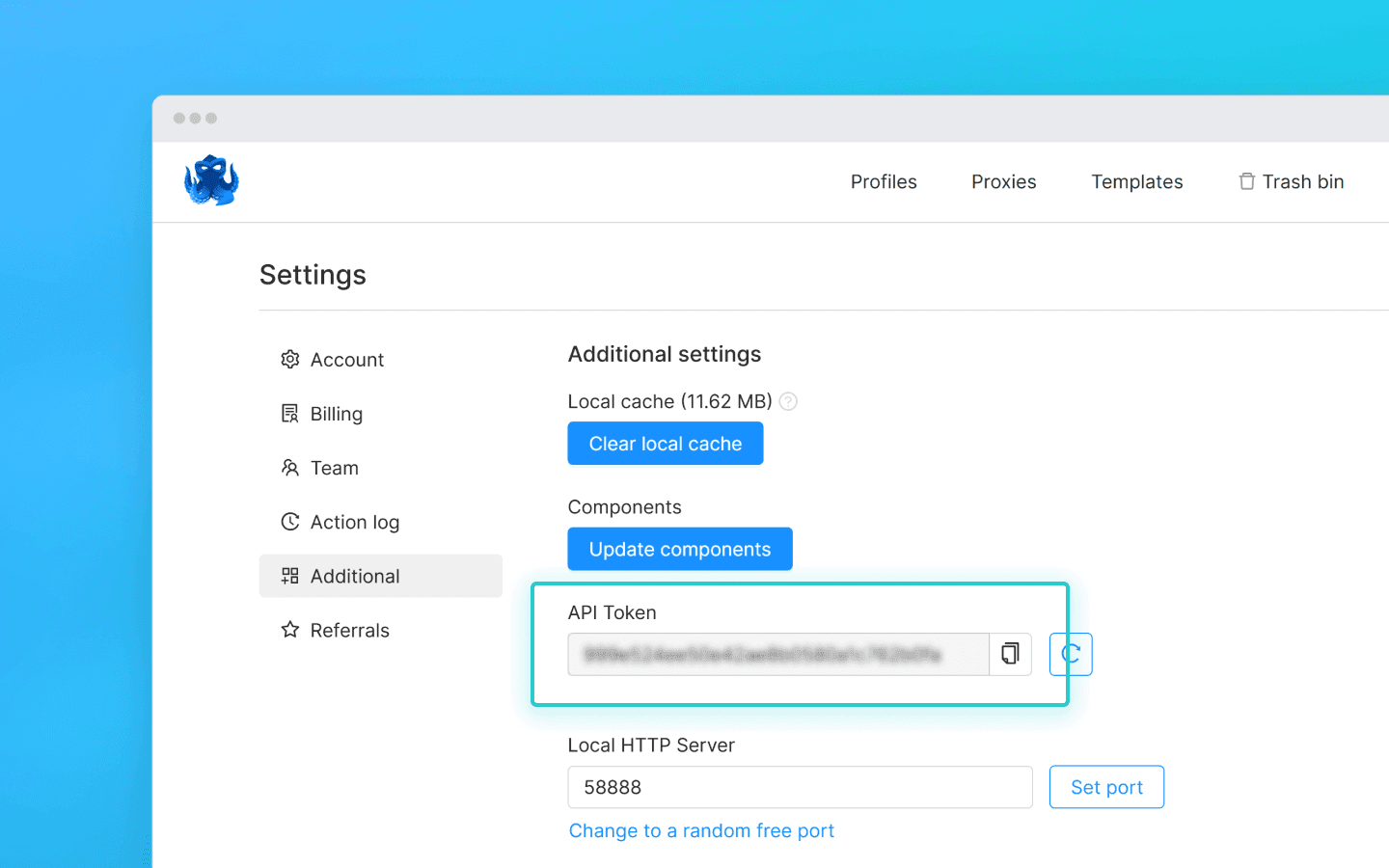
To interact with Octo Browser via API, you will need an API token. It is available to users with a Base subscription and higher. The API token is displayed in Octo Browser in the master account settings under the “Additional” tab (other team members cannot see the API token).
API limits (rate limits)
Keep in mind that the Octo Browser API has request limits. The provided snippets use the check_limits function, which checks API rate-limit headers and automatically pauses if the number of remaining requests is low. This helps avoid 429 Too Many Requests errors.
When making requests to the Public API, 1 RPM and 1 RPH are consumed per request. When using the Local API, RPM/RPH are not consumed, except for POST Start Profile (1 RPM and 1 RPH) and POST One-time profile (4 RPM and 4 RPH).
The exact number of profiles you can launch, create, and delete under a specific subscription fully depends on your scripts and their logic. You can independently calculate the required number of requests for your workflow based on which requests affect RPH and RPM limits.
Some API requests may require more complex processing, meaning their execution may cost more than a single request. This is necessary to balance server load and ensure optimal performance for all users.
RPM means requests per minute.
RPH means requests per hour.
Request limit values depend on your subscription.
With the setup complete, let’s move on to useful snippets.
Retrieving profile names and saving them to a .txt file
This snippet is useful when you need to quickly collect a list of all created profiles in one place. It helps simplify profile tracking, verifying their actual existence, and further actions with them.
Create a file get_titles.js in the octo_api folder and paste the snippet code into it.
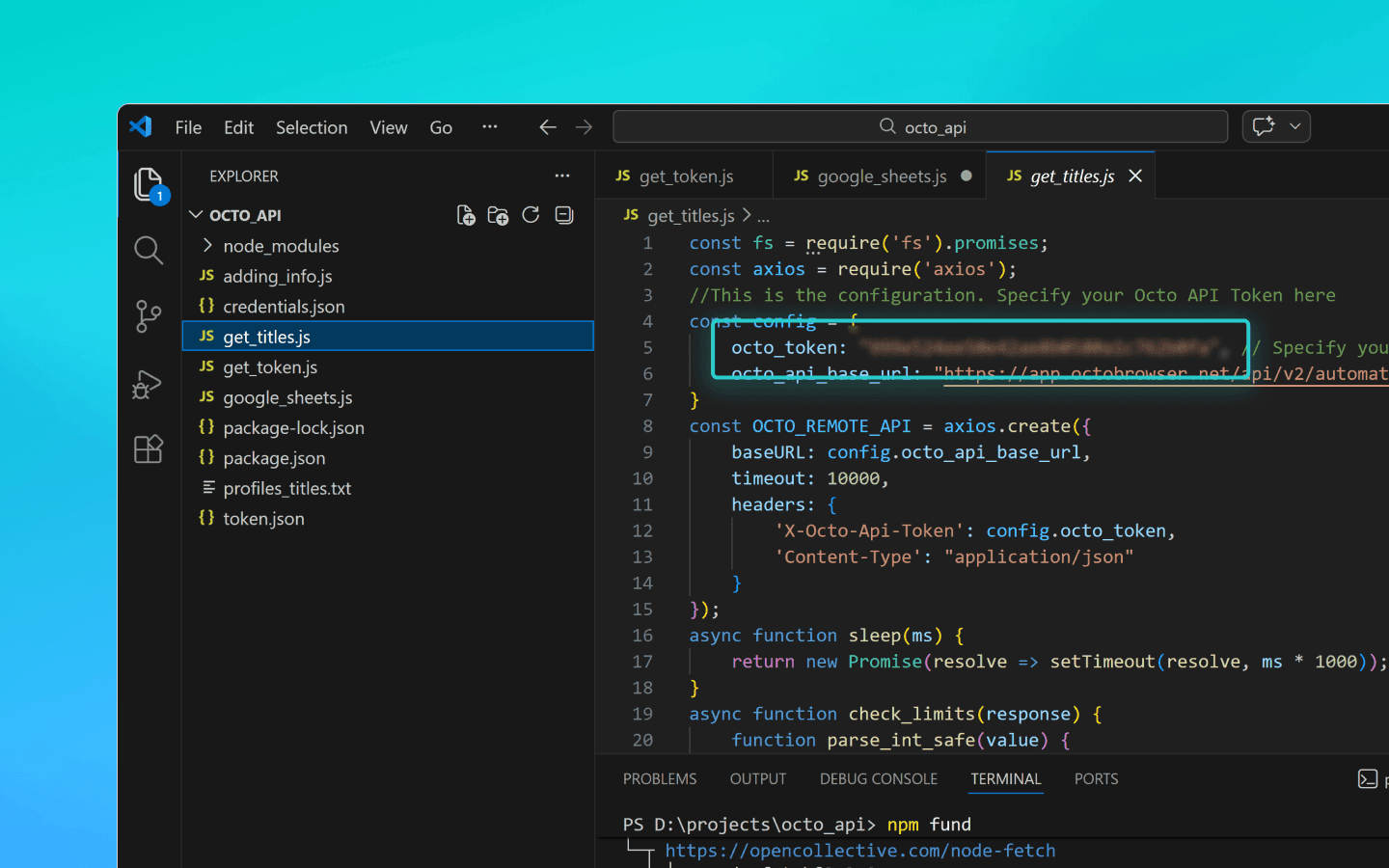
Replace OCTO_API_TOKEN in the octo_token field with your API token from Octo Browser.
Save the file.
Enter the command node get_titles.js in the terminal and run the script.
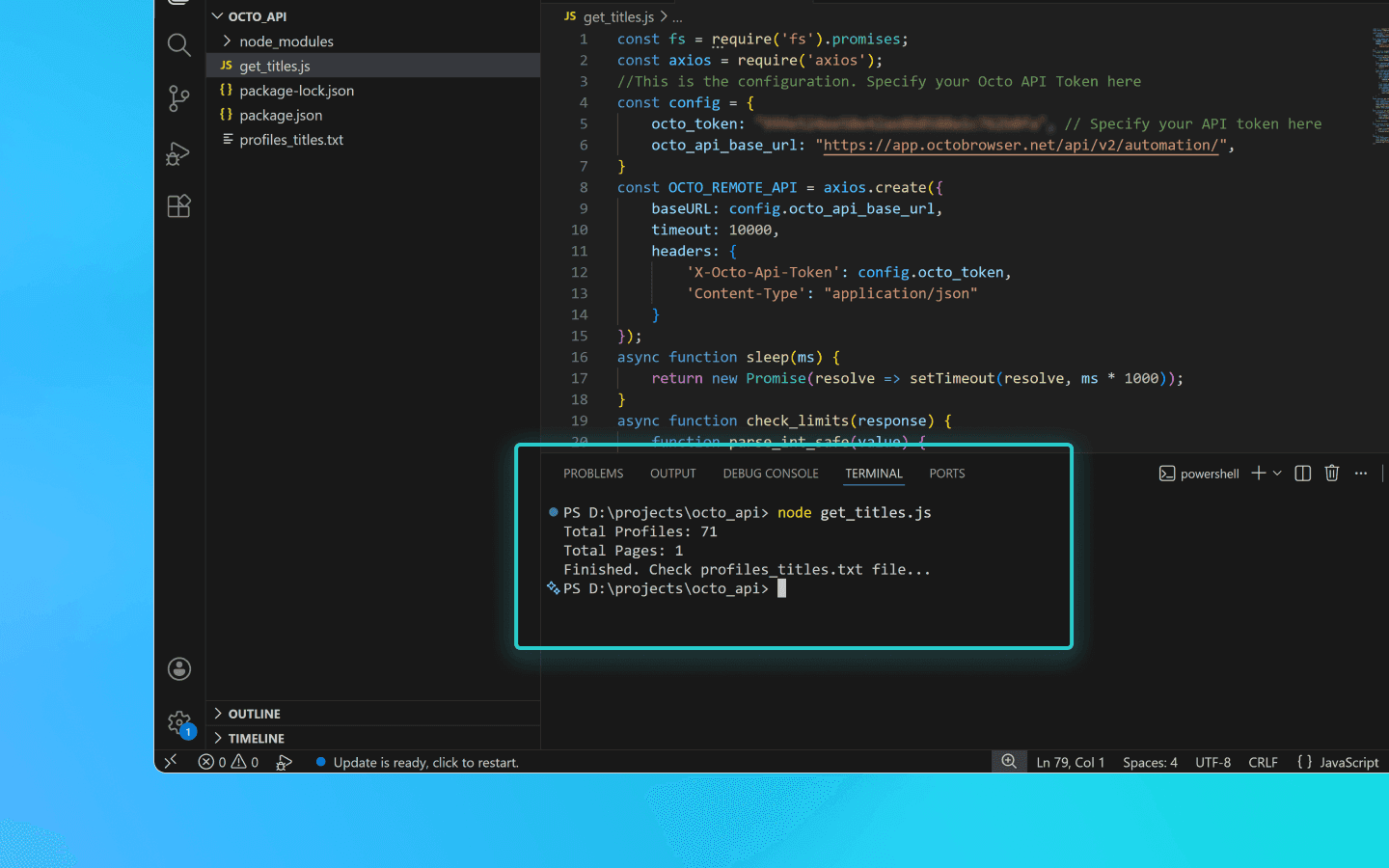
Profile names will be saved line by line in the profiles_titles.txt file in the same folder as the script.
Snippet for saving profile names to a .txt file
const fs = require('fs').promises;
const axios = require('axios');
//This is the configuration. Specify your Octo API Token here
const config = {
    octo_token: "OCTO_API_TOKEN", // Specify your API token here
    octo_api_base_url: "https://app.octobrowser.net/api/v2/automation/",
}
const OCTO_REMOTE_API = axios.create({
    baseURL: config.octo_api_base_url,
    timeout: 10000,
    headers: {
        'X-Octo-Api-Token': config.octo_token,
        'Content-Type': "application/json"
    }
});
async function sleep(ms) {
    return new Promise(resolve => setTimeout(resolve, ms * 1000));
}
async function check_limits(response) {
    function parse_int_safe(value) {
        const parsed = parseInt(value, 10);
        return isNaN(parsed) ? 0 : parsed;
    }
    const ratelimit_header = response.headers.ratelimit;
    if (!ratelimit_header) {
        console.warn('No ratelimit header found!');
        return;
    }
    const limit_entries = ratelimit_header.split(',').map(entry => entry.trim());
    for (const entry of limit_entries) {
        const name_match = entry.match(/^([^;]+)/);
        const r_match = entry.match(/;r=(\d+)/);
        const t_match = entry.match(/;t=(\d+)/);
        if (!r_match || !t_match) {
            console.warn(`Invalid ratelimit format: ${entry}`);
            continue;
        }
        const limit_name = name_match ? name_match[1] : 'unknown_limit';
        const remaining_quantity = parse_int_safe(r_match[1]);
        const window_seconds = parse_int_safe(t_match[1]);
        if (remaining_quantity < 5) {
            const wait_time = window_seconds + 1;
            console.log(`Waiting ${wait_time} seconds due to ${limit_name} limit`);
            await sleep(wait_time);
        }
    }
}
async function get_total_pages() {
    const response = await OCTO_REMOTE_API.get('/profiles?page=0&page_len=10');
    const total_profiles = response.data.total_count;
    const total_pages = Math.ceil(response.data.total_count / 100);
    console.log(`Total Profiles: ${total_profiles}\nTotal Pages: ${total_pages}`);
    await check_limits(response);
    return total_pages;
}
async function get_all_profiles_titles(total_pages) {
    let profiles = [];
    for (let i = 0; i < total_pages; i++) {
        let response = await OCTO_REMOTE_API.get(`/profiles?page=${i}&page_len=100&fields=title`);
        await check_limits(response);
        profiles.push(...response.data.data);
    }
    return profiles;
}
async function write_file(profiles) {
    const titles = profiles.map(item => item.title).filter(Boolean);
    try {
        await fs.writeFile('./profiles_titles.txt', titles.join('\n'), 'utf-8');
    } catch (error) {
        console.error(`ERROR: While trying writing the file some error occured:\n${error}`);
    }
}
(async () => {
    const total_pages = await get_total_pages();
    const profiles = await get_all_profiles_titles(total_pages);
    await write_file(profiles);
    console.log('Finished. Check profiles_titles.txt file...');
})()
const fs = require('fs').promises;
const axios = require('axios');
//This is the configuration. Specify your Octo API Token here
const config = {
    octo_token: "OCTO_API_TOKEN", // Specify your API token here
    octo_api_base_url: "https://app.octobrowser.net/api/v2/automation/",
}
const OCTO_REMOTE_API = axios.create({
    baseURL: config.octo_api_base_url,
    timeout: 10000,
    headers: {
        'X-Octo-Api-Token': config.octo_token,
        'Content-Type': "application/json"
    }
});
async function sleep(ms) {
    return new Promise(resolve => setTimeout(resolve, ms * 1000));
}
async function check_limits(response) {
    function parse_int_safe(value) {
        const parsed = parseInt(value, 10);
        return isNaN(parsed) ? 0 : parsed;
    }
    const ratelimit_header = response.headers.ratelimit;
    if (!ratelimit_header) {
        console.warn('No ratelimit header found!');
        return;
    }
    const limit_entries = ratelimit_header.split(',').map(entry => entry.trim());
    for (const entry of limit_entries) {
        const name_match = entry.match(/^([^;]+)/);
        const r_match = entry.match(/;r=(\d+)/);
        const t_match = entry.match(/;t=(\d+)/);
        if (!r_match || !t_match) {
            console.warn(`Invalid ratelimit format: ${entry}`);
            continue;
        }
        const limit_name = name_match ? name_match[1] : 'unknown_limit';
        const remaining_quantity = parse_int_safe(r_match[1]);
        const window_seconds = parse_int_safe(t_match[1]);
        if (remaining_quantity < 5) {
            const wait_time = window_seconds + 1;
            console.log(`Waiting ${wait_time} seconds due to ${limit_name} limit`);
            await sleep(wait_time);
        }
    }
}
async function get_total_pages() {
    const response = await OCTO_REMOTE_API.get('/profiles?page=0&page_len=10');
    const total_profiles = response.data.total_count;
    const total_pages = Math.ceil(response.data.total_count / 100);
    console.log(`Total Profiles: ${total_profiles}\nTotal Pages: ${total_pages}`);
    await check_limits(response);
    return total_pages;
}
async function get_all_profiles_titles(total_pages) {
    let profiles = [];
    for (let i = 0; i < total_pages; i++) {
        let response = await OCTO_REMOTE_API.get(`/profiles?page=${i}&page_len=100&fields=title`);
        await check_limits(response);
        profiles.push(...response.data.data);
    }
    return profiles;
}
async function write_file(profiles) {
    const titles = profiles.map(item => item.title).filter(Boolean);
    try {
        await fs.writeFile('./profiles_titles.txt', titles.join('\n'), 'utf-8');
    } catch (error) {
        console.error(`ERROR: While trying writing the file some error occured:\n${error}`);
    }
}
(async () => {
    const total_pages = await get_total_pages();
    const profiles = await get_all_profiles_titles(total_pages);
    await write_file(profiles);
    console.log('Finished. Check profiles_titles.txt file...');
})()
Adding extensions, start pages, and bookmarks to profiles
This automation script lets you quickly standardize profile configurations and avoid manually adding the same parameters.
To add extensions, you will need their UUIDs:
Open a profile with the extension installed.
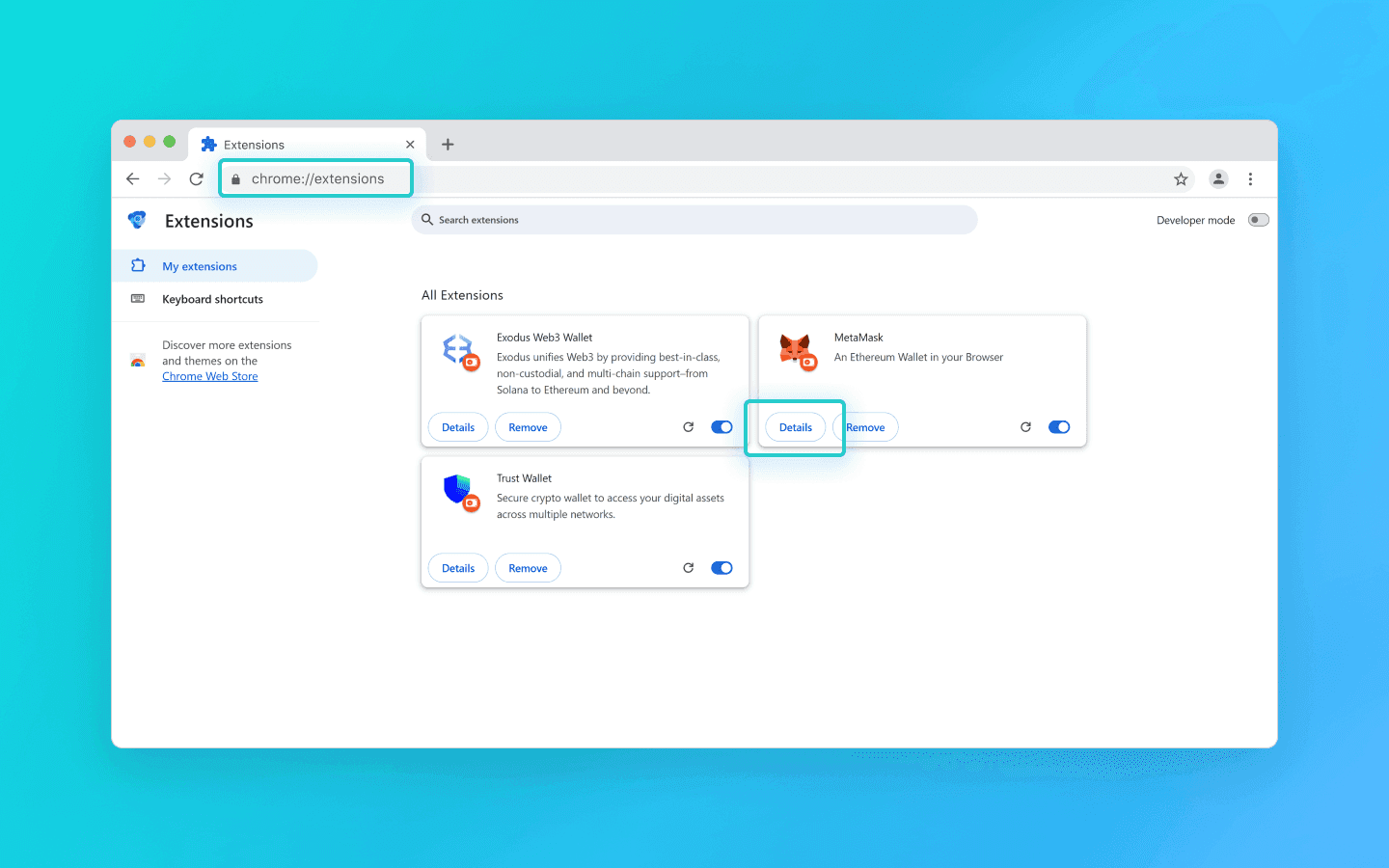
In the profile address bar, enter chrome://extensions/ and press Enter.
On the required extension, click the “Details” button.
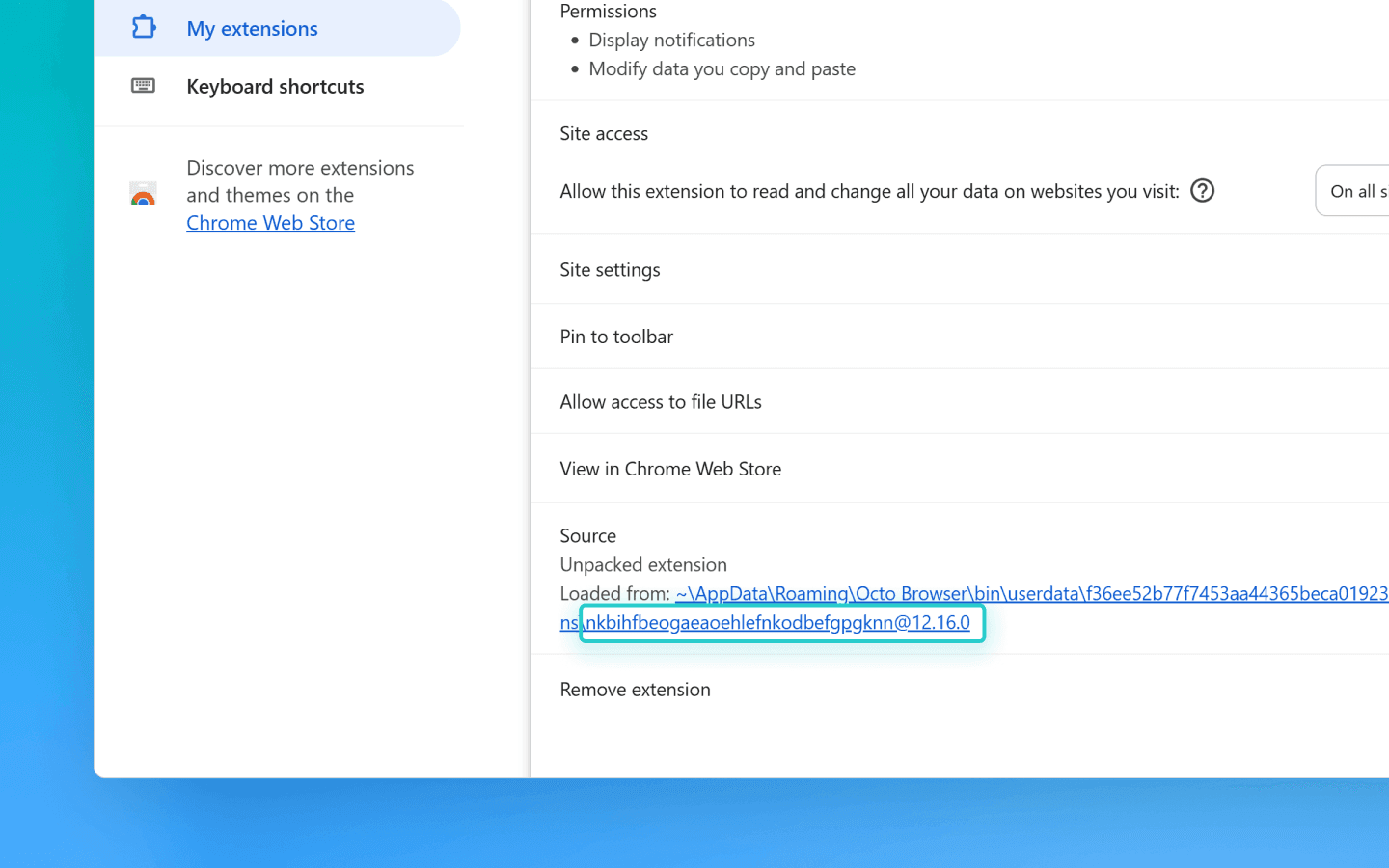
At the bottom of the page, copy the extension UUID along with its version.
You can find methods for retrieving UUIDs via API in the documentation.
Next, you need to edit the code:
Create a file named adding_info.js in the octo_api folder.
Paste the snippet into it.
Insert your API token into the octo_token field.
Add the UUIDs of the required extensions to the extensions field.
Add name (bookmark title) and URL (website address) to the bookmarks field.
Add the URLs of the websites you want to open automatically on profile launch to the start_pages field.
If you only need to add extensions, bookmarks, or start pages, you can remove the unnecessary parameters from the snippet:
data: { extensions: ["nkbihfbeogaeaoehlefnkodbefgpgknn@12.17.2"], //remove if you don’t need to add extensions bookmarks: [ { name: "google", url: "https://google.com" }, { name: "facebook", url: "https://facebook.com" } ],//remove if you don’t need bookmarks start_pages: ["https://google.com", "https://facebook.com"] //remove if you don’t need start pages }data: { extensions: ["nkbihfbeogaeaoehlefnkodbefgpgknn@12.17.2"], //remove if you don’t need to add extensions bookmarks: [ { name: "google", url: "https://google.com" }, { name: "facebook", url: "https://facebook.com" } ],//remove if you don’t need bookmarks start_pages: ["https://google.com", "https://facebook.com"] //remove if you don’t need start pages }
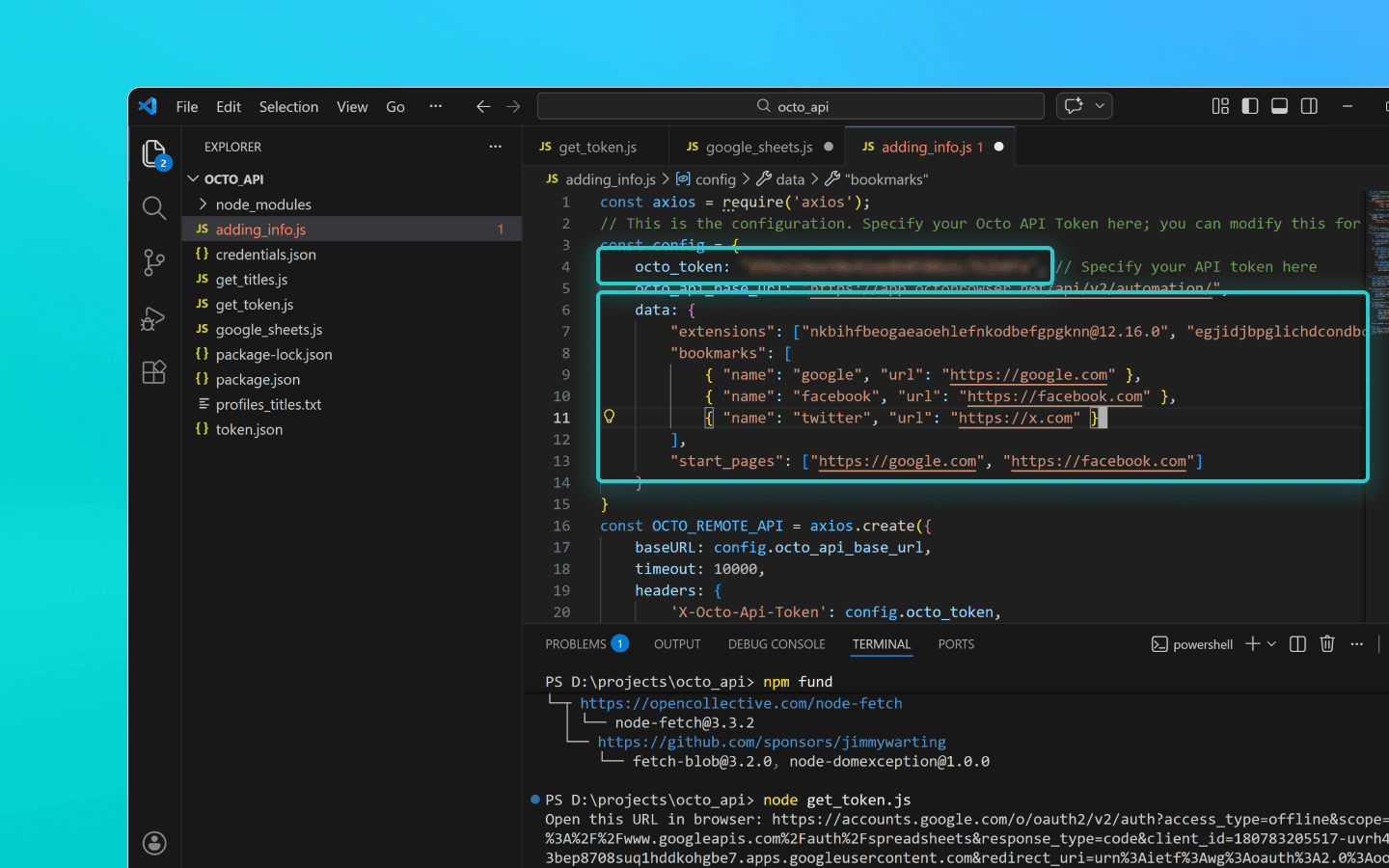
Save the adding_info.js file.
Run it using the command node adding_info.js.
The required extensions, bookmarks, and start pages will be added to all your profiles. If you need to apply changes to specific profiles only, refer to the example in the documentation.
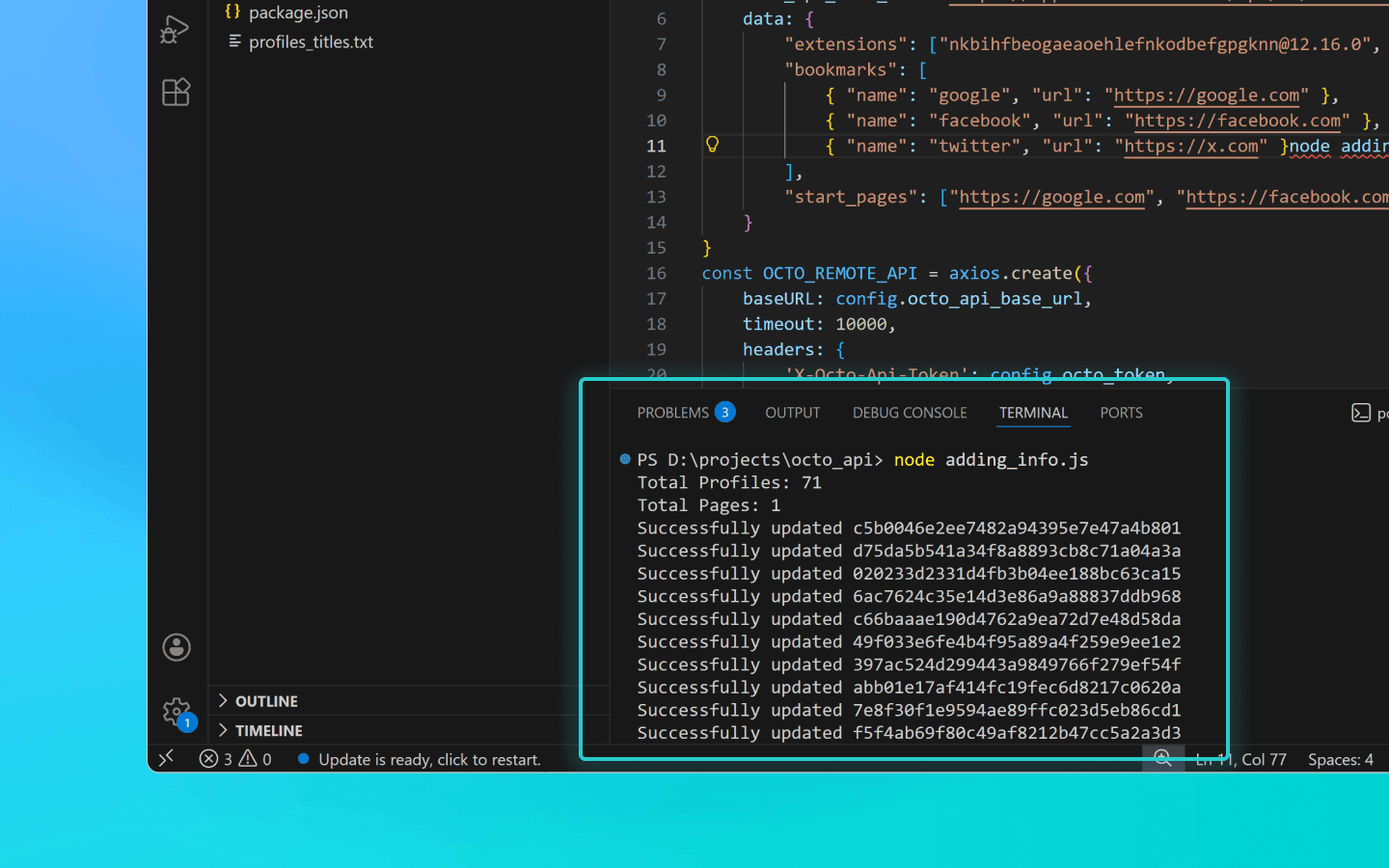
Before running the script, make sure the profiles you want to update are not running. Running profiles will not be updated.
Snippet for adding extensions, start pages, and bookmarks to profiles
const axios = require('axios'); // This is the configuration. Specify your Octo API Token here; you can modify this for your personal needs const config = { octo_token: "OCTO_API_TOKEN", // Specify your API token here octo_api_base_url: "https://app.octobrowser.net/api/v2/automation/", data: { "extensions": ["aapfglkgnhmiaabhiijkjpfmhllaodgp@4.2.3"], "bookmarks": [ { "name": "google", "url": "https://google.com" }, { "name": "facebook", "url": "https://facebook.com" } ], "start_pages": ["https://google.com", "https://facebook.com"] } } const OCTO_REMOTE_API = axios.create({ baseURL: config.octo_api_base_url, timeout: 10000, headers: { 'X-Octo-Api-Token': config.octo_token, 'Content-Type': "application/json" } }); //functions async function sleep(ms) { return new Promise(resolve => setTimeout(resolve, ms * 1000)); } async function check_limits(response) { function parse_int_safe(value) { const parsed = parseInt(value, 10); return isNaN(parsed) ? 0 : parsed; } const ratelimit_header = response.headers.ratelimit; if (!ratelimit_header) { console.warn('No ratelimit header found!'); return; } const limit_entries = ratelimit_header.split(',').map(entry => entry.trim()); for (const entry of limit_entries) { const name_match = entry.match(/^([^;]+)/); const r_match = entry.match(/;r=(\d+)/); const t_match = entry.match(/;t=(\d+)/); if (!r_match || !t_match) { console.warn(`Invalid ratelimit format: ${entry}`); continue; } const limit_name = name_match ? name_match[1] : 'unknown_limit'; const remaining_quantity = parse_int_safe(r_match[1]); const window_seconds = parse_int_safe(t_match[1]); if (remaining_quantity < 5) { const wait_time = window_seconds + 1; console.log(`Waiting ${wait_time} seconds due to ${limit_name} limit`); await sleep(wait_time); } } } async function get_total_profiles() { const response = await OCTO_REMOTE_API.get('/profiles?page=0&page_len=10'); const total_profiles = response.data.total_count; const total_pages = Math.ceil(response.data.total_count / 100); console.log(`Total Profiles: ${total_profiles}\nTotal Pages: ${total_pages}`); await check_limits(response); return total_pages; } async function get_all_profiles_uuids(total_pages) { let profiles = []; for (let i = 0; i < total_pages; i++) { let response = await OCTO_REMOTE_API.get(`/profiles?page=${i}&page_len=100`); await check_limits(response); profiles.push(...response.data.data); } return profiles; } async function patch_all_profiles(profiles) { let updated = []; let not_updated = []; for (let profile of profiles) { try { const response = await OCTO_REMOTE_API.patch(`/profiles/${profile.uuid}`, config.data); await check_limits(response); updated.push(profile); console.log(`Successfully updated ${profile.uuid}`); } catch (error) { not_updated.push(profile); console.error(`ERROR: Can't patch profile ${profile.uuid}`); } } return [updated, not_updated]; } (async () => { const total = await get_total_profiles(); const profiles = await get_all_profiles_uuids(total); const [updated, not_updated] = await patch_all_profiles(profiles); console.log(`Finished process:\nUpdated: ${updated.length}\nNot updated: ${not_updated.length}`); })();
const axios = require('axios'); // This is the configuration. Specify your Octo API Token here; you can modify this for your personal needs const config = { octo_token: "OCTO_API_TOKEN", // Specify your API token here octo_api_base_url: "https://app.octobrowser.net/api/v2/automation/", data: { "extensions": ["aapfglkgnhmiaabhiijkjpfmhllaodgp@4.2.3"], "bookmarks": [ { "name": "google", "url": "https://google.com" }, { "name": "facebook", "url": "https://facebook.com" } ], "start_pages": ["https://google.com", "https://facebook.com"] } } const OCTO_REMOTE_API = axios.create({ baseURL: config.octo_api_base_url, timeout: 10000, headers: { 'X-Octo-Api-Token': config.octo_token, 'Content-Type': "application/json" } }); //functions async function sleep(ms) { return new Promise(resolve => setTimeout(resolve, ms * 1000)); } async function check_limits(response) { function parse_int_safe(value) { const parsed = parseInt(value, 10); return isNaN(parsed) ? 0 : parsed; } const ratelimit_header = response.headers.ratelimit; if (!ratelimit_header) { console.warn('No ratelimit header found!'); return; } const limit_entries = ratelimit_header.split(',').map(entry => entry.trim()); for (const entry of limit_entries) { const name_match = entry.match(/^([^;]+)/); const r_match = entry.match(/;r=(\d+)/); const t_match = entry.match(/;t=(\d+)/); if (!r_match || !t_match) { console.warn(`Invalid ratelimit format: ${entry}`); continue; } const limit_name = name_match ? name_match[1] : 'unknown_limit'; const remaining_quantity = parse_int_safe(r_match[1]); const window_seconds = parse_int_safe(t_match[1]); if (remaining_quantity < 5) { const wait_time = window_seconds + 1; console.log(`Waiting ${wait_time} seconds due to ${limit_name} limit`); await sleep(wait_time); } } } async function get_total_profiles() { const response = await OCTO_REMOTE_API.get('/profiles?page=0&page_len=10'); const total_profiles = response.data.total_count; const total_pages = Math.ceil(response.data.total_count / 100); console.log(`Total Profiles: ${total_profiles}\nTotal Pages: ${total_pages}`); await check_limits(response); return total_pages; } async function get_all_profiles_uuids(total_pages) { let profiles = []; for (let i = 0; i < total_pages; i++) { let response = await OCTO_REMOTE_API.get(`/profiles?page=${i}&page_len=100`); await check_limits(response); profiles.push(...response.data.data); } return profiles; } async function patch_all_profiles(profiles) { let updated = []; let not_updated = []; for (let profile of profiles) { try { const response = await OCTO_REMOTE_API.patch(`/profiles/${profile.uuid}`, config.data); await check_limits(response); updated.push(profile); console.log(`Successfully updated ${profile.uuid}`); } catch (error) { not_updated.push(profile); console.error(`ERROR: Can't patch profile ${profile.uuid}`); } } return [updated, not_updated]; } (async () => { const total = await get_total_profiles(); const profiles = await get_all_profiles_uuids(total); const [updated, not_updated] = await patch_all_profiles(profiles); console.log(`Finished process:\nUpdated: ${updated.length}\nNot updated: ${not_updated.length}`); })();
Exporting profile data to Google Sheets
You can export your profile data into a spreadsheet. This makes it easier to structure information, as well as sort and analyze it. You can export the following profile parameters:
UUID,
tags,
name,
description.
Create a file named google_sheets.js in the octo_api folder.
Add the snippet code to the file.
Fill in the octo_token field. The API token can be found in Octo Browser.
Fill in the table_id field. This is the ID of your Google Sheets document.
Fill in the table_sheet_name field. This is the name of the sheet within the Google Sheets document where you want to export the data.
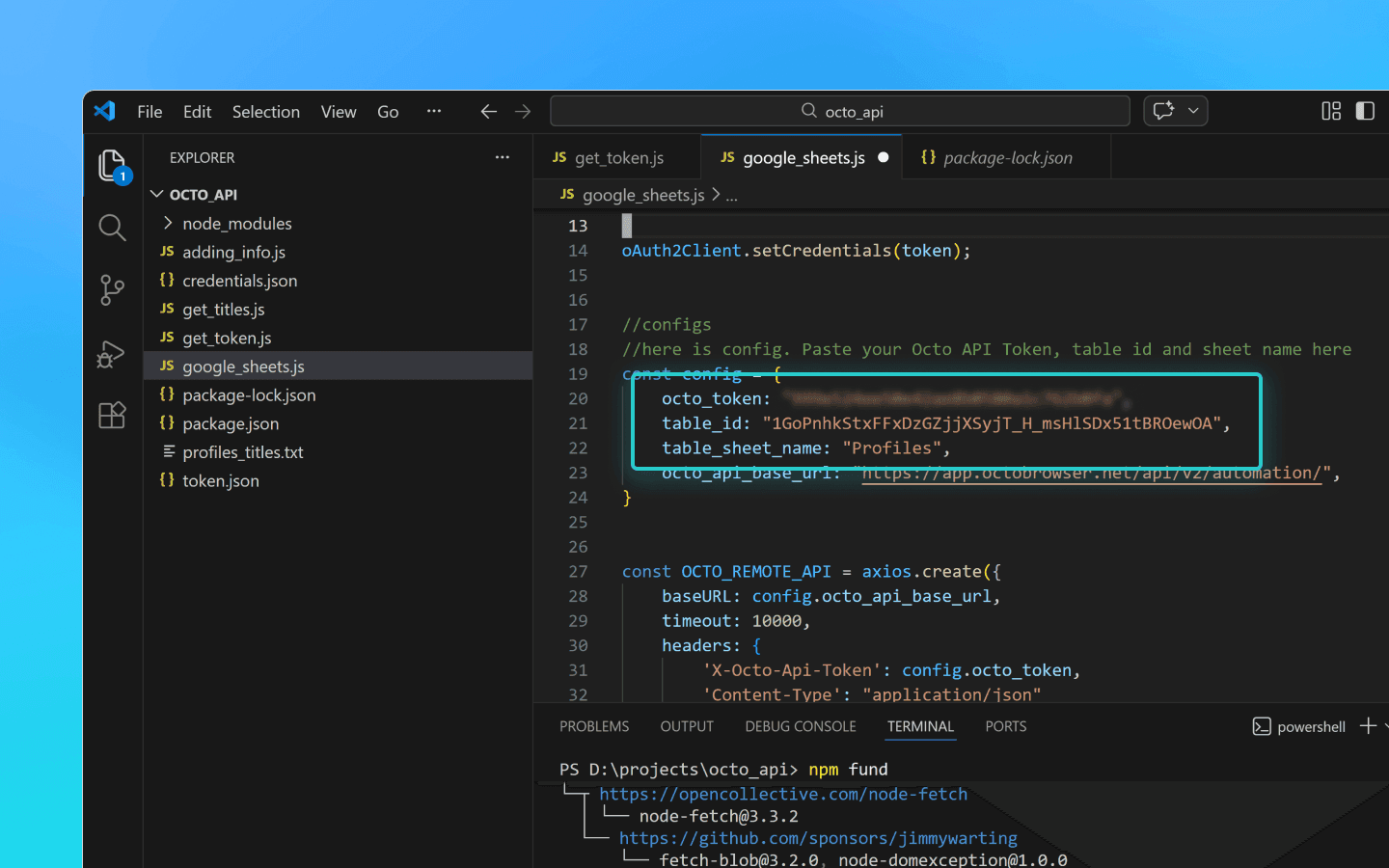
Save the changes.
Add the credentials.json and token.json files to the octo_api folder.
Run the script in the VS Code terminal using the command node google_sheets.js.
Once the script finishes, the data will be uploaded to the specified spreadsheet.
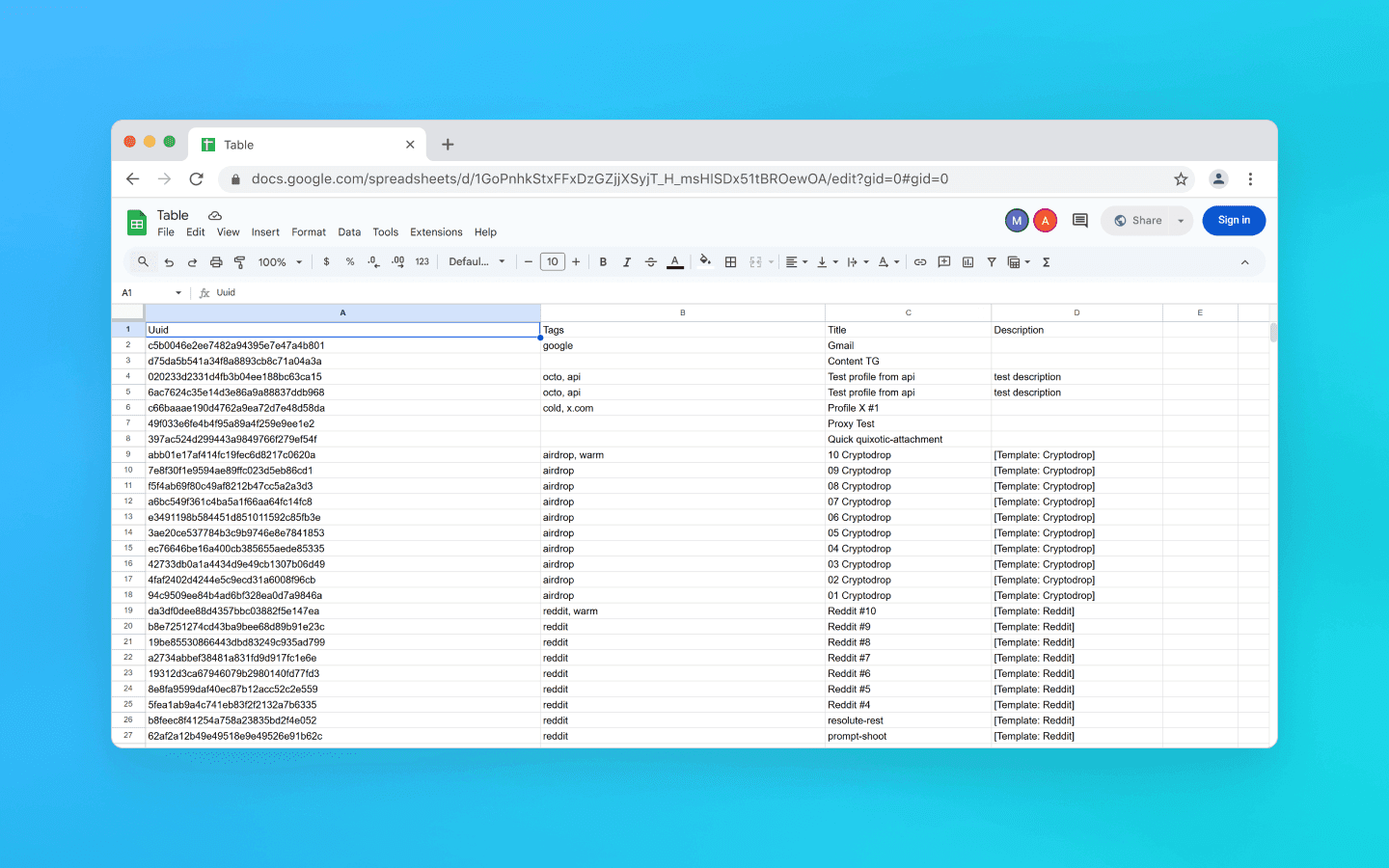
Snippet for exporting profile data to Google Sheets
const axios = require('axios'); const { google } = require('googleapis'); const token = require('./token.json'); const credentials = require('./credentials.json'); const oAuth2Client = new google.auth.OAuth2( credentials.installed.client_id, credentials.installed.client_secret, credentials.installed.redirect_uris[0] ); oAuth2Client.setCredentials(token); //configuration //Paste your Octo API token, spreadsheet ID and sheet name here const config = { octo_token: "OCTO_API_TOKEN", table_id: "1pqnVysHymZSI5Lzx6odasdasAqE022fqUEf6q5LnOqAhylLSM", table_sheet_name: "Profiles", octo_api_base_url: "https://app.octobrowser.net/api/v2/automation/", } const OCTO_REMOTE_API = axios.create({ baseURL: config.octo_api_base_url, timeout: 10000, headers: { 'X-Octo-Api-Token': config.octo_token, 'Content-Type': "application/json" } }); //functions async function check_limits(response) { function parse_int_safe(value) { const parsed = parseInt(value, 10); return isNaN(parsed) ? 0 : parsed; } const ratelimit_header = response.headers.ratelimit; if (!ratelimit_header) { console.warn('No ratelimit header found!'); return; } const limit_entries = ratelimit_header.split(',').map(entry => entry.trim()); for (const entry of limit_entries) { const name_match = entry.match(/^([^;]+)/); const r_match = entry.match(/;r=(\d+)/); const t_match = entry.match(/;t=(\d+)/); if (!r_match || !t_match) { console.warn(`Invalid ratelimit format: ${entry}`); continue; } const limit_name = name_match ? name_match[1] : 'unknown_limit'; const remaining_quantity = parse_int_safe(r_match[1]); const window_seconds = parse_int_safe(t_match[1]); if (remaining_quantity < 5) { const wait_time = window_seconds + 1; console.log(`Waiting ${wait_time} seconds due to ${limit_name} limit`); await sleep(wait_time); } } } async function sleep(ms) { return new Promise(resolve => setTimeout(resolve, ms * 1000)); } async function get_total_pages() { const response = await OCTO_REMOTE_API.get('/profiles?page=0&page_len=10'); const total_profiles = response.data.total_count; const total_pages = Math.ceil(response.data.total_count / 100); console.log(`Total Profiles: ${total_profiles}\nTotal Pages: ${total_pages}`); await check_limits(response); return total_pages; } async function get_all_profiles_data(total_pages) { let profiles = []; for (let i = 0; i < total_pages; i++) { let response = await OCTO_REMOTE_API.get(`/profiles?page=${i}&page_len=100&fields=title,description,tags`); await check_limits(response); profiles.push(...response.data.data); } return profiles; } async function fill_sheet_with_data(oAuth2Client, spreadsheet_id, list_name, data) { const sheets = google.sheets({ version: 'v4', auth: oAuth2Client }); try { const sheetInfo = await sheets.spreadsheets.get({ spreadsheetId: spreadsheet_id, }); const sheetExists = sheetInfo.data.sheets.some( sheet => sheet.properties.title === list_name ); if (!sheetExists) { await sheets.spreadsheets.batchUpdate({ spreadsheetId: spreadsheet_id, resource: { requests: [{ addSheet: { properties: { title: list_name } } }] } }); console.log(`Создан новый лист "${list_name}".`); } const headers = ['Uuid', 'Tags', 'Title', 'Description']; const values = data.map(item => [ item.uuid, Array.isArray(item.tags) ? item.tags.join(', ') : item.tags, item.title, item.description || '' ]); await sheets.spreadsheets.values.update({ spreadsheetId: spreadsheet_id, range: `${list_name}!A1:D1`, valueInputOption: 'RAW', resource: { values: [headers] } }); await sheets.spreadsheets.values.update({ spreadsheetId: spreadsheet_id, range: `${list_name}!A2:D${values.length + 1}`, valueInputOption: 'RAW', resource: { values: values } }); console.log(`Данные успешно записаны в лист "${list_name}".`); } catch (err) { console.error('Ошибка при обновлении таблицы:', err); throw err; } } (async () => { const total_pages = await get_total_pages(); const profiles_data = await get_all_profiles_data(total_pages); await fill_sheet_with_data(oAuth2Client, config.table_id, config.table_sheet_name, profiles_data); })()
const axios = require('axios'); const { google } = require('googleapis'); const token = require('./token.json'); const credentials = require('./credentials.json'); const oAuth2Client = new google.auth.OAuth2( credentials.installed.client_id, credentials.installed.client_secret, credentials.installed.redirect_uris[0] ); oAuth2Client.setCredentials(token); //configuration //Paste your Octo API token, spreadsheet ID and sheet name here const config = { octo_token: "OCTO_API_TOKEN", table_id: "1pqnVysHymZSI5Lzx6odasdasAqE022fqUEf6q5LnOqAhylLSM", table_sheet_name: "Profiles", octo_api_base_url: "https://app.octobrowser.net/api/v2/automation/", } const OCTO_REMOTE_API = axios.create({ baseURL: config.octo_api_base_url, timeout: 10000, headers: { 'X-Octo-Api-Token': config.octo_token, 'Content-Type': "application/json" } }); //functions async function check_limits(response) { function parse_int_safe(value) { const parsed = parseInt(value, 10); return isNaN(parsed) ? 0 : parsed; } const ratelimit_header = response.headers.ratelimit; if (!ratelimit_header) { console.warn('No ratelimit header found!'); return; } const limit_entries = ratelimit_header.split(',').map(entry => entry.trim()); for (const entry of limit_entries) { const name_match = entry.match(/^([^;]+)/); const r_match = entry.match(/;r=(\d+)/); const t_match = entry.match(/;t=(\d+)/); if (!r_match || !t_match) { console.warn(`Invalid ratelimit format: ${entry}`); continue; } const limit_name = name_match ? name_match[1] : 'unknown_limit'; const remaining_quantity = parse_int_safe(r_match[1]); const window_seconds = parse_int_safe(t_match[1]); if (remaining_quantity < 5) { const wait_time = window_seconds + 1; console.log(`Waiting ${wait_time} seconds due to ${limit_name} limit`); await sleep(wait_time); } } } async function sleep(ms) { return new Promise(resolve => setTimeout(resolve, ms * 1000)); } async function get_total_pages() { const response = await OCTO_REMOTE_API.get('/profiles?page=0&page_len=10'); const total_profiles = response.data.total_count; const total_pages = Math.ceil(response.data.total_count / 100); console.log(`Total Profiles: ${total_profiles}\nTotal Pages: ${total_pages}`); await check_limits(response); return total_pages; } async function get_all_profiles_data(total_pages) { let profiles = []; for (let i = 0; i < total_pages; i++) { let response = await OCTO_REMOTE_API.get(`/profiles?page=${i}&page_len=100&fields=title,description,tags`); await check_limits(response); profiles.push(...response.data.data); } return profiles; } async function fill_sheet_with_data(oAuth2Client, spreadsheet_id, list_name, data) { const sheets = google.sheets({ version: 'v4', auth: oAuth2Client }); try { const sheetInfo = await sheets.spreadsheets.get({ spreadsheetId: spreadsheet_id, }); const sheetExists = sheetInfo.data.sheets.some( sheet => sheet.properties.title === list_name ); if (!sheetExists) { await sheets.spreadsheets.batchUpdate({ spreadsheetId: spreadsheet_id, resource: { requests: [{ addSheet: { properties: { title: list_name } } }] } }); console.log(`Создан новый лист "${list_name}".`); } const headers = ['Uuid', 'Tags', 'Title', 'Description']; const values = data.map(item => [ item.uuid, Array.isArray(item.tags) ? item.tags.join(', ') : item.tags, item.title, item.description || '' ]); await sheets.spreadsheets.values.update({ spreadsheetId: spreadsheet_id, range: `${list_name}!A1:D1`, valueInputOption: 'RAW', resource: { values: [headers] } }); await sheets.spreadsheets.values.update({ spreadsheetId: spreadsheet_id, range: `${list_name}!A2:D${values.length + 1}`, valueInputOption: 'RAW', resource: { values: values } }); console.log(`Данные успешно записаны в лист "${list_name}".`); } catch (err) { console.error('Ошибка при обновлении таблицы:', err); throw err; } } (async () => { const total_pages = await get_total_pages(); const profiles_data = await get_all_profiles_data(total_pages); await fill_sheet_with_data(oAuth2Client, config.table_id, config.table_sheet_name, profiles_data); })()
How to get table_id
Open or create a spreadsheet in Google Sheets.
Copy the table ID. This is the part of the URL between
/d/and/edit.
For example, if your link looks like https://docs.google.com/spreadsheets/d/1GoPnhkStxFFxDzGZjjXSyjT_H_msHlSDx51tBROewOA/edit, then table_id is 1GoPnhkStxFFxDzGZjjXSyjT_H_msHlSDx51tBROewOA.
How to get the credentials.json file
Sign into a personal (non-organization) Gmail account.
Select any European country from the list and click Agree and continue.
Click Select a project, then New project.
Enter any project name and click Create.
Go to https://console.cloud.google.com/auth and click Get Started.
Enter any App Name, your email, and click Next.
Select External, enter your email again, click Next, check the consent box, then click Continue and Finish.
In the Test Users section, click Add Users.
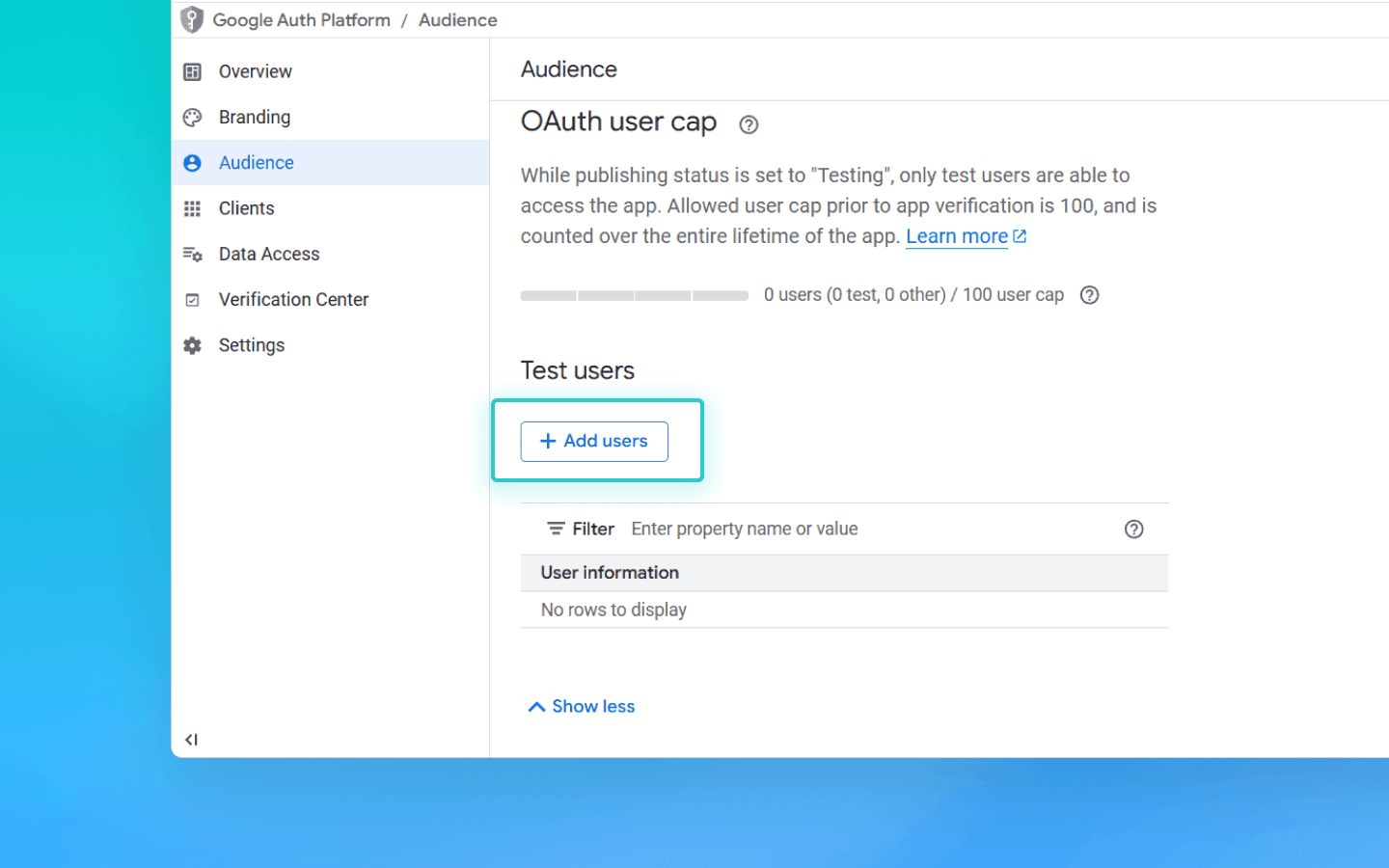
. Add your email and click Save.
. On the page https://console.cloud.google.com/auth/overview, click Create OAuth Client.
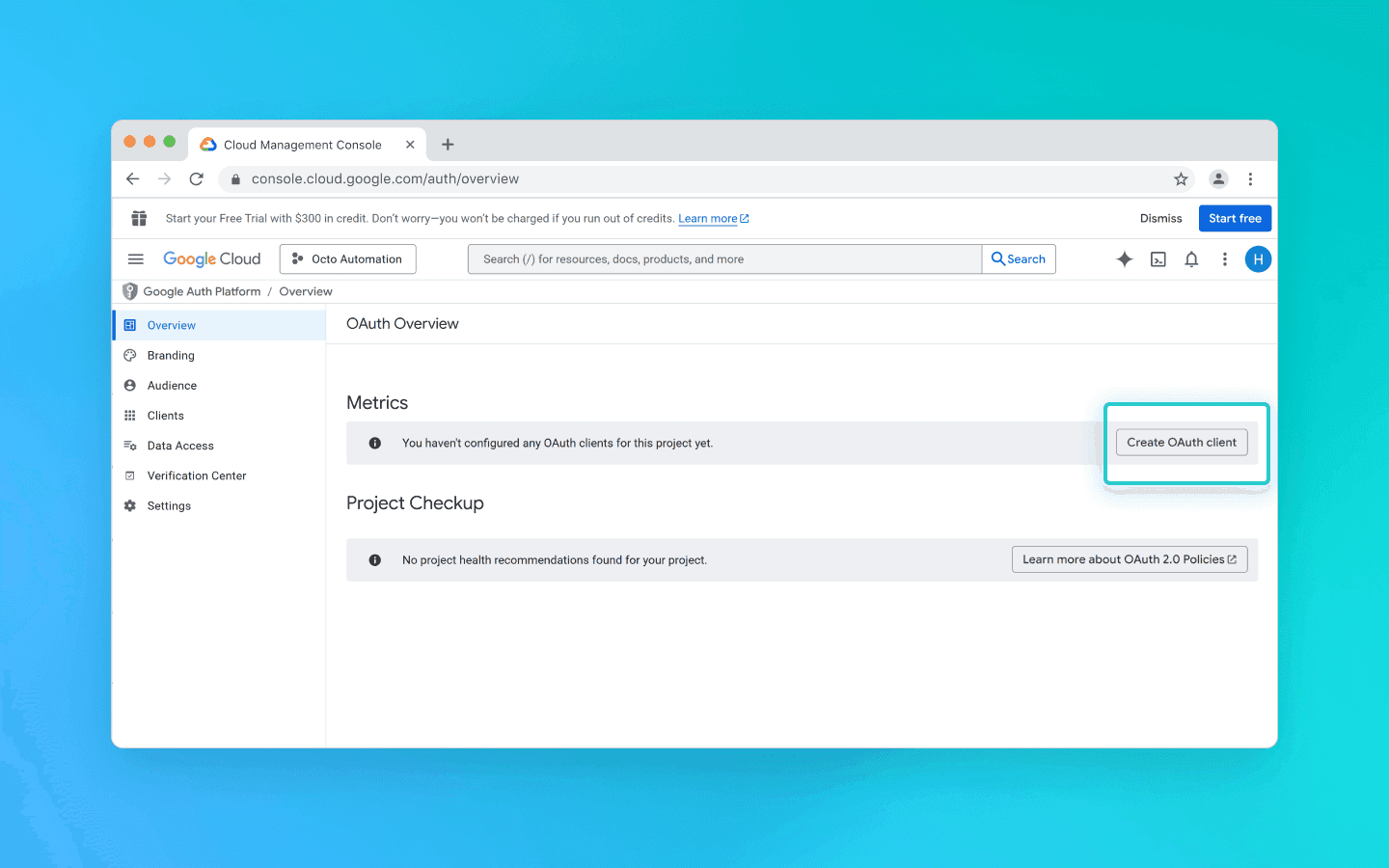
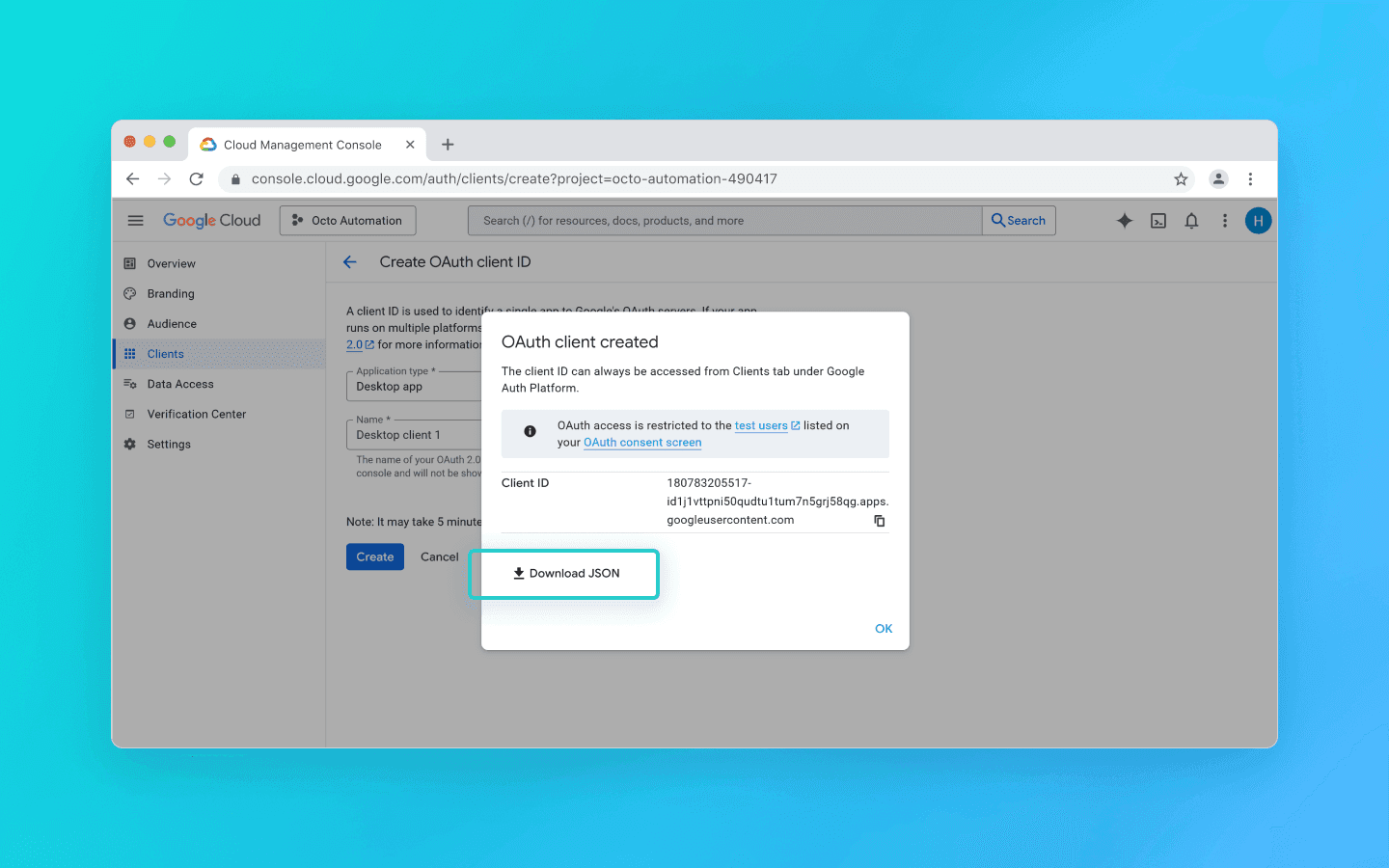
. Select Desktop app from the list, enter any name, and click Create.
. A pop-up window will appear. Download the JSON file from it.
. Search for Google Sheets API.
. Select it and click Enable.
. Open the previously downloaded JSON file.
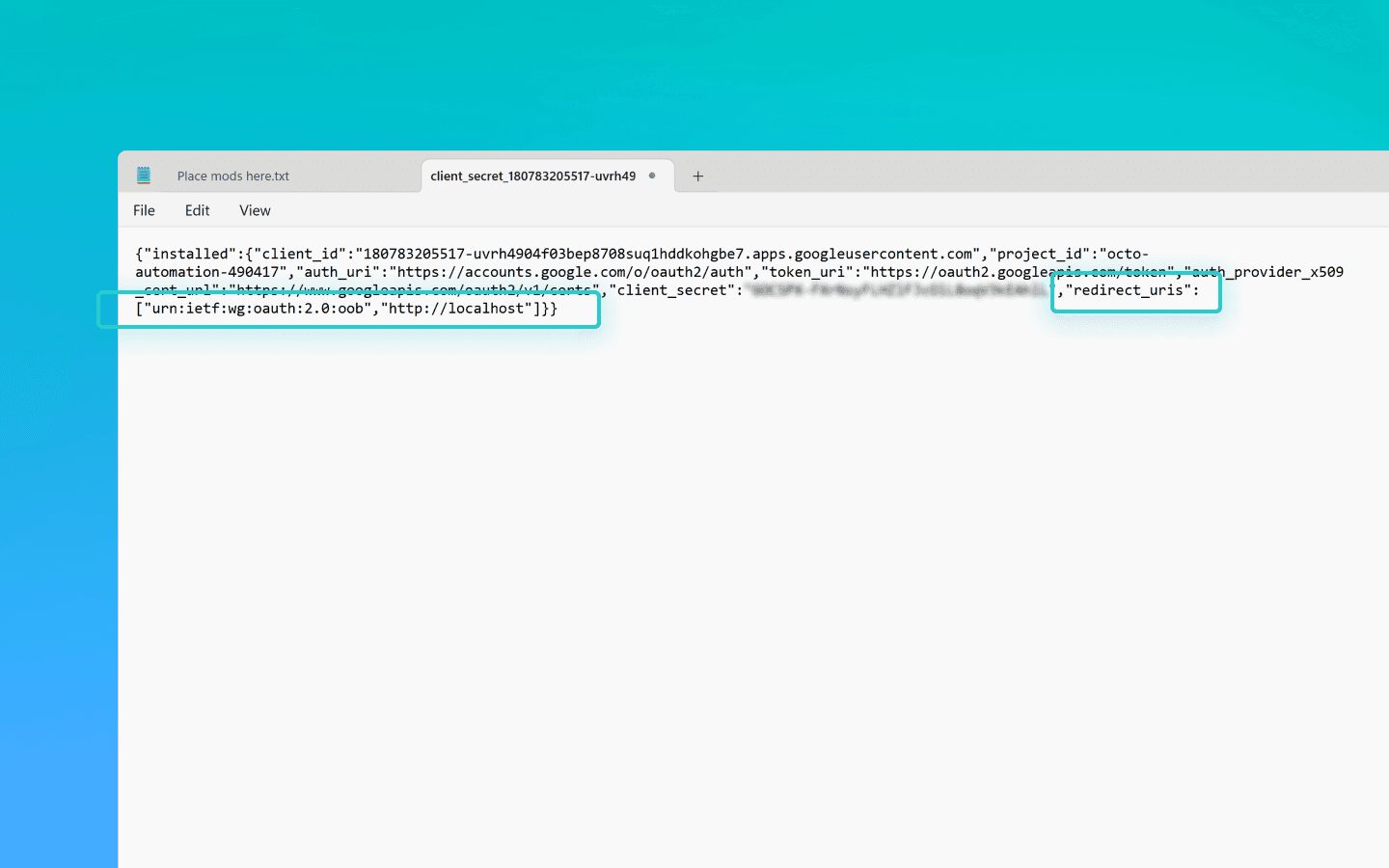
. Change the value of
redirect_urisfromhttp://localhostto"redirect_uris": ["urn:ietf:wg:oauth:2.0:oob","http://localhost"].
Make the change carefully so you don’t accidentally remove the brackets.
. Save the file.
. Rename it to credentials.json.
. Add it to the octo_api folder.
How to get the token.json file
Create a file named get_token.js in the octo_api folder and open it in VS Code.
Run the command Npm install googleapis in the VS Code terminal.
Paste the token generation script into get_token.js and save the file.
Run the script using node get_token.js.
You will see a link saying Open this URL in browser:
https://accounts.google.com/o/oauth2/…Open the link.
Sign into your Google account.
Click through the consent screens.
On the final page, Google will display an authorization code.
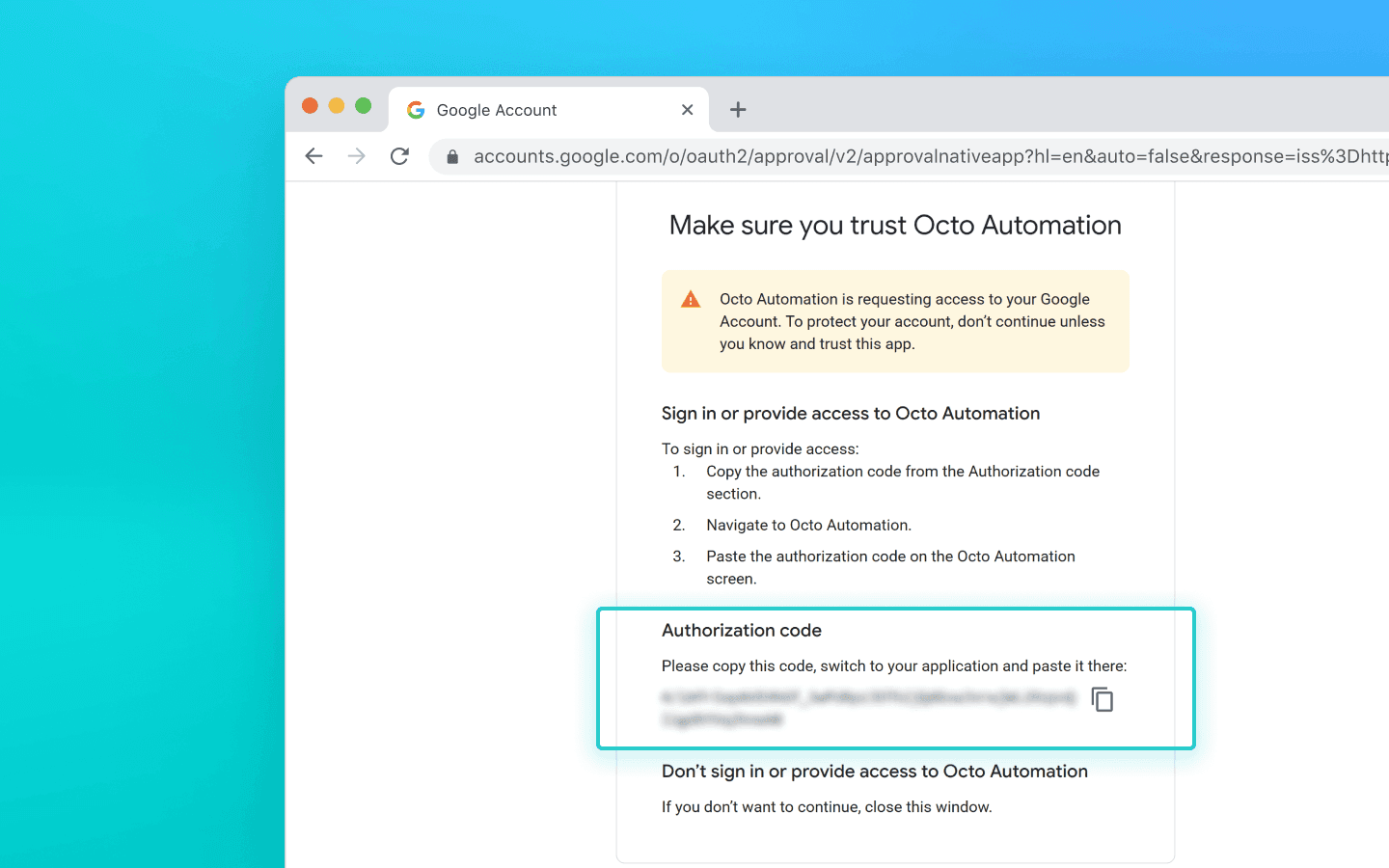
. Paste the code into the terminal and press Enter.
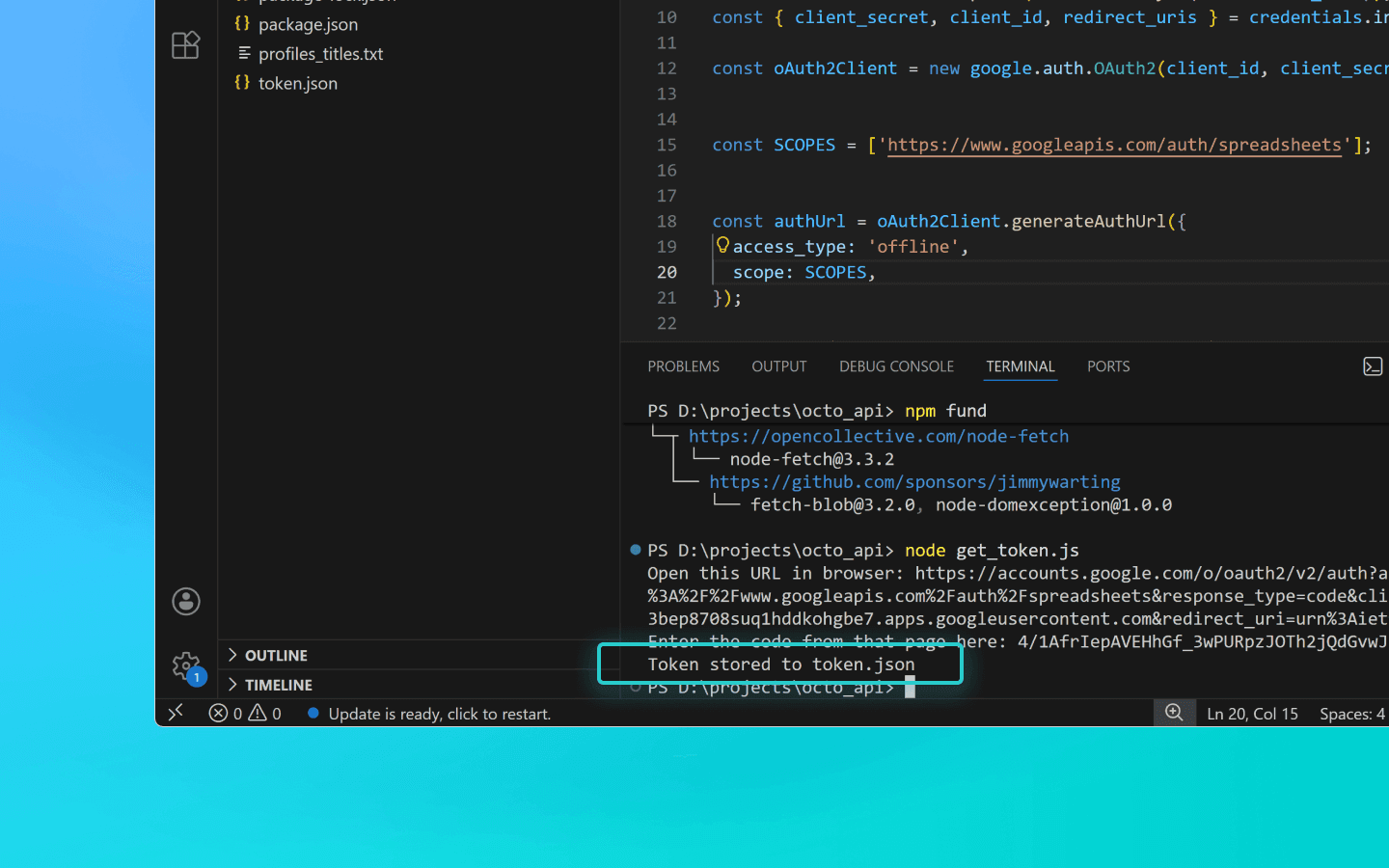
. The script will then create a token.json file in the folder where you ran it.
Token generation script
const fs = require('fs'); const readline = require('readline'); const { google } = require('googleapis'); const CREDENTIALS_PATH = 'credentials.json'; const TOKEN_PATH = 'token.json'; const credentials = JSON.parse(fs.readFileSync(CREDENTIALS_PATH)); const { client_secret, client_id, redirect_uris } = credentials.installed; const oAuth2Client = new google.auth.OAuth2(client_id, client_secret, redirect_uris[0]); const SCOPES = ['https://www.googleapis.com/auth/spreadsheets']; const authUrl = oAuth2Client.generateAuthUrl({ access_type: 'offline', scope: SCOPES, }); console.log('Open this URL in browser:', authUrl); const rl = readline.createInterface({ input: process.stdin, output: process.stdout, }); rl.question('Enter the code from that page here: ', (code) => { rl.close(); oAuth2Client.getToken(code, (err, token) => { if (err) return console.error('Error retrieving access token', err); fs.writeFileSync(TOKEN_PATH, JSON.stringify(token)); console.log('Token stored to', TOKEN_PATH); }); });
const fs = require('fs'); const readline = require('readline'); const { google } = require('googleapis'); const CREDENTIALS_PATH = 'credentials.json'; const TOKEN_PATH = 'token.json'; const credentials = JSON.parse(fs.readFileSync(CREDENTIALS_PATH)); const { client_secret, client_id, redirect_uris } = credentials.installed; const oAuth2Client = new google.auth.OAuth2(client_id, client_secret, redirect_uris[0]); const SCOPES = ['https://www.googleapis.com/auth/spreadsheets']; const authUrl = oAuth2Client.generateAuthUrl({ access_type: 'offline', scope: SCOPES, }); console.log('Open this URL in browser:', authUrl); const rl = readline.createInterface({ input: process.stdin, output: process.stdout, }); rl.question('Enter the code from that page here: ', (code) => { rl.close(); oAuth2Client.getToken(code, (err, token) => { if (err) return console.error('Error retrieving access token', err); fs.writeFileSync(TOKEN_PATH, JSON.stringify(token)); console.log('Token stored to', TOKEN_PATH); }); });
Conclusion
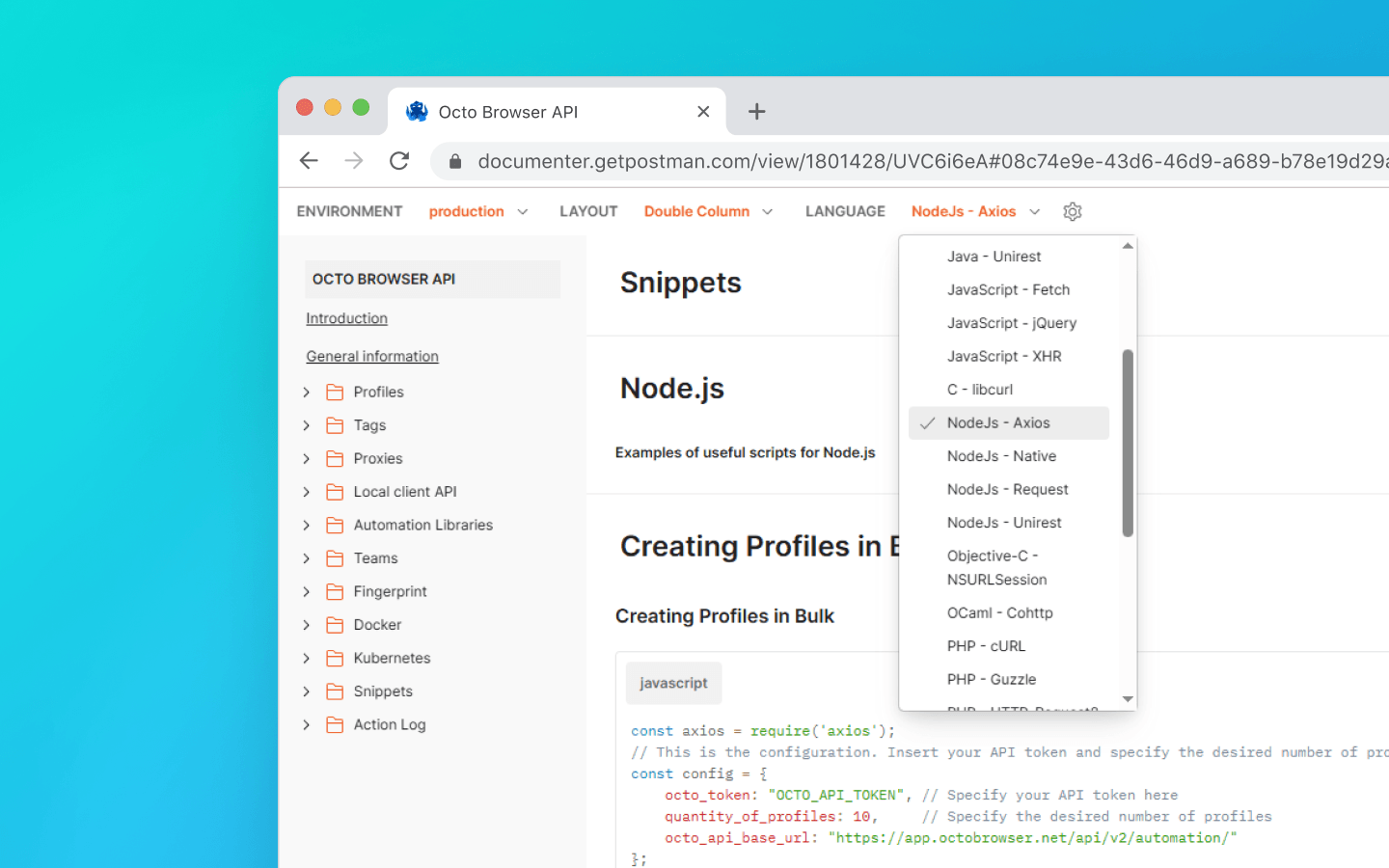
We used the Node.js programming language in the examples in this article. You can find useful snippets in other languages in our documentation.
In this article, we have covered:
how to prepare your environment;
how to get your Octo Browser API token;
how to retrieve an extension UUID;
how to get profile names using API and save them to a text file;
how to bulk add extensions, bookmarks, and start pages to existing profiles;
how to export profile data to Google Sheets.
If you still have questions or couldn’t find the example you need in the documentation, feel free to contact our Customer Service on Telegram or using our website chat or the in-browser widget.
Manage any number of accounts without bans, routine, and unnecessary expenses.
Would you like to try Octo Browser at discount?
Use the promo code OCTOBLOG to get 30% off any subscription. This offer is valid only for new users.
Preparation
Download and install VS Code.
Download and install Node.js.
Create a folder in a convenient location and name it, for example, octo_api.
Open this folder in VS Code.
Create a file with a .js extension. It is best to name it after the action the code will perform to avoid confusion: for example, get_titles.js.
Open the terminal and run the command npm install axios to install a dependency for Node.js.
If VS Code shows an error, open Windows PowerShell as administrator, enter the command Set-ExecutionPolicy -Scope CurrentUser -ExecutionPolicy RemoteSigned and confirm. Then repeat the previous step.
Launch Octo Browser.
Where to find your API token
To interact with Octo Browser via API, you will need an API token. It is available to users with a Base subscription and higher. The API token is displayed in Octo Browser in the master account settings under the “Additional” tab (other team members cannot see the API token).
API limits (rate limits)
Keep in mind that the Octo Browser API has request limits. The provided snippets use the check_limits function, which checks API rate-limit headers and automatically pauses if the number of remaining requests is low. This helps avoid 429 Too Many Requests errors.
When making requests to the Public API, 1 RPM and 1 RPH are consumed per request. When using the Local API, RPM/RPH are not consumed, except for POST Start Profile (1 RPM and 1 RPH) and POST One-time profile (4 RPM and 4 RPH).
The exact number of profiles you can launch, create, and delete under a specific subscription fully depends on your scripts and their logic. You can independently calculate the required number of requests for your workflow based on which requests affect RPH and RPM limits.
Some API requests may require more complex processing, meaning their execution may cost more than a single request. This is necessary to balance server load and ensure optimal performance for all users.
RPM means requests per minute.
RPH means requests per hour.
Request limit values depend on your subscription.
With the setup complete, let’s move on to useful snippets.
Retrieving profile names and saving them to a .txt file
This snippet is useful when you need to quickly collect a list of all created profiles in one place. It helps simplify profile tracking, verifying their actual existence, and further actions with them.
Create a file get_titles.js in the octo_api folder and paste the snippet code into it.
Replace OCTO_API_TOKEN in the octo_token field with your API token from Octo Browser.
Save the file.
Enter the command node get_titles.js in the terminal and run the script.
Profile names will be saved line by line in the profiles_titles.txt file in the same folder as the script.
Snippet for saving profile names to a .txt file
const fs = require('fs').promises; const axios = require('axios'); //This is the configuration. Specify your Octo API Token here const config = { octo_token: "OCTO_API_TOKEN", // Specify your API token here octo_api_base_url: "https://app.octobrowser.net/api/v2/automation/", } const OCTO_REMOTE_API = axios.create({ baseURL: config.octo_api_base_url, timeout: 10000, headers: { 'X-Octo-Api-Token': config.octo_token, 'Content-Type': "application/json" } }); async function sleep(ms) { return new Promise(resolve => setTimeout(resolve, ms * 1000)); } async function check_limits(response) { function parse_int_safe(value) { const parsed = parseInt(value, 10); return isNaN(parsed) ? 0 : parsed; } const ratelimit_header = response.headers.ratelimit; if (!ratelimit_header) { console.warn('No ratelimit header found!'); return; } const limit_entries = ratelimit_header.split(',').map(entry => entry.trim()); for (const entry of limit_entries) { const name_match = entry.match(/^([^;]+)/); const r_match = entry.match(/;r=(\d+)/); const t_match = entry.match(/;t=(\d+)/); if (!r_match || !t_match) { console.warn(`Invalid ratelimit format: ${entry}`); continue; } const limit_name = name_match ? name_match[1] : 'unknown_limit'; const remaining_quantity = parse_int_safe(r_match[1]); const window_seconds = parse_int_safe(t_match[1]); if (remaining_quantity < 5) { const wait_time = window_seconds + 1; console.log(`Waiting ${wait_time} seconds due to ${limit_name} limit`); await sleep(wait_time); } } } async function get_total_pages() { const response = await OCTO_REMOTE_API.get('/profiles?page=0&page_len=10'); const total_profiles = response.data.total_count; const total_pages = Math.ceil(response.data.total_count / 100); console.log(`Total Profiles: ${total_profiles}\nTotal Pages: ${total_pages}`); await check_limits(response); return total_pages; } async function get_all_profiles_titles(total_pages) { let profiles = []; for (let i = 0; i < total_pages; i++) { let response = await OCTO_REMOTE_API.get(`/profiles?page=${i}&page_len=100&fields=title`); await check_limits(response); profiles.push(...response.data.data); } return profiles; } async function write_file(profiles) { const titles = profiles.map(item => item.title).filter(Boolean); try { await fs.writeFile('./profiles_titles.txt', titles.join('\n'), 'utf-8'); } catch (error) { console.error(`ERROR: While trying writing the file some error occured:\n${error}`); } } (async () => { const total_pages = await get_total_pages(); const profiles = await get_all_profiles_titles(total_pages); await write_file(profiles); console.log('Finished. Check profiles_titles.txt file...'); })()
Adding extensions, start pages, and bookmarks to profiles
This automation script lets you quickly standardize profile configurations and avoid manually adding the same parameters.
To add extensions, you will need their UUIDs:
Open a profile with the extension installed.
In the profile address bar, enter chrome://extensions/ and press Enter.
On the required extension, click the “Details” button.
At the bottom of the page, copy the extension UUID along with its version.
You can find methods for retrieving UUIDs via API in the documentation.
Next, you need to edit the code:
Create a file named adding_info.js in the octo_api folder.
Paste the snippet into it.
Insert your API token into the octo_token field.
Add the UUIDs of the required extensions to the extensions field.
Add name (bookmark title) and URL (website address) to the bookmarks field.
Add the URLs of the websites you want to open automatically on profile launch to the start_pages field.
If you only need to add extensions, bookmarks, or start pages, you can remove the unnecessary parameters from the snippet:
data: {

        extensions: ["nkbihfbeogaeaoehlefnkodbefgpgknn@12.17.2"], //remove if you don’t need to add extensions

        bookmarks: [

            { name: "google", url: "https://google.com" },

            { name: "facebook", url: "https://facebook.com" }

        ],//remove if you don’t need bookmarks

        start_pages: ["https://google.com", "https://facebook.com"] //remove if you don’t need start pages

    }
Save the adding_info.js file.
Run it using the command node adding_info.js.
The required extensions, bookmarks, and start pages will be added to all your profiles. If you need to apply changes to specific profiles only, refer to the example in the documentation.
Before running the script, make sure the profiles you want to update are not running. Running profiles will not be updated.
Snippet for adding extensions, start pages, and bookmarks to profiles
const axios = require('axios');
// This is the configuration. Specify your Octo API Token here; you can modify this for your personal needs
const config = {
    octo_token: "OCTO_API_TOKEN", // Specify your API token here
    octo_api_base_url: "https://app.octobrowser.net/api/v2/automation/",
    data: {
        "extensions": ["aapfglkgnhmiaabhiijkjpfmhllaodgp@4.2.3"],
        "bookmarks": [
            { "name": "google", "url": "https://google.com" },
            { "name": "facebook", "url": "https://facebook.com" }
        ],
        "start_pages": ["https://google.com", "https://facebook.com"]
    }
}
const OCTO_REMOTE_API = axios.create({
    baseURL: config.octo_api_base_url,
    timeout: 10000,
    headers: {
        'X-Octo-Api-Token': config.octo_token,
        'Content-Type': "application/json"
    }
});
//functions
async function sleep(ms) {
    return new Promise(resolve => setTimeout(resolve, ms * 1000));
}
async function check_limits(response) {
    function parse_int_safe(value) {
        const parsed = parseInt(value, 10);
        return isNaN(parsed) ? 0 : parsed;
    }
    const ratelimit_header = response.headers.ratelimit;
    if (!ratelimit_header) {
        console.warn('No ratelimit header found!');
        return;
    }
    const limit_entries = ratelimit_header.split(',').map(entry => entry.trim());
    for (const entry of limit_entries) {
        const name_match = entry.match(/^([^;]+)/);
        const r_match = entry.match(/;r=(\d+)/);
        const t_match = entry.match(/;t=(\d+)/);
        if (!r_match || !t_match) {
            console.warn(`Invalid ratelimit format: ${entry}`);
            continue;
        }
        const limit_name = name_match ? name_match[1] : 'unknown_limit';
        const remaining_quantity = parse_int_safe(r_match[1]);
        const window_seconds = parse_int_safe(t_match[1]);
        if (remaining_quantity < 5) {
            const wait_time = window_seconds + 1;
            console.log(`Waiting ${wait_time} seconds due to ${limit_name} limit`);
            await sleep(wait_time);
        }
    }
}
async function get_total_profiles() {
    const response = await OCTO_REMOTE_API.get('/profiles?page=0&page_len=10');
    const total_profiles = response.data.total_count;
    const total_pages = Math.ceil(response.data.total_count / 100);
    console.log(`Total Profiles: ${total_profiles}\nTotal Pages: ${total_pages}`);
    await check_limits(response);
    return total_pages;
}
async function get_all_profiles_uuids(total_pages) {
    let profiles = [];
    for (let i = 0; i < total_pages; i++) {
        let response = await OCTO_REMOTE_API.get(`/profiles?page=${i}&page_len=100`);
        await check_limits(response);
        profiles.push(...response.data.data);
    }
    return profiles;
}
async function patch_all_profiles(profiles) {
    let updated = [];
    let not_updated = [];
    for (let profile of profiles) {
        try {
            const response = await OCTO_REMOTE_API.patch(`/profiles/${profile.uuid}`, config.data);
            await check_limits(response);
            updated.push(profile);
            console.log(`Successfully updated ${profile.uuid}`);
        } catch (error) {
            not_updated.push(profile);
            console.error(`ERROR: Can't patch profile ${profile.uuid}`);
        }
    }
    return [updated, not_updated];
}
(async () => {
    const total = await get_total_profiles();
    const profiles = await get_all_profiles_uuids(total);
    const [updated, not_updated] = await patch_all_profiles(profiles);
    console.log(`Finished process:\nUpdated: ${updated.length}\nNot updated: ${not_updated.length}`);
})();
Exporting profile data to Google Sheets
You can export your profile data into a spreadsheet. This makes it easier to structure information, as well as sort and analyze it. You can export the following profile parameters:
UUID,
tags,
name,
description.
Create a file named google_sheets.js in the octo_api folder.
Add the snippet code to the file.
Fill in the octo_token field. The API token can be found in Octo Browser.
Fill in the table_id field. This is the ID of your Google Sheets document.
Fill in the table_sheet_name field. This is the name of the sheet within the Google Sheets document where you want to export the data.
Save the changes.
Add the credentials.json and token.json files to the octo_api folder.
Run the script in the VS Code terminal using the command node google_sheets.js.
Once the script finishes, the data will be uploaded to the specified spreadsheet.
Snippet for exporting profile data to Google Sheets
const axios = require('axios');
const { google } = require('googleapis');
const token = require('./token.json');
const credentials = require('./credentials.json');


const oAuth2Client = new google.auth.OAuth2(
    credentials.installed.client_id,
    credentials.installed.client_secret,
    credentials.installed.redirect_uris[0]
);


oAuth2Client.setCredentials(token);


//configuration
//Paste your Octo API token, spreadsheet ID and sheet name here
const config = {
    octo_token: "OCTO_API_TOKEN",
    table_id: "1pqnVysHymZSI5Lzx6odasdasAqE022fqUEf6q5LnOqAhylLSM",
    table_sheet_name: "Profiles",
    octo_api_base_url: "https://app.octobrowser.net/api/v2/automation/",
}


const OCTO_REMOTE_API = axios.create({
    baseURL: config.octo_api_base_url,
    timeout: 10000,
    headers: {
        'X-Octo-Api-Token': config.octo_token,
        'Content-Type': "application/json"
    }
});


//functions
async function check_limits(response) {
    function parse_int_safe(value) {
        const parsed = parseInt(value, 10);
        return isNaN(parsed) ? 0 : parsed;
    }
    const ratelimit_header = response.headers.ratelimit;
    if (!ratelimit_header) {
        console.warn('No ratelimit header found!');
        return;
    }
    const limit_entries = ratelimit_header.split(',').map(entry => entry.trim());
    for (const entry of limit_entries) {
        const name_match = entry.match(/^([^;]+)/);
        const r_match = entry.match(/;r=(\d+)/);
        const t_match = entry.match(/;t=(\d+)/);
        if (!r_match || !t_match) {
            console.warn(`Invalid ratelimit format: ${entry}`);
            continue;
        }
        const limit_name = name_match ? name_match[1] : 'unknown_limit';
        const remaining_quantity = parse_int_safe(r_match[1]);
        const window_seconds = parse_int_safe(t_match[1]);
        if (remaining_quantity < 5) {
            const wait_time = window_seconds + 1;
            console.log(`Waiting ${wait_time} seconds due to ${limit_name} limit`);
            await sleep(wait_time);
        }
    }
}


async function sleep(ms) {
    return new Promise(resolve => setTimeout(resolve, ms * 1000));
}


async function get_total_pages() {
    const response = await OCTO_REMOTE_API.get('/profiles?page=0&page_len=10');
    const total_profiles = response.data.total_count;
    const total_pages = Math.ceil(response.data.total_count / 100);
    console.log(`Total Profiles: ${total_profiles}\nTotal Pages: ${total_pages}`);
    await check_limits(response);
    return total_pages;
}


async function get_all_profiles_data(total_pages) {
    let profiles = [];
    for (let i = 0; i < total_pages; i++) {
        let response = await OCTO_REMOTE_API.get(`/profiles?page=${i}&page_len=100&fields=title,description,tags`);
        await check_limits(response);
        profiles.push(...response.data.data);
    }
    return profiles;
}


async function fill_sheet_with_data(oAuth2Client, spreadsheet_id, list_name, data) {
    const sheets = google.sheets({ version: 'v4', auth: oAuth2Client });


    try {
        const sheetInfo = await sheets.spreadsheets.get({
            spreadsheetId: spreadsheet_id,
        });


        const sheetExists = sheetInfo.data.sheets.some(
            sheet => sheet.properties.title === list_name
        );


        if (!sheetExists) {
            await sheets.spreadsheets.batchUpdate({
                spreadsheetId: spreadsheet_id,
                resource: {
                    requests: [{
                        addSheet: {
                            properties: {
                                title: list_name
                            }
                        }
                    }]
                }
            });
            console.log(`Создан новый лист "${list_name}".`);
        }


        const headers = ['Uuid', 'Tags', 'Title', 'Description'];
        const values = data.map(item => [
            item.uuid,
            Array.isArray(item.tags) ? item.tags.join(', ') : item.tags,
            item.title,
            item.description || ''
        ]);


        await sheets.spreadsheets.values.update({
            spreadsheetId: spreadsheet_id,
            range: `${list_name}!A1:D1`,
            valueInputOption: 'RAW',
            resource: {
                values: [headers]
            }
        });


        await sheets.spreadsheets.values.update({
            spreadsheetId: spreadsheet_id,
            range: `${list_name}!A2:D${values.length + 1}`,
            valueInputOption: 'RAW',
            resource: {
                values: values
            }
        });


        console.log(`Данные успешно записаны в лист "${list_name}".`);


    } catch (err) {
        console.error('Ошибка при обновлении таблицы:', err);
        throw err;
    }
}


(async () => {
    const total_pages = await get_total_pages();
    const profiles_data = await get_all_profiles_data(total_pages);
    await fill_sheet_with_data(oAuth2Client, config.table_id, config.table_sheet_name, profiles_data);
})()
How to get table_id
Open or create a spreadsheet in Google Sheets.
Copy the table ID. This is the part of the URL between
/d/and/edit.
For example, if your link looks like https://docs.google.com/spreadsheets/d/1GoPnhkStxFFxDzGZjjXSyjT_H_msHlSDx51tBROewOA/edit, then table_id is 1GoPnhkStxFFxDzGZjjXSyjT_H_msHlSDx51tBROewOA.
How to get the credentials.json file
Sign into a personal (non-organization) Gmail account.
Select any European country from the list and click Agree and continue.
Click Select a project, then New project.
Enter any project name and click Create.
Go to https://console.cloud.google.com/auth and click Get Started.
Enter any App Name, your email, and click Next.
Select External, enter your email again, click Next, check the consent box, then click Continue and Finish.
In the Test Users section, click Add Users.
. Add your email and click Save.
. On the page https://console.cloud.google.com/auth/overview, click Create OAuth Client.
. Select Desktop app from the list, enter any name, and click Create.
. A pop-up window will appear. Download the JSON file from it.
. Search for Google Sheets API.
. Select it and click Enable.
. Open the previously downloaded JSON file.
. Change the value of
redirect_urisfromhttp://localhostto"redirect_uris": ["urn:ietf:wg:oauth:2.0:oob","http://localhost"].
Make the change carefully so you don’t accidentally remove the brackets.
. Save the file.
. Rename it to credentials.json.
. Add it to the octo_api folder.
How to get the token.json file
Create a file named get_token.js in the octo_api folder and open it in VS Code.
Run the command Npm install googleapis in the VS Code terminal.
Paste the token generation script into get_token.js and save the file.
Run the script using node get_token.js.
You will see a link saying Open this URL in browser:
https://accounts.google.com/o/oauth2/…Open the link.
Sign into your Google account.
Click through the consent screens.
On the final page, Google will display an authorization code.
. Paste the code into the terminal and press Enter.
. The script will then create a token.json file in the folder where you ran it.
Token generation script
const fs = require('fs');
const readline = require('readline');
const { google } = require('googleapis');

const CREDENTIALS_PATH = 'credentials.json';
const TOKEN_PATH = 'token.json';


const credentials = JSON.parse(fs.readFileSync(CREDENTIALS_PATH));
const { client_secret, client_id, redirect_uris } = credentials.installed;

const oAuth2Client = new google.auth.OAuth2(client_id, client_secret, redirect_uris[0]);


const SCOPES = ['https://www.googleapis.com/auth/spreadsheets'];


const authUrl = oAuth2Client.generateAuthUrl({
  access_type: 'offline',
  scope: SCOPES,
});

console.log('Open this URL in browser:', authUrl);

const rl = readline.createInterface({
  input: process.stdin,
  output: process.stdout,
});

rl.question('Enter the code from that page here: ', (code) => {
  rl.close();
  oAuth2Client.getToken(code, (err, token) => {
    if (err) return console.error('Error retrieving access token', err);
    fs.writeFileSync(TOKEN_PATH, JSON.stringify(token));
    console.log('Token stored to', TOKEN_PATH);
  });
});
Conclusion
We used the Node.js programming language in the examples in this article. You can find useful snippets in other languages in our documentation.
In this article, we have covered:
how to prepare your environment;
how to get your Octo Browser API token;
how to retrieve an extension UUID;
how to get profile names using API and save them to a text file;
how to bulk add extensions, bookmarks, and start pages to existing profiles;
how to export profile data to Google Sheets.
If you still have questions or couldn’t find the example you need in the documentation, feel free to contact our Customer Service on Telegram or using our website chat or the in-browser widget.
Stay up to date with the latest Octo Browser news
By clicking the button you agree to our Privacy Policy.
Stay up to date with the latest Octo Browser news
By clicking the button you agree to our Privacy Policy.
Stay up to date with the latest Octo Browser news
By clicking the button you agree to our Privacy Policy.

Join Octo Browser now
Or contact Customer Service at any time with any questions you might have.
Join Octo Browser now
Or contact Customer Service at any time with any questions you might have.
Join Octo Browser now
Or contact Customer Service at any time with any questions you might have.