CDP leaks in Puppeteer: how anti-fraud systems detect automation through Chrome DevTools Protocol

Markus_automation
Expert in data parsing and automation
Among browser automation tools, Puppeteer has long held a special place. Unlike the heavyweight Selenium ecosystem, it gave developers native, high-performance control over Chromium out of the box within the Node.js environment.
Puppeteer became an industry standard thanks to its massive ecosystem of ready-made plugins and its deep integration with the V8 engine. You can take Puppeteer, connect puppeteer-extra-plugin-stealth, purchase high-quality proxies, carefully spoof Canvas and WebGL fingerprints, and for many tasks, that will be sufficient.
However, on well-protected websites, such a scraper may run into difficulties. Protection systems such as Cloudflare, Akamai, or DataDome may start blocking your sessions. Why does this happen?
The problem does not lie in your code logic or the quality of your proxies. The reason is embedded in the very foundation that makes Puppeteer so powerful and convenient: the Chrome DevTools Protocol (CDP). This low-level control protocol leaves behind specific digital traces that modern anti-fraud algorithms can detect and use to identify bots.
Let's examine how these leaks occur and why superficial spoofing techniques for standard Puppeteer setups no longer work.
Contents
Maintain your online anonymity with Octo Browser. Your real digital fingerprint cannot be tracked.
Would you like to try Octo Browser at discount?
Use the promo code OCTOSCRAPER to get 30% off any subscription. This offer is valid only for new users.
What is CDP, and why does it leave digital traces?
The Chrome DevTools Protocol provides low-level access to the browser's architecture. It was originally designed for debugging, inspection, and profiling, not for stealth scraping.
The protocol operates through WebSocket connections that interact directly with the V8 engine. When your script sends a command, such as a click or page navigation, the browser opens a local socket for bidirectional communication. This process inevitably generates internal logs, affects memory allocation, and leaves artifacts inside the isolated browser environment. Security systems can analyze these micro-changes and timing patterns to detect automated behavior. As a result, the mere existence of the connection can reveal browser automation.
How CDP leaks differ from traditional fingerprinting
It is important to understand that CDP leaks and browser fingerprint leaks represent two fundamentally different detection vectors.
Traditional fingerprinting (Canvas, WebGL, Fonts) identifies unique hardware characteristics and rendering behavior. Fingerprint inconsistencies or spoofing errors allow anti-bot systems to detect manipulation and classify the user as suspicious.
CDP leaks reveal behavioral and structural indicators of code execution. They expose the fact that the browser is being remotely controlled.
You may have a perfectly unique WebGL fingerprint, but automation flags can instantly invalidate that advantage. Browser fingerprint checks require considerable resources and processing time, whereas checking environment variables or call stacks is almost free. This is precisely why anti-fraud systems favor CDP-based detection. It allows them to filter out bots during basic protocol-level checks, conserving server resources otherwise spent on more expensive deep behavioral analysis.
Anatomy of Chrome DevTools Protocol leaks
Execution Context markers
One of Puppeteer's primary weaknesses lies in how exactly it executes your code inside the browser. Under the hood, the page.evaluate() method relies on the CDP command Runtime.evaluate.
When a script is injected into the browser, modern Puppeteer versions generate a specific Source URL associated with that code fragment. If an error occurs during script execution, the V8 engine creates a standard stack trace that may contain entries like:
at pptr:evaluate;C:\Users\Admin\Projects\...\main.js:17:14
at pptr:evaluate;C:\Users\Admin\Projects\...\main.js:17:14
By overriding basic browser functions, anti-fraud systems can intentionally trigger invisible errors and inspect the Error.stack object. They may discover:
The
pptr:prefix, a direct reference to Puppeteer.An absolute path to a file on your local machine or server, beginning with
C:\or/var/www/....
A real user's browser never executes code from local filesystem paths when visiting a public website. Therefore, such markers represent definitive evidence of automation.
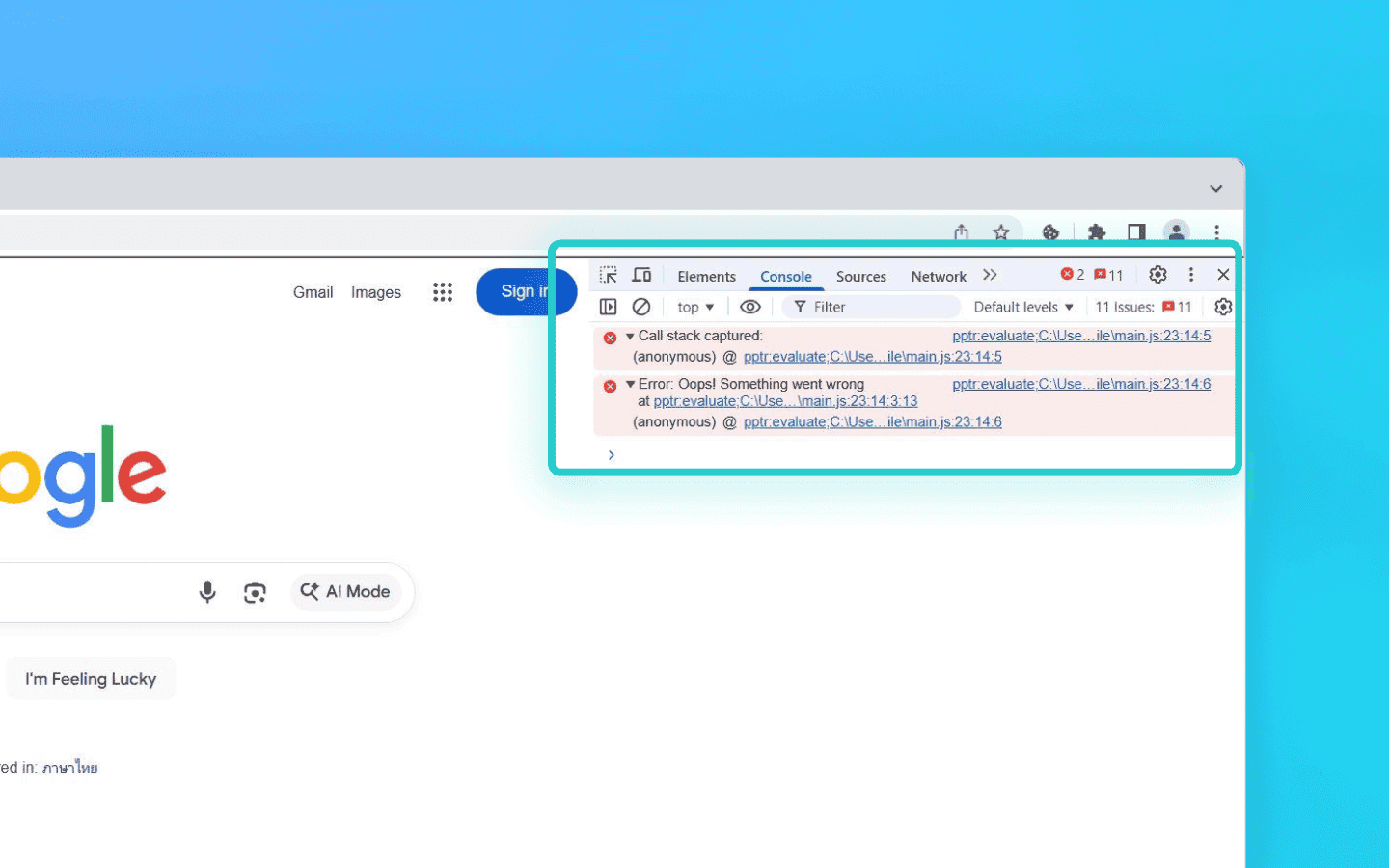
Changing your IP address or spoofing Canvas fingerprints will not solve this problem. To hide these markers, you must modify either the library itself or the browser execution environment.
The most reliable solution is to remove the pptr:evaluate marker directly from Puppeteer's source code before commands are sent to the browser. Since manually searching for and editing files after every npm install is impractical, a simple patcher can be used:
const fs = require('fs');
const path = require('path');

// Path to ExecutionContext.js in recent Puppeteer versions
const targetFile = path.resolve(__dirname, 'node_modules/puppeteer-core/lib/cjs/puppeteer/cdp/ExecutionContext.js');

if (fs.existsSync(targetFile)) {
    let content = fs.readFileSync(targetFile, 'utf8');
    // Replace the pptr:evaluate prefix with an anonymous call
    // and remove the local file path
    const patchedContent = content.replace(/pptr:evaluate;.*?\\n/g, 'anonymous:evaluation;\n');
    fs.writeFileSync(targetFile, patchedContent, 'utf8');
    console.log('Puppeteer patched successfully. pptr:evaluate markers removed.');
}
const fs = require('fs');
const path = require('path');

// Path to ExecutionContext.js in recent Puppeteer versions
const targetFile = path.resolve(__dirname, 'node_modules/puppeteer-core/lib/cjs/puppeteer/cdp/ExecutionContext.js');

if (fs.existsSync(targetFile)) {
    let content = fs.readFileSync(targetFile, 'utf8');
    // Replace the pptr:evaluate prefix with an anonymous call
    // and remove the local file path
    const patchedContent = content.replace(/pptr:evaluate;.*?\\n/g, 'anonymous:evaluation;\n');
    fs.writeFileSync(targetFile, patchedContent, 'utf8');
    console.log('Puppeteer patched successfully. pptr:evaluate markers removed.');
}
If modifying node_modules is not an option, the markers can be filtered at runtime by injecting a spoofing script before the target page loads. The script overrides the native Error object behavior and sanitizes stack traces:
await page.evaluateOnNewDocument(() => {
    // Save the original Error constructor
    const NativeError = window.Error;

    window.Error = function(...args) {
        const err = new NativeError(...args);
        const originalStack = err.stack;

        if (originalStack) {
            Object.defineProperty(err, 'stack', {
                get: function() {
                    // Break stack trace into strings and remove Puppeteer-related entries from it
                    return originalStack
                        .split('\n')
                        .filter(line => !line.includes('pptr:evaluate'))
                        .join('\n');
                }
            });
        }
        return err;
    };

    // Restore the prototype chain to avoid detection
    window.Error.prototype = NativeError.prototype;
});
await page.evaluateOnNewDocument(() => {
    // Save the original Error constructor
    const NativeError = window.Error;

    window.Error = function(...args) {
        const err = new NativeError(...args);
        const originalStack = err.stack;

        if (originalStack) {
            Object.defineProperty(err, 'stack', {
                get: function() {
                    // Break stack trace into strings and remove Puppeteer-related entries from it
                    return originalStack
                        .split('\n')
                        .filter(line => !line.includes('pptr:evaluate'))
                        .join('\n');
                }
            });
        }
        return err;
    };

    // Restore the prototype chain to avoid detection
    window.Error.prototype = NativeError.prototype;
});
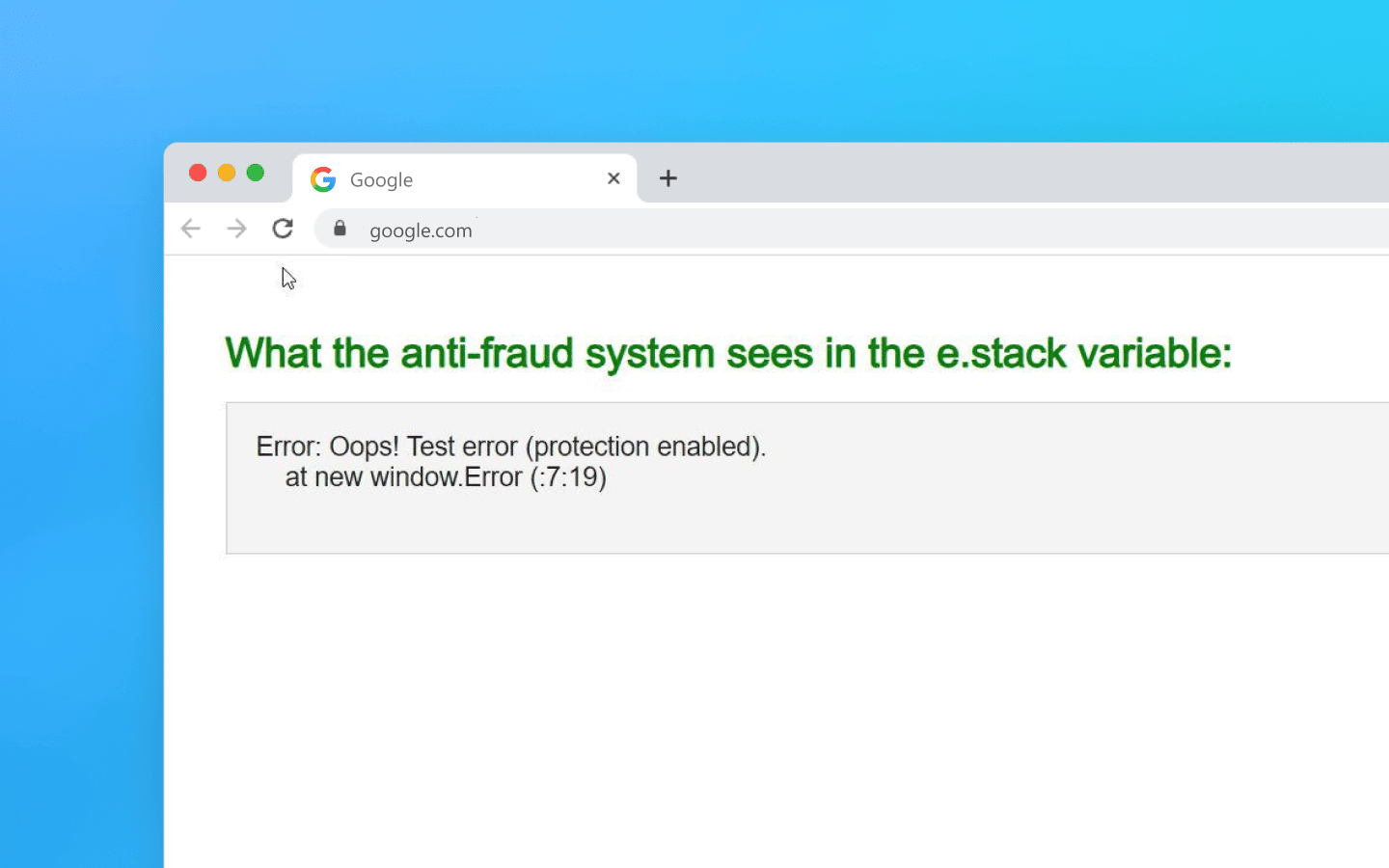
As a result, instead of exposing local file paths, the stack trace will display something like this
Vulnerabilities of Page.addScriptToEvaluateOnNewDocument
Attempts to conceal browser automation, including the use of popular stealth plugins, typically rely on injecting spoofing JavaScript before the target website loads. In Puppeteer, this is usually done through the Page.addScriptToEvaluateOnNewDocument command.
However, the use of this method itself leaves distinct traces in the execution environment.
Timing anomalies. The command forces the V8 engine to execute your code synchronously when the page context is created, before the HTML parser begins its work. Injecting large scripts introduces measurable micro-delays during the
document_startphase. Anti-fraud systems measure the timing between internal browser events and can detect these unnatural gaps.Lifecycle violations. Stealth plugins cannot simply remove automation flags; they rely on complex hooks and overrides instead. Protection systems can detect that complex proxy objects and overridden properties have appeared in the
windowobject unusually early, before theDOMContentLoadedevent or even before the<head>tag has been parsed. This breaks the natural page lifecycle.Lack of isolation. Any script injected through the CDP
addScriptToEvaluateOnNewDocumentcommand runs in the page's main execution context. As a result, your spoofing code and the website's anti-fraud scripts share the same environment. A slightest bug or an accidentally exposed variable may be enough for the protection system to detect automation.
You cannot completely abandon spoofing, but you can change how the spoofing code is delivered. Instead of injecting code through the debugging protocol, you can use the browser's native extensions system.
Browsers were designed to allow extensions to inject code safely. If you package your spoofing logic into a Manifest V3 extension and load it when launching Puppeteer, anti-fraud systems will perceive the timing and injections as normal browser extension behavior.
For example, you can create a stealth-extension directory containing a manifest.json file:
{
  "manifest_version": 3,
  "name": "My Custom Stealth",
  "version": "1.0",
  "content_scripts": [
    {
      "matches": ["<all_urls>"],
      "js": ["inject.js"],
      "run_at": "document_start",
      "world": "MAIN"
    }
  ]
}
{
  "manifest_version": 3,
  "name": "My Custom Stealth",
  "version": "1.0",
  "content_scripts": [
    {
      "matches": ["<all_urls>"],
      "js": ["inject.js"],
      "run_at": "document_start",
      "world": "MAIN"
    }
  ]
}
And load it when launching Puppeteer instead of calling evaluateOnNewDocument:
const browser = await puppeteer.launch({
  args: [
    `--disable-extensions-except=${pathToExtension}`,
    `--load-extension=${pathToExtension}`
  ]
});
const browser = await puppeteer.launch({
  args: [
    `--disable-extensions-except=${pathToExtension}`,
    `--load-extension=${pathToExtension}`
  ]
});
A second approach is to avoid V8 injection mechanisms altogether. You can use an external proxy server or Puppeteer's built-in request interception to modify the raw HTML response on the fly.
Insert your spoofing <script> tag as the first line inside the <head> element. In this scenario, the code executes naturally as part of the browser's standard document parsing process, without triggering suspicions from timing-based detection systems.
If you must use addScriptToEvaluateOnNewDocument, avoid loading large monolithic stealth plugins. Instead, split the spoofing process into two stages.
Before the page loads, remove only the webdriver marker. This code executes in a fraction of a millisecond and does not create anomalies detectable through the Performance API.
// Inject a minimal payload before HTML parsing begins
await page.evaluateOnNewDocument(() => {
    // Remove the most obvious automation marker
    Object.defineProperty(navigator, 'webdriver', {
        get: () => undefined,
    });
    // No heavy WebGL or Canvas spoofing here!
});
// Inject a minimal payload before HTML parsing begins
await page.evaluateOnNewDocument(() => {
    // Remove the most obvious automation marker
    Object.defineProperty(navigator, 'webdriver', {
        get: () => undefined,
    });
    // No heavy WebGL or Canvas spoofing here!
});
Load all other modifications—such as GPU, audio, plugin, or font spoofing—later, after the browser has already started rendering the page. This can be done through a standard page.evaluate() call or by attaching to the DOMContentLoaded event.
// Navigate to the website
await page.goto('https://target-site.com');

// The page is already loading and timing checks are complete.
// Now it is safer to inject heavier spoofing logic.
await page.evaluate(() => {
    // Spoof Canvas, WebGL, fonts, etc.
    const getParameter = WebGLRenderingContext.getParameter;
    WebGLRenderingContext.prototype.getParameter = function(parameter) {
        if (parameter === 37445) return 'Intel Inc.';
        if (parameter === 37446) return 'Intel Iris OpenGL Engine';
        return getParameter(parameter);
    };
});
// Navigate to the website
await page.goto('https://target-site.com');

// The page is already loading and timing checks are complete.
// Now it is safer to inject heavier spoofing logic.
await page.evaluate(() => {
    // Spoof Canvas, WebGL, fonts, etc.
    const getParameter = WebGLRenderingContext.getParameter;
    WebGLRenderingContext.prototype.getParameter = function(parameter) {
        if (parameter === 37445) return 'Intel Inc.';
        if (parameter === 37446) return 'Intel Iris OpenGL Engine';
        return getParameter(parameter);
    };
});
Protection systems typically check webdriver synchronously at the very beginning of the page lifecycle, making this approach effective against such checks. More advanced anti-fraud checks usually run asynchronously after the page has already loaded. By that point, the second-stage heavier spoofing script has already been loaded without introducing page startup delays.
The Network.setUserAgentOverride problem
Changing the User-Agent through CDP is easy, but the problem is that only the HTTP header is modified this way, while other environmental indicators remain untouched.
As a result, you create a critical inconsistency. The Network.setUserAgentOverride method cannot properly spoof internal navigator object properties or specific Client Hints headers.
An analytics system may see a mobile User-Agent in the request header while simultaneously detecting desktop API rendering behavior and mismatched sec-ch-ua headers.
Never change the User-Agent string alone. If you are emulating a device, you must spoof the entire set of Client Hints and hardware sensors and characteristics. Instead of relying solely on setUserAgent, use the extended CDP parameters and provide a complete userAgentMetadata object. Also remember to emulate device-specific behaviors, such as touchscreen emulation, when impersonating mobile devices.
Debug TCP port scanning
To control the browser, Puppeteer launches Chromium with an open port for WebSocket communication. By default, this is often a local debugging port such as the classic 9222 or another randomly assigned port.
An anti-fraud script runs directly inside the user's browser. From within your own system and on behalf of your browser, it can simply issue a banal AJAX request such as:
http://127.0.0.1:9222/json/version.
Protection systems use so-called timing attacks or local network scanning through WebSockets. If a script connects to a standard debugging port and immediately receives a response from the browser engine, it can infer that the browser is being controlled by an automation script.
Randomizing the port is not a complete solution, since scanners can probe entire port ranges. The simplest solution is to stop using TCP ports for communication between Node.js and the browser altogether.
Puppeteer can communicate with Chromium through anonymous operating system pipes instead of network sockets. In this mode, no debugging ports are opened, leaving nothing for anti-fraud systems to scan.
Simply add the pipe: true argument when launching the browser. This protects you from local host network scanning.
Achieving results without detection
Perfect Puppeteer invisibility is fundamentally impossible because every form of emulation introduces some deviation from genuine user behavior. As demonstrated above, this is simply a technical reality.
For serious use cases, default plugins are never enough. Achieving a high level of anonymity requires an entirely different approach:
Chrome binary patching. This involves directly modifying the browser executable, for example with a hex editor. The goal is to replace hardcoded protocol strings with randomized values inside the binary itself. Unlike stealth plugins, which leave a brief vulnerability window between startup and JavaScript injection, binary modifications eliminate the issue at its source.
Specialized browser engines. Architectural-level solutions such as anti-detect browsers implement fingerprint spoofing and automation concealment inside the C++ codebase of the Blink engine rather than through JavaScript injections.
Avoiding CDP altogether. Control logic can be moved into custom Chrome extensions that communicate with a control server through their own WebSocket channels, allowing you to close debugging ports.
Using anti-detect browsers
Specialized solutions such as anti-detect browsers deserve separate attention. They address the issue at hand by modifying Chromium's source code, affecting the browser kernel directly. Obvious automation indicators such as navigator.webdriver are, of course, removed during binary compilation rather than hidden afterward.
All the heavy lifting involved in environment emulation happens under the hood. When a protection script requests GPU information, such as WebGL vendor or renderer values, the engine does not need to execute a JavaScript wrapper to spoof them, as the C++ code natively and instantly returns the required values. The same applies to more complex metrics. What’s more, the user does not interact with any of these mechanisms directly, except possibly for configuring the necessary parameters before launching a profile.
From an anti-fraud system’s perspective, such a browser appears to be a regular user. At the same time, you can control the fingerprint through Puppeteer simply by connecting it to the anti-detect browser’s open port.
Less obvious details and conclusions
Using the
--disable-blink-features=AutomationControlledargument removes the basicwebdrivermarker but leaves indirect traces behind.Forcing
Log.enableandPerformance.enableto remain disabled reduces available telemetry but improves overall stealth.The new Headless Mode (
--headless=new) unifies the architectures of standard and headless browsers, changing howClientRectsand font rendering are detected and making rendering behavior appear more natural.
Successfully bypassing detection does not begin with installing a hundred npm packages. It begins with understanding how the browser engine actually works.
Modern browser automation requires engineering-level precision. CDP leaks are not bugs; they are architectural characteristics of the technology. The deeper your understanding of the browser, the more control you have over every execution context, and the more resilient your automation systems become.
Maintain your online anonymity with Octo Browser. Your real digital fingerprint cannot be tracked.
Would you like to try Octo Browser at discount?
Use the promo code OCTOSCRAPER to get 30% off any subscription. This offer is valid only for new users.
What is CDP, and why does it leave digital traces?
The Chrome DevTools Protocol provides low-level access to the browser's architecture. It was originally designed for debugging, inspection, and profiling, not for stealth scraping.
The protocol operates through WebSocket connections that interact directly with the V8 engine. When your script sends a command, such as a click or page navigation, the browser opens a local socket for bidirectional communication. This process inevitably generates internal logs, affects memory allocation, and leaves artifacts inside the isolated browser environment. Security systems can analyze these micro-changes and timing patterns to detect automated behavior. As a result, the mere existence of the connection can reveal browser automation.
How CDP leaks differ from traditional fingerprinting
It is important to understand that CDP leaks and browser fingerprint leaks represent two fundamentally different detection vectors.
Traditional fingerprinting (Canvas, WebGL, Fonts) identifies unique hardware characteristics and rendering behavior. Fingerprint inconsistencies or spoofing errors allow anti-bot systems to detect manipulation and classify the user as suspicious.
CDP leaks reveal behavioral and structural indicators of code execution. They expose the fact that the browser is being remotely controlled.
You may have a perfectly unique WebGL fingerprint, but automation flags can instantly invalidate that advantage. Browser fingerprint checks require considerable resources and processing time, whereas checking environment variables or call stacks is almost free. This is precisely why anti-fraud systems favor CDP-based detection. It allows them to filter out bots during basic protocol-level checks, conserving server resources otherwise spent on more expensive deep behavioral analysis.
Anatomy of Chrome DevTools Protocol leaks
Execution Context markers
One of Puppeteer's primary weaknesses lies in how exactly it executes your code inside the browser. Under the hood, the page.evaluate() method relies on the CDP command Runtime.evaluate.
When a script is injected into the browser, modern Puppeteer versions generate a specific Source URL associated with that code fragment. If an error occurs during script execution, the V8 engine creates a standard stack trace that may contain entries like:
at pptr:evaluate;C:\Users\Admin\Projects\...\main.js:17:14
By overriding basic browser functions, anti-fraud systems can intentionally trigger invisible errors and inspect the Error.stack object. They may discover:
The
pptr:prefix, a direct reference to Puppeteer.An absolute path to a file on your local machine or server, beginning with
C:\or/var/www/....
A real user's browser never executes code from local filesystem paths when visiting a public website. Therefore, such markers represent definitive evidence of automation.
Changing your IP address or spoofing Canvas fingerprints will not solve this problem. To hide these markers, you must modify either the library itself or the browser execution environment.
The most reliable solution is to remove the pptr:evaluate marker directly from Puppeteer's source code before commands are sent to the browser. Since manually searching for and editing files after every npm install is impractical, a simple patcher can be used:
const fs = require('fs');
const path = require('path');

// Path to ExecutionContext.js in recent Puppeteer versions
const targetFile = path.resolve(__dirname, 'node_modules/puppeteer-core/lib/cjs/puppeteer/cdp/ExecutionContext.js');

if (fs.existsSync(targetFile)) {
    let content = fs.readFileSync(targetFile, 'utf8');
    // Replace the pptr:evaluate prefix with an anonymous call
    // and remove the local file path
    const patchedContent = content.replace(/pptr:evaluate;.*?\\n/g, 'anonymous:evaluation;\n');
    fs.writeFileSync(targetFile, patchedContent, 'utf8');
    console.log('Puppeteer patched successfully. pptr:evaluate markers removed.');
}
If modifying node_modules is not an option, the markers can be filtered at runtime by injecting a spoofing script before the target page loads. The script overrides the native Error object behavior and sanitizes stack traces:
await page.evaluateOnNewDocument(() => {
    // Save the original Error constructor
    const NativeError = window.Error;

    window.Error = function(...args) {
        const err = new NativeError(...args);
        const originalStack = err.stack;

        if (originalStack) {
            Object.defineProperty(err, 'stack', {
                get: function() {
                    // Break stack trace into strings and remove Puppeteer-related entries from it
                    return originalStack
                        .split('\n')
                        .filter(line => !line.includes('pptr:evaluate'))
                        .join('\n');
                }
            });
        }
        return err;
    };

    // Restore the prototype chain to avoid detection
    window.Error.prototype = NativeError.prototype;
});
As a result, instead of exposing local file paths, the stack trace will display something like this
Vulnerabilities of Page.addScriptToEvaluateOnNewDocument
Attempts to conceal browser automation, including the use of popular stealth plugins, typically rely on injecting spoofing JavaScript before the target website loads. In Puppeteer, this is usually done through the Page.addScriptToEvaluateOnNewDocument command.
However, the use of this method itself leaves distinct traces in the execution environment.
Timing anomalies. The command forces the V8 engine to execute your code synchronously when the page context is created, before the HTML parser begins its work. Injecting large scripts introduces measurable micro-delays during the
document_startphase. Anti-fraud systems measure the timing between internal browser events and can detect these unnatural gaps.Lifecycle violations. Stealth plugins cannot simply remove automation flags; they rely on complex hooks and overrides instead. Protection systems can detect that complex proxy objects and overridden properties have appeared in the
windowobject unusually early, before theDOMContentLoadedevent or even before the<head>tag has been parsed. This breaks the natural page lifecycle.Lack of isolation. Any script injected through the CDP
addScriptToEvaluateOnNewDocumentcommand runs in the page's main execution context. As a result, your spoofing code and the website's anti-fraud scripts share the same environment. A slightest bug or an accidentally exposed variable may be enough for the protection system to detect automation.
You cannot completely abandon spoofing, but you can change how the spoofing code is delivered. Instead of injecting code through the debugging protocol, you can use the browser's native extensions system.
Browsers were designed to allow extensions to inject code safely. If you package your spoofing logic into a Manifest V3 extension and load it when launching Puppeteer, anti-fraud systems will perceive the timing and injections as normal browser extension behavior.
For example, you can create a stealth-extension directory containing a manifest.json file:
{
  "manifest_version": 3,
  "name": "My Custom Stealth",
  "version": "1.0",
  "content_scripts": [
    {
      "matches": ["<all_urls>"],
      "js": ["inject.js"],
      "run_at": "document_start",
      "world": "MAIN"
    }
  ]
}
And load it when launching Puppeteer instead of calling evaluateOnNewDocument:
const browser = await puppeteer.launch({
  args: [
    `--disable-extensions-except=${pathToExtension}`,
    `--load-extension=${pathToExtension}`
  ]
});
A second approach is to avoid V8 injection mechanisms altogether. You can use an external proxy server or Puppeteer's built-in request interception to modify the raw HTML response on the fly.
Insert your spoofing <script> tag as the first line inside the <head> element. In this scenario, the code executes naturally as part of the browser's standard document parsing process, without triggering suspicions from timing-based detection systems.
If you must use addScriptToEvaluateOnNewDocument, avoid loading large monolithic stealth plugins. Instead, split the spoofing process into two stages.
Before the page loads, remove only the webdriver marker. This code executes in a fraction of a millisecond and does not create anomalies detectable through the Performance API.
// Inject a minimal payload before HTML parsing begins
await page.evaluateOnNewDocument(() => {
    // Remove the most obvious automation marker
    Object.defineProperty(navigator, 'webdriver', {
        get: () => undefined,
    });
    // No heavy WebGL or Canvas spoofing here!
});
Load all other modifications—such as GPU, audio, plugin, or font spoofing—later, after the browser has already started rendering the page. This can be done through a standard page.evaluate() call or by attaching to the DOMContentLoaded event.
// Navigate to the website
await page.goto('https://target-site.com');

// The page is already loading and timing checks are complete.
// Now it is safer to inject heavier spoofing logic.
await page.evaluate(() => {
    // Spoof Canvas, WebGL, fonts, etc.
    const getParameter = WebGLRenderingContext.getParameter;
    WebGLRenderingContext.prototype.getParameter = function(parameter) {
        if (parameter === 37445) return 'Intel Inc.';
        if (parameter === 37446) return 'Intel Iris OpenGL Engine';
        return getParameter(parameter);
    };
});
Protection systems typically check webdriver synchronously at the very beginning of the page lifecycle, making this approach effective against such checks. More advanced anti-fraud checks usually run asynchronously after the page has already loaded. By that point, the second-stage heavier spoofing script has already been loaded without introducing page startup delays.
The Network.setUserAgentOverride problem
Changing the User-Agent through CDP is easy, but the problem is that only the HTTP header is modified this way, while other environmental indicators remain untouched.
As a result, you create a critical inconsistency. The Network.setUserAgentOverride method cannot properly spoof internal navigator object properties or specific Client Hints headers.
An analytics system may see a mobile User-Agent in the request header while simultaneously detecting desktop API rendering behavior and mismatched sec-ch-ua headers.
Never change the User-Agent string alone. If you are emulating a device, you must spoof the entire set of Client Hints and hardware sensors and characteristics. Instead of relying solely on setUserAgent, use the extended CDP parameters and provide a complete userAgentMetadata object. Also remember to emulate device-specific behaviors, such as touchscreen emulation, when impersonating mobile devices.
Debug TCP port scanning
To control the browser, Puppeteer launches Chromium with an open port for WebSocket communication. By default, this is often a local debugging port such as the classic 9222 or another randomly assigned port.
An anti-fraud script runs directly inside the user's browser. From within your own system and on behalf of your browser, it can simply issue a banal AJAX request such as:
http://127.0.0.1:9222/json/version.
Protection systems use so-called timing attacks or local network scanning through WebSockets. If a script connects to a standard debugging port and immediately receives a response from the browser engine, it can infer that the browser is being controlled by an automation script.
Randomizing the port is not a complete solution, since scanners can probe entire port ranges. The simplest solution is to stop using TCP ports for communication between Node.js and the browser altogether.
Puppeteer can communicate with Chromium through anonymous operating system pipes instead of network sockets. In this mode, no debugging ports are opened, leaving nothing for anti-fraud systems to scan.
Simply add the pipe: true argument when launching the browser. This protects you from local host network scanning.
Achieving results without detection
Perfect Puppeteer invisibility is fundamentally impossible because every form of emulation introduces some deviation from genuine user behavior. As demonstrated above, this is simply a technical reality.
For serious use cases, default plugins are never enough. Achieving a high level of anonymity requires an entirely different approach:
Chrome binary patching. This involves directly modifying the browser executable, for example with a hex editor. The goal is to replace hardcoded protocol strings with randomized values inside the binary itself. Unlike stealth plugins, which leave a brief vulnerability window between startup and JavaScript injection, binary modifications eliminate the issue at its source.
Specialized browser engines. Architectural-level solutions such as anti-detect browsers implement fingerprint spoofing and automation concealment inside the C++ codebase of the Blink engine rather than through JavaScript injections.
Avoiding CDP altogether. Control logic can be moved into custom Chrome extensions that communicate with a control server through their own WebSocket channels, allowing you to close debugging ports.
Using anti-detect browsers
Specialized solutions such as anti-detect browsers deserve separate attention. They address the issue at hand by modifying Chromium's source code, affecting the browser kernel directly. Obvious automation indicators such as navigator.webdriver are, of course, removed during binary compilation rather than hidden afterward.
All the heavy lifting involved in environment emulation happens under the hood. When a protection script requests GPU information, such as WebGL vendor or renderer values, the engine does not need to execute a JavaScript wrapper to spoof them, as the C++ code natively and instantly returns the required values. The same applies to more complex metrics. What’s more, the user does not interact with any of these mechanisms directly, except possibly for configuring the necessary parameters before launching a profile.
From an anti-fraud system’s perspective, such a browser appears to be a regular user. At the same time, you can control the fingerprint through Puppeteer simply by connecting it to the anti-detect browser’s open port.
Less obvious details and conclusions
Using the
--disable-blink-features=AutomationControlledargument removes the basicwebdrivermarker but leaves indirect traces behind.Forcing
Log.enableandPerformance.enableto remain disabled reduces available telemetry but improves overall stealth.The new Headless Mode (
--headless=new) unifies the architectures of standard and headless browsers, changing howClientRectsand font rendering are detected and making rendering behavior appear more natural.
Successfully bypassing detection does not begin with installing a hundred npm packages. It begins with understanding how the browser engine actually works.
Modern browser automation requires engineering-level precision. CDP leaks are not bugs; they are architectural characteristics of the technology. The deeper your understanding of the browser, the more control you have over every execution context, and the more resilient your automation systems become.
Stay up to date with the latest Octo Browser news
By clicking the button you agree to our Privacy Policy.
Stay up to date with the latest Octo Browser news
By clicking the button you agree to our Privacy Policy.
Stay up to date with the latest Octo Browser news
By clicking the button you agree to our Privacy Policy.

Join Octo Browser now
Or contact Customer Service at any time with any questions you might have.
Join Octo Browser now
Or contact Customer Service at any time with any questions you might have.
Join Octo Browser now
Or contact Customer Service at any time with any questions you might have.