Playwright vs Puppeteer vs Selenium: comparing the frameworks


Markus_automation
Expert in data parsing and automation
Selenium, Puppeteer, and Playwright are three popular browser automation solutions. They are commonly used both for web application testing and for data collection and processing.
Each framework evolved with its own philosophy: Selenium is the most mature and time-tested solution; Puppeteer was developed at Google for working with the Chrome environment; and Playwright is a more modern tool from Microsoft, introduced in 2020.
This article will help you choose the optimal tool for your tasks. We will examine differences in functionality, performance, concurrency capabilities, and other key parameters.
Contents
Stay anonymous, take advantage of multi-accounting, and achieve your goals with the highest-quality anti-detect browser on the market.
Would you like to try Octo Browser at discount?
Use the promo code OCTOSCRAPER to get 30% off any subscription. This offer is valid only for new users.
Programming languages support
Selenium was designed for a broad developer audience, which is why it has the widest official language support. There are official libraries for Java, Python, C#, Ruby, JavaScript, Kotlin, PHP, and other programming languages. Years of evolution have made Selenium an almost universal tool.
Puppeteer was originally developed exclusively for Node.js (JavaScript and TypeScript). Officially, only these environments are supported, although there are unofficial ports for Python, .NET, and others. Still, the primary and most up-to-date Puppeteer interface is JavaScript.
Playwright supports multiple languages out of the box. In addition to JavaScript and TypeScript, there are official clients for Python, Java, and .NET (C#). Unlike Puppeteer, Playwright is not tied to Node.js — you can write scripts in any officially supported language.
Thus, Selenium and Playwright win in terms of programming language diversity. Selenium has the broadest official coverage, including rare and legacy languages. Playwright supports the most popular modern languages. Puppeteer is officially limited to the Node.js ecosystem.
Browser support
Selenium is built on the WebDriver standard and can automate virtually any browser with a compatible driver. It supports Chrome (Chromium), Firefox, Safari, Edge, Opera, and even Internet Explorer. In terms of cross-browser coverage, Selenium offers the widest support. Automating Internet Explorer may seem outdated, but in certain environments, legacy system support can be decisive.
Puppeteer is focused on Chromium-based browsers. Out of the box, it works with Google Chrome (Chromium) and other Chromium-based browsers. Support for other engines is limited: if you need WebKit or non-Chromium browsers, Puppeteer will not help you directly.
Playwright was designed as a multi-browser solution. It supports three major engines: Chromium, Firefox, and WebKit. It does not work with legacy or rare browsers, but for most scraping and testing tasks, this coverage is sufficient.
In cross-browser capability, Selenium remains the leader, followed by Playwright, which covers all modern engines. Puppeteer is significantly more limited in this aspect.
Functionality and ease of use
All three solutions provide a core set of browser automation capabilities:
launching the browser (including in headless mode);
page navigation;
element selection;
user interaction simulation (clicks, text input);
JavaScript execution;
DOM extraction, and more.
Any standard web automation task can be solved with Selenium, Puppeteer, or Playwright. However, they differ in developer convenience and built-in features.
Selenium provides low-level control via the WebDriver API. Its syntax and approach may feel somewhat verbose and boilerplate-heavy compared to modern tools. Developers often need to configure explicit waits and describe each action in detail. However, Selenium has become extremely stable over the years. Powerful wrapper libraries (such as WebDriverIO or Selenide) partially simplify development. By itself, Selenium is rather minimalistic.
Newer Puppeteer and Playwright offer a cleaner, more modern API. Both operate asynchronically, simplifying step-by-step scenario writing without deeply nested callbacks.
Playwright places particular emphasis on developer experience. It includes built-in tools that simplify writing tests and scripts: Playwright Inspector allows step-by-step debugging in real time, while Codegen records your actions in the browser and generates corresponding code automatically.
This significantly lowers the entry barrier for beginners. Playwright also implements smart auto-waiting by default without explicitly adding wait statements. The result is cleaner code and fewer errors.
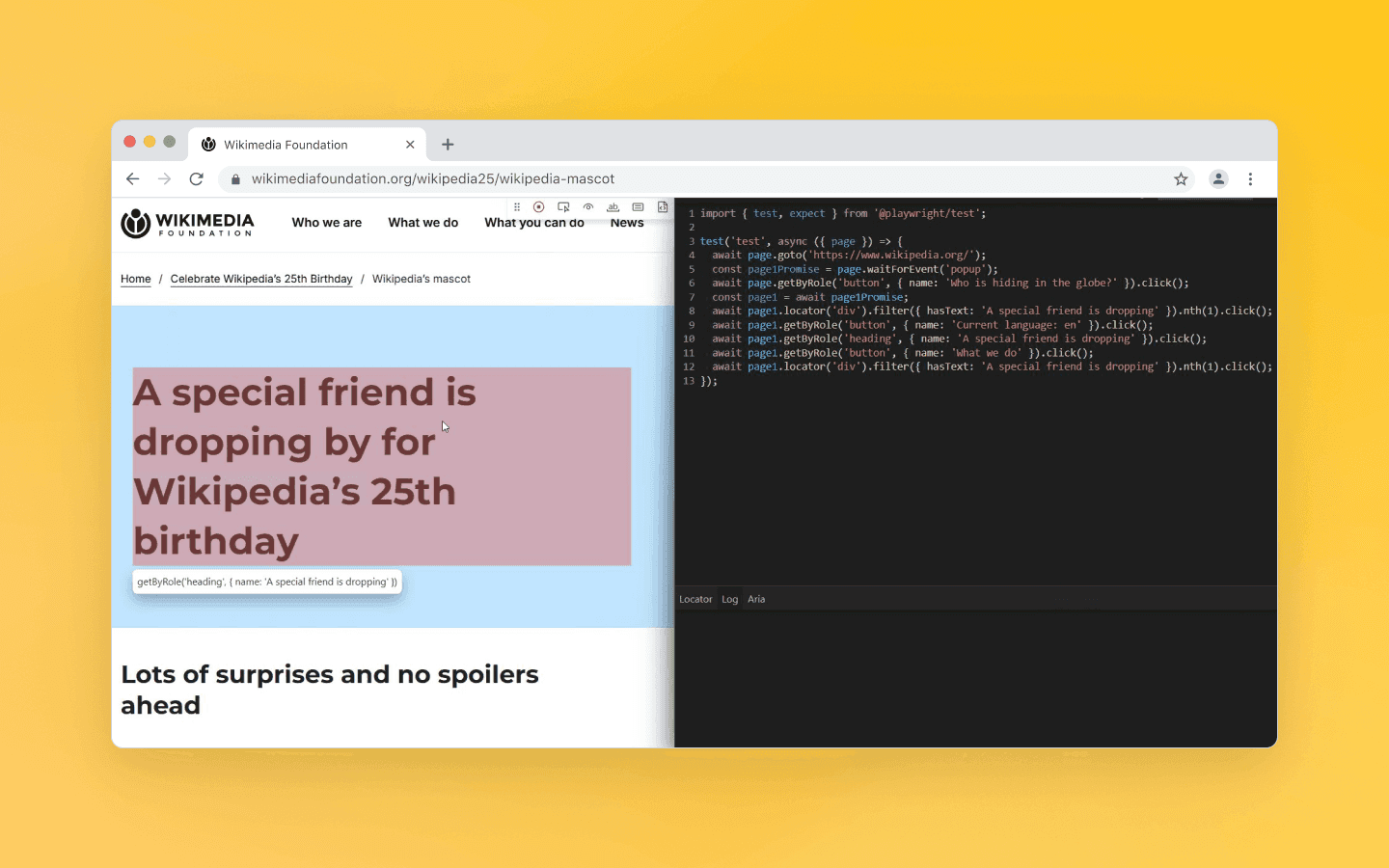
Codegen lets you complete browser actions and generates corresponding code
Puppeteer does not provide automatic waiting to the same extent. As with Selenium, synchronization responsibility lies with the developer (or external utilities). Puppeteer and Selenium also lack built-in code generation or an interactive mode out of the box.
A strong side of Puppeteer is its deep integration with Chrome DevTools. It controls the browser directly via the DevTools Protocol, providing access to low-level operations such as:
intercepting network requests and responses;
listening to browser console events;
spoofing geolocation and emulating mobile devices;
retrieving performance metrics.
Playwright also provides similar capabilities (via the Chromium protocol and its own implementations for other engines). Request interception and mobile emulation are convenient in Playwright as well.
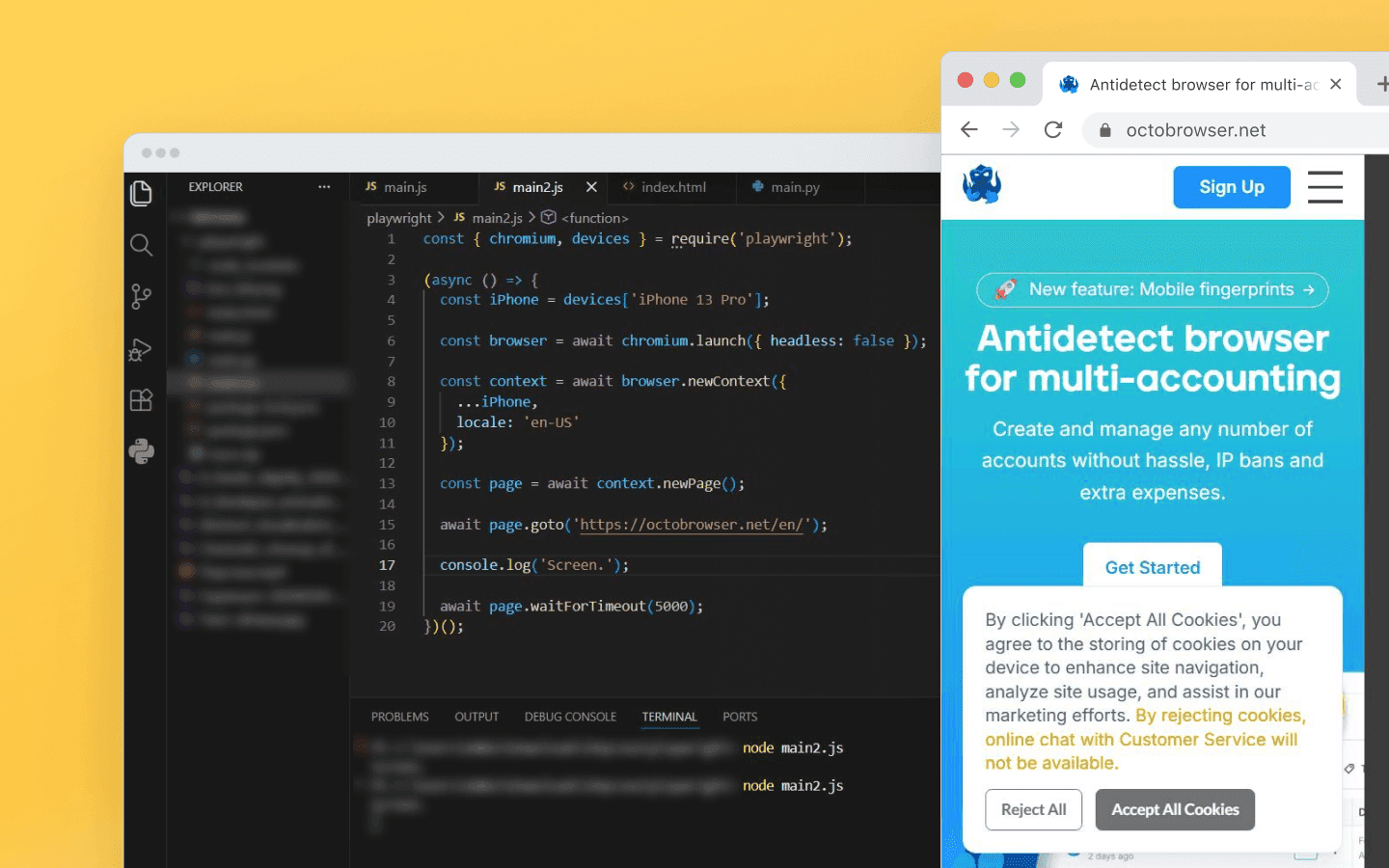
Emulating a mobile device
Selenium was not originally designed for such deep-level control. Only in version 4 did limited DevTools support appear. Therefore, for tasks involving network requests or advanced browser features, Puppeteer or Playwright are generally preferable to pure Selenium.
As for working with dynamic and JavaScript-heavy websites, all three tools launch a real browser and can execute JavaScript on the page, which makes them suitable for scraping SPAs, dynamically loaded websites, and similar cases. However, their efficiency in such tasks differs:
Selenium is less efficient in these conditions: under heavy JavaScript loads, scripts run slower and require more resources per session.
Puppeteer handles heavy JavaScript well thanks to its tight integration with the Chrome engine, which makes it one of the best solutions for fast automation in a Node.js environment.
Playwright, in addition to high speed, offers advanced load distribution across different browser engines (Chromium, Firefox, WebKit). This is convenient when you need to parallelize the rendering of heavy pages.
Playwright stands out for its thoughtful design and developer conveniences: the Inspector, automatic code generation, auto-waiting, and other details give it an advantage. Puppeteer offers simplicity and speed in the Node.js environment. Selenium is simply reliable, although slower in some scenarios. There are no truly unique features in Puppeteer or Selenium, and almost everything can be implemented in any of these frameworks. Therefore, in terms of usability and capabilities, Playwright can be considered the winner (especially for beginners).
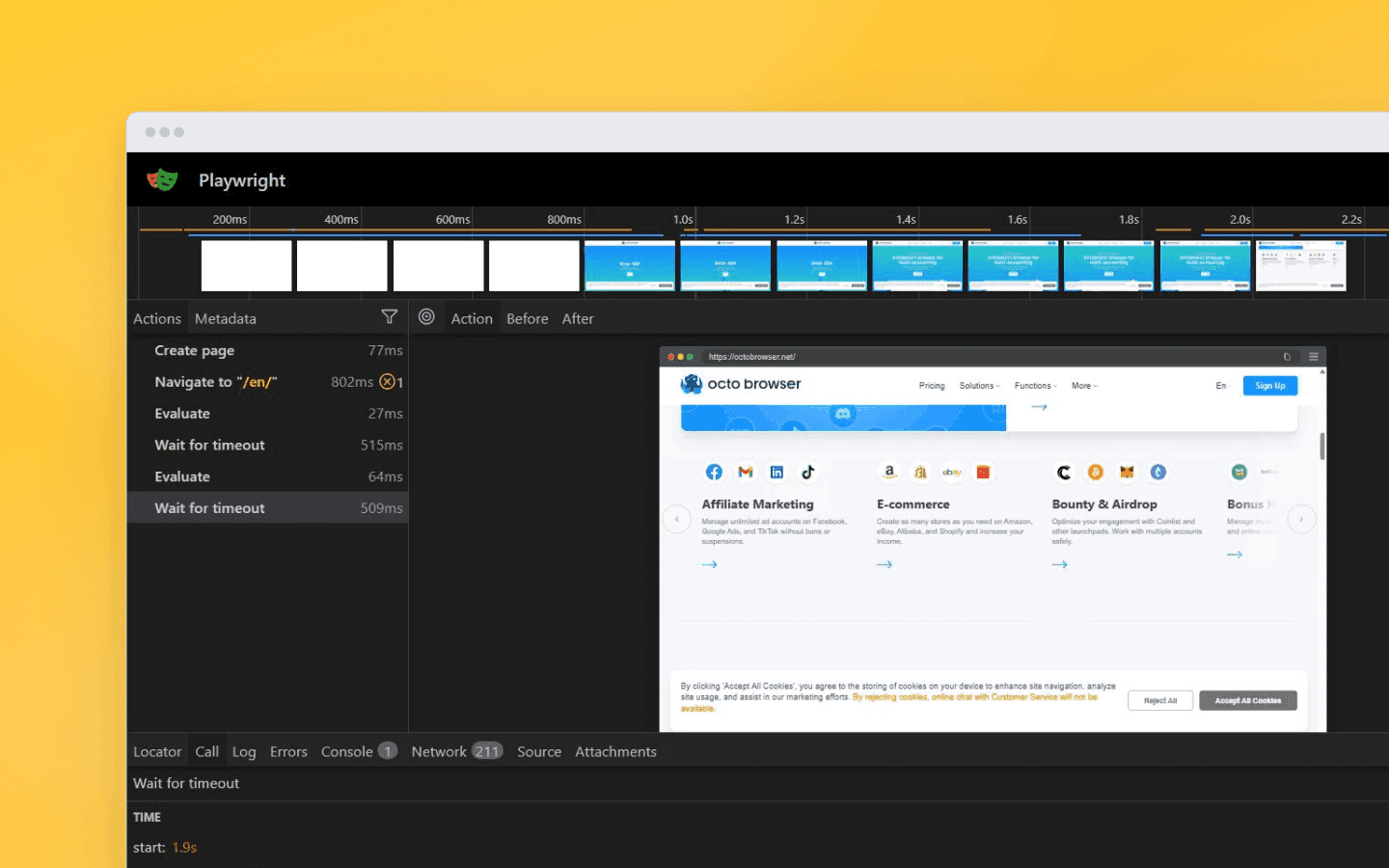
Playwright lets you analyze test execution frame by frame, view network requests, and inspect the DOM state at any moment
Performance and speed
As mentioned earlier, Selenium is slower than Puppeteer and Playwright. There is a rational explanation for this, as Selenium communicates with the browser via the heavier WebDriver protocol (HTTP requests), while Puppeteer and Playwright use a more lightweight DevTools connection (WebSocket). In practice, this can be confirmed: Puppeteer and Playwright execute scenarios faster (sometimes by an order of magnitude) than equivalent scripts written in Selenium. For example, the same scenario (scraping booking pages) with identical input data showed lower performance in Selenium compared to Playwright. Over 24 hours of operation, a scraper built with Playwright processed 30,000 URLs, while Selenium managed a maximum of 8,000 at peak.
There is also a slight difference between Puppeteer and Playwright: in very short scripts, Puppeteer sometimes outperforms Playwright. This is due to Playwright’s higher initial overhead. However, in long-running tasks, the difference evens out: during extended sessions, the speed of Puppeteer and Playwright is nearly identical. So the choice based on speed alone is not critical here, except in cases where you need to execute thousands of very short sessions, where Puppeteer may provide a faster browser startup time.
Selenium is not only slower but also more demanding in terms of hardware. The framework consumes more RAM and places a heavier load on the CPU. When running dozens of browser threads in parallel, the difference in resource usage becomes noticeable.
At the same time, it is important to stay objective and take into account:
External factors: network latency, website load speed, and server-side execution time often matter more than a 100 ms difference in the framework itself.
Project scale: for small projects, the speed difference may be insignificant. Selenium remains a viable tool; it simply requires more resources to achieve the same results at scale.
Puppeteer and Playwright are faster compared to Selenium, and they are largely comparable to each other in performance, although Puppeteer can be slightly faster in short tasks. If your goal is maximum performance and you are limited to Chrome, Puppeteer may be more efficient. In other cases, however, given the other differences between frameworks, speed is unlikely to become the deciding factor.
Scaling and parallel execution
Since we have touched on parallel execution, let’s look at it more closely. In scraping, running multiple browser sessions simultaneously is a must-have feature. It is used to speed up tests or scrape multiple pages at once. However, it is important to understand that concurrency is usually limited by resources (CPU/RAM), network capacity, and the target website’s restrictions, not just by the chosen solution. There are also differences in approach here:
Selenium offers a dedicated solution — Selenium Grid. It is a separate component that allows distributed test execution across different machines or browsers in parallel. Grid is powerful but fairly complex, requiring infrastructure setup (hosts, nodes, hubs, and so on). It is used less frequently in web scraping but helps scale Selenium horizontally. There are also lighter alternatives (such as Selenoid) for local parallel browser execution. Selenium itself does not include a built-in parallel orchestration system within its API — parallel execution is typically implemented at the own code level or via Grid (or similar tools) when distribution across machines is required.
Puppeteer does not provide a built-in cluster management solution itself, but multiple instances can be launched in parallel manually. There is also a popular open-source library, puppeteer-cluster, which simplifies running multiple Chromium instances in parallel and distributing tasks between them, but it is still an external tool. Puppeteer itself cannot coordinate multiple browsers out of the box — you will need to write custom code or use additional libraries. In practice, Puppeteer is most often used with Chromium-based browsers, so if you require different engines and/or browsers, the framework’s flexibility becomes more limited.
Playwright was originally designed with parallel execution in mind. When using the built-in Playwright Test Runner, tests are automatically executed in multiple threads by default. Even without the Test Runner, the Playwright API allows you to open multiple independent browser contexts within a single process — similar to running several isolated browser profiles managed from one codebase. In addition, Playwright supports distributing tests across different machines, which simplifies scaling for large workloads.
Thus, Playwright offers the best out-of-the-box concurrency support among the three solutions. Selenium can be considered second, and Puppeteer third. However, this comparison applies to their basic configurations. In large real-world systems, the surrounding infrastructure, task queues, stability, and hardware resources matter more.
For large-scale web scraping, Selenium is generally less suitable, as it is relatively slow and resource-intensive, which can become a bottleneck. Puppeteer is faster but limited to one browser engine (Chrome). When running a large number of tasks on the same engine and with the same signature types, additional constraints may arise. Playwright, in turn, allows distributing loads across different browsers and threads. Still, overall efficiency will always be limited by CPU/RAM, network bandwidth, and the target website’s restrictions.
Stealth and anti-detection
When scraping websites, not only speed and load performance matter, but also how detectable the solution is to anti-bot systems. Modern websites can identify automated clients through various technical signals — and unfortunately, all three frameworks leave automation traces by default.
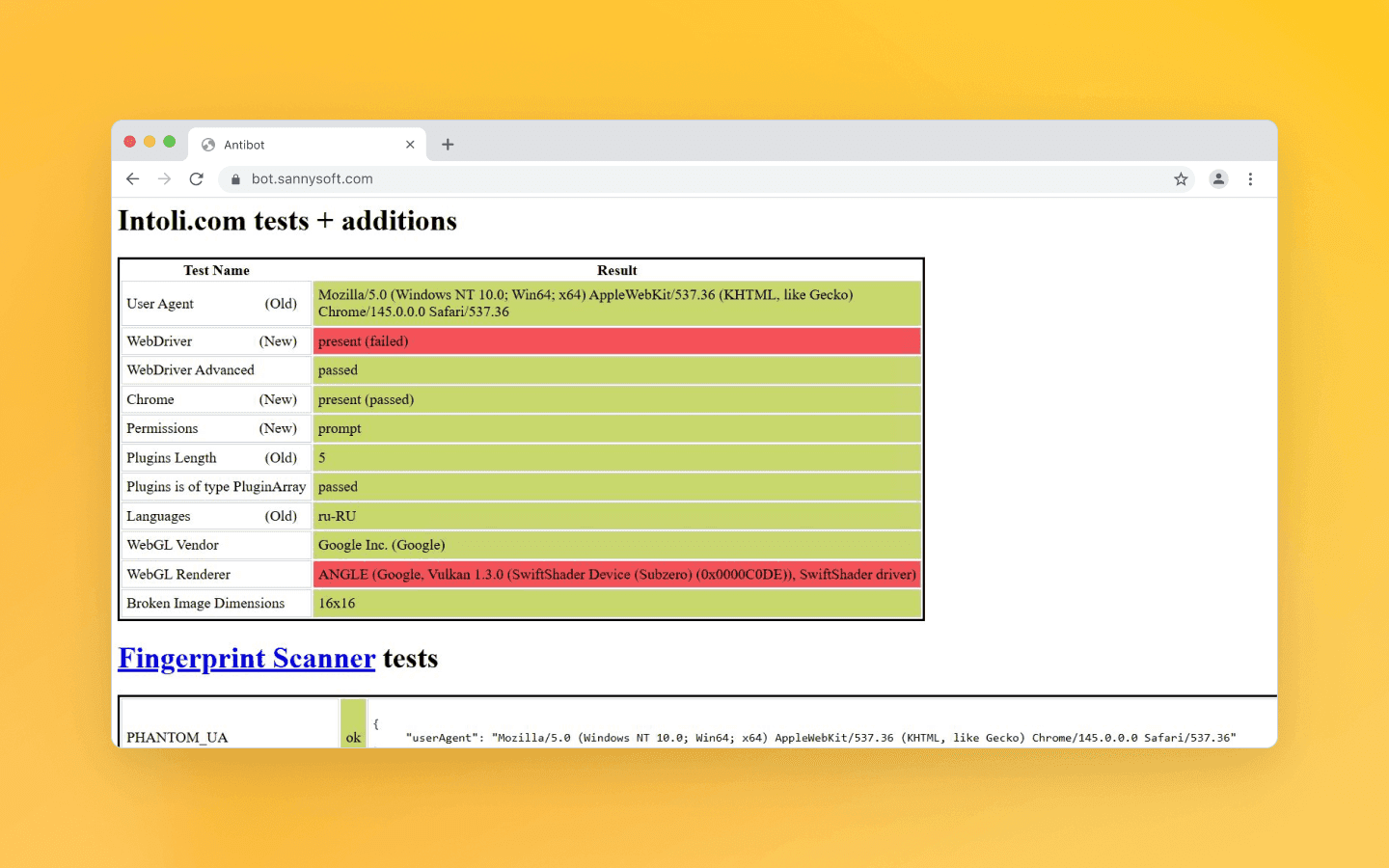
Selenium, Puppeteer, and Playwright were all originally created for white-hat purposes (e.g., testing, monitoring) and were not designed to disguise themselves as real browsers. As a result, they send signals that clearly indicate automation, and anti-bot systems take them into account when detecting bots.
The most obvious pattern is the special flag navigator.webdriver = true. In some automation configurations, this property is exposed and serves as a quick indicator of a “controlled” browser. This is an open signal that page scripts can use to suspect automation. The exact behavior depends on the engine, mode, and launch method, so relying on a single signal is not enough.
Anti-bot scripts also check other indicators: mismatched Canvas or WebGL fingerprints, missing plugins, unusual values in navigator.languages or deviceMemory, and so on.
The issue is addressed with special patches and browser wrappers that attempt to mask automation as real user behavior. For example, Puppeteer has the puppeteer-extra-plugin-stealth plugin, which, when launching Chromium:
disables certain flags (including --disable-blink-features=AutomationControlled, which removes navigator.webdriver);
overrides several JavaScript API functions with more realistic values;
fixes known fingerprint anomalies.
Similar approaches are available for Playwright — there are third-party modules like playwright-stealth that replicate the heuristics of puppeteer-stealth. Playwright allows you to execute code when creating a new page, which makes it possible to override navigator.webdriver or other properties before the website loads.
For Selenium, the Undetected Chromedriver module is available. It modifies the standard ChromeDriver by removing automation signatures. For example, it handles AutomationControlled, hides the “Chrome is being controlled by automated test software” message, and so on.
However, it is important to understand that fully hiding bot emulation is very difficult. Consider the anti-detect browser Octo Browser: it allows you to configure unique fingerprints (Canvas, WebGL, fonts, audio), emulate human input patterns, isolate sessions, and more. Puppeteer or Playwright, even with plugins, on the other hand, cover only basic spoofing techniques and can bypass only the simplest protection systems. Therefore, if your goal is to seriously challenge anti-bot systems, additional configuration is required:
run the browser in non-headless mode;
randomize user agents, time zones, and WebGL fingerprints;
use stealth-type plugins.
This is still insufficient against advanced systems, but it can help bypass basic anti-bot protection.
Thus, in terms of stealth, none of the three frameworks has a clear advantage.
Feauture | Selenium 🐢 | Puppeteer 🐶 | Playwright 🎭 |
Languages | Java, Python, C#, JS, Ruby, PHP | JS/TS only (officially) | JS/TS, Python, Java, C# |
Browsers | Chrome, Firefox, Safari, Edge, IE | Chrome (Chromium) | Chromium, Firefox, WebKit |
Speed | Slow (HTTP) | Very fast (CDP) | Very fast (WebSocket) |
Convenience | Low (lots of code) | Medium | High (Codegen, Trace Viewer) |
Mobile emulation | Basic | Excellent | Excellent |
Conclusion | For legacy and enterprise | For Node.js fans | A universal choice |
Usage in scraping and testing: which framework to choose
Each tool has its own strengths, and the choice depends on your tasks and constraints.
If you are a beginner developer, consider Playwright. It offers an easier start, making it simpler to achieve results from scratch. Out of the box, Playwright handles much of the routine work for you, lowering the entry barrier.
If your project already uses Selenium or requires integration with existing testing infrastructure, it makes sense to choose Selenium. Large companies often have established ecosystems built around it. Selenium is also indispensable when support for exotic combinations is required (for example, testing legacy sites in Microsoft Edge IE Mode or writing scripts in Ruby or PHP). For legacy systems, it remains a reliable workhorse.
If your main scenario is web scraping, automation is deployed in the cloud, and speed and scalability are important, consider Playwright. It is a fast and modern tool that is easier to scale. Playwright also actively introduces new features, which makes it promising for the future.
If you only need to automate Chrome (Chromium) and require maximum speed with low-level control, choose Puppeteer. It is ideal for Node.js projects where nothing beyond Chrome is needed. In this narrow use case, it slightly outperforms competitors in raw performance. Puppeteer also provides direct access to most Chrome DevTools capabilities, which can be essential if you need, for example, PDF snapshots of pages or deep debugging of browser events.
For automated testing (QA), the choice is less straightforward. If you are starting a new test project and using a modern tech stack, Playwright can significantly increase productivity. However, Selenium remains the standard in many enterprises. There is also an alternative in the form of Cypress (for web applications), but that is a separate topic. In terms of the three discussed tools, Selenium remains a reliable choice for complex integrations and long-term projects, Playwright is ideal for quick starts and modern web technologies, and Puppeteer fits specialized Chrome-only scenarios.
As you can see, there is no clear winner here, as each solution is strong within its own niche. However, Playwright can be seen as a balanced option with strong prospects: it combines broad functionality with high speeds, making it a strong candidate for new projects. Selenium remains relevant where its unique combination of compatibility in terms of languages and browsers and long-established reliability is required. Puppeteer remains an excellent tool for Chrome (Chromium), especially if you are deeply embedded in the Node.js ecosystem and value simplicity and direct control — in that niche, it is hard to beat.
Ultimately, when choosing a framework, focus on your project’s specific needs: required browsers, programming language, scale, the importance of anti-detection, and so on. All three solutions are actively evolving and capable of handling complex browser automation tasks. Choosing the right tool is the key to efficient development and successful project deployment.
Stay anonymous, take advantage of multi-accounting, and achieve your goals with the highest-quality anti-detect browser on the market.
Would you like to try Octo Browser at discount?
Use the promo code OCTOSCRAPER to get 30% off any subscription. This offer is valid only for new users.
Programming languages support
Selenium was designed for a broad developer audience, which is why it has the widest official language support. There are official libraries for Java, Python, C#, Ruby, JavaScript, Kotlin, PHP, and other programming languages. Years of evolution have made Selenium an almost universal tool.
Puppeteer was originally developed exclusively for Node.js (JavaScript and TypeScript). Officially, only these environments are supported, although there are unofficial ports for Python, .NET, and others. Still, the primary and most up-to-date Puppeteer interface is JavaScript.
Playwright supports multiple languages out of the box. In addition to JavaScript and TypeScript, there are official clients for Python, Java, and .NET (C#). Unlike Puppeteer, Playwright is not tied to Node.js — you can write scripts in any officially supported language.
Thus, Selenium and Playwright win in terms of programming language diversity. Selenium has the broadest official coverage, including rare and legacy languages. Playwright supports the most popular modern languages. Puppeteer is officially limited to the Node.js ecosystem.
Browser support
Selenium is built on the WebDriver standard and can automate virtually any browser with a compatible driver. It supports Chrome (Chromium), Firefox, Safari, Edge, Opera, and even Internet Explorer. In terms of cross-browser coverage, Selenium offers the widest support. Automating Internet Explorer may seem outdated, but in certain environments, legacy system support can be decisive.
Puppeteer is focused on Chromium-based browsers. Out of the box, it works with Google Chrome (Chromium) and other Chromium-based browsers. Support for other engines is limited: if you need WebKit or non-Chromium browsers, Puppeteer will not help you directly.
Playwright was designed as a multi-browser solution. It supports three major engines: Chromium, Firefox, and WebKit. It does not work with legacy or rare browsers, but for most scraping and testing tasks, this coverage is sufficient.
In cross-browser capability, Selenium remains the leader, followed by Playwright, which covers all modern engines. Puppeteer is significantly more limited in this aspect.
Functionality and ease of use
All three solutions provide a core set of browser automation capabilities:
launching the browser (including in headless mode);
page navigation;
element selection;
user interaction simulation (clicks, text input);
JavaScript execution;
DOM extraction, and more.
Any standard web automation task can be solved with Selenium, Puppeteer, or Playwright. However, they differ in developer convenience and built-in features.
Selenium provides low-level control via the WebDriver API. Its syntax and approach may feel somewhat verbose and boilerplate-heavy compared to modern tools. Developers often need to configure explicit waits and describe each action in detail. However, Selenium has become extremely stable over the years. Powerful wrapper libraries (such as WebDriverIO or Selenide) partially simplify development. By itself, Selenium is rather minimalistic.
Newer Puppeteer and Playwright offer a cleaner, more modern API. Both operate asynchronically, simplifying step-by-step scenario writing without deeply nested callbacks.
Playwright places particular emphasis on developer experience. It includes built-in tools that simplify writing tests and scripts: Playwright Inspector allows step-by-step debugging in real time, while Codegen records your actions in the browser and generates corresponding code automatically.
This significantly lowers the entry barrier for beginners. Playwright also implements smart auto-waiting by default without explicitly adding wait statements. The result is cleaner code and fewer errors.
Codegen lets you complete browser actions and generates corresponding code
Puppeteer does not provide automatic waiting to the same extent. As with Selenium, synchronization responsibility lies with the developer (or external utilities). Puppeteer and Selenium also lack built-in code generation or an interactive mode out of the box.
A strong side of Puppeteer is its deep integration with Chrome DevTools. It controls the browser directly via the DevTools Protocol, providing access to low-level operations such as:
intercepting network requests and responses;
listening to browser console events;
spoofing geolocation and emulating mobile devices;
retrieving performance metrics.
Playwright also provides similar capabilities (via the Chromium protocol and its own implementations for other engines). Request interception and mobile emulation are convenient in Playwright as well.
Emulating a mobile device
Selenium was not originally designed for such deep-level control. Only in version 4 did limited DevTools support appear. Therefore, for tasks involving network requests or advanced browser features, Puppeteer or Playwright are generally preferable to pure Selenium.
As for working with dynamic and JavaScript-heavy websites, all three tools launch a real browser and can execute JavaScript on the page, which makes them suitable for scraping SPAs, dynamically loaded websites, and similar cases. However, their efficiency in such tasks differs:
Selenium is less efficient in these conditions: under heavy JavaScript loads, scripts run slower and require more resources per session.
Puppeteer handles heavy JavaScript well thanks to its tight integration with the Chrome engine, which makes it one of the best solutions for fast automation in a Node.js environment.
Playwright, in addition to high speed, offers advanced load distribution across different browser engines (Chromium, Firefox, WebKit). This is convenient when you need to parallelize the rendering of heavy pages.
Playwright stands out for its thoughtful design and developer conveniences: the Inspector, automatic code generation, auto-waiting, and other details give it an advantage. Puppeteer offers simplicity and speed in the Node.js environment. Selenium is simply reliable, although slower in some scenarios. There are no truly unique features in Puppeteer or Selenium, and almost everything can be implemented in any of these frameworks. Therefore, in terms of usability and capabilities, Playwright can be considered the winner (especially for beginners).
Playwright lets you analyze test execution frame by frame, view network requests, and inspect the DOM state at any moment
Performance and speed
As mentioned earlier, Selenium is slower than Puppeteer and Playwright. There is a rational explanation for this, as Selenium communicates with the browser via the heavier WebDriver protocol (HTTP requests), while Puppeteer and Playwright use a more lightweight DevTools connection (WebSocket). In practice, this can be confirmed: Puppeteer and Playwright execute scenarios faster (sometimes by an order of magnitude) than equivalent scripts written in Selenium. For example, the same scenario (scraping booking pages) with identical input data showed lower performance in Selenium compared to Playwright. Over 24 hours of operation, a scraper built with Playwright processed 30,000 URLs, while Selenium managed a maximum of 8,000 at peak.
There is also a slight difference between Puppeteer and Playwright: in very short scripts, Puppeteer sometimes outperforms Playwright. This is due to Playwright’s higher initial overhead. However, in long-running tasks, the difference evens out: during extended sessions, the speed of Puppeteer and Playwright is nearly identical. So the choice based on speed alone is not critical here, except in cases where you need to execute thousands of very short sessions, where Puppeteer may provide a faster browser startup time.
Selenium is not only slower but also more demanding in terms of hardware. The framework consumes more RAM and places a heavier load on the CPU. When running dozens of browser threads in parallel, the difference in resource usage becomes noticeable.
At the same time, it is important to stay objective and take into account:
External factors: network latency, website load speed, and server-side execution time often matter more than a 100 ms difference in the framework itself.
Project scale: for small projects, the speed difference may be insignificant. Selenium remains a viable tool; it simply requires more resources to achieve the same results at scale.
Puppeteer and Playwright are faster compared to Selenium, and they are largely comparable to each other in performance, although Puppeteer can be slightly faster in short tasks. If your goal is maximum performance and you are limited to Chrome, Puppeteer may be more efficient. In other cases, however, given the other differences between frameworks, speed is unlikely to become the deciding factor.
Scaling and parallel execution
Since we have touched on parallel execution, let’s look at it more closely. In scraping, running multiple browser sessions simultaneously is a must-have feature. It is used to speed up tests or scrape multiple pages at once. However, it is important to understand that concurrency is usually limited by resources (CPU/RAM), network capacity, and the target website’s restrictions, not just by the chosen solution. There are also differences in approach here:
Selenium offers a dedicated solution — Selenium Grid. It is a separate component that allows distributed test execution across different machines or browsers in parallel. Grid is powerful but fairly complex, requiring infrastructure setup (hosts, nodes, hubs, and so on). It is used less frequently in web scraping but helps scale Selenium horizontally. There are also lighter alternatives (such as Selenoid) for local parallel browser execution. Selenium itself does not include a built-in parallel orchestration system within its API — parallel execution is typically implemented at the own code level or via Grid (or similar tools) when distribution across machines is required.
Puppeteer does not provide a built-in cluster management solution itself, but multiple instances can be launched in parallel manually. There is also a popular open-source library, puppeteer-cluster, which simplifies running multiple Chromium instances in parallel and distributing tasks between them, but it is still an external tool. Puppeteer itself cannot coordinate multiple browsers out of the box — you will need to write custom code or use additional libraries. In practice, Puppeteer is most often used with Chromium-based browsers, so if you require different engines and/or browsers, the framework’s flexibility becomes more limited.
Playwright was originally designed with parallel execution in mind. When using the built-in Playwright Test Runner, tests are automatically executed in multiple threads by default. Even without the Test Runner, the Playwright API allows you to open multiple independent browser contexts within a single process — similar to running several isolated browser profiles managed from one codebase. In addition, Playwright supports distributing tests across different machines, which simplifies scaling for large workloads.
Thus, Playwright offers the best out-of-the-box concurrency support among the three solutions. Selenium can be considered second, and Puppeteer third. However, this comparison applies to their basic configurations. In large real-world systems, the surrounding infrastructure, task queues, stability, and hardware resources matter more.
For large-scale web scraping, Selenium is generally less suitable, as it is relatively slow and resource-intensive, which can become a bottleneck. Puppeteer is faster but limited to one browser engine (Chrome). When running a large number of tasks on the same engine and with the same signature types, additional constraints may arise. Playwright, in turn, allows distributing loads across different browsers and threads. Still, overall efficiency will always be limited by CPU/RAM, network bandwidth, and the target website’s restrictions.
Stealth and anti-detection
When scraping websites, not only speed and load performance matter, but also how detectable the solution is to anti-bot systems. Modern websites can identify automated clients through various technical signals — and unfortunately, all three frameworks leave automation traces by default.
Selenium, Puppeteer, and Playwright were all originally created for white-hat purposes (e.g., testing, monitoring) and were not designed to disguise themselves as real browsers. As a result, they send signals that clearly indicate automation, and anti-bot systems take them into account when detecting bots.
The most obvious pattern is the special flag navigator.webdriver = true. In some automation configurations, this property is exposed and serves as a quick indicator of a “controlled” browser. This is an open signal that page scripts can use to suspect automation. The exact behavior depends on the engine, mode, and launch method, so relying on a single signal is not enough.
Anti-bot scripts also check other indicators: mismatched Canvas or WebGL fingerprints, missing plugins, unusual values in navigator.languages or deviceMemory, and so on.
The issue is addressed with special patches and browser wrappers that attempt to mask automation as real user behavior. For example, Puppeteer has the puppeteer-extra-plugin-stealth plugin, which, when launching Chromium:
disables certain flags (including --disable-blink-features=AutomationControlled, which removes navigator.webdriver);
overrides several JavaScript API functions with more realistic values;
fixes known fingerprint anomalies.
Similar approaches are available for Playwright — there are third-party modules like playwright-stealth that replicate the heuristics of puppeteer-stealth. Playwright allows you to execute code when creating a new page, which makes it possible to override navigator.webdriver or other properties before the website loads.
For Selenium, the Undetected Chromedriver module is available. It modifies the standard ChromeDriver by removing automation signatures. For example, it handles AutomationControlled, hides the “Chrome is being controlled by automated test software” message, and so on.
However, it is important to understand that fully hiding bot emulation is very difficult. Consider the anti-detect browser Octo Browser: it allows you to configure unique fingerprints (Canvas, WebGL, fonts, audio), emulate human input patterns, isolate sessions, and more. Puppeteer or Playwright, even with plugins, on the other hand, cover only basic spoofing techniques and can bypass only the simplest protection systems. Therefore, if your goal is to seriously challenge anti-bot systems, additional configuration is required:
run the browser in non-headless mode;
randomize user agents, time zones, and WebGL fingerprints;
use stealth-type plugins.
This is still insufficient against advanced systems, but it can help bypass basic anti-bot protection.
Thus, in terms of stealth, none of the three frameworks has a clear advantage.
Feauture | Selenium 🐢 | Puppeteer 🐶 | Playwright 🎭 |
Languages | Java, Python, C#, JS, Ruby, PHP | JS/TS only (officially) | JS/TS, Python, Java, C# |
Browsers | Chrome, Firefox, Safari, Edge, IE | Chrome (Chromium) | Chromium, Firefox, WebKit |
Speed | Slow (HTTP) | Very fast (CDP) | Very fast (WebSocket) |
Convenience | Low (lots of code) | Medium | High (Codegen, Trace Viewer) |
Mobile emulation | Basic | Excellent | Excellent |
Conclusion | For legacy and enterprise | For Node.js fans | A universal choice |
Usage in scraping and testing: which framework to choose
Each tool has its own strengths, and the choice depends on your tasks and constraints.
If you are a beginner developer, consider Playwright. It offers an easier start, making it simpler to achieve results from scratch. Out of the box, Playwright handles much of the routine work for you, lowering the entry barrier.
If your project already uses Selenium or requires integration with existing testing infrastructure, it makes sense to choose Selenium. Large companies often have established ecosystems built around it. Selenium is also indispensable when support for exotic combinations is required (for example, testing legacy sites in Microsoft Edge IE Mode or writing scripts in Ruby or PHP). For legacy systems, it remains a reliable workhorse.
If your main scenario is web scraping, automation is deployed in the cloud, and speed and scalability are important, consider Playwright. It is a fast and modern tool that is easier to scale. Playwright also actively introduces new features, which makes it promising for the future.
If you only need to automate Chrome (Chromium) and require maximum speed with low-level control, choose Puppeteer. It is ideal for Node.js projects where nothing beyond Chrome is needed. In this narrow use case, it slightly outperforms competitors in raw performance. Puppeteer also provides direct access to most Chrome DevTools capabilities, which can be essential if you need, for example, PDF snapshots of pages or deep debugging of browser events.
For automated testing (QA), the choice is less straightforward. If you are starting a new test project and using a modern tech stack, Playwright can significantly increase productivity. However, Selenium remains the standard in many enterprises. There is also an alternative in the form of Cypress (for web applications), but that is a separate topic. In terms of the three discussed tools, Selenium remains a reliable choice for complex integrations and long-term projects, Playwright is ideal for quick starts and modern web technologies, and Puppeteer fits specialized Chrome-only scenarios.
As you can see, there is no clear winner here, as each solution is strong within its own niche. However, Playwright can be seen as a balanced option with strong prospects: it combines broad functionality with high speeds, making it a strong candidate for new projects. Selenium remains relevant where its unique combination of compatibility in terms of languages and browsers and long-established reliability is required. Puppeteer remains an excellent tool for Chrome (Chromium), especially if you are deeply embedded in the Node.js ecosystem and value simplicity and direct control — in that niche, it is hard to beat.
Ultimately, when choosing a framework, focus on your project’s specific needs: required browsers, programming language, scale, the importance of anti-detection, and so on. All three solutions are actively evolving and capable of handling complex browser automation tasks. Choosing the right tool is the key to efficient development and successful project deployment.
Stay up to date with the latest Octo Browser news
By clicking the button you agree to our Privacy Policy.
Stay up to date with the latest Octo Browser news
By clicking the button you agree to our Privacy Policy.
Stay up to date with the latest Octo Browser news
By clicking the button you agree to our Privacy Policy.

Join Octo Browser now
Or contact Customer Service at any time with any questions you might have.
Join Octo Browser now
Or contact Customer Service at any time with any questions you might have.
Join Octo Browser now
Or contact Customer Service at any time with any questions you might have.