User-Agent Client Hints: a replacement for User-Agent or a new data source

Markus_automation
Expert in data parsing and automation
Every HTTP request contains a set of headers that transmit information about the client to the server. One of these headers is User-Agent. Historically, it was a long string containing the browser name, version, operating system, and even the device model. Developers used this string to serve different versions of a website for different browsers.
Client Hints are an HTTP extension that allows the browser to provide hints about itself to the server only upon explicit request. Instead of passively sending all data in the User-Agent string, the browser waits until the server returns an Accept-CH header listing the required headers. Only after that does it add these headers to subsequent requests.
Currently, browsers used by more than 75% of Internet users support Client Hints. In practice, this directly affects how parsers, anti-fraud systems, and fingerprinting work today, because older approaches to parsing User-Agent are becoming less reliable. Proper handling of UA-CH makes it possible to obtain the same data while maintaining greater accuracy and control when developing parsers and user detection logic. Taking UA-CH into account is also important for fingerprinting, since spoofing a single UA without considering UA-CH can cause inconsistencies.
In this article, we break down how the UA-CH protocol works and share practical tips.
Contents
Maintain your online anonymity with Octo Browser. Your real digital fingerprint cannot be tracked.
Would you like to try Octo Browser at discount?
Use the promo code OCTOSCRAPER to get 30% off any subscription. This offer is valid only for new users.
Client Hints and User-Agent Client Hints
Although the Client Hints mechanism appeared back in 2013, it was used for optimizing content delivery and did not concern browser identification. Only with the introduction of User-Agent Client Hints did it start to be considered as an alternative to the standard User-Agent.
The Client Hints approach is implemented in Chromium-based browsers: the server requests hints, and the browser decides what to return. This means that, by default, the browser does not send any extra data and only provides the information explicitly requested by the server. The simplest example is that developers can avoid complex parsing of the User-Agent string and instead use simple headers, without relying on regular expressions.
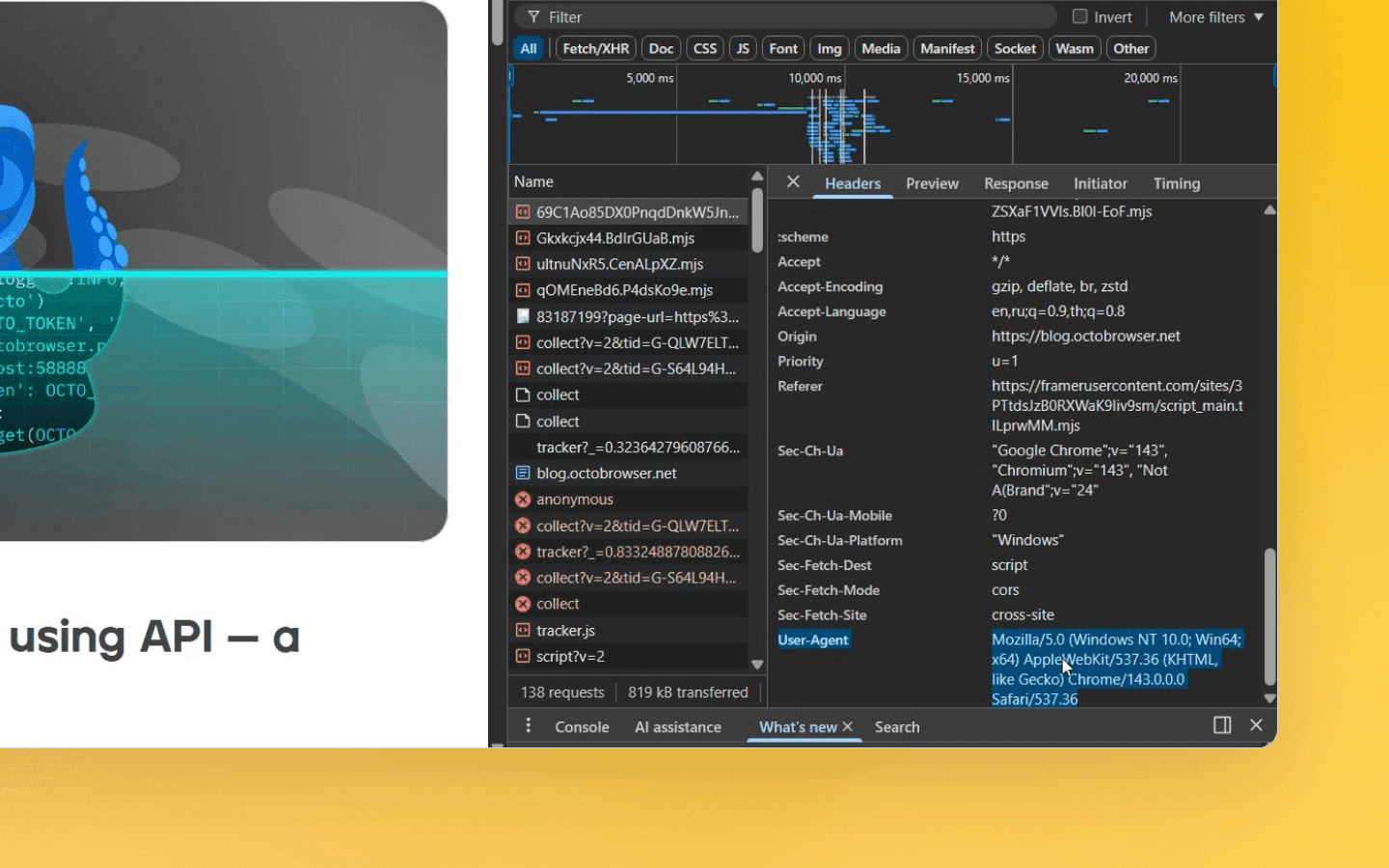
Over time, User-Agent accumulated details and legacy workarounds like Mozilla/5.0 (this specific entry has been around since the 1990s). This led to:
Parsing complexity. Since the User-Agent format is not standardized, parsing the string requires regular expressions, which are not always reliable. Hard-to-read User-Agent strings become a source of bugs and compatibility issues.
Privacy data leakage. User-Agent transmits a large amount of information, and it is sent with every request. These details allow user tracking: the exact browser version, device model, and bitness are all used by trackers for fingerprinting.
As you can see, there was a clear need to replace User-Agent with a new mechanism that would be structured and server-controlled, while preserving compatibility and improving privacy.
Further we will use the term entropy. In the context of UA-CH, it refers to the degree of uniqueness of the transmitted information. The higher the entropy of a parameter set, the higher the chance that the browser will have a unique fingerprint, which in turn helps antifraud systems recognize it among many other profiles.
User-Agent Client Hints (UA-CH) are a specialized set of client hints that transmit browser and device characteristics. Instead of a single UA string, the browser sends a set of structured headers with the Sec-CH-UA-* prefix, including:
Sec-CH-UA— a list of browser brands and their versions.Sec-CH-UA-Mobile ?0or?1— indicates whether the current browser is considered mobile.Sec-CH-UA-Platform— the operating system name (Windows, Android, macOS).Sec-CH-UA-Platform-Version,Sec-CH-UA-Arch,Sec-CH-UA-Bitness,Sec-CH-UA-Model,Sec-CH-UA-Full-Version-List— high-entropy hints with the exact OS version, architecture, and device model. They can reveal more unique information and therefore are only sent upon explicit server request.
Some hints are considered low-entropy: they are sent immediately and do not provide unique information (browser brand, platform, mobile indicator).
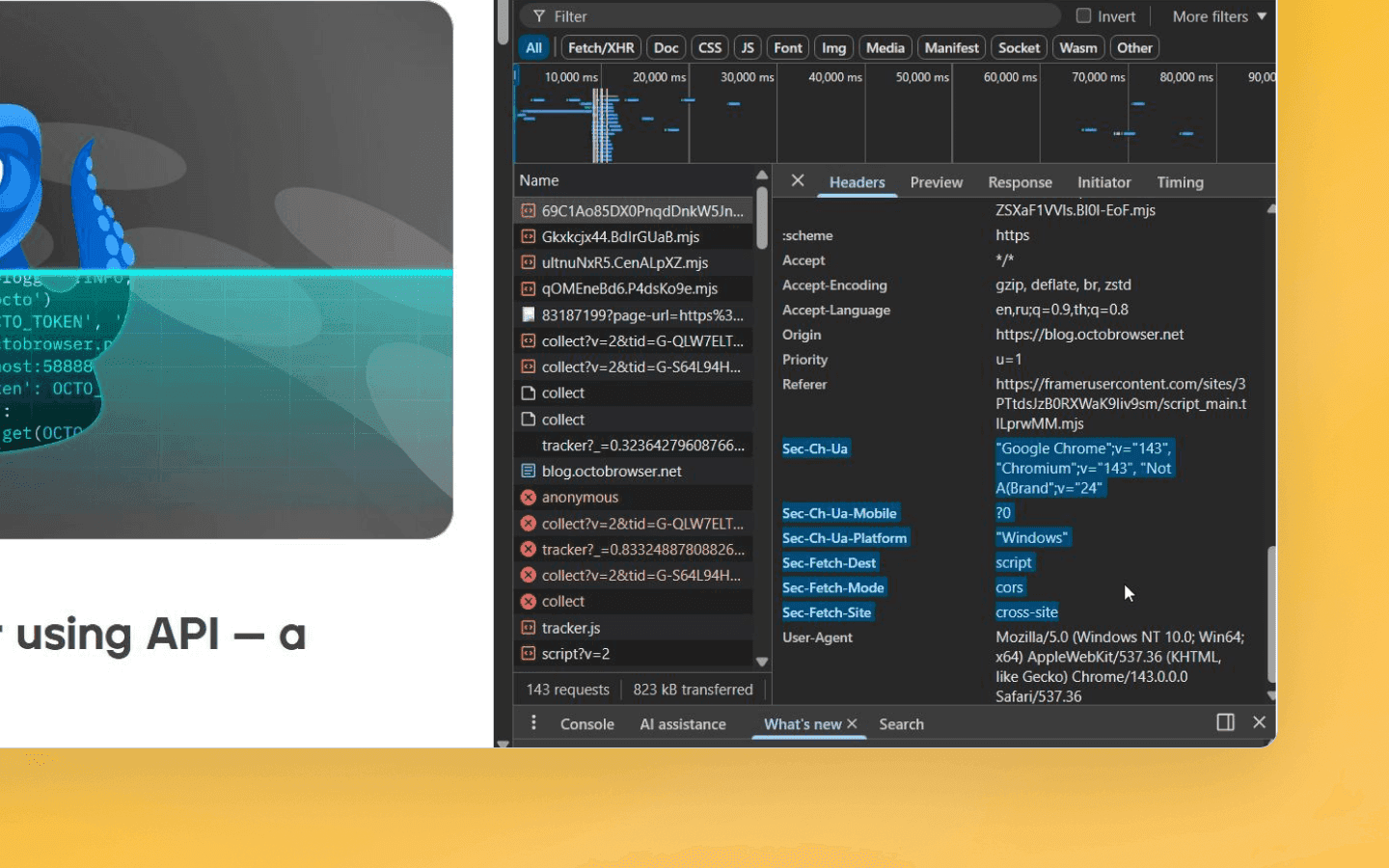
High-entropy hints (exact OS version, device model, architecture, and bitness) are sent by the browser only after an explicit Accept-CH request, because they provide more unique data. This way, UA-CH allow transmitting the same and even additional information compared to User-Agent, but in a more privacy-aware and server-controlled manner. That said, “control” is somewhat overstated, because technically UA-CH can transmit much more information than UA alone, and nothing prevents a server from requesting all of it via additional requests. From a data handling perspective, UA-CH are more convenient and structured than a long string, but privacy concerns still remain.
How the Client Hints exchange works
In practice, the UA-CH lifecycle looks like this:
The first request
On the first request, the browser adds low-entropy hints to the headers by default:
Sec-CH-UA: "Google Chrome";v="137", "Chromium";v="137", "Not/A)Brand";v="24"
Sec-CH-UA-Mobile: ?0
Sec-CH-UA-Platform: "Windows"
Sec-CH-UA: "Google Chrome";v="137", "Chromium";v="137", "Not/A)Brand";v="24"
Sec-CH-UA-Mobile: ?0
Sec-CH-UA-Platform: "Windows"
This is the basic set of data about the browser brand and operating system.
Server response
In its response, the server may specify an Accept-CH header listing the additional hints it needs. For example:
Accept-CH: Sec-CH-UA-Platform-Version, Sec-CH-UA-Arch, Sec-CH-UA-Model
Accept-CH: Sec-CH-UA-Platform-Version, Sec-CH-UA-Arch, Sec-CH-UA-Model
This is a command to request the OS version, architecture, and model. The browser then caches this requirement and, in subsequent requests to the same domain, adds these headers.
Subsequent requests
The following request will already look like this:
Sec-CH-UA-Platform-Version: "10.0"
Sec-CH-UA-Arch: "x86"
Sec-CH-UA-Model: ""
Sec-CH-UA-Platform-Version: "10.0"
Sec-CH-UA-Arch: "x86"
Sec-CH-UA-Model: ""
In the end, the server receives only general information on the first request, and everything else is added on subsequent navigations after the Accept-CH request.
For CDNs and proxies to correctly cache different content versions, the server must also add Vary: Sec-CH-UA-Platform-Version, Sec-CH-UA-Arch. This is required, for example, if the website serves different JavaScript builds for ARM and x86.
What about the JavaScript API?
In addition to HTTP headers, UA-CH hints are also available in browser JavaScript. In Chromium-based browsers, there is the navigator.userAgentData object, which immediately provides low-entropy data:
const brands = navigator.userAgentData?.brands;  // [{brand: 'Chromium', version: '137'}, ...]
const mobile = navigator.userAgentData?.mobile;  // true/false
const platform = navigator.userAgentData?.platform;  // "Windows"
const brands = navigator.userAgentData?.brands;  // [{brand: 'Chromium', version: '137'}, ...]
const mobile = navigator.userAgentData?.mobile;  // true/false
const platform = navigator.userAgentData?.platform;  // "Windows"
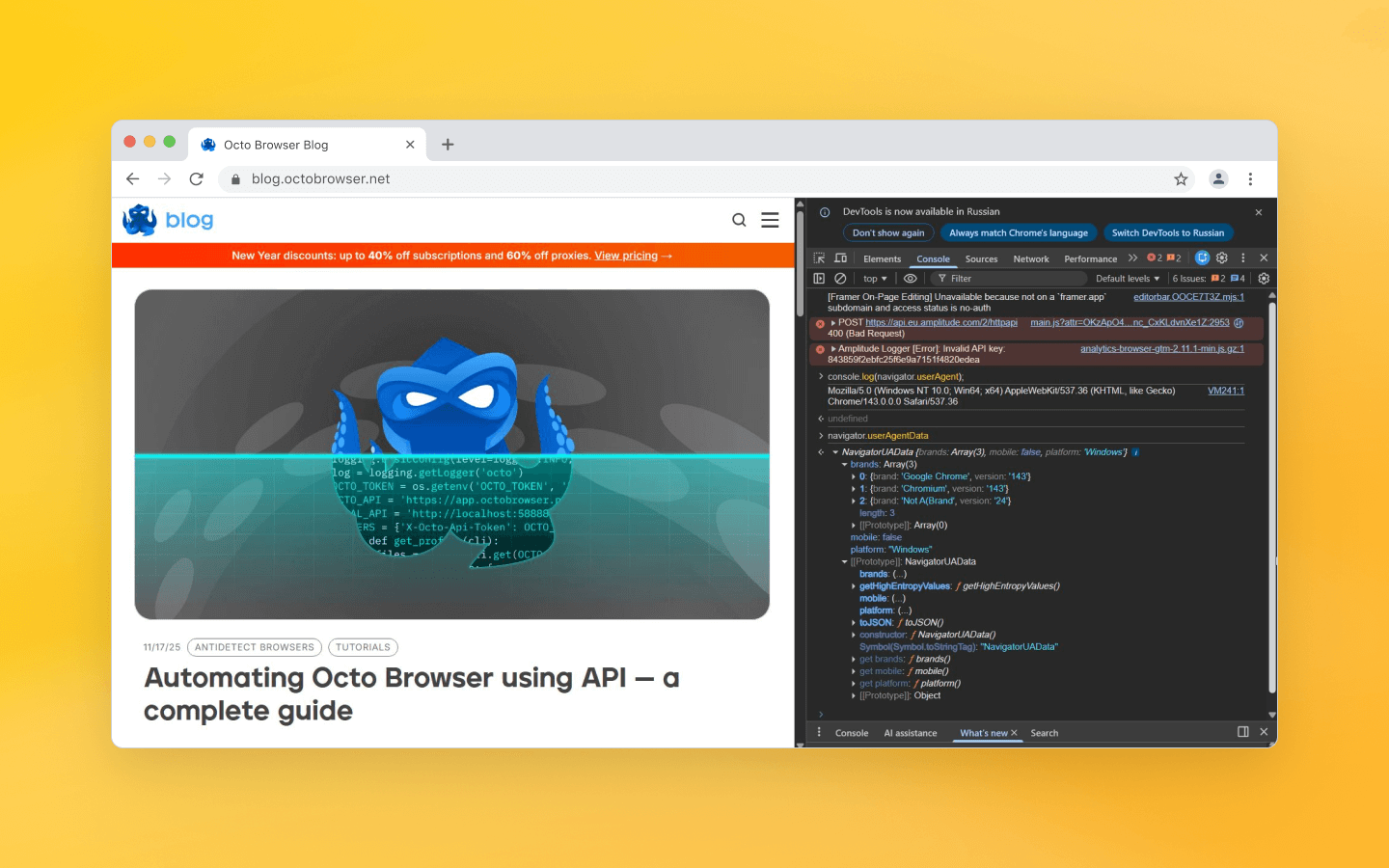
To obtain detailed (high-entropy) fields, a promise — a special object that describes how to work with the data — is invoked:
navigator.userAgentData.getHighEntropyValues([
  'architecture','bitness','model','platformVersion','fullVersionList','wow64'
]).then(ua => {
  console.log(ua.architecture);     // "x86"
  console.log(ua.bitness);          // "64"
  console.log(ua.platformVersion);  // "10.0"
  console.log(ua.model);            // device model or empty
  console.log(ua.fullVersionList);  // array of full versions
});
navigator.userAgentData.getHighEntropyValues([
  'architecture','bitness','model','platformVersion','fullVersionList','wow64'
]).then(ua => {
  console.log(ua.architecture);     // "x86"
  console.log(ua.bitness);          // "64"
  console.log(ua.platformVersion);  // "10.0"
  console.log(ua.model);            // device model or empty
  console.log(ua.fullVersionList);  // array of full versions
});
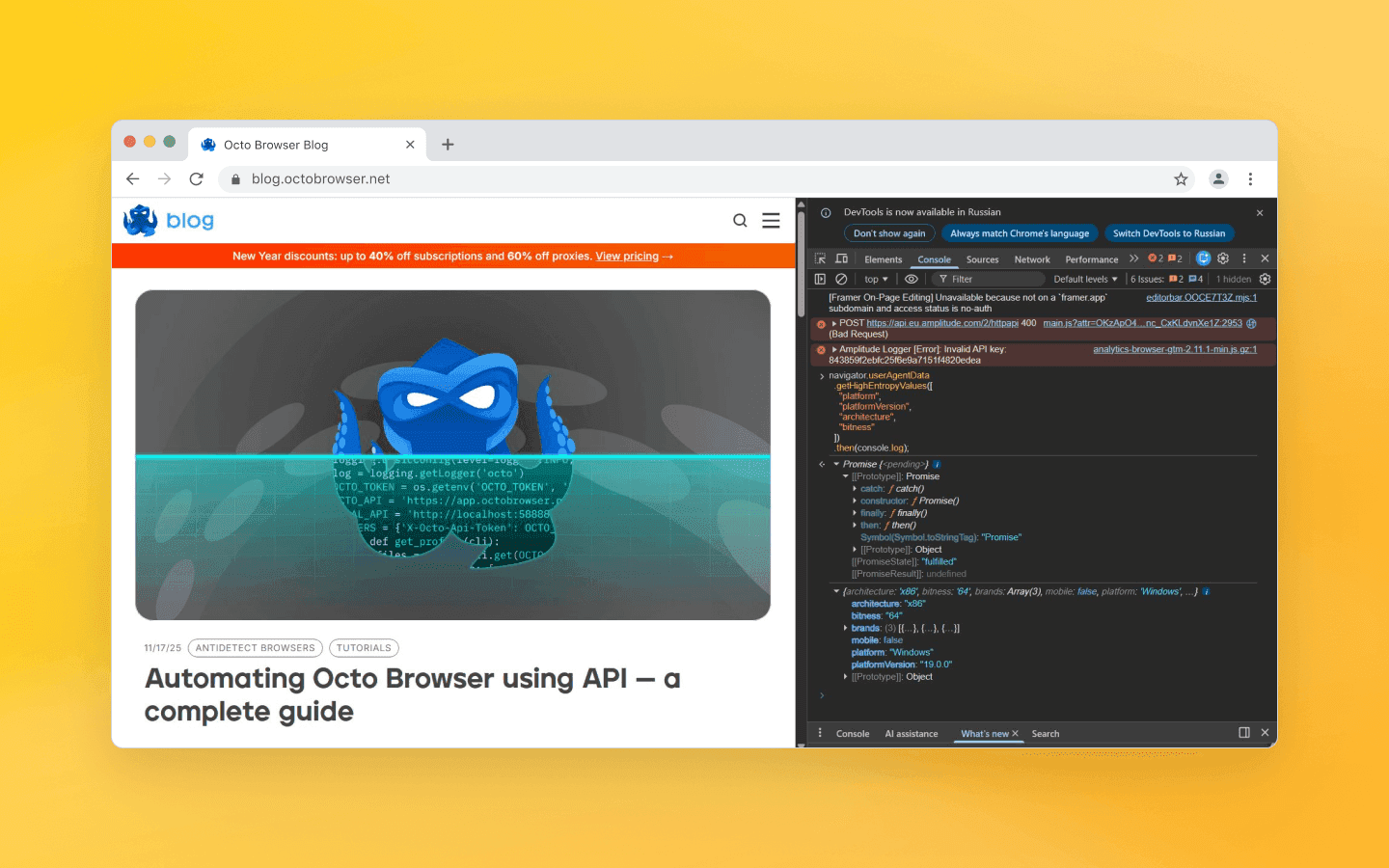
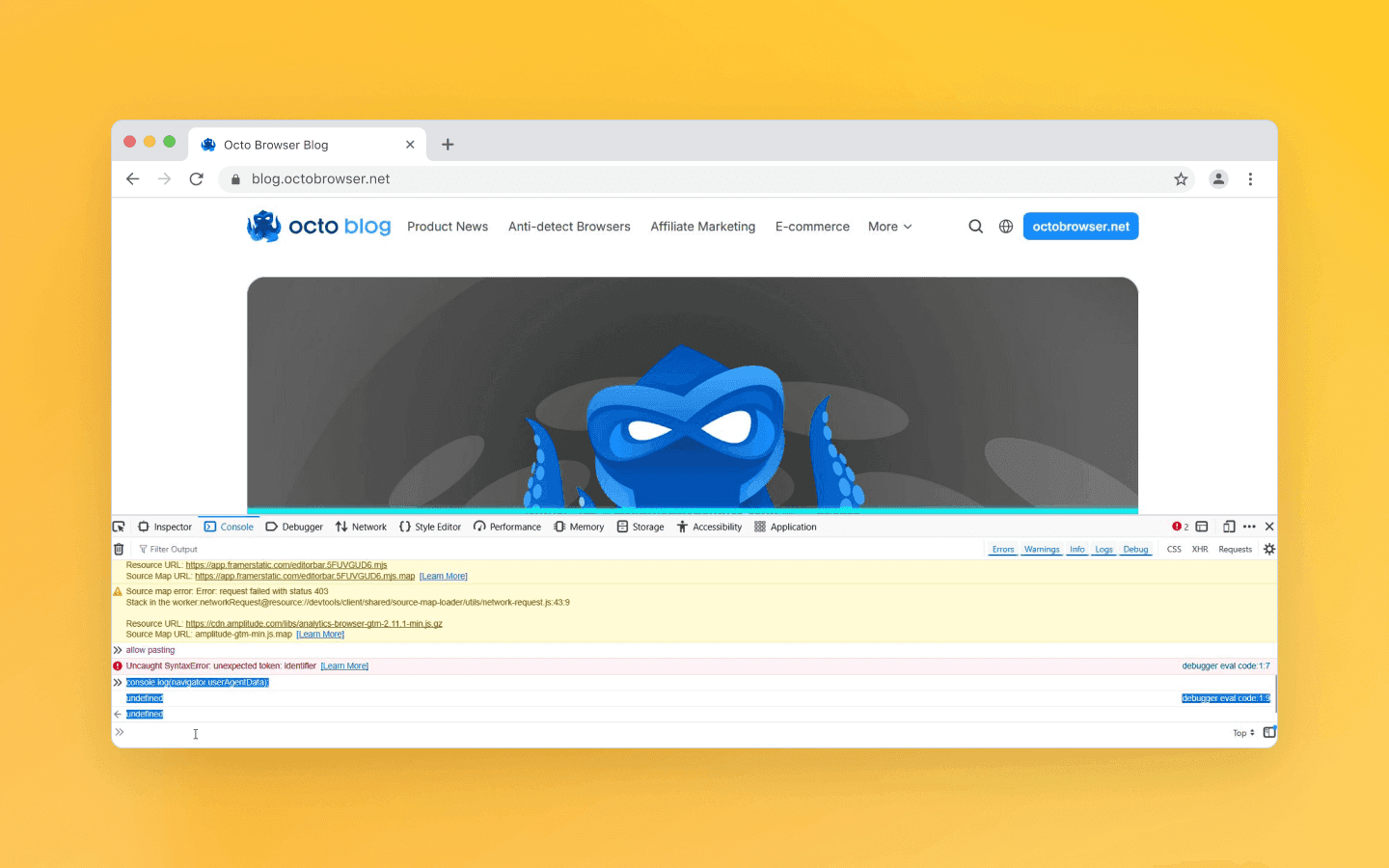
It is important to note that this API is supported only in Chromium browsers (it is not available in Safari or Firefox), so the code must include a fallback to the classic navigator.userAgent, at least for the foreseeable future. On the server side, it is also important to check for the presence of Sec-CH-UA-* headers, because without them you will have to rely on parsing the old User-Agent.
User-Agent vs UA-CH
Let’s look at the key differences between the classic User-Agent and the new Client Hints approach:
Feature | User‑Agent | UA‑CH (Client Hints) |
Format | one long string | a set of structured headers |
Transmission | always sent with every request | only the fields requested by the server are sent |
Expandability | difficult to expand, any new parameter can break parsers | flexible, new hints can be added on demand |
Server-side parsing | requires regular expressions | headers are read directly |
Browser support | all browsers | Chromium-based browsers (Chrome 89+, Edge, Opera) |
First-load accuracy | full information immediately | only basic hints first, details later |
Server control | none | the server decides what to request |
Fingerprinting risk | high | reduced, but not fully eliminated |
Format: UA is one long string; UA-CH is a set of structured HTTP headers (with the
Sec-CH-UA-*prefix).Transmission: UA is sent with every request; UA-CH only sends what the server explicitly requests. The browser itself decides which fields to add when needed.
Extensibility: the classic UA is hard to extend (any new parameter can break parsers); UA-CH is a more flexible protocol—new hints can be added without breaking existing ones, since the server explicitly requests them.
Parsing: the UA string has to be manually split and parsed (using regular expressions); UA-CH are read directly from headers, which is simpler and more reliable.
Support: UA is understood by all browsers; UA-CH are implemented by default in Chromium-based browsers (Chrome 89+, Octo Browser, Edge, Opera, Brave, Vivaldi, and others on the same engine), but are not supported by Safari and Firefox by default.
First-load accuracy: the classic UA provides full information immediately; UA-CH provide only basic hints on the first request, with details becoming available only after a server-side request (this is important to consider when selecting content versions).
Server control: UA does not allow the server to choose what data is sent—everything is always transmitted; with UA-CH, the server itself decides in
Accept-CHwhich fields it needs.Fingerprinting risk: UA-CH expose less unique information to trackers, but this does not eliminate other user-uniqueness methods (language, time zone, Canvas/WebGL, etc.). UA-CH only reduce the amount of data disclosed at the initial stage, but do not fully solve the fingerprinting problem.
In summary, UA-CH allow collecting the required information in a more deliberate and privacy-aware way, which simplifies development and increases flexibility. However, the transition will clearly take time. It feels like the hybrid approach will be around for a while: where UA-CH are available, they will be used, and everywhere else, the old User-Agent will continue to be parsed.
Practical recommendations
Do not request everything at once. If you specify all hints in
Accept-CH, it starts to resemble fingerprinting. Request only what you actually need. For example, adaptive images benefit fromSec-CH-Viewport-Width,Sec-CH-DPR, andSec-CH-Width; interface adaptation usesSec-CH-UA-MobileandSec-CH-UA-Platform; traffic optimization usesSec-CH-Save-Data,Sec-CH-RTT, andSec-CH-ECT. Avoid unnecessary probes like requesting all device and memory hints at once, as this can trigger protection systems.Do not forget about caching. If you vary content based on Client Hints, always include
Varyfor those headers. For example, if you differentiate content bySec-CH-UA-MobileandSec-CH-Viewport-Width, the response must includeVary: Sec-CH-UA-Mobile, Sec-CH-Viewport-Width. Otherwise, a CDN or proxy may cache the response without accounting for the required hints and serve an incorrect version.Avoid frequent changes. The browser caches
Accept-CH. Do not request different hints on every page, as this increases header overhead.Fallback is mandatory. UA-CH do not yet cover the entire market. By default, it is better to read
Sec-CH-UA-*ornavigator.userAgentData, and if they are not available, fall back to parsing the classicUser-Agent. Do not rely on UA-CH as a mandatory source.
Conclusions
User-Agent Client Hints are not just another header, but an attempt to completely rethink the outdated single-string model. With UA-CH, client data is transmitted in a structured way and on demand, which:
simplifies the developer’s work;
creates opportunities for further industry development.
The key benefit of UA-CH for parser developers and users of anti-detect browsers today is the balance between the necessary information and ease of use.
Maintain your online anonymity with Octo Browser. Your real digital fingerprint cannot be tracked.
Would you like to try Octo Browser at discount?
Use the promo code OCTOSCRAPER to get 30% off any subscription. This offer is valid only for new users.
Client Hints and User-Agent Client Hints
Although the Client Hints mechanism appeared back in 2013, it was used for optimizing content delivery and did not concern browser identification. Only with the introduction of User-Agent Client Hints did it start to be considered as an alternative to the standard User-Agent.
The Client Hints approach is implemented in Chromium-based browsers: the server requests hints, and the browser decides what to return. This means that, by default, the browser does not send any extra data and only provides the information explicitly requested by the server. The simplest example is that developers can avoid complex parsing of the User-Agent string and instead use simple headers, without relying on regular expressions.
Over time, User-Agent accumulated details and legacy workarounds like Mozilla/5.0 (this specific entry has been around since the 1990s). This led to:
Parsing complexity. Since the User-Agent format is not standardized, parsing the string requires regular expressions, which are not always reliable. Hard-to-read User-Agent strings become a source of bugs and compatibility issues.
Privacy data leakage. User-Agent transmits a large amount of information, and it is sent with every request. These details allow user tracking: the exact browser version, device model, and bitness are all used by trackers for fingerprinting.
As you can see, there was a clear need to replace User-Agent with a new mechanism that would be structured and server-controlled, while preserving compatibility and improving privacy.
Further we will use the term entropy. In the context of UA-CH, it refers to the degree of uniqueness of the transmitted information. The higher the entropy of a parameter set, the higher the chance that the browser will have a unique fingerprint, which in turn helps antifraud systems recognize it among many other profiles.
User-Agent Client Hints (UA-CH) are a specialized set of client hints that transmit browser and device characteristics. Instead of a single UA string, the browser sends a set of structured headers with the Sec-CH-UA-* prefix, including:
Sec-CH-UA— a list of browser brands and their versions.Sec-CH-UA-Mobile ?0or?1— indicates whether the current browser is considered mobile.Sec-CH-UA-Platform— the operating system name (Windows, Android, macOS).Sec-CH-UA-Platform-Version,Sec-CH-UA-Arch,Sec-CH-UA-Bitness,Sec-CH-UA-Model,Sec-CH-UA-Full-Version-List— high-entropy hints with the exact OS version, architecture, and device model. They can reveal more unique information and therefore are only sent upon explicit server request.
Some hints are considered low-entropy: they are sent immediately and do not provide unique information (browser brand, platform, mobile indicator).
High-entropy hints (exact OS version, device model, architecture, and bitness) are sent by the browser only after an explicit Accept-CH request, because they provide more unique data. This way, UA-CH allow transmitting the same and even additional information compared to User-Agent, but in a more privacy-aware and server-controlled manner. That said, “control” is somewhat overstated, because technically UA-CH can transmit much more information than UA alone, and nothing prevents a server from requesting all of it via additional requests. From a data handling perspective, UA-CH are more convenient and structured than a long string, but privacy concerns still remain.
How the Client Hints exchange works
In practice, the UA-CH lifecycle looks like this:
The first request
On the first request, the browser adds low-entropy hints to the headers by default:
Sec-CH-UA: "Google Chrome";v="137", "Chromium";v="137", "Not/A)Brand";v="24"
Sec-CH-UA-Mobile: ?0
Sec-CH-UA-Platform: "Windows"
This is the basic set of data about the browser brand and operating system.
Server response
In its response, the server may specify an Accept-CH header listing the additional hints it needs. For example:
Accept-CH: Sec-CH-UA-Platform-Version, Sec-CH-UA-Arch, Sec-CH-UA-Model
This is a command to request the OS version, architecture, and model. The browser then caches this requirement and, in subsequent requests to the same domain, adds these headers.
Subsequent requests
The following request will already look like this:
Sec-CH-UA-Platform-Version: "10.0"
Sec-CH-UA-Arch: "x86"
Sec-CH-UA-Model: ""
In the end, the server receives only general information on the first request, and everything else is added on subsequent navigations after the Accept-CH request.
For CDNs and proxies to correctly cache different content versions, the server must also add Vary: Sec-CH-UA-Platform-Version, Sec-CH-UA-Arch. This is required, for example, if the website serves different JavaScript builds for ARM and x86.
What about the JavaScript API?
In addition to HTTP headers, UA-CH hints are also available in browser JavaScript. In Chromium-based browsers, there is the navigator.userAgentData object, which immediately provides low-entropy data:
const brands = navigator.userAgentData?.brands;  // [{brand: 'Chromium', version: '137'}, ...]
const mobile = navigator.userAgentData?.mobile;  // true/false
const platform = navigator.userAgentData?.platform;  // "Windows"
To obtain detailed (high-entropy) fields, a promise — a special object that describes how to work with the data — is invoked:
navigator.userAgentData.getHighEntropyValues([
  'architecture','bitness','model','platformVersion','fullVersionList','wow64'
]).then(ua => {
  console.log(ua.architecture);     // "x86"
  console.log(ua.bitness);          // "64"
  console.log(ua.platformVersion);  // "10.0"
  console.log(ua.model);            // device model or empty
  console.log(ua.fullVersionList);  // array of full versions
});
It is important to note that this API is supported only in Chromium browsers (it is not available in Safari or Firefox), so the code must include a fallback to the classic navigator.userAgent, at least for the foreseeable future. On the server side, it is also important to check for the presence of Sec-CH-UA-* headers, because without them you will have to rely on parsing the old User-Agent.
User-Agent vs UA-CH
Let’s look at the key differences between the classic User-Agent and the new Client Hints approach:
Feature | User‑Agent | UA‑CH (Client Hints) |
Format | one long string | a set of structured headers |
Transmission | always sent with every request | only the fields requested by the server are sent |
Expandability | difficult to expand, any new parameter can break parsers | flexible, new hints can be added on demand |
Server-side parsing | requires regular expressions | headers are read directly |
Browser support | all browsers | Chromium-based browsers (Chrome 89+, Edge, Opera) |
First-load accuracy | full information immediately | only basic hints first, details later |
Server control | none | the server decides what to request |
Fingerprinting risk | high | reduced, but not fully eliminated |
Format: UA is one long string; UA-CH is a set of structured HTTP headers (with the
Sec-CH-UA-*prefix).Transmission: UA is sent with every request; UA-CH only sends what the server explicitly requests. The browser itself decides which fields to add when needed.
Extensibility: the classic UA is hard to extend (any new parameter can break parsers); UA-CH is a more flexible protocol—new hints can be added without breaking existing ones, since the server explicitly requests them.
Parsing: the UA string has to be manually split and parsed (using regular expressions); UA-CH are read directly from headers, which is simpler and more reliable.
Support: UA is understood by all browsers; UA-CH are implemented by default in Chromium-based browsers (Chrome 89+, Octo Browser, Edge, Opera, Brave, Vivaldi, and others on the same engine), but are not supported by Safari and Firefox by default.
First-load accuracy: the classic UA provides full information immediately; UA-CH provide only basic hints on the first request, with details becoming available only after a server-side request (this is important to consider when selecting content versions).
Server control: UA does not allow the server to choose what data is sent—everything is always transmitted; with UA-CH, the server itself decides in
Accept-CHwhich fields it needs.Fingerprinting risk: UA-CH expose less unique information to trackers, but this does not eliminate other user-uniqueness methods (language, time zone, Canvas/WebGL, etc.). UA-CH only reduce the amount of data disclosed at the initial stage, but do not fully solve the fingerprinting problem.
In summary, UA-CH allow collecting the required information in a more deliberate and privacy-aware way, which simplifies development and increases flexibility. However, the transition will clearly take time. It feels like the hybrid approach will be around for a while: where UA-CH are available, they will be used, and everywhere else, the old User-Agent will continue to be parsed.
Practical recommendations
Do not request everything at once. If you specify all hints in
Accept-CH, it starts to resemble fingerprinting. Request only what you actually need. For example, adaptive images benefit fromSec-CH-Viewport-Width,Sec-CH-DPR, andSec-CH-Width; interface adaptation usesSec-CH-UA-MobileandSec-CH-UA-Platform; traffic optimization usesSec-CH-Save-Data,Sec-CH-RTT, andSec-CH-ECT. Avoid unnecessary probes like requesting all device and memory hints at once, as this can trigger protection systems.Do not forget about caching. If you vary content based on Client Hints, always include
Varyfor those headers. For example, if you differentiate content bySec-CH-UA-MobileandSec-CH-Viewport-Width, the response must includeVary: Sec-CH-UA-Mobile, Sec-CH-Viewport-Width. Otherwise, a CDN or proxy may cache the response without accounting for the required hints and serve an incorrect version.Avoid frequent changes. The browser caches
Accept-CH. Do not request different hints on every page, as this increases header overhead.Fallback is mandatory. UA-CH do not yet cover the entire market. By default, it is better to read
Sec-CH-UA-*ornavigator.userAgentData, and if they are not available, fall back to parsing the classicUser-Agent. Do not rely on UA-CH as a mandatory source.
Conclusions
User-Agent Client Hints are not just another header, but an attempt to completely rethink the outdated single-string model. With UA-CH, client data is transmitted in a structured way and on demand, which:
simplifies the developer’s work;
creates opportunities for further industry development.
The key benefit of UA-CH for parser developers and users of anti-detect browsers today is the balance between the necessary information and ease of use.
Stay up to date with the latest Octo Browser news
By clicking the button you agree to our Privacy Policy.
Stay up to date with the latest Octo Browser news
By clicking the button you agree to our Privacy Policy.
Stay up to date with the latest Octo Browser news
By clicking the button you agree to our Privacy Policy.

Join Octo Browser now
Or contact Customer Service at any time with any questions you might have.
Join Octo Browser now
Or contact Customer Service at any time with any questions you might have.
Join Octo Browser now
Or contact Customer Service at any time with any questions you might have.