Comparing IPv4 and IPv6: from network architecture to bypassing blocks

Markus_automation
Expert in data parsing and automation
If you work with automation, multi-accounting, or affiliate marketing, you inevitably deal with IPv4 and IPv6. These protocols form the basis of any network infrastructure, yet their differences are often overlooked.
Meanwhile, if you don’t understand how network protocols function at the architecture and routing level, a wrong choice can lead to increased costs, reduced ROI, and scaling issues.
In this article, we will examine the differences between IPv4 and IPv6, look at their behavior in real-world scenarios, and explain why the industry is still in a transition phase despite the formal superiority of IPv6.
Contents
Maintain your online anonymity with Octo Browser. Your real digital fingerprint cannot be tracked.
Would you like to try Octo Browser at discount?
Use the promo code OCTOBLOG to get 30% off any subscription. This offer is valid only for new users.
Architecture and operating principles: from subnet masks to autoconfiguration
The easiest way to explain a complex technical concept is through analogy. Let’s imagine that the global network is a giant delivery service. Network-layer protocols are the main sorting center. This layer doesn’t care what exactly you are sending: an account password, a JSON file during scraping, or a piece of HTML code from a website. Its only task is to take your data, package it into a network packet, and attach a label with the exact IP addresses of the sender and recipient.
The protocol architecture defines what this packet looks like and the rules by which it is moved:
Packet structure: how much space is allocated on the “envelope” for the address (32 bits in IPv4 or 128 bits in IPv6), whether there are priority labels, and whether transit “couriers” (routers) need to recalculate the package weight (checksum) at every station.
Delivery logic: how intermediate nodes pass the packet to each other so that it reaches the server via the shortest and safest path.
How does the classic IPv4 work?
Launched in 1983, this protocol gave us a 32-bit address space, meaning about 4.3 billion combinations in the familiar dotted decimal format (e.g., 192.168.1.1). At the time, it seemed that this volume would be enough forever. However, today it is clear that with IPv4 there aren’t even enough addresses for all smart devices.
In addition to the address shortage problem, IPv4 architecture is quite heavy and requires constant management:
Routing workarounds: to conserve scarce IP addresses, they must be strictly divided into logical segments (network address + specific node address). Subnet masks are used for this. Without them, providers simply wouldn’t be able to route traffic properly.
Heavy headers: every time your script sends an HTTP request, the network stack builds a bulky header. It includes the version, length, and most importantly, the checksum.
The checksum is a header field that verifies its integrity (absence of transmission errors). In IPv6, this field was removed: data integrity is handled at higher levels (TCP/UDP), while the link layer reliably protects frames from distortion.
On-the-fly recalculation: each transit router along the packet path modifies the TTL (time to live) parameter and therefore must recalculate the header checksum again. At gigabit speeds, this creates a heavy and unnecessary load on hardware. Only after recalculation is your actual payload attached, and the formed datagram is sent into the network.
Note that IPv6 no longer includes the Header Checksum field. Routers no longer need to spend CPU time recalculating the checksum at every step. The new header also removed the Identification, Flags, and Fragment Offset fields responsible for reassembling fragmented packets, which further saves time.
What is the fundamental difference of IPv6?
The new standard uses a 128-bit space, providing a mathematically inexhaustible pool of addresses. Moreover, the changes affect not only length but also the mechanics of operation:
Syntax: the format changed to hexadecimal, where blocks are separated by colons (
2001:0db8:85a3::8a2e:0370:7334), requiring adaptation of regular expressions during automated processing and scraping.
C:\Users\Admin> ipconfig

Windows IP Configuration
Wireless LAN adapter:

   Connection-specific DNS Suffix . . .:
   IPv6 Address. . . . . . . . . . . . : 2001:0db8:85a3:0000:0000:8a2e:0370:7334
   Link-local IPv6 Address . . . . . . : fe80::a1b2:c3d4:e5f6:7890%12
   IPv4 Address. . . . . . . . . . . . : 192.168.1.45
   Subnet Mask . . . . . . . . . . . . : 255.255.255.0
   Default Gateway. . . . . . . . . .  : 192.168.1.1
C:\Users\Admin> ipconfig

Windows IP Configuration
Wireless LAN adapter:

   Connection-specific DNS Suffix . . .:
   IPv6 Address. . . . . . . . . . . . : 2001:0db8:85a3:0000:0000:8a2e:0370:7334
   Link-local IPv6 Address . . . . . . : fe80::a1b2:c3d4:e5f6:7890%12
   IPv4 Address. . . . . . . . . . . . : 192.168.1.45
   Subnet Mask . . . . . . . . . . . . : 255.255.255.0
   Default Gateway. . . . . . . . . .  : 192.168.1.1
Rejection of Broadcast: multicast completely replaced broadcast requests. Devices no longer waste CPU resources processing irrelevant broadcast traffic.
SLAAC instead of DHCP: the protocol integrates the SLAAC autoconfiguration mechanism, allowing end devices to independently generate a valid IP address without a dedicated server.
Stateless address autoconfiguration (SLAAC) allows devices to independently generate their IPv6 addresses based on prefixes announced by routers. It is suitable for networks requiring minimal administrator involvement.
Dynamic host configuration protocol (DHCP) provides centralized control over address allocation and additional network parameters. It is preferred in environments where strict control over address space and client settings is required.
Simplified header: the checksum was removed from the header structure, significantly speeding up packet processing on transit routers.
Comparative analysis: security or scalability?
Let’s examine the differences between the two protocols at the application level.
Address space distribution and NAT
The exhaustion of the old address pool has led to hyperinflation of their cost on the secondary market. Registrars limit the allocation of 32-bit blocks due to their physical scarcity, and Internet providers are forced to massively implement multi-level translation systems (CGNAT) to hide thousands of users behind a single public IP.
In the new IPv6 standard, there are enough addresses to issue billions of unique IPs by default. This completely changes the rules of the game: data centers and servers no longer need to conserve addresses or invent complex allocation schemes, as there are enough unique IPs for every device.
IPsec: evolution of security
When using IPv4, data is transmitted like text on a postcard by default at the base network level: any intermediate node or attacker can read the message along the way.
That is why additional security layers on top of the base network layer are required. Common examples include secure website connections (the HTTPS lock icon you see in the browser), end-to-end encrypted messengers (like WhatsApp or Telegram secret chats), or VPN services that hide traffic on public Wi-Fi networks. In other words, responsibility for data security lies with specific websites and applications, not the Internet itself.
With IPv6, security is embedded into the protocol itself. The network can automatically encrypt data, and devices can establish secure communication channels directly. Protection works at the operating system level, not just within applications.
However, it is important to understand that using IPv6 is not a guarantee of secure data transmission. The network provides powerful data security tools, but for them to work, both devices (for example, your PC and a corporate server) must be configured to use secure tunnels. If you access a regular public website that does not support secure connections (i.e., it uses the old HTTP format), your data will still be transmitted in plain text. Therefore, the HTTPS lock remains essential even with next-generation networks.
Summary of key technologies
Technology | What it is in simple terms | IPv4 (old standard) | IPv6 (new standard) |
NAT (Network Address Translation) | Allows multiple devices to access the Internet using a single public IP address. | Essential due to address scarcity. Slows down the network and prevents direct device communication. | No longer needed. Each device has its own IP address, allowing direct and fast communication without intermediaries. |
IPsec (network encryption) | A system that protects data from interception and tampering at the network level. | Optional add-on. Security had to be implemented separately with complex configurations. | Built into the foundation. Supported at the protocol level by default. |
Broadcast vs Multicast | A way of communicating within a local network when sending one message to multiple devices. | Broadcast was used: a device “shouted” to the entire network, forcing all devices to process it and spend resources. | Broadcast is removed. Instead, intelligent Multicast is used: packets are delivered only to “subscribed” devices. |
Anycast | You send a request to an address, and the nearest available server responds. | Rarely used and difficult to configure. | Standard feature. Ideal for accelerating content delivery (CDN) and DNS servers. |
SLAAC (IP autoconfiguration) | The ability of a device to assign itself an address when connecting to a Wi-Fi or cable network. | Devices depended on the router (DHCP server). If it failed, no IP could be assigned, leaving the device unconnected. | Devices can generate their own unique address by requesting a network prefix. Connection is almost instant. |
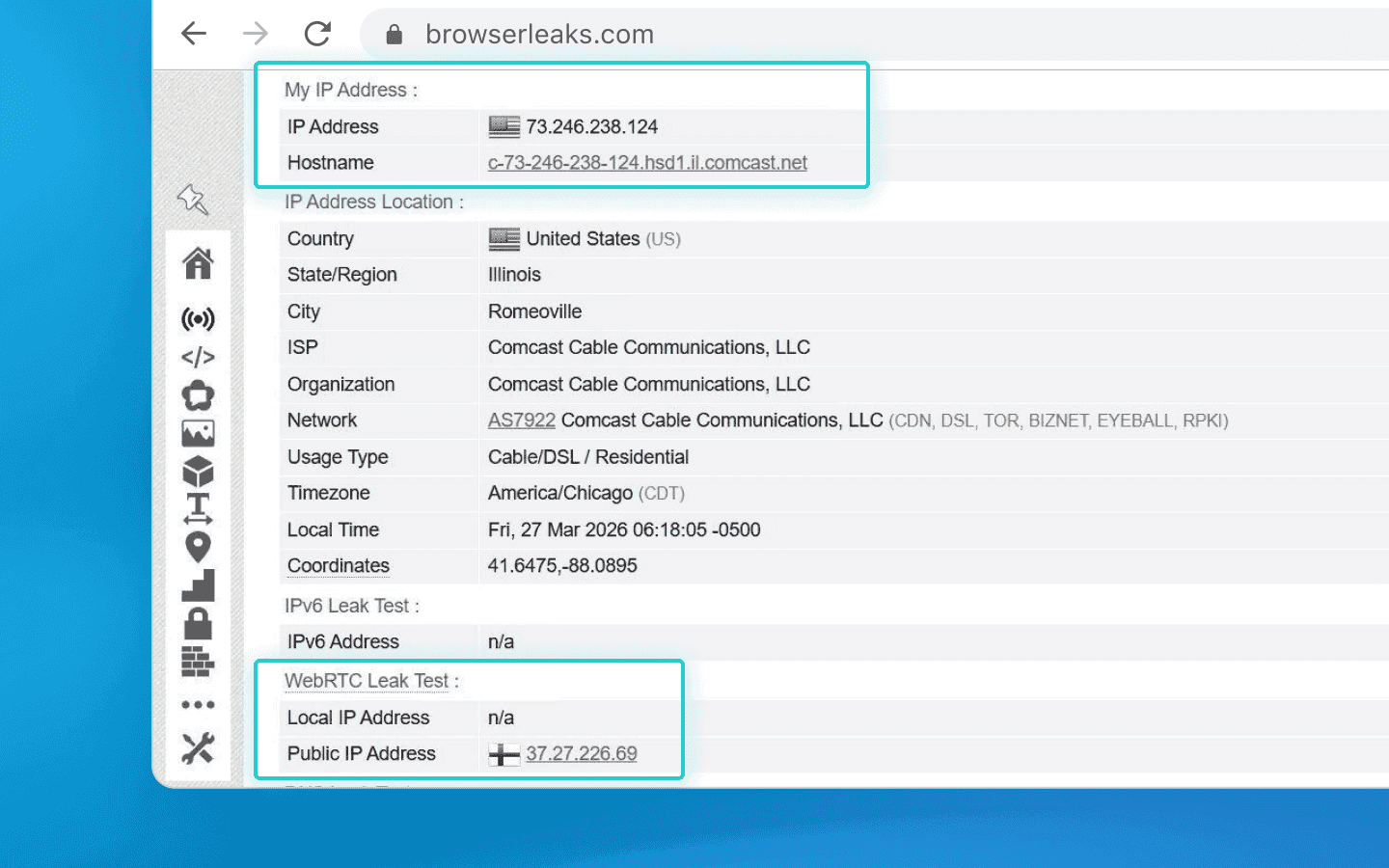
Here is how your real IP address leaks via WebRTC
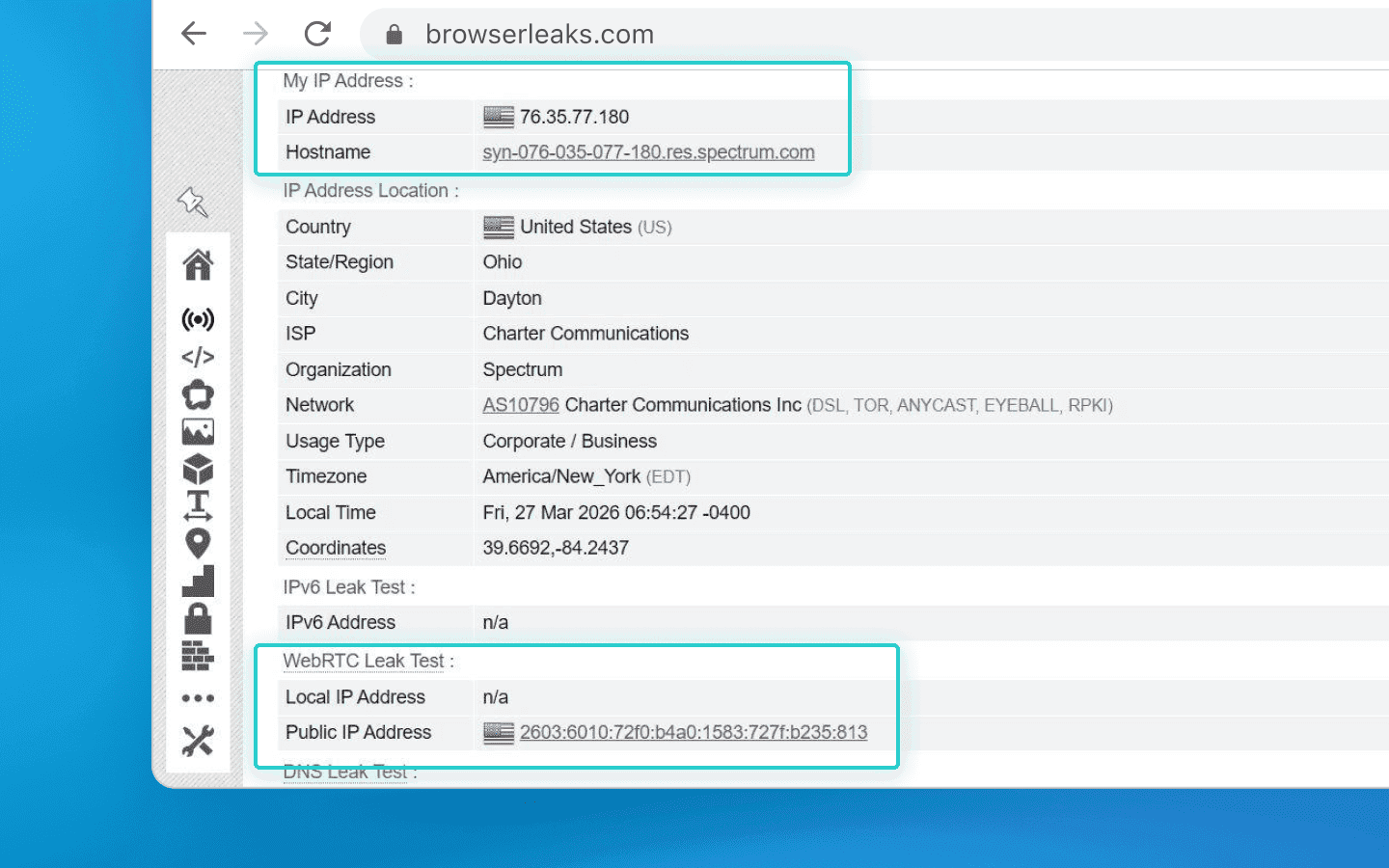
There are no leaks if you use a high-quality anti-detect browser
IPv6 for bypassing blocks and scraping
For automated data collection, IP address rotation is critical. Using IPv6 pools reduces blocking risks thanks to the virtually infinite address pool. With rare geos, IPv4 will inevitably hit limits, while IPv6 effectively removes this constraint.
However, there are still things to consider related to proper setups, as not all devices fully support IPv6.
Proxy and anti-detect browser configuration
When working with automation scripts (e.g., created using Puppeteer or Playwright) and anti-detect browsers (such as Octo Browser), it is crucial to prevent accidental leaks of your real IP address.
Modern website protection systems constantly analyze your digital fingerprint and look for its potential inconsistencies. For example, you configure your browser profile to use a purchased IPv6 proxy. But if your operating system allows even a single request to pass through your regular home IPv4, your entire spoofing fails. The website will instantly detect the inconsistency, recognize spoofing, and may flag your connection, issue a CAPTCHA, or block access entirely.
To prevent such annoying scraping issues, use reliable “airtight tunnels” for traffic (SOCKS5 proxies). They force all data through the required tunnel, leaving no chance for accidental IP leaks.
Treacherous WebRTC: how your microphone and camera can expose you
Any modern browser uses WebRTC technology for video calls and voice chats directly in the browser. To ensure fast direct connections, it can request access to available network interfaces.
This is exactly where the danger lies. Even if you configure a proxy through a secure tunnel, WebRTC may bypass it and expose your real IP address.
To manage this, automation specialists use anti-detect browsers. They do not disable WebRTC (a disabled microphone looks suspicious by default), but intercept its requests. When a website asks for your real IP address, the anti-detect browser provides the proxy server address instead. As a result, everything appears natural, as if you are connecting from a regular device in another country with consistent network parameters.
Infinite address rotation (/64 subnet) as the ultimate weapon
IPv4-based large-scale scraping typically relies on residential proxy pools. They offer millions of real addresses with good rotation, but there is a major drawback: you pay for each gigabyte of traffic. Heavy scraping tasks can quickly consume all your data. Additionally, residential IPs belong to real users, so speed and connection stability can suffer.
This is not even mentioning dedicated IPv4 addresses, which cost at least $1 per month each — and you’ll need many of them.
With IPv6, the economics are completely different. You rent an inexpensive server and receive a /64 subnet for free. That’s 18 quintillion (a number with 18 zeroes) unique IP addresses!
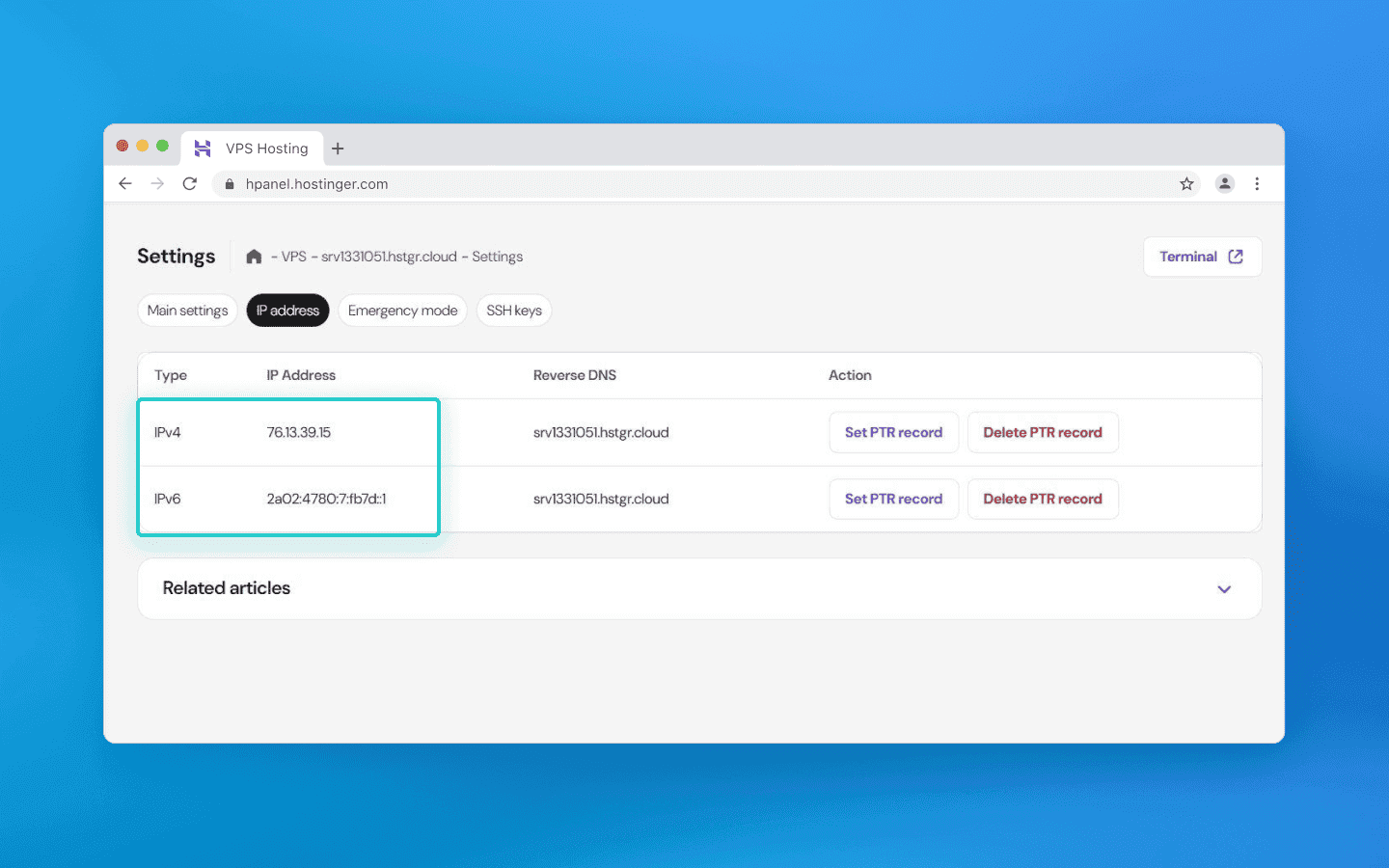
A VPS from Hostinger shows that along with IPv4, it provides a large IPv6 pool (for $30, you get a massive number of IPs).
What is the main advantage? You set up rotation directly on your server and stop paying per gigabyte to third-party services. You get a stable high-speed connection, terabytes of included traffic, and the ability to generate a new IP for every request. Proper script configuration within such a massive subnet eliminates the need for expensive IPv4 proxies.
Important: for the server to correctly respond to each of your millions of new addresses, fine-tuning system services (NDP proxy) is required. But that is a topic for another article.
Dual Stack: why IPv4 will be around for a long time
Despite all the advantages of IPv6, the old and new Internet are not fully compatible yet. A device with only an IPv6 address cannot access a website that operates solely on IPv4. To bridge this gap, providers use Dual Stack, supporting both protocols and deploying translation gateways that convert data on the fly.
Completely abandoning IPv4 is not feasible yet for three main reasons:
Provider economics: CGNAT allows thousands of users to share a single IP efficiently. While it creates issues for automation, it is cost-effective for providers compared to upgrading infrastructure.
Local networks: inside private networks, there is no address shortage. Internal addressing is sufficient, so businesses have no urgent need to migrate to a newer standard.
IoT: many IoT devices (sensors, cameras) operate locally and do not require complex IPv6 addressing, and IPv4 remains simpler for local administrators to manage.
Transitioning to IPv6 is a key competitive advantage for those working with big data and multi-accounting.
IPv4 will still be around for a long time, as the transition period continues. However, those who master the virtually infinite /64 subnets early will gain a clear advantage.
The new protocol provides a virtually unlimited supply of clean IP addresses. What remains is to stop fearing new formats, understand basic server configuration, and take advantage of this resource while others continue paying for each gigabyte they use.
Maintain your online anonymity with Octo Browser. Your real digital fingerprint cannot be tracked.
Would you like to try Octo Browser at discount?
Use the promo code OCTOBLOG to get 30% off any subscription. This offer is valid only for new users.
Architecture and operating principles: from subnet masks to autoconfiguration
The easiest way to explain a complex technical concept is through analogy. Let’s imagine that the global network is a giant delivery service. Network-layer protocols are the main sorting center. This layer doesn’t care what exactly you are sending: an account password, a JSON file during scraping, or a piece of HTML code from a website. Its only task is to take your data, package it into a network packet, and attach a label with the exact IP addresses of the sender and recipient.
The protocol architecture defines what this packet looks like and the rules by which it is moved:
Packet structure: how much space is allocated on the “envelope” for the address (32 bits in IPv4 or 128 bits in IPv6), whether there are priority labels, and whether transit “couriers” (routers) need to recalculate the package weight (checksum) at every station.
Delivery logic: how intermediate nodes pass the packet to each other so that it reaches the server via the shortest and safest path.
How does the classic IPv4 work?
Launched in 1983, this protocol gave us a 32-bit address space, meaning about 4.3 billion combinations in the familiar dotted decimal format (e.g., 192.168.1.1). At the time, it seemed that this volume would be enough forever. However, today it is clear that with IPv4 there aren’t even enough addresses for all smart devices.
In addition to the address shortage problem, IPv4 architecture is quite heavy and requires constant management:
Routing workarounds: to conserve scarce IP addresses, they must be strictly divided into logical segments (network address + specific node address). Subnet masks are used for this. Without them, providers simply wouldn’t be able to route traffic properly.
Heavy headers: every time your script sends an HTTP request, the network stack builds a bulky header. It includes the version, length, and most importantly, the checksum.
The checksum is a header field that verifies its integrity (absence of transmission errors). In IPv6, this field was removed: data integrity is handled at higher levels (TCP/UDP), while the link layer reliably protects frames from distortion.
On-the-fly recalculation: each transit router along the packet path modifies the TTL (time to live) parameter and therefore must recalculate the header checksum again. At gigabit speeds, this creates a heavy and unnecessary load on hardware. Only after recalculation is your actual payload attached, and the formed datagram is sent into the network.
Note that IPv6 no longer includes the Header Checksum field. Routers no longer need to spend CPU time recalculating the checksum at every step. The new header also removed the Identification, Flags, and Fragment Offset fields responsible for reassembling fragmented packets, which further saves time.
What is the fundamental difference of IPv6?
The new standard uses a 128-bit space, providing a mathematically inexhaustible pool of addresses. Moreover, the changes affect not only length but also the mechanics of operation:
Syntax: the format changed to hexadecimal, where blocks are separated by colons (
2001:0db8:85a3::8a2e:0370:7334), requiring adaptation of regular expressions during automated processing and scraping.
C:\Users\Admin> ipconfig

Windows IP Configuration
Wireless LAN adapter:

   Connection-specific DNS Suffix . . .:
   IPv6 Address. . . . . . . . . . . . : 2001:0db8:85a3:0000:0000:8a2e:0370:7334
   Link-local IPv6 Address . . . . . . : fe80::a1b2:c3d4:e5f6:7890%12
   IPv4 Address. . . . . . . . . . . . : 192.168.1.45
   Subnet Mask . . . . . . . . . . . . : 255.255.255.0
   Default Gateway. . . . . . . . . .  : 192.168.1.1
Rejection of Broadcast: multicast completely replaced broadcast requests. Devices no longer waste CPU resources processing irrelevant broadcast traffic.
SLAAC instead of DHCP: the protocol integrates the SLAAC autoconfiguration mechanism, allowing end devices to independently generate a valid IP address without a dedicated server.
Stateless address autoconfiguration (SLAAC) allows devices to independently generate their IPv6 addresses based on prefixes announced by routers. It is suitable for networks requiring minimal administrator involvement.
Dynamic host configuration protocol (DHCP) provides centralized control over address allocation and additional network parameters. It is preferred in environments where strict control over address space and client settings is required.
Simplified header: the checksum was removed from the header structure, significantly speeding up packet processing on transit routers.
Comparative analysis: security or scalability?
Let’s examine the differences between the two protocols at the application level.
Address space distribution and NAT
The exhaustion of the old address pool has led to hyperinflation of their cost on the secondary market. Registrars limit the allocation of 32-bit blocks due to their physical scarcity, and Internet providers are forced to massively implement multi-level translation systems (CGNAT) to hide thousands of users behind a single public IP.
In the new IPv6 standard, there are enough addresses to issue billions of unique IPs by default. This completely changes the rules of the game: data centers and servers no longer need to conserve addresses or invent complex allocation schemes, as there are enough unique IPs for every device.
IPsec: evolution of security
When using IPv4, data is transmitted like text on a postcard by default at the base network level: any intermediate node or attacker can read the message along the way.
That is why additional security layers on top of the base network layer are required. Common examples include secure website connections (the HTTPS lock icon you see in the browser), end-to-end encrypted messengers (like WhatsApp or Telegram secret chats), or VPN services that hide traffic on public Wi-Fi networks. In other words, responsibility for data security lies with specific websites and applications, not the Internet itself.
With IPv6, security is embedded into the protocol itself. The network can automatically encrypt data, and devices can establish secure communication channels directly. Protection works at the operating system level, not just within applications.
However, it is important to understand that using IPv6 is not a guarantee of secure data transmission. The network provides powerful data security tools, but for them to work, both devices (for example, your PC and a corporate server) must be configured to use secure tunnels. If you access a regular public website that does not support secure connections (i.e., it uses the old HTTP format), your data will still be transmitted in plain text. Therefore, the HTTPS lock remains essential even with next-generation networks.
Summary of key technologies
Technology | What it is in simple terms | IPv4 (old standard) | IPv6 (new standard) |
NAT (Network Address Translation) | Allows multiple devices to access the Internet using a single public IP address. | Essential due to address scarcity. Slows down the network and prevents direct device communication. | No longer needed. Each device has its own IP address, allowing direct and fast communication without intermediaries. |
IPsec (network encryption) | A system that protects data from interception and tampering at the network level. | Optional add-on. Security had to be implemented separately with complex configurations. | Built into the foundation. Supported at the protocol level by default. |
Broadcast vs Multicast | A way of communicating within a local network when sending one message to multiple devices. | Broadcast was used: a device “shouted” to the entire network, forcing all devices to process it and spend resources. | Broadcast is removed. Instead, intelligent Multicast is used: packets are delivered only to “subscribed” devices. |
Anycast | You send a request to an address, and the nearest available server responds. | Rarely used and difficult to configure. | Standard feature. Ideal for accelerating content delivery (CDN) and DNS servers. |
SLAAC (IP autoconfiguration) | The ability of a device to assign itself an address when connecting to a Wi-Fi or cable network. | Devices depended on the router (DHCP server). If it failed, no IP could be assigned, leaving the device unconnected. | Devices can generate their own unique address by requesting a network prefix. Connection is almost instant. |
Here is how your real IP address leaks via WebRTC
There are no leaks if you use a high-quality anti-detect browser
IPv6 for bypassing blocks and scraping
For automated data collection, IP address rotation is critical. Using IPv6 pools reduces blocking risks thanks to the virtually infinite address pool. With rare geos, IPv4 will inevitably hit limits, while IPv6 effectively removes this constraint.
However, there are still things to consider related to proper setups, as not all devices fully support IPv6.
Proxy and anti-detect browser configuration
When working with automation scripts (e.g., created using Puppeteer or Playwright) and anti-detect browsers (such as Octo Browser), it is crucial to prevent accidental leaks of your real IP address.
Modern website protection systems constantly analyze your digital fingerprint and look for its potential inconsistencies. For example, you configure your browser profile to use a purchased IPv6 proxy. But if your operating system allows even a single request to pass through your regular home IPv4, your entire spoofing fails. The website will instantly detect the inconsistency, recognize spoofing, and may flag your connection, issue a CAPTCHA, or block access entirely.
To prevent such annoying scraping issues, use reliable “airtight tunnels” for traffic (SOCKS5 proxies). They force all data through the required tunnel, leaving no chance for accidental IP leaks.
Treacherous WebRTC: how your microphone and camera can expose you
Any modern browser uses WebRTC technology for video calls and voice chats directly in the browser. To ensure fast direct connections, it can request access to available network interfaces.
This is exactly where the danger lies. Even if you configure a proxy through a secure tunnel, WebRTC may bypass it and expose your real IP address.
To manage this, automation specialists use anti-detect browsers. They do not disable WebRTC (a disabled microphone looks suspicious by default), but intercept its requests. When a website asks for your real IP address, the anti-detect browser provides the proxy server address instead. As a result, everything appears natural, as if you are connecting from a regular device in another country with consistent network parameters.
Infinite address rotation (/64 subnet) as the ultimate weapon
IPv4-based large-scale scraping typically relies on residential proxy pools. They offer millions of real addresses with good rotation, but there is a major drawback: you pay for each gigabyte of traffic. Heavy scraping tasks can quickly consume all your data. Additionally, residential IPs belong to real users, so speed and connection stability can suffer.
This is not even mentioning dedicated IPv4 addresses, which cost at least $1 per month each — and you’ll need many of them.
With IPv6, the economics are completely different. You rent an inexpensive server and receive a /64 subnet for free. That’s 18 quintillion (a number with 18 zeroes) unique IP addresses!
A VPS from Hostinger shows that along with IPv4, it provides a large IPv6 pool (for $30, you get a massive number of IPs).
What is the main advantage? You set up rotation directly on your server and stop paying per gigabyte to third-party services. You get a stable high-speed connection, terabytes of included traffic, and the ability to generate a new IP for every request. Proper script configuration within such a massive subnet eliminates the need for expensive IPv4 proxies.
Important: for the server to correctly respond to each of your millions of new addresses, fine-tuning system services (NDP proxy) is required. But that is a topic for another article.
Dual Stack: why IPv4 will be around for a long time
Despite all the advantages of IPv6, the old and new Internet are not fully compatible yet. A device with only an IPv6 address cannot access a website that operates solely on IPv4. To bridge this gap, providers use Dual Stack, supporting both protocols and deploying translation gateways that convert data on the fly.
Completely abandoning IPv4 is not feasible yet for three main reasons:
Provider economics: CGNAT allows thousands of users to share a single IP efficiently. While it creates issues for automation, it is cost-effective for providers compared to upgrading infrastructure.
Local networks: inside private networks, there is no address shortage. Internal addressing is sufficient, so businesses have no urgent need to migrate to a newer standard.
IoT: many IoT devices (sensors, cameras) operate locally and do not require complex IPv6 addressing, and IPv4 remains simpler for local administrators to manage.
Transitioning to IPv6 is a key competitive advantage for those working with big data and multi-accounting.
IPv4 will still be around for a long time, as the transition period continues. However, those who master the virtually infinite /64 subnets early will gain a clear advantage.
The new protocol provides a virtually unlimited supply of clean IP addresses. What remains is to stop fearing new formats, understand basic server configuration, and take advantage of this resource while others continue paying for each gigabyte they use.
Stay up to date with the latest Octo Browser news
By clicking the button you agree to our Privacy Policy.
Stay up to date with the latest Octo Browser news
By clicking the button you agree to our Privacy Policy.
Stay up to date with the latest Octo Browser news
By clicking the button you agree to our Privacy Policy.

Join Octo Browser now
Or contact Customer Service at any time with any questions you might have.
Join Octo Browser now
Or contact Customer Service at any time with any questions you might have.
Join Octo Browser now
Or contact Customer Service at any time with any questions you might have.