How to create multiple Google Play developer accounts

Nikolai Izoitko
Content Manager, Octo Browser
Many mobile app developers and publishers eventually face the need to manage multiple Google Play developer accounts. Some create separate developer accounts for client projects, while others use them for different brands, teams, or monetization strategies. In large studios, this is standard practice, especially when apps are published in different regions or belong to different legal entities.
At the same time, Google takes multi-accounting very seriously. Improper workspace configuration, data overlap, or violations of platform policies can lead to access restrictions across all related accounts. That is why it is important to understand not only how to create multiple Google Play developer accounts, but also how to manage them safely in the long term. Read more in the article below.
Contents
Stay anonymous, take advantage of multi-accounting, and achieve your goals with the highest-quality anti-detect browser on the market.
Can I have multiple Google Play developer accounts?
Google allows developers to have multiple Google Play accounts if there are legitimate and transparent reasons for doing so. For example, separate Google Play developer accounts are commonly created by:
mobile development studios;
companies with multiple brands;
game and app publishers;
teams that separate workflows;
developers working with different legal entities.
However, it is important to understand that Google closely monitors connections between developer accounts. If one profile violates platform policies, restrictions and suspensions may affect several of your accounts at once. That is why it is critical to follow security best practices and carefully separate work environments when working with Google Play.
Google pays especially close attention to the following:
reuse of the same payment information;
identical devices and IP addresses;
overlapping contact information;
related domains and websites;
duplicate app content;
mass account creation without a clear purpose.
If the system determines that multiple developer accounts are related and one of them violates platform rules, all linked profiles may face sanctions. That is why it is important to plan your Google Play account management structure and workflow isolation in advance.
At the same time, simply having multiple Google Play developer accounts is not considered a violation. The key is to comply with the official policy and use separate accounts for legitimate business purposes rather than to bypass restrictions.
What is the difference between a Google account and a Google Play developer account?
Many beginner developers assume that a Google account and a Google Play developer account are the same thing. In reality, they serve different purposes within the Google ecosystem.
What is a Google account?
This is a standard Google account used to access the company’s services such as Gmail, YouTube, Google Play, and others. A single user may have multiple Google accounts for personal or business purposes.
However, a regular Google account alone does not allow you to publish apps on Google Play.
What is a Google Play developer account?
This is a developer account registered in Google Play Console. It allows you to:
publish Android apps;
manage Google Play listings;
configure monetization;
manage subscriptions and in-app purchases;
access analytics and reports;
manage team permissions.
To create a Google Play developer account, you need to:
Have a regular Google account.
Register in Google Play Console.
Pay the registration fee.
Complete identity or company verification.
In other words, a Google Play developer account is an additional layer linked to a standard Google account.
Why create separate Google Play developer accounts?
Using multiple Google Play developer accounts is a common practice among developers, mobile studios, and app publishers. In most cases, this is not about bypassing platform restrictions, but about improving project management, separating business operations, and organizing workflows more efficiently. Let’s look at why Google Play multi-accounting can be useful.
Separating projects and brands
If a company publishes apps under different brands, it makes sense to separate them across multiple Google Play developer accounts.
For example:
one account for gaming apps;
another for corporate services;
a third for utilities or SaaS products.
This approach simplifies publication management, analytics, and monetization settings.
Working with client apps
For agencies and outsourcing teams, separate Google Play developer accounts are often a mandatory requirement. Clients prefer to own their own Google Play developer accounts in order to:
retain control over the app;
manage payments;
access analytics;
avoid dependency on contractors.
In this model, the agency receives access through the role and permissions system inside Google Play Console, while the app itself remains the property of the client.
Separating legal entities
Large companies often operate through multiple legal entities:
in different countries;
for separate business niches;
for different monetization models.
In such cases, separate Google Play developer accounts simplify tax reporting and help separate financial flows.
Testing and experimental projects
Some developers create separate accounts for:
MVP applications;
test releases;
internal experiments;
new monetization models.
This prevents core commercial apps from being mixed with experimental projects.
Separating teams and permissions
When you work with multiple teams, separate accounts help:
limit access levels;
separate areas of responsibility;
simplify administration;
reduce the risk of accidental mistakes.
This is especially relevant for large studios employing developers, marketers, ASO specialists, analysts, and project managers.
Operating in different regions
Sometimes developers create separate Google Play accounts to publish apps in different countries or regions. This may be related to:
local legal requirements;
regional monetization specifics;
separate marketing strategies;
regional support teams.
At the same time, it is important to follow Google Play official policy and avoid unnecessary artificial app duplication.
Reducing operational risks
Although Google can still link accounts together, proper project separation helps reduce the impact of isolated issues on the entire business. For example:
moderation errors do not affect all apps at once;
issues with one brand do not impact others;
different teams can operate independently.
However, it is important to understand that creating multiple accounts does not protect you from sanctions or even account suspensions if platform policies are violated. Google evaluates related developer accounts holistically and may apply restrictions across the developer’s entire connected infrastructure.
How to create multiple Google Play developer accounts
Each developer account is created on top of a separate Google account. That means before registering a new profile in Google Play Console, you usually need to create a new Google account with unique contact information.
After that, you can proceed with registration in the Google Play Console. Google will ask you to choose the account type—organization or individual developer. The organization option is more convenient for team collaboration and access management.
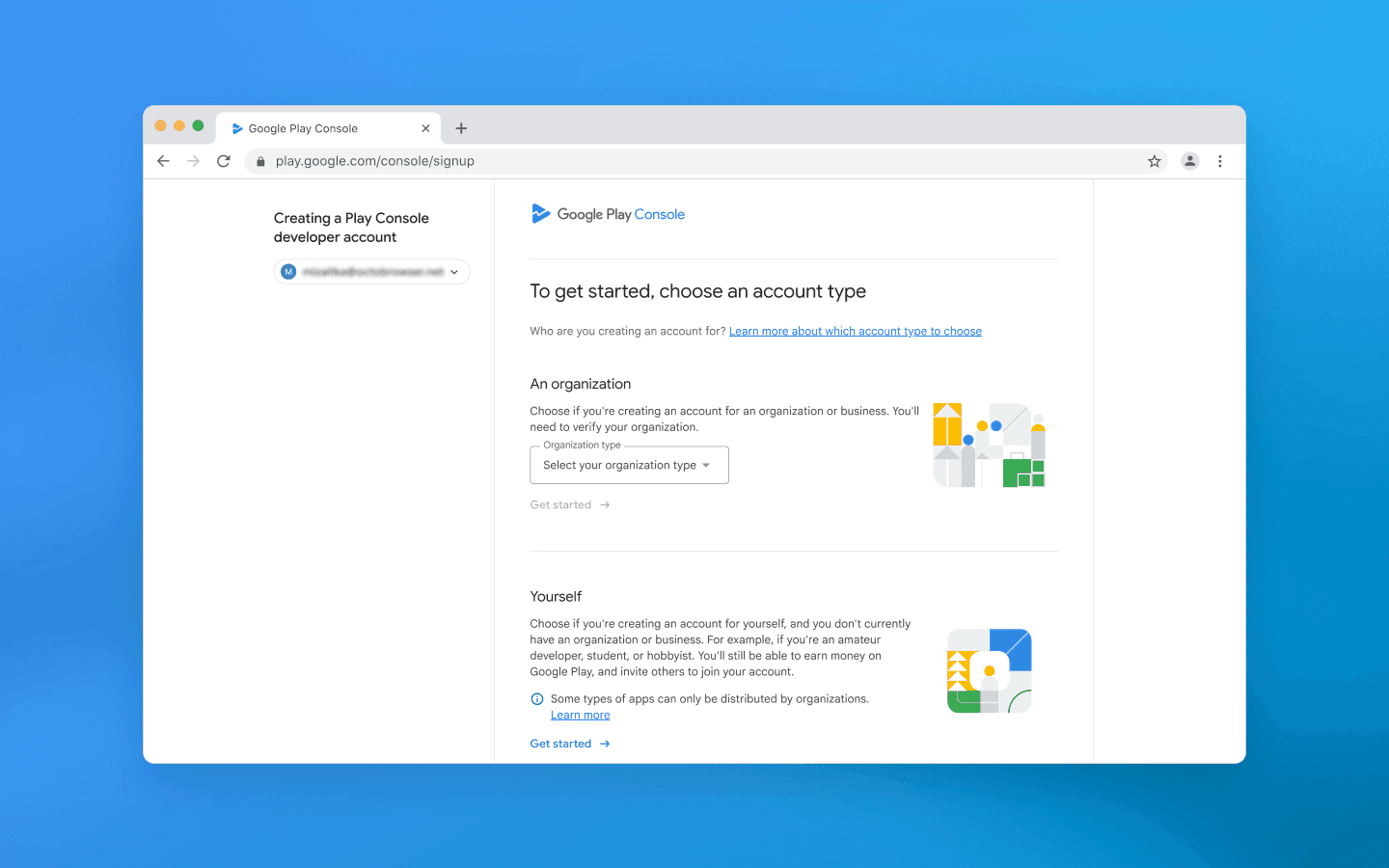
During registration, you will need to:
provide the email address linked to the account;
fill in the developer information;
verify your phone number;
complete identity or company verification;
link a payment profile and pay the Google Play Console registration fee ($25).
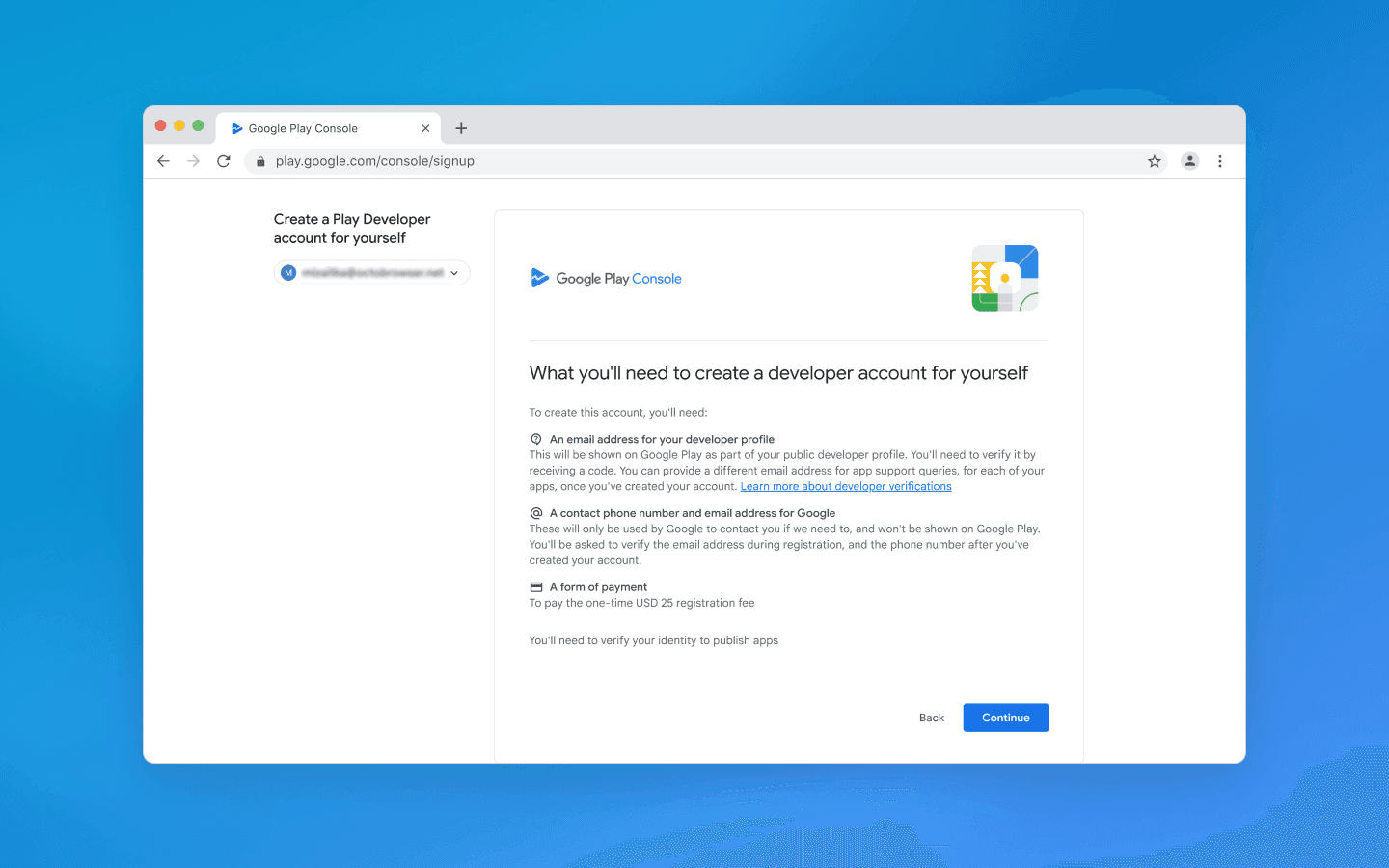
At this stage, it is important to use real and accurate information. Google has become significantly stricter about developer verification, so attempts to register accounts with false or unreliable data often lead to additional checks or outright rejection.
You should also keep in mind that Google views mass developer account registration without a clear business purpose negatively. Each profile should be used for a legitimate project, brand, client, or business direction.
After creating a Google Play developer account, it is recommended to immediately set up the basic infrastructure:
two-factor authentication;
backup email addresses;
role distribution within the team;
access permissions for developers and marketers;
a system for storing passwords and work-related data.
Once you have several Google Play developer accounts, manually switching between them quickly becomes a problem, and accidental mistakes turn into a real risk. That is why large teams and experienced developers implement multi-accounting and environment isolation solutions.
How to manage multiple Google Play developer accounts
The more Google Play developer accounts you create, the higher the risk of mistakes, data overlap, and organizational chaos. That is why the key task is to build a stable workflow where every account is isolated, controllable, and predictable.
Separating working environments
The core principle of managing multiple accounts is strict environment isolation. Every Google Play developer account should operate in the most independent environment possible.
Developers usually separate:
browser profiles;
devices (or virtual environments);
login credentials;
sessions and cookies;
employee work accounts.
This reduces the risk of accounts being linked through shared technical data and helps prevent data leaks.
Centralized access management
Google Play Console features a built-in system of roles and permissions. This allows developers to avoid sharing login credentials directly and instead grant access only to specific account functions.
It is recommended to:
assign roles according to the principle of minimum required access;
separate administrators, developers, and analysts;
restrict access to financial data;
regularly review the user list.
This approach is especially important when working with client accounts and distributed teams.
Organizing account structure
When working with multiple Google Play developer accounts, it is important to define the account architecture in advance.
Accounts are most commonly separated by:
brands;
clients;
product categories;
regions;
stages (production/test/experimental).
The more logical your structure is, the easier it will be to scale without losing control.
Managing payment and legal information
Every developer account is tied to payment and legal information. Mistakes at this level can lead to account restrictions or publishing limitations.
That is why it is important to:
use a separate payment profile for each account;
keep legal information up to date;
ensure compliance with regional requirements;
carefully document which account belongs to which business entity.
Monitoring activity and changes
When managing multiple Google Play accounts, it is important to continuously monitor:
new releases;
application changes;
warnings from Google;
moderation status;
permission changes.
Without centralized monitoring, it is easy to miss important signals that may affect the stability of the entire infrastructure.
Using specialized management tools
At scale, manually switching between multiple Google Play developer accounts in a regular browser becomes too inconvenient. This creates a need for tools that isolate environments and simplify the management of multiple developer profiles.
One of the most reliable solutions is to use anti-detect browsers for multi-accounting such as Octo Browser. They allow you to:
create separate browser profiles for each account;
assign a unique digital fingerprint to each profile;
isolate cookies and session parameters;
attach a separate proxy to each profile and work with different IP addresses;
separate access to profiles and account resources within a team.
Using an anti-detect browser is critically important for agencies and teams that manage dozens of projects and clients simultaneously. However, it can also be useful for individual developers who want to organize their workflows and hide connections between their Google Play accounts.
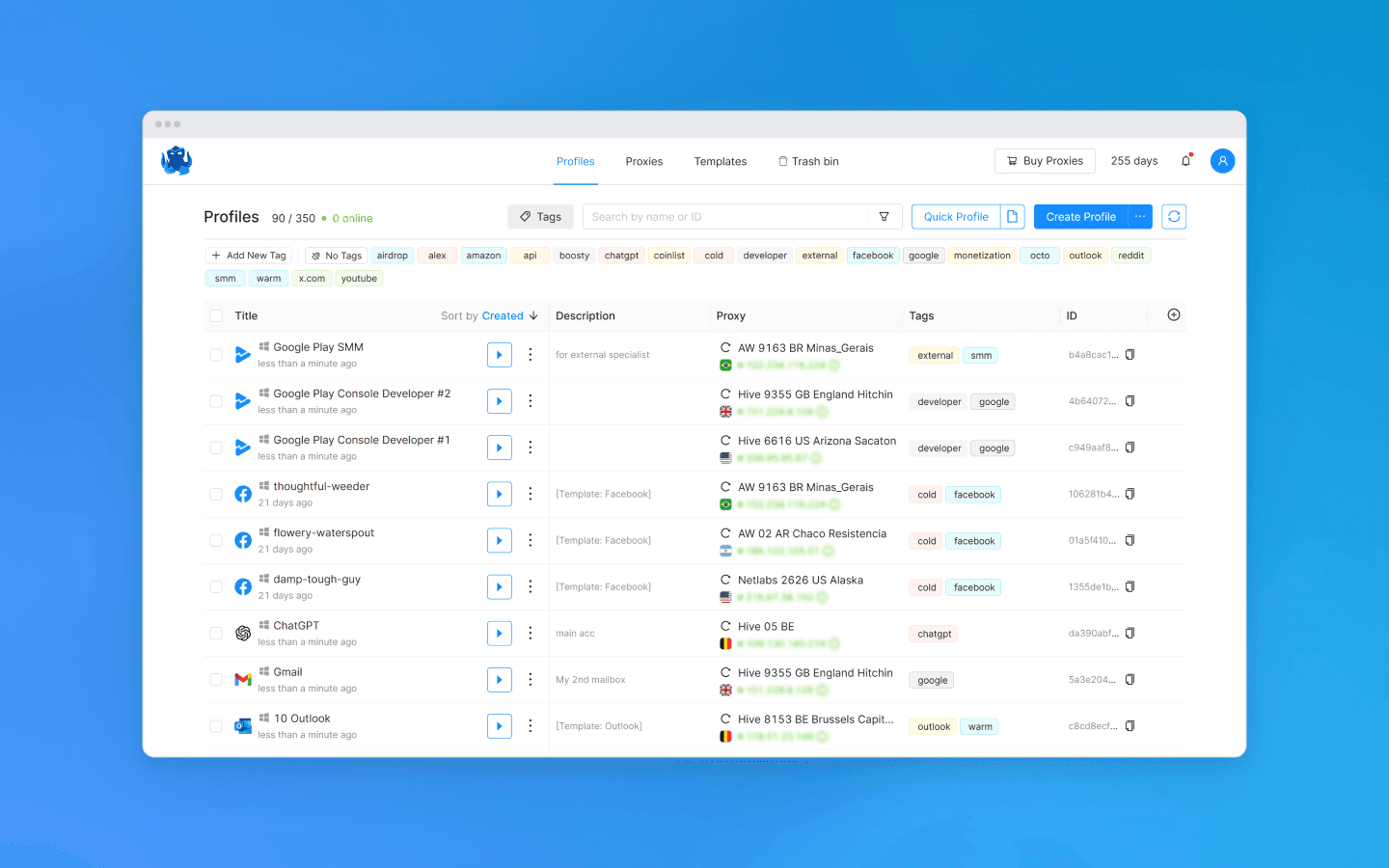
You can also create profiles in Octo Browser for all the services you use in your work. This allows you to switch between them without logging out, share access with other team members, and, by using different digital fingerprints and IP addresses, hide connections between your profiles from platforms.
Conclusion
Working with multiple Google Play developer accounts is standard practice for studios, agencies, and developers managing multiple products or client projects. Google does not prohibit the use of multiple Google Play developer accounts, but it expects them to be used for legitimate business purposes and in compliance with its official policy.
To work safely and consistently, it is important to:
separate accounts according to business logic (brands, clients, products);
carefully configure access rights;
maintain accurate payment and legal information;
minimize technical overlap between accounts using an anti-detect browser;
build a clear management system for the entire infrastructure.
Ultimately, the effectiveness of Google Play multi-accounting directly depends on how well your workflows are organized.
FAQ
Can I have more than one Google Play developer account?
Yes. Google does not prohibit having multiple Google Play developer accounts as long as they are used for different legitimate purposes—for example, separate companies, brands, client projects, or independent product lines. It is important to follow Google Play official policy and not use multi-accounting to bypass platform restrictions.
How can I create multiple Google Play developer accounts?
Create a separate Google account.
Register in the Google Play Console.
Fill in the developer information (personal or corporate).
Complete identity or company verification.
Pay the registration fee.
If you require multiple Google Play developer accounts, repeat these steps for each one.
What is the best way to manage multiple Google Play developer accounts?
Separate accounts by brands, clients, or products.
Set up roles and permissions for your team in the Google Play Console instead of sharing login credentials.
Use an anti-detect browser to isolate work environments (browser profiles, devices, sessions) in order to minimize overlap between accounts.
Stay anonymous, take advantage of multi-accounting, and achieve your goals with the highest-quality anti-detect browser on the market.
Can I have multiple Google Play developer accounts?
Google allows developers to have multiple Google Play accounts if there are legitimate and transparent reasons for doing so. For example, separate Google Play developer accounts are commonly created by:
mobile development studios;
companies with multiple brands;
game and app publishers;
teams that separate workflows;
developers working with different legal entities.
However, it is important to understand that Google closely monitors connections between developer accounts. If one profile violates platform policies, restrictions and suspensions may affect several of your accounts at once. That is why it is critical to follow security best practices and carefully separate work environments when working with Google Play.
Google pays especially close attention to the following:
reuse of the same payment information;
identical devices and IP addresses;
overlapping contact information;
related domains and websites;
duplicate app content;
mass account creation without a clear purpose.
If the system determines that multiple developer accounts are related and one of them violates platform rules, all linked profiles may face sanctions. That is why it is important to plan your Google Play account management structure and workflow isolation in advance.
At the same time, simply having multiple Google Play developer accounts is not considered a violation. The key is to comply with the official policy and use separate accounts for legitimate business purposes rather than to bypass restrictions.
What is the difference between a Google account and a Google Play developer account?
Many beginner developers assume that a Google account and a Google Play developer account are the same thing. In reality, they serve different purposes within the Google ecosystem.
What is a Google account?
This is a standard Google account used to access the company’s services such as Gmail, YouTube, Google Play, and others. A single user may have multiple Google accounts for personal or business purposes.
However, a regular Google account alone does not allow you to publish apps on Google Play.
What is a Google Play developer account?
This is a developer account registered in Google Play Console. It allows you to:
publish Android apps;
manage Google Play listings;
configure monetization;
manage subscriptions and in-app purchases;
access analytics and reports;
manage team permissions.
To create a Google Play developer account, you need to:
Have a regular Google account.
Register in Google Play Console.
Pay the registration fee.
Complete identity or company verification.
In other words, a Google Play developer account is an additional layer linked to a standard Google account.
Why create separate Google Play developer accounts?
Using multiple Google Play developer accounts is a common practice among developers, mobile studios, and app publishers. In most cases, this is not about bypassing platform restrictions, but about improving project management, separating business operations, and organizing workflows more efficiently. Let’s look at why Google Play multi-accounting can be useful.
Separating projects and brands
If a company publishes apps under different brands, it makes sense to separate them across multiple Google Play developer accounts.
For example:
one account for gaming apps;
another for corporate services;
a third for utilities or SaaS products.
This approach simplifies publication management, analytics, and monetization settings.
Working with client apps
For agencies and outsourcing teams, separate Google Play developer accounts are often a mandatory requirement. Clients prefer to own their own Google Play developer accounts in order to:
retain control over the app;
manage payments;
access analytics;
avoid dependency on contractors.
In this model, the agency receives access through the role and permissions system inside Google Play Console, while the app itself remains the property of the client.
Separating legal entities
Large companies often operate through multiple legal entities:
in different countries;
for separate business niches;
for different monetization models.
In such cases, separate Google Play developer accounts simplify tax reporting and help separate financial flows.
Testing and experimental projects
Some developers create separate accounts for:
MVP applications;
test releases;
internal experiments;
new monetization models.
This prevents core commercial apps from being mixed with experimental projects.
Separating teams and permissions
When you work with multiple teams, separate accounts help:
limit access levels;
separate areas of responsibility;
simplify administration;
reduce the risk of accidental mistakes.
This is especially relevant for large studios employing developers, marketers, ASO specialists, analysts, and project managers.
Operating in different regions
Sometimes developers create separate Google Play accounts to publish apps in different countries or regions. This may be related to:
local legal requirements;
regional monetization specifics;
separate marketing strategies;
regional support teams.
At the same time, it is important to follow Google Play official policy and avoid unnecessary artificial app duplication.
Reducing operational risks
Although Google can still link accounts together, proper project separation helps reduce the impact of isolated issues on the entire business. For example:
moderation errors do not affect all apps at once;
issues with one brand do not impact others;
different teams can operate independently.
However, it is important to understand that creating multiple accounts does not protect you from sanctions or even account suspensions if platform policies are violated. Google evaluates related developer accounts holistically and may apply restrictions across the developer’s entire connected infrastructure.
How to create multiple Google Play developer accounts
Each developer account is created on top of a separate Google account. That means before registering a new profile in Google Play Console, you usually need to create a new Google account with unique contact information.
After that, you can proceed with registration in the Google Play Console. Google will ask you to choose the account type—organization or individual developer. The organization option is more convenient for team collaboration and access management.
During registration, you will need to:
provide the email address linked to the account;
fill in the developer information;
verify your phone number;
complete identity or company verification;
link a payment profile and pay the Google Play Console registration fee ($25).
At this stage, it is important to use real and accurate information. Google has become significantly stricter about developer verification, so attempts to register accounts with false or unreliable data often lead to additional checks or outright rejection.
You should also keep in mind that Google views mass developer account registration without a clear business purpose negatively. Each profile should be used for a legitimate project, brand, client, or business direction.
After creating a Google Play developer account, it is recommended to immediately set up the basic infrastructure:
two-factor authentication;
backup email addresses;
role distribution within the team;
access permissions for developers and marketers;
a system for storing passwords and work-related data.
Once you have several Google Play developer accounts, manually switching between them quickly becomes a problem, and accidental mistakes turn into a real risk. That is why large teams and experienced developers implement multi-accounting and environment isolation solutions.
How to manage multiple Google Play developer accounts
The more Google Play developer accounts you create, the higher the risk of mistakes, data overlap, and organizational chaos. That is why the key task is to build a stable workflow where every account is isolated, controllable, and predictable.
Separating working environments
The core principle of managing multiple accounts is strict environment isolation. Every Google Play developer account should operate in the most independent environment possible.
Developers usually separate:
browser profiles;
devices (or virtual environments);
login credentials;
sessions and cookies;
employee work accounts.
This reduces the risk of accounts being linked through shared technical data and helps prevent data leaks.
Centralized access management
Google Play Console features a built-in system of roles and permissions. This allows developers to avoid sharing login credentials directly and instead grant access only to specific account functions.
It is recommended to:
assign roles according to the principle of minimum required access;
separate administrators, developers, and analysts;
restrict access to financial data;
regularly review the user list.
This approach is especially important when working with client accounts and distributed teams.
Organizing account structure
When working with multiple Google Play developer accounts, it is important to define the account architecture in advance.
Accounts are most commonly separated by:
brands;
clients;
product categories;
regions;
stages (production/test/experimental).
The more logical your structure is, the easier it will be to scale without losing control.
Managing payment and legal information
Every developer account is tied to payment and legal information. Mistakes at this level can lead to account restrictions or publishing limitations.
That is why it is important to:
use a separate payment profile for each account;
keep legal information up to date;
ensure compliance with regional requirements;
carefully document which account belongs to which business entity.
Monitoring activity and changes
When managing multiple Google Play accounts, it is important to continuously monitor:
new releases;
application changes;
warnings from Google;
moderation status;
permission changes.
Without centralized monitoring, it is easy to miss important signals that may affect the stability of the entire infrastructure.
Using specialized management tools
At scale, manually switching between multiple Google Play developer accounts in a regular browser becomes too inconvenient. This creates a need for tools that isolate environments and simplify the management of multiple developer profiles.
One of the most reliable solutions is to use anti-detect browsers for multi-accounting such as Octo Browser. They allow you to:
create separate browser profiles for each account;
assign a unique digital fingerprint to each profile;
isolate cookies and session parameters;
attach a separate proxy to each profile and work with different IP addresses;
separate access to profiles and account resources within a team.
Using an anti-detect browser is critically important for agencies and teams that manage dozens of projects and clients simultaneously. However, it can also be useful for individual developers who want to organize their workflows and hide connections between their Google Play accounts.
You can also create profiles in Octo Browser for all the services you use in your work. This allows you to switch between them without logging out, share access with other team members, and, by using different digital fingerprints and IP addresses, hide connections between your profiles from platforms.
Conclusion
Working with multiple Google Play developer accounts is standard practice for studios, agencies, and developers managing multiple products or client projects. Google does not prohibit the use of multiple Google Play developer accounts, but it expects them to be used for legitimate business purposes and in compliance with its official policy.
To work safely and consistently, it is important to:
separate accounts according to business logic (brands, clients, products);
carefully configure access rights;
maintain accurate payment and legal information;
minimize technical overlap between accounts using an anti-detect browser;
build a clear management system for the entire infrastructure.
Ultimately, the effectiveness of Google Play multi-accounting directly depends on how well your workflows are organized.
FAQ
Can I have more than one Google Play developer account?
Yes. Google does not prohibit having multiple Google Play developer accounts as long as they are used for different legitimate purposes—for example, separate companies, brands, client projects, or independent product lines. It is important to follow Google Play official policy and not use multi-accounting to bypass platform restrictions.
How can I create multiple Google Play developer accounts?
Create a separate Google account.
Register in the Google Play Console.
Fill in the developer information (personal or corporate).
Complete identity or company verification.
Pay the registration fee.
If you require multiple Google Play developer accounts, repeat these steps for each one.
What is the best way to manage multiple Google Play developer accounts?
Separate accounts by brands, clients, or products.
Set up roles and permissions for your team in the Google Play Console instead of sharing login credentials.
Use an anti-detect browser to isolate work environments (browser profiles, devices, sessions) in order to minimize overlap between accounts.
Stay up to date with the latest Octo Browser news
By clicking the button you agree to our Privacy Policy.
Stay up to date with the latest Octo Browser news
By clicking the button you agree to our Privacy Policy.
Stay up to date with the latest Octo Browser news
By clicking the button you agree to our Privacy Policy.

Join Octo Browser now
Or contact Customer Service at any time with any questions you might have.
Join Octo Browser now
Or contact Customer Service at any time with any questions you might have.
Join Octo Browser now
Or contact Customer Service at any time with any questions you might have.