How to find a Telegram group or channel


Nikolai Izoitko
Content Manager, Octo Browser
If you need to find a group or channel on Telegram, there are several ways to do so. Some communities are easy to discover through Telegram's built-in search, while others are only accessible through invitation links or direct invites. To quickly find useful channels, niche groups, and professional communities, it's important to understand how Telegram search works.
In this guide, you'll learn how to search for communities using Telegram's built-in tools, third-party services, and alternative methods that can help you find groups and channels even when Telegram's default search falls short.
Contents
Maintain your online anonymity with Octo Browser. Your real digital fingerprint cannot be tracked.
Would you like to try Octo Browser at discount?
Use the promo code OCTOBLOG to get 30% off any subscription. This offer is valid only for new users.
Telegram groups and channels: understanding public and private communities
Telegram groups and channels serve different purposes.
A group is designed for communication between its members. Participants can send messages, ask questions, join discussions, and share files and links. Depending on the settings, administrators can restrict certain actions or assign moderators.
A channel works differently. Content is typically published by a single author or a team of administrators, while subscribers receive updates in a news feed format. Channels are commonly used for news, analysis, educational content, and project updates.
Communities can also be either public or private.
A public group or channel has a unique username. For example, if a community uses an address like t.me/example, it can be found through Telegram's built-in search. Public communities are indexed by Telegram and appear in search results.
Private groups and channels work differently. They don't have a public address, and you can only join by receiving an invitation from an administrator or using a special invite link. These communities don't appear in Telegram's search results and cannot be found through standard Telegram search.
Thus, if you can't find a community through Telegram search, its privacy settings may be restricting access to it.
How to search for Telegram groups using the built-in Telegram search
The easiest way to find a Telegram group or channel is to use the app's built-in search feature. The search bar is located at the top of both the mobile and desktop versions of Telegram. It lets you search for users, groups, channels, and even individual messages.
To search, follow these simple steps:
Open the Telegram app.
Tap or click the search bar.
Enter the name of the group or channel, or a relevant keyword.
Browse the search results.
Open a community and read its description.
For example, if you're interested in coding in Python, you could search for queries such as Python, Python development, Python jobs, or Python tutorials. Telegram will display channels and groups related to these topics.
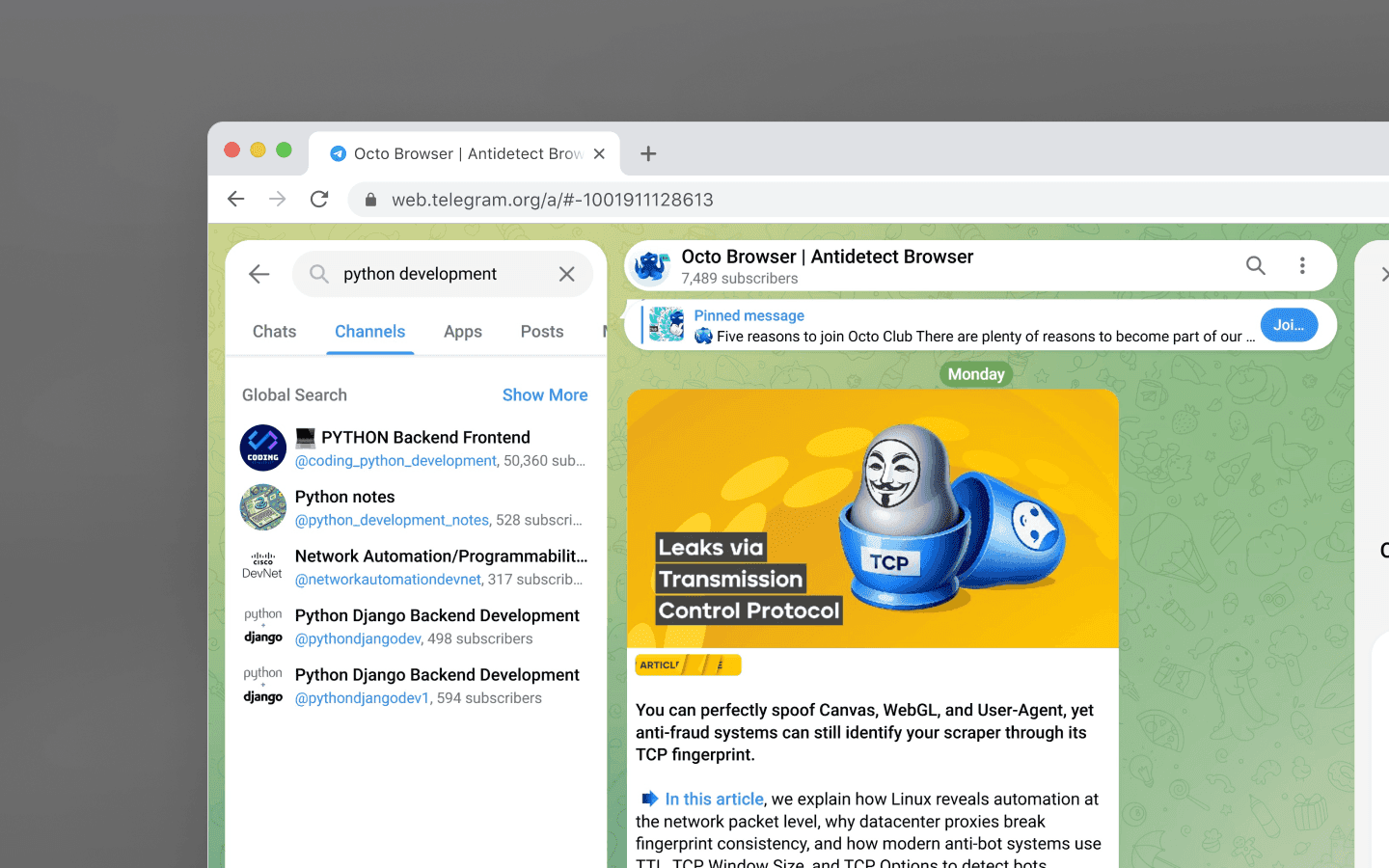
When searching on Telegram, keep the following points in mind:
Search results depend on the accuracy of your query. If a community's name is in English, searching in another language may not return the desired result.
Telegram takes community popularity into account. Larger channels and groups often appear higher in the results.
More specific keywords usually produce better results. Instead of searching for
marketing, trydigital marketing,SEO,targeted advertising, or another more specific topic.
If you can't find the community you're looking for, try different spellings, abbreviations, industry jargon, or English equivalents if you’re not originally searching in English. This is especially useful when searching for highly technical or international communities.
For most users, Telegram's built-in search remains the fastest and easiest way to find public channels and groups.
Advanced search tools: directories, bots, and web search
Sometimes Telegram's built-in search isn't enough. This can happen when a community is newly created, has an unusual name, isn't well indexed within Telegram, or targets a niche audience.
In these cases, you can use additional search tools, including:
Specialized Telegram search bots;
Telegram directories;
Search engines;
Niche forums and social media platforms;
Curated channel lists published in blogs or other media.
The main advantage of third-party tools is their broader coverage. Many directories index thousands of communities and let you filter them by category, language, region, and topic.
Another advantage is the ability to search by a community's description rather than just its name. For example, if you're looking for an investing group or a travel channel, a specialized directory will often provide many more relevant results than Telegram's built-in search.
Combining Telegram's built-in search with directories and web search significantly improves your chances of finding communities that would otherwise be difficult to discover.
Using Telegram search bots
Search bots are specialized Telegram services that help users find groups and channels by keyword, category, or topic.
Typically, you simply start the bot, enter a search query, and receive a list of matching communities.
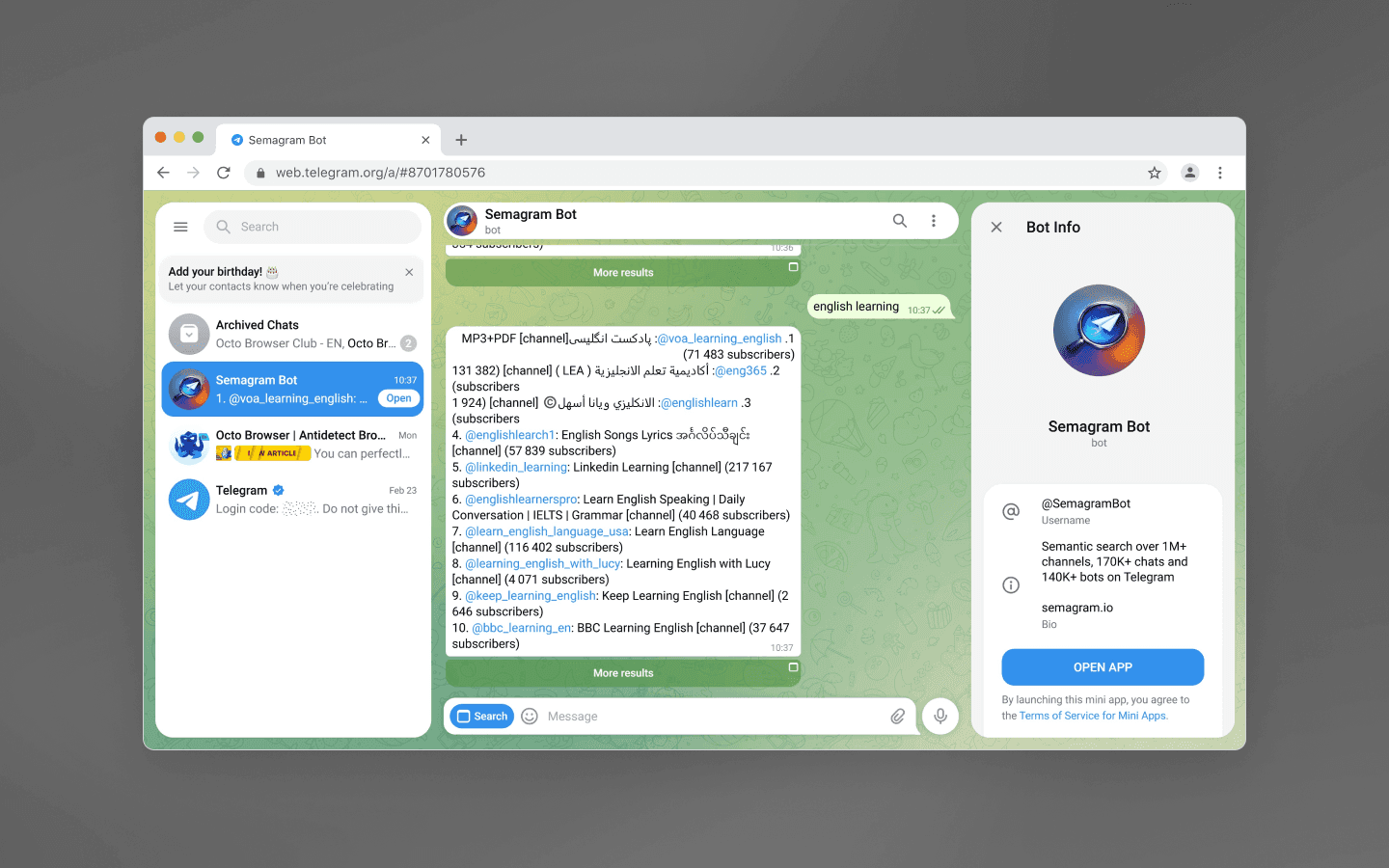
These bots are particularly useful when Telegram's built-in search returns too few results or when you're looking for lesser-known niche communities.
When using search bots, pay attention to the following:
How frequently the bot’s database is updated;
The number of available categories;
Whether the bot asks for personal information (it shouldn’t);
Its reputation among users.
Reliable bots should never ask for your phone number, verification codes, or any other sensitive information.
Third-party Telegram directories
Another effective way to find Telegram groups and channels is through specialized directories. These services index thousands of communities and let you browse them by topic, popularity, language, and other criteria.
Directories are especially useful if you don't know the exact name of the community you're looking for. For example, you can browse categories such as cryptocurrency, coding, design, or marketing and choose from a wide selection of popular communities.
Most directories offer convenient category-based navigation. Simply select a topic, browse the available groups and channels, and open them directly in Telegram using the provided links.
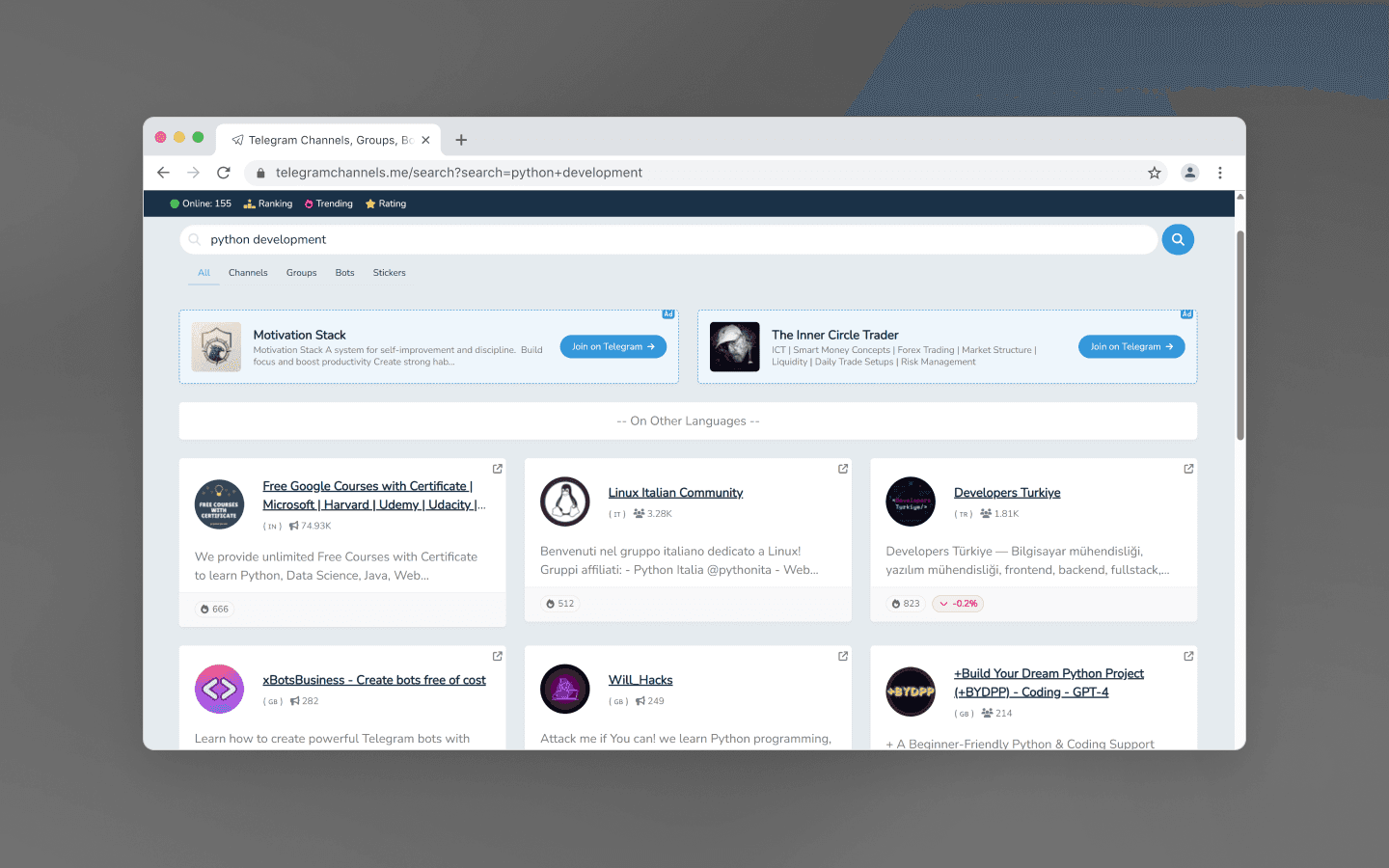
When choosing a directory, look for the following signs of a high-quality resource:
Regularly updated databases;
Community descriptions;
Working links;
Subscriber count information;
Filtering groups and channels by categories.
Keep in mind that some directories are updated automatically. As a result, they may include abandoned communities or channels with outdated content. Before subscribing, it's worth checking the date of the community’s latest posts and evaluating its overall activity.
Directories are an excellent starting point for Telegram search. Once you've found several interesting communities, you can discover related ones through Telegram's own recommendations.
Google, Bing, Reddit, and social media
Search engines index countless pages that contain links to Telegram communities. These include articles, reviews, rankings, forums, and curated lists. In practice, Google and Bing can often help you find a Telegram channel or group faster than Telegram's built-in search.
This approach is especially useful when you already know the name of the community or its topic. You can simply search for relevant Telegram communities using queries such as:
Telegram finance channel;
Telegram web design group;
Telegram technology news channel;
Telegram investment group.
You can also use more specific search operators. For example, searching for a community's name together with the word "Telegram" often leads directly to the correct channel.
Many channel owners also promote their projects through Facebook or VK pages, blogs, and video-sharing platforms. If Telegram search doesn't return any results, check the official accounts of the author or company. The channel link is often published there.
Reddit and other niche forums can also be valuable sources of information. Users regularly share curated lists of the best Telegram channels and groups covering topics ranging from coding and design to cryptocurrency, investing, and artificial intelligence. Try searches such as best Telegram channels for developers, Telegram crypto groups, or Telegram marketing channels Reddit. These discussions often feature recommendations from real users rather than sponsored lists, helping you discover valuable Telegram communities you might otherwise miss.
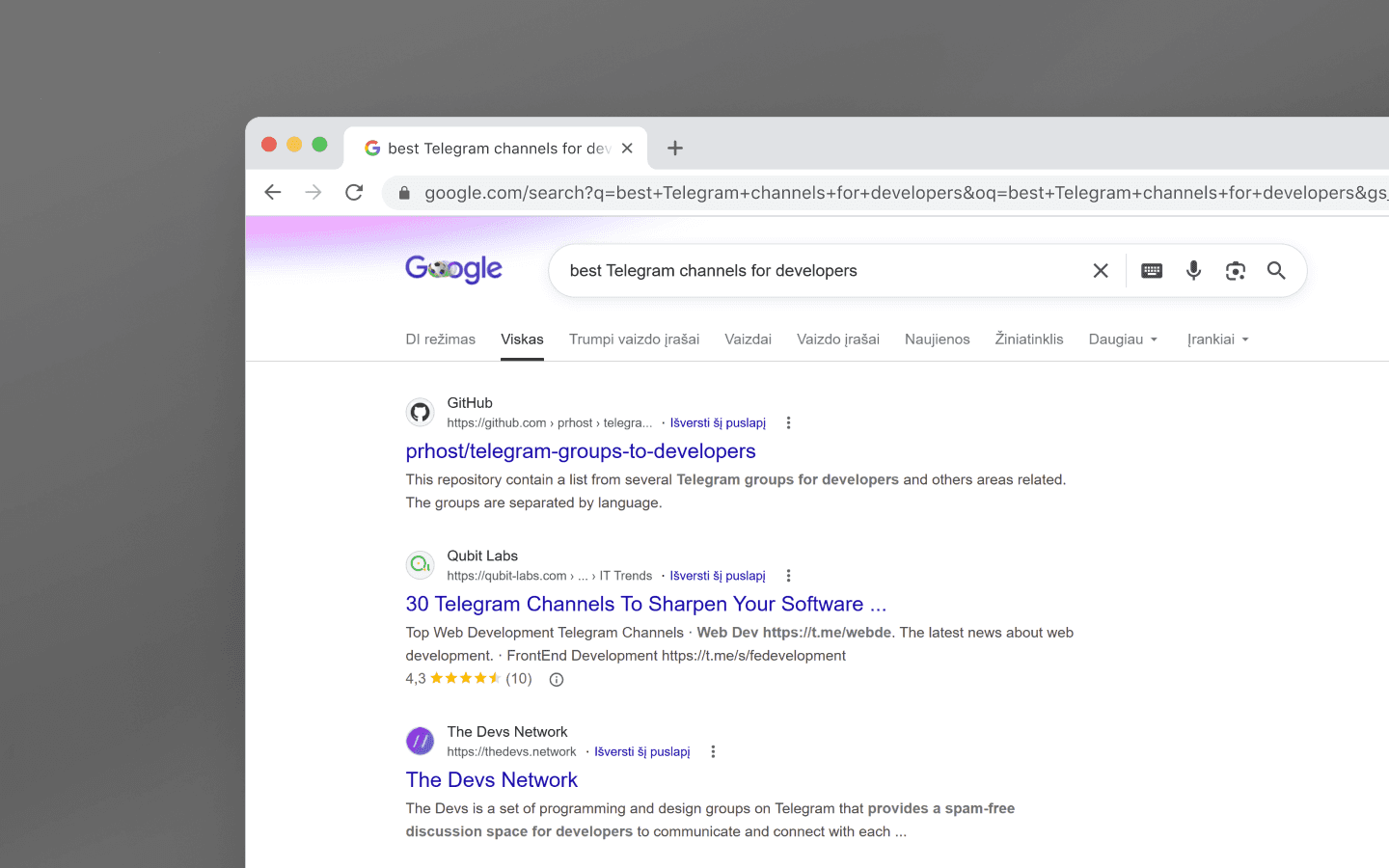
By combining Telegram search with search engines, forums, and social media platforms, you can discover significantly more communities than by relying solely on Telegram's built-in search.
How to join a group or subscribe to a channel using an invite link
Not every community can be found through search. Many owners choose to create private groups and channels that are accessible by invitation only.
In these cases, you'll need an invite link. This is a special link that lets you instantly join a group or subscribe to a channel:
Get the invite link from an administrator or community member.
Open the link on a device with Telegram installed.
Go to the group's or channel's page.
Tap the button to join or subscribe.
If the link is valid, Telegram will automatically open the corresponding community.
If you manage multiple accounts, it's especially important to keep them in separate work environments to avoid unnecessary links between accounts and mass bans. A professional multi-accounting solution such as Octo Browser lets you launch each account in its own isolated profile, complete with a unique browser fingerprint and dedicated proxy.
Invite links are commonly used for corporate chats, study groups, private clubs, professional communities, and local groups.
Keep in mind that some invite links have restrictions. An administrator may limit the number of users who can join or set an expiration date. If a link has expired, you'll need to request a new one.
Be cautious when opening links from unknown sources. Only use invite links obtained from trusted sources to reduce the risk of scams or unwanted content.
If you can't find a Telegram group by searching for it but know for a fact that it exists, the most likely reason is that it's accessible only via an invite link.
Conclusion
There are several ways to find a Telegram group or channel. For most public communities, using Telegram's built-in search with the right keywords is enough.
If Telegram search doesn't return the results you're looking for, try additional tools such as search bots, Telegram directories, Google, Bing, and topic-specific communities on social media.
Private communities use invite links instead. Private groups and channels don't appear in Telegram's standard search results, so you can only access them through an invitation from an administrator or an existing member.
The main ways to find Telegram communities include:
Telegram's built-in search;
Telegram search bots;
Telegram directories;
Google and Bing;
Social media and forums;
Invite links.
By combining these methods, you can quickly find almost any public channel or group, as well as gain access to private communities if you have an invite.
FAQ
What's the difference between a Telegram group and a Telegram channel?
A group is designed for conversations between members. Everyone can participate in discussions and share messages and files. A channel, on the other hand, is primarily used to publish content, with administrators creating most of the activity while subscribers mainly consume information.
Can I search for private Telegram groups?
No. Private groups don't appear in Telegram's built-in search. To join one, you'll need an invite link or a direct invitation from an administrator or an existing member.
Is it safe to use Telegram search bots?
Most popular Telegram search bots are safe as long as they don't ask for your personal information. Avoid services that request your verification code, password, or access to your Telegram account.
What's the best way to find Telegram groups and channels?
The most effective approach is to combine several search methods. Start with Telegram's built-in search, then use directories, search bots, and search engines if needed. This approach typically produces the best results.
Can I find Telegram groups using Google?
Yes. Many Telegram groups and channels are indexed by search engines. Google and Bing often make it easier to find communities by topic, name, or link, especially when Telegram's built-in search doesn't return the desired results.
Why can't I find a group using Telegram's built-in search?
There are several possible reasons. The community may be private, recently created, have an unusual name, or simply not match your search terms. In these cases, try different keywords, use Telegram directories, or obtain an invite link directly.
Maintain your online anonymity with Octo Browser. Your real digital fingerprint cannot be tracked.
Would you like to try Octo Browser at discount?
Use the promo code OCTOBLOG to get 30% off any subscription. This offer is valid only for new users.
Telegram groups and channels: understanding public and private communities
Telegram groups and channels serve different purposes.
A group is designed for communication between its members. Participants can send messages, ask questions, join discussions, and share files and links. Depending on the settings, administrators can restrict certain actions or assign moderators.
A channel works differently. Content is typically published by a single author or a team of administrators, while subscribers receive updates in a news feed format. Channels are commonly used for news, analysis, educational content, and project updates.
Communities can also be either public or private.
A public group or channel has a unique username. For example, if a community uses an address like t.me/example, it can be found through Telegram's built-in search. Public communities are indexed by Telegram and appear in search results.
Private groups and channels work differently. They don't have a public address, and you can only join by receiving an invitation from an administrator or using a special invite link. These communities don't appear in Telegram's search results and cannot be found through standard Telegram search.
Thus, if you can't find a community through Telegram search, its privacy settings may be restricting access to it.
How to search for Telegram groups using the built-in Telegram search
The easiest way to find a Telegram group or channel is to use the app's built-in search feature. The search bar is located at the top of both the mobile and desktop versions of Telegram. It lets you search for users, groups, channels, and even individual messages.
To search, follow these simple steps:
Open the Telegram app.
Tap or click the search bar.
Enter the name of the group or channel, or a relevant keyword.
Browse the search results.
Open a community and read its description.
For example, if you're interested in coding in Python, you could search for queries such as Python, Python development, Python jobs, or Python tutorials. Telegram will display channels and groups related to these topics.
When searching on Telegram, keep the following points in mind:
Search results depend on the accuracy of your query. If a community's name is in English, searching in another language may not return the desired result.
Telegram takes community popularity into account. Larger channels and groups often appear higher in the results.
More specific keywords usually produce better results. Instead of searching for
marketing, trydigital marketing,SEO,targeted advertising, or another more specific topic.
If you can't find the community you're looking for, try different spellings, abbreviations, industry jargon, or English equivalents if you’re not originally searching in English. This is especially useful when searching for highly technical or international communities.
For most users, Telegram's built-in search remains the fastest and easiest way to find public channels and groups.
Advanced search tools: directories, bots, and web search
Sometimes Telegram's built-in search isn't enough. This can happen when a community is newly created, has an unusual name, isn't well indexed within Telegram, or targets a niche audience.
In these cases, you can use additional search tools, including:
Specialized Telegram search bots;
Telegram directories;
Search engines;
Niche forums and social media platforms;
Curated channel lists published in blogs or other media.
The main advantage of third-party tools is their broader coverage. Many directories index thousands of communities and let you filter them by category, language, region, and topic.
Another advantage is the ability to search by a community's description rather than just its name. For example, if you're looking for an investing group or a travel channel, a specialized directory will often provide many more relevant results than Telegram's built-in search.
Combining Telegram's built-in search with directories and web search significantly improves your chances of finding communities that would otherwise be difficult to discover.
Using Telegram search bots
Search bots are specialized Telegram services that help users find groups and channels by keyword, category, or topic.
Typically, you simply start the bot, enter a search query, and receive a list of matching communities.
These bots are particularly useful when Telegram's built-in search returns too few results or when you're looking for lesser-known niche communities.
When using search bots, pay attention to the following:
How frequently the bot’s database is updated;
The number of available categories;
Whether the bot asks for personal information (it shouldn’t);
Its reputation among users.
Reliable bots should never ask for your phone number, verification codes, or any other sensitive information.
Third-party Telegram directories
Another effective way to find Telegram groups and channels is through specialized directories. These services index thousands of communities and let you browse them by topic, popularity, language, and other criteria.
Directories are especially useful if you don't know the exact name of the community you're looking for. For example, you can browse categories such as cryptocurrency, coding, design, or marketing and choose from a wide selection of popular communities.
Most directories offer convenient category-based navigation. Simply select a topic, browse the available groups and channels, and open them directly in Telegram using the provided links.
When choosing a directory, look for the following signs of a high-quality resource:
Regularly updated databases;
Community descriptions;
Working links;
Subscriber count information;
Filtering groups and channels by categories.
Keep in mind that some directories are updated automatically. As a result, they may include abandoned communities or channels with outdated content. Before subscribing, it's worth checking the date of the community’s latest posts and evaluating its overall activity.
Directories are an excellent starting point for Telegram search. Once you've found several interesting communities, you can discover related ones through Telegram's own recommendations.
Google, Bing, Reddit, and social media
Search engines index countless pages that contain links to Telegram communities. These include articles, reviews, rankings, forums, and curated lists. In practice, Google and Bing can often help you find a Telegram channel or group faster than Telegram's built-in search.
This approach is especially useful when you already know the name of the community or its topic. You can simply search for relevant Telegram communities using queries such as:
Telegram finance channel;
Telegram web design group;
Telegram technology news channel;
Telegram investment group.
You can also use more specific search operators. For example, searching for a community's name together with the word "Telegram" often leads directly to the correct channel.
Many channel owners also promote their projects through Facebook or VK pages, blogs, and video-sharing platforms. If Telegram search doesn't return any results, check the official accounts of the author or company. The channel link is often published there.
Reddit and other niche forums can also be valuable sources of information. Users regularly share curated lists of the best Telegram channels and groups covering topics ranging from coding and design to cryptocurrency, investing, and artificial intelligence. Try searches such as best Telegram channels for developers, Telegram crypto groups, or Telegram marketing channels Reddit. These discussions often feature recommendations from real users rather than sponsored lists, helping you discover valuable Telegram communities you might otherwise miss.
By combining Telegram search with search engines, forums, and social media platforms, you can discover significantly more communities than by relying solely on Telegram's built-in search.
How to join a group or subscribe to a channel using an invite link
Not every community can be found through search. Many owners choose to create private groups and channels that are accessible by invitation only.
In these cases, you'll need an invite link. This is a special link that lets you instantly join a group or subscribe to a channel:
Get the invite link from an administrator or community member.
Open the link on a device with Telegram installed.
Go to the group's or channel's page.
Tap the button to join or subscribe.
If the link is valid, Telegram will automatically open the corresponding community.
If you manage multiple accounts, it's especially important to keep them in separate work environments to avoid unnecessary links between accounts and mass bans. A professional multi-accounting solution such as Octo Browser lets you launch each account in its own isolated profile, complete with a unique browser fingerprint and dedicated proxy.
Invite links are commonly used for corporate chats, study groups, private clubs, professional communities, and local groups.
Keep in mind that some invite links have restrictions. An administrator may limit the number of users who can join or set an expiration date. If a link has expired, you'll need to request a new one.
Be cautious when opening links from unknown sources. Only use invite links obtained from trusted sources to reduce the risk of scams or unwanted content.
If you can't find a Telegram group by searching for it but know for a fact that it exists, the most likely reason is that it's accessible only via an invite link.
Conclusion
There are several ways to find a Telegram group or channel. For most public communities, using Telegram's built-in search with the right keywords is enough.
If Telegram search doesn't return the results you're looking for, try additional tools such as search bots, Telegram directories, Google, Bing, and topic-specific communities on social media.
Private communities use invite links instead. Private groups and channels don't appear in Telegram's standard search results, so you can only access them through an invitation from an administrator or an existing member.
The main ways to find Telegram communities include:
Telegram's built-in search;
Telegram search bots;
Telegram directories;
Google and Bing;
Social media and forums;
Invite links.
By combining these methods, you can quickly find almost any public channel or group, as well as gain access to private communities if you have an invite.
FAQ
What's the difference between a Telegram group and a Telegram channel?
A group is designed for conversations between members. Everyone can participate in discussions and share messages and files. A channel, on the other hand, is primarily used to publish content, with administrators creating most of the activity while subscribers mainly consume information.
Can I search for private Telegram groups?
No. Private groups don't appear in Telegram's built-in search. To join one, you'll need an invite link or a direct invitation from an administrator or an existing member.
Is it safe to use Telegram search bots?
Most popular Telegram search bots are safe as long as they don't ask for your personal information. Avoid services that request your verification code, password, or access to your Telegram account.
What's the best way to find Telegram groups and channels?
The most effective approach is to combine several search methods. Start with Telegram's built-in search, then use directories, search bots, and search engines if needed. This approach typically produces the best results.
Can I find Telegram groups using Google?
Yes. Many Telegram groups and channels are indexed by search engines. Google and Bing often make it easier to find communities by topic, name, or link, especially when Telegram's built-in search doesn't return the desired results.
Why can't I find a group using Telegram's built-in search?
There are several possible reasons. The community may be private, recently created, have an unusual name, or simply not match your search terms. In these cases, try different keywords, use Telegram directories, or obtain an invite link directly.
Stay up to date with the latest Octo Browser news
By clicking the button you agree to our Privacy Policy.
Stay up to date with the latest Octo Browser news
By clicking the button you agree to our Privacy Policy.
Stay up to date with the latest Octo Browser news
By clicking the button you agree to our Privacy Policy.

Join Octo Browser now
Or contact Customer Service at any time with any questions you might have.
Join Octo Browser now
Or contact Customer Service at any time with any questions you might have.
Join Octo Browser now
Or contact Customer Service at any time with any questions you might have.