How to increase marketplace sales with an anti-detect browser


Robert Hall
E-commerce consultant
Marketplaces offer sellers strong growth opportunities: you can quickly launch new products, test pricing, and find your audience. However, there are also risks related to security, scaling, and promotion. Platforms limit the number of listings, reduce product visibility, and may block accounts due to suspicious activity. Working with just one account on platforms like eBay or Amazon makes it impossible to reach the full audience, test different strategies, or increase the number of listings.
Anti-detect browsers solve these problems: they allow you to safely manage multiple accounts, bypass platform restrictions, and increase sales without the risk of bans. Let’s discuss the advantages of multi-accounting and what you need to get started.
Contents
Stay anonymous, take advantage of multi-accounting, and achieve your goals with the highest-quality anti-detect browser on the market.
Would you like to try Octo Browser at discount?
Use the promo code OCTOECOM to get 30% off any subscription. This offer is valid only for new users.
Why a seller needs an anti-detect browser
Marketplaces collect dozens of device parameters: screen resolution, installed fonts, WebGL version, plugin list, and other data about your device and connection. This set of data is called a digital fingerprint.
Fingerprint data is used by platforms to identify users and gather analytics about their audience. If multiple accounts share the same fingerprint, the platform may suspect policy violations. In that case, all linked accounts can be blocked.
An anti-detect browser is a solution for creating multiple isolated profiles, each with its own digital fingerprint. This allows you to safely manage dozens of accounts on commercial platforms, change IP addresses, and bypass restrictions.
Technical foundations: anonymity and fingerprint quality
Octo Browser doesn’t just spoof device data. It helps create profiles that look like real users to marketplaces. This simplifies working with multiple accounts and reduces the risk of them being linked together.
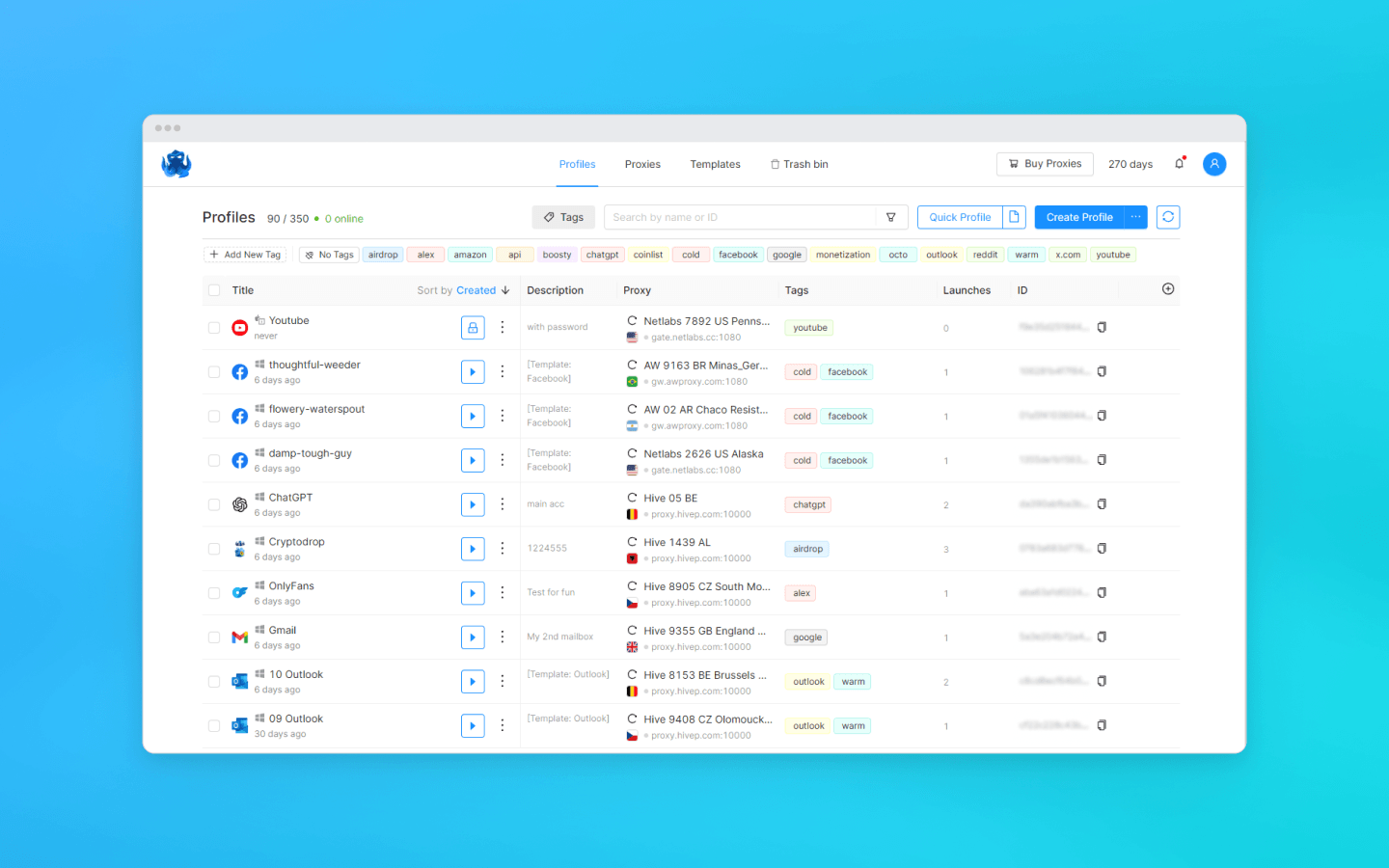
You can create a quick profile and Octo will automatically select optimal settings. Alternatively, you can configure everything manually: choose the operating system, screen resolution, fonts, and other parameters.
Octo Browser prevents data leaks. Search history, local storage, cache, and cookies of each virtual profile are fully isolated. For marketplaces, these profiles appear as different users on different devices.
5 key benefits of multi-accounting on marketplaces
Let’s look at real-world scenarios where multi-accounting delivers measurable results:
Competitor analysis and audience reach expansion
Marketplaces analyze user behavior: they personalize search results, hide certain listings, and test different pricing strategies. By using multiple profiles, you can view search results from different user perspectives. This allows you to collect objective data, track competitors, analyze their pricing, reviews, and strategies without the risk of being blocked. You gain a clearer understanding of market positioning and identify untapped niches.
Expanding geographic reach works the same way. Profiles with different geolocations allow you to target audiences unavailable to a single account. Post listings using local IPs and language settings for each region, and each account will interact with its own target audience.
Idea testing: A/B price testing, descriptions, and storefronts
With a single account, A/B testing must be done sequentially: one week with one description, another week with a different one. Results become blurred over time due to seasonality, competitor activity, and other factors.
With an anti-detect browser, you can test your approaches simultaneously:
Change prices for the same product.
Test different descriptions and images.
Compare conversion rates and select the most effective strategy.
How it works:
Create multiple profiles with identical settings and geolocation.
Change one setting: price, image, description, or title.
After 2–3 days, compare conversion rates and CTR.
Use the winning setup across all accounts.
This way you get clean, reliable data without external interference.
Bypassing platform limits and increasing visibility
Marketplaces often limit the number of free listings for new accounts. For example, on Avito, a new account can post only 1–5 listings for free depending on the category. After that, listings are paid or unlocked after ranking improves. Multi-accounting allows you to bypass these limits and post more free listings using multiple accounts.
Ten accounts with different digital fingerprints occupy more positions in search results. Users see your product multiple times, seemingly from different sellers. This increases views, click-through rates, and sales.
On Amazon, multi-accounting allows you to bypass product category restrictions. Some categories require separate approval. It’s often easier to create a new profile and register it under the required category.
Leveraging new seller bonuses
Almost all marketplaces offer bonuses to new sellers: discounts on promoted listings, free premium placements, reduced fees for the first 30 days.
One account can use these bonuses only once. Ten accounts can use them ten times.
You create a new profile, receive bonuses, and promote products at a lower cost. When bonuses expire, you move to the next profile. Meanwhile, your main account continues operating normally.
Boosting sales and protecting reputation
A few negative reviews can reduce conversion rates, and dozens can destroy your sales entirely. Removing reviews on marketplaces is difficult, even if they are unjustified.
Multi-accounting allows you to stimulate sales through reviews. You increase brand trust and attract more customers than competitors.
Another scenario is reputation protection. Competitors may leave negative reviews intentionally. You counterbalance them with a higher volume of positive feedback.
How to set up an anti-detect browser for marketplaces
This step-by-step guide works for all popular marketplaces: Amazon, Etsy, eBay.
Step 1. Choose an anti-detect browser and proxies
The choice of an anti-detect browser depends on your goals. Octo Browser covers most marketplace scenarios thanks to high-quality fingerprint spoofing and automation support.
Without proxies, marketplaces will see your real IP, linking all profiles to a single address. This defeats the purpose of multi-accounting. In Octo Browser, you can assign or change proxies at any time. Supported protocols include HTTP, HTTPS, SOCKS5.
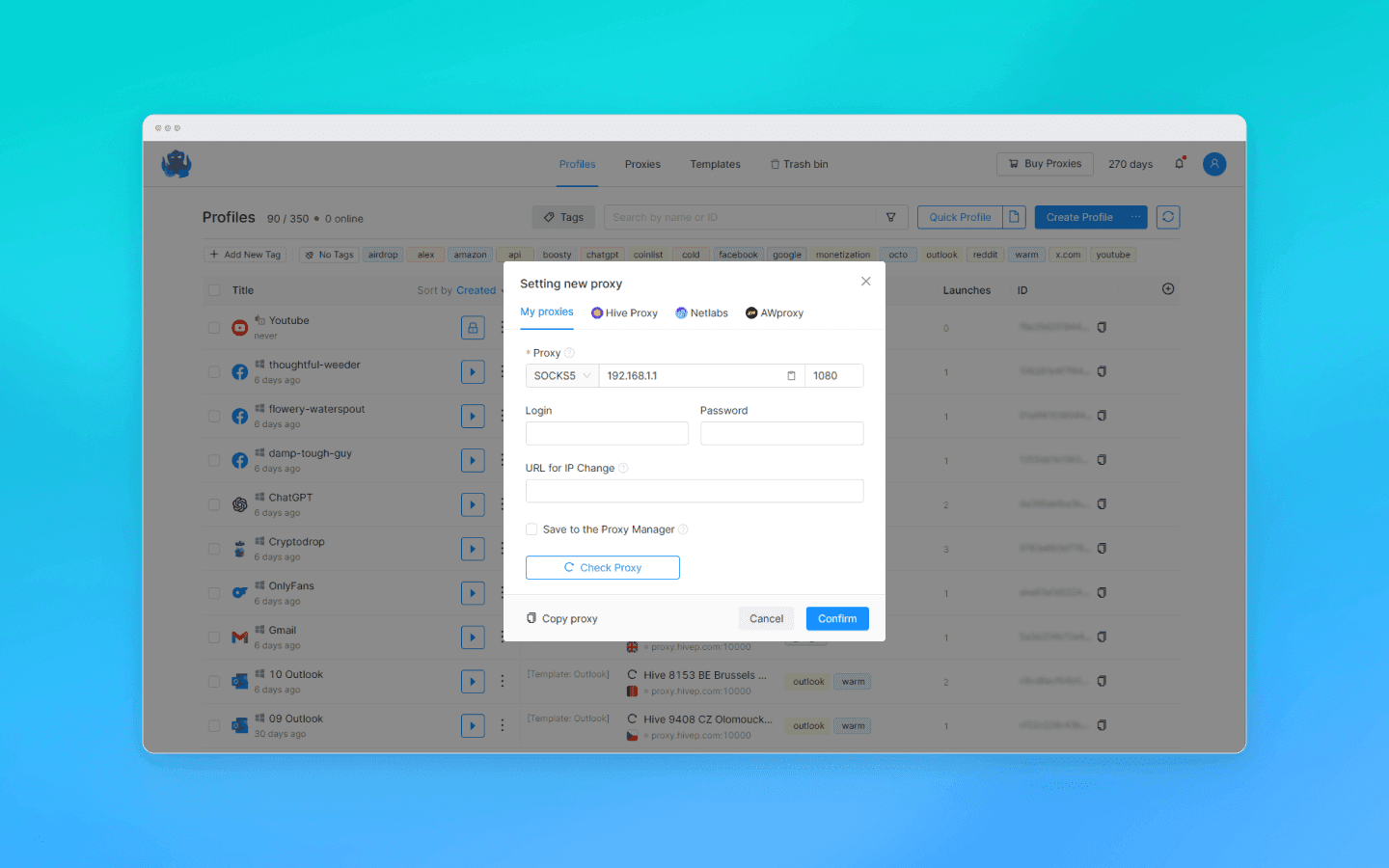
Which proxies to choose:
Residential proxies — best for long-term use. These are real user IPs trusted by marketplaces.
Mobile proxies — ideal for platforms with aggressive anti-fraud systems.
Step 2. Create your first profile
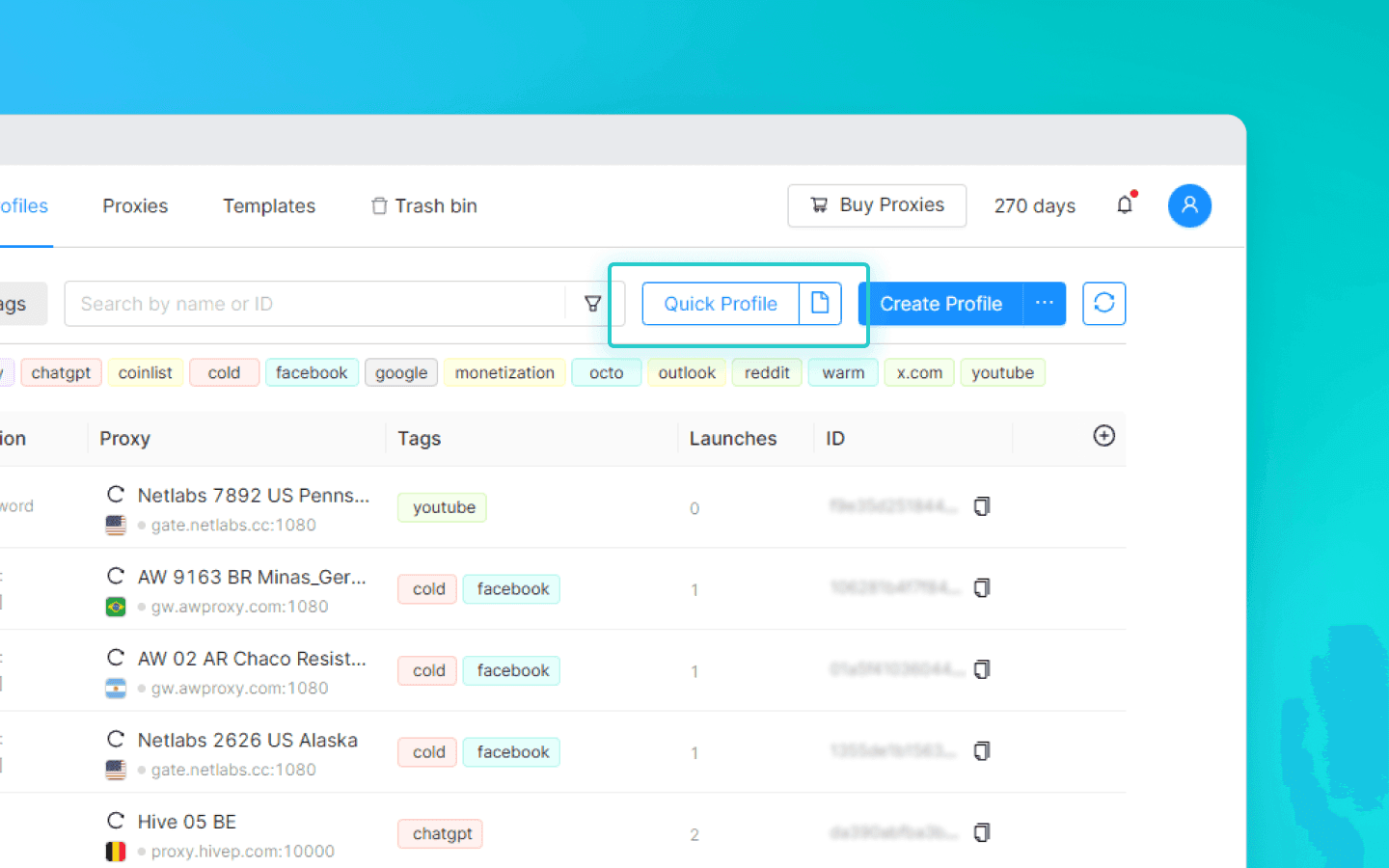
Select “Quick Profile” or “Create Profile.”
The first option gives you a ready-to-use profile with automatically configured fingerprint settings — fast and safe.
The second option allows full customization: set a name, assign a proxy, and configure all parameters manually.
Step 3. Assign a proxy and configure geolocation
In the “Proxy” field, enter your proxy details in the following format:
protocol://login:password@ip:port
For example: socks5://user:pass123@192.168.1.1:1080
After saving the profile, Octo Browser will check the proxy. If there are issues, Octo will notify you.
Geolocation is configured automatically. The browser matches the time zone and regional settings to the proxy IP. Manual setup is not required if you use correct proxies.
Common multi-accounting mistakes
We analyzed user reports related to account bans. Here are the most common mistakes:
Cheap proxies. Using shared proxies from public lists. Marketplaces know these IPs and block them quickly. Always use residential or mobile proxies from trusted providers.
Reusing email or phone numbers. Accounts get linked and blocked. Always use unique contact details for each account.
Behavioral patterns. Creating multiple accounts in a short time, instantly adding 1,000 products, using identical passwords and actions. Platforms analyze behavior, not just device parameters.
Ignoring WebRTC and DNS leaks. The browser may expose your real IP or send DNS requests via your ISP. Octo Browser blocks these leaks, but manual misconfiguration is still possible. Always test your setup via ipleak.net.
Conclusions
Due to high competition in e-commerce and dropshipping, anti-detect browsers are becoming essential tools for retailers. Multi-accounting mitigates risks: if one account is banned, others remain active, allowing you to continue selling.
Octo Browser is designed for:
building and promoting brands on marketplaces;
expanding audience reach;
testing sales strategies;
increasing product visibility and reducing promotion costs;
managing reputation and seeding reviews;
competitor analysis and workflow automation;
organizing team workflows with multi-user access.
Start small with 3 to 5 profiles. Within a month, you’ll see a difference in reach and conversion rates. Once you understand the mechanics, scale to any number of accounts.
Stay anonymous, take advantage of multi-accounting, and achieve your goals with the highest-quality anti-detect browser on the market.
Would you like to try Octo Browser at discount?
Use the promo code OCTOECOM to get 30% off any subscription. This offer is valid only for new users.
Why a seller needs an anti-detect browser
Marketplaces collect dozens of device parameters: screen resolution, installed fonts, WebGL version, plugin list, and other data about your device and connection. This set of data is called a digital fingerprint.
Fingerprint data is used by platforms to identify users and gather analytics about their audience. If multiple accounts share the same fingerprint, the platform may suspect policy violations. In that case, all linked accounts can be blocked.
An anti-detect browser is a solution for creating multiple isolated profiles, each with its own digital fingerprint. This allows you to safely manage dozens of accounts on commercial platforms, change IP addresses, and bypass restrictions.
Technical foundations: anonymity and fingerprint quality
Octo Browser doesn’t just spoof device data. It helps create profiles that look like real users to marketplaces. This simplifies working with multiple accounts and reduces the risk of them being linked together.
You can create a quick profile and Octo will automatically select optimal settings. Alternatively, you can configure everything manually: choose the operating system, screen resolution, fonts, and other parameters.
Octo Browser prevents data leaks. Search history, local storage, cache, and cookies of each virtual profile are fully isolated. For marketplaces, these profiles appear as different users on different devices.
5 key benefits of multi-accounting on marketplaces
Let’s look at real-world scenarios where multi-accounting delivers measurable results:
Competitor analysis and audience reach expansion
Marketplaces analyze user behavior: they personalize search results, hide certain listings, and test different pricing strategies. By using multiple profiles, you can view search results from different user perspectives. This allows you to collect objective data, track competitors, analyze their pricing, reviews, and strategies without the risk of being blocked. You gain a clearer understanding of market positioning and identify untapped niches.
Expanding geographic reach works the same way. Profiles with different geolocations allow you to target audiences unavailable to a single account. Post listings using local IPs and language settings for each region, and each account will interact with its own target audience.
Idea testing: A/B price testing, descriptions, and storefronts
With a single account, A/B testing must be done sequentially: one week with one description, another week with a different one. Results become blurred over time due to seasonality, competitor activity, and other factors.
With an anti-detect browser, you can test your approaches simultaneously:
Change prices for the same product.
Test different descriptions and images.
Compare conversion rates and select the most effective strategy.
How it works:
Create multiple profiles with identical settings and geolocation.
Change one setting: price, image, description, or title.
After 2–3 days, compare conversion rates and CTR.
Use the winning setup across all accounts.
This way you get clean, reliable data without external interference.
Bypassing platform limits and increasing visibility
Marketplaces often limit the number of free listings for new accounts. For example, on Avito, a new account can post only 1–5 listings for free depending on the category. After that, listings are paid or unlocked after ranking improves. Multi-accounting allows you to bypass these limits and post more free listings using multiple accounts.
Ten accounts with different digital fingerprints occupy more positions in search results. Users see your product multiple times, seemingly from different sellers. This increases views, click-through rates, and sales.
On Amazon, multi-accounting allows you to bypass product category restrictions. Some categories require separate approval. It’s often easier to create a new profile and register it under the required category.
Leveraging new seller bonuses
Almost all marketplaces offer bonuses to new sellers: discounts on promoted listings, free premium placements, reduced fees for the first 30 days.
One account can use these bonuses only once. Ten accounts can use them ten times.
You create a new profile, receive bonuses, and promote products at a lower cost. When bonuses expire, you move to the next profile. Meanwhile, your main account continues operating normally.
Boosting sales and protecting reputation
A few negative reviews can reduce conversion rates, and dozens can destroy your sales entirely. Removing reviews on marketplaces is difficult, even if they are unjustified.
Multi-accounting allows you to stimulate sales through reviews. You increase brand trust and attract more customers than competitors.
Another scenario is reputation protection. Competitors may leave negative reviews intentionally. You counterbalance them with a higher volume of positive feedback.
How to set up an anti-detect browser for marketplaces
This step-by-step guide works for all popular marketplaces: Amazon, Etsy, eBay.
Step 1. Choose an anti-detect browser and proxies
The choice of an anti-detect browser depends on your goals. Octo Browser covers most marketplace scenarios thanks to high-quality fingerprint spoofing and automation support.
Without proxies, marketplaces will see your real IP, linking all profiles to a single address. This defeats the purpose of multi-accounting. In Octo Browser, you can assign or change proxies at any time. Supported protocols include HTTP, HTTPS, SOCKS5.
Which proxies to choose:
Residential proxies — best for long-term use. These are real user IPs trusted by marketplaces.
Mobile proxies — ideal for platforms with aggressive anti-fraud systems.
Step 2. Create your first profile
Select “Quick Profile” or “Create Profile.”
The first option gives you a ready-to-use profile with automatically configured fingerprint settings — fast and safe.
The second option allows full customization: set a name, assign a proxy, and configure all parameters manually.
Step 3. Assign a proxy and configure geolocation
In the “Proxy” field, enter your proxy details in the following format:
protocol://login:password@ip:port
For example: socks5://user:pass123@192.168.1.1:1080
After saving the profile, Octo Browser will check the proxy. If there are issues, Octo will notify you.
Geolocation is configured automatically. The browser matches the time zone and regional settings to the proxy IP. Manual setup is not required if you use correct proxies.
Common multi-accounting mistakes
We analyzed user reports related to account bans. Here are the most common mistakes:
Cheap proxies. Using shared proxies from public lists. Marketplaces know these IPs and block them quickly. Always use residential or mobile proxies from trusted providers.
Reusing email or phone numbers. Accounts get linked and blocked. Always use unique contact details for each account.
Behavioral patterns. Creating multiple accounts in a short time, instantly adding 1,000 products, using identical passwords and actions. Platforms analyze behavior, not just device parameters.
Ignoring WebRTC and DNS leaks. The browser may expose your real IP or send DNS requests via your ISP. Octo Browser blocks these leaks, but manual misconfiguration is still possible. Always test your setup via ipleak.net.
Conclusions
Due to high competition in e-commerce and dropshipping, anti-detect browsers are becoming essential tools for retailers. Multi-accounting mitigates risks: if one account is banned, others remain active, allowing you to continue selling.
Octo Browser is designed for:
building and promoting brands on marketplaces;
expanding audience reach;
testing sales strategies;
increasing product visibility and reducing promotion costs;
managing reputation and seeding reviews;
competitor analysis and workflow automation;
organizing team workflows with multi-user access.
Start small with 3 to 5 profiles. Within a month, you’ll see a difference in reach and conversion rates. Once you understand the mechanics, scale to any number of accounts.
Stay up to date with the latest Octo Browser news
By clicking the button you agree to our Privacy Policy.
Stay up to date with the latest Octo Browser news
By clicking the button you agree to our Privacy Policy.
Stay up to date with the latest Octo Browser news
By clicking the button you agree to our Privacy Policy.

Join Octo Browser now
Or contact Customer Service at any time with any questions you might have.
Join Octo Browser now
Or contact Customer Service at any time with any questions you might have.
Join Octo Browser now
Or contact Customer Service at any time with any questions you might have.