Scraping protected GraphQL APIs: bypassing limits, APQ, and TLS fingerprinting


Markus_automation
Expert in data parsing and automation
When collecting data from modern web resources—especially social media platforms and large web applications—simply requesting HTML pages with GET requests is no longer enough. Most major platforms have switched to dynamic interfaces and APIs, with GraphQL becoming one of the most widely adopted technologies.
On the one hand, GraphQL allows you to retrieve related data through a single entry point instead of querying multiple separate REST endpoints. Rather than sending a chain of requests, you can build a single query and specify exactly which data you need.
On the other hand, this architecture makes the GraphQL endpoint the central point of interaction between the client and the server. As a result, it has become a primary focus of attention of anti-bot systems. Where protection mechanisms once analyzed many different requests, they now concentrate much of their control logic on the content, structure, frequency, and behavior of GraphQL queries.
To understand why GraphQL is both convenient for scraping and interesting from a security perspective, let's first examine how it works.
Contents
Stay anonymous, take advantage of multi-accounting, and achieve your goals with the highest-quality anti-detect browser on the market.
Would you like to try Octo Browser at discount?
Use the promo code OCTOSCRAPER to get 30% off any subscription. This offer is valid only for new users.
The single endpoint problem
In the traditional REST architecture, routing helps distribute load and apply different rate limits. For example, the /api/users endpoint may have one set of restrictions, while /api/feed has another.
With GraphQL, there is only one endpoint. All useful data is sent in the body of a POST request as JSON containing the query, variables, and operation name. At the HTTP level, it looks something like this:
{
  "operationName": null,
  "variables": {},
  "query": "query { users { id name posts(last: 5) { id text timestamp } } }"
}
{
  "operationName": null,
  "variables": {},
  "query": "query { users { id name posts(last: 5) { id text timestamp } } }"
}
For readability, however, we're accustomed to seeing the same request in its expanded graph form:
query {
 users {
   id
   name
   posts(last: 5) {
     id
     text
     timestamp
   }
 }
}
query {
 users {
   id
   name
   posts(last: 5) {
     id
     text
     timestamp
   }
 }
}
This means that, from the perspective of load balancers and basic security systems, every request appears to be an identical call to the same URL.
To determine what the client is actually doing, anti-bot systems attempt to inspect the JSON payload in real time, while the application server parses the resulting heavy AST (Abstract Syntax Tree).
Modern scraping and protection strategies are built precisely around this architectural characteristic.
What to do when Introspection is disabled
Before developing a scraper, determine how exactly the target site's anti-bot system works. GraphQL analysis usually begins by attempting an Introspection query. This built-in feature instructs the server to return complete API documentation, including all types, fields, relationships, and arguments.

Naturally, serious platforms restrict access to this information. Even so, there are still ways to obtain it.
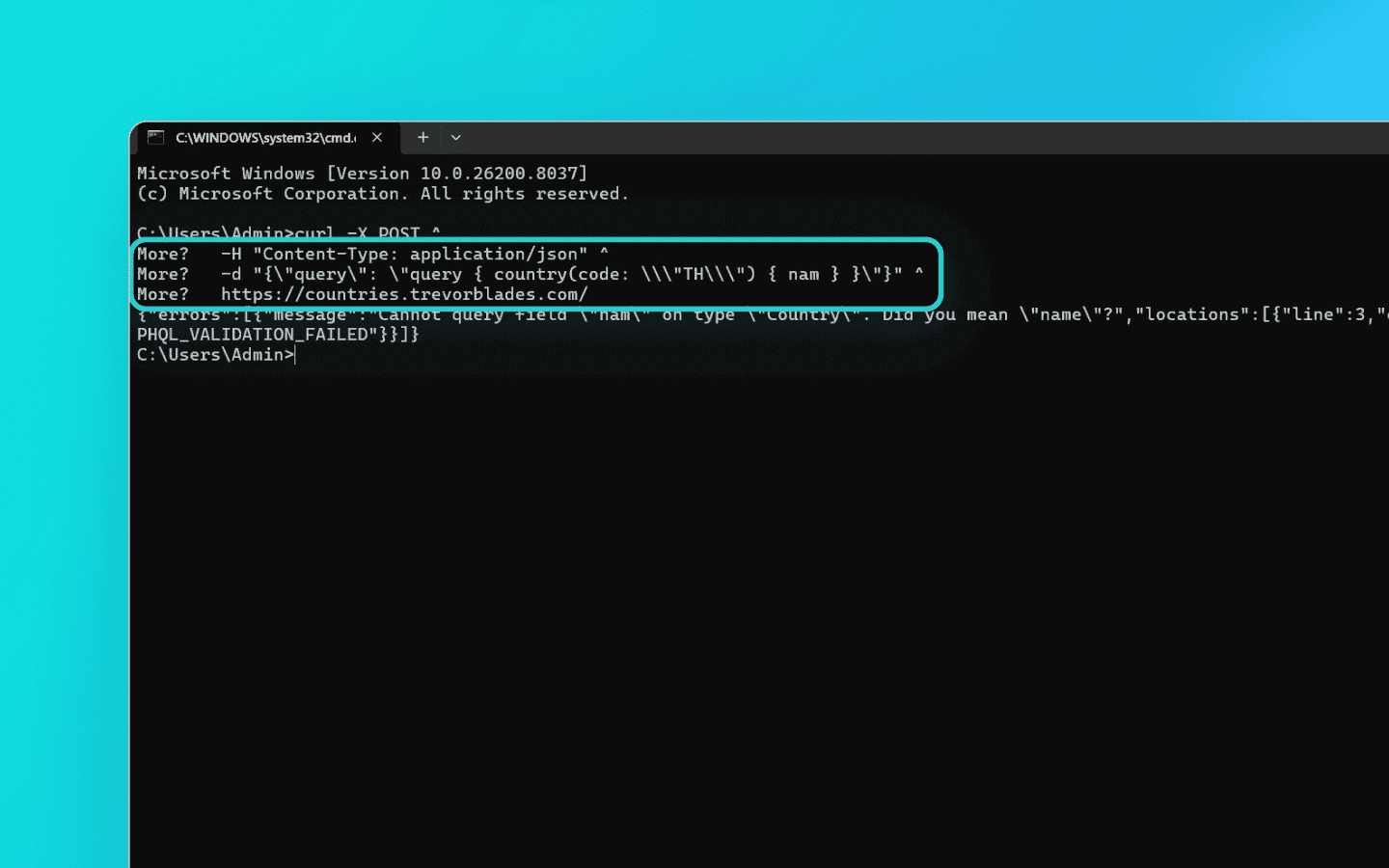
Analyze error messages. Many GraphQL servers try to help users by default. For example, if you request a non-existent field called
nam, the server may return an error such as"Cannot query field "nam". Did you mean "name"?".This process can be automated to gradually reconstruct a significant portion of the hidden schema.
Look for middleware leaks.
Introspectionis often disabled on the primary application server but accidentally left enabled on microservices orAPI gatewaysthat are directly accessible.
Scraping always requires improvisation. Look for alternative paths, because they are often left unprotected.
Automatic Persisted Queries (APQ)
Suppose you've successfully reconstructed the schema, understood the data structure, and built your GraphQL query. Instead of sending data, however, the server returns a validation error. That's APQ at work.
To avoid repeatedly sending large graph queries over the network, developers introduced Automatic Persisted Queries (APQ). This GraphQL optimization allows the client to send a hash (a unique query identifier) instead of the full query text. This significantly reduces request size, speeds up transmission, and allows queries to be cached on a CDN.
Here's how it works for a typical client: instead of sending the full query, the frontend computes its SHA-256 hash and sends only the hash together with the query variables. The server checks its cache, and if the hash is recognized, executes the associated query.
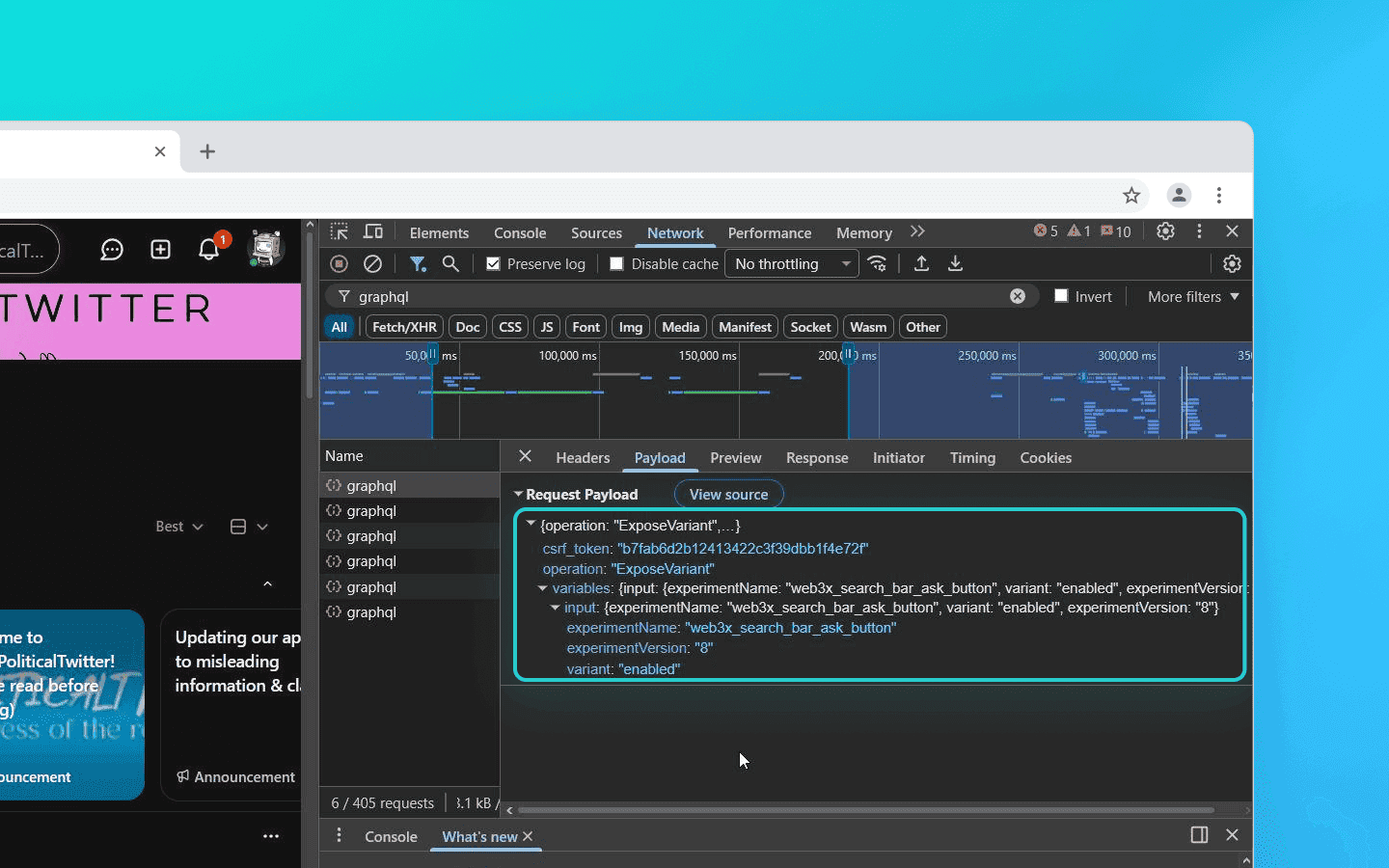
For example, Reddit's frontend doesn't send the query body at all. Instead, it sends only the pre-registered operation name (operation: "ExposeVariant") along with the required variables
Why this complicates scraping: you can't simply write your own custom query in a script and send it to the server. The server expects a 64-character hash. If you send your query in plain text, you'll receive a validation error.
Ways to bypass this:
Static asset parsing. All legitimate hashes are embedded in the compiled frontend JavaScript bundles. An automated scraping script should first download these JS files, extract the hash-to-query mappings, and only then build a database before issuing actual requests.
Fallback requests. APQ is designed so that if the server doesn't recognize a hash, the client resends both the hash and the complete query. Many servers leave this behavior enabled, allowing a scraper to dynamically register arbitrary queries—even ones never intended by the frontend.
Transport-layer obfuscation (TLS fingerprinting)
To avoid burning through your proxy pool, pay attention to the transport layer. Start your spoofing by ensuring your TLS handshake is properly formed.
TLS (Transport Layer Security) is a protocol that establishes secure connections. During the handshake, the client sends a ClientHello message containing a set of encryption parameters. These parameters reveal a great deal about you to the server.
Protection systems such as Cloudflare, Akamai, and DataDome analyze these network fingerprints. Standard libraries like Python's requests or Node.js axios have highly recognizable signatures that differ from those of a real Google Chrome or Safari, as they send a different order of cipher suites, protocol versions, and extensions in the ClientHello packet.
There are two main approaches for large-scale data collection:
Specialized libraries. Replace standard HTTP clients with libraries capable of emulating TLS fingerprints, such as
curl-cffifor Python ortls-clientfor Go. These tools mimic browser behavior at the request level while maintaining high performance.Anti-detect browsers. If the target platform has particularly aggressive protection, you can use an advanced anti-detect browser such as Octo Browser. In this case, TLS fingerprint spoofing takes place at the browser kernel level. Although this approach is somewhat slower, it is also the most reliable. The server sees behavior indistinguishable from that of a real browser, minimizing the risk of detection and blocks.
Bypassing rate limiting
Once your scraper is up and running, you may encounter another layer of protection: rate limiting.
With REST APIs, protection systems typically count the number of HTTP requests per second from a single IP address. GraphQL, however, allows a single HTTP request to retrieve an enormous amount of related data. Scrapers commonly take advantage of two built-in GraphQL features to bypass traditional request counters:
Batch requests. Originally, batching was introduced so that a frontend could combine multiple independent API requests into a single JSON array and send them together. For a scraper, this means that instead of making 100 separate requests to retrieve 100 user profiles, you can send a single request containing an array of 100 operation objects. If the rate limiter only analyzes traffic at the HTTP level, it counts this as just one request.
Aliases. If the server blocks JSON batching, you can use another GraphQL feature: aliases. Aliases let you request the same field multiple times with different arguments within a single operation. This increases the load on the server's database, but to the network firewall it still appears to be one legitimate request.
query GetMultipleUsers {
  user_1: user(id: "1001") { name, email }
  user_2: user(id: "1002") { name, email }
  # … and so on
}
query GetMultipleUsers {
  user_1: user(id: "1001") { name, email }
  user_2: user(id: "1002") { name, email }
  # … and so on
}
However, it's important to understand that today neither batching nor aliases are guaranteed to solve the problem.
Instead of simply counting requests, many platforms now implement Query Cost Analysis. Each field and relationship in the schema is assigned a weight. A simple scalar field such as name may cost one point, while requesting a nested list like posts(last: 100) may cost ten points.
Before executing your query, the server parses it, calculates its total cost, and rejects it with an error such as "Max query complexity exceeded" if the total exceeds the preconfigured limit—for example, if 500 aliases push the query beyond a threshold of 1,000 points.
Protection systems also strictly enforce limits on query nesting depth. If a scraper attempts, in one request, to retrieve a recursive graph of relationships—such as user → their friends → friends' posts → post comments—it will almost certainly hit the preconfigured nesting depth limit.
How to work with this: rather than trying to find the perfect size for a deep query—for example, splitting it into batches of 20–30 aliases instead of 500—it's often better to redesign the scraper around a flat retrieval strategy.
Flat queries. Start with a lightweight top-level query that retrieves only a flat list of IDs of the required objects without their relationships.
Chunking and workers. Split the retrieved IDs into small, safe batches (chunks). Then use a pool of workers to fetch detailed information for those IDs in parallel.
Local graph reconstruction. Rebuild the relational structure on the scraper side. Store the data locally (or in an intermediate database) and merge it programmatically.
This approach requires additional orchestration logic and local caching. In return, it provides stable, multithreaded scraping without triggering WAF rules, shadow bans, or database timeouts on the target platform.
Conclusion
Scraping modern GraphQL APIs demands full-fledged interaction with complex distributed systems, including transport-layer considerations such as TLS emulation, as well as an understanding of AST processing and server-side caching mechanisms.
Protection systems continue to evolve, but the architectural flexibility that makes GraphQL so attractive to developers also leaves plenty of opportunities for well-designed data collection systems.
Stay anonymous, take advantage of multi-accounting, and achieve your goals with the highest-quality anti-detect browser on the market.
Would you like to try Octo Browser at discount?
Use the promo code OCTOSCRAPER to get 30% off any subscription. This offer is valid only for new users.
The single endpoint problem
In the traditional REST architecture, routing helps distribute load and apply different rate limits. For example, the /api/users endpoint may have one set of restrictions, while /api/feed has another.
With GraphQL, there is only one endpoint. All useful data is sent in the body of a POST request as JSON containing the query, variables, and operation name. At the HTTP level, it looks something like this:
{
  "operationName": null,
  "variables": {},
  "query": "query { users { id name posts(last: 5) { id text timestamp } } }"
}
For readability, however, we're accustomed to seeing the same request in its expanded graph form:
query {
 users {
   id
   name
   posts(last: 5) {
     id
     text
     timestamp
   }
 }
}
This means that, from the perspective of load balancers and basic security systems, every request appears to be an identical call to the same URL.
To determine what the client is actually doing, anti-bot systems attempt to inspect the JSON payload in real time, while the application server parses the resulting heavy AST (Abstract Syntax Tree).
Modern scraping and protection strategies are built precisely around this architectural characteristic.
What to do when Introspection is disabled
Before developing a scraper, determine how exactly the target site's anti-bot system works. GraphQL analysis usually begins by attempting an Introspection query. This built-in feature instructs the server to return complete API documentation, including all types, fields, relationships, and arguments.
Naturally, serious platforms restrict access to this information. Even so, there are still ways to obtain it.
Analyze error messages. Many GraphQL servers try to help users by default. For example, if you request a non-existent field called
nam, the server may return an error such as"Cannot query field "nam". Did you mean "name"?".This process can be automated to gradually reconstruct a significant portion of the hidden schema.
Look for middleware leaks.
Introspectionis often disabled on the primary application server but accidentally left enabled on microservices orAPI gatewaysthat are directly accessible.
Scraping always requires improvisation. Look for alternative paths, because they are often left unprotected.
Automatic Persisted Queries (APQ)
Suppose you've successfully reconstructed the schema, understood the data structure, and built your GraphQL query. Instead of sending data, however, the server returns a validation error. That's APQ at work.
To avoid repeatedly sending large graph queries over the network, developers introduced Automatic Persisted Queries (APQ). This GraphQL optimization allows the client to send a hash (a unique query identifier) instead of the full query text. This significantly reduces request size, speeds up transmission, and allows queries to be cached on a CDN.
Here's how it works for a typical client: instead of sending the full query, the frontend computes its SHA-256 hash and sends only the hash together with the query variables. The server checks its cache, and if the hash is recognized, executes the associated query.
For example, Reddit's frontend doesn't send the query body at all. Instead, it sends only the pre-registered operation name (operation: "ExposeVariant") along with the required variables
Why this complicates scraping: you can't simply write your own custom query in a script and send it to the server. The server expects a 64-character hash. If you send your query in plain text, you'll receive a validation error.
Ways to bypass this:
Static asset parsing. All legitimate hashes are embedded in the compiled frontend JavaScript bundles. An automated scraping script should first download these JS files, extract the hash-to-query mappings, and only then build a database before issuing actual requests.
Fallback requests. APQ is designed so that if the server doesn't recognize a hash, the client resends both the hash and the complete query. Many servers leave this behavior enabled, allowing a scraper to dynamically register arbitrary queries—even ones never intended by the frontend.
Transport-layer obfuscation (TLS fingerprinting)
To avoid burning through your proxy pool, pay attention to the transport layer. Start your spoofing by ensuring your TLS handshake is properly formed.
TLS (Transport Layer Security) is a protocol that establishes secure connections. During the handshake, the client sends a ClientHello message containing a set of encryption parameters. These parameters reveal a great deal about you to the server.
Protection systems such as Cloudflare, Akamai, and DataDome analyze these network fingerprints. Standard libraries like Python's requests or Node.js axios have highly recognizable signatures that differ from those of a real Google Chrome or Safari, as they send a different order of cipher suites, protocol versions, and extensions in the ClientHello packet.
There are two main approaches for large-scale data collection:
Specialized libraries. Replace standard HTTP clients with libraries capable of emulating TLS fingerprints, such as
curl-cffifor Python ortls-clientfor Go. These tools mimic browser behavior at the request level while maintaining high performance.Anti-detect browsers. If the target platform has particularly aggressive protection, you can use an advanced anti-detect browser such as Octo Browser. In this case, TLS fingerprint spoofing takes place at the browser kernel level. Although this approach is somewhat slower, it is also the most reliable. The server sees behavior indistinguishable from that of a real browser, minimizing the risk of detection and blocks.
Bypassing rate limiting
Once your scraper is up and running, you may encounter another layer of protection: rate limiting.
With REST APIs, protection systems typically count the number of HTTP requests per second from a single IP address. GraphQL, however, allows a single HTTP request to retrieve an enormous amount of related data. Scrapers commonly take advantage of two built-in GraphQL features to bypass traditional request counters:
Batch requests. Originally, batching was introduced so that a frontend could combine multiple independent API requests into a single JSON array and send them together. For a scraper, this means that instead of making 100 separate requests to retrieve 100 user profiles, you can send a single request containing an array of 100 operation objects. If the rate limiter only analyzes traffic at the HTTP level, it counts this as just one request.
Aliases. If the server blocks JSON batching, you can use another GraphQL feature: aliases. Aliases let you request the same field multiple times with different arguments within a single operation. This increases the load on the server's database, but to the network firewall it still appears to be one legitimate request.
query GetMultipleUsers {
  user_1: user(id: "1001") { name, email }
  user_2: user(id: "1002") { name, email }
  # … and so on
}
However, it's important to understand that today neither batching nor aliases are guaranteed to solve the problem.
Instead of simply counting requests, many platforms now implement Query Cost Analysis. Each field and relationship in the schema is assigned a weight. A simple scalar field such as name may cost one point, while requesting a nested list like posts(last: 100) may cost ten points.
Before executing your query, the server parses it, calculates its total cost, and rejects it with an error such as "Max query complexity exceeded" if the total exceeds the preconfigured limit—for example, if 500 aliases push the query beyond a threshold of 1,000 points.
Protection systems also strictly enforce limits on query nesting depth. If a scraper attempts, in one request, to retrieve a recursive graph of relationships—such as user → their friends → friends' posts → post comments—it will almost certainly hit the preconfigured nesting depth limit.
How to work with this: rather than trying to find the perfect size for a deep query—for example, splitting it into batches of 20–30 aliases instead of 500—it's often better to redesign the scraper around a flat retrieval strategy.
Flat queries. Start with a lightweight top-level query that retrieves only a flat list of IDs of the required objects without their relationships.
Chunking and workers. Split the retrieved IDs into small, safe batches (chunks). Then use a pool of workers to fetch detailed information for those IDs in parallel.
Local graph reconstruction. Rebuild the relational structure on the scraper side. Store the data locally (or in an intermediate database) and merge it programmatically.
This approach requires additional orchestration logic and local caching. In return, it provides stable, multithreaded scraping without triggering WAF rules, shadow bans, or database timeouts on the target platform.
Conclusion
Scraping modern GraphQL APIs demands full-fledged interaction with complex distributed systems, including transport-layer considerations such as TLS emulation, as well as an understanding of AST processing and server-side caching mechanisms.
Protection systems continue to evolve, but the architectural flexibility that makes GraphQL so attractive to developers also leaves plenty of opportunities for well-designed data collection systems.
Stay up to date with the latest Octo Browser news
By clicking the button you agree to our Privacy Policy.
Stay up to date with the latest Octo Browser news
By clicking the button you agree to our Privacy Policy.
Stay up to date with the latest Octo Browser news
By clicking the button you agree to our Privacy Policy.

Join Octo Browser now
Or contact Customer Service at any time with any questions you might have.
Join Octo Browser now
Or contact Customer Service at any time with any questions you might have.
Join Octo Browser now
Or contact Customer Service at any time with any questions you might have.