WebSockets-based timing attacks: how anti-fraud systems scan your local ports


Markus_automation
Expert in data parsing and automation
It's a common misconception that reliable anonymity only requires a spoofed browser fingerprint and high-quality proxies, whether residential or mobile. In reality, that's no longer enough. Modern anti-fraud systems analyze a much broader range of signals and can detect automation even when your external fingerprint appears flawless.
One reason for this is local information leaks and indirect signals, including access to your local ports through WebSockets and timing attacks, which allow websites to infer details about your execution environment.
In this article, we'll explain how these attacks work, why they're possible, and how anti-detect browsers protect against these types of leaks.
Contents
Stay anonymous, take advantage of multi-accounting, and achieve your goals with the highest-quality anti-detect browser on the market.
Would you like to try Octo Browser at discount?
Use the promo code OCTOSCRAPER to get 30% off any subscription. This offer is valid only for new users.
How WebSocket becomes a local scanner
First, a bit of background. WebSocket is a TCP-based communication protocol designed for real-time message exchange between a client and a server.
Originally, it was created to enable things like browser games with minimal latency or real-time typing indicators in chat applications. But developers of anti-fraud systems quickly realized that if a browser can open a socket to a remote server, in most cases nothing prevents it from attempting to connect to the user's local addresses as well.
Here's how it works: as soon as the target webpage loads—or when you sign in—a hidden anti-fraud script begins asynchronously attempting to establish connections. It doesn't scan every possible port. Instead, it probes 127.0.0.1 using a predefined list of ports, such as 9222 for CDP or ports commonly used by local VPN clients and database servers. More often than not, this approach works.
Why browsers allow this
Modern browsers and operating systems have two architectural characteristics that make this possible.
Bypassing strict CORS restrictions. If an anti-fraud script tried to scan ports using a regular HTTP request (via
fetch()orXMLHttpRequest), the browser would block access to the response because of its security measures, same-origin policy, CORS restrictions, and mixed content rules. WebSockets work differently. The protocol does not use the traditional CORS model to restrict access to responses. Instead, it sends anOriginheader, which the server may choose to validate. Simply determining whether a connection succeeds or fails already provides valuable information for analysis.The firewall's blind spot. The
loopbackinterface (127.0.0.1) enjoys an exceptionally high level of trust within the operating system, as the traffic sent from the browser to a local port never leaves your network interface.
As a result, the built-in firewalls in Windows and macOS typically do not inspect or filter these internal connections, treating them as inherently safe.
This gives anti-fraud systems a legitimate, essentially unrestricted channel for probing your local environment.
But how can they tell whether a port is open if browser security policies prevent them from reading direct system responses?
That's where timing attacks come into play.
How a timing attack works
The browser sandbox imposes strict limitations on scripts. Due to the Same-Origin Policy (SOP) and CORS restrictions, a script cannot simply read a response from a local service or obtain the exact error code returned by a failed connection. Fortunately for a timing attack, it doesn't need to.
The process works like this:
The script starts an internal timer (typically using
performance.now()).It initiates a WebSocket connection:
new WebSocket('ws://127.0.0.1:9222')The script waits for the
onerrorevent to fire.Once the error occurs, the timer stops, and the elapsed time is calculated.
The key lies in how the operating system's network stack handles TCP connections:
If the port is closed. The operating system immediately rejects the incoming SYN packet by sending a
TCP RSTpacket in response. The browser closes the socket and triggers theonerrorhandler. On a local machine, this typically takes only 1–5 milliseconds.If the port is open. A full TCP three-way handshake is completed first. The browser then sends an HTTP Upgrade request to establish a WebSocket connection. Even if the service listening on that port is not actually a WebSocket server (for example, a database or an SSH daemon), the connection is not terminated immediately. Instead, it fails only after the protocol mismatch is detected. The additional time required for the handshake and data exchange increases the delay to roughly 10–50 milliseconds.
If the port is filtered by a firewall. The firewall silently drops the SYN packet instead of rejecting it. The browser receives no response from the operating system and waits until the system timeout expires. In this case, the delay is measured in seconds rather than milliseconds.
Modern browsers intentionally reduce timer precision to approximately 0.1–1 ms. However, network timing attacks don't require nanosecond accuracy.
The difference between an immediate TCP RST and a delayed connection attempt is measured in tens of milliseconds, which is more than enough for reliable detection.
Advanced anti-fraud systems also account for factors such as CPU load, JavaScript garbage collection, and operating system behavior, so they don't rely on hardcoded thresholds.
Instead, the script first calibrates itself.
Before probing the ports it's actually interested in, it attempts to connect to a deliberately random, high-numbered, and presumably closed port, for example:
ws://127.0.0.1:54321
This establishes a baseline response time for a closed port on your specific machine at that moment.
Only then does the anti-fraud system compare the timing of ports commonly associated with multi-accounting tools against this baseline to identify anomalies.
Why anti-fraud systems care about your localhost
The primary objective of an anti-fraud system is to deanonymize browser profiles and detect multi-accounting.
Most anti-detect solutions focus heavily on spoofing browser fingerprints—Canvas, WebGL, fonts, and similar signals—while paying far less attention to the network stack.
Open local ports associated with automation tools become highly reliable indicators that a digital identity has been spoofed.
What scoring algorithms look for
Indicator | Description | Why it matters |
Port 9222 | Standard CDP debugging port | An open port strongly suggests an actively automated browser. |
Port 22 | SSH service | Often associated with proxy tunnels or rented remote servers. |
Port 3306 | MySQL database | Reveals server environments that are highly unusual for ordinary home users. |
Timing characteristics | Response time differences | Allows the system to distinguish between filtered traffic (delayed response) and genuinely closed ports (immediate rejection). |
The timing data collected within fractions of a second is sent to the anti-fraud scoring server.
There, the observed port pattern is analyzed. Depending on the results, negative risk points may be added to your profile's overall score.
If port 9222 is open, it's a strong indication that the browser is being controlled through the Chrome DevTools Protocol (CDP) by automation frameworks such as Puppeteer, Playwright, or Selenium.
At that point, mouse movement emulation or simulated human input is unlikely to help. The session may receive a very high risk score, resulting in anything from a CAPTCHA challenge to an outright account ban, depending on how aggressive the anti-fraud system is.
Likewise, if ports such as 22 (SSH), 3306 (MySQL), or ports commonly used by local proxy applications are open, it's difficult to pass as a typical user device.
The anti-fraud system is likely to conclude that it's dealing with a virtual machine, a rented server, or a professional multi-accounting workstation, significantly reducing the trust assigned to the account.
Cross-linking and account farm detection
This is perhaps the biggest concern for anyone managing multiple accounts.
Imagine you're running 50 browser profiles on a single machine.
Each profile has:
a unique browser fingerprint;
a dedicated proxy;
a different IP address.
To external websites, they appear to be 50 different people. However, the underlying operating system or server is still the same.
That means the same background services are running, exposing the same set of open ports. This unique combination of open ports can effectively become a super fingerprint.
An anti-fraud system can recognize that fifty supposedly unrelated users all share the exact same, highly unusual local service configuration. It can then link them together into a single account farm and shadow-ban the entire group.
In other words, by scanning localhost, anti-bot systems can look behind your browser fingerprint and uncover the actual infrastructure powering your multi-accounting setup.
How to protect yourself: isolation and firewall configuration
When dealing with sophisticated anti-fraud systems, your defense strategy should be based on the following principles:
Isolate the network stack. Use virtual machines or containers with strictly isolated network environments. If the browser runs inside a fully isolated environment, timing attacks will return the standard response times of closed ports because services running on the host machine are physically inaccessible from within the virtual environment.
Configure your firewall correctly. Your firewall shouldn't simply block connection attempts, it should reject them immediately. Specifically, use REJECT, which instantly returns a TCP RST packet, instead of a DROP, which silently discards packets and forces the browser to wait for a timeout. A REJECT response mimics the behavior of a naturally closed port and therefore does not appear suspicious to timing-based detection algorithms.
Block localhost access entirely. The most radical—but also the most effective—approach is to completely prevent the browser from accessing localhost. This immediately neutralizes anti-fraud scripts that attempt to probe your system.
However, this approach has a downside: some legitimate applications, such as software for hardware security keys or e-signature tools, communicate through local agents. Losing access to those services can itself become an anomaly that contributes to a higher risk score.
Therefore, there are two practical approaches:
Fine-grained filtering. Allow access only to trusted local services at the firewall or browser-extension level, while immediately rejecting (using REJECT) any background attempts to establish WebSocket connections to unknown local ports.
Use specialized tools. The other option is to rely on software that handles these issues at the browser kernel level, such as anti-detect browsers.
For example, Octo Browser includes built-in protection against local port scanning. Octo intercepts any attempts by scripts, including those using the WebSocket API, to access addresses within the 127.0.0.0/8 range or localhost, handling them directly at the browser API level.
Testing protection measures
You can easily see how this works with a simple test.
First, start any local server on your device so that it opens a listening port.
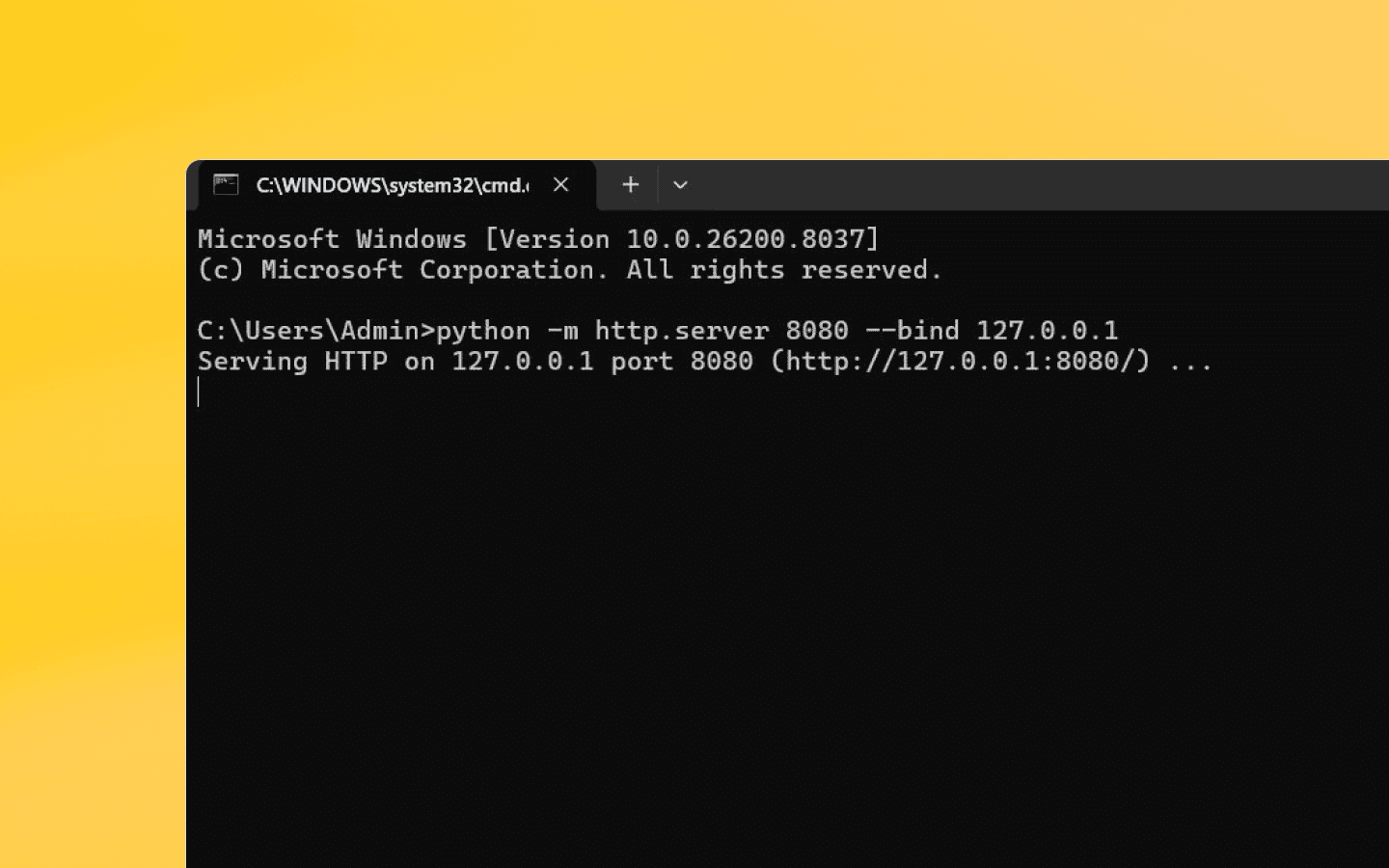
An open port will look something like this.
Next, open any website in your browser and attempt to access the open port.
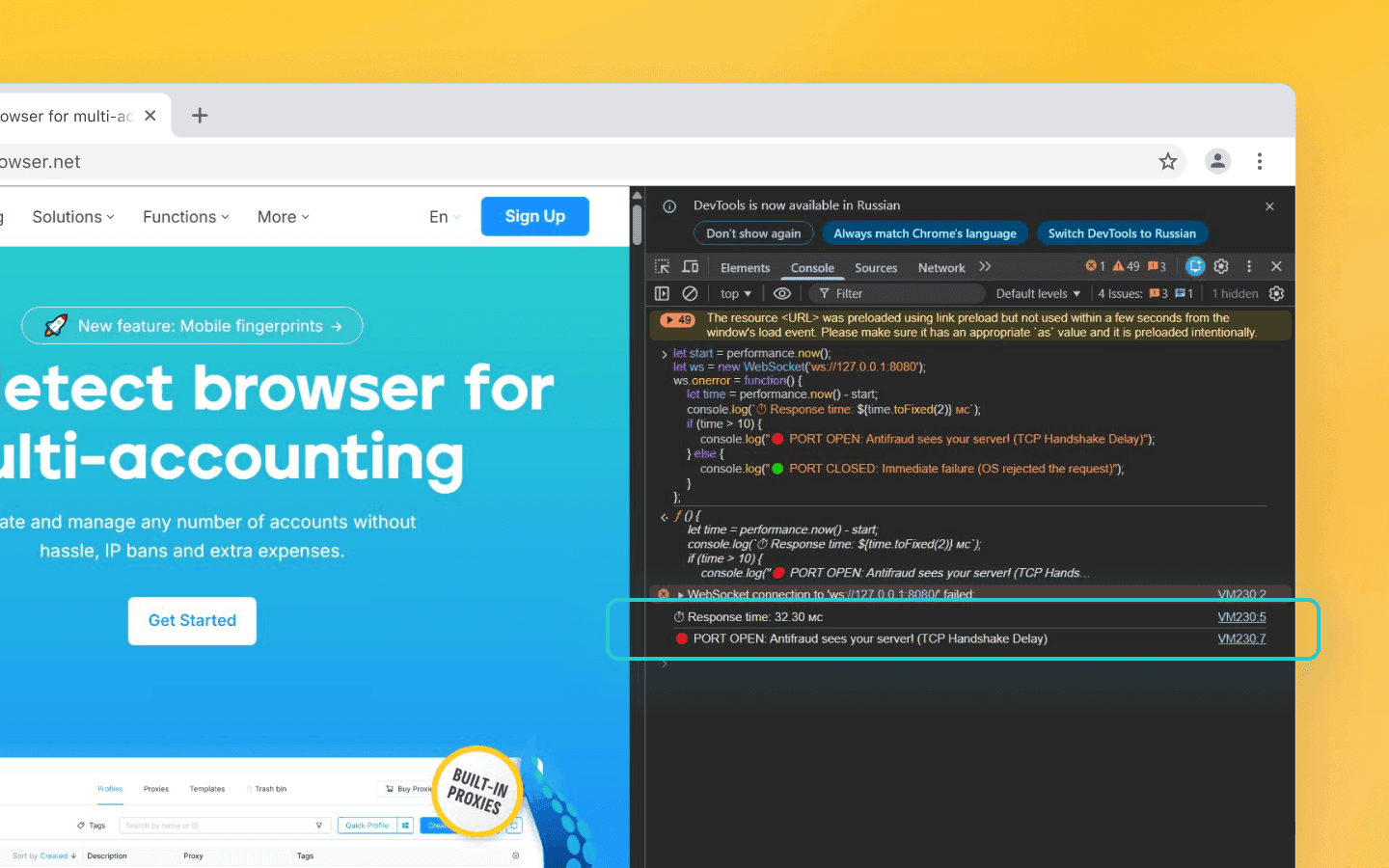
In a standard Chrome browser, the response arrives with a slight delay. That delay confirms that the port is open.
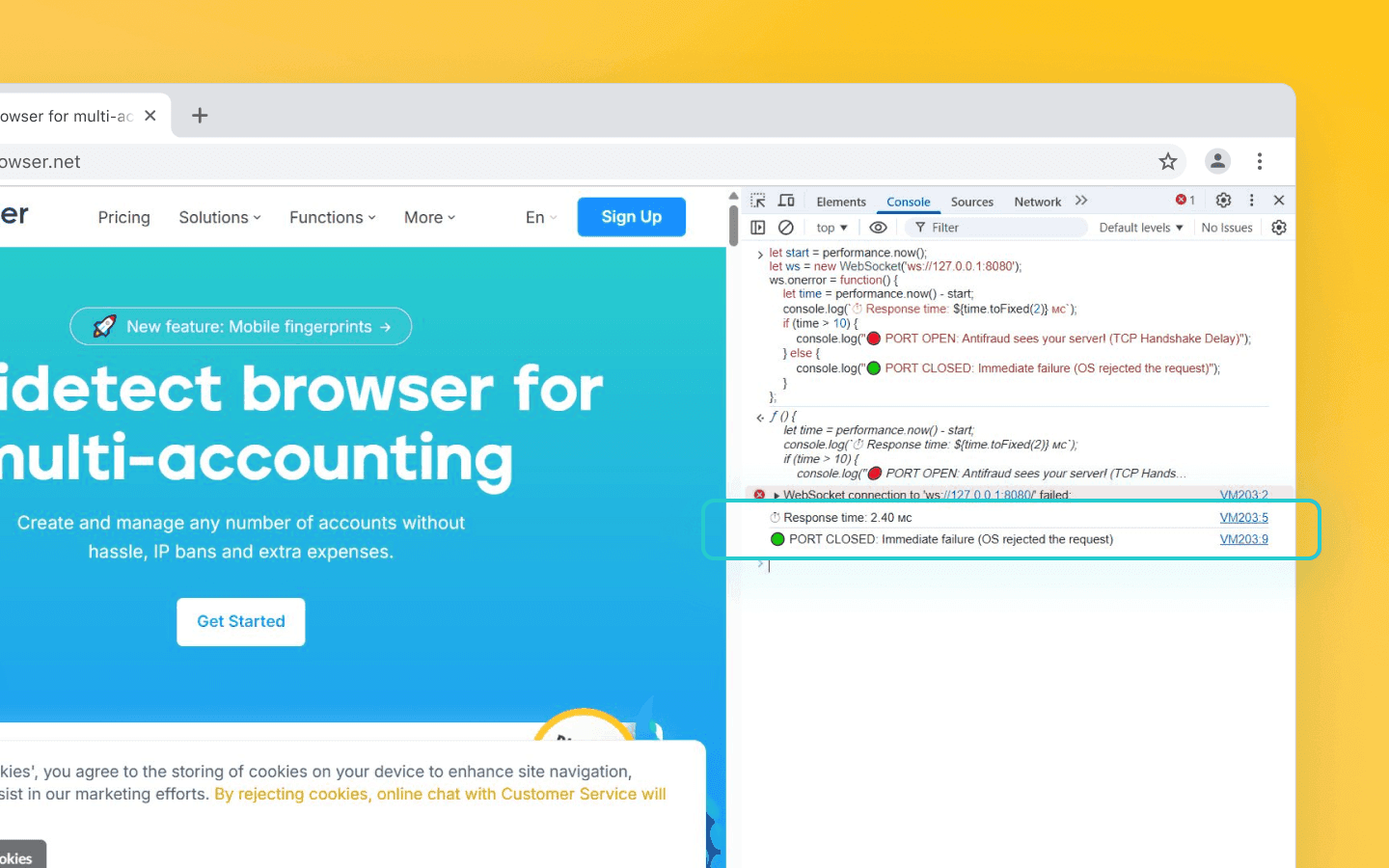
Perform the same test in Octo Browser, and you'll see that the port appears to be closed.
Octo Browser controls access to your local ports to prevent data leaks.
Does Private Network Access (PNA) solve the problem?
Private Network Access (PNA) is a security feature implemented in modern browsers (primarily Chrome) that prevents public websites from sending requests to devices or servers on the user's local network.
Modern browsers do attempt to mitigate this vulnerability by:
restricting or completely blocking access to localhost from insecure public contexts;
requiring a Secure Context (HTTPS) before such connections can be initiated;
performing CORS preflight requests before allowing access to local network resources.
However, anti-fraud system developers have adapted to this too.They use public domains that resolve to 127.0.0.1 (for example, yourapp.localhost.com) together with valid HTTPS certificates, allowing them to bypass some of these basic restrictions.
More importantly, PNA cannot protect you against TCP-level timing attacks. Even if PNA ultimately blocks a request because the required headers are missing, the browser must first establish a TCP connection before it can determine whether those headers are acceptable. If the port is closed, the operating system immediately rejects the connection with a TCP RST packet. If the port is open, the TCP handshake completes successfully. The browser then attempts to exchange data, encounters the PNA restrictions, terminates the connection, and only then reports an error.
Those extra steps take tens of milliseconds, which is precisely the timing difference that anti-fraud algorithms rely on. In other words, PNA prevents websites from reading local data, but it cannot conceal the time required to establish a connection.
Conclusion
Today, effective anonymity requires a comprehensive approach. You can create what appears to be the perfect browser profile, but a single forgotten debugging port like 9222 or an exposed database port can completely undermine your otherwise flawless spoofing. Protect your network stack: isolate your working environments, configure your firewall carefully, or rely on solutions that address these types of leaks at the browser kernel level.
Stay anonymous, take advantage of multi-accounting, and achieve your goals with the highest-quality anti-detect browser on the market.
Would you like to try Octo Browser at discount?
Use the promo code OCTOSCRAPER to get 30% off any subscription. This offer is valid only for new users.
How WebSocket becomes a local scanner
First, a bit of background. WebSocket is a TCP-based communication protocol designed for real-time message exchange between a client and a server.
Originally, it was created to enable things like browser games with minimal latency or real-time typing indicators in chat applications. But developers of anti-fraud systems quickly realized that if a browser can open a socket to a remote server, in most cases nothing prevents it from attempting to connect to the user's local addresses as well.
Here's how it works: as soon as the target webpage loads—or when you sign in—a hidden anti-fraud script begins asynchronously attempting to establish connections. It doesn't scan every possible port. Instead, it probes 127.0.0.1 using a predefined list of ports, such as 9222 for CDP or ports commonly used by local VPN clients and database servers. More often than not, this approach works.
Why browsers allow this
Modern browsers and operating systems have two architectural characteristics that make this possible.
Bypassing strict CORS restrictions. If an anti-fraud script tried to scan ports using a regular HTTP request (via
fetch()orXMLHttpRequest), the browser would block access to the response because of its security measures, same-origin policy, CORS restrictions, and mixed content rules. WebSockets work differently. The protocol does not use the traditional CORS model to restrict access to responses. Instead, it sends anOriginheader, which the server may choose to validate. Simply determining whether a connection succeeds or fails already provides valuable information for analysis.The firewall's blind spot. The
loopbackinterface (127.0.0.1) enjoys an exceptionally high level of trust within the operating system, as the traffic sent from the browser to a local port never leaves your network interface.
As a result, the built-in firewalls in Windows and macOS typically do not inspect or filter these internal connections, treating them as inherently safe.
This gives anti-fraud systems a legitimate, essentially unrestricted channel for probing your local environment.
But how can they tell whether a port is open if browser security policies prevent them from reading direct system responses?
That's where timing attacks come into play.
How a timing attack works
The browser sandbox imposes strict limitations on scripts. Due to the Same-Origin Policy (SOP) and CORS restrictions, a script cannot simply read a response from a local service or obtain the exact error code returned by a failed connection. Fortunately for a timing attack, it doesn't need to.
The process works like this:
The script starts an internal timer (typically using
performance.now()).It initiates a WebSocket connection:
new WebSocket('ws://127.0.0.1:9222')The script waits for the
onerrorevent to fire.Once the error occurs, the timer stops, and the elapsed time is calculated.
The key lies in how the operating system's network stack handles TCP connections:
If the port is closed. The operating system immediately rejects the incoming SYN packet by sending a
TCP RSTpacket in response. The browser closes the socket and triggers theonerrorhandler. On a local machine, this typically takes only 1–5 milliseconds.If the port is open. A full TCP three-way handshake is completed first. The browser then sends an HTTP Upgrade request to establish a WebSocket connection. Even if the service listening on that port is not actually a WebSocket server (for example, a database or an SSH daemon), the connection is not terminated immediately. Instead, it fails only after the protocol mismatch is detected. The additional time required for the handshake and data exchange increases the delay to roughly 10–50 milliseconds.
If the port is filtered by a firewall. The firewall silently drops the SYN packet instead of rejecting it. The browser receives no response from the operating system and waits until the system timeout expires. In this case, the delay is measured in seconds rather than milliseconds.
Modern browsers intentionally reduce timer precision to approximately 0.1–1 ms. However, network timing attacks don't require nanosecond accuracy.
The difference between an immediate TCP RST and a delayed connection attempt is measured in tens of milliseconds, which is more than enough for reliable detection.
Advanced anti-fraud systems also account for factors such as CPU load, JavaScript garbage collection, and operating system behavior, so they don't rely on hardcoded thresholds.
Instead, the script first calibrates itself.
Before probing the ports it's actually interested in, it attempts to connect to a deliberately random, high-numbered, and presumably closed port, for example:
ws://127.0.0.1:54321
This establishes a baseline response time for a closed port on your specific machine at that moment.
Only then does the anti-fraud system compare the timing of ports commonly associated with multi-accounting tools against this baseline to identify anomalies.
Why anti-fraud systems care about your localhost
The primary objective of an anti-fraud system is to deanonymize browser profiles and detect multi-accounting.
Most anti-detect solutions focus heavily on spoofing browser fingerprints—Canvas, WebGL, fonts, and similar signals—while paying far less attention to the network stack.
Open local ports associated with automation tools become highly reliable indicators that a digital identity has been spoofed.
What scoring algorithms look for
Indicator | Description | Why it matters |
Port 9222 | Standard CDP debugging port | An open port strongly suggests an actively automated browser. |
Port 22 | SSH service | Often associated with proxy tunnels or rented remote servers. |
Port 3306 | MySQL database | Reveals server environments that are highly unusual for ordinary home users. |
Timing characteristics | Response time differences | Allows the system to distinguish between filtered traffic (delayed response) and genuinely closed ports (immediate rejection). |
The timing data collected within fractions of a second is sent to the anti-fraud scoring server.
There, the observed port pattern is analyzed. Depending on the results, negative risk points may be added to your profile's overall score.
If port 9222 is open, it's a strong indication that the browser is being controlled through the Chrome DevTools Protocol (CDP) by automation frameworks such as Puppeteer, Playwright, or Selenium.
At that point, mouse movement emulation or simulated human input is unlikely to help. The session may receive a very high risk score, resulting in anything from a CAPTCHA challenge to an outright account ban, depending on how aggressive the anti-fraud system is.
Likewise, if ports such as 22 (SSH), 3306 (MySQL), or ports commonly used by local proxy applications are open, it's difficult to pass as a typical user device.
The anti-fraud system is likely to conclude that it's dealing with a virtual machine, a rented server, or a professional multi-accounting workstation, significantly reducing the trust assigned to the account.
Cross-linking and account farm detection
This is perhaps the biggest concern for anyone managing multiple accounts.
Imagine you're running 50 browser profiles on a single machine.
Each profile has:
a unique browser fingerprint;
a dedicated proxy;
a different IP address.
To external websites, they appear to be 50 different people. However, the underlying operating system or server is still the same.
That means the same background services are running, exposing the same set of open ports. This unique combination of open ports can effectively become a super fingerprint.
An anti-fraud system can recognize that fifty supposedly unrelated users all share the exact same, highly unusual local service configuration. It can then link them together into a single account farm and shadow-ban the entire group.
In other words, by scanning localhost, anti-bot systems can look behind your browser fingerprint and uncover the actual infrastructure powering your multi-accounting setup.
How to protect yourself: isolation and firewall configuration
When dealing with sophisticated anti-fraud systems, your defense strategy should be based on the following principles:
Isolate the network stack. Use virtual machines or containers with strictly isolated network environments. If the browser runs inside a fully isolated environment, timing attacks will return the standard response times of closed ports because services running on the host machine are physically inaccessible from within the virtual environment.
Configure your firewall correctly. Your firewall shouldn't simply block connection attempts, it should reject them immediately. Specifically, use REJECT, which instantly returns a TCP RST packet, instead of a DROP, which silently discards packets and forces the browser to wait for a timeout. A REJECT response mimics the behavior of a naturally closed port and therefore does not appear suspicious to timing-based detection algorithms.
Block localhost access entirely. The most radical—but also the most effective—approach is to completely prevent the browser from accessing localhost. This immediately neutralizes anti-fraud scripts that attempt to probe your system.
However, this approach has a downside: some legitimate applications, such as software for hardware security keys or e-signature tools, communicate through local agents. Losing access to those services can itself become an anomaly that contributes to a higher risk score.
Therefore, there are two practical approaches:
Fine-grained filtering. Allow access only to trusted local services at the firewall or browser-extension level, while immediately rejecting (using REJECT) any background attempts to establish WebSocket connections to unknown local ports.
Use specialized tools. The other option is to rely on software that handles these issues at the browser kernel level, such as anti-detect browsers.
For example, Octo Browser includes built-in protection against local port scanning. Octo intercepts any attempts by scripts, including those using the WebSocket API, to access addresses within the 127.0.0.0/8 range or localhost, handling them directly at the browser API level.
Testing protection measures
You can easily see how this works with a simple test.
First, start any local server on your device so that it opens a listening port.
An open port will look something like this.
Next, open any website in your browser and attempt to access the open port.
In a standard Chrome browser, the response arrives with a slight delay. That delay confirms that the port is open.
Perform the same test in Octo Browser, and you'll see that the port appears to be closed.
Octo Browser controls access to your local ports to prevent data leaks.
Does Private Network Access (PNA) solve the problem?
Private Network Access (PNA) is a security feature implemented in modern browsers (primarily Chrome) that prevents public websites from sending requests to devices or servers on the user's local network.
Modern browsers do attempt to mitigate this vulnerability by:
restricting or completely blocking access to localhost from insecure public contexts;
requiring a Secure Context (HTTPS) before such connections can be initiated;
performing CORS preflight requests before allowing access to local network resources.
However, anti-fraud system developers have adapted to this too.They use public domains that resolve to 127.0.0.1 (for example, yourapp.localhost.com) together with valid HTTPS certificates, allowing them to bypass some of these basic restrictions.
More importantly, PNA cannot protect you against TCP-level timing attacks. Even if PNA ultimately blocks a request because the required headers are missing, the browser must first establish a TCP connection before it can determine whether those headers are acceptable. If the port is closed, the operating system immediately rejects the connection with a TCP RST packet. If the port is open, the TCP handshake completes successfully. The browser then attempts to exchange data, encounters the PNA restrictions, terminates the connection, and only then reports an error.
Those extra steps take tens of milliseconds, which is precisely the timing difference that anti-fraud algorithms rely on. In other words, PNA prevents websites from reading local data, but it cannot conceal the time required to establish a connection.
Conclusion
Today, effective anonymity requires a comprehensive approach. You can create what appears to be the perfect browser profile, but a single forgotten debugging port like 9222 or an exposed database port can completely undermine your otherwise flawless spoofing. Protect your network stack: isolate your working environments, configure your firewall carefully, or rely on solutions that address these types of leaks at the browser kernel level.
Stay up to date with the latest Octo Browser news
By clicking the button you agree to our Privacy Policy.
Stay up to date with the latest Octo Browser news
By clicking the button you agree to our Privacy Policy.
Stay up to date with the latest Octo Browser news
By clicking the button you agree to our Privacy Policy.

Join Octo Browser now
Or contact Customer Service at any time with any questions you might have.
Join Octo Browser now
Or contact Customer Service at any time with any questions you might have.
Join Octo Browser now
Or contact Customer Service at any time with any questions you might have.