How anti-fraud systems expose mobile emulation

Markus_automation
Expert in data parsing and automation
When working with the most demanding online platforms, there are certain unspoken rules. One of the main ones is using mobile devices. If a service has a full-fledged mobile application, it is generally expected that users will interact with it through the app itself. This is tied both to the way anti-fraud systems work and to the typical behavior of real users.
Against this backdrop, anti-detect browsers with support for mobile profiles are becoming increasingly popular. They allow users to imitate mobile device activity while still remaining in a desktop environment. In this article, we discuss what these tools are, how they work, and in which cases it actually makes sense to use them.
Contents
Maintain your online anonymity with Octo Browser. Your real digital fingerprint cannot be tracked.
Would you like to try Octo Browser at discount?
Use the promo code OCTOSCRAPER to get 30% off any subscription. This offer is valid only for new users.
The evolution of mobile emulation
The simplest way to switch from desktop to mobile is the feature in developer tools that lets you see how a website looks in a mobile layout. However, it is important to understand that mobile mode in DevTools is a UI debugging tool, not a spoofing solution. DevTools will not make you invisible to Cloudflare or DataDome.
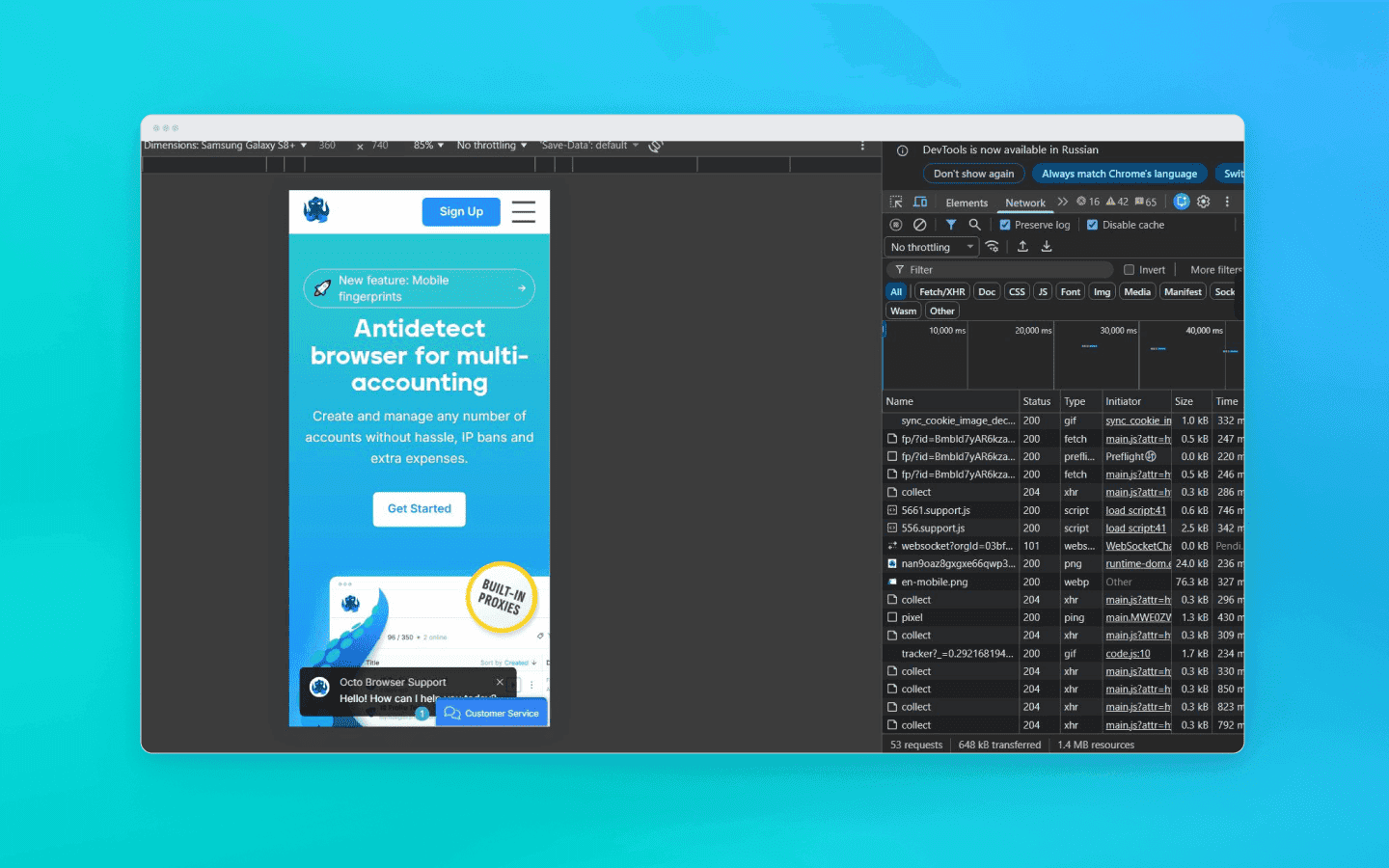
Engineers and affiliates use anti-detect browsers for spoofing and multi-accounting. Developers of anti-detect solutions invest enormous resources into deep fingerprint spoofing, from WebGL and Canvas to spoofing at the Chromium network stack level or through proxifying layers.
Anti-detect browsers offering mobile profiles can generally be divided into two main categories:
anti-detect browsers that emulate a mobile browser (but not the actual device);
anti-detect browsers that emulate a real mobile device.
Mobile profiles (Desktop Imitation)
This category includes most classic and advanced anti-detect browsers that emulate a mobile browser at the software level. Physically, such anti-detect browsers still run on your desktop CPU, but they spoof their parameters to look like mobile ones. This involves intercepting and spoofing WebGL fingerprints, controlling Canvas and WebGL rendering parameters, emulating touch events, and synchronizing TLS signatures at the browser network stack or proxy layer so that they match a mobile operating system.
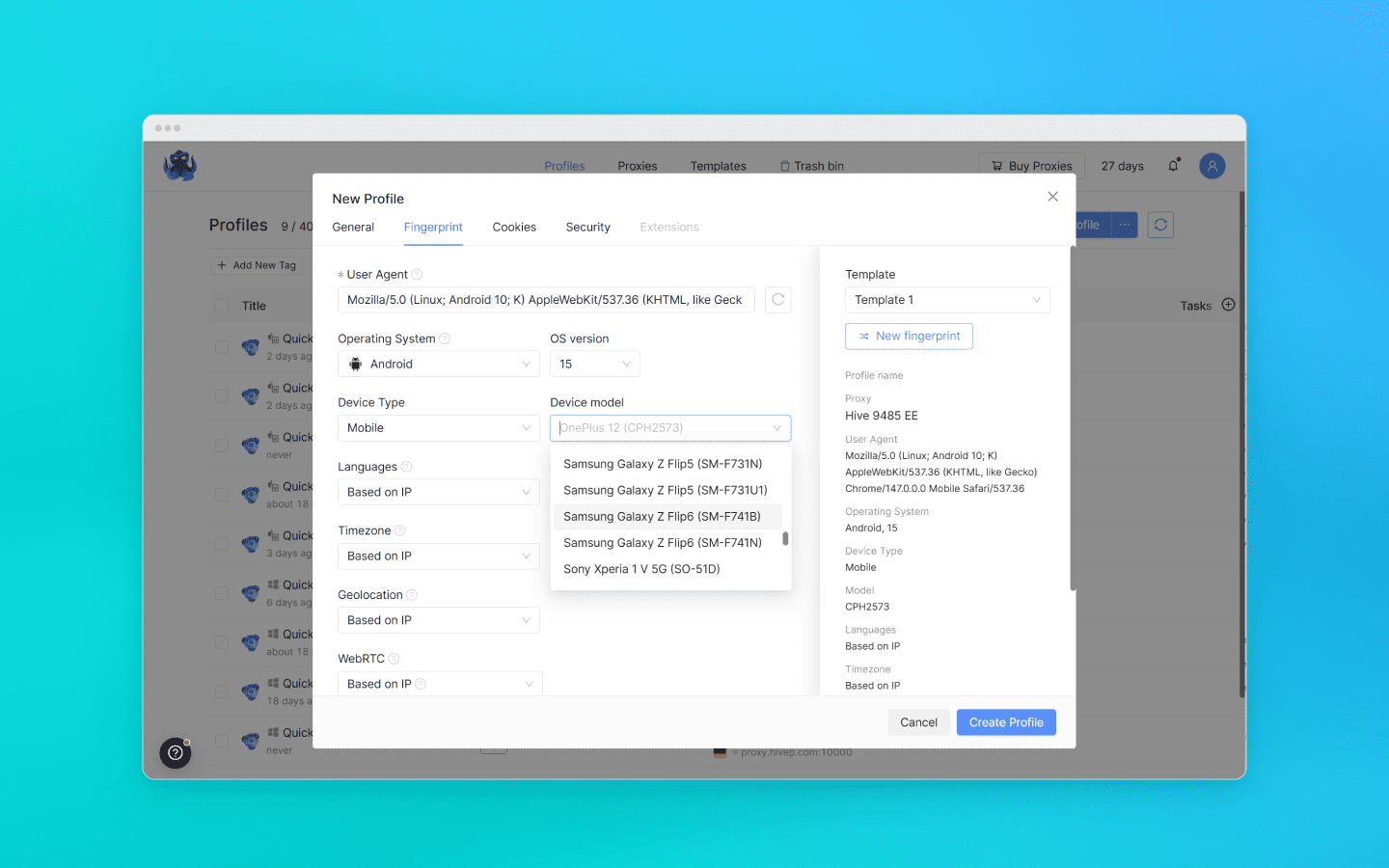
To anti-fraud systems analyzing mobile traffic, such a profile can appear to be a believable mobile client. From a cost-effectiveness perspective, this is an efficient, fast, and easily scalable approach that perfectly covers 90% of tasks that do not require a real mobile device.
Real mobile devices (Cloud Phones and farms)
These solutions completely abandon software-level spoofing on desktops and instead provide users with access to physical smartphones or virtual machines deployed on real ARM server processors. There is no need to imitate sensor behavior or mobile GPUs here, as everything happens physically at the hardware level. The key difference with this approach is the ability to run native mobile applications.
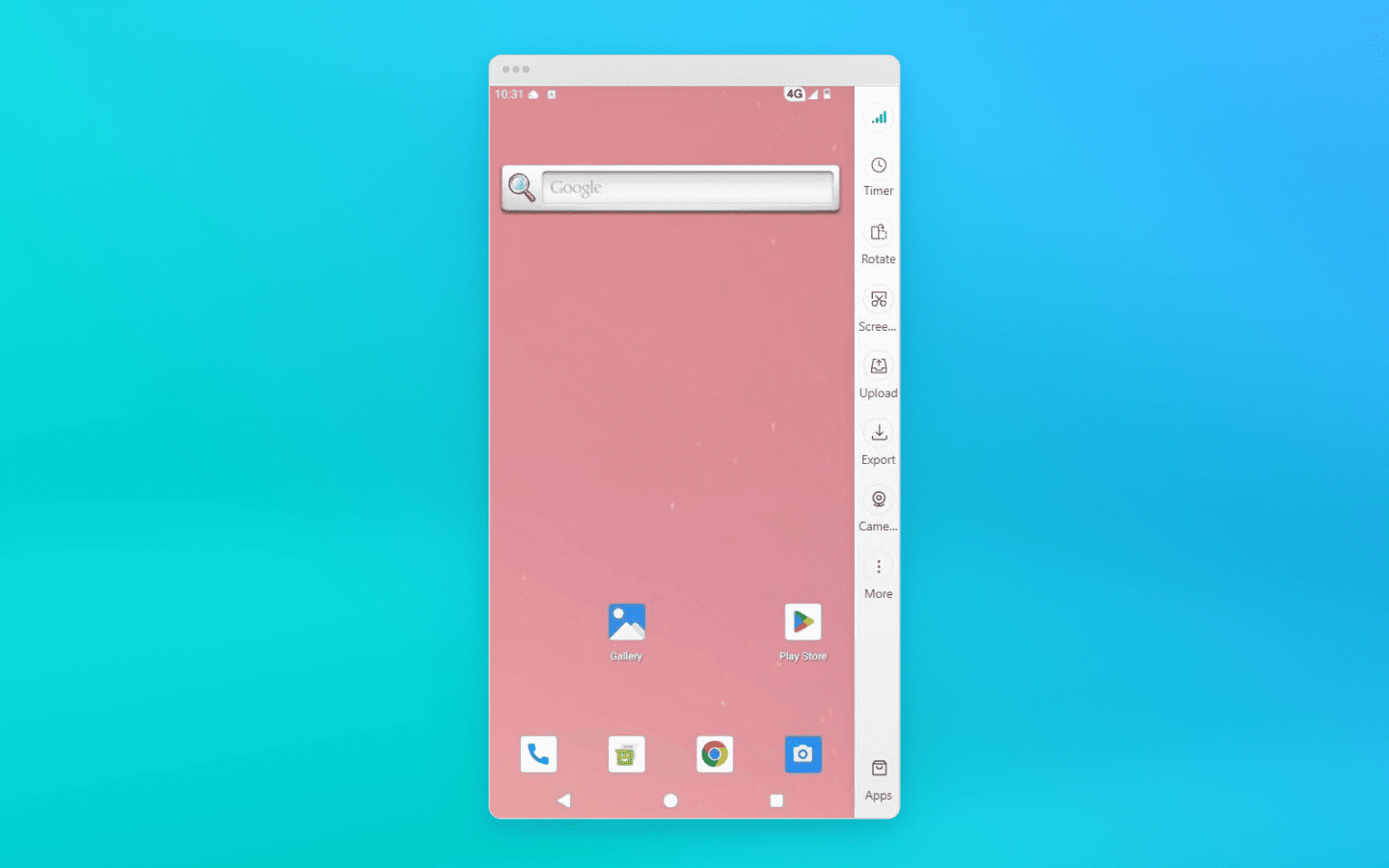
Having a profile on a real device is indispensable for platforms with extremely advanced protection systems, where registration or account preparation is only possible through the official application (TikTok, Instagram, banking apps). However, achieving 100% authenticity comes at a cost, both literally and figuratively: such infrastructures are slower, more difficult to configure, and many times more expensive.
How anti-fraud systems reveal desktop spoofing
Since deploying an infrastructure made up of real smartphones is, in most cases, unjustifiably expensive and slow, the overwhelming majority of specialists work with mobile profiles running on desktop hardware.
Anti-fraud systems take the economics of affiliate marketing and scraping into account. They operate under the assumption that the probability of finding an Ubuntu server or a Windows 11 home PC hiding behind a mobile device mask is extremely high.
That is why their main objective is to remove that mask. But how exactly do they do it? The secret is not in checking screen width or the User-Agent, but in the fundamental architectural differences between desktop hardware and mobile ARM chips.
Cryptographic conflict at the TLS level
A close inspection of a fake mobile profile begins long before the first byte of HTML loads or a single line of JavaScript executes. You can get flagged during the establishment of the secure HTTPS connection itself, the so-called TLS handshake.
How does it work? When you connect to a website, the browser sends the server an open ClientHello message, a cryptographic greeting that lists supported encryption algorithms and extensions. This is where the fundamental architectural differences come into play.
A real mobile device builds the ClientHello packet according to the specifics of its mobile operating system. Yes, Android uses a Chromium-like stack (just like desktop Chrome), but the mobile environment imposes its own rules: a specific set of ciphers, different transport parameters, and a unique extension order. A desktop emulator assembles this packet slightly differently. As a result, the handshake with the server physically happens in a different way.
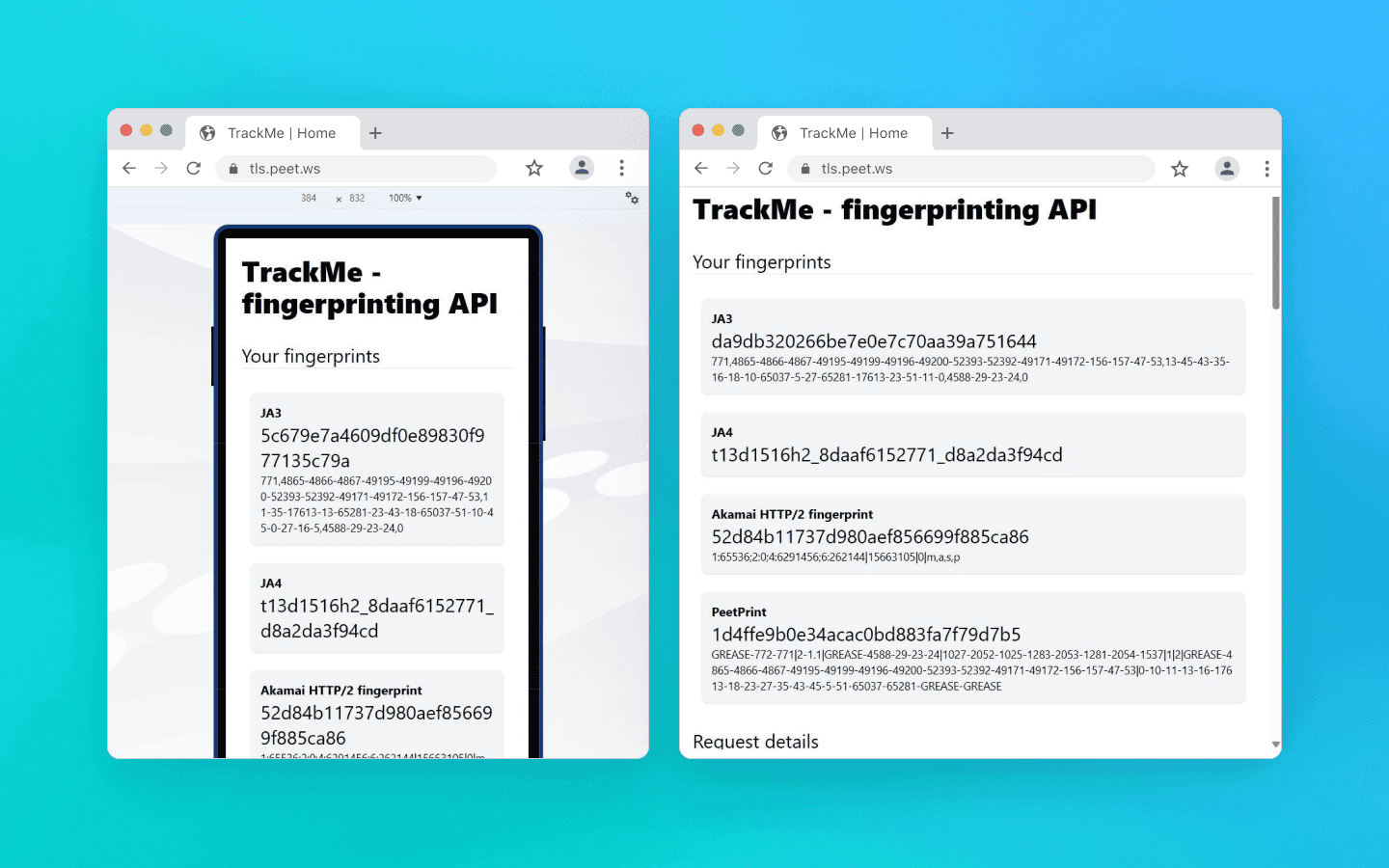
On the left you can see the cryptographic fingerprint of a desktop pretending to be a mobile device, and on the right a correct mobile TLS packet on the same computer
iPhone emulation is even more complicated. Apple’s ecosystem does not use the BoringSSL library that Chromium relies on at all. Safari uses Apple’s own TLS stack, which makes its fingerprint fundamentally different from Chromium-based browsers; it builds packets in an entirely different “cryptographic language.” If a desktop Chrome tries to imitate mobile Safari at the socket level, it creates a massive fingerprint mismatch and looks ridiculous to anti-fraud systems.
Modern protection systems like Cloudflare and Akamai use TLS fingerprinting methods such as JA3 and JA4. If you use low-quality mobile emulation, a solid anti-fraud system collecting these fingerprints will immediately notice inconsistencies:
At the application level, the User-Agent claims to be mobile Chrome on Android.
At the transport level, the packet structure reveals that it is actually a desktop browser running on Windows.
Regular JS injections or HTTP header spoofing will not help here, because they operate at the application layer and cannot change how the browser binary opens sockets.
High-quality anti-detect browsers, such as Octo Browser, modify Chromium’s networking stack at the source-code level. They force the desktop engine to build low-level cryptographic packets exactly the way a real mobile device does.
Hardware leaks and shader math: how your GPU gives you away
Let’s move on from the network layer to graphics rendering. The simplest and most primitive way to disguise desktop hardware is to intercept JavaScript calls to the WebGL API, in other words, make the browser return the name of a mobile GPU instead of your desktop graphics card.
The problem here is that modern anti-fraud systems stopped trusting plain text a long time ago. Advanced systems validate the math and architectural limits of the graphics pipeline to verify whether the device is truly mobile. How do they check this?
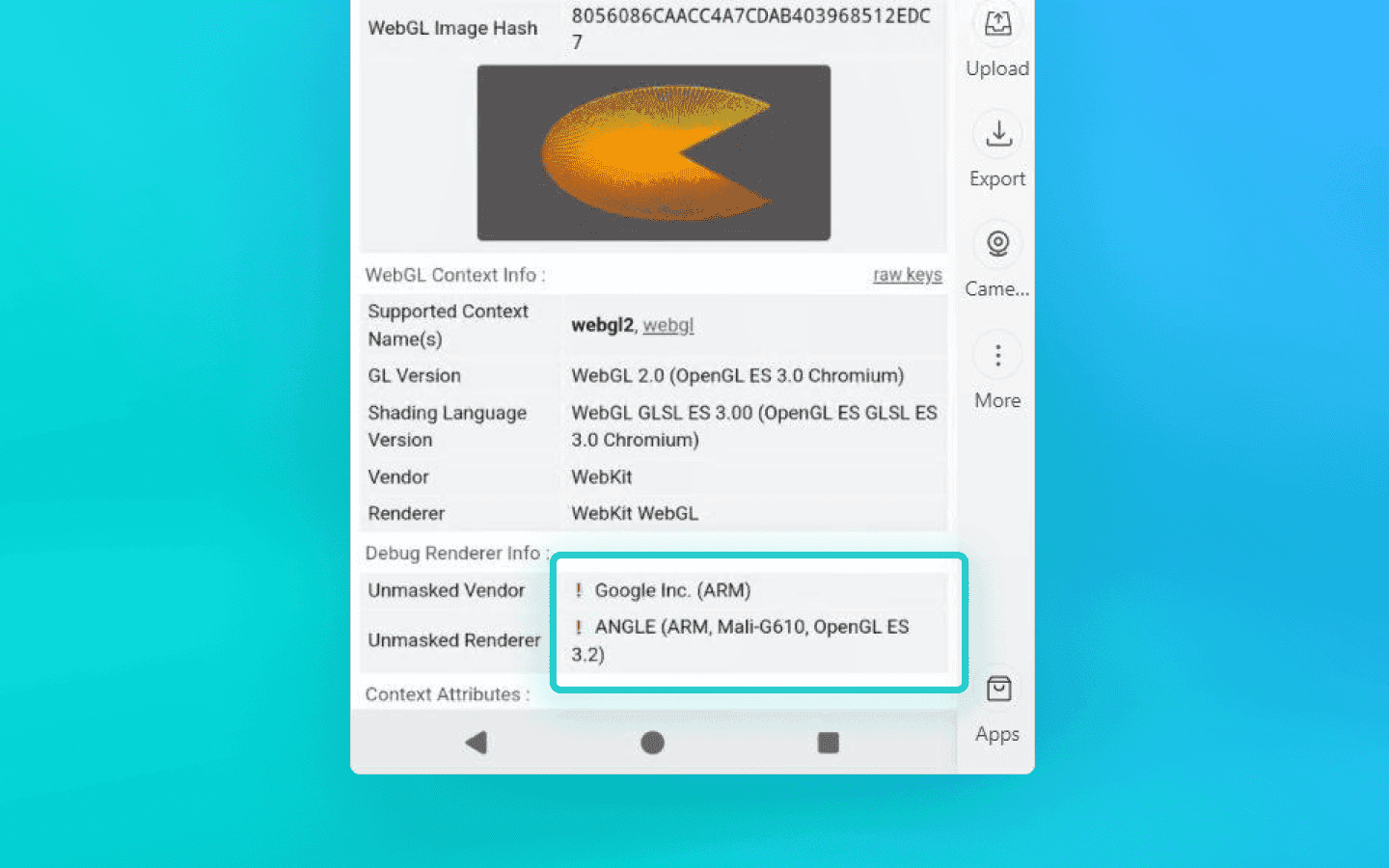
The red exclamation marks indicate that the checker detected interference
Texture and pipeline limits: mobile GPUs like Qualcomm Adreno or ARM Mali have strict hardware limits. For example, the
MAX_TEXTURE_SIZEparameter is traditionally lower than on desktop GPUs, although flagship devices today may overlap somewhat. If an anti-detect browser only spoofs the GPU name but ignores these microparameters, the browser will report support for massive desktop textures sized at 16384 or even 32768 pixels.Floating-point precision: protection algorithms query the
getShaderPrecisionFormatmethod to measure floating-point calculation accuracy. The key detail is that x86/x64 architectures (desktop) and ARM architectures (mobile) process geometry and rounding differently. These differences come from GPUs, drivers, and graphics APIs. Rendering a hidden 3D scene on Canvas and hashing the result (pixel fingerprinting) can expose desktop rasterization algorithms.Memory limits: mobile operating systems often impose stricter limits on the amount of RAM allocated to a browser tab. A desktop emulator running on a machine with 32 GB of RAM can easily render a heavy scene, which itself becomes behavioral evidence that the anti-fraud system is dealing with a desktop, not a smartphone.
The trap for scripts
How do simple solutions and extensions try to hide these mathematical inconsistencies? They rely on JS injections by overriding native browser functions.
But this creates another problem: call stack analysis. An anti-fraud system can intentionally trigger a DOM error. A hidden spoofing extension intercepts the event, runs into the artificial error, and leaves its own traces inside the Error object’s call stack, exposing internal anonymizing wrapper functions or entries like VM5:44 in the console.
The mere presence of the workaround becomes evidence. That is why reliable hardware spoofing is only possible deep inside the browser’s source code, without relying on JS scripts that can expose themselves.
Examples of low-quality solutions
Dummy extensions (User-Agent Switcher): the classic example with millions of installs. These tools only change a single line in the HTTP headers. Any basic anti-fraud checker immediately sees that the UA claims
Android / Pixel 7whilenavigator.platformstill returnsWin32. Naturally, such extensions also completely ignore TLS fingerprints and proper WebGL spoofing.
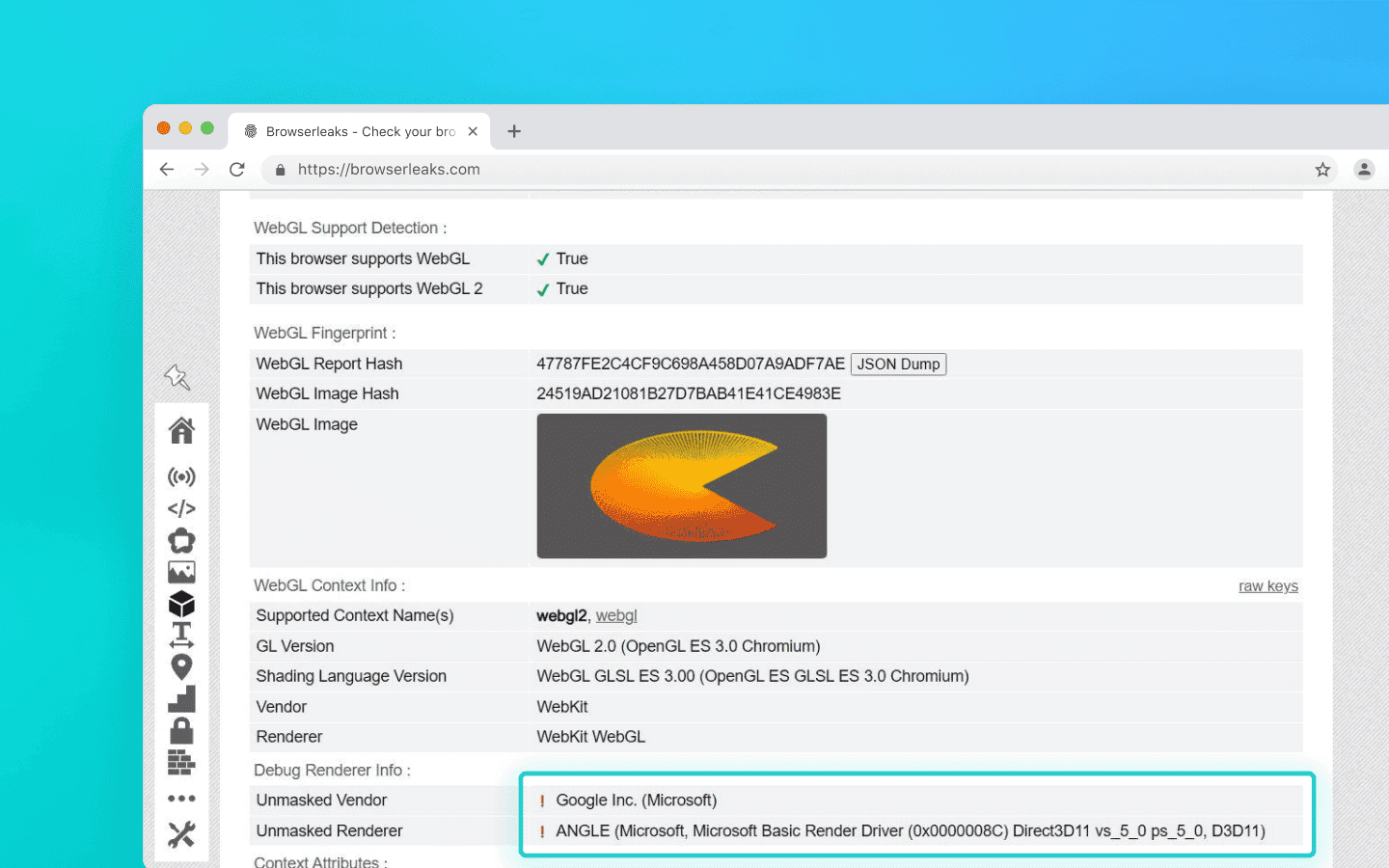
The UA claims Android, while the rest of the parameters clearly indicate a normal desktop machine: this is how User-Agent Switcher works
Gaming emulators (BlueStacks, NoxPlayer, LDPlayer): one of the most common mistakes is trying to bypass anti-fraud systems using gaming emulators. These emulators are built for performance, not anonymity. They straightforwardly work with your desktop GPU to process graphics. A WebGL query from a browser running inside BlueStacks or NoxPlayer will reveal NVIDIA or AMD hardware instead of a mobile Adreno GPU.
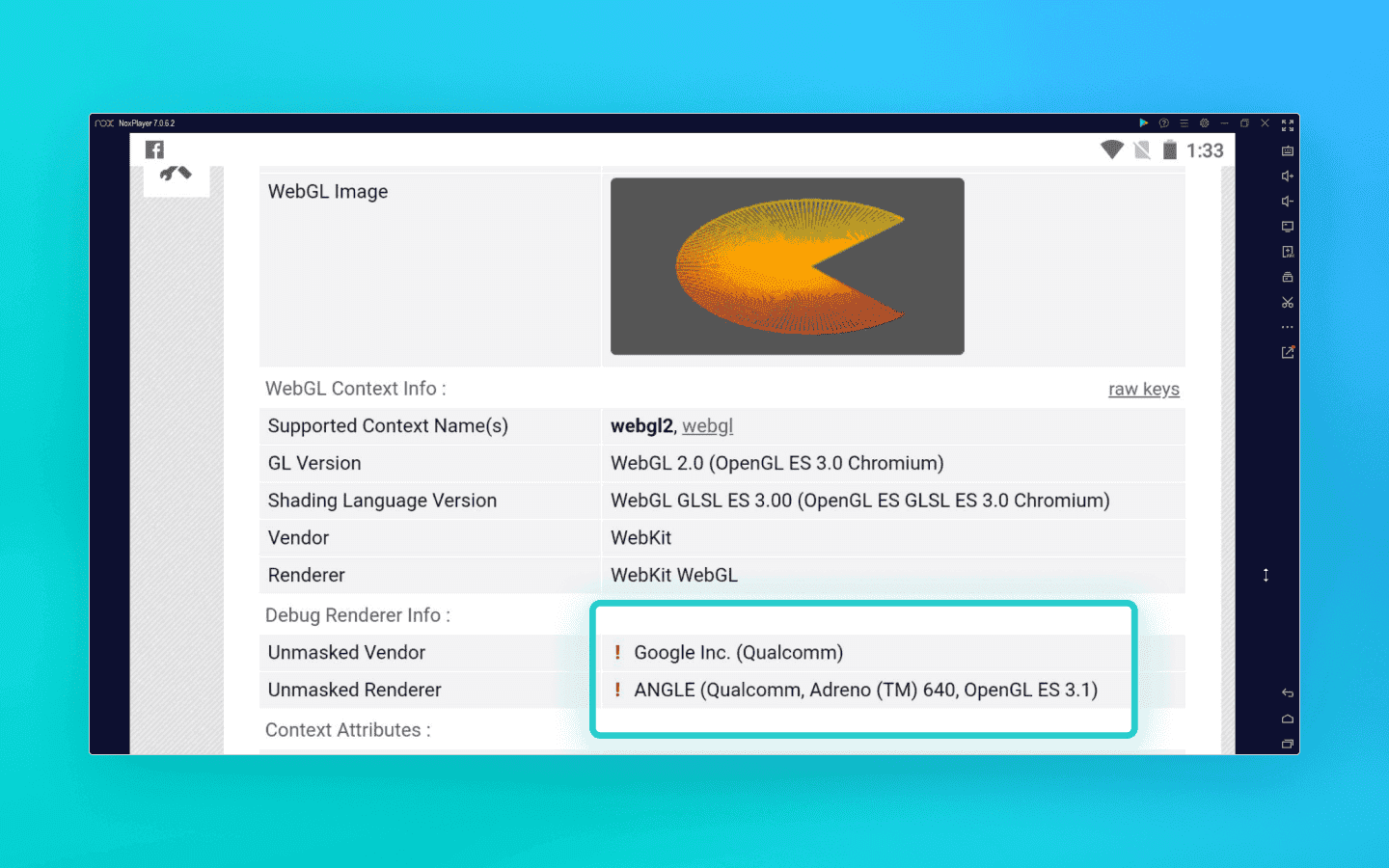
The exclamation marks show that the checker detected a JS injection. In the screenshot, a mobile browser is running through the NOX emulator
Bare automation (Selenium/Puppeteer): in an attempt to save money, people often write custom Python scripts combined with datacenter proxies. But proper spoofing can only be implemented at the browser kernel level, which tools like Selenium cannot provide.
The geo-engine paradox
Everything is clear with cheap workarounds, but even professional solutions can suffer from fingerprint inconsistencies. Anti-fraud systems may catch you using simple logic and geopolitics. Let’s look at how deeply modern protection algorithms think using the iPhone as an example.
Historically, Apple strictly required all third-party browsers on iOS to use the WebKit engine. Trying to emulate iOS with desktop Chrome (Blink/V8) was instantly exposed by checking for specific CSS rules and APIs.
In 2024, the European Union introduced antitrust legislation that forced Apple to allow third-party browser engines on iOS. As a result, iPhone emulation using Blink became legitimate. However, the law only applies within EU countries.
Anti-fraud systems started detecting inconsistencies using cross-correlation:
UA: Chrome on iOS.
JS engine: Blink (V8).
Connection IP address: United States, Latin America, or Asia.
The result is a profile that will very likely be classified as fake. A real iPhone using Blink outside the EU is practically nonexistent in normal user scenarios. That is why Android is usually a much safer, more logical, and more controllable choice.
Telemetry: physics versus math
Let’s now turn from geopolitics to physics. A real smartphone is still a physical object interacting with a human being.
Its hardware sensors—gyroscope and accelerometer—constantly record tiny movements from both the device and the user’s hand. Basic emulators imitate this tremor using scripts with Math.random(). But advanced anti-fraud systems can process this data stream using signal analysis methods. AI can easily distinguish flat synthetic white noise from the complex harmonic physics of real MEMS sensors and human pulse patterns.
Of course, not every anti-fraud system has the computational power for such analysis, but you should expect it from serious platforms such as fintech services or major social media.
On top of that, the architectural differences between x86/x64 processors (desktop) and ARM processors (mobile) inevitably appear not only in graphics rendering, but also in computational profiling. Protection systems measure the execution speed and timing of heavy cryptographic instructions, which often makes it possible to determine whether the “brain” of the device is an Intel or AMD CPU or a mobile Snapdragon chip.
The practical side: why mobile profiles in anti-detect browsers are still ideal for 90% of tasks
After reading about gyroscope spectral analysis and WebGL math, you might think that the era of desktop emulation is over and everyone should urgently move to more expensive solutions with mobile profiles based on real ARM devices. But let’s be realistic: only a small percentage of services have anti-fraud systems sophisticated enough to inspect your profiles this deeply.
Mobile profiles created in high-quality desktop anti-detect browsers with kernel-level spoofing remain—and will remain for a long time—the most efficient and economically reasonable solution for the overwhelming majority of tasks. Here’s why:
1. The mobile web is not only native apps. Yes, creating accounts using native Instagram or TikTok mobile apps through desktop emulation is painful today. Those platforms use strict sensor and architectural checks. But mobile website versions are restricted by the browser sandbox. They do not have direct access to low-level OS telemetry. If your anti-detect browser correctly spoofs TLS fingerprints, Client Hints, memory limits, and WebGL parameters deep inside the Chromium source code, you look like organic traffic to the mobile web.
2. E-commerce, scraping, and marketplaces. Platforms like Amazon, Wildberries, Ozon, ticket aggregators, and betting sites primarily care about clean IP addresses, timezone and font consistency, and the absence of obvious JS workarounds. Mobile traffic usually receives a higher trust score from such platforms. That is why using mobile profiles for scraping mobile layouts or bonus hunting reduces the chance of CAPTCHAs or account bans. Real ARM-based mobile profiles for such tasks are essentially overkill and unnecessarily expensive.
3. Scalability and cost-effectiveness. The biggest advantage of desktop emulation is cost-effective scalability. A single mid-range server can run hundreds of mobile web profiles. Renting real ARM nodes or physical smartphones, on the other hand, costs enormous amounts of money. If what you need is affiliate marketing through web interfaces, managing advertising accounts on Facebook or Google, or scraping data, desktop anti-detect browsers provide a dramatically higher ROI.
Conclusion
You need to clearly understand your goals. If you automate actions inside sophisticated native APK applications, you cannot avoid using real devices or profiles running on real devices. But for working with mobile web, advertising, scraping, and e-commerce, high-quality mobile profiles created in a reliable anti-detect browser remain the ideal balance between trust levels and scaling costs.
Maintain your online anonymity with Octo Browser. Your real digital fingerprint cannot be tracked.
Would you like to try Octo Browser at discount?
Use the promo code OCTOSCRAPER to get 30% off any subscription. This offer is valid only for new users.
The evolution of mobile emulation
The simplest way to switch from desktop to mobile is the feature in developer tools that lets you see how a website looks in a mobile layout. However, it is important to understand that mobile mode in DevTools is a UI debugging tool, not a spoofing solution. DevTools will not make you invisible to Cloudflare or DataDome.
Engineers and affiliates use anti-detect browsers for spoofing and multi-accounting. Developers of anti-detect solutions invest enormous resources into deep fingerprint spoofing, from WebGL and Canvas to spoofing at the Chromium network stack level or through proxifying layers.
Anti-detect browsers offering mobile profiles can generally be divided into two main categories:
anti-detect browsers that emulate a mobile browser (but not the actual device);
anti-detect browsers that emulate a real mobile device.
Mobile profiles (Desktop Imitation)
This category includes most classic and advanced anti-detect browsers that emulate a mobile browser at the software level. Physically, such anti-detect browsers still run on your desktop CPU, but they spoof their parameters to look like mobile ones. This involves intercepting and spoofing WebGL fingerprints, controlling Canvas and WebGL rendering parameters, emulating touch events, and synchronizing TLS signatures at the browser network stack or proxy layer so that they match a mobile operating system.
To anti-fraud systems analyzing mobile traffic, such a profile can appear to be a believable mobile client. From a cost-effectiveness perspective, this is an efficient, fast, and easily scalable approach that perfectly covers 90% of tasks that do not require a real mobile device.
Real mobile devices (Cloud Phones and farms)
These solutions completely abandon software-level spoofing on desktops and instead provide users with access to physical smartphones or virtual machines deployed on real ARM server processors. There is no need to imitate sensor behavior or mobile GPUs here, as everything happens physically at the hardware level. The key difference with this approach is the ability to run native mobile applications.
Having a profile on a real device is indispensable for platforms with extremely advanced protection systems, where registration or account preparation is only possible through the official application (TikTok, Instagram, banking apps). However, achieving 100% authenticity comes at a cost, both literally and figuratively: such infrastructures are slower, more difficult to configure, and many times more expensive.
How anti-fraud systems reveal desktop spoofing
Since deploying an infrastructure made up of real smartphones is, in most cases, unjustifiably expensive and slow, the overwhelming majority of specialists work with mobile profiles running on desktop hardware.
Anti-fraud systems take the economics of affiliate marketing and scraping into account. They operate under the assumption that the probability of finding an Ubuntu server or a Windows 11 home PC hiding behind a mobile device mask is extremely high.
That is why their main objective is to remove that mask. But how exactly do they do it? The secret is not in checking screen width or the User-Agent, but in the fundamental architectural differences between desktop hardware and mobile ARM chips.
Cryptographic conflict at the TLS level
A close inspection of a fake mobile profile begins long before the first byte of HTML loads or a single line of JavaScript executes. You can get flagged during the establishment of the secure HTTPS connection itself, the so-called TLS handshake.
How does it work? When you connect to a website, the browser sends the server an open ClientHello message, a cryptographic greeting that lists supported encryption algorithms and extensions. This is where the fundamental architectural differences come into play.
A real mobile device builds the ClientHello packet according to the specifics of its mobile operating system. Yes, Android uses a Chromium-like stack (just like desktop Chrome), but the mobile environment imposes its own rules: a specific set of ciphers, different transport parameters, and a unique extension order. A desktop emulator assembles this packet slightly differently. As a result, the handshake with the server physically happens in a different way.
On the left you can see the cryptographic fingerprint of a desktop pretending to be a mobile device, and on the right a correct mobile TLS packet on the same computer
iPhone emulation is even more complicated. Apple’s ecosystem does not use the BoringSSL library that Chromium relies on at all. Safari uses Apple’s own TLS stack, which makes its fingerprint fundamentally different from Chromium-based browsers; it builds packets in an entirely different “cryptographic language.” If a desktop Chrome tries to imitate mobile Safari at the socket level, it creates a massive fingerprint mismatch and looks ridiculous to anti-fraud systems.
Modern protection systems like Cloudflare and Akamai use TLS fingerprinting methods such as JA3 and JA4. If you use low-quality mobile emulation, a solid anti-fraud system collecting these fingerprints will immediately notice inconsistencies:
At the application level, the User-Agent claims to be mobile Chrome on Android.
At the transport level, the packet structure reveals that it is actually a desktop browser running on Windows.
Regular JS injections or HTTP header spoofing will not help here, because they operate at the application layer and cannot change how the browser binary opens sockets.
High-quality anti-detect browsers, such as Octo Browser, modify Chromium’s networking stack at the source-code level. They force the desktop engine to build low-level cryptographic packets exactly the way a real mobile device does.
Hardware leaks and shader math: how your GPU gives you away
Let’s move on from the network layer to graphics rendering. The simplest and most primitive way to disguise desktop hardware is to intercept JavaScript calls to the WebGL API, in other words, make the browser return the name of a mobile GPU instead of your desktop graphics card.
The problem here is that modern anti-fraud systems stopped trusting plain text a long time ago. Advanced systems validate the math and architectural limits of the graphics pipeline to verify whether the device is truly mobile. How do they check this?
The red exclamation marks indicate that the checker detected interference
Texture and pipeline limits: mobile GPUs like Qualcomm Adreno or ARM Mali have strict hardware limits. For example, the
MAX_TEXTURE_SIZEparameter is traditionally lower than on desktop GPUs, although flagship devices today may overlap somewhat. If an anti-detect browser only spoofs the GPU name but ignores these microparameters, the browser will report support for massive desktop textures sized at 16384 or even 32768 pixels.Floating-point precision: protection algorithms query the
getShaderPrecisionFormatmethod to measure floating-point calculation accuracy. The key detail is that x86/x64 architectures (desktop) and ARM architectures (mobile) process geometry and rounding differently. These differences come from GPUs, drivers, and graphics APIs. Rendering a hidden 3D scene on Canvas and hashing the result (pixel fingerprinting) can expose desktop rasterization algorithms.Memory limits: mobile operating systems often impose stricter limits on the amount of RAM allocated to a browser tab. A desktop emulator running on a machine with 32 GB of RAM can easily render a heavy scene, which itself becomes behavioral evidence that the anti-fraud system is dealing with a desktop, not a smartphone.
The trap for scripts
How do simple solutions and extensions try to hide these mathematical inconsistencies? They rely on JS injections by overriding native browser functions.
But this creates another problem: call stack analysis. An anti-fraud system can intentionally trigger a DOM error. A hidden spoofing extension intercepts the event, runs into the artificial error, and leaves its own traces inside the Error object’s call stack, exposing internal anonymizing wrapper functions or entries like VM5:44 in the console.
The mere presence of the workaround becomes evidence. That is why reliable hardware spoofing is only possible deep inside the browser’s source code, without relying on JS scripts that can expose themselves.
Examples of low-quality solutions
Dummy extensions (User-Agent Switcher): the classic example with millions of installs. These tools only change a single line in the HTTP headers. Any basic anti-fraud checker immediately sees that the UA claims
Android / Pixel 7whilenavigator.platformstill returnsWin32. Naturally, such extensions also completely ignore TLS fingerprints and proper WebGL spoofing.
The UA claims Android, while the rest of the parameters clearly indicate a normal desktop machine: this is how User-Agent Switcher works
Gaming emulators (BlueStacks, NoxPlayer, LDPlayer): one of the most common mistakes is trying to bypass anti-fraud systems using gaming emulators. These emulators are built for performance, not anonymity. They straightforwardly work with your desktop GPU to process graphics. A WebGL query from a browser running inside BlueStacks or NoxPlayer will reveal NVIDIA or AMD hardware instead of a mobile Adreno GPU.
The exclamation marks show that the checker detected a JS injection. In the screenshot, a mobile browser is running through the NOX emulator
Bare automation (Selenium/Puppeteer): in an attempt to save money, people often write custom Python scripts combined with datacenter proxies. But proper spoofing can only be implemented at the browser kernel level, which tools like Selenium cannot provide.
The geo-engine paradox
Everything is clear with cheap workarounds, but even professional solutions can suffer from fingerprint inconsistencies. Anti-fraud systems may catch you using simple logic and geopolitics. Let’s look at how deeply modern protection algorithms think using the iPhone as an example.
Historically, Apple strictly required all third-party browsers on iOS to use the WebKit engine. Trying to emulate iOS with desktop Chrome (Blink/V8) was instantly exposed by checking for specific CSS rules and APIs.
In 2024, the European Union introduced antitrust legislation that forced Apple to allow third-party browser engines on iOS. As a result, iPhone emulation using Blink became legitimate. However, the law only applies within EU countries.
Anti-fraud systems started detecting inconsistencies using cross-correlation:
UA: Chrome on iOS.
JS engine: Blink (V8).
Connection IP address: United States, Latin America, or Asia.
The result is a profile that will very likely be classified as fake. A real iPhone using Blink outside the EU is practically nonexistent in normal user scenarios. That is why Android is usually a much safer, more logical, and more controllable choice.
Telemetry: physics versus math
Let’s now turn from geopolitics to physics. A real smartphone is still a physical object interacting with a human being.
Its hardware sensors—gyroscope and accelerometer—constantly record tiny movements from both the device and the user’s hand. Basic emulators imitate this tremor using scripts with Math.random(). But advanced anti-fraud systems can process this data stream using signal analysis methods. AI can easily distinguish flat synthetic white noise from the complex harmonic physics of real MEMS sensors and human pulse patterns.
Of course, not every anti-fraud system has the computational power for such analysis, but you should expect it from serious platforms such as fintech services or major social media.
On top of that, the architectural differences between x86/x64 processors (desktop) and ARM processors (mobile) inevitably appear not only in graphics rendering, but also in computational profiling. Protection systems measure the execution speed and timing of heavy cryptographic instructions, which often makes it possible to determine whether the “brain” of the device is an Intel or AMD CPU or a mobile Snapdragon chip.
The practical side: why mobile profiles in anti-detect browsers are still ideal for 90% of tasks
After reading about gyroscope spectral analysis and WebGL math, you might think that the era of desktop emulation is over and everyone should urgently move to more expensive solutions with mobile profiles based on real ARM devices. But let’s be realistic: only a small percentage of services have anti-fraud systems sophisticated enough to inspect your profiles this deeply.
Mobile profiles created in high-quality desktop anti-detect browsers with kernel-level spoofing remain—and will remain for a long time—the most efficient and economically reasonable solution for the overwhelming majority of tasks. Here’s why:
1. The mobile web is not only native apps. Yes, creating accounts using native Instagram or TikTok mobile apps through desktop emulation is painful today. Those platforms use strict sensor and architectural checks. But mobile website versions are restricted by the browser sandbox. They do not have direct access to low-level OS telemetry. If your anti-detect browser correctly spoofs TLS fingerprints, Client Hints, memory limits, and WebGL parameters deep inside the Chromium source code, you look like organic traffic to the mobile web.
2. E-commerce, scraping, and marketplaces. Platforms like Amazon, Wildberries, Ozon, ticket aggregators, and betting sites primarily care about clean IP addresses, timezone and font consistency, and the absence of obvious JS workarounds. Mobile traffic usually receives a higher trust score from such platforms. That is why using mobile profiles for scraping mobile layouts or bonus hunting reduces the chance of CAPTCHAs or account bans. Real ARM-based mobile profiles for such tasks are essentially overkill and unnecessarily expensive.
3. Scalability and cost-effectiveness. The biggest advantage of desktop emulation is cost-effective scalability. A single mid-range server can run hundreds of mobile web profiles. Renting real ARM nodes or physical smartphones, on the other hand, costs enormous amounts of money. If what you need is affiliate marketing through web interfaces, managing advertising accounts on Facebook or Google, or scraping data, desktop anti-detect browsers provide a dramatically higher ROI.
Conclusion
You need to clearly understand your goals. If you automate actions inside sophisticated native APK applications, you cannot avoid using real devices or profiles running on real devices. But for working with mobile web, advertising, scraping, and e-commerce, high-quality mobile profiles created in a reliable anti-detect browser remain the ideal balance between trust levels and scaling costs.
Stay up to date with the latest Octo Browser news
By clicking the button you agree to our Privacy Policy.
Stay up to date with the latest Octo Browser news
By clicking the button you agree to our Privacy Policy.
Stay up to date with the latest Octo Browser news
By clicking the button you agree to our Privacy Policy.

Join Octo Browser now
Or contact Customer Service at any time with any questions you might have.
Join Octo Browser now
Or contact Customer Service at any time with any questions you might have.
Join Octo Browser now
Or contact Customer Service at any time with any questions you might have.