Whoer review 2026: checking IP address, DNS, WebRTC, and browser fingerprint


Nikolai Izoitko
Content Manager, Octo Browser
Internet services collect dozens of technical parameters about every visitor. Some use them for analytics, others for fraud prevention, and still others to combat multi-accounting and automation. That is why affiliate marketers, automation specialists, and SMM professionals need to understand what information websites can see and how closely their browser resembles a regular user’s device.
Specialized anonymity-checking services are available for quick diagnostics. One of the best-known is Whoer.net. It lets you check your IP address, detect DNS and WebRTC leaks, evaluate your browser settings, and see what information may potentially be visible to websites.
However, it's important to interpret Whoer’s results correctly. A high anonymity score does not guarantee that an anti-fraud system won't detect environment spoofing, while a low score doesn't necessarily indicate a problem. Let's examine how Whoer works, what exactly it checks, and when it is actually worth using.
Contents
Maintain your online anonymity with Octo Browser. Your real digital fingerprint cannot be tracked.
Would you like to try Octo Browser at а discount?
Use the promo code OCTOBLOG to get 30% off any subscription. This offer is valid only for new users.
Quick verdict: is Whoer worth using?
Yes—but only if you understand its capabilities and limitations. Whoer is useful as the first step when checking a browser, VPN, or proxy. The platform quickly shows:
The detectable IP address;
whether the geolocation matches;
whether DNS leaks are present;
whether the browser exposes the real IP address through WebRTC;
how natural certain browser parameters appear.
This is usually enough to identify obvious configuration mistakes. However, Whoer should not be considered a full-fledged simulator of modern anti-fraud systems. It checks only a limited set of signals and does not model the full range of data analyzed by Google, Meta, TikTok, Amazon, banking services, or advertising platforms.
A good result in Whoer is therefore a useful indicator, but not the final measure of your browser fingerprint's quality.
What is Whoer?
Whoer.net is a service for checking the anonymity of your Internet connection and analyzing browser parameters. As soon as you open its website, Whoer automatically collects the information that your browser normally sends to websites during a standard connection.
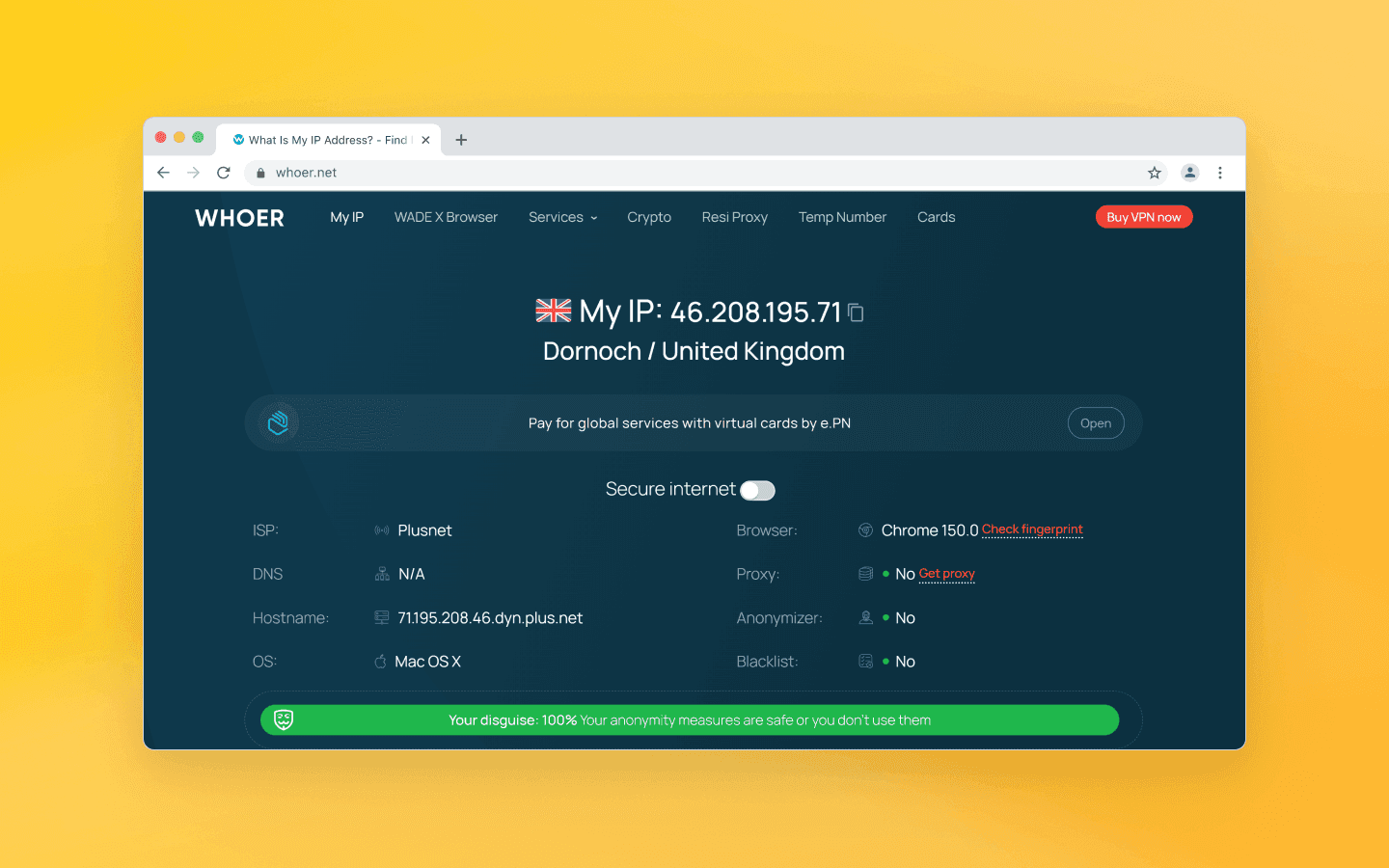
Unlike more specialized browser fingerprint checkers, Whoer's main advantage is its simplicity. Most results appear immediately after opening the page, with no registration or complicated configuration required.
That is why the service is often used as an initial check after purchasing proxies, configuring a VPN, or creating a new profile in an anti-detect browser.
How does Whoer work?
When a user opens the Whoer page, the browser performs the same standard actions that occur on virtually every modern website.
During the page load, the service collects several data groups.
The first group consists of network information:
connection port;
estimated geolocation;
Internet service provider (ISP);
Autonomous System Number (ASN).
Based on this information, the service estimates the user's location and attempts to determine whether the IP address belongs to a data center, a mobile carrier, or a residential Internet provider.
The second group includes information that the browser exposes through HTTP headers and modern web APIs, including:
User-Agent;
browser language;
time zone;
screen resolution;
platform information;
certain Client Hints.
The third group is collected using JavaScript.
While scripts are running, the browser exposes various APIs that reveal device characteristics, graphics rendering behavior, multimedia settings, and other parameters used to build a browser fingerprint.
Whoer also performs additional checks. For example, it may initiate DNS requests to determine which DNS servers handle them, or use the WebRTC API to detect potential leaks of your local IP address.
It is important to understand that Whoer does not gain full access to your device. It only analyzes the information that your browser already provides to modern websites by design.
Key Whoer features
IP address and geolocation check
After you open the page, Whoer displays your public IP address, estimated location (down to the city level), ISP information, and network type.
The geolocation is determined using specialized IP databases. Because of this, minor inaccuracies are possible: for example, Whoer may identify a neighboring city or even a nearby region.
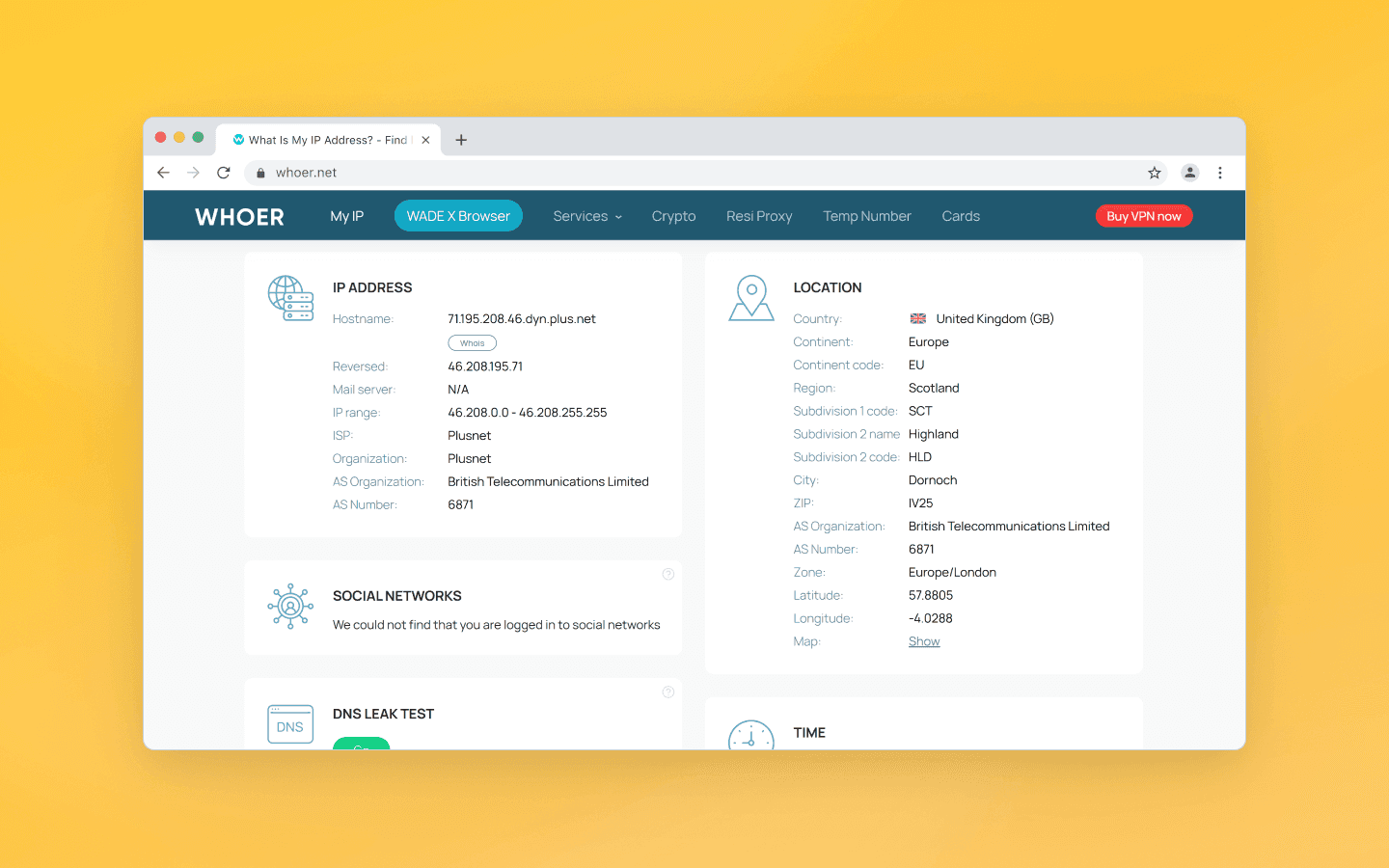
If you're using a VPN or proxy, Whoer will display its IP address instead of your real one. This makes it easy to verify that:
the connection is actually routed through the selected server;
the proxy is working correctly;
the IP address does not reveal your real location.
When working with advertising accounts, it's especially important for the IP address to match the rest of the profile characteristics. For example, if the browser reports German as its language and uses a European time zone while the IP address is located in Brazil, this inconsistency may look suspicious.
Whoer Anonymity Score
One of Whoer's best-known features is the Anonymity Score, displayed as a percentage. It is an internal rating based on several checks performed by the platform itself. The final score may be affected by:
detection of a VPN;
proxy usage;
DNS and WebRTC leaks;
proper browser configuration;
consistency between the IP address and the reported connection parameters.
The fewer potential leaks the service detects, the higher the resulting score.
However, it's important to understand that this is Whoer's own scoring methodology. Another service may use a completely different algorithm and produce a different result for the very same browser profile.
For that reason, you shouldn't rely entirely on the Whoer Anonymity Score. It is much more useful to review the test results and eliminate any detected issues.
DNS leak detection
Whenever your browser opens a website, it first has to resolve the domain name into an IP address through the Domain Name System (DNS). If a VPN or proxy is configured incorrectly, DNS requests may bypass the secure tunnel and be sent directly through your Internet provider's DNS servers. This is known as a DNS leak.
Even if your public IP address has already been replaced by a VPN, a DNS request can still reveal:
your real country;
your actual Internet service provider;
certain characteristics of your network.
Whoer shows which DNS servers were used during the test. If it detects your ISP's DNS servers instead of those provided by your VPN, it's a clear sign that you should review your connection settings.
Such leaks are particularly critical when registering accounts, managing ad accounts, or using geo-dependent services.
WebRTC leak detection
WebRTC is a technology that enables browsers to exchange audio, video, and data directly without requiring additional software. It powers features such as video calls, voice chats, and screen sharing.
However, WebRTC can also reveal the device's actual network addresses. If your set-up is configured incorrectly, a website may obtain:
your local IP address;
your IPv6 address;
in some cases, a public IP address different from the one provided by your VPN.
Whoer checks whether your browser exposes this information. If a leak is detected, it means that certain network details are available to websites through the WebRTC API.
For most everyday users, this is not a serious issue. However, when working with multiple accounts, a WebRTC leak can break the consistency of your browser fingerprint.
Browser fingerprint analysis
Modern websites analyze dozens of browser and device characteristics, combining them into a unique browser fingerprint. Whoer checks some of these parameters and shows how natural they appear.
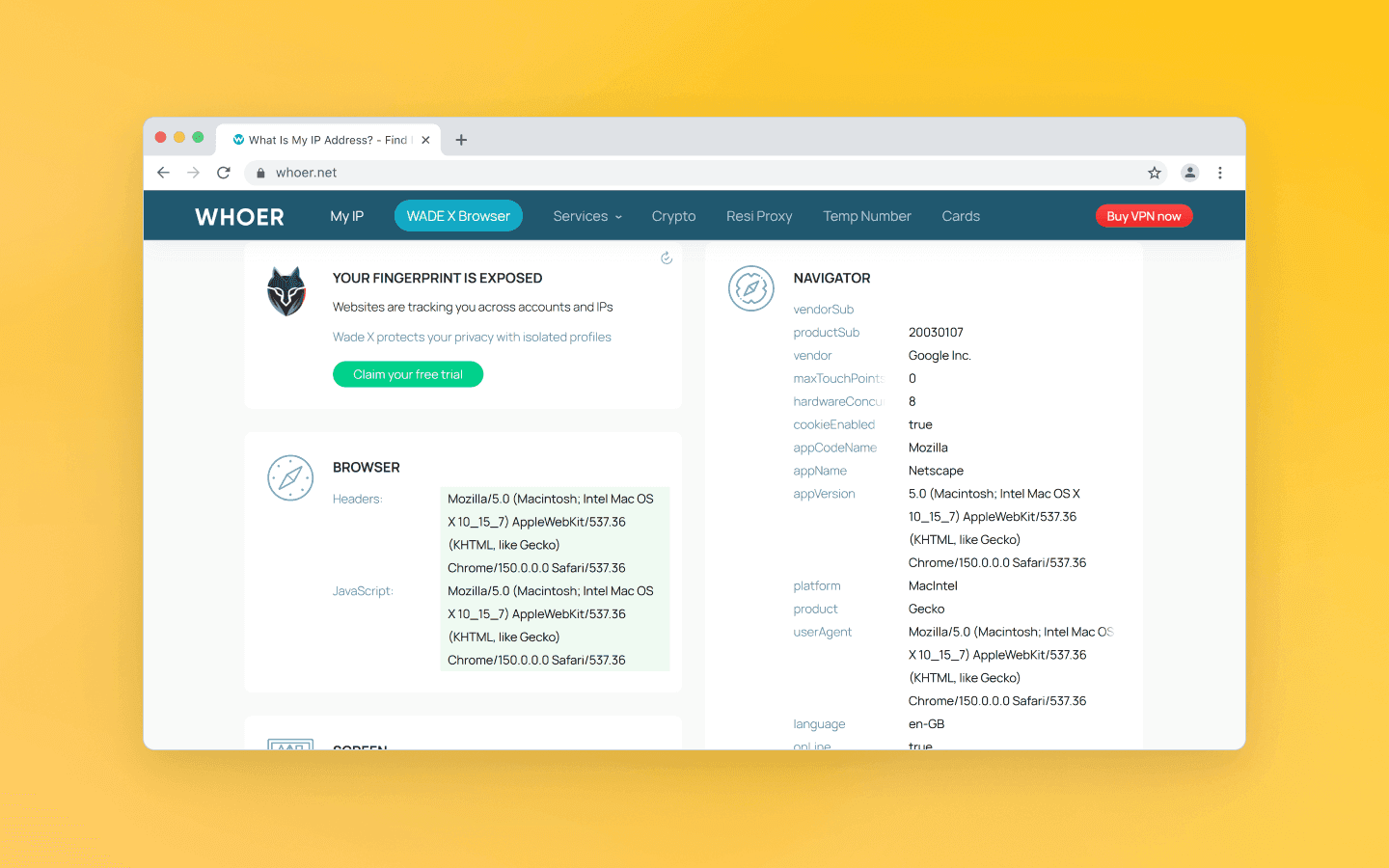
The main fingerprint components include:
Canvas. The Canvas API allows browsers to render images using JavaScript. Even when the same code is executed, the resulting image may differ slightly depending on the graphics card, drivers, operating system, and rendering behavior.
WebGL. WebGL provides access to hardware-accelerated graphics. It allows websites to identify the GPU model, graphics renderer, and certain driver characteristics.
User-Agent. Provides basic information about the browser, including its name, version, operating system, and architecture.
Client Hints. A more modern replacement for the User-Agent. Client Hints allow websites to request additional browser information when needed.
Screen Resolution. Your screen resolution should be consistent with the rest of the browser profile. Unusual combinations may attract the attention of anti-fraud systems.
Fonts. Installed fonts also contribute to a device's fingerprint. The available font set differs between Windows, macOS, and Linux, and also depends on the software installed on the system.
AudioContext. Used for audio processing. Because of differences in hardware and browser implementations, the computed output can vary slightly from one device to another.
Hardware Concurrency. This parameter reports the number of logical CPU cores available to the browser. Unrealistic values may trigger additional scrutiny.
Timezone. Your time zone should match your IP address and the geographic location your profile claims to represent.
Language. Your browser's language settings. Make sure the browser interface language, operating system locale, timezone, and IP geolocation are all consistent with one another.
VPN and proxy detection
Many users visit Whoer to check whether websites can detect their VPN or proxy. Whoer compares the IP address against various databases, analyzing its origin (data center, mobile, or residential), the reputation of the IP range, and information about the provider.
The final assessment is based on the combination of these factors. A data center IP address does not automatically mean a VPN is being used. Likewise, a residential IP address does not guarantee that the connection isn't routed through a proxy.
Whoer analyzes the available signals and reports the most likely conclusion. However, this remains a probabilistic assessment and should not be treated as a definitive verdict.
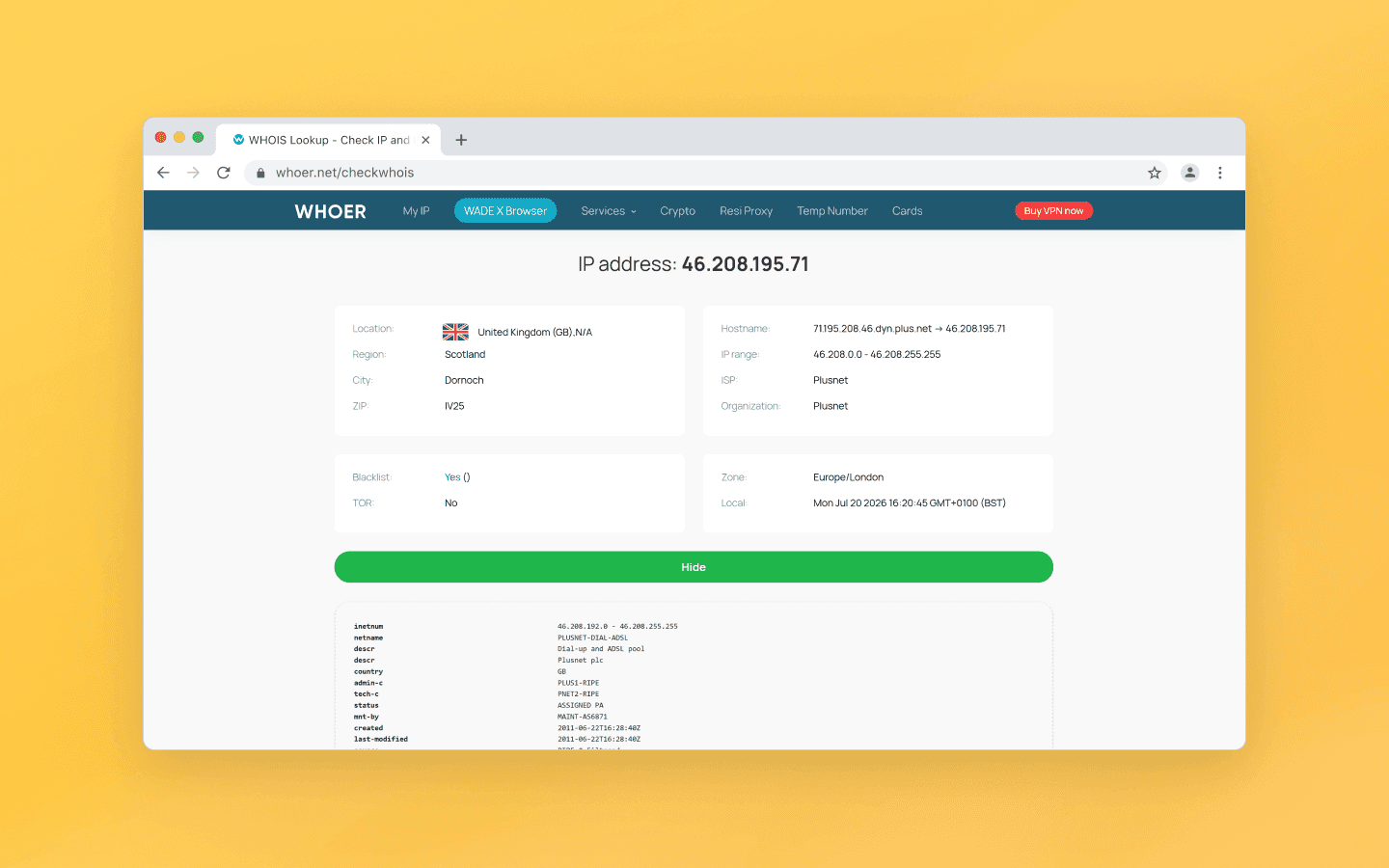
WHOIS and IP reputation lookup
Whoer also provides additional information about an IP address that is often more valuable than the anonymity score itself:
ASN (Autonomous System Number). Shows which organization owns the network. This helps determine whether the IP address belongs to a residential ISP, a mobile carrier, a cloud provider, or a commercial hosting infrastructure.
IP owner. Whoer displays the organization to which the IP range has been assigned. In many cases, the owner's name alone explains why a service may treat the IP address as suspicious.
IP reputation. Reflects the address's usage history. If it has previously been associated with spam, automated registrations, or other suspicious activity, that may affect its reputation.
Blacklists. Some IP addresses used in malicious activities are added to public blacklists. Such an IP address may still work, but additional verification checks become much more likely.
How to use Whoer
Go to Whoer.net using the browser or browser profile you want to test. If you're using an anti-detect browser, make sure to open Whoer using the specific profile you want to check.
The tests start automatically, and within a few seconds you'll see the results.
If any leaks are detected, review the findings, adjust the necessary settings, and run the Whoer test again.
How to interpret Whoer results
In general, it's best to think of Whoer's results as a checklist. If most tests pass, your browser profile appears consistent, and no leaks are detected, you can move on to more in-depth diagnostics using specialized browser fingerprint analysis services. Here's what you should evaluate first:
IP address. If the expected IP address and country are displayed, the check has passed. If the service shows your residential IP address instead of the configured proxy, there’s a problem.
DNS. Your DNS configuration should match the connection you're using. For example, if you're connected through a VPN but the DNS servers belong to your home Internet provider, a DNS leak is present.
WebRTC. When working with multiple accounts, it's preferable that WebRTC does not expose your device's real network information.
Browser fingerprint. The key objective is to achieve a logical, internally consistent combination of browser and device parameters.
IP reputation. A poor IP reputation does not automatically lead to a straightforward account ban. However, if you experience problems registering accounts or passing moderation checks, checking your IP reputation is one of the first troubleshooting steps you should take.
Does 100% on Whoer mean complete anonymity?
Many users draw incorrect conclusions from Whoer tests. They see a 100% Anonymity score, pass DNS leak and WebRTC leak tests, and assume that their browser can no longer be distinguished from an ordinary user’s device.
However, Whoer only checks a limited set of parameters available to the service itself. Anti-fraud systems used by major platforms such as Google, Meta, TikTok, Amazon, or Stripe analyze many more data sources in combination. For example, they evaluate links between sessions and user behavior. If different parameters contradict each other, the risk of additional verification increases.
Whoer helps identify some of these inconsistencies, but it does not simulate the entire anti-fraud decision-making process.
Whoer for checking VPNs and proxies
Whoer remains one of the most convenient tools for checking VPNs and proxies. A quick check before creating new accounts or working with ad accounts has practically become an industry standard.
After purchasing a proxy, the new IP address should be checked. Whoer helps quickly verify that:
the correct address is being used;
the expected country is detected;
there are no DNS leaks;
WebRTC does not reveal the real IP address.
This is significantly faster than searching for problems after launching an advertising campaign.
Some VPN clients do not work the way users expect. For example:
part of the traffic may bypass the tunnel;
DNS requests may continue using the provider’s servers;
WebRTC may remain active.
Whoer allows users to quickly detect such issues.
How to use Whoer with an anti-detect browser
Whoer works well as a quick diagnostic tool for profiles in anti-detect browsers. After creating a new profile, you can check:
whether the proxy is working correctly;
whether the IP geolocation matches the profile settings;
whether there are DNS or WebRTC leaks;
whether the language and timezone are detected correctly.
This check helps ensure that the basic configuration looks logical.
However, the capabilities of an anti-detect browser go far beyond simple IP replacement. For example, Octo Browser helps you manage multiple digital fingerprint parameters, including browser, device, and software environment characteristics.
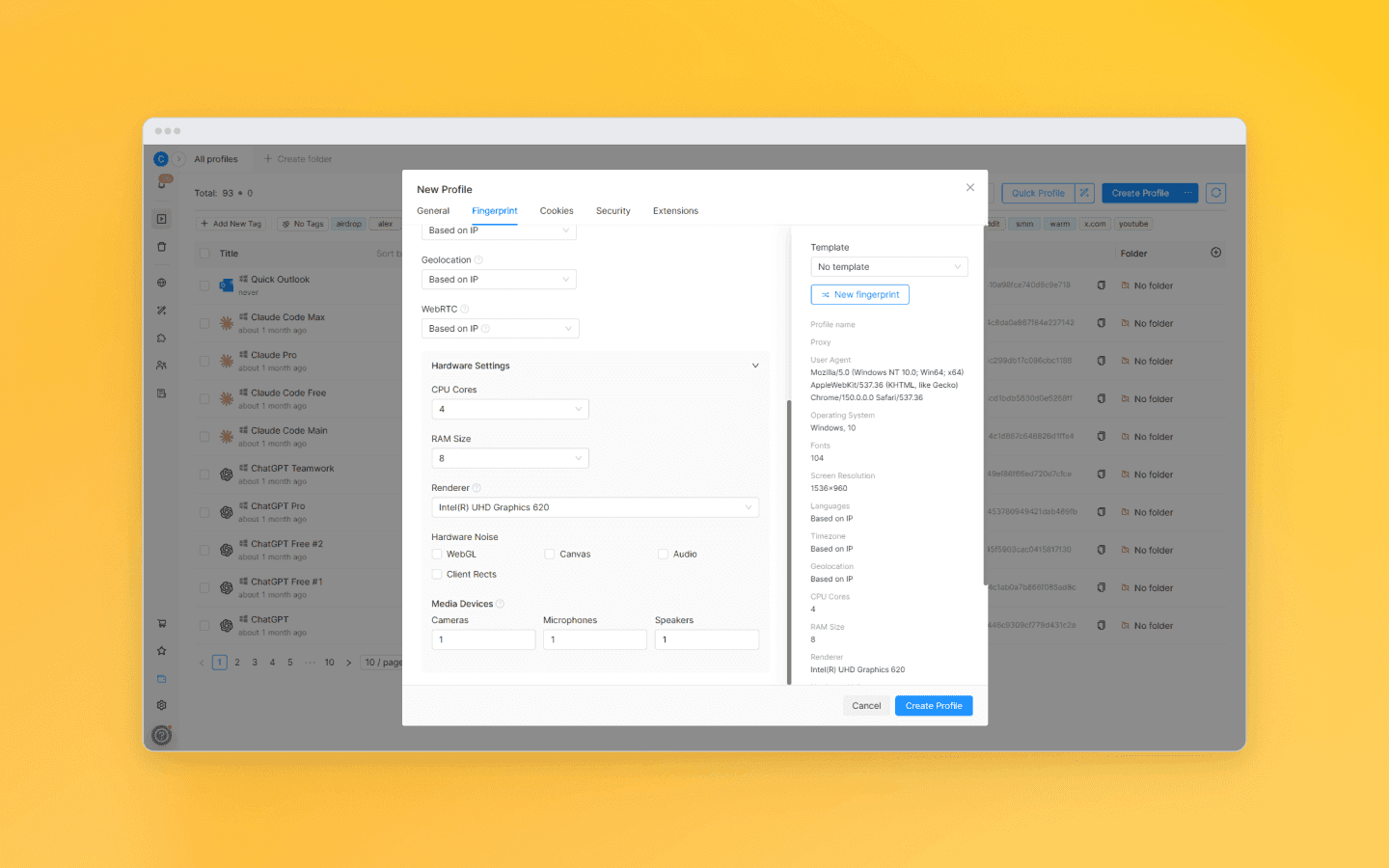
Therefore, professionals usually follow this workflow:
Create a profile in Octo Browser.
Connect a proxy.
Check the profile in Whoer.
Make sure there are no network leaks.
If necessary, additionally test the fingerprint in specialized services.
Only then start working with accounts.
This approach helps identify most basic issues before starting work and avoid unexpected errors during registration, authorization, or launching advertising campaigns.
Whoer: pros and cons
Like any anonymity testing tool, Whoer has both strengths and weaknesses. The service is well suited for quick diagnostics, but it cannot replace a comprehensive analysis of your digital environment.
One of Whoer's biggest advantages is its accessibility. Users don't need to understand network protocols or install additional software.
Most tests run automatically within seconds, and the key results are displayed as soon as the page loads.
Whoer's main limitation is that it only reports the status of certain parameters. It does not analyze the device's complete digital fingerprint or behavioral factors.
Every website uses its own analysis algorithms. A profile that appears perfectly normal to one platform may still raise flags with another.
The Anonymity Score can also be misleading, as it is easy to misinterpret.
Can Whoer replace paid tools?
Whoer offers free testing tools that are accessible to virtually any user. They are sufficient for everyday tasks, such as:
checking whether a VPN is working properly;
verifying proxy quality;
detecting accidental leaks;
seeing what information websites can collect.
However, professional use cases require deeper analysis. Users who manage large numbers of accounts or rely on automation typically need additional capabilities, such as:
managing separate browser profiles;
cookie isolation;
environment configuration;
digital fingerprint management;
API-based automation;
working with proxy pools.
For these tasks, anti-detect browsers are the better choice, while Whoer is best viewed as one component of a broader verification workflow.
Whoer alternatives
Whoer is suitable for quickly checking your IP address, DNS, WebRTC, and basic browser parameters. However, other services are often used for more in-depth analysis.
BrowserLeaks provides detailed information about your digital fingerprint, including Canvas, WebGL, Client Hints, JavaScript APIs, and many other technical parameters. It is better suited for developers and specialists who need a detailed analysis of the browser environment.
Pixelscan evaluates the quality of a browser profile. The service detects inconsistencies that may appear suspicious to anti-fraud systems. As a result, it is widely used with anti-detect browsers and for multi-accounting.
Whoer vs BrowserLeaks vs Pixelscan
Different services solve similar problems, but each focuses on different aspects.
Parameter | Whoer | BrowserLeaks | Pixelscan |
IP check | Yes | Limited | Yes |
Fingerprint analysis | Basic | Very detailed | Deep |
DNS leak detection | Yes | Yes | Yes |
WebRTC leak detection | Yes | Yes | Yes |
Proxy detection | Yes | Limited | Yes |
Ease of use | High | Medium | Medium |
Suitable for beginners | Yes | Partially | Partially |
Analysis depth | Basic | High | High |
Whoer is best suited for quick checks. In most cases, it is enough to verify within a few minutes that:
the IP address is working properly;
the proxy is connected;
there are no obvious leaks.
BrowserLeaks is designed for technical analysis of individual browser components. It is the preferred choice when you need to understand exactly which parameters are exposed to websites.
Pixelscan is useful for evaluating the quality of profiles in anti-detect browsers and identifying potential inconsistencies.
In practice, specialists often use several tools together. For example:
Whoer for a quick proxy check;
BrowserLeaks for an in-depth fingerprint analysis;
Pixelscan for evaluating the overall quality of a browser profile.
This approach provides a much more complete picture than relying on a single service.
Conclusion
Whoer is a convenient tool for quickly checking your Internet connection and browser parameters. It helps identify basic configuration issues, including IP address, DNS, and WebRTC leaks, VPN or proxy configuration errors, and problems with basic digital fingerprint settings.
However, it should not be treated as the sole indicator of security or anonymity. Modern analysis systems evaluate far more signals than any single service can test.
For professional work with accounts, advertising platforms, and automation, a comprehensive approach is essential: always use high-quality proxies, properly configured profiles in an anti-detect browser, and regular environment diagnostics.
Whoer does its job well by showing what information is visible to an ordinary website. However, the overall quality of a digital profile is determined not by a single test, but by the consistency of all its parameters taken together.
FAQ
What is Whoer?
Whoer is a service for checking the anonymity of your Internet connection and browser configuration. It identifies your IP address and geolocation, checks for DNS and WebRTC leaks, partially analyzes your browser fingerprint, and shows what information a website can obtain about your device.
Is Whoer.net free?
Yes. The service's core features are available free of charge, and no registration is required. Users can check their IP address, geolocation, DNS, WebRTC, browser parameters, and network connection. This is sufficient to verify that a VPN or proxy is working correctly.
Is Whoer safe to use?
Yes. Whoer works like a regular website and analyzes only the information your browser already shares with any website you visit. The service does not have access to files, passwords, or other data stored on your device.
What does Whoer check?
Whoer checks your public IP address, geolocation, DNS and WebRTC leaks, part of your browser fingerprint, signs of VPN or proxy usage, and also displays information about your network, ASN, and IP address owner.
How accurate is the Anonymity Score?
The Anonymity Score is Whoer's internal rating based on the results of its own tests. It helps identify obvious issues, but it is not a universal measure of anonymity and does not reflect all the techniques used by modern anti-fraud systems.
Does a 100% score on Whoer mean complete anonymity?
No. A 100% score simply means that Whoer did not detect any issues with the parameters it checks. Anti-fraud systems also analyze TLS and TCP/IP fingerprints, user behavior, cookies, account history, and many other signals.
Can Whoer detect VPN usage?
Yes, but not with 100% accuracy. The service analyzes IP address characteristics, ASN, reputation, and ownership of the IP range. The result is probabilistic and depends on the used databases.
Can Whoer detect proxy usage?
Yes. Whoer can identify signs of data center proxies and certain other proxy types based on IP address characteristics and network information. However, residential proxies and newly allocated IP ranges may be identified less accurately.
Does Whoer check for DNS leaks?
Yes. The service performs a DNS Leak Test and shows which DNS servers are being used to resolve domain names. This makes it easy to identify VPN or proxy configuration issues.
What does Blacklisted IP mean in Whoer?
A Blacklisted IP means that the address appears in one or more “bad reputation” IP databases. This does not guarantee that it will be blocked outright, but it increases the likelihood of additional checks by websites and online services.
Maintain your online anonymity with Octo Browser. Your real digital fingerprint cannot be tracked.
Would you like to try Octo Browser at а discount?
Use the promo code OCTOBLOG to get 30% off any subscription. This offer is valid only for new users.
Quick verdict: is Whoer worth using?
Yes—but only if you understand its capabilities and limitations. Whoer is useful as the first step when checking a browser, VPN, or proxy. The platform quickly shows:
The detectable IP address;
whether the geolocation matches;
whether DNS leaks are present;
whether the browser exposes the real IP address through WebRTC;
how natural certain browser parameters appear.
This is usually enough to identify obvious configuration mistakes. However, Whoer should not be considered a full-fledged simulator of modern anti-fraud systems. It checks only a limited set of signals and does not model the full range of data analyzed by Google, Meta, TikTok, Amazon, banking services, or advertising platforms.
A good result in Whoer is therefore a useful indicator, but not the final measure of your browser fingerprint's quality.
What is Whoer?
Whoer.net is a service for checking the anonymity of your Internet connection and analyzing browser parameters. As soon as you open its website, Whoer automatically collects the information that your browser normally sends to websites during a standard connection.
Unlike more specialized browser fingerprint checkers, Whoer's main advantage is its simplicity. Most results appear immediately after opening the page, with no registration or complicated configuration required.
That is why the service is often used as an initial check after purchasing proxies, configuring a VPN, or creating a new profile in an anti-detect browser.
How does Whoer work?
When a user opens the Whoer page, the browser performs the same standard actions that occur on virtually every modern website.
During the page load, the service collects several data groups.
The first group consists of network information:
connection port;
estimated geolocation;
Internet service provider (ISP);
Autonomous System Number (ASN).
Based on this information, the service estimates the user's location and attempts to determine whether the IP address belongs to a data center, a mobile carrier, or a residential Internet provider.
The second group includes information that the browser exposes through HTTP headers and modern web APIs, including:
User-Agent;
browser language;
time zone;
screen resolution;
platform information;
certain Client Hints.
The third group is collected using JavaScript.
While scripts are running, the browser exposes various APIs that reveal device characteristics, graphics rendering behavior, multimedia settings, and other parameters used to build a browser fingerprint.
Whoer also performs additional checks. For example, it may initiate DNS requests to determine which DNS servers handle them, or use the WebRTC API to detect potential leaks of your local IP address.
It is important to understand that Whoer does not gain full access to your device. It only analyzes the information that your browser already provides to modern websites by design.
Key Whoer features
IP address and geolocation check
After you open the page, Whoer displays your public IP address, estimated location (down to the city level), ISP information, and network type.
The geolocation is determined using specialized IP databases. Because of this, minor inaccuracies are possible: for example, Whoer may identify a neighboring city or even a nearby region.
If you're using a VPN or proxy, Whoer will display its IP address instead of your real one. This makes it easy to verify that:
the connection is actually routed through the selected server;
the proxy is working correctly;
the IP address does not reveal your real location.
When working with advertising accounts, it's especially important for the IP address to match the rest of the profile characteristics. For example, if the browser reports German as its language and uses a European time zone while the IP address is located in Brazil, this inconsistency may look suspicious.
Whoer Anonymity Score
One of Whoer's best-known features is the Anonymity Score, displayed as a percentage. It is an internal rating based on several checks performed by the platform itself. The final score may be affected by:
detection of a VPN;
proxy usage;
DNS and WebRTC leaks;
proper browser configuration;
consistency between the IP address and the reported connection parameters.
The fewer potential leaks the service detects, the higher the resulting score.
However, it's important to understand that this is Whoer's own scoring methodology. Another service may use a completely different algorithm and produce a different result for the very same browser profile.
For that reason, you shouldn't rely entirely on the Whoer Anonymity Score. It is much more useful to review the test results and eliminate any detected issues.
DNS leak detection
Whenever your browser opens a website, it first has to resolve the domain name into an IP address through the Domain Name System (DNS). If a VPN or proxy is configured incorrectly, DNS requests may bypass the secure tunnel and be sent directly through your Internet provider's DNS servers. This is known as a DNS leak.
Even if your public IP address has already been replaced by a VPN, a DNS request can still reveal:
your real country;
your actual Internet service provider;
certain characteristics of your network.
Whoer shows which DNS servers were used during the test. If it detects your ISP's DNS servers instead of those provided by your VPN, it's a clear sign that you should review your connection settings.
Such leaks are particularly critical when registering accounts, managing ad accounts, or using geo-dependent services.
WebRTC leak detection
WebRTC is a technology that enables browsers to exchange audio, video, and data directly without requiring additional software. It powers features such as video calls, voice chats, and screen sharing.
However, WebRTC can also reveal the device's actual network addresses. If your set-up is configured incorrectly, a website may obtain:
your local IP address;
your IPv6 address;
in some cases, a public IP address different from the one provided by your VPN.
Whoer checks whether your browser exposes this information. If a leak is detected, it means that certain network details are available to websites through the WebRTC API.
For most everyday users, this is not a serious issue. However, when working with multiple accounts, a WebRTC leak can break the consistency of your browser fingerprint.
Browser fingerprint analysis
Modern websites analyze dozens of browser and device characteristics, combining them into a unique browser fingerprint. Whoer checks some of these parameters and shows how natural they appear.
The main fingerprint components include:
Canvas. The Canvas API allows browsers to render images using JavaScript. Even when the same code is executed, the resulting image may differ slightly depending on the graphics card, drivers, operating system, and rendering behavior.
WebGL. WebGL provides access to hardware-accelerated graphics. It allows websites to identify the GPU model, graphics renderer, and certain driver characteristics.
User-Agent. Provides basic information about the browser, including its name, version, operating system, and architecture.
Client Hints. A more modern replacement for the User-Agent. Client Hints allow websites to request additional browser information when needed.
Screen Resolution. Your screen resolution should be consistent with the rest of the browser profile. Unusual combinations may attract the attention of anti-fraud systems.
Fonts. Installed fonts also contribute to a device's fingerprint. The available font set differs between Windows, macOS, and Linux, and also depends on the software installed on the system.
AudioContext. Used for audio processing. Because of differences in hardware and browser implementations, the computed output can vary slightly from one device to another.
Hardware Concurrency. This parameter reports the number of logical CPU cores available to the browser. Unrealistic values may trigger additional scrutiny.
Timezone. Your time zone should match your IP address and the geographic location your profile claims to represent.
Language. Your browser's language settings. Make sure the browser interface language, operating system locale, timezone, and IP geolocation are all consistent with one another.
VPN and proxy detection
Many users visit Whoer to check whether websites can detect their VPN or proxy. Whoer compares the IP address against various databases, analyzing its origin (data center, mobile, or residential), the reputation of the IP range, and information about the provider.
The final assessment is based on the combination of these factors. A data center IP address does not automatically mean a VPN is being used. Likewise, a residential IP address does not guarantee that the connection isn't routed through a proxy.
Whoer analyzes the available signals and reports the most likely conclusion. However, this remains a probabilistic assessment and should not be treated as a definitive verdict.
WHOIS and IP reputation lookup
Whoer also provides additional information about an IP address that is often more valuable than the anonymity score itself:
ASN (Autonomous System Number). Shows which organization owns the network. This helps determine whether the IP address belongs to a residential ISP, a mobile carrier, a cloud provider, or a commercial hosting infrastructure.
IP owner. Whoer displays the organization to which the IP range has been assigned. In many cases, the owner's name alone explains why a service may treat the IP address as suspicious.
IP reputation. Reflects the address's usage history. If it has previously been associated with spam, automated registrations, or other suspicious activity, that may affect its reputation.
Blacklists. Some IP addresses used in malicious activities are added to public blacklists. Such an IP address may still work, but additional verification checks become much more likely.
How to use Whoer
Go to Whoer.net using the browser or browser profile you want to test. If you're using an anti-detect browser, make sure to open Whoer using the specific profile you want to check.
The tests start automatically, and within a few seconds you'll see the results.
If any leaks are detected, review the findings, adjust the necessary settings, and run the Whoer test again.
How to interpret Whoer results
In general, it's best to think of Whoer's results as a checklist. If most tests pass, your browser profile appears consistent, and no leaks are detected, you can move on to more in-depth diagnostics using specialized browser fingerprint analysis services. Here's what you should evaluate first:
IP address. If the expected IP address and country are displayed, the check has passed. If the service shows your residential IP address instead of the configured proxy, there’s a problem.
DNS. Your DNS configuration should match the connection you're using. For example, if you're connected through a VPN but the DNS servers belong to your home Internet provider, a DNS leak is present.
WebRTC. When working with multiple accounts, it's preferable that WebRTC does not expose your device's real network information.
Browser fingerprint. The key objective is to achieve a logical, internally consistent combination of browser and device parameters.
IP reputation. A poor IP reputation does not automatically lead to a straightforward account ban. However, if you experience problems registering accounts or passing moderation checks, checking your IP reputation is one of the first troubleshooting steps you should take.
Does 100% on Whoer mean complete anonymity?
Many users draw incorrect conclusions from Whoer tests. They see a 100% Anonymity score, pass DNS leak and WebRTC leak tests, and assume that their browser can no longer be distinguished from an ordinary user’s device.
However, Whoer only checks a limited set of parameters available to the service itself. Anti-fraud systems used by major platforms such as Google, Meta, TikTok, Amazon, or Stripe analyze many more data sources in combination. For example, they evaluate links between sessions and user behavior. If different parameters contradict each other, the risk of additional verification increases.
Whoer helps identify some of these inconsistencies, but it does not simulate the entire anti-fraud decision-making process.
Whoer for checking VPNs and proxies
Whoer remains one of the most convenient tools for checking VPNs and proxies. A quick check before creating new accounts or working with ad accounts has practically become an industry standard.
After purchasing a proxy, the new IP address should be checked. Whoer helps quickly verify that:
the correct address is being used;
the expected country is detected;
there are no DNS leaks;
WebRTC does not reveal the real IP address.
This is significantly faster than searching for problems after launching an advertising campaign.
Some VPN clients do not work the way users expect. For example:
part of the traffic may bypass the tunnel;
DNS requests may continue using the provider’s servers;
WebRTC may remain active.
Whoer allows users to quickly detect such issues.
How to use Whoer with an anti-detect browser
Whoer works well as a quick diagnostic tool for profiles in anti-detect browsers. After creating a new profile, you can check:
whether the proxy is working correctly;
whether the IP geolocation matches the profile settings;
whether there are DNS or WebRTC leaks;
whether the language and timezone are detected correctly.
This check helps ensure that the basic configuration looks logical.
However, the capabilities of an anti-detect browser go far beyond simple IP replacement. For example, Octo Browser helps you manage multiple digital fingerprint parameters, including browser, device, and software environment characteristics.
Therefore, professionals usually follow this workflow:
Create a profile in Octo Browser.
Connect a proxy.
Check the profile in Whoer.
Make sure there are no network leaks.
If necessary, additionally test the fingerprint in specialized services.
Only then start working with accounts.
This approach helps identify most basic issues before starting work and avoid unexpected errors during registration, authorization, or launching advertising campaigns.
Whoer: pros and cons
Like any anonymity testing tool, Whoer has both strengths and weaknesses. The service is well suited for quick diagnostics, but it cannot replace a comprehensive analysis of your digital environment.
One of Whoer's biggest advantages is its accessibility. Users don't need to understand network protocols or install additional software.
Most tests run automatically within seconds, and the key results are displayed as soon as the page loads.
Whoer's main limitation is that it only reports the status of certain parameters. It does not analyze the device's complete digital fingerprint or behavioral factors.
Every website uses its own analysis algorithms. A profile that appears perfectly normal to one platform may still raise flags with another.
The Anonymity Score can also be misleading, as it is easy to misinterpret.
Can Whoer replace paid tools?
Whoer offers free testing tools that are accessible to virtually any user. They are sufficient for everyday tasks, such as:
checking whether a VPN is working properly;
verifying proxy quality;
detecting accidental leaks;
seeing what information websites can collect.
However, professional use cases require deeper analysis. Users who manage large numbers of accounts or rely on automation typically need additional capabilities, such as:
managing separate browser profiles;
cookie isolation;
environment configuration;
digital fingerprint management;
API-based automation;
working with proxy pools.
For these tasks, anti-detect browsers are the better choice, while Whoer is best viewed as one component of a broader verification workflow.
Whoer alternatives
Whoer is suitable for quickly checking your IP address, DNS, WebRTC, and basic browser parameters. However, other services are often used for more in-depth analysis.
BrowserLeaks provides detailed information about your digital fingerprint, including Canvas, WebGL, Client Hints, JavaScript APIs, and many other technical parameters. It is better suited for developers and specialists who need a detailed analysis of the browser environment.
Pixelscan evaluates the quality of a browser profile. The service detects inconsistencies that may appear suspicious to anti-fraud systems. As a result, it is widely used with anti-detect browsers and for multi-accounting.
Whoer vs BrowserLeaks vs Pixelscan
Different services solve similar problems, but each focuses on different aspects.
Parameter | Whoer | BrowserLeaks | Pixelscan |
IP check | Yes | Limited | Yes |
Fingerprint analysis | Basic | Very detailed | Deep |
DNS leak detection | Yes | Yes | Yes |
WebRTC leak detection | Yes | Yes | Yes |
Proxy detection | Yes | Limited | Yes |
Ease of use | High | Medium | Medium |
Suitable for beginners | Yes | Partially | Partially |
Analysis depth | Basic | High | High |
Whoer is best suited for quick checks. In most cases, it is enough to verify within a few minutes that:
the IP address is working properly;
the proxy is connected;
there are no obvious leaks.
BrowserLeaks is designed for technical analysis of individual browser components. It is the preferred choice when you need to understand exactly which parameters are exposed to websites.
Pixelscan is useful for evaluating the quality of profiles in anti-detect browsers and identifying potential inconsistencies.
In practice, specialists often use several tools together. For example:
Whoer for a quick proxy check;
BrowserLeaks for an in-depth fingerprint analysis;
Pixelscan for evaluating the overall quality of a browser profile.
This approach provides a much more complete picture than relying on a single service.
Conclusion
Whoer is a convenient tool for quickly checking your Internet connection and browser parameters. It helps identify basic configuration issues, including IP address, DNS, and WebRTC leaks, VPN or proxy configuration errors, and problems with basic digital fingerprint settings.
However, it should not be treated as the sole indicator of security or anonymity. Modern analysis systems evaluate far more signals than any single service can test.
For professional work with accounts, advertising platforms, and automation, a comprehensive approach is essential: always use high-quality proxies, properly configured profiles in an anti-detect browser, and regular environment diagnostics.
Whoer does its job well by showing what information is visible to an ordinary website. However, the overall quality of a digital profile is determined not by a single test, but by the consistency of all its parameters taken together.
FAQ
What is Whoer?
Whoer is a service for checking the anonymity of your Internet connection and browser configuration. It identifies your IP address and geolocation, checks for DNS and WebRTC leaks, partially analyzes your browser fingerprint, and shows what information a website can obtain about your device.
Is Whoer.net free?
Yes. The service's core features are available free of charge, and no registration is required. Users can check their IP address, geolocation, DNS, WebRTC, browser parameters, and network connection. This is sufficient to verify that a VPN or proxy is working correctly.
Is Whoer safe to use?
Yes. Whoer works like a regular website and analyzes only the information your browser already shares with any website you visit. The service does not have access to files, passwords, or other data stored on your device.
What does Whoer check?
Whoer checks your public IP address, geolocation, DNS and WebRTC leaks, part of your browser fingerprint, signs of VPN or proxy usage, and also displays information about your network, ASN, and IP address owner.
How accurate is the Anonymity Score?
The Anonymity Score is Whoer's internal rating based on the results of its own tests. It helps identify obvious issues, but it is not a universal measure of anonymity and does not reflect all the techniques used by modern anti-fraud systems.
Does a 100% score on Whoer mean complete anonymity?
No. A 100% score simply means that Whoer did not detect any issues with the parameters it checks. Anti-fraud systems also analyze TLS and TCP/IP fingerprints, user behavior, cookies, account history, and many other signals.
Can Whoer detect VPN usage?
Yes, but not with 100% accuracy. The service analyzes IP address characteristics, ASN, reputation, and ownership of the IP range. The result is probabilistic and depends on the used databases.
Can Whoer detect proxy usage?
Yes. Whoer can identify signs of data center proxies and certain other proxy types based on IP address characteristics and network information. However, residential proxies and newly allocated IP ranges may be identified less accurately.
Does Whoer check for DNS leaks?
Yes. The service performs a DNS Leak Test and shows which DNS servers are being used to resolve domain names. This makes it easy to identify VPN or proxy configuration issues.
What does Blacklisted IP mean in Whoer?
A Blacklisted IP means that the address appears in one or more “bad reputation” IP databases. This does not guarantee that it will be blocked outright, but it increases the likelihood of additional checks by websites and online services.
Stay up to date with the latest Octo Browser news
By clicking the button you agree to our Privacy Policy.
Stay up to date with the latest Octo Browser news
By clicking the button you agree to our Privacy Policy.
Stay up to date with the latest Octo Browser news
By clicking the button you agree to our Privacy Policy.

Join Octo Browser now
Or contact Customer Service at any time with any questions you might have.
Join Octo Browser now
Or contact Customer Service at any time with any questions you might have.
Join Octo Browser now
Or contact Customer Service at any time with any questions you might have.